Relay
This scenario shows how to configure service dhcp-relay. The
relay agent must be used when the DHCP server and the DHCP
clients are not connected to the same layer 2 domain.
Test DHCP Relay
Description
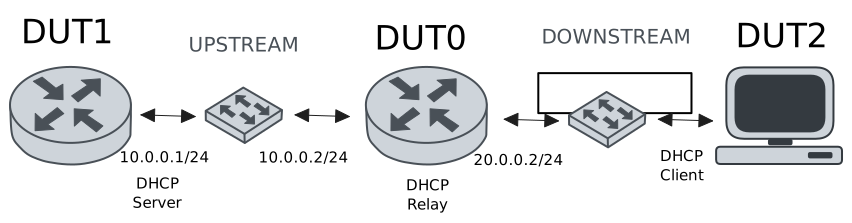
This example demonstrates how to configure a DHCP relay instance in DUT0 to forward DHCP requests from DUT2 to DUT1.
Scenario
Step 1: Set the following configuration in DUT0 :
set interfaces ethernet eth0 vif 100 address 10.0.0.2/24
set interfaces ethernet eth1 vif 200 address 20.0.0.2/24
set service dhcp-relay INS downstream-interface eth1.200
set service dhcp-relay INS server 10.0.0.1
set service dhcp-relay INS upstream-interface eth0.100
set system login user admin authentication encrypted-password '$6$GSjsCj8gHLv$/VcqU6FLi6CT2Oxn0MJQ2C2tqnRDrYKNF8HIYWJp68nvXvPdFccDsT04.WtigUONbKYrgKg8d6rEs8PjljMkH0'
Step 2: Set the following configuration in DUT1 :
set interfaces ethernet eth0 vif 100 address 10.0.0.1/24
set protocols static route 0.0.0.0/0 next-hop 10.0.0.2
set service dhcp-server shared-network dummy subnet 10.0.0.1/32
set service dhcp-server shared-network remote subnet 20.0.0.0/24 start 20.0.0.50 stop 20.0.0.50
set system login user admin authentication encrypted-password '$6$GSjsCj8gHLv$/VcqU6FLi6CT2Oxn0MJQ2C2tqnRDrYKNF8HIYWJp68nvXvPdFccDsT04.WtigUONbKYrgKg8d6rEs8PjljMkH0'
Step 3: Set the following configuration in DUT2 :
set interfaces ethernet eth0 vif 200 address dhcp
set system login user admin authentication encrypted-password '$6$GSjsCj8gHLv$/VcqU6FLi6CT2Oxn0MJQ2C2tqnRDrYKNF8HIYWJp68nvXvPdFccDsT04.WtigUONbKYrgKg8d6rEs8PjljMkH0'
Step 4: Ping IP address 10.0.0.1 from DUT0:
admin@DUT0$ ping 10.0.0.1 count 1 size 56 timeout 1Show output
PING 10.0.0.1 (10.0.0.1) 56(84) bytes of data.
64 bytes from 10.0.0.1: icmp_seq=1 ttl=64 time=0.311 ms

--- 10.0.0.1 ping statistics ---
1 packets transmitted, 1 received, 0% packet loss, time 0ms
rtt min/avg/max/mdev = 0.311/0.311/0.311/0.000 ms
Step 5: Run command interfaces ethernet show at DUT2 and check if output contains the following tokens:
20.0.0.50Show output
---------------------------------------------------------------------
  Name             IP Address           Admin  Oper  Vrf  Description
---------------------------------------------------------------------
    eth0  fe80::dcad:beff:feef:6c20/64  up     up
eth0.200  20.0.0.50/24                  up     up
          fe80::dcad:beff:feef:6c20/64
    eth1                                down   down
    eth2                                down   down
    eth3                                down   down
Test DHCP Relay With Giaddr
Description
This example demonstrates how to set the gateway IP address (giaddr) in the IP address. This value must be set in an IP address that the DHCP server can reach.
Scenario
Step 1: Set the following configuration in DUT0 :
set interfaces ethernet eth0 vif 100 address 10.0.0.2/24
set interfaces ethernet eth1 vif 200 address 20.0.0.2/24
set interfaces ethernet eth1 vif 200 address 20.0.0.3/24
set service dhcp-relay INS downstream-interface eth1.200
set service dhcp-relay INS server 10.0.0.1 giaddr 20.0.0.3
set service dhcp-relay INS upstream-interface eth0.100
set system login user admin authentication encrypted-password '$6$GSjsCj8gHLv$/VcqU6FLi6CT2Oxn0MJQ2C2tqnRDrYKNF8HIYWJp68nvXvPdFccDsT04.WtigUONbKYrgKg8d6rEs8PjljMkH0'
Step 2: Set the following configuration in DUT1 :
set interfaces ethernet eth0 vif 100 address 10.0.0.1/24
set protocols static route 0.0.0.0/0 next-hop 10.0.0.2
set service dhcp-server shared-network dummy subnet 10.0.0.1/32
set service dhcp-server shared-network remote subnet 20.0.0.0/24 start 20.0.0.50 stop 20.0.0.50
set system login user admin authentication encrypted-password '$6$GSjsCj8gHLv$/VcqU6FLi6CT2Oxn0MJQ2C2tqnRDrYKNF8HIYWJp68nvXvPdFccDsT04.WtigUONbKYrgKg8d6rEs8PjljMkH0'
Step 3: Set the following configuration in DUT2 :
set interfaces ethernet eth0 vif 200 address dhcp
set system login user admin authentication encrypted-password '$6$GSjsCj8gHLv$/VcqU6FLi6CT2Oxn0MJQ2C2tqnRDrYKNF8HIYWJp68nvXvPdFccDsT04.WtigUONbKYrgKg8d6rEs8PjljMkH0'
Step 4: Ping IP address 10.0.0.1 from DUT0:
admin@DUT0$ ping 10.0.0.1 count 1 size 56 timeout 1Show output
PING 10.0.0.1 (10.0.0.1) 56(84) bytes of data.
64 bytes from 10.0.0.1: icmp_seq=1 ttl=64 time=0.449 ms

--- 10.0.0.1 ping statistics ---
1 packets transmitted, 1 received, 0% packet loss, time 0ms
rtt min/avg/max/mdev = 0.449/0.449/0.449/0.000 ms
Step 5: Run command interfaces ethernet show at DUT2 and check if output contains the following tokens:
20.0.0.50Show output
---------------------------------------------------------------------
  Name             IP Address           Admin  Oper  Vrf  Description
---------------------------------------------------------------------
    eth0  fe80::dcad:beff:feef:6c20/64  up     up
eth0.200  20.0.0.50/24                  up     up
          fe80::dcad:beff:feef:6c20/64
    eth1                                down   down
    eth2                                down   down
    eth3                                down   down
Step 6: Run command system journal show | cat at DUT1 and check if output matches the following regular expressions:
DHCPACK on 20.0.0.50 to [^\)]+\) via 20.0.0.3Show output
Mar 20 11:00:18.263620 osdx systemd-journald[1944]: Runtime Journal (/run/log/journal/e123bcf6d5be44acb5b98c152ad7b31f) is 964.0K, max 6.5M, 5.5M free.
Mar 20 11:00:18.264626 osdx systemd-journald[1944]: Received client request to rotate journal, rotating.
Mar 20 11:00:18.264674 osdx systemd-journald[1944]: Vacuuming done, freed 0B of archived journals from /run/log/journal/e123bcf6d5be44acb5b98c152ad7b31f.
Mar 20 11:00:18.273116 osdx OSDxCLI[56616]: User 'admin' executed a new command: 'system journal clear'.
Mar 20 11:00:18.490258 osdx OSDxCLI[56616]: User 'admin' executed a new command: 'system coredump delete all'.
Mar 20 11:00:20.367121 osdx OSDxCLI[56616]: User 'admin' entered the configuration menu.
Mar 20 11:00:20.491807 osdx OSDxCLI[56616]: User 'admin' added a new cfg line: 'set interfaces eth0.100 address 10.0.0.1/24'.
Mar 20 11:00:20.574229 osdx OSDxCLI[56616]: User 'admin' added a new cfg line: 'set service dhcp-server shared-network dummy subnet 10.0.0.1/32'.
Mar 20 11:00:20.660123 osdx OSDxCLI[56616]: User 'admin' added a new cfg line: 'set service dhcp-server shared-network remote subnet 20.0.0.0/24 start 20.0.0.50 stop 20.0.0.50'.
Mar 20 11:00:20.782597 osdx OSDxCLI[56616]: User 'admin' added a new cfg line: 'set protocols static route 0.0.0.0/0 next-hop 10.0.0.2'.
Mar 20 11:00:20.883959 osdx OSDxCLI[56616]: User 'admin' added a new cfg line: 'show working'.
Mar 20 11:00:20.962745 osdx ubnt-cfgd[217353]: inactive
Mar 20 11:00:21.013720 osdx INFO[217363]: FRR daemons did not change
Mar 20 11:00:21.064644 osdx kernel: 8021q: adding VLAN 0 to HW filter on device eth0
Mar 20 11:00:21.102001 osdx (udev-worker)[217413]: Network interface NamePolicy= disabled on kernel command line.
Mar 20 11:00:21.281401 osdx systemd[1]: Started dhcpd@main.service - "DHCP Server Service instance main".
Mar 20 11:00:21.285155 osdx cfgd[1619]: [56616]Completed change to active configuration
Mar 20 11:00:21.295050 osdx dhcpd[217490]: Wrote 0 leases to leases file.
Mar 20 11:00:21.298965 osdx OSDxCLI[56616]: User 'admin' committed the configuration.
Mar 20 11:00:21.322929 osdx dhcpd[217490]:
Mar 20 11:00:21.322941 osdx dhcpd[217490]: No subnet declaration for eth0 (no IPv4 addresses).
Mar 20 11:00:21.322944 osdx dhcpd[217490]: ** Ignoring requests on eth0.  If this is not what
Mar 20 11:00:21.322947 osdx dhcpd[217490]:    you want, please write a subnet declaration
Mar 20 11:00:21.322950 osdx dhcpd[217490]:    in your dhcpd.conf file for the network segment
Mar 20 11:00:21.322952 osdx dhcpd[217490]:    to which interface eth0 is attached. **
Mar 20 11:00:21.322955 osdx dhcpd[217490]:
Mar 20 11:00:21.336808 osdx dhcpd[217490]: Server starting service.
Mar 20 11:00:21.341051 osdx OSDxCLI[56616]: User 'admin' left the configuration menu.
Mar 20 11:00:22.176037 osdx dhcpd[217490]: DHCPDISCOVER from de:ad:be:ef:6c:20 via 20.0.0.3
Mar 20 11:00:23.176408 osdx dhcpd[217490]: DHCPOFFER on 20.0.0.50 to de:ad:be:ef:6c:20 (osdx) via 20.0.0.3
Mar 20 11:00:23.177259 osdx dhcpd[217490]: DHCPREQUEST for 20.0.0.50 (10.0.0.1) from de:ad:be:ef:6c:20 (osdx) via 20.0.0.3
Mar 20 11:00:23.222921 osdx dhcpd[217490]: DHCPACK on 20.0.0.50 to de:ad:be:ef:6c:20 (osdx) via 20.0.0.3
Test DHCP Relay With GRE Tunnel
Description
This example demonstrates how to configure a DHCP relay that forwards DHCP requests to the DHCP server through a GRE tunnel (upstream).
Scenario
Step 1: Set the following configuration in DUT0 :
set interfaces ethernet eth0 vif 100 address 10.0.0.2/24
set interfaces ethernet eth1 vif 200 address 20.0.0.2/24
set interfaces tunnel tun1 address 1.0.0.2/32
set interfaces tunnel tun1 encapsulation gre
set interfaces tunnel tun1 local-address 10.0.0.2
set interfaces tunnel tun1 local-interface eth0.100
set interfaces tunnel tun1 nhrp holdtime 5
set interfaces tunnel tun1 nhrp nhs 1.0.0.1 nbma 10.0.0.1
set service dhcp-relay INS downstream-interface eth1.200
set service dhcp-relay INS server 1.0.0.1
set service dhcp-relay INS upstream-interface eth0.100
set service dhcp-relay INS upstream-interface tun1
set system login user admin authentication encrypted-password '$6$GSjsCj8gHLv$/VcqU6FLi6CT2Oxn0MJQ2C2tqnRDrYKNF8HIYWJp68nvXvPdFccDsT04.WtigUONbKYrgKg8d6rEs8PjljMkH0'
Step 2: Set the following configuration in DUT1 :
set interfaces ethernet eth0 vif 100 address 10.0.0.1/24
set interfaces tunnel tun1 address 1.0.0.1/32
set interfaces tunnel tun1 encapsulation gre
set interfaces tunnel tun1 local-address 10.0.0.1
set interfaces tunnel tun1 local-interface eth0.100
set interfaces tunnel tun1 nhrp
set protocols static route 0.0.0.0/0 next-hop 10.0.0.2
set protocols static route 20.0.0.0/24 next-hop 1.0.0.2
set service dhcp-server shared-network dummy subnet 1.0.0.1/32
set service dhcp-server shared-network remote subnet 20.0.0.0/24 start 20.0.0.50 stop 20.0.0.50
set system login user admin authentication encrypted-password '$6$GSjsCj8gHLv$/VcqU6FLi6CT2Oxn0MJQ2C2tqnRDrYKNF8HIYWJp68nvXvPdFccDsT04.WtigUONbKYrgKg8d6rEs8PjljMkH0'
Step 3: Set the following configuration in DUT2 :
set interfaces ethernet eth0 vif 200 address dhcp
set system login user admin authentication encrypted-password '$6$GSjsCj8gHLv$/VcqU6FLi6CT2Oxn0MJQ2C2tqnRDrYKNF8HIYWJp68nvXvPdFccDsT04.WtigUONbKYrgKg8d6rEs8PjljMkH0'
Step 4: Ping IP address 10.0.0.1 from DUT0:
admin@DUT0$ ping 10.0.0.1 count 1 size 56 timeout 1Show output
PING 10.0.0.1 (10.0.0.1) 56(84) bytes of data.
64 bytes from 10.0.0.1: icmp_seq=1 ttl=64 time=0.332 ms

--- 10.0.0.1 ping statistics ---
1 packets transmitted, 1 received, 0% packet loss, time 0ms
rtt min/avg/max/mdev = 0.332/0.332/0.332/0.000 ms
Step 5: Ping IP address 1.0.0.1 from DUT0:
admin@DUT0$ ping 1.0.0.1 count 1 size 56 timeout 1Show output
PING 1.0.0.1 (1.0.0.1) 56(84) bytes of data.
64 bytes from 1.0.0.1: icmp_seq=1 ttl=64 time=0.320 ms

--- 1.0.0.1 ping statistics ---
1 packets transmitted, 1 received, 0% packet loss, time 0ms
rtt min/avg/max/mdev = 0.320/0.320/0.320/0.000 ms
Step 6: Run command interfaces ethernet show at DUT2 and check if output contains the following tokens:
20.0.0.50Show output
---------------------------------------------------------------------
  Name             IP Address           Admin  Oper  Vrf  Description
---------------------------------------------------------------------
    eth0  fe80::dcad:beff:feef:6c20/64  up     up
eth0.200  20.0.0.50/24                  up     up
          fe80::dcad:beff:feef:6c20/64
    eth1                                down   down
    eth2                                down   down
    eth3                                down   down
Test DHCP Relay With Multiple Instances
Description
This example demonstrates how to configure multiple DHCP relay instances.
Scenario
Step 1: Set the following configuration in DUT0 :
set interfaces ethernet eth0 vif 100 address 10.0.0.2/24
set interfaces ethernet eth1 vif 200 address 20.0.0.2/24
set interfaces ethernet eth1 vif 300 address 30.0.0.2/24
set service dhcp-relay INS downstream-interface eth1.200
set service dhcp-relay INS server 10.0.0.1
set service dhcp-relay INS upstream-interface eth0.100
set service dhcp-relay INS2 downstream-interface eth1.300
set service dhcp-relay INS2 server 10.0.0.1
set service dhcp-relay INS2 upstream-interface eth0.100
set system login user admin authentication encrypted-password '$6$GSjsCj8gHLv$/VcqU6FLi6CT2Oxn0MJQ2C2tqnRDrYKNF8HIYWJp68nvXvPdFccDsT04.WtigUONbKYrgKg8d6rEs8PjljMkH0'
Step 2: Set the following configuration in DUT1 :
set interfaces ethernet eth0 vif 100 address 10.0.0.1/24
set protocols static route 0.0.0.0/0 next-hop 10.0.0.2
set service dhcp-server shared-network dummy subnet 10.0.0.1/32
set service dhcp-server shared-network remote subnet 20.0.0.0/24 start 20.0.0.50 stop 20.0.0.50
set service dhcp-server shared-network remote2 subnet 30.0.0.0/24 start 30.0.0.50 stop 30.0.0.50
set system login user admin authentication encrypted-password '$6$GSjsCj8gHLv$/VcqU6FLi6CT2Oxn0MJQ2C2tqnRDrYKNF8HIYWJp68nvXvPdFccDsT04.WtigUONbKYrgKg8d6rEs8PjljMkH0'
Step 3: Set the following configuration in DUT2 :
set interfaces ethernet eth0 vif 200 address dhcp
set interfaces ethernet eth0 vif 300 address dhcp
set system login user admin authentication encrypted-password '$6$GSjsCj8gHLv$/VcqU6FLi6CT2Oxn0MJQ2C2tqnRDrYKNF8HIYWJp68nvXvPdFccDsT04.WtigUONbKYrgKg8d6rEs8PjljMkH0'
Step 4: Ping IP address 10.0.0.1 from DUT0:
admin@DUT0$ ping 10.0.0.1 count 1 size 56 timeout 1Show output
PING 10.0.0.1 (10.0.0.1) 56(84) bytes of data.
64 bytes from 10.0.0.1: icmp_seq=1 ttl=64 time=1.17 ms

--- 10.0.0.1 ping statistics ---
1 packets transmitted, 1 received, 0% packet loss, time 0ms
rtt min/avg/max/mdev = 1.172/1.172/1.172/0.000 ms
Step 5: Run command interfaces ethernet show at DUT2 and check if output contains the following tokens:
20.0.0.50Show output
---------------------------------------------------------------------
  Name             IP Address           Admin  Oper  Vrf  Description
---------------------------------------------------------------------
    eth0  fe80::dcad:beff:feef:6c20/64  up     up
eth0.200  20.0.0.50/24                  up     up
          fe80::dcad:beff:feef:6c20/64
eth0.300  30.0.0.50/24                  up     up
          fe80::dcad:beff:feef:6c20/64
    eth1                                down   down
    eth2                                down   down
    eth3                                down   down
Step 6: Run command interfaces ethernet show at DUT2 and check if output contains the following tokens:
30.0.0.50Show output
---------------------------------------------------------------------
  Name             IP Address           Admin  Oper  Vrf  Description
---------------------------------------------------------------------
    eth0  fe80::dcad:beff:feef:6c20/64  up     up
eth0.200  20.0.0.50/24                  up     up
          fe80::dcad:beff:feef:6c20/64
eth0.300  30.0.0.50/24                  up     up
          fe80::dcad:beff:feef:6c20/64
    eth1                                down   down
    eth2                                down   down
    eth3                                down   down
Step 7: Run command system journal show | cat at DUT1 and check if output matches the following regular expressions:
DHCPACK on 20.0.0.50 to [^\)]+\) via 20.0.0.2
DHCPACK on 30.0.0.50 to [^\)]+\) via 30.0.0.2
Show output
Mar 20 11:00:51.367363 osdx systemd-journald[1944]: Runtime Journal (/run/log/journal/e123bcf6d5be44acb5b98c152ad7b31f) is 932.0K, max 6.5M, 5.6M free.
Mar 20 11:00:51.368853 osdx systemd-journald[1944]: Received client request to rotate journal, rotating.
Mar 20 11:00:51.368918 osdx systemd-journald[1944]: Vacuuming done, freed 0B of archived journals from /run/log/journal/e123bcf6d5be44acb5b98c152ad7b31f.
Mar 20 11:00:51.381633 osdx OSDxCLI[56616]: User 'admin' executed a new command: 'system journal clear'.
Mar 20 11:00:51.666581 osdx OSDxCLI[56616]: User 'admin' executed a new command: 'system coredump delete all'.
Mar 20 11:00:53.900135 osdx OSDxCLI[56616]: User 'admin' entered the configuration menu.
Mar 20 11:00:54.013666 osdx OSDxCLI[56616]: User 'admin' added a new cfg line: 'set interfaces eth0.100 address 10.0.0.1/24'.
Mar 20 11:00:54.127355 osdx OSDxCLI[56616]: User 'admin' added a new cfg line: 'set service dhcp-server shared-network dummy subnet 10.0.0.1/32'.
Mar 20 11:00:54.243666 osdx OSDxCLI[56616]: User 'admin' added a new cfg line: 'set service dhcp-server shared-network remote subnet 20.0.0.0/24 start 20.0.0.50 stop 20.0.0.50'.
Mar 20 11:00:54.375605 osdx OSDxCLI[56616]: User 'admin' added a new cfg line: 'set protocols static route 0.0.0.0/0 next-hop 10.0.0.2'.
Mar 20 11:00:54.473622 osdx OSDxCLI[56616]: User 'admin' added a new cfg line: 'set service dhcp-server shared-network remote2 subnet 30.0.0.0/24 start 30.0.0.50 stop 30.0.0.50'.
Mar 20 11:00:54.548008 osdx OSDxCLI[56616]: User 'admin' added a new cfg line: 'show working'.
Mar 20 11:00:54.644379 osdx ubnt-cfgd[218360]: inactive
Mar 20 11:00:54.684222 osdx INFO[218372]: FRR daemons did not change
Mar 20 11:00:54.716680 osdx kernel: 8021q: adding VLAN 0 to HW filter on device eth0
Mar 20 11:00:54.745365 osdx (udev-worker)[218422]: Network interface NamePolicy= disabled on kernel command line.
Mar 20 11:00:54.909213 osdx systemd[1]: Started dhcpd@main.service - "DHCP Server Service instance main".
Mar 20 11:00:54.911583 osdx cfgd[1619]: [56616]Completed change to active configuration
Mar 20 11:00:54.915740 osdx dhcpd[218499]: Wrote 0 leases to leases file.
Mar 20 11:00:54.929231 osdx OSDxCLI[56616]: User 'admin' committed the configuration.
Mar 20 11:00:54.940409 osdx dhcpd[218499]:
Mar 20 11:00:54.940418 osdx dhcpd[218499]: No subnet declaration for eth0 (no IPv4 addresses).
Mar 20 11:00:54.940421 osdx dhcpd[218499]: ** Ignoring requests on eth0.  If this is not what
Mar 20 11:00:54.940425 osdx dhcpd[218499]:    you want, please write a subnet declaration
Mar 20 11:00:54.940428 osdx dhcpd[218499]:    in your dhcpd.conf file for the network segment
Mar 20 11:00:54.940431 osdx dhcpd[218499]:    to which interface eth0 is attached. **
Mar 20 11:00:54.940434 osdx dhcpd[218499]:
Mar 20 11:00:54.944851 osdx dhcpd[218499]: Server starting service.
Mar 20 11:00:54.947694 osdx OSDxCLI[56616]: User 'admin' left the configuration menu.
Mar 20 11:00:55.754384 osdx dhcpd[218499]: DHCPDISCOVER from de:ad:be:ef:6c:20 via 20.0.0.2
Mar 20 11:00:55.914266 osdx dhcpd[218499]: DHCPDISCOVER from de:ad:be:ef:6c:20 via 30.0.0.2
Mar 20 11:00:56.755071 osdx dhcpd[218499]: DHCPOFFER on 20.0.0.50 to de:ad:be:ef:6c:20 (osdx) via 20.0.0.2
Mar 20 11:00:56.755837 osdx dhcpd[218499]: DHCPREQUEST for 20.0.0.50 (10.0.0.1) from de:ad:be:ef:6c:20 (osdx) via 20.0.0.2
Mar 20 11:00:56.825489 osdx dhcpd[218499]: DHCPACK on 20.0.0.50 to de:ad:be:ef:6c:20 (osdx) via 20.0.0.2
Mar 20 11:00:56.914397 osdx dhcpd[218499]: DHCPOFFER on 30.0.0.50 to de:ad:be:ef:6c:20 (osdx) via 30.0.0.2
Mar 20 11:00:56.915136 osdx dhcpd[218499]: DHCPREQUEST for 30.0.0.50 (10.0.0.1) from de:ad:be:ef:6c:20 (osdx) via 30.0.0.2
Mar 20 11:00:56.945572 osdx dhcpd[218499]: DHCPACK on 30.0.0.50 to de:ad:be:ef:6c:20 (osdx) via 30.0.0.2