Mac Limit
This scenario shows how to set a MAC learning limit on the bridge port with hardware offload enabled.
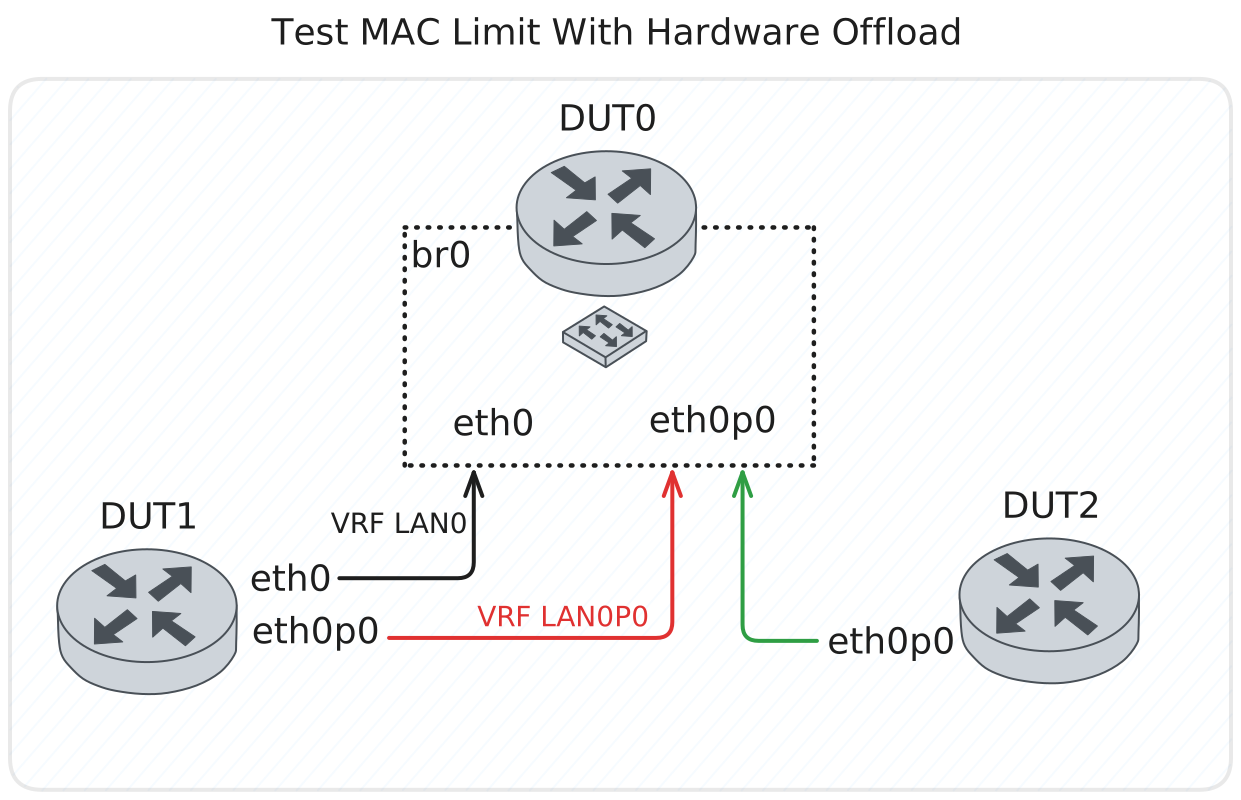
Test MAC Limit With Hardware Offload
Description
Verify that MAC learning limit can be set on a bridge interface and that the limit is enforced when hardware offload is enabled.
Scenario
Step 1: Set the following configuration in DUT0 :
set interfaces bridge br0 hardware-offload eth0
set interfaces ethernet eth0p0 bridge-group bridge br0
set interfaces ethernet eth1 bridge-group bridge br0
set system login user admin authentication encrypted-password '$6$GSjsCj8gHLv$/VcqU6FLi6CT2Oxn0MJQ2C2tqnRDrYKNF8HIYWJp68nvXvPdFccDsT04.WtigUONbKYrgKg8d6rEs8PjljMkH0'
Step 2: Set the following configuration in DUT1 :
set interfaces ethernet eth0 address 192.168.1.4/24
set interfaces ethernet eth0 vrf LAN0
set interfaces ethernet eth2 address 192.168.1.3/24
set interfaces ethernet eth2 vrf LAN0P0
set system login user admin authentication encrypted-password '$6$GSjsCj8gHLv$/VcqU6FLi6CT2Oxn0MJQ2C2tqnRDrYKNF8HIYWJp68nvXvPdFccDsT04.WtigUONbKYrgKg8d6rEs8PjljMkH0'
set system vrf LAN0
set system vrf LAN0P0
Step 3: Set the following configuration in DUT2 :
set interfaces ethernet eth2 address 192.168.1.2/24
set system login user admin authentication encrypted-password '$6$GSjsCj8gHLv$/VcqU6FLi6CT2Oxn0MJQ2C2tqnRDrYKNF8HIYWJp68nvXvPdFccDsT04.WtigUONbKYrgKg8d6rEs8PjljMkH0'
Verify initial connectivity works on both paths before applying MAC limit.
Step 4: Ping IP address 192.168.1.4 from DUT1:
admin@DUT1$ ping 192.168.1.4 vrf LAN0P0 count 1 size 56 timeout 1Show output
ping: Warning: source address might be selected on device other than: LAN0P0
PING 192.168.1.4 (192.168.1.4) from 192.168.1.3 LAN0P0: 56(84) bytes of data.
64 bytes from 192.168.1.4: icmp_seq=1 ttl=64 time=7.62 ms

--- 192.168.1.4 ping statistics ---
1 packets transmitted, 1 received, 0% packet loss, time 0ms
rtt min/avg/max/mdev = 7.615/7.615/7.615/0.000 ms
Step 5: Ping IP address 192.168.1.4 from DUT2:
admin@DUT2$ ping 192.168.1.4 count 1 size 56 timeout 1Show output
PING 192.168.1.4 (192.168.1.4) 56(84) bytes of data.
64 bytes from 192.168.1.4: icmp_seq=1 ttl=64 time=0.598 ms

--- 192.168.1.4 ping statistics ---
1 packets transmitted, 1 received, 0% packet loss, time 0ms
rtt min/avg/max/mdev = 0.598/0.598/0.598/0.000 ms
Disable the interface that should fail, then set MAC learning limit to 1. Only the first learned MAC address will be allowed on the bridge port.
Step 6: Modify the following configuration lines in DUT2 :
set interfaces ethernet eth2 disable
Step 7: Modify the following configuration lines in DUT0 :
set interfaces ethernet eth0p0 bridge-group mac-limit 1Verify first path maintains connectivity while second path fails due to MAC limit.
Step 8: Ping IP address 192.168.1.4 from DUT1:
admin@DUT1$ ping 192.168.1.4 vrf LAN0P0 count 1 size 56 timeout 1Show output
ping: Warning: source address might be selected on device other than: LAN0P0 PING 192.168.1.4 (192.168.1.4) from 192.168.1.3 LAN0P0: 56(84) bytes of data. 64 bytes from 192.168.1.4: icmp_seq=1 ttl=64 time=1.96 ms --- 192.168.1.4 ping statistics --- 1 packets transmitted, 1 received, 0% packet loss, time 0ms rtt min/avg/max/mdev = 1.959/1.959/1.959/0.000 msRe-enable the interface and verify that connectivity fails due to MAC limit enforcement.
Step 9: Modify the following configuration lines in DUT2 :
delete interfaces ethernet eth2 disable
Step 10: Expect a failure in the following command:
Ping IP address 192.168.1.4 from DUT2:
admin@DUT2$ ping 192.168.1.4 count 1 size 56 timeout 1Show output
PING 192.168.1.4 (192.168.1.4) 56(84) bytes of data.

--- 192.168.1.4 ping statistics ---
1 packets transmitted, 0 received, 100% packet loss, time 0ms
Verify MAC learning table shows 100% usage, confirming limit is enforced.
Step 11: Run command interfaces bridge br0 show mac-learning at DUT0 and check if output matches the following regular expressions:
(br0)\s+(eth0p0)\s+\d+\s+\d+\s+(N\/A)\s+\d+\s+\d+\s+100\.0%Show output
Note: Only showing ports with mac-limit configured.

--------------------------------------------------------------------------
bridge  port    sw learn  sw limit  sw usage  hw learn  hw limit  hw usage
--------------------------------------------------------------------------
br0     eth0p0         1         0       N/A         1         1    100.0%
Additional verification pinging vice versa to ensure connectivity is truly blocked in both directions.
Step 12: Ping IP address 192.168.1.3 from DUT1:
admin@DUT1$ ping 192.168.1.3 vrf LAN0 count 1 size 56 timeout 1Show output
ping: Warning: source address might be selected on device other than: LAN0
PING 192.168.1.3 (192.168.1.3) from 192.168.1.4 LAN0: 56(84) bytes of data.
64 bytes from 192.168.1.3: icmp_seq=1 ttl=64 time=0.598 ms

--- 192.168.1.3 ping statistics ---
1 packets transmitted, 1 received, 0% packet loss, time 1ms
rtt min/avg/max/mdev = 0.598/0.598/0.598/0.000 ms
Step 13: Expect a failure in the following command:
Ping IP address 192.168.1.2 from DUT1:
admin@DUT1$ ping 192.168.1.2 vrf LAN0 count 1 size 56 timeout 1Show output
ping: Warning: source address might be selected on device other than: LAN0
PING 192.168.1.2 (192.168.1.2) from 192.168.1.4 LAN0: 56(84) bytes of data.

--- 192.168.1.2 ping statistics ---
1 packets transmitted, 0 received, 100% packet loss, time 0ms