Check Smart Apn
Comprehensive test for Smart APN algorithm behavior. This test validates: 1. Iterative search with no PLMN match (priority ordering) 2. PLMN-based selection with valid PLMN and show command 3. Log functionality
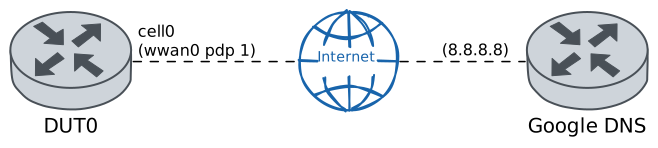
Test Iterative Search
Description
Configure three Smart APN entries with INVALID PLMN codes (99991, 99992, 99993). Entries are configured in non-sequential order (3, 1, 2). Since no PLMN matches, PLMN selection fails and iterative search is triggered. Verify through log that entries were tried in priority order (1 -> 2 -> 3). No connection should be established since no PLMN matches the network.
Scenario
Step 1: Set the following configuration in DUT0 :
set cellular profile CELLPROFILE1 apn invalid_apn.es
set cellular profile CELLPROFILE2 apn movistar.es
set cellular profile CELLPROFILE3 apn invalid_apn2.es
set controllers cellular wwan0 encrypted-pin U2FsdGVkX18CusuqPjRjSoeK5Kc1gXr7wtX5NRqFTw4=
set controllers cellular wwan0 smart-apn 1 pdp 1 profile CELLPROFILE1
set controllers cellular wwan0 smart-apn 1 plmn-code 99991
set controllers cellular wwan0 smart-apn 2 pdp 1 profile CELLPROFILE2
set controllers cellular wwan0 smart-apn 2 plmn-code 99992
set controllers cellular wwan0 smart-apn 3 pdp 1 profile CELLPROFILE3
set controllers cellular wwan0 smart-apn 3 plmn-code 99993
set interfaces cellular cell0 address dhcp
set interfaces cellular cell0 phy wwan0 pdp 1
set system login user admin authentication encrypted-password '$6$GSjsCj8gHLv$/VcqU6FLi6CT2Oxn0MJQ2C2tqnRDrYKNF8HIYWJp68nvXvPdFccDsT04.WtigUONbKYrgKg8d6rEs8PjljMkH0'
Step 2: Run command controllers cellular wwan0 show network-status at DUT0 and check if output matches the following regular expressions:
SIM status\s* = OK
Registration state\s* = registered
Show output
SIM status = OK
Registration state = registered
Public Land Mobile Network code = HOME[21407] ACT[21422]
Public Land Mobile Network name = Movistar
Network technology currently in use = lte
Current Service Domain registered = cs-ps (capable cs-ps)
Current Roaming status = off
3GPP Cell ID = 72016414
Radio Band = eutran-3
Channel = 1301
LTE Tracking Area Code (TAC) = 28673
LTE Carrier Aggregation Info:
   Primary Cell Info:
      Band = E-UTRA Band 3
      Frequency = 1301
      Downlink Bandwidth = 20 MHz
      Physical Cell ID = 216
      Scell State = registered
      RSRP (dBm) = -84
      RSRQ (dB) = -8
      RSSI (dBm) = -53
      SINR (dB) = 12
      Uplink Bandwidth = 20 MHz
   Secondary Cell Info #0:
      Band = E-UTRA Band 20
      Frequency = 6400
      Downlink Bandwidth = 10 MHz
      Physical Cell ID = 195
      Scell State = inactive
      RSRP (dBm) = -82
      RSRQ (dB) = -9
      RSSI (dBm) = -63
      SINR (dB) = 9
RX level (dBm) = -53 or greater
Coverage level = 5 (*****)
Note
Smart APN configured with invalid PLMNs (99991, 99992, 99993). The algorithm finds no PLMN match, triggering iterative search.
Step 3: Run command controllers cellular wwan0 smart-apn show log at DUT0 and expect this output:
Show output
2026-03-06 14:56:29.003612+00:00 Starting automatic search
2026-03-06 14:56:29.010524+00:00 Configuring registration
2026-03-06 14:56:37.271779+00:00 Registered to PLMN 21407
2026-03-06 14:56:37.274359+00:00 Searching for PLMN matching entry
2026-03-06 14:56:37.274776+00:00 No PLMN match found
2026-03-06 14:56:37.275187+00:00 Starting iterative search
2026-03-06 14:56:37.275584+00:00 Entry 1: PLMN 99991
2026-03-06 14:56:37.275996+00:00 PLMN mismatch
2026-03-06 14:56:37.276412+00:00 Entry 2: PLMN 99992
2026-03-06 14:56:37.276834+00:00 PLMN mismatch
2026-03-06 14:56:37.277270+00:00 Entry 3: PLMN 99993
2026-03-06 14:56:37.277706+00:00 PLMN mismatch
2026-03-06 14:56:37.278195+00:00 No valid entry found
Note
Examining log to verify iterative search was triggered and entries were tried in priority order.
Note
Iterative search confirmed. Log shows algorithm iterated through entries in priority order 1, 2, 3.
Step 4: Run command controllers cellular wwan0 smart-apn show at DUT0 and expect this output:
Show output
No smart APN entry selected
Note
Iterative search test complete. No connection established as expected (no PLMN match).
Test PLMN Based Selection
Description
Change configuration so entry 2 has a valid PLMN code (21407). The algorithm should now find a match and select entry 2 immediately. Verify connection is established and entry 2 is selected.
Scenario
Note
Setting up PLMN-based selection test: entry 2 will have valid PLMN 21407. The algorithm should find match and select entry 2 (CELLPROFILE2).
Step 1: Set the following configuration in DUT0 :
set cellular profile CELLPROFILE1 apn invalid_apn.es
set cellular profile CELLPROFILE2 apn movistar.es
set cellular profile CELLPROFILE3 apn invalid_apn2.es
set controllers cellular wwan0 encrypted-pin U2FsdGVkX19B1A5pUKHdZ8cnz0LpoC/4U6Txj3on1Xc=
set controllers cellular wwan0 smart-apn 1 pdp 1 profile CELLPROFILE1
set controllers cellular wwan0 smart-apn 1 plmn-code 99991
set controllers cellular wwan0 smart-apn 2 pdp 1 profile CELLPROFILE2
set controllers cellular wwan0 smart-apn 2 plmn-code 21407
set controllers cellular wwan0 smart-apn 3 pdp 1 profile CELLPROFILE3
set controllers cellular wwan0 smart-apn 3 plmn-code 99993
set interfaces cellular cell0 address dhcp
set interfaces cellular cell0 phy wwan0 pdp 1
set system login user admin authentication encrypted-password '$6$GSjsCj8gHLv$/VcqU6FLi6CT2Oxn0MJQ2C2tqnRDrYKNF8HIYWJp68nvXvPdFccDsT04.WtigUONbKYrgKg8d6rEs8PjljMkH0'
Step 2: Run command controllers cellular wwan0 show network-status at DUT0 and check if output matches the following regular expressions:
SIM status\s* = OK
Registration state\s* = registered
Show output
SIM status = OK
Registration state = registered
Public Land Mobile Network code = HOME[21407] ACT[21422]
Public Land Mobile Network name = Movistar
Network technology currently in use = lte
Current Service Domain registered = cs-ps (capable cs-ps)
Current Roaming status = off
3GPP Cell ID = 72016414
Radio Band = eutran-3
Channel = 1301
LTE Tracking Area Code (TAC) = 28673
LTE Carrier Aggregation Info:
   Primary Cell Info:
      Band = E-UTRA Band 3
      Frequency = 1301
      Downlink Bandwidth = 20 MHz
      Physical Cell ID = 216
      Scell State = registered
      RSRP (dBm) = -83
      RSRQ (dB) = -8
      RSSI (dBm) = -50
      SINR (dB) = 8
      Uplink Bandwidth = 20 MHz
   Secondary Cell Info #0:
      Band = E-UTRA Band 20
      Frequency = 6400
      Downlink Bandwidth = 10 MHz
      Physical Cell ID = 195
      Scell State = inactive
      RSRP (dBm) = -83
      RSRQ (dB) = -8
      RSSI (dBm) = -66
      SINR (dB) = 11
RX level (dBm) = -58
Coverage level = 5 (*****)
Step 3: Run command controllers cellular wwan0 pdp 1 show network-data-connection at DUT0 and check if output matches the following regular expressions:
Connection status\s* = connectedShow output
Connection status               = connected
Traffic channel status          = active
Max. TX channel rate (bps)      = 50000000
Max. RX channel rate (bps)      = 300000000
IPv4 address                    = 88.31.23.18
IPv4 mask                       = 255.255.255.252
IPv4 gateway                    = 88.31.23.17
IPv4 primary DNS                = 80.58.61.248
IPv4 secondary DNS              = 80.58.61.249
Note
Configuration applied. Verifying PLMN-based selection occurred.
Step 4: Run command controllers cellular wwan0 show network-status at DUT0 and expect this output:
Show output
SIM status = OK
Registration state = registered
Public Land Mobile Network code = HOME[21407] ACT[21422]
Public Land Mobile Network name = Movistar
Network technology currently in use = lte
Current Service Domain registered = cs-ps (capable cs-ps)
Current Roaming status = off
3GPP Cell ID = 72016414
Radio Band = eutran-3
Channel = 1301
LTE Tracking Area Code (TAC) = 28673
LTE Carrier Aggregation Info:
   Primary Cell Info:
      Band = E-UTRA Band 3
      Frequency = 1301
      Downlink Bandwidth = 20 MHz
      Physical Cell ID = 216
      Scell State = registered
      RSRP (dBm) = -83
      RSRQ (dB) = -10
      RSSI (dBm) = -50
      SINR (dB) = 12
      Uplink Bandwidth = 20 MHz
   Secondary Cell Info #0:
      Band = E-UTRA Band 20
      Frequency = 6400
      Downlink Bandwidth = 10 MHz
      Physical Cell ID = 195
      Scell State = inactive
      RSRP (dBm) = -83
      RSRQ (dB) = -9
      RSSI (dBm) = -64
      SINR (dB) = 11
RX level (dBm) = -53 or greater
Coverage level = 5 (*****)
Note
Network PLMN is 21407. Algorithm should select entry 2 which has matching PLMN.
Step 5: Run command controllers cellular wwan0 smart-apn show at DUT0 and check if output matches the following regular expressions:
Selected Entry\s*:\s*2
Selection Method\s*:\s*automatic
Show output
Selected Entry: 2
Selection Method: automatic
PLMN Code: 21407
Registration:
   APN Name: <empty>
PDP #1:
   APN Name: movistar.es
PDP #2:
PDP #3:
PDP #4:
Note
Entry 2 selected via automatic PLMN matching. Verifying connectivity.
Note
Testing Smart APN log to verify PLMN-based selection occurred.
Step 6: Run command controllers cellular wwan0 smart-apn show log at DUT0 and expect this output:
Show output
2026-03-06 14:56:29.003612+00:00 Starting automatic search
2026-03-06 14:56:29.010524+00:00 Configuring registration
2026-03-06 14:56:37.271779+00:00 Registered to PLMN 21407
2026-03-06 14:56:37.274359+00:00 Searching for PLMN matching entry
2026-03-06 14:56:37.274776+00:00 No PLMN match found
2026-03-06 14:56:37.275187+00:00 Starting iterative search
2026-03-06 14:56:37.275584+00:00 Entry 1: PLMN 99991
2026-03-06 14:56:37.275996+00:00 PLMN mismatch
2026-03-06 14:56:37.276412+00:00 Entry 2: PLMN 99992
2026-03-06 14:56:37.276834+00:00 PLMN mismatch
2026-03-06 14:56:37.277270+00:00 Entry 3: PLMN 99993
2026-03-06 14:56:37.277706+00:00 PLMN mismatch
2026-03-06 14:56:37.278195+00:00 No valid entry found

2026-03-06 14:57:34.607992+00:00 Starting automatic search
2026-03-06 14:57:34.615379+00:00 Configuring registration
2026-03-06 14:57:42.588293+00:00 Registered to PLMN 21407
2026-03-06 14:57:42.590189+00:00 Searching for PLMN matching entry
2026-03-06 14:57:42.590777+00:00 Entry 2: PLMN 21407
2026-03-06 14:57:42.591275+00:00 PLMN match found (entry 2)
2026-03-06 14:57:42.591796+00:00 Valid entry found
Note
Smart APN log confirms PLMN-based selection with matching entry found.
Step 7: Run command interfaces cellular cell0 show at DUT0 and check if output matches the following regular expressions:
cell0\s+\d+.\d+.\d+.\d+\/\d+\s+up\s+upShow output
------------------------------------------------------------------
Name            IP Address           Admin  Oper  Vrf  Description
------------------------------------------------------------------
cell0  88.31.23.18/30                up     up
       fe80::90d4:adff:fe27:c7d0/64
Step 8: Ping IP address 8.8.8.8 from DUT0:
admin@DUT0$ ping 8.8.8.8 count 1 size 56 timeout 1Show output
PING 8.8.8.8 (8.8.8.8) 56(84) bytes of data.
64 bytes from 8.8.8.8: icmp_seq=1 ttl=117 time=24.4 ms

--- 8.8.8.8 ping statistics ---
1 packets transmitted, 1 received, 0% packet loss, time 0ms
rtt min/avg/max/mdev = 24.394/24.394/24.394/0.000 ms
Note
Successfully validated PLMN-based selection. Entry 2 (PLMN 21407) selected and connected.
Test Log Functionality
Description
Comprehensive test of Smart APN log operations. 1. Set initial config and change to iterative (all invalid PLMNs) 2. Verify log shows iterative search entries 3. Change to automatic config (entry 2 valid PLMN) 4. Verify log contains entries from both phases 5. Clear log and verify only last entry remains
Scenario
Note
Starting log functionality test. Setting up iterative search first.
Step 1: Set the following configuration in DUT0 :
set cellular profile CELLPROFILE1 apn invalid_apn.es
set cellular profile CELLPROFILE2 apn movistar.es
set cellular profile CELLPROFILE3 apn invalid_apn2.es
set controllers cellular wwan0 encrypted-pin U2FsdGVkX1+OkgNS+VyA0zDvfMyS2CfGt1zFwnO59sg=
set controllers cellular wwan0 smart-apn 1 pdp 1 profile CELLPROFILE1
set controllers cellular wwan0 smart-apn 1 plmn-code 99991
set controllers cellular wwan0 smart-apn 2 pdp 1 profile CELLPROFILE2
set controllers cellular wwan0 smart-apn 2 plmn-code 99992
set controllers cellular wwan0 smart-apn 3 pdp 1 profile CELLPROFILE3
set controllers cellular wwan0 smart-apn 3 plmn-code 99993
set interfaces cellular cell0 address dhcp
set interfaces cellular cell0 phy wwan0 pdp 1
set system login user admin authentication encrypted-password '$6$GSjsCj8gHLv$/VcqU6FLi6CT2Oxn0MJQ2C2tqnRDrYKNF8HIYWJp68nvXvPdFccDsT04.WtigUONbKYrgKg8d6rEs8PjljMkH0'
Step 2: Run command controllers cellular wwan0 show network-status at DUT0 and check if output matches the following regular expressions:
SIM status\s* = OK
Registration state\s* = registered
Show output
SIM status = OK
Registration state = registered
Public Land Mobile Network code = HOME[21407] ACT[21422]
Public Land Mobile Network name = Movistar
Network technology currently in use = lte
Current Service Domain registered = cs-ps (capable cs-ps)
Current Roaming status = off
3GPP Cell ID = 72016414
Radio Band = eutran-3
Channel = 1301
LTE Tracking Area Code (TAC) = 28673
LTE Carrier Aggregation Info:
   Primary Cell Info:
      Band = E-UTRA Band 3
      Frequency = 1301
      Downlink Bandwidth = 20 MHz
      Physical Cell ID = 216
      Scell State = registered
      RSRP (dBm) = -84
      RSRQ (dB) = -9
      RSSI (dBm) = -52
      SINR (dB) = 10
      Uplink Bandwidth = 20 MHz
   Secondary Cell Info #0:
      Band = E-UTRA Band 20
      Frequency = 6400
      Downlink Bandwidth = 10 MHz
      Physical Cell ID = 195
      Scell State = inactive
      RSRP (dBm) = -83
      RSRQ (dB) = -9
      RSSI (dBm) = -65
      SINR (dB) = 12
RX level (dBm) = -57
Coverage level = 5 (*****)
Note
Iterative config applied. Verifying log contains iterative search entries.
Step 3: Run command controllers cellular wwan0 smart-apn show log at DUT0 and expect this output:
Show output
2026-03-06 14:56:29.003612+00:00 Starting automatic search
2026-03-06 14:56:29.010524+00:00 Configuring registration
2026-03-06 14:56:37.271779+00:00 Registered to PLMN 21407
2026-03-06 14:56:37.274359+00:00 Searching for PLMN matching entry
2026-03-06 14:56:37.274776+00:00 No PLMN match found
2026-03-06 14:56:37.275187+00:00 Starting iterative search
2026-03-06 14:56:37.275584+00:00 Entry 1: PLMN 99991
2026-03-06 14:56:37.275996+00:00 PLMN mismatch
2026-03-06 14:56:37.276412+00:00 Entry 2: PLMN 99992
2026-03-06 14:56:37.276834+00:00 PLMN mismatch
2026-03-06 14:56:37.277270+00:00 Entry 3: PLMN 99993
2026-03-06 14:56:37.277706+00:00 PLMN mismatch
2026-03-06 14:56:37.278195+00:00 No valid entry found

2026-03-06 14:57:34.607992+00:00 Starting automatic search
2026-03-06 14:57:34.615379+00:00 Configuring registration
2026-03-06 14:57:42.588293+00:00 Registered to PLMN 21407
2026-03-06 14:57:42.590189+00:00 Searching for PLMN matching entry
2026-03-06 14:57:42.590777+00:00 Entry 2: PLMN 21407
2026-03-06 14:57:42.591275+00:00 PLMN match found (entry 2)
2026-03-06 14:57:42.591796+00:00 Valid entry found

2026-03-06 14:58:47.233927+00:00 Starting automatic search
2026-03-06 14:58:47.241395+00:00 Configuring registration
2026-03-06 14:58:55.470114+00:00 Registered to PLMN 21407
2026-03-06 14:58:55.472914+00:00 Searching for PLMN matching entry
2026-03-06 14:58:55.473830+00:00 No PLMN match found
2026-03-06 14:58:55.474464+00:00 Starting iterative search
2026-03-06 14:58:55.475128+00:00 Entry 1: PLMN 99991
2026-03-06 14:58:55.475719+00:00 PLMN mismatch
2026-03-06 14:58:55.476376+00:00 Entry 2: PLMN 99992
2026-03-06 14:58:55.477037+00:00 PLMN mismatch
2026-03-06 14:58:55.477759+00:00 Entry 3: PLMN 99993
2026-03-06 14:58:55.478428+00:00 PLMN mismatch
2026-03-06 14:58:55.479078+00:00 No valid entry found
Note
Iterative search log verified. Now changing to automatic selection.
Step 4: Modify the following configuration lines in DUT0 :
set controllers cellular wwan0 smart-apn 2 plmn-code 21407
Step 5: Run command controllers cellular wwan0 show network-status at DUT0 and check if output matches the following regular expressions:
SIM status\s* = OK
Registration state\s* = registered
Show output
SIM status = OK
Registration state = registered
Public Land Mobile Network code = HOME[21407] ACT[21422]
Public Land Mobile Network name = Movistar
Network technology currently in use = lte
Current Service Domain registered = cs-ps (capable cs-ps)
Current Roaming status = off
3GPP Cell ID = 72016414
Radio Band = eutran-3
Channel = 1301
LTE Tracking Area Code (TAC) = 28673
LTE Carrier Aggregation Info:
   Primary Cell Info:
      Band = E-UTRA Band 3
      Frequency = 1301
      Downlink Bandwidth = 20 MHz
      Physical Cell ID = 216
      Scell State = registered
      RSRP (dBm) = -83
      RSRQ (dB) = -9
      RSSI (dBm) = -54
      SINR (dB) = 8
      Uplink Bandwidth = 20 MHz
RX level (dBm) = -56
Coverage level = 5 (*****)
Step 6: Run command controllers cellular wwan0 pdp 1 show network-data-connection at DUT0 and check if output matches the following regular expressions:
Connection status\s* = connectedShow output
Connection status               = connected
Traffic channel status          = active
Max. TX channel rate (bps)      = 50000000
Max. RX channel rate (bps)      = 300000000
IPv4 address                    = 5.205.198.207
IPv4 mask                       = 255.255.255.224
IPv4 gateway                    = 5.205.198.208
IPv4 primary DNS                = 80.58.61.248
IPv4 secondary DNS              = 80.58.61.249
Note
Automatic selection triggered. Verifying log contains entries from both phases.
Step 7: Run command controllers cellular wwan0 smart-apn show log at DUT0 and expect this output:
Show output
2026-03-06 14:56:29.003612+00:00 Starting automatic search
2026-03-06 14:56:29.010524+00:00 Configuring registration
2026-03-06 14:56:37.271779+00:00 Registered to PLMN 21407
2026-03-06 14:56:37.274359+00:00 Searching for PLMN matching entry
2026-03-06 14:56:37.274776+00:00 No PLMN match found
2026-03-06 14:56:37.275187+00:00 Starting iterative search
2026-03-06 14:56:37.275584+00:00 Entry 1: PLMN 99991
2026-03-06 14:56:37.275996+00:00 PLMN mismatch
2026-03-06 14:56:37.276412+00:00 Entry 2: PLMN 99992
2026-03-06 14:56:37.276834+00:00 PLMN mismatch
2026-03-06 14:56:37.277270+00:00 Entry 3: PLMN 99993
2026-03-06 14:56:37.277706+00:00 PLMN mismatch
2026-03-06 14:56:37.278195+00:00 No valid entry found

2026-03-06 14:57:34.607992+00:00 Starting automatic search
2026-03-06 14:57:34.615379+00:00 Configuring registration
2026-03-06 14:57:42.588293+00:00 Registered to PLMN 21407
2026-03-06 14:57:42.590189+00:00 Searching for PLMN matching entry
2026-03-06 14:57:42.590777+00:00 Entry 2: PLMN 21407
2026-03-06 14:57:42.591275+00:00 PLMN match found (entry 2)
2026-03-06 14:57:42.591796+00:00 Valid entry found

2026-03-06 14:58:47.233927+00:00 Starting automatic search
2026-03-06 14:58:47.241395+00:00 Configuring registration
2026-03-06 14:58:55.470114+00:00 Registered to PLMN 21407
2026-03-06 14:58:55.472914+00:00 Searching for PLMN matching entry
2026-03-06 14:58:55.473830+00:00 No PLMN match found
2026-03-06 14:58:55.474464+00:00 Starting iterative search
2026-03-06 14:58:55.475128+00:00 Entry 1: PLMN 99991
2026-03-06 14:58:55.475719+00:00 PLMN mismatch
2026-03-06 14:58:55.476376+00:00 Entry 2: PLMN 99992
2026-03-06 14:58:55.477037+00:00 PLMN mismatch
2026-03-06 14:58:55.477759+00:00 Entry 3: PLMN 99993
2026-03-06 14:58:55.478428+00:00 PLMN mismatch
2026-03-06 14:58:55.479078+00:00 No valid entry found

2026-03-06 14:59:04.450250+00:00 Starting automatic search
2026-03-06 14:59:04.460354+00:00 Configuring registration
2026-03-06 14:59:14.037940+00:00 Registered to PLMN 21407
2026-03-06 14:59:14.039963+00:00 Searching for PLMN matching entry
2026-03-06 14:59:14.040707+00:00 Entry 2: PLMN 21407
2026-03-06 14:59:14.041445+00:00 PLMN match found (entry 2)
2026-03-06 14:59:14.042164+00:00 Valid entry found
Note
Log contains 2232 characters with entries from both iterative and automatic selection. Now clearing log.
Step 8: Run command controllers cellular wwan0 smart-apn clear log at DUT0 and expect this output:
Show output
Command executed successfully!
Note
Log clear command executed. Verifying only last entry remains.
Step 9: Run command controllers cellular wwan0 smart-apn show log at DUT0 and expect this output:
Show output
2026-03-06 14:59:04.450250+00:00 Starting automatic search
2026-03-06 14:59:04.460354+00:00 Configuring registration
2026-03-06 14:59:14.037940+00:00 Registered to PLMN 21407
2026-03-06 14:59:14.039963+00:00 Searching for PLMN matching entry
2026-03-06 14:59:14.040707+00:00 Entry 2: PLMN 21407
2026-03-06 14:59:14.041445+00:00 PLMN match found (entry 2)
2026-03-06 14:59:14.042164+00:00 Valid entry found
Note
Log clear successful. Reduced from 2232 to 407 characters. Only the last connection entry remains.