Snmp Monitor Stats
This scenario shows how to monitor Ethernet statistics using SNMP.
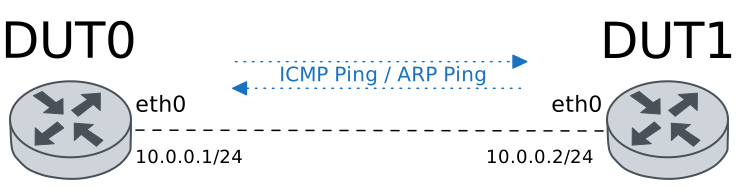
Test Ethernet Stats Through SNMP
Description
Some ping operations are performed and SNMP monitoring is used to check whether interface statistics increase.
Scenario
Step 1: Set the following configuration in DUT1 :
set interfaces ethernet eth0 address 10.0.0.2/24
set protocols static route 0.0.0.0/0 interface eth0
set system login user admin authentication encrypted-password '$6$GSjsCj8gHLv$/VcqU6FLi6CT2Oxn0MJQ2C2tqnRDrYKNF8HIYWJp68nvXvPdFccDsT04.WtigUONbKYrgKg8d6rEs8PjljMkH0'
Step 2: Set the following configuration in DUT0 :
set interfaces ethernet eth2 address 10.0.0.1/24
set protocols static route 0.0.0.0/0 interface eth2
set service snmp community 'COMMUNITY2TEST!'
set system login user admin authentication encrypted-password '$6$GSjsCj8gHLv$/VcqU6FLi6CT2Oxn0MJQ2C2tqnRDrYKNF8HIYWJp68nvXvPdFccDsT04.WtigUONbKYrgKg8d6rEs8PjljMkH0'
Step 3: Run command service snmp walk local-agent v1 COMMUNITY2TEST! oid 1.3.6.1.4.1.2007.6.3.1.10.5 | grep eth2 at DUT0 and expect this output:
Show output
TELDAT-OSDX-MONDB-INTERFACES-MIB::telOSDxMonDBInterfacesEthernetStatsRxBytes."eth2" = INTEGER: 627544887
TELDAT-OSDX-MONDB-INTERFACES-MIB::telOSDxMonDBInterfacesEthernetStatsRxPackets."eth2" = INTEGER: 595359
TELDAT-OSDX-MONDB-INTERFACES-MIB::telOSDxMonDBInterfacesEthernetStatsRxErrors."eth2" = INTEGER: 0
TELDAT-OSDX-MONDB-INTERFACES-MIB::telOSDxMonDBInterfacesEthernetStatsRxMulticasts."eth2" = INTEGER: 10576
TELDAT-OSDX-MONDB-INTERFACES-MIB::telOSDxMonDBInterfacesEthernetStatsRxBroadcasts."eth2" = INTEGER: 776
TELDAT-OSDX-MONDB-INTERFACES-MIB::telOSDxMonDBInterfacesEthernetStatsTxBytes."eth2" = INTEGER: 1328712934
TELDAT-OSDX-MONDB-INTERFACES-MIB::telOSDxMonDBInterfacesEthernetStatsTxPackets."eth2" = INTEGER: 994863
TELDAT-OSDX-MONDB-INTERFACES-MIB::telOSDxMonDBInterfacesEthernetStatsTxErrors."eth2" = INTEGER: 0
TELDAT-OSDX-MONDB-INTERFACES-MIB::telOSDxMonDBInterfacesEthernetStatsTxMulticasts."eth2" = INTEGER: 8478
TELDAT-OSDX-MONDB-INTERFACES-MIB::telOSDxMonDBInterfacesEthernetStatsTxBroadcasts."eth2" = INTEGER: 950
Note
Generate some traffic between DUT0 and DUT1.
Step 4: Ping IP address 10.0.0.2 from DUT0:
admin@DUT0$ ping 10.0.0.2 count 5 size 56 timeout 1Show output
PING 10.0.0.2 (10.0.0.2) 56(84) bytes of data.
64 bytes from 10.0.0.2: icmp_seq=1 ttl=64 time=0.812 ms
64 bytes from 10.0.0.2: icmp_seq=2 ttl=64 time=0.344 ms
64 bytes from 10.0.0.2: icmp_seq=3 ttl=64 time=0.449 ms
64 bytes from 10.0.0.2: icmp_seq=4 ttl=64 time=0.372 ms
64 bytes from 10.0.0.2: icmp_seq=5 ttl=64 time=0.479 ms

--- 10.0.0.2 ping statistics ---
5 packets transmitted, 5 received, 0% packet loss, time 4076ms
rtt min/avg/max/mdev = 0.344/0.491/0.812/0.167 ms
Step 5: Ping IP address 224.0.0.1 from DUT0:
admin@DUT0$ ping 224.0.0.1 count 1 size 56 timeout 1Show output
PING 224.0.0.1 (224.0.0.1) 56(84) bytes of data.

--- 224.0.0.1 ping statistics ---
1 packets transmitted, 0 received, 100% packet loss, time 0ms
Step 6: Ping IP address 224.0.0.1 from DUT1:
admin@DUT1$ ping 224.0.0.1 count 1 size 56 timeout 1Show output
PING 224.0.0.1 (224.0.0.1) 56(84) bytes of data.

--- 224.0.0.1 ping statistics ---
1 packets transmitted, 0 received, 100% packet loss, time 0ms
Step 7: Send arp ping from DUT0 to IP address 1.1.1.1:
admin@DUT0$ arping 1.1.1.1 interface eth2 timeout 5 count 1Show output
ARPING 1.1.1.1 from 10.0.0.1 eth2
Sent 1 probes (1 broadcast(s))
Received 0 response(s)
Step 8: Send arp ping from DUT1 to IP address 1.1.1.1:
admin@DUT1$ arping 1.1.1.1 interface eth0 timeout 5 count 1Show output
ARPING 1.1.1.1 from 10.0.0.2 eth0
Sent 1 probes (1 broadcast(s))
Received 0 response(s)
Note
Repeat the SNMP command above to check for new statistics (information may take some time to refresh).