Remove-Private-As
Test BGP remove-private-as functionality. When a router receives routes from a neighbor using a private AS number (64512-65534 for 16-bit or 4200000000-4294967294 for 32-bit), those private AS numbers appear in the AS-path. The remove-private-as command strips these private AS numbers from the AS-path before advertising routes to an eBGP peer. This is commonly used when a network uses private AS numbers internally (for example, with customers or branch offices) but needs to advertise routes to the internet without exposing those private AS numbers. The command only works on eBGP sessions and only affects outbound advertisements to that neighbor.
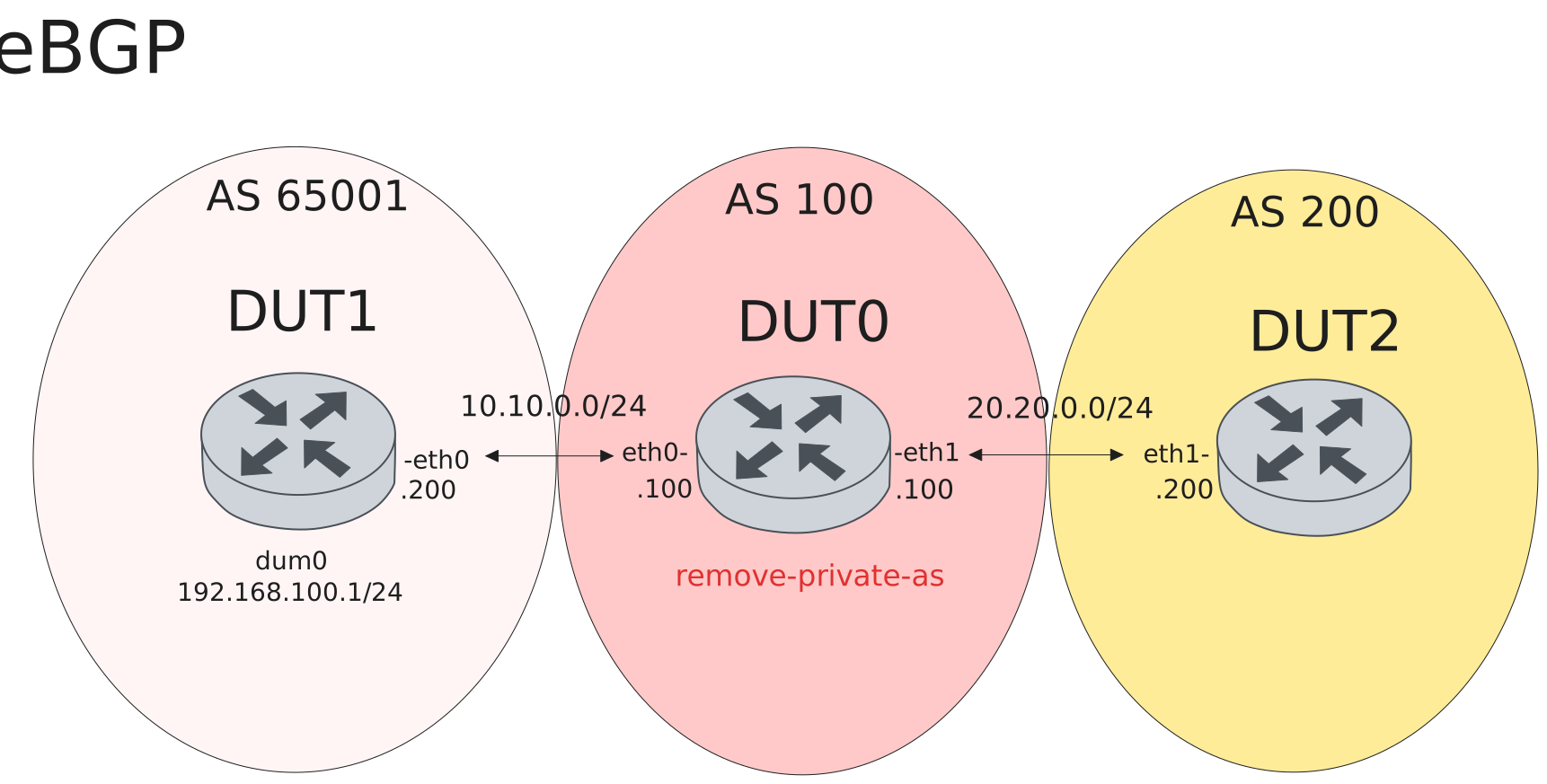
Test eBGP - Without remove-private-as shows private AS in path
Description
Baseline test showing default behavior where private AS numbers are visible in the AS-path. DUT1 uses private AS 65001 and originates route 192.168.100.0/24. DUT0 (AS 100) receives the route and forwards it to DUT2 (AS 200). Without remove-private-as, DUT2 should see the full AS-path including the private AS number.
Scenario
Step 1: Set the following configuration in DUT0 :
set interfaces ethernet eth0 address 10.10.0.100/24
set interfaces ethernet eth1 address 20.20.0.100/24
set protocols bgp 100 neighbor dut1 remote-address 10.10.0.200
set protocols bgp 100 neighbor dut1 remote-as 65001
set protocols bgp 100 neighbor dut1 route-map import PERMIT
set protocols bgp 100 neighbor dut2 remote-address 20.20.0.200
set protocols bgp 100 neighbor dut2 remote-as 200
set protocols bgp 100 neighbor dut2 route-map export PERMIT
set protocols route-map PERMIT rule 1 action permit
set system login user admin authentication encrypted-password '$6$GSjsCj8gHLv$/VcqU6FLi6CT2Oxn0MJQ2C2tqnRDrYKNF8HIYWJp68nvXvPdFccDsT04.WtigUONbKYrgKg8d6rEs8PjljMkH0'
Step 2: Set the following configuration in DUT1 :
set interfaces dummy dum0 address 192.168.100.1/24
set interfaces ethernet eth0 address 10.10.0.200/24
set protocols bgp 65001 neighbor peer remote-address 10.10.0.100
set protocols bgp 65001 neighbor peer remote-as 100
set protocols bgp 65001 neighbor peer route-map export PERMIT
set protocols bgp 65001 redistribute connected
set protocols route-map PERMIT rule 1 action permit
set system login user admin authentication encrypted-password '$6$GSjsCj8gHLv$/VcqU6FLi6CT2Oxn0MJQ2C2tqnRDrYKNF8HIYWJp68nvXvPdFccDsT04.WtigUONbKYrgKg8d6rEs8PjljMkH0'
Step 3: Set the following configuration in DUT2 :
set interfaces ethernet eth0 address 20.20.0.200/24
set protocols bgp 200 neighbor peer remote-address 20.20.0.100
set protocols bgp 200 neighbor peer remote-as 100
set protocols bgp 200 neighbor peer route-map import PERMIT
set protocols route-map PERMIT rule 1 action permit
set system login user admin authentication encrypted-password '$6$GSjsCj8gHLv$/VcqU6FLi6CT2Oxn0MJQ2C2tqnRDrYKNF8HIYWJp68nvXvPdFccDsT04.WtigUONbKYrgKg8d6rEs8PjljMkH0'
Attention
Verify eBGP sessions establish on DUT0.
Step 4: Run command protocols bgp show ip summary at DUT0 and check if output matches the following regular expressions:
10.10.0.200.*Established.*\n.*20.20.0.200.*EstablishedShow output
IPv4 Unicast Summary:
BGP router identifier 20.20.0.100, local AS number 100 VRF default vrf-id 0
BGP table version 2
RIB entries 3, using 384 bytes of memory
Peers 2, using 47 KiB of memory

Neighbor        LocalAddr       V         AS   MsgRcvd   MsgSent   TblVer  InQ OutQ  Up/Down        State   PfxRcd   PfxSnt Desc
10.10.0.200     10.10.0.100     4      65001         5         5        2    0    0 00:00:02  Established        2 (Policy) N/A
20.20.0.200     20.20.0.100     4        200         3         5        0    0    0 00:00:00  Established (Policy)        0 N/A

Total number of neighbors 2
Attention
Verify DUT0 receives route 192.168.100.0/24 from DUT1.
Step 5: Run command protocols bgp show ip at DUT0 and check if output matches the following regular expressions:
192.168.100.0/24.*10.10.0.200Show output
BGP table version is 2, local router ID is 20.20.0.100, vrf id 0
Default local pref 100, local AS 100
local address -
Status codes:  s suppressed, d damped, h history, u unsorted, * valid, > best, = multipath,
               i internal, r RIB-failure, S Stale, R Removed
Nexthop codes: @NNN nexthop's vrf id, < announce-nh-self
Origin codes:  i - IGP, e - EGP, ? - incomplete
RPKI validation codes: V valid, I invalid, N Not found

     Network          Next Hop            Metric LocPrf Weight Path
 *u  10.10.0.0/24     10.10.0.200              0             0 65001 ?
 *u  192.168.100.0/24 10.10.0.200              0             0 65001 ?

Displayed 2 routes and 2 total paths
Attention
Verify DUT2 receives route 192.168.100.0/24 with private AS 65001 in path.
Step 6: Run command protocols bgp show ip 192.168.100.0/24 at DUT2 and check if output matches the following regular expressions:
100 65001Show output
BGP routing table entry for 192.168.100.0/24, version 2
Paths: (1 available, best #1, table default)
  Not advertised to any peer
  100 65001
    20.20.0.100 from 20.20.0.100 (20.20.0.100)
      Origin incomplete, valid, external, best (First path received)
      Last update: Thu Mar  5 14:39:22 2026
Test eBGP - Remove-private-as strips private AS from path
Description
Test BGP remove-private-as which strips private AS numbers from the AS-path before advertising to eBGP peers. DUT1 uses private AS 65001 and originates route 192.168.100.0/24. DUT0 (AS 100) receives the route and has remove-private-as configured toward DUT2. When DUT0 advertises the route to DUT2, the private AS is stripped from the AS-path, so DUT2 sees only the public AS numbers.
Scenario
Step 1: Set the following configuration in DUT0 :
set interfaces ethernet eth0 address 10.10.0.100/24
set interfaces ethernet eth1 address 20.20.0.100/24
set protocols bgp 100 neighbor dut1 remote-address 10.10.0.200
set protocols bgp 100 neighbor dut1 remote-as 65001
set protocols bgp 100 neighbor dut1 route-map import PERMIT
set protocols bgp 100 neighbor dut2 remote-address 20.20.0.200
set protocols bgp 100 neighbor dut2 remote-as 200
set protocols bgp 100 neighbor dut2 remove-private-as
set protocols bgp 100 neighbor dut2 route-map export PERMIT
set protocols route-map PERMIT rule 1 action permit
set system login user admin authentication encrypted-password '$6$GSjsCj8gHLv$/VcqU6FLi6CT2Oxn0MJQ2C2tqnRDrYKNF8HIYWJp68nvXvPdFccDsT04.WtigUONbKYrgKg8d6rEs8PjljMkH0'
Step 2: Set the following configuration in DUT1 :
set interfaces dummy dum0 address 192.168.100.1/24
set interfaces ethernet eth0 address 10.10.0.200/24
set protocols bgp 65001 neighbor peer remote-address 10.10.0.100
set protocols bgp 65001 neighbor peer remote-as 100
set protocols bgp 65001 neighbor peer route-map export PERMIT
set protocols bgp 65001 redistribute connected
set protocols route-map PERMIT rule 1 action permit
set system login user admin authentication encrypted-password '$6$GSjsCj8gHLv$/VcqU6FLi6CT2Oxn0MJQ2C2tqnRDrYKNF8HIYWJp68nvXvPdFccDsT04.WtigUONbKYrgKg8d6rEs8PjljMkH0'
Step 3: Set the following configuration in DUT2 :
set interfaces ethernet eth0 address 20.20.0.200/24
set protocols bgp 200 neighbor peer remote-address 20.20.0.100
set protocols bgp 200 neighbor peer remote-as 100
set protocols bgp 200 neighbor peer route-map import PERMIT
set protocols route-map PERMIT rule 1 action permit
set system login user admin authentication encrypted-password '$6$GSjsCj8gHLv$/VcqU6FLi6CT2Oxn0MJQ2C2tqnRDrYKNF8HIYWJp68nvXvPdFccDsT04.WtigUONbKYrgKg8d6rEs8PjljMkH0'
Attention
Verify eBGP sessions establish on DUT0.
Step 4: Run command protocols bgp show ip summary at DUT0 and check if output matches the following regular expressions:
10.10.0.200.*Established.*\n.*20.20.0.200.*EstablishedShow output
IPv4 Unicast Summary:
BGP router identifier 20.20.0.100, local AS number 100 VRF default vrf-id 0
BGP table version 2
RIB entries 3, using 384 bytes of memory
Peers 2, using 47 KiB of memory

Neighbor        LocalAddr       V         AS   MsgRcvd   MsgSent   TblVer  InQ OutQ  Up/Down        State   PfxRcd   PfxSnt Desc
10.10.0.200     10.10.0.100     4      65001         5         5        2    0    0 00:00:01  Established        2 (Policy) N/A
20.20.0.200     20.20.0.100     4        200         2         2        0    0    0 00:00:00  Established (Policy)        0 N/A

Total number of neighbors 2
Attention
Verify DUT0 receives route 192.168.100.0/24 from DUT1 with private AS in path.
Step 5: Run command protocols bgp show ip 192.168.100.0/24 at DUT0 and check if output matches the following regular expressions:
65001.*\n.*10.10.0.200 from 10.10.0.200Show output
BGP routing table entry for 192.168.100.0/24, version 2
Paths: (1 available, best #1, table default)
  Not advertised to any peer
  65001
    10.10.0.200 from 10.10.0.200 (192.168.100.1)
      Origin incomplete, metric 0, valid, external, best (First path received)
      Last update: Thu Mar  5 14:39:34 2026
Attention
Verify DUT2 sees only AS 100 in the path (private AS was removed by DUT0).
Step 6: Run command protocols bgp show ip 192.168.100.0/24 at DUT2 and check if output matches the following regular expressions:
(?m)^\s+100$Show output
BGP routing table entry for 192.168.100.0/24, version 2
Paths: (1 available, best #1, table default)
  Not advertised to any peer
  100
    20.20.0.100 from 20.20.0.100 (20.20.0.100)
      Origin incomplete, valid, external, best (First path received)
      Last update: Thu Mar  5 14:39:36 2026