Multihop
Scenario to verify BGP peer-group ebgp-multihop and ttl-security inheritance.
By default, eBGP requires peers to be directly connected (TTL=1). The
ebgp-multihop <N> command sets the maximum TTL to N, allowing sessions over
multiple hops. If the hop count exceeds N, the TTL expires and the session cannot
establish. The ttl-security hops <N> command provides a security mechanism that
discards BGP packets with TTL below (255 - N), protecting against spoofed packets
from distant sources. If the actual hop count exceeds N, packets arrive with a TTL
too low and are rejected. A transit node (DUT2) sits between DUT0 and DUT1 (2 hops
apart), so values of 1 hop should fail and values of 3+ hops should succeed. When
configured on a peer-group, all members inherit the multihop or ttl-security behavior.
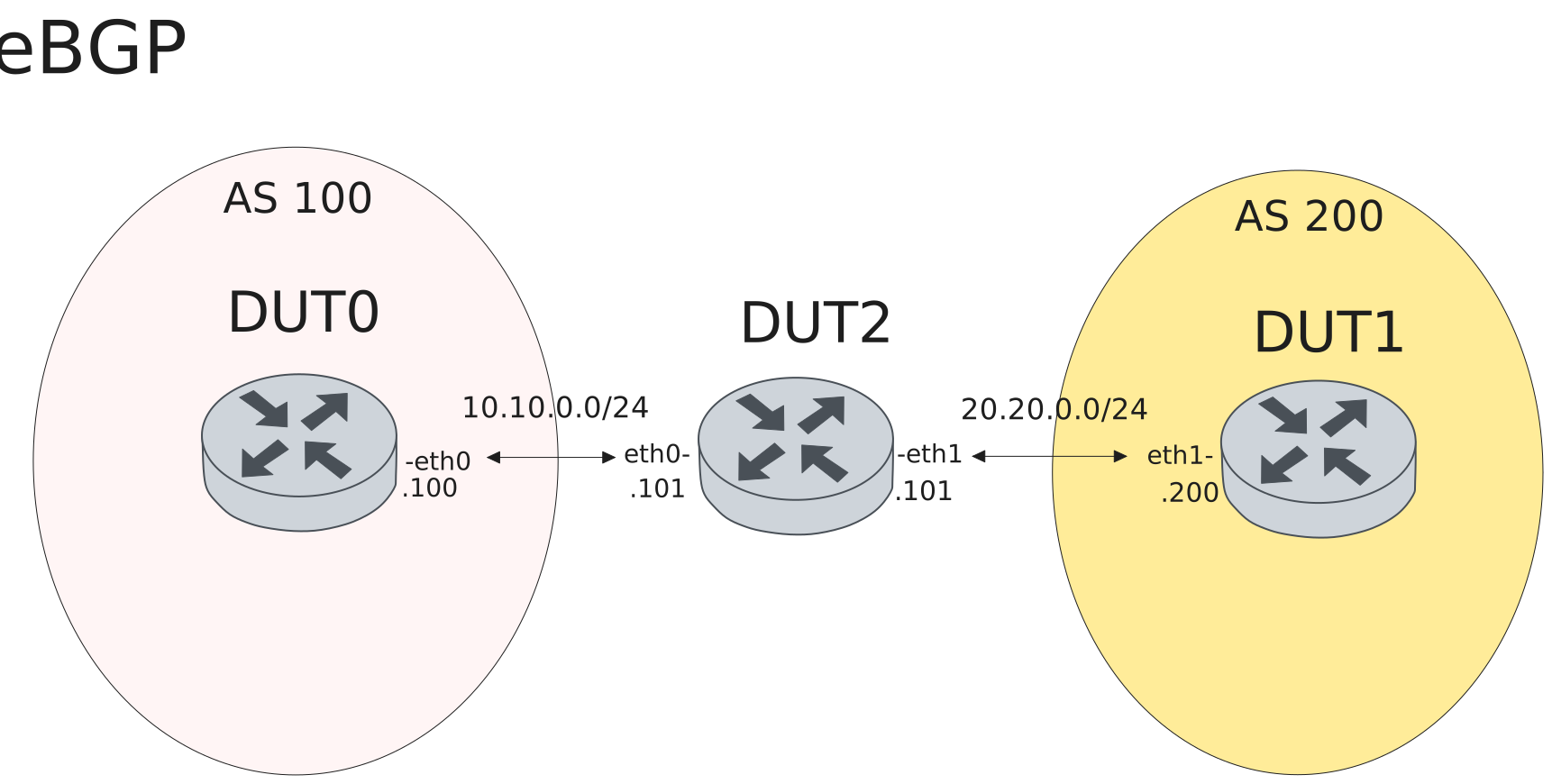
Test eBGP - Peer-group multihop and ttl-security
Description
Test ebgp-multihop and ttl-security hops configured on a peer-group
with values that block or allow a 2-hop eBGP session.
Scenario
Example 1
Step 1: Set the following configuration in DUT0 :
set interfaces ethernet eth0 address 10.10.0.100/24
set protocols bgp 100 neighbor peer peer-group MYGROUP
set protocols bgp 100 neighbor peer remote-address 20.20.0.200
set protocols bgp 100 peer-group MYGROUP ebgp-multihop 1
set protocols bgp 100 peer-group MYGROUP remote-as 200
set protocols bgp 100 peer-group MYGROUP route-map import PERMIT
set protocols route-map PERMIT rule 1 action permit
set protocols static route 20.20.0.0/24 next-hop 10.10.0.101
set system login user admin authentication encrypted-password '$6$GSjsCj8gHLv$/VcqU6FLi6CT2Oxn0MJQ2C2tqnRDrYKNF8HIYWJp68nvXvPdFccDsT04.WtigUONbKYrgKg8d6rEs8PjljMkH0'
Step 2: Set the following configuration in DUT1 :
set interfaces ethernet eth1 address 20.20.0.200/24
set protocols bgp 200 neighbor peer ebgp-multihop 1
set protocols bgp 200 neighbor peer remote-address 10.10.0.100
set protocols bgp 200 neighbor peer remote-as 100
set protocols bgp 200 neighbor peer route-map export PERMIT
set protocols route-map PERMIT rule 1 action permit
set protocols static route 10.10.0.0/24 next-hop 20.20.0.101
set system login user admin authentication encrypted-password '$6$GSjsCj8gHLv$/VcqU6FLi6CT2Oxn0MJQ2C2tqnRDrYKNF8HIYWJp68nvXvPdFccDsT04.WtigUONbKYrgKg8d6rEs8PjljMkH0'
Step 3: Set the following configuration in DUT2 :
set interfaces ethernet eth0 address 10.10.0.101/24
set interfaces ethernet eth1 address 20.20.0.101/24
set system login user admin authentication encrypted-password '$6$GSjsCj8gHLv$/VcqU6FLi6CT2Oxn0MJQ2C2tqnRDrYKNF8HIYWJp68nvXvPdFccDsT04.WtigUONbKYrgKg8d6rEs8PjljMkH0'
Attention
Verify eBGP session does NOT establish with ebgp-multihop 1 (expected Active).
Step 4: Run command protocols bgp show ip summary at DUT0 and check if output matches the following regular expressions:
20.20.0.200.*ActiveShow output
IPv4 Unicast Summary:
BGP router identifier 10.10.0.100, local AS number 100 VRF default vrf-id 0
BGP table version 0
RIB entries 0, using 0 bytes of memory
Peers 1, using 24 KiB of memory
Peer groups 1, using 64 bytes of memory

Neighbor        LocalAddr       V         AS   MsgRcvd   MsgSent   TblVer  InQ OutQ  Up/Down        State   PfxRcd   PfxSnt Desc
20.20.0.200     10.10.0.100     4        200         0         0        0    0    0    never       Active        0        0 N/A

Total number of neighbors 1
Example 2
Step 1: Set the following configuration in DUT0 :
set interfaces ethernet eth0 address 10.10.0.100/24
set protocols bgp 100 neighbor peer peer-group MYGROUP
set protocols bgp 100 neighbor peer remote-address 20.20.0.200
set protocols bgp 100 peer-group MYGROUP ebgp-multihop 3
set protocols bgp 100 peer-group MYGROUP remote-as 200
set protocols bgp 100 peer-group MYGROUP route-map import PERMIT
set protocols route-map PERMIT rule 1 action permit
set protocols static route 20.20.0.0/24 next-hop 10.10.0.101
set system login user admin authentication encrypted-password '$6$GSjsCj8gHLv$/VcqU6FLi6CT2Oxn0MJQ2C2tqnRDrYKNF8HIYWJp68nvXvPdFccDsT04.WtigUONbKYrgKg8d6rEs8PjljMkH0'
Step 2: Set the following configuration in DUT1 :
set interfaces ethernet eth1 address 20.20.0.200/24
set protocols bgp 200 neighbor peer ebgp-multihop 3
set protocols bgp 200 neighbor peer remote-address 10.10.0.100
set protocols bgp 200 neighbor peer remote-as 100
set protocols bgp 200 neighbor peer route-map export PERMIT
set protocols route-map PERMIT rule 1 action permit
set protocols static route 10.10.0.0/24 next-hop 20.20.0.101
set system login user admin authentication encrypted-password '$6$GSjsCj8gHLv$/VcqU6FLi6CT2Oxn0MJQ2C2tqnRDrYKNF8HIYWJp68nvXvPdFccDsT04.WtigUONbKYrgKg8d6rEs8PjljMkH0'
Step 3: Set the following configuration in DUT2 :
set interfaces ethernet eth0 address 10.10.0.101/24
set interfaces ethernet eth1 address 20.20.0.101/24
set system login user admin authentication encrypted-password '$6$GSjsCj8gHLv$/VcqU6FLi6CT2Oxn0MJQ2C2tqnRDrYKNF8HIYWJp68nvXvPdFccDsT04.WtigUONbKYrgKg8d6rEs8PjljMkH0'
Attention
Verify eBGP session establishes with ebgp-multihop 3.
Step 4: Run command protocols bgp show ip summary at DUT0 and check if output matches the following regular expressions:
20.20.0.200.*EstablishedShow output
IPv4 Unicast Summary:
BGP router identifier 10.10.0.100, local AS number 100 VRF default vrf-id 0
BGP table version 0
RIB entries 0, using 0 bytes of memory
Peers 1, using 24 KiB of memory
Peer groups 1, using 64 bytes of memory

Neighbor        LocalAddr       V         AS   MsgRcvd   MsgSent   TblVer  InQ OutQ  Up/Down        State   PfxRcd   PfxSnt Desc
20.20.0.200     10.10.0.100     4        200         3         5        0    0    0 00:00:02  Established        0 (Policy) N/A

Total number of neighbors 1
Example 3
Step 1: Set the following configuration in DUT0 :
set interfaces ethernet eth0 address 10.10.0.100/24
set protocols bgp 100 neighbor peer peer-group MYGROUP
set protocols bgp 100 neighbor peer remote-address 20.20.0.200
set protocols bgp 100 peer-group MYGROUP remote-as 200
set protocols bgp 100 peer-group MYGROUP route-map import PERMIT
set protocols bgp 100 peer-group MYGROUP ttl-security hops 1
set protocols route-map PERMIT rule 1 action permit
set protocols static route 20.20.0.0/24 next-hop 10.10.0.101
set system login user admin authentication encrypted-password '$6$GSjsCj8gHLv$/VcqU6FLi6CT2Oxn0MJQ2C2tqnRDrYKNF8HIYWJp68nvXvPdFccDsT04.WtigUONbKYrgKg8d6rEs8PjljMkH0'
Step 2: Set the following configuration in DUT1 :
set interfaces ethernet eth1 address 20.20.0.200/24
set protocols bgp 200 neighbor peer remote-address 10.10.0.100
set protocols bgp 200 neighbor peer remote-as 100
set protocols bgp 200 neighbor peer route-map export PERMIT
set protocols bgp 200 neighbor peer ttl-security hops 1
set protocols route-map PERMIT rule 1 action permit
set protocols static route 10.10.0.0/24 next-hop 20.20.0.101
set system login user admin authentication encrypted-password '$6$GSjsCj8gHLv$/VcqU6FLi6CT2Oxn0MJQ2C2tqnRDrYKNF8HIYWJp68nvXvPdFccDsT04.WtigUONbKYrgKg8d6rEs8PjljMkH0'
Step 3: Set the following configuration in DUT2 :
set interfaces ethernet eth0 address 10.10.0.101/24
set interfaces ethernet eth1 address 20.20.0.101/24
set system login user admin authentication encrypted-password '$6$GSjsCj8gHLv$/VcqU6FLi6CT2Oxn0MJQ2C2tqnRDrYKNF8HIYWJp68nvXvPdFccDsT04.WtigUONbKYrgKg8d6rEs8PjljMkH0'
Attention
Verify eBGP session does NOT establish with ttl-security hops 1 (expected Connect).
Step 4: Run command protocols bgp show ip summary at DUT0 and check if output matches the following regular expressions:
20.20.0.200.*ConnectShow output
IPv4 Unicast Summary:
BGP router identifier 10.10.0.100, local AS number 100 VRF default vrf-id 0
BGP table version 0
RIB entries 0, using 0 bytes of memory
Peers 1, using 24 KiB of memory
Peer groups 1, using 64 bytes of memory

Neighbor        LocalAddr       V         AS   MsgRcvd   MsgSent   TblVer  InQ OutQ  Up/Down        State   PfxRcd   PfxSnt Desc
20.20.0.200     10.10.0.100     4        200         0         0        0    0    0    never      Connect        0        0 N/A

Total number of neighbors 1
Example 4
Step 1: Set the following configuration in DUT0 :
set interfaces ethernet eth0 address 10.10.0.100/24
set protocols bgp 100 neighbor peer peer-group MYGROUP
set protocols bgp 100 neighbor peer remote-address 20.20.0.200
set protocols bgp 100 peer-group MYGROUP remote-as 200
set protocols bgp 100 peer-group MYGROUP route-map import PERMIT
set protocols bgp 100 peer-group MYGROUP ttl-security hops 5
set protocols route-map PERMIT rule 1 action permit
set protocols static route 20.20.0.0/24 next-hop 10.10.0.101
set system login user admin authentication encrypted-password '$6$GSjsCj8gHLv$/VcqU6FLi6CT2Oxn0MJQ2C2tqnRDrYKNF8HIYWJp68nvXvPdFccDsT04.WtigUONbKYrgKg8d6rEs8PjljMkH0'
Step 2: Set the following configuration in DUT1 :
set interfaces ethernet eth1 address 20.20.0.200/24
set protocols bgp 200 neighbor peer remote-address 10.10.0.100
set protocols bgp 200 neighbor peer remote-as 100
set protocols bgp 200 neighbor peer route-map export PERMIT
set protocols bgp 200 neighbor peer ttl-security hops 5
set protocols route-map PERMIT rule 1 action permit
set protocols static route 10.10.0.0/24 next-hop 20.20.0.101
set system login user admin authentication encrypted-password '$6$GSjsCj8gHLv$/VcqU6FLi6CT2Oxn0MJQ2C2tqnRDrYKNF8HIYWJp68nvXvPdFccDsT04.WtigUONbKYrgKg8d6rEs8PjljMkH0'
Step 3: Set the following configuration in DUT2 :
set interfaces ethernet eth0 address 10.10.0.101/24
set interfaces ethernet eth1 address 20.20.0.101/24
set system login user admin authentication encrypted-password '$6$GSjsCj8gHLv$/VcqU6FLi6CT2Oxn0MJQ2C2tqnRDrYKNF8HIYWJp68nvXvPdFccDsT04.WtigUONbKYrgKg8d6rEs8PjljMkH0'
Attention
Verify eBGP session establishes with ttl-security hops 5.
Step 4: Run command protocols bgp show ip summary at DUT0 and check if output matches the following regular expressions:
20.20.0.200.*EstablishedShow output
IPv4 Unicast Summary:
BGP router identifier 10.10.0.100, local AS number 100 VRF default vrf-id 0
BGP table version 0
RIB entries 0, using 0 bytes of memory
Peers 1, using 24 KiB of memory
Peer groups 1, using 64 bytes of memory

Neighbor        LocalAddr       V         AS   MsgRcvd   MsgSent   TblVer  InQ OutQ  Up/Down        State   PfxRcd   PfxSnt Desc
20.20.0.200     10.10.0.100     4        200         3         5        0    0    0 00:00:02  Established        0 (Policy) N/A

Total number of neighbors 1