Site-To-Site
This scenario shows how to configure and connect two subnets with each other through a VPN tunnel. The initiator requests an additional IP address from the responder to use as the inner IPsec tunnel address.
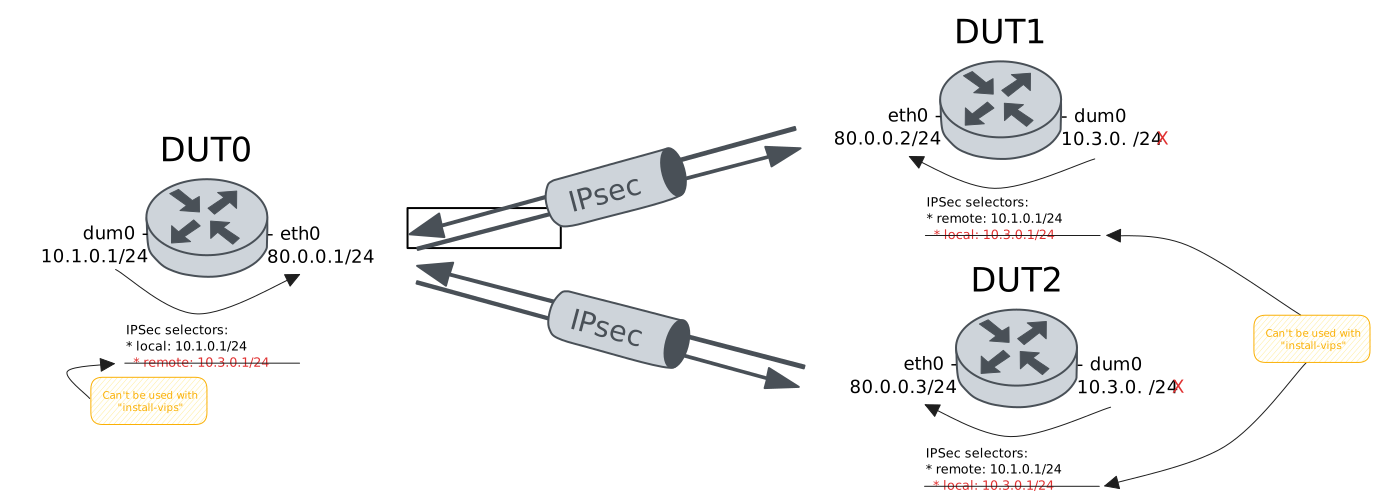
Test Site-To-Site VIP Pool And A Single Client
Description
In this scenario, DUT1 acts as initiator
and requests a VIP from the DUT0 pool.
Scenario
Step 1: Set the following configuration in DUT0 :
set interfaces dummy dum0 address 10.1.0.1/24
set interfaces ethernet eth0 address 80.0.0.1/24
set protocols static route 10.3.0.0/24 interface eth0
set system login user admin authentication encrypted-password '$6$GSjsCj8gHLv$/VcqU6FLi6CT2Oxn0MJQ2C2tqnRDrYKNF8HIYWJp68nvXvPdFccDsT04.WtigUONbKYrgKg8d6rEs8PjljMkH0'
set vpn ipsec auth-profile AUTH-SA global-secrets ike-psk %any encrypted-secret U2FsdGVkX19d+xB7Ei+sJL+4rKWnoE39HzGnkxvejvA=
set vpn ipsec auth-profile AUTH-SA local auth ike-psk id %any
set vpn ipsec auth-profile AUTH-SA remote auth ike-psk id %any
set vpn ipsec esp-group CHILD-SA mode tunnel
set vpn ipsec esp-group CHILD-SA proposal 1 encryption aes256gcm128
set vpn ipsec esp-group CHILD-SA proposal 1 pfs dh-group19
set vpn ipsec ike-group IKE-SA key-exchange ikev2
set vpn ipsec ike-group IKE-SA proposal 1 dh-group 19
set vpn ipsec ike-group IKE-SA proposal 1 encryption aes256gcm128
set vpn ipsec ike-group IKE-SA proposal 1 hash sha256
set vpn ipsec pool POOL prefix 10.3.0.0/24
set vpn ipsec site-to-site peer PEER auth-profile AUTH-SA
set vpn ipsec site-to-site peer PEER connection-type respond
set vpn ipsec site-to-site peer PEER default-esp-group CHILD-SA
set vpn ipsec site-to-site peer PEER ike-group IKE-SA
set vpn ipsec site-to-site peer PEER pool POOL
set vpn ipsec site-to-site peer PEER tunnel 1 local prefix 10.1.0.0/24
Step 2: Set the following configuration in DUT1 :
set interfaces dummy dum0
set interfaces ethernet eth0 address 80.0.0.2/24
set protocols static route 10.1.0.0/24 interface eth0
set system login user admin authentication encrypted-password '$6$GSjsCj8gHLv$/VcqU6FLi6CT2Oxn0MJQ2C2tqnRDrYKNF8HIYWJp68nvXvPdFccDsT04.WtigUONbKYrgKg8d6rEs8PjljMkH0'
set vpn ipsec auth-profile AUTH-SA global-secrets ike-psk %any encrypted-secret U2FsdGVkX18K9USvDYzffiR+QOPas8lUhfRjZnlfePA=
set vpn ipsec auth-profile AUTH-SA local auth ike-psk id %any
set vpn ipsec auth-profile AUTH-SA remote auth ike-psk id %any
set vpn ipsec esp-group CHILD-SA mode tunnel
set vpn ipsec esp-group CHILD-SA proposal 1 encryption aes256gcm128
set vpn ipsec esp-group CHILD-SA proposal 1 pfs dh-group19
set vpn ipsec ike-group IKE-SA key-exchange ikev2
set vpn ipsec ike-group IKE-SA proposal 1 dh-group 19
set vpn ipsec ike-group IKE-SA proposal 1 encryption aes256gcm128
set vpn ipsec ike-group IKE-SA proposal 1 hash sha256
set vpn ipsec site-to-site peer PEER auth-profile AUTH-SA
set vpn ipsec site-to-site peer PEER connection-type initiate
set vpn ipsec site-to-site peer PEER default-esp-group CHILD-SA
set vpn ipsec site-to-site peer PEER ike-group IKE-SA
set vpn ipsec site-to-site peer PEER install-vips interface dum0
set vpn ipsec site-to-site peer PEER remote-address 80.0.0.1
set vpn ipsec site-to-site peer PEER tunnel 1 remote prefix 10.1.0.0/24
Step 3: Ping IP address 80.0.0.1 from DUT1:
admin@DUT1$ ping 80.0.0.1 count 1 size 56 timeout 1Show output
PING 80.0.0.1 (80.0.0.1) 56(84) bytes of data.
64 bytes from 80.0.0.1: icmp_seq=1 ttl=64 time=0.419 ms

--- 80.0.0.1 ping statistics ---
1 packets transmitted, 1 received, 0% packet loss, time 0ms
rtt min/avg/max/mdev = 0.419/0.419/0.419/0.000 ms
Step 4: Ping IP address 80.0.0.2 from DUT0:
admin@DUT0$ ping 80.0.0.2 count 1 size 56 timeout 1Show output
PING 80.0.0.2 (80.0.0.2) 56(84) bytes of data.
64 bytes from 80.0.0.2: icmp_seq=1 ttl=64 time=0.259 ms

--- 80.0.0.2 ping statistics ---
1 packets transmitted, 1 received, 0% packet loss, time 0ms
rtt min/avg/max/mdev = 0.259/0.259/0.259/0.000 ms
Step 5: Run command interfaces dummy dum0 show at DUT1 and expect this output:
Show output
---------------------------------------------------------------
Name          IP Address          Admin  Oper  Vrf  Description
---------------------------------------------------------------
dum0  10.3.0.1/32                 up     up
      fe80::52:73ff:fe34:cc9d/64
Step 6: Run command vpn ipsec show sa at DUT1 and check if output matches the following regular expressions:
peer-PEER-tunnel-\d+.+INSTALLEDShow output
vpn-peer-PEER: #1, ESTABLISHED, IKEv2, 3814c7d0b4db16d9_i* 8bdee760f6a4429a_r
  local  '80.0.0.2' @ 80.0.0.2[4500] [10.3.0.1]
  remote '80.0.0.1' @ 80.0.0.1[4500]
  AES_GCM_16-256/PRF_HMAC_SHA2_256/ECP_256
  established 0s ago, rekeying in 21630s
  peer-PEER-tunnel-1: #1, reqid 1, INSTALLED, TUNNEL-in-UDP, ESP:AES_GCM_16-256
    installed 0s ago, rekeying in 3305s, expires in 3960s
    in  c981bc5d,      0 bytes,     0 packets
    out c4dcb389,      0 bytes,     0 packets
    local  10.3.0.1/32
    remote 10.1.0.0/24
Step 7: Ping IP address 10.1.0.1 from DUT1:
admin@DUT1$ ping 10.1.0.1 local-address 10.3.0.1 count 1 size 56 timeout 1Show output
PING 10.1.0.1 (10.1.0.1) from 10.3.0.1 : 56(84) bytes of data.
64 bytes from 10.1.0.1: icmp_seq=1 ttl=64 time=0.607 ms

--- 10.1.0.1 ping statistics ---
1 packets transmitted, 1 received, 0% packet loss, time 0ms
rtt min/avg/max/mdev = 0.607/0.607/0.607/0.000 ms
Step 8: Initiate a tcp connection from DUT1 to DUT0 and try to send some messages between both endpoints
admin@DUT0$ monitor test connection server 8080 tcp
admin@DUT1$ monitor test connection client 10.1.0.1 8080 tcp local-address 10.3.0.1
Step 9: Run command vpn ipsec show sa at DUT1 and check if output matches the following regular expressions:
[1-9]\d? packetsShow output
vpn-peer-PEER: #1, ESTABLISHED, IKEv2, 3814c7d0b4db16d9_i* 8bdee760f6a4429a_r
  local  '80.0.0.2' @ 80.0.0.2[4500] [10.3.0.1]
  remote '80.0.0.1' @ 80.0.0.1[4500]
  AES_GCM_16-256/PRF_HMAC_SHA2_256/ECP_256
  established 3s ago, rekeying in 21627s
  peer-PEER-tunnel-1: #1, reqid 1, INSTALLED, TUNNEL-in-UDP, ESP:AES_GCM_16-256
    installed 3s ago, rekeying in 3302s, expires in 3957s
    in  c981bc5d,    660 bytes,    10 packets,     0s ago
    out c4dcb389,    712 bytes,    11 packets,     0s ago
    local  10.3.0.1/32
    remote 10.1.0.0/24
Step 10: Run command vpn ipsec show pool summary at DUT0 and check if output matches the following regular expressions:
1\s+0\s+\d+Show output
--------------------------------------
pool  base IP   online  offline  total
--------------------------------------
POOL  10.3.0.0       1        0    254
Test Site-To-Site VIP Pool And A Single Client Using On-Demand Connection-Type
Description
In this scenario, DUT1 requests a VIP from
the DUT0 pool. Both devices use
on-demand as a connection-type.
Scenario
Step 1: Set the following configuration in DUT0 :
set interfaces dummy dum0 address 10.1.0.1/24
set interfaces ethernet eth0 address 80.0.0.1/24
set protocols static route 10.3.0.0/24 interface eth0
set system login user admin authentication encrypted-password '$6$GSjsCj8gHLv$/VcqU6FLi6CT2Oxn0MJQ2C2tqnRDrYKNF8HIYWJp68nvXvPdFccDsT04.WtigUONbKYrgKg8d6rEs8PjljMkH0'
set vpn ipsec auth-profile AUTH-SA global-secrets ike-psk %any encrypted-secret U2FsdGVkX1+ZtteYZXt8dGEFwf6sJKFwYrxy70h6iiI=
set vpn ipsec auth-profile AUTH-SA local auth ike-psk id %any
set vpn ipsec auth-profile AUTH-SA remote auth ike-psk id %any
set vpn ipsec esp-group CHILD-SA mode tunnel
set vpn ipsec esp-group CHILD-SA proposal 1 encryption aes256gcm128
set vpn ipsec esp-group CHILD-SA proposal 1 pfs dh-group19
set vpn ipsec ike-group IKE-SA key-exchange ikev2
set vpn ipsec ike-group IKE-SA proposal 1 dh-group 19
set vpn ipsec ike-group IKE-SA proposal 1 encryption aes256gcm128
set vpn ipsec ike-group IKE-SA proposal 1 hash sha256
set vpn ipsec pool POOL prefix 10.3.0.0/24
set vpn ipsec site-to-site peer PEER auth-profile AUTH-SA
set vpn ipsec site-to-site peer PEER connection-type on-demand
set vpn ipsec site-to-site peer PEER default-esp-group CHILD-SA
set vpn ipsec site-to-site peer PEER ike-group IKE-SA
set vpn ipsec site-to-site peer PEER pool POOL
set vpn ipsec site-to-site peer PEER tunnel 1 local prefix 10.1.0.0/24
Step 2: Set the following configuration in DUT1 :
set interfaces dummy dum0
set interfaces ethernet eth0 address 80.0.0.2/24
set protocols static route 10.1.0.0/24 interface eth0
set system login user admin authentication encrypted-password '$6$GSjsCj8gHLv$/VcqU6FLi6CT2Oxn0MJQ2C2tqnRDrYKNF8HIYWJp68nvXvPdFccDsT04.WtigUONbKYrgKg8d6rEs8PjljMkH0'
set vpn ipsec auth-profile AUTH-SA global-secrets ike-psk %any encrypted-secret U2FsdGVkX18NmJPLWyeLWO3NDMP0NtEkabRFoK4Cpus=
set vpn ipsec auth-profile AUTH-SA local auth ike-psk id %any
set vpn ipsec auth-profile AUTH-SA remote auth ike-psk id %any
set vpn ipsec esp-group CHILD-SA mode tunnel
set vpn ipsec esp-group CHILD-SA proposal 1 encryption aes256gcm128
set vpn ipsec esp-group CHILD-SA proposal 1 pfs dh-group19
set vpn ipsec ike-group IKE-SA key-exchange ikev2
set vpn ipsec ike-group IKE-SA proposal 1 dh-group 19
set vpn ipsec ike-group IKE-SA proposal 1 encryption aes256gcm128
set vpn ipsec ike-group IKE-SA proposal 1 hash sha256
set vpn ipsec site-to-site peer PEER auth-profile AUTH-SA
set vpn ipsec site-to-site peer PEER connection-type on-demand
set vpn ipsec site-to-site peer PEER default-esp-group CHILD-SA
set vpn ipsec site-to-site peer PEER ike-group IKE-SA
set vpn ipsec site-to-site peer PEER install-vips interface dum0
set vpn ipsec site-to-site peer PEER remote-address 80.0.0.1
set vpn ipsec site-to-site peer PEER tunnel 1 remote prefix 10.1.0.0/24
Step 3: Ping IP address 80.0.0.1 from DUT1:
admin@DUT1$ ping 80.0.0.1 count 1 size 56 timeout 1Show output
PING 80.0.0.1 (80.0.0.1) 56(84) bytes of data.
64 bytes from 80.0.0.1: icmp_seq=1 ttl=64 time=0.645 ms

--- 80.0.0.1 ping statistics ---
1 packets transmitted, 1 received, 0% packet loss, time 0ms
rtt min/avg/max/mdev = 0.645/0.645/0.645/0.000 ms
Step 4: Ping IP address 80.0.0.2 from DUT0:
admin@DUT0$ ping 80.0.0.2 count 1 size 56 timeout 1Show output
PING 80.0.0.2 (80.0.0.2) 56(84) bytes of data.
64 bytes from 80.0.0.2: icmp_seq=1 ttl=64 time=0.329 ms

--- 80.0.0.2 ping statistics ---
1 packets transmitted, 1 received, 0% packet loss, time 0ms
rtt min/avg/max/mdev = 0.329/0.329/0.329/0.000 ms
Step 5: Expect a failure in the following command:
Ping IP address 10.1.0.1 from DUT1:
admin@DUT1$ ping 10.1.0.1 count 5 size 56 timeout 1Show output
PING 10.1.0.1 (10.1.0.1) 56(84) bytes of data.

--- 10.1.0.1 ping statistics ---
5 packets transmitted, 0 received, 100% packet loss, time 4072ms
Step 6: Run command interfaces dummy dum0 show at DUT1 and expect this output:
Show output
----------------------------------------------------------------
Name          IP Address           Admin  Oper  Vrf  Description
----------------------------------------------------------------
dum0  10.3.0.1/32                  up     up
      fe80::c1a:ebff:fee9:a0b5/64
Step 7: Run command vpn ipsec show sa at DUT1 and check if output matches the following regular expressions:
peer-PEER-tunnel-\d+.+INSTALLEDShow output
vpn-peer-PEER: #1, ESTABLISHED, IKEv2, 71a8b5369033f074_i* 3a83499693463427_r
  local  '80.0.0.2' @ 80.0.0.2[4500] [10.3.0.1]
  remote '80.0.0.1' @ 80.0.0.1[4500]
  AES_GCM_16-256/PRF_HMAC_SHA2_256/ECP_256
  established 5s ago, rekeying in 16650s
  peer-PEER-tunnel-1: #2, reqid 1, INSTALLED, TUNNEL-in-UDP, ESP:AES_GCM_16-256
    installed 5s ago, rekeying in 3331s, expires in 3955s
    in  c5dff223,      0 bytes,     0 packets
    out c1f5eb4f,    336 bytes,     4 packets,     1s ago
    local  10.3.0.1/32
    remote 10.1.0.0/24
Step 8: Ping IP address 10.1.0.1 from DUT1:
admin@DUT1$ ping 10.1.0.1 local-address 10.3.0.1 count 1 size 56 timeout 1Show output
PING 10.1.0.1 (10.1.0.1) from 10.3.0.1 : 56(84) bytes of data.
64 bytes from 10.1.0.1: icmp_seq=1 ttl=64 time=0.811 ms

--- 10.1.0.1 ping statistics ---
1 packets transmitted, 1 received, 0% packet loss, time 0ms
rtt min/avg/max/mdev = 0.811/0.811/0.811/0.000 ms
Step 9: Initiate a tcp connection from DUT1 to DUT0 and try to send some messages between both endpoints
admin@DUT0$ monitor test connection server 8080 tcp
admin@DUT1$ monitor test connection client 10.1.0.1 8080 tcp local-address 10.3.0.1
Step 10: Run command vpn ipsec show sa at DUT1 and check if output matches the following regular expressions:
[1-9]\d? packetsShow output
vpn-peer-PEER: #1, ESTABLISHED, IKEv2, 71a8b5369033f074_i* 3a83499693463427_r
  local  '80.0.0.2' @ 80.0.0.2[4500] [10.3.0.1]
  remote '80.0.0.1' @ 80.0.0.1[4500]
  AES_GCM_16-256/PRF_HMAC_SHA2_256/ECP_256
  established 8s ago, rekeying in 16647s
  peer-PEER-tunnel-1: #2, reqid 1, INSTALLED, TUNNEL-in-UDP, ESP:AES_GCM_16-256
    installed 8s ago, rekeying in 3328s, expires in 3952s
    in  c5dff223,    660 bytes,    10 packets,     0s ago
    out c1f5eb4f,   1048 bytes,    15 packets,     0s ago
    local  10.3.0.1/32
    remote 10.1.0.0/24
Step 11: Run command vpn ipsec show pool summary at DUT0 and check if output matches the following regular expressions:
1\s+0\s+\d+Show output
--------------------------------------
pool  base IP   online  offline  total
--------------------------------------
POOL  10.3.0.0       1        0    254
Test Site-To-Site VIP Pool And Multiple Clients
Description
In this scenario, DUT0 install routes
in a separate VRF called LAN.
Scenario
Step 1: Set the following configuration in DUT0 :
set interfaces dummy dum0 address 10.1.0.1/24
set interfaces ethernet eth0 address 80.0.0.1/24
set protocols static route 10.3.0.0/24 interface eth0
set system login user admin authentication encrypted-password '$6$GSjsCj8gHLv$/VcqU6FLi6CT2Oxn0MJQ2C2tqnRDrYKNF8HIYWJp68nvXvPdFccDsT04.WtigUONbKYrgKg8d6rEs8PjljMkH0'
set vpn ipsec auth-profile AUTH-SA global-secrets ike-psk %any encrypted-secret U2FsdGVkX18tRwf5NzRrXvrblHijNzAWMdGp8qxfhuY=
set vpn ipsec auth-profile AUTH-SA local auth ike-psk id %any
set vpn ipsec auth-profile AUTH-SA remote auth ike-psk id %any
set vpn ipsec esp-group CHILD-SA mode tunnel
set vpn ipsec esp-group CHILD-SA proposal 1 encryption aes256gcm128
set vpn ipsec esp-group CHILD-SA proposal 1 pfs dh-group19
set vpn ipsec ike-group IKE-SA key-exchange ikev2
set vpn ipsec ike-group IKE-SA proposal 1 dh-group 19
set vpn ipsec ike-group IKE-SA proposal 1 encryption aes256gcm128
set vpn ipsec ike-group IKE-SA proposal 1 hash sha256
set vpn ipsec pool POOL prefix 10.3.0.0/24
set vpn ipsec site-to-site peer PEER auth-profile AUTH-SA
set vpn ipsec site-to-site peer PEER connection-type respond
set vpn ipsec site-to-site peer PEER default-esp-group CHILD-SA
set vpn ipsec site-to-site peer PEER ike-group IKE-SA
set vpn ipsec site-to-site peer PEER pool POOL
set vpn ipsec site-to-site peer PEER tunnel 1 local prefix 10.1.0.0/24
Step 2: Set the following configuration in DUT1 :
set interfaces dummy dum0
set interfaces ethernet eth0 address 80.0.0.2/24
set protocols static route 10.1.0.0/24 interface eth0
set system login user admin authentication encrypted-password '$6$GSjsCj8gHLv$/VcqU6FLi6CT2Oxn0MJQ2C2tqnRDrYKNF8HIYWJp68nvXvPdFccDsT04.WtigUONbKYrgKg8d6rEs8PjljMkH0'
set vpn ipsec auth-profile AUTH-SA global-secrets ike-psk %any encrypted-secret U2FsdGVkX1/JN1XY+h4h+sNVlZM4XFHw80AKvb1gmeA=
set vpn ipsec auth-profile AUTH-SA local auth ike-psk id %any
set vpn ipsec auth-profile AUTH-SA remote auth ike-psk id %any
set vpn ipsec esp-group CHILD-SA mode tunnel
set vpn ipsec esp-group CHILD-SA proposal 1 encryption aes256gcm128
set vpn ipsec esp-group CHILD-SA proposal 1 pfs dh-group19
set vpn ipsec ike-group IKE-SA key-exchange ikev2
set vpn ipsec ike-group IKE-SA proposal 1 dh-group 19
set vpn ipsec ike-group IKE-SA proposal 1 encryption aes256gcm128
set vpn ipsec ike-group IKE-SA proposal 1 hash sha256
set vpn ipsec site-to-site peer PEER auth-profile AUTH-SA
set vpn ipsec site-to-site peer PEER connection-type initiate
set vpn ipsec site-to-site peer PEER default-esp-group CHILD-SA
set vpn ipsec site-to-site peer PEER ike-group IKE-SA
set vpn ipsec site-to-site peer PEER install-vips interface dum0
set vpn ipsec site-to-site peer PEER remote-address 80.0.0.1
set vpn ipsec site-to-site peer PEER tunnel 1 remote prefix 10.1.0.0/24
Step 3: Ping IP address 80.0.0.1 from DUT1:
admin@DUT1$ ping 80.0.0.1 count 1 size 56 timeout 1Show output
PING 80.0.0.1 (80.0.0.1) 56(84) bytes of data.
64 bytes from 80.0.0.1: icmp_seq=1 ttl=64 time=0.454 ms

--- 80.0.0.1 ping statistics ---
1 packets transmitted, 1 received, 0% packet loss, time 0ms
rtt min/avg/max/mdev = 0.454/0.454/0.454/0.000 ms
Step 4: Ping IP address 80.0.0.2 from DUT0:
admin@DUT0$ ping 80.0.0.2 count 1 size 56 timeout 1Show output
PING 80.0.0.2 (80.0.0.2) 56(84) bytes of data.
64 bytes from 80.0.0.2: icmp_seq=1 ttl=64 time=0.406 ms

--- 80.0.0.2 ping statistics ---
1 packets transmitted, 1 received, 0% packet loss, time 0ms
rtt min/avg/max/mdev = 0.406/0.406/0.406/0.000 ms
Step 5: Set the following configuration in DUT2 :
set interfaces dummy dum0
set interfaces ethernet eth0 address 80.0.0.3/24
set protocols static route 10.1.0.0/24 interface eth0
set system login user admin authentication encrypted-password '$6$GSjsCj8gHLv$/VcqU6FLi6CT2Oxn0MJQ2C2tqnRDrYKNF8HIYWJp68nvXvPdFccDsT04.WtigUONbKYrgKg8d6rEs8PjljMkH0'
set vpn ipsec auth-profile AUTH-SA global-secrets ike-psk %any encrypted-secret U2FsdGVkX19hFwUI6JX7+Pcj6utVKwAPVL861vz/3+8=
set vpn ipsec auth-profile AUTH-SA local auth ike-psk id %any
set vpn ipsec auth-profile AUTH-SA remote auth ike-psk id %any
set vpn ipsec esp-group CHILD-SA proposal 1 encryption aes256gcm128
set vpn ipsec esp-group CHILD-SA proposal 1 pfs dh-group19
set vpn ipsec ike-group IKE-SA key-exchange ikev2
set vpn ipsec ike-group IKE-SA proposal 1 dh-group 19
set vpn ipsec ike-group IKE-SA proposal 1 encryption aes256gcm128
set vpn ipsec ike-group IKE-SA proposal 1 hash sha256
set vpn ipsec site-to-site peer PEER auth-profile AUTH-SA
set vpn ipsec site-to-site peer PEER default-esp-group CHILD-SA
set vpn ipsec site-to-site peer PEER ike-group IKE-SA
set vpn ipsec site-to-site peer PEER install-vips interface dum0
set vpn ipsec site-to-site peer PEER remote-address 80.0.0.1
set vpn ipsec site-to-site peer PEER tunnel 1 remote prefix 10.1.0.0/24
Step 6: Run command interfaces dummy dum0 show at DUT1 and expect this output:
Show output
----------------------------------------------------------------
Name          IP Address           Admin  Oper  Vrf  Description
----------------------------------------------------------------
dum0  10.3.0.1/32                  up     up
      fe80::c1a:ebff:fee9:a0b5/64
Step 7: Run command vpn ipsec show sa at DUT1 and check if output matches the following regular expressions:
peer-PEER-tunnel-\d+.+INSTALLEDShow output
vpn-peer-PEER: #1, ESTABLISHED, IKEv2, e6c8f24905577e1b_i* 2fbf3d1027a30d89_r
  local  '80.0.0.2' @ 80.0.0.2[4500] [10.3.0.1]
  remote '80.0.0.1' @ 80.0.0.1[4500]
  AES_GCM_16-256/PRF_HMAC_SHA2_256/ECP_256
  established 3s ago, rekeying in 20734s
  peer-PEER-tunnel-1: #1, reqid 1, INSTALLED, TUNNEL-in-UDP, ESP:AES_GCM_16-256
    installed 3s ago, rekeying in 3291s, expires in 3957s
    in  c10a4ba2,      0 bytes,     0 packets
    out c99f7c86,      0 bytes,     0 packets
    local  10.3.0.1/32
    remote 10.1.0.0/24
Step 8: Ping IP address 10.1.0.1 from DUT1:
admin@DUT1$ ping 10.1.0.1 local-address 10.3.0.1 count 1 size 56 timeout 1Show output
PING 10.1.0.1 (10.1.0.1) from 10.3.0.1 : 56(84) bytes of data.
64 bytes from 10.1.0.1: icmp_seq=1 ttl=64 time=0.638 ms

--- 10.1.0.1 ping statistics ---
1 packets transmitted, 1 received, 0% packet loss, time 0ms
rtt min/avg/max/mdev = 0.638/0.638/0.638/0.000 ms
Step 9: Initiate a tcp connection from DUT1 to DUT0 and try to send some messages between both endpoints
admin@DUT0$ monitor test connection server 8080 tcp
admin@DUT1$ monitor test connection client 10.1.0.1 8080 tcp local-address 10.3.0.1
Step 10: Run command vpn ipsec show sa at DUT1 and check if output matches the following regular expressions:
[1-9]\d? packetsShow output
vpn-peer-PEER: #1, ESTABLISHED, IKEv2, e6c8f24905577e1b_i* 2fbf3d1027a30d89_r
  local  '80.0.0.2' @ 80.0.0.2[4500] [10.3.0.1]
  remote '80.0.0.1' @ 80.0.0.1[4500]
  AES_GCM_16-256/PRF_HMAC_SHA2_256/ECP_256
  established 6s ago, rekeying in 20731s
  peer-PEER-tunnel-1: #1, reqid 1, INSTALLED, TUNNEL-in-UDP, ESP:AES_GCM_16-256
    installed 6s ago, rekeying in 3288s, expires in 3954s
    in  c10a4ba2,    660 bytes,    10 packets,     0s ago
    out c99f7c86,    712 bytes,    11 packets,     0s ago
    local  10.3.0.1/32
    remote 10.1.0.0/24
Step 11: Run command interfaces dummy dum0 show at DUT2 and expect this output:
Show output
-----------------------------------------------------------------
Name           IP Address           Admin  Oper  Vrf  Description
-----------------------------------------------------------------
dum0  10.3.0.2/32                   up     up
      fe80::44ed:59ff:fe79:4799/64
Step 12: Run command vpn ipsec show sa at DUT2 and check if output matches the following regular expressions:
peer-PEER-tunnel-\d+.+INSTALLEDShow output
vpn-peer-PEER: #1, ESTABLISHED, IKEv2, 5d5e6e98da7dc788_i* 3f4d7b75cce42a55_r
  local  '80.0.0.3' @ 80.0.0.3[4500] [10.3.0.2]
  remote '80.0.0.1' @ 80.0.0.1[4500]
  AES_GCM_16-256/PRF_HMAC_SHA2_256/ECP_256
  established 3s ago, rekeying in 25848s
  peer-PEER-tunnel-1: #1, reqid 1, INSTALLED, TUNNEL-in-UDP, ESP:AES_GCM_16-256
    installed 3s ago, rekeying in 3325s, expires in 3957s
    in  c3a640c5,      0 bytes,     0 packets
    out c4274bbb,      0 bytes,     0 packets
    local  10.3.0.2/32
    remote 10.1.0.0/24
Step 13: Ping IP address 10.1.0.1 from DUT2:
admin@DUT2$ ping 10.1.0.1 local-address 10.3.0.2 count 1 size 56 timeout 1Show output
PING 10.1.0.1 (10.1.0.1) from 10.3.0.2 : 56(84) bytes of data.
64 bytes from 10.1.0.1: icmp_seq=1 ttl=64 time=0.384 ms

--- 10.1.0.1 ping statistics ---
1 packets transmitted, 1 received, 0% packet loss, time 0ms
rtt min/avg/max/mdev = 0.384/0.384/0.384/0.000 ms
Step 14: Initiate a tcp connection from DUT2 to DUT0 and try to send some messages between both endpoints
admin@DUT0$ monitor test connection server 8080 tcp
admin@DUT2$ monitor test connection client 10.1.0.1 8080 tcp local-address 10.3.0.2
Step 15: Run command vpn ipsec show sa at DUT2 and check if output matches the following regular expressions:
[1-9]\d? packetsShow output
vpn-peer-PEER: #1, ESTABLISHED, IKEv2, 5d5e6e98da7dc788_i* 3f4d7b75cce42a55_r
  local  '80.0.0.3' @ 80.0.0.3[4500] [10.3.0.2]
  remote '80.0.0.1' @ 80.0.0.1[4500]
  AES_GCM_16-256/PRF_HMAC_SHA2_256/ECP_256
  established 6s ago, rekeying in 25845s
  peer-PEER-tunnel-1: #1, reqid 1, INSTALLED, TUNNEL-in-UDP, ESP:AES_GCM_16-256
    installed 6s ago, rekeying in 3322s, expires in 3954s
    in  c3a640c5,    712 bytes,    11 packets,     0s ago
    out c4274bbb,    712 bytes,    11 packets,     0s ago
    local  10.3.0.2/32
    remote 10.1.0.0/24
Step 16: Run command vpn ipsec show pool summary at DUT0 and check if output matches the following regular expressions:
2\s+0\s+\d+Show output
--------------------------------------
pool  base IP   online  offline  total
--------------------------------------
POOL  10.3.0.0       2        0    254