Radius Capture
This scenario shows how to capture and filter RADIUS accounting messages after successful authentication.
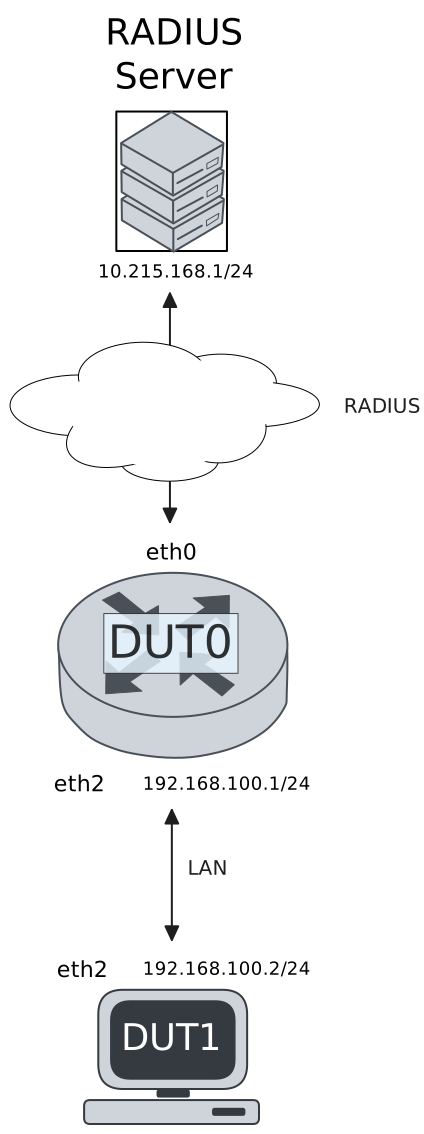
Test RADIUS Accounting With 802.1x Authentication
Description
DUT0 is configured with an 802.1x-authenticated interface and DUT1 acts as an 802.1x supplicant. RADIUS accounting messages are captured in DUT0.
Scenario
Step 1: Set the following configuration in DUT0 :
set interfaces ethernet eth0 address 10.215.168.64/24
set interfaces ethernet eth2 address 192.168.100.1/24
set interfaces ethernet eth2 authenticator 802.1x max-retransmissions 2
set interfaces ethernet eth2 authenticator aaa accounting list1
set interfaces ethernet eth2 authenticator aaa authentication list1
set interfaces ethernet eth2 authenticator log-level debug
set interfaces ethernet eth2 authenticator mode only-802.1x
set interfaces ethernet eth2 authenticator quiet-period 60
set interfaces ethernet eth2 authenticator reauth-period 0
set system aaa group radius radgroup1 server serv1
set system aaa list list1 method 1 group radius radgroup1
set system aaa server radius serv1 address 10.215.168.1
set system aaa server radius serv1 encrypted-key U2FsdGVkX18VxZ2nYf48rexNnDUFGf8tQ0PtEzbJvsXAoQgR+eG38B5y/4dBlGI1YASq0kA2zekb+26VRHPIJA==
set system login user admin authentication encrypted-password '$6$GSjsCj8gHLv$/VcqU6FLi6CT2Oxn0MJQ2C2tqnRDrYKNF8HIYWJp68nvXvPdFccDsT04.WtigUONbKYrgKg8d6rEs8PjljMkH0'
Step 2: Ping IP address 10.215.168.1 from DUT0:
admin@DUT0$ ping 10.215.168.1 count 1 size 56 timeout 1Show output
PING 10.215.168.1 (10.215.168.1) 56(84) bytes of data.
64 bytes from 10.215.168.1: icmp_seq=1 ttl=64 time=0.246 ms

--- 10.215.168.1 ping statistics ---
1 packets transmitted, 1 received, 0% packet loss, time 0ms
rtt min/avg/max/mdev = 0.246/0.246/0.246/0.000 ms
Note
Start packet capture in DUT0 to filter RADIUS messages
Step 3: Set the following configuration in DUT1 :
set interfaces ethernet eth2 address 192.168.100.2/24
set interfaces ethernet eth2 supplicant encrypted-password U2FsdGVkX1/m/eKiPKzMea0KlutfXa4jpuyQx1NJljs=
set interfaces ethernet eth2 supplicant username testing
set system login user admin authentication encrypted-password '$6$GSjsCj8gHLv$/VcqU6FLi6CT2Oxn0MJQ2C2tqnRDrYKNF8HIYWJp68nvXvPdFccDsT04.WtigUONbKYrgKg8d6rEs8PjljMkH0'
Step 4: Run command interfaces ethernet eth2 supplicant show status at DUT1 and check if output contains the following tokens:
AuthorizedShow output
---------------------------------------------------
        Field                      Value
---------------------------------------------------
EAP State                                   SUCCESS
EAP TLS Cipher          ECDHE-RSA-AES256-GCM-SHA384
EAP TLS Version                             TLSv1.2
PAE State                             AUTHENTICATED
Supplicant Port Status                   Authorized
WPA State                                 COMPLETED
Step 5: Ping IP address 192.168.100.1 from DUT1:
admin@DUT1$ ping 192.168.100.1 count 1 size 56 timeout 1Show output
PING 192.168.100.1 (192.168.100.1) 56(84) bytes of data.
64 bytes from 192.168.100.1: icmp_seq=1 ttl=64 time=0.330 ms

--- 192.168.100.1 ping statistics ---
1 packets transmitted, 1 received, 0% packet loss, time 0ms
rtt min/avg/max/mdev = 0.330/0.330/0.330/0.000 ms
Note
Stop packet capture in DUT0 and expect
the following RADIUS messages:
Show output
tcpdump: listening on eth0, link-type EN10MB (Ethernet), snapshot length 262144 bytes
14:30:12.818847 de:ad:be:ef:6c:00 > fe:30:0c:d4:fe:10, ethertype IPv4 (0x0800), length 183: (tos 0x0, ttl 64, id 11774, offset 0, flags [none], proto UDP (17), length 169)
    10.215.168.64.37548 > 10.215.168.1.1813: [bad udp cksum 0x6696 -> 0xaccf!] RADIUS, length: 141
        Accounting-Request (4), id: 0x0b, Authenticator: 2342859092d8ab4342df6e7d14b9679f
          Acct-Status-Type Attribute (40), length: 6, Value: Start
            0x0000:  0000 0001
          Acct-Authentic Attribute (45), length: 6, Value: RADIUS
            0x0000:  0000 0001
          User-Name Attribute (1), length: 9, Value: testing
            0x0000:  7465 7374 696e 67
          Called-Station-Id Attribute (30), length: 20, Value: DE-AD-BE-EF-6C-02:
            0x0000:  4445 2d41 442d 4245 2d45 462d 3643 2d30
            0x0010:  323a
          Service-Type Attribute (6), length: 6, Value: Framed
            0x0000:  0000 0002
          Calling-Station-Id Attribute (31), length: 19, Value: DE-AD-BE-EF-6C-12
            0x0000:  4445 2d41 442d 4245 2d45 462d 3643 2d31
            0x0010:  32
          Acct-Session-Id Attribute (44), length: 18, Value: D16E249888D184AC
            0x0000:  4431 3645 3234 3938 3838 4431 3834 4143
          NAS-Port-Type Attribute (61), length: 6, Value: Ethernet
            0x0000:  0000 000f
          Connect-Info Attribute (77), length: 13, Value: Unsupported
            0x0000:  556e 7375 7070 6f72 7465 64
          NAS-Port-Id Attribute (87), length: 6, Value: eth2
            0x0000:  6574 6832
          Event-Timestamp Attribute (55), length: 6, Value: Mon Mar 23 14:30:12 2026
            0x0000:  69c1 4e74
          Acct-Delay-Time Attribute (41), length: 6, Value: 00 secs
            0x0000:  0000 0000
1 packet captured
2 packets received by filter
0 packets dropped by kernel
admin@osdx$
Step 6: Run command interfaces ethernet eth2 authenticator show stats at DUT0 and check if output matches the following regular expressions:
Authentication Mode\s+802.1X
Session User MAC\s+de:ad:be:ef:6c:12
Session User Name\s+testing
Show output
---------------------------------------------
         Field                   Value
---------------------------------------------
Access Challenges                           9
Authentication Backend                 RADIUS
Authentication Failures                     0
Authentication Mode                    802.1X
Authentication Status     Authorized (802.1X)
Authentication Successes                    1
EAPoL frames (Rx)                          11
EAPoL frames (Tx)                          11
Quiet Period                               60
Reauthenticate                          FALSE
Reauthenticate Period                       0
Session Time                                0
Session User MAC            de:ad:be:ef:6c:12
Session User Name                     testing
Test RADIUS Accounting With MAB Authentication
Description
DUT0 is configured with a MAB-authenticated interface. RADIUS accounting messages are captured in DUT0.
Scenario
Step 1: Set the following configuration in DUT0 :
set interfaces ethernet eth0 address 10.215.168.64/24
set interfaces ethernet eth2 address 192.168.100.1/24
set interfaces ethernet eth2 authenticator aaa accounting list1
set interfaces ethernet eth2 authenticator aaa authentication list1
set interfaces ethernet eth2 authenticator log-level debug
set interfaces ethernet eth2 authenticator mode only-MAB
set interfaces ethernet eth2 authenticator quiet-period 60
set interfaces ethernet eth2 authenticator reauth-period 0
set system aaa group radius radgroup1 server serv1
set system aaa list list1 method 1 group radius radgroup1
set system aaa server radius serv1 address 10.215.168.1
set system aaa server radius serv1 encrypted-key U2FsdGVkX1/7w2SWGRhD+/A29AuBbGZ1uhKpFrQFH5d+vblWc8KM/zHyyHfs5A3SEaWCH5uMF8XIWFEgfVtqBw==
set system login user admin authentication encrypted-password '$6$GSjsCj8gHLv$/VcqU6FLi6CT2Oxn0MJQ2C2tqnRDrYKNF8HIYWJp68nvXvPdFccDsT04.WtigUONbKYrgKg8d6rEs8PjljMkH0'
Step 2: Ping IP address 10.215.168.1 from DUT0:
admin@DUT0$ ping 10.215.168.1 count 1 size 56 timeout 1Show output
PING 10.215.168.1 (10.215.168.1) 56(84) bytes of data.
64 bytes from 10.215.168.1: icmp_seq=1 ttl=64 time=0.277 ms

--- 10.215.168.1 ping statistics ---
1 packets transmitted, 1 received, 0% packet loss, time 0ms
rtt min/avg/max/mdev = 0.277/0.277/0.277/0.000 ms
Note
Start packet capture in DUT0 to filter RADIUS messages
Step 3: Set the following configuration in DUT1 :
set interfaces ethernet eth2 address 192.168.100.2/24
set system login user admin authentication encrypted-password '$6$GSjsCj8gHLv$/VcqU6FLi6CT2Oxn0MJQ2C2tqnRDrYKNF8HIYWJp68nvXvPdFccDsT04.WtigUONbKYrgKg8d6rEs8PjljMkH0'
Step 4: Ping IP address 192.168.100.1 from DUT1:
admin@DUT1$ ping 192.168.100.1 count 1 size 56 timeout 1Show output
PING 192.168.100.1 (192.168.100.1) 56(84) bytes of data.
64 bytes from 192.168.100.1: icmp_seq=1 ttl=64 time=0.356 ms

--- 192.168.100.1 ping statistics ---
1 packets transmitted, 1 received, 0% packet loss, time 0ms
rtt min/avg/max/mdev = 0.356/0.356/0.356/0.000 ms
Note
Stop packet capture in DUT0 and expect
the following RADIUS messages:
Show output
tcpdump: listening on eth0, link-type EN10MB (Ethernet), snapshot length 262144 bytes
14:30:24.490460 de:ad:be:ef:6c:00 > fe:30:0c:d4:fe:10, ethertype IPv4 (0x0800), length 193: (tos 0x0, ttl 64, id 48772, offset 0, flags [none], proto UDP (17), length 179)
    10.215.168.64.38169 > 10.215.168.1.1813: [bad udp cksum 0x66a0 -> 0xba87!] RADIUS, length: 151
        Accounting-Request (4), id: 0x01, Authenticator: dd83a8debd483e47b142373fa0e9efc5
          Acct-Status-Type Attribute (40), length: 6, Value: Start
            0x0000:  0000 0001
          Acct-Authentic Attribute (45), length: 6, Value: Local
            0x0000:  0000 0002
          User-Name Attribute (1), length: 19, Value: de:ad:be:ef:6c:12
            0x0000:  6465 3a61 643a 6265 3a65 663a 3663 3a31
            0x0010:  32
          Called-Station-Id Attribute (30), length: 20, Value: DE-AD-BE-EF-6C-02:
            0x0000:  4445 2d41 442d 4245 2d45 462d 3643 2d30
            0x0010:  323a
          Service-Type Attribute (6), length: 6, Value: Framed
            0x0000:  0000 0002
          Calling-Station-Id Attribute (31), length: 19, Value: DE-AD-BE-EF-6C-12
            0x0000:  4445 2d41 442d 4245 2d45 462d 3643 2d31
            0x0010:  32
          Acct-Session-Id Attribute (44), length: 18, Value: 6FE2E1446676B1D2
            0x0000:  3646 4532 4531 3434 3636 3736 4231 4432
          NAS-Port-Type Attribute (61), length: 6, Value: Ethernet
            0x0000:  0000 000f
          Connect-Info Attribute (77), length: 13, Value: Unsupported
            0x0000:  556e 7375 7070 6f72 7465 64
          NAS-Port-Id Attribute (87), length: 6, Value: eth2
            0x0000:  6574 6832
          Event-Timestamp Attribute (55), length: 6, Value: Mon Mar 23 14:30:24 2026
            0x0000:  69c1 4e80
          Acct-Delay-Time Attribute (41), length: 6, Value: 00 secs
            0x0000:  0000 0000
1 packet captured
2 packets received by filter
0 packets dropped by kernel
admin@osdx$
Step 5: Run command interfaces ethernet eth2 authenticator show stats at DUT0 and check if output matches the following regular expressions:
Authentication Mode\s+MAB
Session User MAC\s+de:ad:be:ef:6c:12
Session User Name\s+N/A
Show output
-------------------------------------------
         Field                  Value
-------------------------------------------
Access Challenges                         0
Authentication Backend               RADIUS
Authentication Failures                   0
Authentication Mode                     MAB
Authentication Status      Authorized (MAB)
Authentication Successes                  1
EAPoL frames (Rx)                         0
EAPoL frames (Tx)                         0
Quiet Period                             60
Reauthenticate                        FALSE
Reauthenticate Period                     0
Session Time                              0
Session User MAC          de:ad:be:ef:6c:12
Session User Name                       N/A