Network Access Server
This scenario shows different Network Access Server (NAS) configurations: server failover and VRF-aware communication.
Test 802.1X Authentication Against NAS Through a VRF-Aware Interface
Description
This scenario shows how to configure 802.1X authentication. It focuses on Authenticator/NAS communication, when performed via an VRF-aware Ethernet interface.
Scenario
Step 1: Set the following configuration in DUT0 :
set interfaces ethernet eth0 address 10.215.168.64/24
set interfaces ethernet eth0 vrf WAN
set interfaces ethernet eth2 address 192.168.100.1/24
set interfaces ethernet eth2 authenticator 802.1x max-retransmissions 2
set interfaces ethernet eth2 authenticator aaa authentication list1
set interfaces ethernet eth2 authenticator log-level debug
set interfaces ethernet eth2 authenticator mode only-802.1x
set interfaces ethernet eth2 authenticator quiet-period 60
set interfaces ethernet eth2 authenticator reauth-period 0
set system aaa group radius radgroup1 local-vrf WAN
set system aaa group radius radgroup1 server serv1
set system aaa list list1 method 1 group radius radgroup1
set system aaa server radius serv1 address 10.215.168.1
set system aaa server radius serv1 encrypted-key U2FsdGVkX18XJju0BOA5ZLXrB/3KXE3Un8oGcGyiDdmsnipgP2fb9vPLFBk4oKzIyDP+QmFUSpdKvte2x2Tzhw==
set system login user admin authentication encrypted-password '$6$GSjsCj8gHLv$/VcqU6FLi6CT2Oxn0MJQ2C2tqnRDrYKNF8HIYWJp68nvXvPdFccDsT04.WtigUONbKYrgKg8d6rEs8PjljMkH0'
set system vrf WAN
Step 2: Ping IP address 10.215.168.1 from DUT0:
admin@DUT0$ ping 10.215.168.1 vrf WAN count 1 size 56 timeout 1Show output
ping: Warning: source address might be selected on device other than: WAN
PING 10.215.168.1 (10.215.168.1) from 10.215.168.64 WAN: 56(84) bytes of data.
64 bytes from 10.215.168.1: icmp_seq=1 ttl=64 time=0.208 ms

--- 10.215.168.1 ping statistics ---
1 packets transmitted, 1 received, 0% packet loss, time 0ms
rtt min/avg/max/mdev = 0.208/0.208/0.208/0.000 ms
Step 3: Set the following configuration in DUT1 :
set interfaces ethernet eth2 address 192.168.100.2/24
set interfaces ethernet eth2 supplicant encrypted-password U2FsdGVkX19kAyGqf6BB6KwN4O3AkX8tFdRnAdmAwUU=
set interfaces ethernet eth2 supplicant username testing
set system login user admin authentication encrypted-password '$6$GSjsCj8gHLv$/VcqU6FLi6CT2Oxn0MJQ2C2tqnRDrYKNF8HIYWJp68nvXvPdFccDsT04.WtigUONbKYrgKg8d6rEs8PjljMkH0'
Step 4: Run command interfaces ethernet eth2 supplicant show status at DUT1 and check if output contains the following tokens:
AuthorizedShow output
---------------------------------------------------
        Field                      Value
---------------------------------------------------
EAP State                                   SUCCESS
EAP TLS Cipher          ECDHE-RSA-AES256-GCM-SHA384
EAP TLS Version                             TLSv1.2
PAE State                             AUTHENTICATED
Supplicant Port Status                   Authorized
WPA State                                 COMPLETED
Step 5: Run command interfaces ethernet eth2 supplicant show stats at DUT1 and check if output matches the following regular expressions:
Port Status\s+AuthorizedShow output
-------------------------------
       Field           Value
-------------------------------
EAPoL Frames (Rx)            11
EAPoL Frames (Tx)            11
Invalid Frames (Rx)           0
Logoff Frames (Tx)            0
Port Status          Authorized
Req Frames (Rx)               9
Req ID Frames (Rx)            1
Resp Frames (Tx)             10
Start Frames (Tx)             1
Step 6: Run command interfaces ethernet eth2 authenticator show stats at DUT0 and check if output matches the following regular expressions:
Authentication Successes\s+1
Authentication Mode\s+802\.1X
Show output
---------------------------------------------
         Field                   Value
---------------------------------------------
Access Challenges                           9
Authentication Backend                 RADIUS
Authentication Failures                     0
Authentication Mode                    802.1X
Authentication Status     Authorized (802.1X)
Authentication Successes                    1
EAPoL frames (Rx)                          11
EAPoL frames (Tx)                          11
Quiet Period                               60
Reauthenticate                          FALSE
Reauthenticate Period                       0
Session Time                                0
Session User MAC            de:ad:be:ef:6c:12
Session User Name                     testing
Step 7: Ping IP address 192.168.100.1 from DUT1:
admin@DUT1$ ping 192.168.100.1 count 1 size 56 timeout 1Show output
PING 192.168.100.1 (192.168.100.1) 56(84) bytes of data.
64 bytes from 192.168.100.1: icmp_seq=1 ttl=64 time=0.745 ms

--- 192.168.100.1 ping statistics ---
1 packets transmitted, 1 received, 0% packet loss, time 0ms
rtt min/avg/max/mdev = 0.745/0.745/0.745/0.000 ms
Test MAB Authentication Against NAS Through a VRF-Aware Interface
Description
This scenario shows how to configure MAB authentication. It focuses on Authenticator/NAS communication, when performed via an VRF-aware Ethernet interface.
Scenario
Step 1: Set the following configuration in DUT0 :
set interfaces ethernet eth0 address 10.215.168.64/24
set interfaces ethernet eth0 vrf WAN
set interfaces ethernet eth2 address 192.168.100.1/24
set interfaces ethernet eth2 authenticator aaa authentication list1
set interfaces ethernet eth2 authenticator log-level debug
set interfaces ethernet eth2 authenticator mode only-MAB
set interfaces ethernet eth2 authenticator quiet-period 60
set interfaces ethernet eth2 authenticator reauth-period 0
set system aaa group radius radgroup1 local-vrf WAN
set system aaa group radius radgroup1 server serv1
set system aaa list list1 method 1 group radius radgroup1
set system aaa server radius serv1 address 10.215.168.1
set system aaa server radius serv1 encrypted-key U2FsdGVkX19K3ZoTPKLRt08nsQ1xW1nK/Ei8WvNq74H1qBF0OBkQYZOCHSdzjVuEamqXpVjfZ7GDzlxZ5PiEsg==
set system login user admin authentication encrypted-password '$6$GSjsCj8gHLv$/VcqU6FLi6CT2Oxn0MJQ2C2tqnRDrYKNF8HIYWJp68nvXvPdFccDsT04.WtigUONbKYrgKg8d6rEs8PjljMkH0'
set system vrf WAN
Step 2: Ping IP address 10.215.168.1 from DUT0:
admin@DUT0$ ping 10.215.168.1 vrf WAN count 1 size 56 timeout 1Show output
ping: Warning: source address might be selected on device other than: WAN
PING 10.215.168.1 (10.215.168.1) from 10.215.168.64 WAN: 56(84) bytes of data.
64 bytes from 10.215.168.1: icmp_seq=1 ttl=64 time=0.294 ms

--- 10.215.168.1 ping statistics ---
1 packets transmitted, 1 received, 0% packet loss, time 0ms
rtt min/avg/max/mdev = 0.294/0.294/0.294/0.000 ms
Step 3: Set the following configuration in DUT1 :
set interfaces ethernet eth2 address 192.168.100.2/24
set system login user admin authentication encrypted-password '$6$GSjsCj8gHLv$/VcqU6FLi6CT2Oxn0MJQ2C2tqnRDrYKNF8HIYWJp68nvXvPdFccDsT04.WtigUONbKYrgKg8d6rEs8PjljMkH0'
Step 4: Ping IP address 192.168.100.1 from DUT1:
admin@DUT1$ ping 192.168.100.1 count 1 size 56 timeout 1Show output
PING 192.168.100.1 (192.168.100.1) 56(84) bytes of data.
64 bytes from 192.168.100.1: icmp_seq=1 ttl=64 time=0.354 ms

--- 192.168.100.1 ping statistics ---
1 packets transmitted, 1 received, 0% packet loss, time 0ms
rtt min/avg/max/mdev = 0.354/0.354/0.354/0.000 ms
Step 5: Run command interfaces ethernet eth2 authenticator show stats at DUT0 and check if output matches the following regular expressions:
Authentication Successes\s+1
Authentication Mode\s+MAB
Show output
-------------------------------------------
         Field                  Value
-------------------------------------------
Access Challenges                         0
Authentication Backend               RADIUS
Authentication Failures                   0
Authentication Mode                     MAB
Authentication Status      Authorized (MAB)
Authentication Successes                  1
EAPoL frames (Rx)                         0
EAPoL frames (Tx)                         0
Quiet Period                             60
Reauthenticate                        FALSE
Reauthenticate Period                     0
Session Time                              0
Session User MAC          de:ad:be:ef:6c:12
Session User Name                       N/A
Step 6: Ping IP address 192.168.100.1 from DUT1:
admin@DUT1$ ping 192.168.100.1 count 1 size 56 timeout 1Show output
PING 192.168.100.1 (192.168.100.1) 56(84) bytes of data.
64 bytes from 192.168.100.1: icmp_seq=1 ttl=64 time=0.508 ms

--- 192.168.100.1 ping statistics ---
1 packets transmitted, 1 received, 0% packet loss, time 0ms
rtt min/avg/max/mdev = 0.508/0.508/0.508/0.000 ms
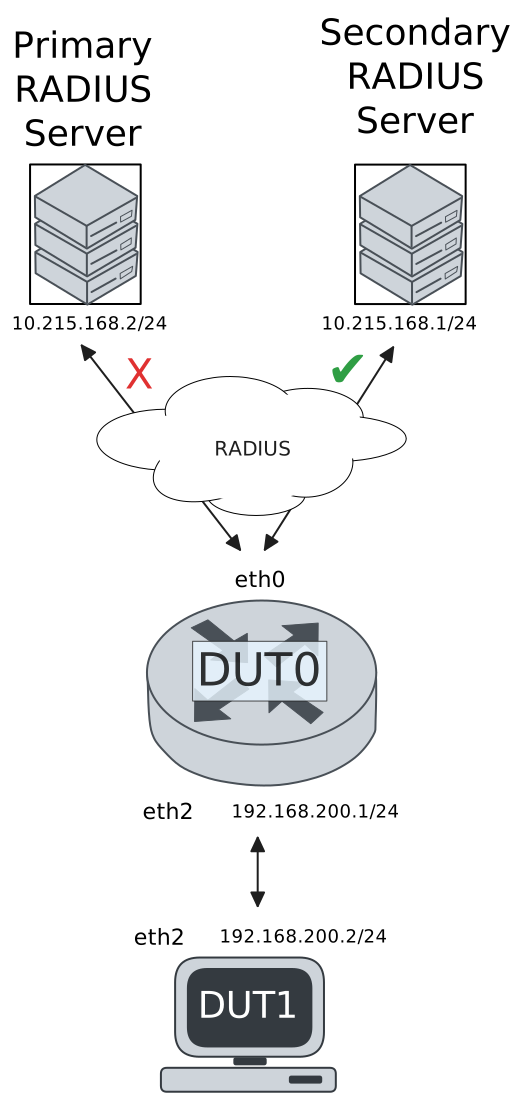
Test 802.1X Authentication With Server Failover
Description
This scenario shows how to configure 802.1X authentication. The primary Nework Access Server is not reachable, so the secondary one is used instead.
Scenario
Step 1: Set the following configuration in DUT0 :
set interfaces ethernet eth0 address 10.215.168.64/24
set interfaces ethernet eth0 vrf WAN
set interfaces ethernet eth2 address 192.168.100.1/24
set interfaces ethernet eth2 authenticator 802.1x max-retransmissions 2
set interfaces ethernet eth2 authenticator aaa authentication list1
set interfaces ethernet eth2 authenticator log-level debug
set interfaces ethernet eth2 authenticator mode only-802.1x
set interfaces ethernet eth2 authenticator quiet-period 60
set interfaces ethernet eth2 authenticator reauth-period 0
set system aaa group radius radgroup0 local-vrf WAN
set system aaa group radius radgroup0 server MAIN
set system aaa group radius radgroup1 local-vrf WAN
set system aaa group radius radgroup1 server serv1
set system aaa list list1 method 0 group radius radgroup0
set system aaa list list1 method 1 group radius radgroup1
set system aaa server radius MAIN address 10.215.168.2
set system aaa server radius MAIN encrypted-key U2FsdGVkX1+ccvWR/qdjeKh1Ovd51QbH3hzYdE7T1xAvFHcFRFW1Vd1EQBeIkr6vDSSg2nV4+luqA9wZZLItPw==
set system aaa server radius serv1 address 10.215.168.1
set system aaa server radius serv1 encrypted-key U2FsdGVkX192rf6Ez+AtLmmsEPlnCynvJ+8dKgfD/cvdCb1J49dZuJO3X35IeFGLxsFhTc1ghXyEvfolULHgHA==
set system login user admin authentication encrypted-password '$6$GSjsCj8gHLv$/VcqU6FLi6CT2Oxn0MJQ2C2tqnRDrYKNF8HIYWJp68nvXvPdFccDsT04.WtigUONbKYrgKg8d6rEs8PjljMkH0'
set system vrf WAN
Step 2: Ping IP address 10.215.168.1 from DUT0:
admin@DUT0$ ping 10.215.168.1 vrf WAN count 1 size 56 timeout 1Show output
ping: Warning: source address might be selected on device other than: WAN
PING 10.215.168.1 (10.215.168.1) from 10.215.168.64 WAN: 56(84) bytes of data.
64 bytes from 10.215.168.1: icmp_seq=1 ttl=64 time=0.246 ms

--- 10.215.168.1 ping statistics ---
1 packets transmitted, 1 received, 0% packet loss, time 0ms
rtt min/avg/max/mdev = 0.246/0.246/0.246/0.000 ms
Step 3: Set the following configuration in DUT1 :
set interfaces ethernet eth2 address 192.168.100.2/24
set interfaces ethernet eth2 supplicant encrypted-password U2FsdGVkX18UCcWpvzjksaXlF/zvcDMcZuEE7I3aA/w=
set interfaces ethernet eth2 supplicant username testing
set system login user admin authentication encrypted-password '$6$GSjsCj8gHLv$/VcqU6FLi6CT2Oxn0MJQ2C2tqnRDrYKNF8HIYWJp68nvXvPdFccDsT04.WtigUONbKYrgKg8d6rEs8PjljMkH0'
Step 4: Run command interfaces ethernet eth2 supplicant show status at DUT1 and check if output contains the following tokens:
AuthorizedShow output
---------------------------------------------------
        Field                      Value
---------------------------------------------------
EAP State                                   SUCCESS
EAP TLS Cipher          ECDHE-RSA-AES256-GCM-SHA384
EAP TLS Version                             TLSv1.2
PAE State                             AUTHENTICATED
Supplicant Port Status                   Authorized
WPA State                                 COMPLETED
Step 5: Run command interfaces ethernet eth2 supplicant show stats at DUT1 and check if output matches the following regular expressions:
Port Status\s+AuthorizedShow output
-------------------------------
       Field           Value
-------------------------------
EAPoL Frames (Rx)            11
EAPoL Frames (Tx)            11
Invalid Frames (Rx)           0
Logoff Frames (Tx)            0
Port Status          Authorized
Req Frames (Rx)               9
Req ID Frames (Rx)            1
Resp Frames (Tx)             10
Start Frames (Tx)             1
Step 6: Run command interfaces ethernet eth2 authenticator show stats at DUT0 and check if output matches the following regular expressions:
Authentication Successes\s+1
Authentication Mode\s+802\.1X
Show output
---------------------------------------------
         Field                   Value
---------------------------------------------
Access Challenges                           9
Authentication Backend                 RADIUS
Authentication Failures                     0
Authentication Mode                    802.1X
Authentication Status     Authorized (802.1X)
Authentication Successes                    1
EAPoL frames (Rx)                          11
EAPoL frames (Tx)                          11
Quiet Period                               60
Reauthenticate                          FALSE
Reauthenticate Period                       0
Session Time                                0
Session User MAC            de:ad:be:ef:6c:12
Session User Name                     testing
Step 7: Ping IP address 192.168.100.1 from DUT1:
admin@DUT1$ ping 192.168.100.1 count 1 size 56 timeout 1Show output
PING 192.168.100.1 (192.168.100.1) 56(84) bytes of data.
64 bytes from 192.168.100.1: icmp_seq=1 ttl=64 time=0.629 ms

--- 192.168.100.1 ping statistics ---
1 packets transmitted, 1 received, 0% packet loss, time 0ms
rtt min/avg/max/mdev = 0.629/0.629/0.629/0.000 ms
Step 8: Run command system journal show | grep "osdx hostapd" at DUT0 and check if output contains the following tokens:
No response from Authentication server 10.215.168.2Show output
Mar 23 14:50:46.989548 osdx hostapd[813341]: eth2: IEEE 802.11 Fetching hardware channel/rate support not supported.
Mar 23 14:50:46.989559 osdx hostapd[813341]: eth2: RADIUS Authentication server 10.215.168.2:1812
Mar 23 14:50:46.989784 osdx hostapd[813341]: connect[radius]: No route to host
Mar 23 14:50:46.989608 osdx hostapd[813341]: eth2: IEEE 802.1X Initializing IEEE 802.1X: mode=802.1X, eap_server=0, eap_quiet_period=60, eap_max_retrans=2
Mar 23 14:50:46.989611 osdx hostapd[813341]: eth2: IEEE 802.1X IEEE 802.1X: Enabling packet capture discovery mode
Mar 23 14:50:47.033469 osdx hostapd[813341]: Discovery mode enabled on eth2
Mar 23 14:50:47.033569 osdx hostapd[813341]: eth2: interface state UNINITIALIZED->ENABLED
Mar 23 14:50:47.033569 osdx hostapd[813341]: eth2: AP-ENABLED
Mar 23 14:50:50.225614 osdx hostapd[813342]: eth2: STA de:ad:be:ef:6c:12 IEEE 802.1X: New STA de:ad:be:ef:6c:12 added
Mar 23 14:50:50.225625 osdx hostapd[813342]: eth2: IEEE 802.1X IEEE 802.1X: Disabling packet capture discovery mode
Mar 23 14:50:50.241506 osdx hostapd[813342]: eth2: STA de:ad:be:ef:6c:12 IEEE 802.1X: start authentication
Mar 23 14:50:50.241541 osdx hostapd[813342]: eth2: STA 01:80:c2:00:00:03 IEEE 802.1X: disabling transmission of periodic EAP-Request frames
Mar 23 14:50:50.241559 osdx hostapd[813342]: eth2: STA de:ad:be:ef:6c:12 IEEE 802.1X: received EAPOL-Start from STA
Mar 23 14:50:50.241575 osdx hostapd[813342]: eth2: STA de:ad:be:ef:6c:12 IEEE 802.1X: unauthorizing port
Mar 23 14:50:50.241583 osdx hostapd[813342]: eth2: STA 01:80:c2:00:00:03 IEEE 802.1X: Trying RADIUS authentication
Mar 23 14:50:50.241602 osdx hostapd[813342]: eth2: STA de:ad:be:ef:6c:12 IEEE 802.1X: Sending EAP Packet (identifier 41)
Mar 23 14:50:50.241918 osdx hostapd[813342]: eth2: STA de:ad:be:ef:6c:12 IEEE 802.1X: received EAP packet (code=2 id=41 len=12) from STA: EAP Response-Identity (1)
Mar 23 14:50:50.241930 osdx hostapd[813342]: eth2: STA de:ad:be:ef:6c:12 IEEE 802.1X: STA identity 'testing'
Mar 23 14:50:50.241955 osdx hostapd[813342]: eth2: RADIUS Authentication server 10.215.168.2:1812
Mar 23 14:50:50.243721 osdx hostapd[813342]: eth2: RADIUS Sending RADIUS message to authentication server
Mar 23 14:50:50.243752 osdx hostapd[813342]: eth2: RADIUS Next RADIUS client retransmit in 1 seconds
Mar 23 14:50:51.243834 osdx hostapd[813342]: eth2: STA de:ad:be:ef:6c:12 RADIUS: Resending RADIUS message (id=0)
Mar 23 14:50:51.243859 osdx hostapd[813342]: eth2: RADIUS Next RADIUS client retransmit in 2 seconds
Mar 23 14:50:53.244527 osdx hostapd[813342]: eth2: STA de:ad:be:ef:6c:12 RADIUS: Resending RADIUS message (id=0)
Mar 23 14:50:53.244552 osdx hostapd[813342]: eth2: RADIUS Next RADIUS client retransmit in 4 seconds
Mar 23 14:50:57.244896 osdx hostapd[813342]: eth2: RADIUS No response from Authentication server 10.215.168.2:1812 - failover (1º round)
Mar 23 14:50:57.244906 osdx hostapd[813342]: eth2: RADIUS Authentication server 10.215.168.1:1812
Mar 23 14:50:57.244949 osdx hostapd[813342]: eth2: STA de:ad:be:ef:6c:12 RADIUS: Resending RADIUS message (id=0)
Mar 23 14:50:57.244976 osdx hostapd[813342]: eth2: RADIUS Next RADIUS client retransmit in 2 seconds
Mar 23 14:50:57.245261 osdx hostapd[813342]: eth2: RADIUS Received 80 bytes from RADIUS server
Mar 23 14:50:57.245267 osdx hostapd[813342]: eth2: RADIUS Received RADIUS message
Mar 23 14:50:57.245274 osdx hostapd[813342]: eth2: STA de:ad:be:ef:6c:12 RADIUS: Received RADIUS packet matched with a pending request, round trip time 0.00 sec
Mar 23 14:50:57.245329 osdx hostapd[813342]: eth2: STA de:ad:be:ef:6c:12 IEEE 802.1X: decapsulated EAP packet (code=1 id=42 len=22) from RADIUS server: EAP-Request-MD5 (4)
Mar 23 14:50:57.245339 osdx hostapd[813342]: eth2: STA de:ad:be:ef:6c:12 IEEE 802.1X: Sending EAP Packet (identifier 42)
Mar 23 14:50:57.245634 osdx hostapd[813342]: eth2: STA de:ad:be:ef:6c:12 IEEE 802.1X: received EAP packet (code=2 id=42 len=6) from STA: EAP Response-unknown (3)
Mar 23 14:50:57.245701 osdx hostapd[813342]: eth2: RADIUS Sending RADIUS message to authentication server
Mar 23 14:50:57.245717 osdx hostapd[813342]: eth2: RADIUS Next RADIUS client retransmit in 1 seconds
Mar 23 14:50:57.245928 osdx hostapd[813342]: eth2: RADIUS Received 64 bytes from RADIUS server
Mar 23 14:50:57.245932 osdx hostapd[813342]: eth2: RADIUS Received RADIUS message
Mar 23 14:50:57.245936 osdx hostapd[813342]: eth2: STA de:ad:be:ef:6c:12 RADIUS: Received RADIUS packet matched with a pending request, round trip time 0.00 sec
Mar 23 14:50:57.245950 osdx hostapd[813342]: eth2: STA de:ad:be:ef:6c:12 IEEE 802.1X: decapsulated EAP packet (code=1 id=43 len=6) from RADIUS server: EAP-Request-PEAP (25)
Mar 23 14:50:57.245955 osdx hostapd[813342]: eth2: STA de:ad:be:ef:6c:12 IEEE 802.1X: Sending EAP Packet (identifier 43)
Mar 23 14:50:57.246279 osdx hostapd[813342]: eth2: STA de:ad:be:ef:6c:12 IEEE 802.1X: received EAP packet (code=2 id=43 len=194) from STA: EAP Response-PEAP (25)
Mar 23 14:50:57.246315 osdx hostapd[813342]: eth2: RADIUS Sending RADIUS message to authentication server
Mar 23 14:50:57.246325 osdx hostapd[813342]: eth2: RADIUS Next RADIUS client retransmit in 1 seconds
Mar 23 14:50:57.247309 osdx hostapd[813342]: eth2: RADIUS Received 1068 bytes from RADIUS server
Mar 23 14:50:57.247316 osdx hostapd[813342]: eth2: RADIUS Received RADIUS message
Mar 23 14:50:57.247320 osdx hostapd[813342]: eth2: STA de:ad:be:ef:6c:12 RADIUS: Received RADIUS packet matched with a pending request, round trip time 0.00 sec
Mar 23 14:50:57.247344 osdx hostapd[813342]: eth2: STA de:ad:be:ef:6c:12 IEEE 802.1X: decapsulated EAP packet (code=1 id=44 len=1004) from RADIUS server: EAP-Request-PEAP (25)
Mar 23 14:50:57.247354 osdx hostapd[813342]: eth2: STA de:ad:be:ef:6c:12 IEEE 802.1X: Sending EAP Packet (identifier 44)
Mar 23 14:50:57.247503 osdx hostapd[813342]: eth2: STA de:ad:be:ef:6c:12 IEEE 802.1X: received EAP packet (code=2 id=44 len=6) from STA: EAP Response-PEAP (25)
Mar 23 14:50:57.247545 osdx hostapd[813342]: eth2: RADIUS Sending RADIUS message to authentication server
Mar 23 14:50:57.247561 osdx hostapd[813342]: eth2: RADIUS Next RADIUS client retransmit in 1 seconds
Mar 23 14:50:57.247704 osdx hostapd[813342]: eth2: RADIUS Received 229 bytes from RADIUS server
Mar 23 14:50:57.247710 osdx hostapd[813342]: eth2: RADIUS Received RADIUS message
Mar 23 14:50:57.247714 osdx hostapd[813342]: eth2: STA de:ad:be:ef:6c:12 RADIUS: Received RADIUS packet matched with a pending request, round trip time 0.00 sec
Mar 23 14:50:57.247731 osdx hostapd[813342]: eth2: STA de:ad:be:ef:6c:12 IEEE 802.1X: decapsulated EAP packet (code=1 id=45 len=171) from RADIUS server: EAP-Request-PEAP (25)
Mar 23 14:50:57.247738 osdx hostapd[813342]: eth2: STA de:ad:be:ef:6c:12 IEEE 802.1X: Sending EAP Packet (identifier 45)
Mar 23 14:50:57.249133 osdx hostapd[813342]: eth2: STA de:ad:be:ef:6c:12 IEEE 802.1X: received EAP packet (code=2 id=45 len=103) from STA: EAP Response-PEAP (25)
Mar 23 14:50:57.249196 osdx hostapd[813342]: eth2: RADIUS Sending RADIUS message to authentication server
Mar 23 14:50:57.249214 osdx hostapd[813342]: eth2: RADIUS Next RADIUS client retransmit in 1 seconds
Mar 23 14:50:57.249530 osdx hostapd[813342]: eth2: RADIUS Received 115 bytes from RADIUS server
Mar 23 14:50:57.249535 osdx hostapd[813342]: eth2: RADIUS Received RADIUS message
Mar 23 14:50:57.249540 osdx hostapd[813342]: eth2: STA de:ad:be:ef:6c:12 RADIUS: Received RADIUS packet matched with a pending request, round trip time 0.00 sec
Mar 23 14:50:57.249556 osdx hostapd[813342]: eth2: STA de:ad:be:ef:6c:12 IEEE 802.1X: decapsulated EAP packet (code=1 id=46 len=57) from RADIUS server: EAP-Request-PEAP (25)
Mar 23 14:50:57.249563 osdx hostapd[813342]: eth2: STA de:ad:be:ef:6c:12 IEEE 802.1X: Sending EAP Packet (identifier 46)
Mar 23 14:50:57.249816 osdx hostapd[813342]: eth2: STA de:ad:be:ef:6c:12 IEEE 802.1X: received EAP packet (code=2 id=46 len=6) from STA: EAP Response-PEAP (25)
Mar 23 14:50:57.249849 osdx hostapd[813342]: eth2: RADIUS Sending RADIUS message to authentication server
Mar 23 14:50:57.249860 osdx hostapd[813342]: eth2: RADIUS Next RADIUS client retransmit in 1 seconds
Mar 23 14:50:57.249990 osdx hostapd[813342]: eth2: RADIUS Received 98 bytes from RADIUS server
Mar 23 14:50:57.249995 osdx hostapd[813342]: eth2: RADIUS Received RADIUS message
Mar 23 14:50:57.249998 osdx hostapd[813342]: eth2: STA de:ad:be:ef:6c:12 RADIUS: Received RADIUS packet matched with a pending request, round trip time 0.00 sec
Mar 23 14:50:57.250012 osdx hostapd[813342]: eth2: STA de:ad:be:ef:6c:12 IEEE 802.1X: decapsulated EAP packet (code=1 id=47 len=40) from RADIUS server: EAP-Request-PEAP (25)
Mar 23 14:50:57.250018 osdx hostapd[813342]: eth2: STA de:ad:be:ef:6c:12 IEEE 802.1X: Sending EAP Packet (identifier 47)
Mar 23 14:50:57.250182 osdx hostapd[813342]: eth2: STA de:ad:be:ef:6c:12 IEEE 802.1X: received EAP packet (code=2 id=47 len=43) from STA: EAP Response-PEAP (25)
Mar 23 14:50:57.250217 osdx hostapd[813342]: eth2: RADIUS Sending RADIUS message to authentication server
Mar 23 14:50:57.250227 osdx hostapd[813342]: eth2: RADIUS Next RADIUS client retransmit in 1 seconds
Mar 23 14:50:57.250388 osdx hostapd[813342]: eth2: RADIUS Received 131 bytes from RADIUS server
Mar 23 14:50:57.250394 osdx hostapd[813342]: eth2: RADIUS Received RADIUS message
Mar 23 14:50:57.250398 osdx hostapd[813342]: eth2: STA de:ad:be:ef:6c:12 RADIUS: Received RADIUS packet matched with a pending request, round trip time 0.00 sec
Mar 23 14:50:57.250413 osdx hostapd[813342]: eth2: STA de:ad:be:ef:6c:12 IEEE 802.1X: decapsulated EAP packet (code=1 id=48 len=73) from RADIUS server: EAP-Request-PEAP (25)
Mar 23 14:50:57.250420 osdx hostapd[813342]: eth2: STA de:ad:be:ef:6c:12 IEEE 802.1X: Sending EAP Packet (identifier 48)
Mar 23 14:50:57.250654 osdx hostapd[813342]: eth2: STA de:ad:be:ef:6c:12 IEEE 802.1X: received EAP packet (code=2 id=48 len=97) from STA: EAP Response-PEAP (25)
Mar 23 14:50:57.250686 osdx hostapd[813342]: eth2: RADIUS Sending RADIUS message to authentication server
Mar 23 14:50:57.250698 osdx hostapd[813342]: eth2: RADIUS Next RADIUS client retransmit in 1 seconds
Mar 23 14:50:57.250875 osdx hostapd[813342]: eth2: RADIUS Received 140 bytes from RADIUS server
Mar 23 14:50:57.250881 osdx hostapd[813342]: eth2: RADIUS Received RADIUS message
Mar 23 14:50:57.250884 osdx hostapd[813342]: eth2: STA de:ad:be:ef:6c:12 RADIUS: Received RADIUS packet matched with a pending request, round trip time 0.00 sec
Mar 23 14:50:57.250899 osdx hostapd[813342]: eth2: STA de:ad:be:ef:6c:12 IEEE 802.1X: decapsulated EAP packet (code=1 id=49 len=82) from RADIUS server: EAP-Request-PEAP (25)
Mar 23 14:50:57.250905 osdx hostapd[813342]: eth2: STA de:ad:be:ef:6c:12 IEEE 802.1X: Sending EAP Packet (identifier 49)
Mar 23 14:50:57.251074 osdx hostapd[813342]: eth2: STA de:ad:be:ef:6c:12 IEEE 802.1X: received EAP packet (code=2 id=49 len=37) from STA: EAP Response-PEAP (25)
Mar 23 14:50:57.251107 osdx hostapd[813342]: eth2: RADIUS Sending RADIUS message to authentication server
Mar 23 14:50:57.251118 osdx hostapd[813342]: eth2: RADIUS Next RADIUS client retransmit in 1 seconds
Mar 23 14:50:57.251270 osdx hostapd[813342]: eth2: RADIUS Received 104 bytes from RADIUS server
Mar 23 14:50:57.251279 osdx hostapd[813342]: eth2: RADIUS Received RADIUS message
Mar 23 14:50:57.251283 osdx hostapd[813342]: eth2: STA de:ad:be:ef:6c:12 RADIUS: Received RADIUS packet matched with a pending request, round trip time 0.00 sec
Mar 23 14:50:57.251297 osdx hostapd[813342]: eth2: STA de:ad:be:ef:6c:12 IEEE 802.1X: decapsulated EAP packet (code=1 id=50 len=46) from RADIUS server: EAP-Request-PEAP (25)
Mar 23 14:50:57.251303 osdx hostapd[813342]: eth2: STA de:ad:be:ef:6c:12 IEEE 802.1X: Sending EAP Packet (identifier 50)
Mar 23 14:50:57.251432 osdx hostapd[813342]: eth2: STA de:ad:be:ef:6c:12 IEEE 802.1X: received EAP packet (code=2 id=50 len=46) from STA: EAP Response-PEAP (25)
Mar 23 14:50:57.251464 osdx hostapd[813342]: eth2: RADIUS Sending RADIUS message to authentication server
Mar 23 14:50:57.251479 osdx hostapd[813342]: eth2: RADIUS Next RADIUS client retransmit in 1 seconds
Mar 23 14:50:57.251638 osdx hostapd[813342]: eth2: RADIUS Received 175 bytes from RADIUS server
Mar 23 14:50:57.251643 osdx hostapd[813342]: eth2: RADIUS Received RADIUS message
Mar 23 14:50:57.251646 osdx hostapd[813342]: eth2: STA de:ad:be:ef:6c:12 RADIUS: Received RADIUS packet matched with a pending request, round trip time 0.00 sec
Mar 23 14:50:57.251668 osdx hostapd[813342]: eth2: STA de:ad:be:ef:6c:12 IEEE 802.1X: old identity 'testing' updated with User-Name from Access-Accept 'testing'
Mar 23 14:50:57.251673 osdx hostapd[813342]: eth2: STA de:ad:be:ef:6c:12 IEEE 802.1X: decapsulated EAP packet (code=3 id=50 len=4) from RADIUS server: EAP Success
Mar 23 14:50:57.251688 osdx hostapd[813342]: eth2: STA de:ad:be:ef:6c:12 IEEE 802.1X: Sending EAP Packet (identifier 50)
Mar 23 14:50:57.251703 osdx hostapd[813342]: eth2: STA de:ad:be:ef:6c:12 IEEE 802.1X: authorizing port
Mar 23 14:50:57.251707 osdx hostapd[813342]: eth2: STA de:ad:be:ef:6c:12 RADIUS: starting accounting session DE782E6E4E740916
Mar 23 14:50:57.251711 osdx hostapd[813342]: eth2: STA de:ad:be:ef:6c:12 IEEE 802.1X: authenticated - EAP type: 25 (PEAP)
Test MAB Authentication With Server Failover
Description
This scenario shows how to configure MAB authentication. The primary Nework Access Server is not reachable, so the secondary one is used instead.
Scenario
Step 1: Set the following configuration in DUT0 :
set interfaces ethernet eth0 address 10.215.168.64/24
set interfaces ethernet eth0 vrf WAN
set interfaces ethernet eth2 address 192.168.100.1/24
set interfaces ethernet eth2 authenticator aaa authentication list1
set interfaces ethernet eth2 authenticator log-level debug
set interfaces ethernet eth2 authenticator mode only-MAB
set interfaces ethernet eth2 authenticator quiet-period 60
set interfaces ethernet eth2 authenticator reauth-period 0
set system aaa group radius radgroup0 local-vrf WAN
set system aaa group radius radgroup0 server MAIN
set system aaa group radius radgroup1 local-vrf WAN
set system aaa group radius radgroup1 server serv1
set system aaa list list1 method 0 group radius radgroup0
set system aaa list list1 method 1 group radius radgroup1
set system aaa server radius MAIN address 10.215.168.2
set system aaa server radius MAIN encrypted-key U2FsdGVkX180psQrcJC/Wh9UPkWrLm18n8C0lpmesreINmOFzEvLPljUJ0n3s1XW0dChNQJVa7ZIjh2f95LzLg==
set system aaa server radius serv1 address 10.215.168.1
set system aaa server radius serv1 encrypted-key U2FsdGVkX1/WfsdulFvJvRj70ngGFPsY5LvzbwGbe5renNxJ2amIiyUI8uOeHCYjONqH7snyMhaZ4Ijh4uHvtA==
set system login user admin authentication encrypted-password '$6$GSjsCj8gHLv$/VcqU6FLi6CT2Oxn0MJQ2C2tqnRDrYKNF8HIYWJp68nvXvPdFccDsT04.WtigUONbKYrgKg8d6rEs8PjljMkH0'
set system vrf WAN
Step 2: Ping IP address 10.215.168.1 from DUT0:
admin@DUT0$ ping 10.215.168.1 vrf WAN count 1 size 56 timeout 1Show output
ping: Warning: source address might be selected on device other than: WAN
PING 10.215.168.1 (10.215.168.1) from 10.215.168.64 WAN: 56(84) bytes of data.
64 bytes from 10.215.168.1: icmp_seq=1 ttl=64 time=0.441 ms

--- 10.215.168.1 ping statistics ---
1 packets transmitted, 1 received, 0% packet loss, time 0ms
rtt min/avg/max/mdev = 0.441/0.441/0.441/0.000 ms
Step 3: Set the following configuration in DUT1 :
set interfaces ethernet eth2 address 192.168.100.2/24
set system login user admin authentication encrypted-password '$6$GSjsCj8gHLv$/VcqU6FLi6CT2Oxn0MJQ2C2tqnRDrYKNF8HIYWJp68nvXvPdFccDsT04.WtigUONbKYrgKg8d6rEs8PjljMkH0'
Step 4: Run command interfaces ethernet eth2 authenticator show stats at DUT0 and check if output matches the following regular expressions:
Authentication Successes\s+1
Authentication Mode\s+MAB
Show output
-------------------------------------------
         Field                  Value
-------------------------------------------
Access Challenges                         0
Authentication Backend               RADIUS
Authentication Failures                   0
Authentication Mode                     MAB
Authentication Status      Authorized (MAB)
Authentication Successes                  1
EAPoL frames (Rx)                         0
EAPoL frames (Tx)                         0
Quiet Period                             60
Reauthenticate                        FALSE
Reauthenticate Period                     0
Session Time                              0
Session User MAC          de:ad:be:ef:6c:12
Session User Name                       N/A
Step 5: Ping IP address 192.168.100.1 from DUT1:
admin@DUT1$ ping 192.168.100.1 count 1 size 56 timeout 1Show output
PING 192.168.100.1 (192.168.100.1) 56(84) bytes of data.
64 bytes from 192.168.100.1: icmp_seq=1 ttl=64 time=0.297 ms

--- 192.168.100.1 ping statistics ---
1 packets transmitted, 1 received, 0% packet loss, time 0ms
rtt min/avg/max/mdev = 0.297/0.297/0.297/0.000 ms
Step 6: Run command system journal show | grep "osdx hostapd" at DUT0 and check if output contains the following tokens:
No response from Authentication server 10.215.168.2Show output
Mar 23 14:51:06.986439 osdx hostapd[813990]: eth2: IEEE 802.11 Fetching hardware channel/rate support not supported.
Mar 23 14:51:06.986455 osdx hostapd[813990]: eth2: RADIUS Authentication server 10.215.168.2:1812
Mar 23 14:51:06.986771 osdx hostapd[813990]: connect[radius]: No route to host
Mar 23 14:51:06.986505 osdx hostapd[813990]: eth2: IEEE 802.1X Initializing IEEE 802.1X: mode=MAB-only, eap_server=0, eap_quiet_period=60, eap_max_retrans=5
Mar 23 14:51:06.986509 osdx hostapd[813990]: eth2: IEEE 802.1X IEEE 802.1X: Enabling packet capture discovery mode
Mar 23 14:51:07.006336 osdx hostapd[813990]: Discovery mode enabled on eth2
Mar 23 14:51:07.006422 osdx hostapd[813990]: eth2: interface state UNINITIALIZED->ENABLED
Mar 23 14:51:07.006422 osdx hostapd[813990]: eth2: AP-ENABLED
Mar 23 14:51:12.006475 osdx hostapd[813991]: eth2: STA de:ad:be:ef:6c:12 DRIVER: Device discovered, triggering MAB authentication
Mar 23 14:51:12.006511 osdx hostapd[813991]: eth2: STA de:ad:be:ef:6c:12 IEEE 802.1X: New STA de:ad:be:ef:6c:12 added
Mar 23 14:51:12.006519 osdx hostapd[813991]: eth2: IEEE 802.1X IEEE 802.1X: Disabling packet capture discovery mode
Mar 23 14:51:12.034385 osdx hostapd[813991]: eth2: STA de:ad:be:ef:6c:12 IEEE 802.1X: MAB-only mode: Starting MAB authentication
Mar 23 14:51:12.034419 osdx hostapd[813991]: eth2: STA de:ad:be:ef:6c:12 IEEE 802.1X: MAB: Starting RADIUS query
Mar 23 14:51:12.034443 osdx hostapd[813991]: eth2: STA de:ad:be:ef:6c:12 IEEE 802.1X: MAB: User-Name = de:ad:be:ef:6c:12
Mar 23 14:51:12.037632 osdx hostapd[813991]: eth2: STA de:ad:be:ef:6c:12 IEEE 802.1X: MAB: User-Password = de:ad:be:ef:6c:12
Mar 23 14:51:12.037650 osdx hostapd[813991]: eth2: RADIUS Authentication server 10.215.168.2:1812
Mar 23 14:51:12.037759 osdx hostapd[813991]: eth2: RADIUS Sending RADIUS message to authentication server
Mar 23 14:51:12.037809 osdx hostapd[813991]: eth2: RADIUS Next RADIUS client retransmit in 1 seconds
Mar 23 14:51:13.037891 osdx hostapd[813991]: eth2: STA de:ad:be:ef:6c:12 RADIUS: Resending RADIUS message (id=128)
Mar 23 14:51:13.037915 osdx hostapd[813991]: eth2: RADIUS Next RADIUS client retransmit in 2 seconds
Mar 23 14:51:15.038007 osdx hostapd[813991]: eth2: STA de:ad:be:ef:6c:12 RADIUS: Resending RADIUS message (id=128)
Mar 23 14:51:15.038033 osdx hostapd[813991]: eth2: RADIUS Next RADIUS client retransmit in 4 seconds
Mar 23 14:51:19.038391 osdx hostapd[813991]: eth2: RADIUS No response from Authentication server 10.215.168.2:1812 - failover (1º round)
Mar 23 14:51:19.038402 osdx hostapd[813991]: eth2: RADIUS Authentication server 10.215.168.1:1812
Mar 23 14:51:19.038450 osdx hostapd[813991]: eth2: STA de:ad:be:ef:6c:12 RADIUS: Resending RADIUS message (id=128)
Mar 23 14:51:19.038480 osdx hostapd[813991]: eth2: RADIUS Next RADIUS client retransmit in 2 seconds
Mar 23 14:51:19.038761 osdx hostapd[813991]: eth2: RADIUS Received 20 bytes from RADIUS server
Mar 23 14:51:19.038768 osdx hostapd[813991]: eth2: RADIUS Received RADIUS message
Mar 23 14:51:19.038771 osdx hostapd[813991]: eth2: STA de:ad:be:ef:6c:12 RADIUS: Received RADIUS packet matched with a pending request, round trip time 0.00 sec
Mar 23 14:51:19.038775 osdx hostapd[813991]: eth2: STA de:ad:be:ef:6c:12 IEEE 802.1X: MAB: Processing RADIUS response
Mar 23 14:51:19.038807 osdx hostapd[813991]: eth2: STA de:ad:be:ef:6c:12 IEEE 802.1X: MAB: Identity set to 'de:ad:be:ef:6c:12'
Mar 23 14:51:19.038827 osdx hostapd[813991]: eth2: STA de:ad:be:ef:6c:12 IEEE 802.1X: MAB: station successfully authenticated
Mar 23 14:51:19.038831 osdx hostapd[813991]: eth2: IEEE 802.1X IEEE 802.1X: Discovery already disabled
Mar 23 14:51:19.038842 osdx hostapd[813991]: eth2: STA de:ad:be:ef:6c:12 IEEE 802.1X: authorizing port
Mar 23 14:51:19.038845 osdx hostapd[813991]: eth2: STA de:ad:be:ef:6c:12 RADIUS: starting accounting session E065695F8AE8292D