X509
These scenarios show how to establish a VPN IPsec site-to-site connection between two end-points using X.509 certificates.
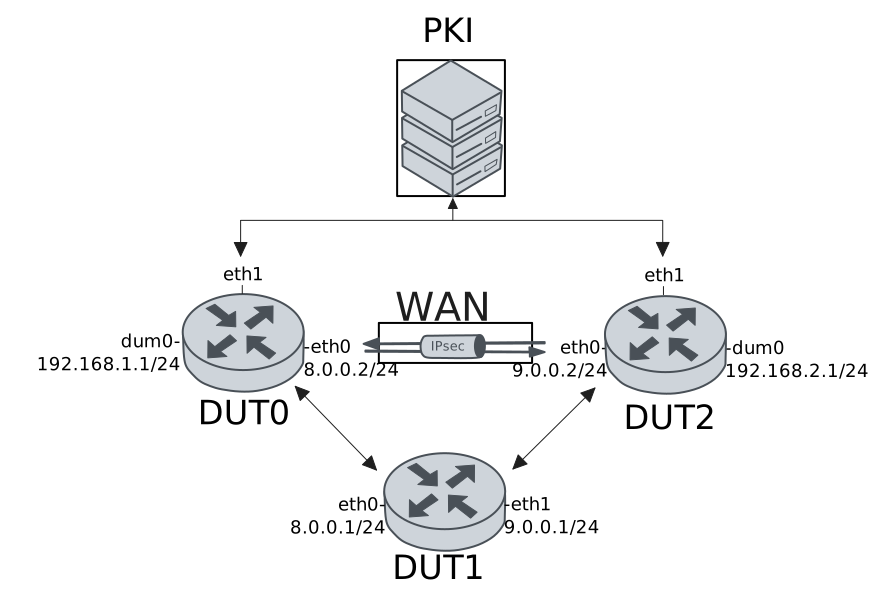
Test Local And Remote Auth With X509 Files
Description
In this scenario, both devices use pre-installed X.509 certificate files for local and remote authentication.
Scenario
Step 1: Set the following configuration in DUT1 :
set interfaces ethernet eth0 address 8.0.0.1/24
set interfaces ethernet eth1 address 9.0.0.1/24
set system login user admin authentication encrypted-password '$6$GSjsCj8gHLv$/VcqU6FLi6CT2Oxn0MJQ2C2tqnRDrYKNF8HIYWJp68nvXvPdFccDsT04.WtigUONbKYrgKg8d6rEs8PjljMkH0'
Step 2: Set the following configuration in DUT2 :
set interfaces dummy dum0 address 192.168.2.1/24
set interfaces ethernet eth0 address 9.0.0.2/24
set interfaces ethernet eth1 address 10.215.168.66/24
set protocols static route 0.0.0.0/0 next-hop 9.0.0.1
set system login user admin authentication encrypted-password '$6$GSjsCj8gHLv$/VcqU6FLi6CT2Oxn0MJQ2C2tqnRDrYKNF8HIYWJp68nvXvPdFccDsT04.WtigUONbKYrgKg8d6rEs8PjljMkH0'
set vpn ipsec auth-profile AUTH local ca-cert-file 'running://ca.pem'
set vpn ipsec auth-profile AUTH local ca-cert-file 'running://root.pem'
set vpn ipsec auth-profile AUTH local cert-file 'running://dut2.pem'
set vpn ipsec auth-profile AUTH local key file 'running://dut2.key'
set vpn ipsec auth-profile AUTH mirror-config false
set vpn ipsec auth-profile AUTH mode x509
set vpn ipsec auth-profile AUTH remote ca-cert-file 'running://ca.pem'
set vpn ipsec auth-profile AUTH remote ca-cert-file 'running://root.pem'
set vpn ipsec esp-group ESP-POLICY lifetime 28800
set vpn ipsec esp-group ESP-POLICY proposal 1 encryption null
set vpn ipsec esp-group ESP-POLICY proposal 1 hash sha1
set vpn ipsec esp-group ESP-POLICY proposal 1 pfs dh-group15
set vpn ipsec ike-group IKE-POLICY key-exchange ikev2
set vpn ipsec ike-group IKE-POLICY lifetime 28800
set vpn ipsec ike-group IKE-POLICY proposal 1 dh-group 15
set vpn ipsec ike-group IKE-POLICY proposal 1 encryption null
set vpn ipsec ike-group IKE-POLICY proposal 1 hash sha1
set vpn ipsec logging log-types any log-level 1
set vpn ipsec site-to-site peer PEER auth-profile AUTH
set vpn ipsec site-to-site peer PEER connection-type respond
set vpn ipsec site-to-site peer PEER ike-group IKE-POLICY
set vpn ipsec site-to-site peer PEER local-address 9.0.0.2
set vpn ipsec site-to-site peer PEER remote-address 8.0.0.2
set vpn ipsec site-to-site peer PEER tunnel 1 esp-group ESP-POLICY
set vpn ipsec site-to-site peer PEER tunnel 1 local prefix 192.168.2.0/24
set vpn ipsec site-to-site peer PEER tunnel 1 remote prefix 192.168.1.0/24
Step 3: Ping IP address 9.0.0.1 from DUT2:
admin@DUT2$ ping 9.0.0.1 count 1 size 56 timeout 1Show output
PING 9.0.0.1 (9.0.0.1) 56(84) bytes of data.
64 bytes from 9.0.0.1: icmp_seq=1 ttl=64 time=0.510 ms

--- 9.0.0.1 ping statistics ---
1 packets transmitted, 1 received, 0% packet loss, time 0ms
rtt min/avg/max/mdev = 0.510/0.510/0.510/0.000 ms
Step 4: Set the following configuration in DUT0 :
set interfaces dummy dum0 address 192.168.1.1/24
set interfaces ethernet eth0 address 8.0.0.2/24
set interfaces ethernet eth1 address 10.215.168.64/24
set protocols static route 0.0.0.0/0 next-hop 8.0.0.1
set system login user admin authentication encrypted-password '$6$GSjsCj8gHLv$/VcqU6FLi6CT2Oxn0MJQ2C2tqnRDrYKNF8HIYWJp68nvXvPdFccDsT04.WtigUONbKYrgKg8d6rEs8PjljMkH0'
set vpn ipsec auth-profile AUTH local ca-cert-file 'running://ca.pem'
set vpn ipsec auth-profile AUTH local ca-cert-file 'running://root.pem'
set vpn ipsec auth-profile AUTH local cert-file 'running://dut0.pem'
set vpn ipsec auth-profile AUTH local key file 'running://dut0.key'
set vpn ipsec auth-profile AUTH mirror-config false
set vpn ipsec auth-profile AUTH mode x509
set vpn ipsec auth-profile AUTH remote ca-cert-file 'running://ca.pem'
set vpn ipsec auth-profile AUTH remote ca-cert-file 'running://root.pem'
set vpn ipsec esp-group ESP-POLICY lifetime 28800
set vpn ipsec esp-group ESP-POLICY proposal 1 encryption null
set vpn ipsec esp-group ESP-POLICY proposal 1 hash sha1
set vpn ipsec esp-group ESP-POLICY proposal 1 pfs dh-group15
set vpn ipsec ike-group IKE-POLICY key-exchange ikev2
set vpn ipsec ike-group IKE-POLICY lifetime 28800
set vpn ipsec ike-group IKE-POLICY proposal 1 dh-group 15
set vpn ipsec ike-group IKE-POLICY proposal 1 encryption null
set vpn ipsec ike-group IKE-POLICY proposal 1 hash sha1
set vpn ipsec logging log-types any log-level 1
set vpn ipsec site-to-site peer PEER auth-profile AUTH
set vpn ipsec site-to-site peer PEER connection-type on-demand
set vpn ipsec site-to-site peer PEER ike-group IKE-POLICY
set vpn ipsec site-to-site peer PEER local-address 8.0.0.2
set vpn ipsec site-to-site peer PEER remote-address 9.0.0.2
set vpn ipsec site-to-site peer PEER tunnel 1 esp-group ESP-POLICY
set vpn ipsec site-to-site peer PEER tunnel 1 local prefix 192.168.1.0/24
set vpn ipsec site-to-site peer PEER tunnel 1 remote prefix 192.168.2.0/24
Step 5: Ping IP address 8.0.0.1 from DUT0:
admin@DUT0$ ping 8.0.0.1 count 1 size 56 timeout 1Show output
PING 8.0.0.1 (8.0.0.1) 56(84) bytes of data.
64 bytes from 8.0.0.1: icmp_seq=1 ttl=64 time=0.482 ms

--- 8.0.0.1 ping statistics ---
1 packets transmitted, 1 received, 0% packet loss, time 0ms
rtt min/avg/max/mdev = 0.482/0.482/0.482/0.000 ms
Step 6: Ping IP address 192.168.2.1 from DUT0:
admin@DUT0$ ping 192.168.2.1 local-address 192.168.1.1 count 1 size 56 timeout 1Show output
PING 192.168.2.1 (192.168.2.1) from 192.168.1.1 : 56(84) bytes of data.
64 bytes from 192.168.2.1: icmp_seq=1 ttl=64 time=0.495 ms

--- 192.168.2.1 ping statistics ---
1 packets transmitted, 1 received, 0% packet loss, time 0ms
rtt min/avg/max/mdev = 0.495/0.495/0.495/0.000 ms
Step 7: Ping IP address 192.168.1.1 from DUT2:
admin@DUT2$ ping 192.168.1.1 local-address 192.168.2.1 count 1 size 56 timeout 1Show output
PING 192.168.1.1 (192.168.1.1) from 192.168.2.1 : 56(84) bytes of data.
64 bytes from 192.168.1.1: icmp_seq=1 ttl=64 time=0.481 ms

--- 192.168.1.1 ping statistics ---
1 packets transmitted, 1 received, 0% packet loss, time 0ms
rtt min/avg/max/mdev = 0.481/0.481/0.481/0.000 ms
Step 8: Run command vpn ipsec show sa at DUT0 and check if output matches the following regular expressions:
vpn-peer-PEER: \#\d, ESTABLISHED, IKEv2
[1-9]\d* packets,
Show output
vpn-peer-PEER: #1, ESTABLISHED, IKEv2, cb9b2b94e99f5305_i* fbbe293080284b97_r
  local  'C=ES, O=Teldat, CN=DUT0' @ 8.0.0.2[500]
  remote 'C=ES, O=Teldat, CN=DUT2' @ 9.0.0.2[500]
  NULL/HMAC_SHA1_96/PRF_HMAC_SHA1/MODP_3072
  established 2s ago, rekeying in 16369s
  peer-PEER-tunnel-1: #2, reqid 1, INSTALLED, TUNNEL, ESP:NULL/HMAC_SHA1_96
    installed 2s ago, rekeying in 16811s, expires in 28798s
    in  cefcc798,    168 bytes,     2 packets,     0s ago
    out ce81b610,    168 bytes,     2 packets,     0s ago
    local  192.168.1.0/24
    remote 192.168.2.0/24
Test Local Auth With SCEP And Remote Auth With X509 Files
Description
In this scenario, DUT0 uses SCEP for local authentication, while the remote peer is authenticated using X.509 certificate files.
Scenario
Step 1: Set the following configuration in DUT1 :
set interfaces ethernet eth0 address 8.0.0.1/24
set interfaces ethernet eth1 address 9.0.0.1/24
set system login user admin authentication encrypted-password '$6$GSjsCj8gHLv$/VcqU6FLi6CT2Oxn0MJQ2C2tqnRDrYKNF8HIYWJp68nvXvPdFccDsT04.WtigUONbKYrgKg8d6rEs8PjljMkH0'
Step 2: Set the following configuration in DUT2 :
set interfaces dummy dum0 address 192.168.2.1/24
set interfaces ethernet eth0 address 9.0.0.2/24
set interfaces ethernet eth1 address 10.215.168.66/24
set protocols static route 0.0.0.0/0 next-hop 9.0.0.1
set system certificate scep csr CSR cgi-path /scep
set system certificate scep csr CSR cipher aes
set system certificate scep csr CSR distinguished-names CN=DUT2
set system certificate scep csr CSR encrypted-password U2FsdGVkX1/Gx/sBahRNKhhc5S5fHils7MGD25Q7SFA=
set system certificate scep csr CSR port 8080
set system certificate scep csr CSR url 'http://10.215.168.1'
set system login user admin authentication encrypted-password '$6$GSjsCj8gHLv$/VcqU6FLi6CT2Oxn0MJQ2C2tqnRDrYKNF8HIYWJp68nvXvPdFccDsT04.WtigUONbKYrgKg8d6rEs8PjljMkH0'
set vpn ipsec auth-profile AUTH local ca-cert-file 'running://ca.pem'
set vpn ipsec auth-profile AUTH local ca-cert-file 'running://root.pem'
set vpn ipsec auth-profile AUTH local cert-file 'running://dut2.pem'
set vpn ipsec auth-profile AUTH local key file 'running://dut2.key'
set vpn ipsec auth-profile AUTH mirror-config false
set vpn ipsec auth-profile AUTH mode x509
set vpn ipsec auth-profile AUTH remote csr CSR
set vpn ipsec esp-group ESP-POLICY lifetime 28800
set vpn ipsec esp-group ESP-POLICY proposal 1 encryption null
set vpn ipsec esp-group ESP-POLICY proposal 1 hash sha1
set vpn ipsec esp-group ESP-POLICY proposal 1 pfs dh-group15
set vpn ipsec ike-group IKE-POLICY key-exchange ikev2
set vpn ipsec ike-group IKE-POLICY lifetime 28800
set vpn ipsec ike-group IKE-POLICY proposal 1 dh-group 15
set vpn ipsec ike-group IKE-POLICY proposal 1 encryption null
set vpn ipsec ike-group IKE-POLICY proposal 1 hash sha1
set vpn ipsec logging log-types any log-level 1
set vpn ipsec site-to-site peer PEER auth-profile AUTH
set vpn ipsec site-to-site peer PEER connection-type respond
set vpn ipsec site-to-site peer PEER ike-group IKE-POLICY
set vpn ipsec site-to-site peer PEER local-address 9.0.0.2
set vpn ipsec site-to-site peer PEER remote-address 8.0.0.2
set vpn ipsec site-to-site peer PEER tunnel 1 esp-group ESP-POLICY
set vpn ipsec site-to-site peer PEER tunnel 1 local prefix 192.168.2.0/24
set vpn ipsec site-to-site peer PEER tunnel 1 remote prefix 192.168.1.0/24
Step 3: Ping IP address 9.0.0.1 from DUT2:
admin@DUT2$ ping 9.0.0.1 count 1 size 56 timeout 1Show output
PING 9.0.0.1 (9.0.0.1) 56(84) bytes of data.
64 bytes from 9.0.0.1: icmp_seq=1 ttl=64 time=0.301 ms

--- 9.0.0.1 ping statistics ---
1 packets transmitted, 1 received, 0% packet loss, time 0ms
rtt min/avg/max/mdev = 0.301/0.301/0.301/0.000 ms
Step 4: Run command pki scep show CSR at DUT2 and check if output matches the following regular expressions:
ca\s+Valid
usercert\s+Valid
Show output
-------------------------------------------------------------------------------------------------
Certificate  Status           Usage                   NotBefore                  NotAfter
-------------------------------------------------------------------------------------------------
ca           Valid   Encipherment & Signature  Apr 16 09:19:39 2025 GMT  Apr 11 09:19:39 2045 GMT
usercert     Valid   -                         Mar 23 15:46:38 2026 GMT  Mar 23 15:46:38 2027 GMT
Step 5: Set the following configuration in DUT0 :
set interfaces dummy dum0 address 192.168.1.1/24
set interfaces ethernet eth0 address 8.0.0.2/24
set interfaces ethernet eth1 address 10.215.168.64/24
set protocols static route 0.0.0.0/0 next-hop 8.0.0.1
set system certificate scep csr CSR cgi-path /scep
set system certificate scep csr CSR cipher aes
set system certificate scep csr CSR distinguished-names CN=DUT0
set system certificate scep csr CSR encrypted-password U2FsdGVkX1/EPveqvaUi+Atuveq8vZvskrNwLNFHt74=
set system certificate scep csr CSR port 8080
set system certificate scep csr CSR url 'http://10.215.168.1'
set system login user admin authentication encrypted-password '$6$GSjsCj8gHLv$/VcqU6FLi6CT2Oxn0MJQ2C2tqnRDrYKNF8HIYWJp68nvXvPdFccDsT04.WtigUONbKYrgKg8d6rEs8PjljMkH0'
set vpn ipsec auth-profile AUTH local csr CSR
set vpn ipsec auth-profile AUTH mirror-config false
set vpn ipsec auth-profile AUTH mode x509
set vpn ipsec auth-profile AUTH remote ca-cert-file 'running://ca.pem'
set vpn ipsec auth-profile AUTH remote ca-cert-file 'running://root.pem'
set vpn ipsec esp-group ESP-POLICY lifetime 28800
set vpn ipsec esp-group ESP-POLICY proposal 1 encryption null
set vpn ipsec esp-group ESP-POLICY proposal 1 hash sha1
set vpn ipsec esp-group ESP-POLICY proposal 1 pfs dh-group15
set vpn ipsec ike-group IKE-POLICY key-exchange ikev2
set vpn ipsec ike-group IKE-POLICY lifetime 28800
set vpn ipsec ike-group IKE-POLICY proposal 1 dh-group 15
set vpn ipsec ike-group IKE-POLICY proposal 1 encryption null
set vpn ipsec ike-group IKE-POLICY proposal 1 hash sha1
set vpn ipsec logging log-types any log-level 1
set vpn ipsec site-to-site peer PEER auth-profile AUTH
set vpn ipsec site-to-site peer PEER connection-type on-demand
set vpn ipsec site-to-site peer PEER ike-group IKE-POLICY
set vpn ipsec site-to-site peer PEER local-address 8.0.0.2
set vpn ipsec site-to-site peer PEER remote-address 9.0.0.2
set vpn ipsec site-to-site peer PEER tunnel 1 esp-group ESP-POLICY
set vpn ipsec site-to-site peer PEER tunnel 1 local prefix 192.168.1.0/24
set vpn ipsec site-to-site peer PEER tunnel 1 remote prefix 192.168.2.0/24
Step 6: Ping IP address 8.0.0.1 from DUT0:
admin@DUT0$ ping 8.0.0.1 count 1 size 56 timeout 1Show output
PING 8.0.0.1 (8.0.0.1) 56(84) bytes of data.
64 bytes from 8.0.0.1: icmp_seq=1 ttl=64 time=0.597 ms

--- 8.0.0.1 ping statistics ---
1 packets transmitted, 1 received, 0% packet loss, time 0ms
rtt min/avg/max/mdev = 0.597/0.597/0.597/0.000 ms
Step 7: Run command pki scep show CSR at DUT0 and check if output matches the following regular expressions:
ca\s+Valid
usercert\s+Valid
Show output
-------------------------------------------------------------------------------------------------
Certificate  Status           Usage                   NotBefore                  NotAfter
-------------------------------------------------------------------------------------------------
ca           Valid   Encipherment & Signature  Apr 16 09:19:39 2025 GMT  Apr 11 09:19:39 2045 GMT
usercert     Valid   -                         Mar 23 15:47:17 2026 GMT  Mar 23 15:47:17 2027 GMT
Step 8: Ping IP address 192.168.2.1 from DUT0:
admin@DUT0$ ping 192.168.2.1 local-address 192.168.1.1 count 1 size 56 timeout 1Show output
PING 192.168.2.1 (192.168.2.1) from 192.168.1.1 : 56(84) bytes of data.
64 bytes from 192.168.2.1: icmp_seq=1 ttl=64 time=1.02 ms

--- 192.168.2.1 ping statistics ---
1 packets transmitted, 1 received, 0% packet loss, time 0ms
rtt min/avg/max/mdev = 1.016/1.016/1.016/0.000 ms
Step 9: Ping IP address 192.168.1.1 from DUT2:
admin@DUT2$ ping 192.168.1.1 local-address 192.168.2.1 count 1 size 56 timeout 1Show output
PING 192.168.1.1 (192.168.1.1) from 192.168.2.1 : 56(84) bytes of data.
64 bytes from 192.168.1.1: icmp_seq=1 ttl=64 time=0.837 ms

--- 192.168.1.1 ping statistics ---
1 packets transmitted, 1 received, 0% packet loss, time 0ms
rtt min/avg/max/mdev = 0.837/0.837/0.837/0.000 ms
Step 10: Run command vpn ipsec show sa at DUT0 and check if output matches the following regular expressions:
vpn-peer-PEER: \#\d, ESTABLISHED, IKEv2
[1-9]\d* packets,
Show output
vpn-peer-PEER: #1, ESTABLISHED, IKEv2, 8c311ae81be9fc98_i* 99191e77179a207e_r
  local  'CN=DUT0' @ 8.0.0.2[500]
  remote 'C=ES, O=Teldat, CN=DUT2' @ 9.0.0.2[500]
  NULL/HMAC_SHA1_96/PRF_HMAC_SHA1/MODP_3072
  established 2s ago, rekeying in 14492s
  peer-PEER-tunnel-1: #2, reqid 1, INSTALLED, TUNNEL, ESP:NULL/HMAC_SHA1_96
    installed 2s ago, rekeying in 15133s, expires in 28798s
    in  c938b75c,    168 bytes,     2 packets,     0s ago
    out c8272bce,    168 bytes,     2 packets,     0s ago
    local  192.168.1.0/24
    remote 192.168.2.0/24
Test Local Auth With X509 Files And Remote Auth With SCEP
Description
In this scenario, DUT0 uses SCEP for remote authentication, while local authentication relies on X.509 certificate files.
Scenario
Step 1: Set the following configuration in DUT1 :
set interfaces ethernet eth0 address 8.0.0.1/24
set interfaces ethernet eth1 address 9.0.0.1/24
set system login user admin authentication encrypted-password '$6$GSjsCj8gHLv$/VcqU6FLi6CT2Oxn0MJQ2C2tqnRDrYKNF8HIYWJp68nvXvPdFccDsT04.WtigUONbKYrgKg8d6rEs8PjljMkH0'
Step 2: Set the following configuration in DUT2 :
set interfaces dummy dum0 address 192.168.2.1/24
set interfaces ethernet eth0 address 9.0.0.2/24
set interfaces ethernet eth1 address 10.215.168.66/24
set protocols static route 0.0.0.0/0 next-hop 9.0.0.1
set system certificate scep csr CSR cgi-path /scep
set system certificate scep csr CSR cipher aes
set system certificate scep csr CSR distinguished-names CN=DUT2
set system certificate scep csr CSR encrypted-password U2FsdGVkX19MO8zQF1u5zCl27s1Y/3M3FSateq0mFWQ=
set system certificate scep csr CSR port 8080
set system certificate scep csr CSR url 'http://10.215.168.1'
set system login user admin authentication encrypted-password '$6$GSjsCj8gHLv$/VcqU6FLi6CT2Oxn0MJQ2C2tqnRDrYKNF8HIYWJp68nvXvPdFccDsT04.WtigUONbKYrgKg8d6rEs8PjljMkH0'
set vpn ipsec auth-profile AUTH local csr CSR
set vpn ipsec auth-profile AUTH mirror-config false
set vpn ipsec auth-profile AUTH mode x509
set vpn ipsec auth-profile AUTH remote ca-cert-file 'running://ca.pem'
set vpn ipsec auth-profile AUTH remote ca-cert-file 'running://root.pem'
set vpn ipsec esp-group ESP-POLICY lifetime 28800
set vpn ipsec esp-group ESP-POLICY proposal 1 encryption null
set vpn ipsec esp-group ESP-POLICY proposal 1 hash sha1
set vpn ipsec esp-group ESP-POLICY proposal 1 pfs dh-group15
set vpn ipsec ike-group IKE-POLICY key-exchange ikev2
set vpn ipsec ike-group IKE-POLICY lifetime 28800
set vpn ipsec ike-group IKE-POLICY proposal 1 dh-group 15
set vpn ipsec ike-group IKE-POLICY proposal 1 encryption null
set vpn ipsec ike-group IKE-POLICY proposal 1 hash sha1
set vpn ipsec logging log-types any log-level 1
set vpn ipsec site-to-site peer PEER auth-profile AUTH
set vpn ipsec site-to-site peer PEER connection-type respond
set vpn ipsec site-to-site peer PEER ike-group IKE-POLICY
set vpn ipsec site-to-site peer PEER local-address 9.0.0.2
set vpn ipsec site-to-site peer PEER remote-address 8.0.0.2
set vpn ipsec site-to-site peer PEER tunnel 1 esp-group ESP-POLICY
set vpn ipsec site-to-site peer PEER tunnel 1 local prefix 192.168.2.0/24
set vpn ipsec site-to-site peer PEER tunnel 1 remote prefix 192.168.1.0/24
Step 3: Ping IP address 9.0.0.1 from DUT2:
admin@DUT2$ ping 9.0.0.1 count 1 size 56 timeout 1Show output
PING 9.0.0.1 (9.0.0.1) 56(84) bytes of data.
64 bytes from 9.0.0.1: icmp_seq=1 ttl=64 time=0.373 ms

--- 9.0.0.1 ping statistics ---
1 packets transmitted, 1 received, 0% packet loss, time 0ms
rtt min/avg/max/mdev = 0.373/0.373/0.373/0.000 ms
Step 4: Run command pki scep show CSR at DUT2 and check if output matches the following regular expressions:
ca\s+Valid
usercert\s+Valid
Show output
-------------------------------------------------------------------------------------------------
Certificate  Status           Usage                   NotBefore                  NotAfter
-------------------------------------------------------------------------------------------------
ca           Valid   Encipherment & Signature  Apr 16 09:19:39 2025 GMT  Apr 11 09:19:39 2045 GMT
usercert     Valid   -                         Mar 23 15:48:05 2026 GMT  Mar 23 15:48:05 2027 GMT
Step 5: Set the following configuration in DUT0 :
set interfaces dummy dum0 address 192.168.1.1/24
set interfaces ethernet eth0 address 8.0.0.2/24
set interfaces ethernet eth1 address 10.215.168.64/24
set protocols static route 0.0.0.0/0 next-hop 8.0.0.1
set system certificate scep csr CSR cgi-path /scep
set system certificate scep csr CSR cipher aes
set system certificate scep csr CSR distinguished-names CN=DUT0
set system certificate scep csr CSR encrypted-password U2FsdGVkX1+CCI87ZFdYQkuaSVmR36Od2IF+sSMCfLE=
set system certificate scep csr CSR port 8080
set system certificate scep csr CSR url 'http://10.215.168.1'
set system login user admin authentication encrypted-password '$6$GSjsCj8gHLv$/VcqU6FLi6CT2Oxn0MJQ2C2tqnRDrYKNF8HIYWJp68nvXvPdFccDsT04.WtigUONbKYrgKg8d6rEs8PjljMkH0'
set vpn ipsec auth-profile AUTH local ca-cert-file 'running://ca.pem'
set vpn ipsec auth-profile AUTH local ca-cert-file 'running://root.pem'
set vpn ipsec auth-profile AUTH local cert-file 'running://dut0.pem'
set vpn ipsec auth-profile AUTH local key file 'running://dut0.key'
set vpn ipsec auth-profile AUTH mirror-config false
set vpn ipsec auth-profile AUTH mode x509
set vpn ipsec auth-profile AUTH remote csr CSR
set vpn ipsec esp-group ESP-POLICY lifetime 28800
set vpn ipsec esp-group ESP-POLICY proposal 1 encryption null
set vpn ipsec esp-group ESP-POLICY proposal 1 hash sha1
set vpn ipsec esp-group ESP-POLICY proposal 1 pfs dh-group15
set vpn ipsec ike-group IKE-POLICY key-exchange ikev2
set vpn ipsec ike-group IKE-POLICY lifetime 28800
set vpn ipsec ike-group IKE-POLICY proposal 1 dh-group 15
set vpn ipsec ike-group IKE-POLICY proposal 1 encryption null
set vpn ipsec ike-group IKE-POLICY proposal 1 hash sha1
set vpn ipsec logging log-types any log-level 1
set vpn ipsec site-to-site peer PEER auth-profile AUTH
set vpn ipsec site-to-site peer PEER connection-type on-demand
set vpn ipsec site-to-site peer PEER ike-group IKE-POLICY
set vpn ipsec site-to-site peer PEER local-address 8.0.0.2
set vpn ipsec site-to-site peer PEER remote-address 9.0.0.2
set vpn ipsec site-to-site peer PEER tunnel 1 esp-group ESP-POLICY
set vpn ipsec site-to-site peer PEER tunnel 1 local prefix 192.168.1.0/24
set vpn ipsec site-to-site peer PEER tunnel 1 remote prefix 192.168.2.0/24
Step 6: Ping IP address 8.0.0.1 from DUT0:
admin@DUT0$ ping 8.0.0.1 count 1 size 56 timeout 1Show output
PING 8.0.0.1 (8.0.0.1) 56(84) bytes of data.
64 bytes from 8.0.0.1: icmp_seq=1 ttl=64 time=0.742 ms

--- 8.0.0.1 ping statistics ---
1 packets transmitted, 1 received, 0% packet loss, time 0ms
rtt min/avg/max/mdev = 0.742/0.742/0.742/0.000 ms
Step 7: Run command pki scep show CSR at DUT0 and check if output matches the following regular expressions:
ca\s+Valid
usercert\s+Valid
Show output
-------------------------------------------------------------------------------------------------
Certificate  Status           Usage                   NotBefore                  NotAfter
-------------------------------------------------------------------------------------------------
ca           Valid   Encipherment & Signature  Apr 16 09:19:39 2025 GMT  Apr 11 09:19:39 2045 GMT
usercert     Valid   -                         Mar 23 15:48:44 2026 GMT  Mar 23 15:48:44 2027 GMT
Step 8: Ping IP address 192.168.2.1 from DUT0:
admin@DUT0$ ping 192.168.2.1 local-address 192.168.1.1 count 1 size 56 timeout 1Show output
PING 192.168.2.1 (192.168.2.1) from 192.168.1.1 : 56(84) bytes of data.
64 bytes from 192.168.2.1: icmp_seq=1 ttl=64 time=0.501 ms

--- 192.168.2.1 ping statistics ---
1 packets transmitted, 1 received, 0% packet loss, time 0ms
rtt min/avg/max/mdev = 0.501/0.501/0.501/0.000 ms
Step 9: Ping IP address 192.168.1.1 from DUT2:
admin@DUT2$ ping 192.168.1.1 local-address 192.168.2.1 count 1 size 56 timeout 1Show output
PING 192.168.1.1 (192.168.1.1) from 192.168.2.1 : 56(84) bytes of data.
64 bytes from 192.168.1.1: icmp_seq=1 ttl=64 time=0.914 ms

--- 192.168.1.1 ping statistics ---
1 packets transmitted, 1 received, 0% packet loss, time 0ms
rtt min/avg/max/mdev = 0.914/0.914/0.914/0.000 ms
Step 10: Run command vpn ipsec show sa at DUT0 and check if output matches the following regular expressions:
vpn-peer-PEER: \#\d, ESTABLISHED, IKEv2
[1-9]\d* packets,
Show output
vpn-peer-PEER: #1, ESTABLISHED, IKEv2, 00d306e008988199_i* 7c87f59a28f7cb45_r
  local  'C=ES, O=Teldat, CN=DUT0' @ 8.0.0.2[500]
  remote 'CN=DUT2' @ 9.0.0.2[500]
  NULL/HMAC_SHA1_96/PRF_HMAC_SHA1/MODP_3072
  established 2s ago, rekeying in 19026s
  peer-PEER-tunnel-1: #2, reqid 1, INSTALLED, TUNNEL, ESP:NULL/HMAC_SHA1_96
    installed 2s ago, rekeying in 18305s, expires in 28798s
    in  c49233f7,    168 bytes,     2 packets,     0s ago
    out c8568246,    168 bytes,     2 packets,     0s ago
    local  192.168.1.0/24
    remote 192.168.2.0/24
Test Local And Remote Auth With SCEP
Description
In this scenario, both devices use SCEP for local and remote authentication.
Scenario
Step 1: Set the following configuration in DUT1 :
set interfaces ethernet eth0 address 8.0.0.1/24
set interfaces ethernet eth1 address 9.0.0.1/24
set system login user admin authentication encrypted-password '$6$GSjsCj8gHLv$/VcqU6FLi6CT2Oxn0MJQ2C2tqnRDrYKNF8HIYWJp68nvXvPdFccDsT04.WtigUONbKYrgKg8d6rEs8PjljMkH0'
Step 2: Set the following configuration in DUT2 :
set interfaces dummy dum0 address 192.168.2.1/24
set interfaces ethernet eth0 address 9.0.0.2/24
set interfaces ethernet eth1 address 10.215.168.66/24
set protocols static route 0.0.0.0/0 next-hop 9.0.0.1
set system certificate scep csr CSR cgi-path /scep
set system certificate scep csr CSR cipher aes
set system certificate scep csr CSR distinguished-names CN=DUT2
set system certificate scep csr CSR encrypted-password U2FsdGVkX18g/QZ0apkz9/PwDH0uep/tICN3tEbKa7g=
set system certificate scep csr CSR port 8080
set system certificate scep csr CSR url 'http://10.215.168.1'
set system login user admin authentication encrypted-password '$6$GSjsCj8gHLv$/VcqU6FLi6CT2Oxn0MJQ2C2tqnRDrYKNF8HIYWJp68nvXvPdFccDsT04.WtigUONbKYrgKg8d6rEs8PjljMkH0'
set vpn ipsec auth-profile AUTH local csr CSR
set vpn ipsec auth-profile AUTH mirror-config false
set vpn ipsec auth-profile AUTH mode x509
set vpn ipsec auth-profile AUTH remote csr CSR
set vpn ipsec esp-group ESP-POLICY lifetime 28800
set vpn ipsec esp-group ESP-POLICY proposal 1 encryption null
set vpn ipsec esp-group ESP-POLICY proposal 1 hash sha1
set vpn ipsec esp-group ESP-POLICY proposal 1 pfs dh-group15
set vpn ipsec ike-group IKE-POLICY key-exchange ikev2
set vpn ipsec ike-group IKE-POLICY lifetime 28800
set vpn ipsec ike-group IKE-POLICY proposal 1 dh-group 15
set vpn ipsec ike-group IKE-POLICY proposal 1 encryption null
set vpn ipsec ike-group IKE-POLICY proposal 1 hash sha1
set vpn ipsec logging log-types any log-level 1
set vpn ipsec site-to-site peer PEER auth-profile AUTH
set vpn ipsec site-to-site peer PEER connection-type respond
set vpn ipsec site-to-site peer PEER ike-group IKE-POLICY
set vpn ipsec site-to-site peer PEER local-address 9.0.0.2
set vpn ipsec site-to-site peer PEER remote-address 8.0.0.2
set vpn ipsec site-to-site peer PEER tunnel 1 esp-group ESP-POLICY
set vpn ipsec site-to-site peer PEER tunnel 1 local prefix 192.168.2.0/24
set vpn ipsec site-to-site peer PEER tunnel 1 remote prefix 192.168.1.0/24
Step 3: Ping IP address 9.0.0.1 from DUT2:
admin@DUT2$ ping 9.0.0.1 count 1 size 56 timeout 1Show output
PING 9.0.0.1 (9.0.0.1) 56(84) bytes of data.
64 bytes from 9.0.0.1: icmp_seq=1 ttl=64 time=0.317 ms

--- 9.0.0.1 ping statistics ---
1 packets transmitted, 1 received, 0% packet loss, time 0ms
rtt min/avg/max/mdev = 0.317/0.317/0.317/0.000 ms
Step 4: Run command pki scep show CSR at DUT2 and check if output matches the following regular expressions:
ca\s+Valid
usercert\s+Valid
Show output
-------------------------------------------------------------------------------------------------
Certificate  Status           Usage                   NotBefore                  NotAfter
-------------------------------------------------------------------------------------------------
ca           Valid   Encipherment & Signature  Apr 16 09:19:39 2025 GMT  Apr 11 09:19:39 2045 GMT
usercert     Valid   -                         Mar 23 15:49:31 2026 GMT  Mar 23 15:49:31 2027 GMT
Step 5: Set the following configuration in DUT0 :
set interfaces dummy dum0 address 192.168.1.1/24
set interfaces ethernet eth0 address 8.0.0.2/24
set interfaces ethernet eth1 address 10.215.168.64/24
set protocols static route 0.0.0.0/0 next-hop 8.0.0.1
set system certificate scep csr CSR cgi-path /scep
set system certificate scep csr CSR cipher aes
set system certificate scep csr CSR distinguished-names CN=DUT0
set system certificate scep csr CSR encrypted-password U2FsdGVkX19+jolHASxeiWLd+pPxC95tfGICEzKIUQw=
set system certificate scep csr CSR port 8080
set system certificate scep csr CSR url 'http://10.215.168.1'
set system login user admin authentication encrypted-password '$6$GSjsCj8gHLv$/VcqU6FLi6CT2Oxn0MJQ2C2tqnRDrYKNF8HIYWJp68nvXvPdFccDsT04.WtigUONbKYrgKg8d6rEs8PjljMkH0'
set vpn ipsec auth-profile AUTH local csr CSR
set vpn ipsec auth-profile AUTH mirror-config false
set vpn ipsec auth-profile AUTH mode x509
set vpn ipsec auth-profile AUTH remote csr CSR
set vpn ipsec esp-group ESP-POLICY lifetime 28800
set vpn ipsec esp-group ESP-POLICY proposal 1 encryption null
set vpn ipsec esp-group ESP-POLICY proposal 1 hash sha1
set vpn ipsec esp-group ESP-POLICY proposal 1 pfs dh-group15
set vpn ipsec ike-group IKE-POLICY key-exchange ikev2
set vpn ipsec ike-group IKE-POLICY lifetime 28800
set vpn ipsec ike-group IKE-POLICY proposal 1 dh-group 15
set vpn ipsec ike-group IKE-POLICY proposal 1 encryption null
set vpn ipsec ike-group IKE-POLICY proposal 1 hash sha1
set vpn ipsec logging log-types any log-level 1
set vpn ipsec site-to-site peer PEER auth-profile AUTH
set vpn ipsec site-to-site peer PEER connection-type on-demand
set vpn ipsec site-to-site peer PEER ike-group IKE-POLICY
set vpn ipsec site-to-site peer PEER local-address 8.0.0.2
set vpn ipsec site-to-site peer PEER remote-address 9.0.0.2
set vpn ipsec site-to-site peer PEER tunnel 1 esp-group ESP-POLICY
set vpn ipsec site-to-site peer PEER tunnel 1 local prefix 192.168.1.0/24
set vpn ipsec site-to-site peer PEER tunnel 1 remote prefix 192.168.2.0/24
Step 6: Ping IP address 8.0.0.1 from DUT0:
admin@DUT0$ ping 8.0.0.1 count 1 size 56 timeout 1Show output
PING 8.0.0.1 (8.0.0.1) 56(84) bytes of data.
64 bytes from 8.0.0.1: icmp_seq=1 ttl=64 time=0.362 ms

--- 8.0.0.1 ping statistics ---
1 packets transmitted, 1 received, 0% packet loss, time 0ms
rtt min/avg/max/mdev = 0.362/0.362/0.362/0.000 ms
Step 7: Run command pki scep show CSR at DUT0 and check if output matches the following regular expressions:
ca\s+Valid
usercert\s+Valid
Show output
-------------------------------------------------------------------------------------------------
Certificate  Status           Usage                   NotBefore                  NotAfter
-------------------------------------------------------------------------------------------------
ca           Valid   Encipherment & Signature  Apr 16 09:19:39 2025 GMT  Apr 11 09:19:39 2045 GMT
usercert     Valid   -                         Mar 23 15:50:10 2026 GMT  Mar 23 15:50:10 2027 GMT
Step 8: Ping IP address 192.168.2.1 from DUT0:
admin@DUT0$ ping 192.168.2.1 local-address 192.168.1.1 count 1 size 56 timeout 1Show output
PING 192.168.2.1 (192.168.2.1) from 192.168.1.1 : 56(84) bytes of data.
64 bytes from 192.168.2.1: icmp_seq=1 ttl=64 time=0.612 ms

--- 192.168.2.1 ping statistics ---
1 packets transmitted, 1 received, 0% packet loss, time 0ms
rtt min/avg/max/mdev = 0.612/0.612/0.612/0.000 ms
Step 9: Ping IP address 192.168.1.1 from DUT2:
admin@DUT2$ ping 192.168.1.1 local-address 192.168.2.1 count 1 size 56 timeout 1Show output
PING 192.168.1.1 (192.168.1.1) from 192.168.2.1 : 56(84) bytes of data.
64 bytes from 192.168.1.1: icmp_seq=1 ttl=64 time=0.725 ms

--- 192.168.1.1 ping statistics ---
1 packets transmitted, 1 received, 0% packet loss, time 0ms
rtt min/avg/max/mdev = 0.725/0.725/0.725/0.000 ms
Step 10: Run command vpn ipsec show sa at DUT0 and check if output matches the following regular expressions:
vpn-peer-PEER: \#\d, ESTABLISHED, IKEv2
[1-9]\d* packets,
Show output
vpn-peer-PEER: #1, ESTABLISHED, IKEv2, dc4ab878fe5ef01c_i* 22d881d84a6f7bff_r
  local  'CN=DUT0' @ 8.0.0.2[500]
  remote 'CN=DUT2' @ 9.0.0.2[500]
  NULL/HMAC_SHA1_96/PRF_HMAC_SHA1/MODP_3072
  established 2s ago, rekeying in 28347s
  peer-PEER-tunnel-1: #2, reqid 1, INSTALLED, TUNNEL, ESP:NULL/HMAC_SHA1_96
    installed 2s ago, rekeying in 14832s, expires in 28798s
    in  ca34bded,    168 bytes,     2 packets,     0s ago
    out cccf7691,    168 bytes,     2 packets,     0s ago
    local  192.168.1.0/24
    remote 192.168.2.0/24