Site-To-Site
This scenario shows how to configure and connect two subnets
with each other through a VPN tunnel and automatically configure
the negotiated remote prefixes as routes. DUT0 acts as a
responder and DUT1 as a initiator.
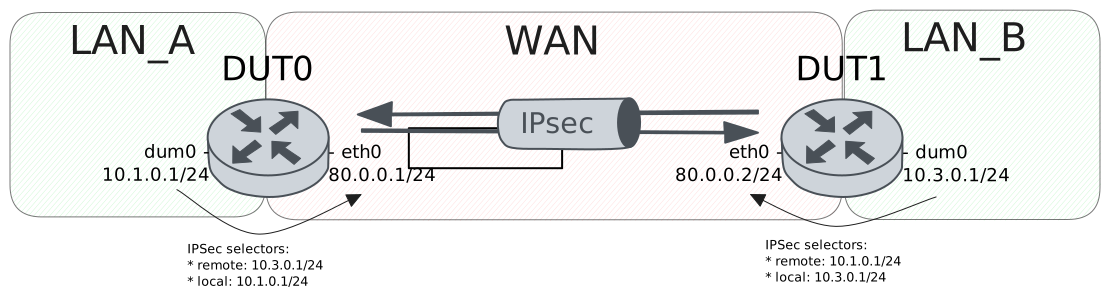
Test Site-To-Site With Basic Route Installation
Description
In this scenario, both devices install routes
for the VPN traffic in the main table.
Scenario
Step 1: Run command protocols ip show route at DUT0 and check if output does not contain the following tokens:
K>* 10.3.0.0/24Show output
Codes: K - kernel route, C - connected, L - local, S - static,
       R - RIP, O - OSPF, I - IS-IS, B - BGP, E - EIGRP, N - NHRP,
       T - Table, v - VNC, V - VNC-Direct, A - Babel, F - PBR,
       f - OpenFabric, t - Table-Direct,
       > - selected route, * - FIB route, q - queued, r - rejected, b - backup
       t - trapped, o - offload failure

IPv4 unicast VRF default:
L   192.168.100.100/32 is directly connected, eth0 inactive, weight 1, 00:57:05
Step 2: Set the following configuration in DUT0 :
set interfaces dummy dum0 address 10.1.0.1/24
set interfaces ethernet eth0 address 80.0.0.1/24
set system login user admin authentication encrypted-password '$6$GSjsCj8gHLv$/VcqU6FLi6CT2Oxn0MJQ2C2tqnRDrYKNF8HIYWJp68nvXvPdFccDsT04.WtigUONbKYrgKg8d6rEs8PjljMkH0'
set system vrf main
set vpn ipsec auth-profile AUTH-SA global-secrets ike-psk %any encrypted-secret U2FsdGVkX1+HwVEM09tckU9IMDc0ahM38Knybgy/wV0=
set vpn ipsec auth-profile AUTH-SA local auth ike-psk id %any
set vpn ipsec auth-profile AUTH-SA remote auth ike-psk id %any
set vpn ipsec esp-group CHILD-SA mode tunnel
set vpn ipsec esp-group CHILD-SA proposal 1 encryption aes256gcm128
set vpn ipsec esp-group CHILD-SA proposal 1 pfs dh-group19
set vpn ipsec ike-group IKE-SA key-exchange ikev2
set vpn ipsec ike-group IKE-SA proposal 1 dh-group 19
set vpn ipsec ike-group IKE-SA proposal 1 encryption aes256gcm128
set vpn ipsec ike-group IKE-SA proposal 1 hash sha256
set vpn ipsec site-to-site peer PEER auth-profile AUTH-SA
set vpn ipsec site-to-site peer PEER connection-type respond
set vpn ipsec site-to-site peer PEER default-esp-group CHILD-SA
set vpn ipsec site-to-site peer PEER ike-group IKE-SA
set vpn ipsec site-to-site peer PEER local-address 80.0.0.1
set vpn ipsec site-to-site peer PEER remote-address 80.0.0.2
set vpn ipsec site-to-site peer PEER tunnel 1 install-routes main
set vpn ipsec site-to-site peer PEER tunnel 1 local prefix 10.1.0.0/24
set vpn ipsec site-to-site peer PEER tunnel 1 remote prefix 10.3.0.0/24
Step 3: Set the following configuration in DUT1 :
set interfaces dummy dum0 address 10.3.0.1/24
set interfaces ethernet eth0 address 80.0.0.2/24
set protocols static route 0.0.0.0/0 next-hop 80.0.0.1
set system login user admin authentication encrypted-password '$6$GSjsCj8gHLv$/VcqU6FLi6CT2Oxn0MJQ2C2tqnRDrYKNF8HIYWJp68nvXvPdFccDsT04.WtigUONbKYrgKg8d6rEs8PjljMkH0'
set system vrf main
set vpn ipsec auth-profile AUTH-SA global-secrets ike-psk %any encrypted-secret U2FsdGVkX19FPMTHwG9ieerb0Eb4hHIH1AIcwbOVVl0=
set vpn ipsec auth-profile AUTH-SA local auth ike-psk id %any
set vpn ipsec auth-profile AUTH-SA remote auth ike-psk id %any
set vpn ipsec esp-group CHILD-SA mode tunnel
set vpn ipsec esp-group CHILD-SA proposal 1 encryption aes256gcm128
set vpn ipsec esp-group CHILD-SA proposal 1 pfs dh-group19
set vpn ipsec ike-group IKE-SA key-exchange ikev2
set vpn ipsec ike-group IKE-SA proposal 1 dh-group 19
set vpn ipsec ike-group IKE-SA proposal 1 encryption aes256gcm128
set vpn ipsec ike-group IKE-SA proposal 1 hash sha256
set vpn ipsec site-to-site peer PEER auth-profile AUTH-SA
set vpn ipsec site-to-site peer PEER connection-type initiate
set vpn ipsec site-to-site peer PEER default-esp-group CHILD-SA
set vpn ipsec site-to-site peer PEER ike-group IKE-SA
set vpn ipsec site-to-site peer PEER local-address 80.0.0.2
set vpn ipsec site-to-site peer PEER remote-address 80.0.0.1
set vpn ipsec site-to-site peer PEER tunnel 1 install-routes main
set vpn ipsec site-to-site peer PEER tunnel 1 local prefix 10.3.0.0/24
set vpn ipsec site-to-site peer PEER tunnel 1 remote prefix 10.1.0.0/24
Step 4: Ping IP address 80.0.0.1 from DUT1:
admin@DUT1$ ping 80.0.0.1 count 1 size 56 timeout 1Show output
PING 80.0.0.1 (80.0.0.1) 56(84) bytes of data.
64 bytes from 80.0.0.1: icmp_seq=1 ttl=64 time=0.428 ms

--- 80.0.0.1 ping statistics ---
1 packets transmitted, 1 received, 0% packet loss, time 0ms
rtt min/avg/max/mdev = 0.428/0.428/0.428/0.000 ms
Step 5: Ping IP address 80.0.0.2 from DUT0:
admin@DUT0$ ping 80.0.0.2 count 1 size 56 timeout 1Show output
PING 80.0.0.2 (80.0.0.2) 56(84) bytes of data.
64 bytes from 80.0.0.2: icmp_seq=1 ttl=64 time=0.324 ms

--- 80.0.0.2 ping statistics ---
1 packets transmitted, 1 received, 0% packet loss, time 0ms
rtt min/avg/max/mdev = 0.324/0.324/0.324/0.000 ms
Step 6: Run command vpn ipsec show sa at DUT0 and check if output matches the following regular expressions:
peer-PEER-tunnel-\d+.+INSTALLEDShow output
vpn-peer-PEER: #1, ESTABLISHED, IKEv2, 1ffb8d86db9ea628_i 2881ba522a8c1654_r*
  local  '80.0.0.1' @ 80.0.0.1[500]
  remote '80.0.0.2' @ 80.0.0.2[500]
  AES_GCM_16-256/PRF_HMAC_SHA2_256/ECP_256
  established 1s ago, rekeying in 26435s
  peer-PEER-tunnel-1: #1, reqid 1, INSTALLED, TUNNEL, ESP:AES_GCM_16-256
    installed 1s ago, rekeying in 3268s, expires in 3959s
    in  cd03c256,      0 bytes,     0 packets
    out cf92c432,      0 bytes,     0 packets
    local  10.1.0.0/24
    remote 10.3.0.0/24
Step 7: Run command protocols ip show route at DUT0 and check if output contains the following tokens:
K>* 10.3.0.0/24Show output
Codes: K - kernel route, C - connected, L - local, S - static,
       R - RIP, O - OSPF, I - IS-IS, B - BGP, E - EIGRP, N - NHRP,
       T - Table, v - VNC, V - VNC-Direct, A - Babel, F - PBR,
       f - OpenFabric, t - Table-Direct,
       > - selected route, * - FIB route, q - queued, r - rejected, b - backup
       t - trapped, o - offload failure

IPv4 unicast VRF default:
C>* 10.1.0.0/24 is directly connected, dum0, weight 1, 00:00:06
K * 10.1.0.0/24 [0/0] is directly connected, dum0, weight 1, 00:00:06
L>* 10.1.0.1/32 is directly connected, dum0, weight 1, 00:00:06
K>* 10.3.0.0/24 [0/0] via 80.0.0.2, eth0, weight 1, 00:00:01
C>* 80.0.0.0/24 is directly connected, eth0, weight 1, 00:00:06
K * 80.0.0.0/24 [0/0] is directly connected, eth0, weight 1, 00:00:06
L>* 80.0.0.1/32 is directly connected, eth0, weight 1, 00:00:06
L   192.168.100.100/32 is directly connected, eth0 inactive, weight 1, 00:57:13
Step 8: Run command vpn ipsec clear sa at DUT1 and expect this output:
Show output
Deleting IPSec SAs... 100.00%
Closed tunnels: 1
Step 9: Run command vpn ipsec initiate peer PEER at DUT1 and expect this output:
Show output
Initiating IPSec SAs... 100.00%
Initiated tunnels: 1
Step 10: Ping IP address 10.1.0.1 from DUT1:
admin@DUT1$ ping 10.1.0.1 local-address 10.3.0.1 count 1 size 56 timeout 1Show output
PING 10.1.0.1 (10.1.0.1) from 10.3.0.1 : 56(84) bytes of data.
64 bytes from 10.1.0.1: icmp_seq=1 ttl=64 time=0.633 ms

--- 10.1.0.1 ping statistics ---
1 packets transmitted, 1 received, 0% packet loss, time 0ms
rtt min/avg/max/mdev = 0.633/0.633/0.633/0.000 ms
Step 11: Initiate a tcp connection from DUT1 to DUT0 and try to send some messages between both endpoints
admin@DUT0$ monitor test connection server 8080 tcp
admin@DUT1$ monitor test connection client 10.1.0.1 8080 tcp local-address 10.3.0.1
Step 12: Run command vpn ipsec show sa at DUT0 and check if output matches the following regular expressions:
[1-9]\d? packetsShow output
vpn-peer-PEER: #2, ESTABLISHED, IKEv2, 4ed042dc20f4f268_i 6d8a8b33ee10e2df_r*
  local  '80.0.0.1' @ 80.0.0.1[500]
  remote '80.0.0.2' @ 80.0.0.2[500]
  AES_GCM_16-256/PRF_HMAC_SHA2_256/ECP_256
  established 3s ago, rekeying in 27646s
  peer-PEER-tunnel-1: #2, reqid 1, INSTALLED, TUNNEL, ESP:AES_GCM_16-256
    installed 3s ago, rekeying in 3321s, expires in 3957s
    in  cbaf09ed,    712 bytes,    11 packets,     0s ago
    out c354d049,    660 bytes,    10 packets,     0s ago
    local  10.1.0.0/24
    remote 10.3.0.0/24
Test Site-To-Site With VRF Route Installation
Description
In this scenario, DUT0 install reoutes
in a separate VRF called LAN.
Scenario
Step 1: Run command protocols vrf LAN ip show route at DUT0 and check if output does not contain the following tokens:
K>* 10.3.0.0/24Show output
% VRF LAN not found
Step 2: Set the following configuration in DUT0 :
set interfaces dummy dum0 address 10.1.0.1/24
set interfaces dummy dum0 vrf LAN
set interfaces ethernet eth0 address 80.0.0.1/24
set interfaces ethernet eth0 vrf WAN
set protocols vrf WAN static route 10.1.0.0/24 next-hop-vrf LAN
set system login user admin authentication encrypted-password '$6$GSjsCj8gHLv$/VcqU6FLi6CT2Oxn0MJQ2C2tqnRDrYKNF8HIYWJp68nvXvPdFccDsT04.WtigUONbKYrgKg8d6rEs8PjljMkH0'
set system vrf LAN
set system vrf WAN
set vpn ipsec auth-profile AUTH-SA global-secrets ike-psk %any encrypted-secret U2FsdGVkX1/WdXkbYUM4BFHtdeaKnEyMaFkAAkIv330=
set vpn ipsec auth-profile AUTH-SA local auth ike-psk id %any
set vpn ipsec auth-profile AUTH-SA remote auth ike-psk id %any
set vpn ipsec esp-group CHILD-SA mode tunnel
set vpn ipsec esp-group CHILD-SA proposal 1 encryption aes256gcm128
set vpn ipsec esp-group CHILD-SA proposal 1 pfs dh-group19
set vpn ipsec ike-group IKE-SA key-exchange ikev2
set vpn ipsec ike-group IKE-SA proposal 1 dh-group 19
set vpn ipsec ike-group IKE-SA proposal 1 encryption aes256gcm128
set vpn ipsec ike-group IKE-SA proposal 1 hash sha256
set vpn ipsec site-to-site peer PEER auth-profile AUTH-SA
set vpn ipsec site-to-site peer PEER connection-type respond
set vpn ipsec site-to-site peer PEER default-esp-group CHILD-SA
set vpn ipsec site-to-site peer PEER ike-group IKE-SA
set vpn ipsec site-to-site peer PEER local-address 80.0.0.1
set vpn ipsec site-to-site peer PEER remote-address 80.0.0.2
set vpn ipsec site-to-site peer PEER tunnel 1 install-routes LAN
set vpn ipsec site-to-site peer PEER tunnel 1 local prefix 10.1.0.0/24
set vpn ipsec site-to-site peer PEER tunnel 1 remote prefix 10.3.0.0/24
Step 3: Set the following configuration in DUT1 :
set interfaces dummy dum0 address 10.3.0.1/24
set interfaces ethernet eth0 address 80.0.0.2/24
set protocols static route 0.0.0.0/0 next-hop 80.0.0.1
set system login user admin authentication encrypted-password '$6$GSjsCj8gHLv$/VcqU6FLi6CT2Oxn0MJQ2C2tqnRDrYKNF8HIYWJp68nvXvPdFccDsT04.WtigUONbKYrgKg8d6rEs8PjljMkH0'
set system vrf main
set vpn ipsec auth-profile AUTH-SA global-secrets ike-psk %any encrypted-secret U2FsdGVkX18E5chlDpK5GspDU/WM5BVxEVtaFRMQEQA=
set vpn ipsec auth-profile AUTH-SA local auth ike-psk id %any
set vpn ipsec auth-profile AUTH-SA remote auth ike-psk id %any
set vpn ipsec esp-group CHILD-SA mode tunnel
set vpn ipsec esp-group CHILD-SA proposal 1 encryption aes256gcm128
set vpn ipsec esp-group CHILD-SA proposal 1 pfs dh-group19
set vpn ipsec ike-group IKE-SA key-exchange ikev2
set vpn ipsec ike-group IKE-SA proposal 1 dh-group 19
set vpn ipsec ike-group IKE-SA proposal 1 encryption aes256gcm128
set vpn ipsec ike-group IKE-SA proposal 1 hash sha256
set vpn ipsec site-to-site peer PEER auth-profile AUTH-SA
set vpn ipsec site-to-site peer PEER connection-type initiate
set vpn ipsec site-to-site peer PEER default-esp-group CHILD-SA
set vpn ipsec site-to-site peer PEER ike-group IKE-SA
set vpn ipsec site-to-site peer PEER local-address 80.0.0.2
set vpn ipsec site-to-site peer PEER remote-address 80.0.0.1
set vpn ipsec site-to-site peer PEER tunnel 1 install-routes main
set vpn ipsec site-to-site peer PEER tunnel 1 local prefix 10.3.0.0/24
set vpn ipsec site-to-site peer PEER tunnel 1 remote prefix 10.1.0.0/24
Step 4: Ping IP address 80.0.0.1 from DUT1:
admin@DUT1$ ping 80.0.0.1 count 1 size 56 timeout 1Show output
PING 80.0.0.1 (80.0.0.1) 56(84) bytes of data.
64 bytes from 80.0.0.1: icmp_seq=1 ttl=64 time=0.332 ms

--- 80.0.0.1 ping statistics ---
1 packets transmitted, 1 received, 0% packet loss, time 0ms
rtt min/avg/max/mdev = 0.332/0.332/0.332/0.000 ms
Step 5: Ping IP address 80.0.0.2 from DUT0:
admin@DUT0$ ping 80.0.0.2 vrf WAN count 1 size 56 timeout 1Show output
ping: Warning: source address might be selected on device other than: WAN
PING 80.0.0.2 (80.0.0.2) from 80.0.0.1 WAN: 56(84) bytes of data.
64 bytes from 80.0.0.2: icmp_seq=1 ttl=64 time=0.365 ms

--- 80.0.0.2 ping statistics ---
1 packets transmitted, 1 received, 0% packet loss, time 0ms
rtt min/avg/max/mdev = 0.365/0.365/0.365/0.000 ms
Step 6: Run command vpn ipsec show sa at DUT0 and check if output matches the following regular expressions:
peer-PEER-tunnel-\d+.+INSTALLEDShow output
vpn-peer-PEER: #1, ESTABLISHED, IKEv2, c17b85d7b3bc3d71_i 886e873b800572e9_r*
  local  '80.0.0.1' @ 80.0.0.1[500]
  remote '80.0.0.2' @ 80.0.0.2[500]
  AES_GCM_16-256/PRF_HMAC_SHA2_256/ECP_256
  established 0s ago, rekeying in 16661s
  peer-PEER-tunnel-1: #1, reqid 1, INSTALLED, TUNNEL, ESP:AES_GCM_16-256
    installed 0s ago, rekeying in 3416s, expires in 3960s
    in  c8eaa463,      0 bytes,     0 packets
    out c7047d09,      0 bytes,     0 packets
    local  10.1.0.0/24
    remote 10.3.0.0/24
Step 7: Run command protocols vrf LAN ip show route at DUT0 and check if output contains the following tokens:
K>* 10.3.0.0/24Show output
Codes: K - kernel route, C - connected, L - local, S - static,
       R - RIP, O - OSPF, I - IS-IS, B - BGP, E - EIGRP, N - NHRP,
       T - Table, v - VNC, V - VNC-Direct, A - Babel, F - PBR,
       f - OpenFabric, t - Table-Direct,
       > - selected route, * - FIB route, q - queued, r - rejected, b - backup
       t - trapped, o - offload failure

IPv4 unicast VRF LAN:
K>* 0.0.0.0/0 [255/8192] unreachable (ICMP unreachable), weight 1, 00:00:06
C>* 10.1.0.0/24 is directly connected, dum0, weight 1, 00:00:06
L>* 10.1.0.1/32 is directly connected, dum0, weight 1, 00:00:06
K>* 10.3.0.0/24 [0/0] via 80.0.0.2, eth0 (vrf WAN), weight 1, 00:00:00
K>* 127.0.0.0/8 [0/0] is directly connected, LAN, weight 1, 00:00:06
Step 8: Run command vpn ipsec clear sa at DUT1 and expect this output:
Show output
Deleting IPSec SAs... 100.00%
Closed tunnels: 1
Step 9: Run command vpn ipsec initiate peer PEER at DUT1 and expect this output:
Show output
Initiating IPSec SAs... 100.00%
Initiated tunnels: 1
Step 10: Ping IP address 10.1.0.1 from DUT1:
admin@DUT1$ ping 10.1.0.1 local-address 10.3.0.1 count 1 size 56 timeout 1Show output
PING 10.1.0.1 (10.1.0.1) from 10.3.0.1 : 56(84) bytes of data.
64 bytes from 10.1.0.1: icmp_seq=1 ttl=64 time=0.648 ms

--- 10.1.0.1 ping statistics ---
1 packets transmitted, 1 received, 0% packet loss, time 0ms
rtt min/avg/max/mdev = 0.648/0.648/0.648/0.000 ms
Step 11: Initiate a tcp connection from DUT1 to DUT0 and try to send some messages between both endpoints
admin@DUT0$ monitor test connection server 8080 tcp vrf LAN
admin@DUT1$ monitor test connection client 10.1.0.1 8080 tcp local-address 10.3.0.1
Step 12: Run command vpn ipsec show sa at DUT0 and check if output matches the following regular expressions:
[1-9]\d? packetsShow output
vpn-peer-PEER: #2, ESTABLISHED, IKEv2, a2da948573054c59_i f841dbb2bce441c7_r*
  local  '80.0.0.1' @ 80.0.0.1[500]
  remote '80.0.0.2' @ 80.0.0.2[500]
  AES_GCM_16-256/PRF_HMAC_SHA2_256/ECP_256
  established 3s ago, rekeying in 15961s
  peer-PEER-tunnel-1: #2, reqid 1, INSTALLED, TUNNEL, ESP:AES_GCM_16-256
    installed 3s ago, rekeying in 3361s, expires in 3957s
    in  c3c230a0,    712 bytes,    11 packets,     1s ago
    out cafe10d0,    660 bytes,    10 packets,     1s ago
    local  10.1.0.0/24
    remote 10.3.0.0/24
Test Site-To-Site With Route Installation And Metrics
Description
In this scenario, DUT0 installs routes with
differents metrics for both IPsec peers. The point is
to check if the routes are installed correctly and most
importantly, whenever the prioritized route is down, the
backup route is used.
Scenario
Step 1: Run command protocols ip show route at DUT0 and check if output does not contain the following tokens:
K>* 10.3.0.0/24Show output
Codes: K - kernel route, C - connected, L - local, S - static,
       R - RIP, O - OSPF, I - IS-IS, B - BGP, E - EIGRP, N - NHRP,
       T - Table, v - VNC, V - VNC-Direct, A - Babel, F - PBR,
       f - OpenFabric, t - Table-Direct,
       > - selected route, * - FIB route, q - queued, r - rejected, b - backup
       t - trapped, o - offload failure

IPv4 unicast VRF default:
L   192.168.100.100/32 is directly connected, eth0 inactive, weight 1, 00:57:38
Step 2: Set the following configuration in DUT0 :
set interfaces dummy dum0 address 10.1.0.1/24
set interfaces ethernet eth0 address 80.0.0.1/24
set interfaces ethernet eth1 address 90.0.0.1/24
set system login user admin authentication encrypted-password '$6$GSjsCj8gHLv$/VcqU6FLi6CT2Oxn0MJQ2C2tqnRDrYKNF8HIYWJp68nvXvPdFccDsT04.WtigUONbKYrgKg8d6rEs8PjljMkH0'
set system vrf main
set vpn ipsec auth-profile AUTH-SA global-secrets ike-psk %any encrypted-secret U2FsdGVkX18UgV2AcfdR6oF1v7kwCOIuXg6GY8Wec0o=
set vpn ipsec auth-profile AUTH-SA local auth ike-psk id %any
set vpn ipsec auth-profile AUTH-SA remote auth ike-psk id %any
set vpn ipsec esp-group CHILD-SA mode tunnel
set vpn ipsec esp-group CHILD-SA proposal 1 encryption aes256gcm128
set vpn ipsec esp-group CHILD-SA proposal 1 pfs dh-group19
set vpn ipsec ike-group IKE-SA key-exchange ikev2
set vpn ipsec ike-group IKE-SA proposal 1 dh-group 19
set vpn ipsec ike-group IKE-SA proposal 1 encryption aes256gcm128
set vpn ipsec ike-group IKE-SA proposal 1 hash sha256
set vpn ipsec logging log-types any log-level 2
set vpn ipsec site-to-site peer PEER auth-profile AUTH-SA
set vpn ipsec site-to-site peer PEER connection-type respond
set vpn ipsec site-to-site peer PEER default-esp-group CHILD-SA
set vpn ipsec site-to-site peer PEER ike-group IKE-SA
set vpn ipsec site-to-site peer PEER local-address 80.0.0.1
set vpn ipsec site-to-site peer PEER remote-address 80.0.0.2
set vpn ipsec site-to-site peer PEER tunnel 1 install-routes main
set vpn ipsec site-to-site peer PEER tunnel 1 local prefix 10.1.0.0/24
set vpn ipsec site-to-site peer PEER tunnel 1 remote prefix 10.3.0.0/24
set vpn ipsec site-to-site peer PEER tunnel 1 route-priority 10
set vpn ipsec site-to-site peer PEER1 auth-profile AUTH-SA
set vpn ipsec site-to-site peer PEER1 connection-type respond
set vpn ipsec site-to-site peer PEER1 default-esp-group CHILD-SA
set vpn ipsec site-to-site peer PEER1 ike-group IKE-SA
set vpn ipsec site-to-site peer PEER1 local-address 90.0.0.1
set vpn ipsec site-to-site peer PEER1 remote-address 90.0.0.3
set vpn ipsec site-to-site peer PEER1 tunnel 1 install-routes main
set vpn ipsec site-to-site peer PEER1 tunnel 1 local prefix 10.1.0.0/24
set vpn ipsec site-to-site peer PEER1 tunnel 1 remote prefix 10.3.0.0/24
set vpn ipsec site-to-site peer PEER1 tunnel 1 route-priority 100
Step 3: Set the following configuration in DUT1 :
set interfaces dummy dum0 address 10.3.0.1/24
set interfaces ethernet eth0 address 80.0.0.2/24
set protocols static route 0.0.0.0/0 next-hop 80.0.0.1
set system login user admin authentication encrypted-password '$6$GSjsCj8gHLv$/VcqU6FLi6CT2Oxn0MJQ2C2tqnRDrYKNF8HIYWJp68nvXvPdFccDsT04.WtigUONbKYrgKg8d6rEs8PjljMkH0'
set system vrf main
set vpn ipsec auth-profile AUTH-SA global-secrets ike-psk %any encrypted-secret U2FsdGVkX19R4DUHqm4Wkx+hY2ePICzkqI7VR/0K6gA=
set vpn ipsec auth-profile AUTH-SA local auth ike-psk id %any
set vpn ipsec auth-profile AUTH-SA remote auth ike-psk id %any
set vpn ipsec esp-group CHILD-SA mode tunnel
set vpn ipsec esp-group CHILD-SA proposal 1 encryption aes256gcm128
set vpn ipsec esp-group CHILD-SA proposal 1 pfs dh-group19
set vpn ipsec ike-group IKE-SA key-exchange ikev2
set vpn ipsec ike-group IKE-SA proposal 1 dh-group 19
set vpn ipsec ike-group IKE-SA proposal 1 encryption aes256gcm128
set vpn ipsec ike-group IKE-SA proposal 1 hash sha256
set vpn ipsec site-to-site peer PEER auth-profile AUTH-SA
set vpn ipsec site-to-site peer PEER connection-type initiate
set vpn ipsec site-to-site peer PEER default-esp-group CHILD-SA
set vpn ipsec site-to-site peer PEER ike-group IKE-SA
set vpn ipsec site-to-site peer PEER local-address 80.0.0.2
set vpn ipsec site-to-site peer PEER remote-address 80.0.0.1
set vpn ipsec site-to-site peer PEER tunnel 1 install-routes main
set vpn ipsec site-to-site peer PEER tunnel 1 local prefix 10.3.0.0/24
set vpn ipsec site-to-site peer PEER tunnel 1 remote prefix 10.1.0.0/24
Step 4: Set the following configuration in DUT2 :
set interfaces dummy dum0 address 10.3.0.1/24
set interfaces ethernet eth1 address 90.0.0.3/24
set protocols static route 0.0.0.0/0 next-hop 90.0.0.1
set system login user admin authentication encrypted-password '$6$GSjsCj8gHLv$/VcqU6FLi6CT2Oxn0MJQ2C2tqnRDrYKNF8HIYWJp68nvXvPdFccDsT04.WtigUONbKYrgKg8d6rEs8PjljMkH0'
set vpn ipsec auth-profile AUTH-SA global-secrets ike-psk %any encrypted-secret U2FsdGVkX1/livF2SI8VRTpBF2CrxfOMjWov8ucMgw0=
set vpn ipsec auth-profile AUTH-SA local auth ike-psk id %any
set vpn ipsec auth-profile AUTH-SA remote auth ike-psk id %any
set vpn ipsec esp-group CHILD-SA mode tunnel
set vpn ipsec esp-group CHILD-SA proposal 1 encryption aes256gcm128
set vpn ipsec esp-group CHILD-SA proposal 1 pfs dh-group19
set vpn ipsec ike-group IKE-SA key-exchange ikev2
set vpn ipsec ike-group IKE-SA proposal 1 dh-group 19
set vpn ipsec ike-group IKE-SA proposal 1 encryption aes256gcm128
set vpn ipsec ike-group IKE-SA proposal 1 hash sha256
set vpn ipsec site-to-site peer PEER auth-profile AUTH-SA
set vpn ipsec site-to-site peer PEER connection-type initiate
set vpn ipsec site-to-site peer PEER default-esp-group CHILD-SA
set vpn ipsec site-to-site peer PEER ike-group IKE-SA
set vpn ipsec site-to-site peer PEER local-address 90.0.0.3
set vpn ipsec site-to-site peer PEER remote-address 90.0.0.1
set vpn ipsec site-to-site peer PEER tunnel 1 local prefix 10.3.0.0/24
set vpn ipsec site-to-site peer PEER tunnel 1 remote prefix 10.1.0.0/24
Step 5: Ping IP address 80.0.0.1 from DUT1:
admin@DUT1$ ping 80.0.0.1 count 1 size 56 timeout 1Show output
PING 80.0.0.1 (80.0.0.1) 56(84) bytes of data.
64 bytes from 80.0.0.1: icmp_seq=1 ttl=64 time=0.405 ms

--- 80.0.0.1 ping statistics ---
1 packets transmitted, 1 received, 0% packet loss, time 0ms
rtt min/avg/max/mdev = 0.405/0.405/0.405/0.000 ms
Step 6: Ping IP address 80.0.0.2 from DUT0:
admin@DUT0$ ping 80.0.0.2 count 1 size 56 timeout 1Show output
PING 80.0.0.2 (80.0.0.2) 56(84) bytes of data.
64 bytes from 80.0.0.2: icmp_seq=1 ttl=64 time=0.247 ms

--- 80.0.0.2 ping statistics ---
1 packets transmitted, 1 received, 0% packet loss, time 0ms
rtt min/avg/max/mdev = 0.247/0.247/0.247/0.000 ms
Step 7: Ping IP address 90.0.0.3 from DUT2:
admin@DUT2$ ping 90.0.0.3 count 1 size 56 timeout 1Show output
PING 90.0.0.3 (90.0.0.3) 56(84) bytes of data.
64 bytes from 90.0.0.3: icmp_seq=1 ttl=64 time=0.274 ms

--- 90.0.0.3 ping statistics ---
1 packets transmitted, 1 received, 0% packet loss, time 0ms
rtt min/avg/max/mdev = 0.274/0.274/0.274/0.000 ms
Step 8: Run command vpn ipsec show sa at DUT0 and check if output matches the following regular expressions:
peer-PEER-tunnel-\d+.+INSTALLEDShow output
vpn-peer-PEER: #1, ESTABLISHED, IKEv2, 9f27f7a20574530b_i 514b1530318684e3_r*
  local  '80.0.0.1' @ 80.0.0.1[500]
  remote '80.0.0.2' @ 80.0.0.2[500]
  AES_GCM_16-256/PRF_HMAC_SHA2_256/ECP_256
  established 5s ago, rekeying in 28107s
  peer-PEER-tunnel-1: #1, reqid 1, INSTALLED, TUNNEL, ESP:AES_GCM_16-256
    installed 5s ago, rekeying in 3309s, expires in 3955s
    in  c8e68864,      0 bytes,     0 packets
    out cd32224c,      0 bytes,     0 packets
    local  10.1.0.0/24
    remote 10.3.0.0/24
vpn-peer-PEER1: #2, ESTABLISHED, IKEv2, 26373dc650ebb81b_i 9e6113373d3fb341_r*
  local  '90.0.0.1' @ 90.0.0.1[500]
  remote '90.0.0.3' @ 90.0.0.3[500]
  AES_GCM_16-256/PRF_HMAC_SHA2_256/ECP_256
  established 1s ago, rekeying in 25326s
  peer-PEER1-tunnel-1: #2, reqid 1, INSTALLED, TUNNEL, ESP:AES_GCM_16-256
    installed 1s ago, rekeying in 3408s, expires in 3959s
    in  cd3235d5,      0 bytes,     0 packets
    out c201fa59,      0 bytes,     0 packets
    local  10.1.0.0/24
    remote 10.3.0.0/24
Step 9: Run command protocols ip show route at DUT0 and check if output contains the following tokens:
K>* 10.3.0.0/24Show output
Codes: K - kernel route, C - connected, L - local, S - static,
       R - RIP, O - OSPF, I - IS-IS, B - BGP, E - EIGRP, N - NHRP,
       T - Table, v - VNC, V - VNC-Direct, A - Babel, F - PBR,
       f - OpenFabric, t - Table-Direct,
       > - selected route, * - FIB route, q - queued, r - rejected, b - backup
       t - trapped, o - offload failure

IPv4 unicast VRF default:
C>* 10.1.0.0/24 is directly connected, dum0, weight 1, 00:00:11
K * 10.1.0.0/24 [0/0] is directly connected, dum0, weight 1, 00:00:11
L>* 10.1.0.1/32 is directly connected, dum0, weight 1, 00:00:11
K * 10.3.0.0/24 [0/100] via 90.0.0.3, eth1, weight 1, 00:00:01
K>* 10.3.0.0/24 [0/10] via 80.0.0.2, eth0, weight 1, 00:00:05
C>* 80.0.0.0/24 is directly connected, eth0, weight 1, 00:00:11
K * 80.0.0.0/24 [0/0] is directly connected, eth0, weight 1, 00:00:11
L>* 80.0.0.1/32 is directly connected, eth0, weight 1, 00:00:11
C>* 90.0.0.0/24 is directly connected, eth1, weight 1, 00:00:11
K * 90.0.0.0/24 [0/0] is directly connected, eth1, weight 1, 00:00:11
L>* 90.0.0.1/32 is directly connected, eth1, weight 1, 00:00:11
L   192.168.100.100/32 is directly connected, eth0 inactive, weight 1, 00:57:52
Step 10: Run command show system route ip at DUT0 and check if output contains the following tokens:
10.3.0.0/24 via 90.0.0.3 dev eth1 proto static metric 100
10.3.0.0/24 via 80.0.0.2 dev eth0 proto static metric 10
Show output
10.1.0.0/24 dev dum0 proto kernel scope link src 10.1.0.1
10.3.0.0/24 via 80.0.0.2 dev eth0 proto static metric 10
10.3.0.0/24 via 90.0.0.3 dev eth1 proto static metric 100
80.0.0.0/24 dev eth0 proto kernel scope link src 80.0.0.1
90.0.0.0/24 dev eth1 proto kernel scope link src 90.0.0.1
Note
The tunnel with the lowest metric configured in the route-priority parameter should be the one used to route the traffic.
Step 11: Run command vpn ipsec clear sa at DUT1 and expect this output:
Show output
Deleting IPSec SAs... 100.00%
Closed tunnels: 1
Step 12: Run command vpn ipsec initiate peer PEER at DUT1 and expect this output:
Show output
Initiating IPSec SAs... 100.00%
Initiated tunnels: 1
Step 13: Ping IP address 10.1.0.1 from DUT1:
admin@DUT1$ ping 10.1.0.1 local-address 10.3.0.1 count 1 size 56 timeout 1Show output
PING 10.1.0.1 (10.1.0.1) from 10.3.0.1 : 56(84) bytes of data.
64 bytes from 10.1.0.1: icmp_seq=1 ttl=64 time=0.339 ms

--- 10.1.0.1 ping statistics ---
1 packets transmitted, 1 received, 0% packet loss, time 0ms
rtt min/avg/max/mdev = 0.339/0.339/0.339/0.000 ms
Step 14: Initiate a tcp connection from DUT1 to DUT0 and try to send some messages between both endpoints
admin@DUT0$ monitor test connection server 8080 tcp
admin@DUT1$ monitor test connection client 10.1.0.1 8080 tcp local-address 10.3.0.1
Step 15: Run command vpn ipsec show sa at DUT0 and check if output matches the following regular expressions:
[1-9]\d? packetsShow output
vpn-peer-PEER: #3, ESTABLISHED, IKEv2, b5d829a969837c47_i a10976df6acc7b47_r*
  local  '80.0.0.1' @ 80.0.0.1[500]
  remote '80.0.0.2' @ 80.0.0.2[500]
  AES_GCM_16-256/PRF_HMAC_SHA2_256/ECP_256
  established 3s ago, rekeying in 27621s
  peer-PEER-tunnel-1: #3, reqid 1, INSTALLED, TUNNEL, ESP:AES_GCM_16-256
    installed 3s ago, rekeying in 3329s, expires in 3957s
    in  c98bb997,    712 bytes,    11 packets,     1s ago
    out c038a9e9,    660 bytes,    10 packets,     1s ago
    local  10.1.0.0/24
    remote 10.3.0.0/24
vpn-peer-PEER1: #2, ESTABLISHED, IKEv2, 26373dc650ebb81b_i 9e6113373d3fb341_r*
  local  '90.0.0.1' @ 90.0.0.1[500]
  remote '90.0.0.3' @ 90.0.0.3[500]
  AES_GCM_16-256/PRF_HMAC_SHA2_256/ECP_256
  established 4s ago, rekeying in 25323s
  peer-PEER1-tunnel-1: #2, reqid 1, INSTALLED, TUNNEL, ESP:AES_GCM_16-256
    installed 4s ago, rekeying in 3405s, expires in 3956s
    in  cd3235d5,      0 bytes,     0 packets
    out c201fa59,      0 bytes,     0 packets
    local  10.1.0.0/24
    remote 10.3.0.0/24
Note
Now we will shutdown the tunnel with the lowest metric from DUT1 and check if the traffic is routed through the backup tunnel.
Step 16: Run command vpn ipsec clear sa at DUT1 and expect this output:
Show output
Deleting IPSec SAs... 100.00%
Closed tunnels: 1
Step 17: Run command vpn ipsec clear sa at DUT2 and expect this output:
Show output
Deleting IPSec SAs... 100.00%
Closed tunnels: 1
Step 18: Run command vpn ipsec initiate peer PEER at DUT2 and expect this output:
Show output
Initiating IPSec SAs... 100.00%
Initiated tunnels: 1
Step 19: Ping IP address 10.1.0.1 from DUT2:
admin@DUT2$ ping 10.1.0.1 local-address 10.3.0.1 count 1 size 56 timeout 1Show output
PING 10.1.0.1 (10.1.0.1) from 10.3.0.1 : 56(84) bytes of data.
64 bytes from 10.1.0.1: icmp_seq=1 ttl=64 time=0.304 ms

--- 10.1.0.1 ping statistics ---
1 packets transmitted, 1 received, 0% packet loss, time 0ms
rtt min/avg/max/mdev = 0.304/0.304/0.304/0.000 ms
Step 20: Initiate a tcp connection from DUT2 to DUT0 and try to send some messages between both endpoints
admin@DUT0$ monitor test connection server 8080 tcp
admin@DUT2$ monitor test connection client 10.1.0.1 8080 tcp local-address 10.3.0.1
Step 21: Run command vpn ipsec show sa at DUT0 and check if output matches the following regular expressions:
[1-9]\d? packetsShow output
vpn-peer-PEER1: #4, ESTABLISHED, IKEv2, 3a5c4cde9e7be24c_i 9151a34e8715cd0a_r*
  local  '90.0.0.1' @ 90.0.0.1[500]
  remote '90.0.0.3' @ 90.0.0.3[500]
  AES_GCM_16-256/PRF_HMAC_SHA2_256/ECP_256
  established 3s ago, rekeying in 21880s
  peer-PEER1-tunnel-1: #4, reqid 1, INSTALLED, TUNNEL, ESP:AES_GCM_16-256
    installed 3s ago, rekeying in 3307s, expires in 3957s
    in  c1a3b3a5,    868 bytes,    14 packets,     0s ago
    out cdeef4ea,    764 bytes,    12 packets,     0s ago
    local  10.1.0.0/24
    remote 10.3.0.0/24
Step 22: Run command show system route ip at DUT0 and check if output contains the following tokens:
10.3.0.0/24 via 90.0.0.3 dev eth1 proto static metric 100Show output
10.1.0.0/24 dev dum0 proto kernel scope link src 10.1.0.1
10.3.0.0/24 via 90.0.0.3 dev eth1 proto static metric 100
80.0.0.0/24 dev eth0 proto kernel scope link src 80.0.0.1
90.0.0.0/24 dev eth1 proto kernel scope link src 90.0.0.1
Step 23: Run command show system route ip at DUT0 and check if output does not contain the following tokens:
10.3.0.0/24 via 80.0.0.2 dev eth0 proto static metric 10Show output
10.1.0.0/24 dev dum0 proto kernel scope link src 10.1.0.1
10.3.0.0/24 via 90.0.0.3 dev eth1 proto static metric 100
80.0.0.0/24 dev eth0 proto kernel scope link src 80.0.0.1
90.0.0.0/24 dev eth1 proto kernel scope link src 90.0.0.1