Acl Id
This scenario shows how to install traffic policies from received RADIUS messages (using the “Filter-Id” attribute and according to RFC2865).
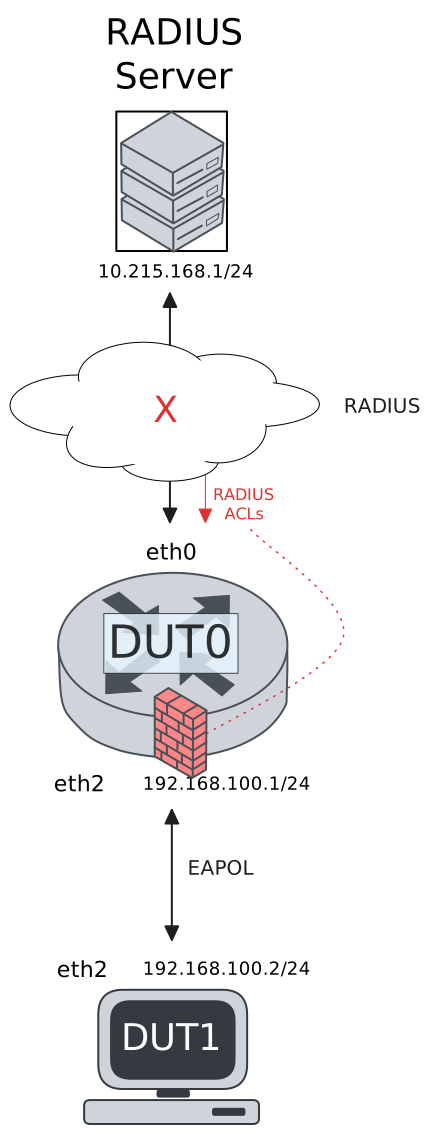
Test 802.1x Filter-ID ACL
Description
DUT0 is configured with an 802.1x-authenticated interface and DUT1 is configured as a supplicant. A traffic policy is automatically configured in DUT0 after the supplicant is authenticated.
Scenario
Step 1: Set the following configuration in DUT0 :
set interfaces ethernet eth0 address 10.215.168.64/24
set interfaces ethernet eth2 address 192.168.100.1/24
set interfaces ethernet eth2 authenticator 802.1x max-retransmissions 2
set interfaces ethernet eth2 authenticator aaa authentication list1
set interfaces ethernet eth2 authenticator aaa authorization acl-alias RADIUS_ACL direction both
set interfaces ethernet eth2 authenticator aaa authorization acl-alias RADIUS_ACL priority very-high
set interfaces ethernet eth2 authenticator aaa authorization acl-alias RADIUS_ACL traffic-policy POL1
set interfaces ethernet eth2 authenticator log-level debug
set interfaces ethernet eth2 authenticator mode only-802.1x
set interfaces ethernet eth2 authenticator quiet-period 60
set interfaces ethernet eth2 authenticator reauth-period 0
set service ssh
set system aaa group radius radgroup1 server serv1
set system aaa list list1 method 1 group radius radgroup1
set system aaa server radius serv1 address 10.215.168.1
set system aaa server radius serv1 encrypted-key U2FsdGVkX18eI8j0FM/qeEF2OVaZdUNpOLlvGnu7syu+a3K/Va5OxTu7iztkMkRFf+HcIy5WufLBVOW6h+LQ3g==
set system login user admin authentication encrypted-password '$6$GSjsCj8gHLv$/VcqU6FLi6CT2Oxn0MJQ2C2tqnRDrYKNF8HIYWJp68nvXvPdFccDsT04.WtigUONbKYrgKg8d6rEs8PjljMkH0'
set traffic policy POL1 rule 1 selector SEL_ICMP
set traffic policy POL1 rule 2 selector SEL_SSH
set traffic policy POL1 rule 3 action drop
set traffic selector SEL_ICMP rule 1 protocol icmp
set traffic selector SEL_SSH rule 1 destination port 22
set traffic selector SEL_SSH rule 1 protocol tcp
set traffic selector SEL_SSH rule 2 protocol tcp
set traffic selector SEL_SSH rule 2 source port 22
Step 2: Ping IP address 10.215.168.1 from DUT0:
admin@DUT0$ ping 10.215.168.1 count 1 size 56 timeout 1Show output
PING 10.215.168.1 (10.215.168.1) 56(84) bytes of data.
64 bytes from 10.215.168.1: icmp_seq=1 ttl=64 time=0.582 ms

--- 10.215.168.1 ping statistics ---
1 packets transmitted, 1 received, 0% packet loss, time 0ms
rtt min/avg/max/mdev = 0.582/0.582/0.582/0.000 ms
Step 3: Set the following configuration in DUT1 :
set interfaces ethernet eth2 address 192.168.100.2/24
set interfaces ethernet eth2 supplicant encrypted-password U2FsdGVkX18aDQ7URMYivE/SSMwmizWGfO1uzhrJ+Ys=
set interfaces ethernet eth2 supplicant username user_acl_id
set system login user admin authentication encrypted-password '$6$GSjsCj8gHLv$/VcqU6FLi6CT2Oxn0MJQ2C2tqnRDrYKNF8HIYWJp68nvXvPdFccDsT04.WtigUONbKYrgKg8d6rEs8PjljMkH0'
Step 4: Run command interfaces ethernet eth2 supplicant show status at DUT1 and check if output contains the following tokens:
AuthorizedShow output
---------------------------------------------------
        Field                      Value
---------------------------------------------------
EAP State                                   SUCCESS
EAP TLS Cipher          ECDHE-RSA-AES256-GCM-SHA384
EAP TLS Version                             TLSv1.2
PAE State                             AUTHENTICATED
Supplicant Port Status                   Authorized
WPA State                                 COMPLETED
Step 5: Run command interfaces ethernet eth2 supplicant show stats at DUT1 and check if output matches the following regular expressions:
Port Status\s+AuthorizedShow output
-------------------------------
       Field           Value
-------------------------------
EAPoL Frames (Rx)            11
EAPoL Frames (Tx)            11
Invalid Frames (Rx)           0
Logoff Frames (Tx)            0
Port Status          Authorized
Req Frames (Rx)               9
Req ID Frames (Rx)            1
Resp Frames (Tx)             10
Start Frames (Tx)             1
Step 6: Run command interfaces ethernet eth2 authenticator show stats at DUT0 and check if output matches the following regular expressions:
Authentication Successes\s+1
Authentication Mode\s+802\.1X
Show output
---------------------------------------------
         Field                   Value
---------------------------------------------
Access Challenges                           9
Authentication Backend                 RADIUS
Authentication Failures                     0
Authentication Mode                    802.1X
Authentication Status     Authorized (802.1X)
Authentication Successes                    1
EAPoL frames (Rx)                          11
EAPoL frames (Tx)                          11
Quiet Period                               60
Reauthenticate                          FALSE
Reauthenticate Period                       0
Session Time                                0
Session User MAC            de:ad:be:ef:6c:12
Session User Name                 user_acl_id
Step 7: Ping IP address 192.168.100.1 from DUT1:
admin@DUT1$ ping 192.168.100.1 count 1 size 56 timeout 1Show output
PING 192.168.100.1 (192.168.100.1) 56(84) bytes of data.
64 bytes from 192.168.100.1: icmp_seq=1 ttl=64 time=0.427 ms

--- 192.168.100.1 ping statistics ---
1 packets transmitted, 1 received, 0% packet loss, time 0ms
rtt min/avg/max/mdev = 0.427/0.427/0.427/0.000 ms
Step 8: Run command interfaces ethernet eth2 authenticator show acl rules at DUT0 and expect this output:
Show output
Received ACL type: Filter-ID.
ACL with alias 'RADIUS_ACL' is not installed.
Step 9: Ping IP address 192.168.100.1 from DUT1:
admin@DUT1$ ping 192.168.100.1 count 1 size 56 timeout 1Show output
PING 192.168.100.1 (192.168.100.1) 56(84) bytes of data.
64 bytes from 192.168.100.1: icmp_seq=1 ttl=64 time=0.475 ms

--- 192.168.100.1 ping statistics ---
1 packets transmitted, 1 received, 0% packet loss, time 0ms
rtt min/avg/max/mdev = 0.475/0.475/0.475/0.000 ms
Step 10: Init an SSH connection from DUT1 to IP address 192.168.100.1 with the user admin:
admin@DUT1$ ssh admin@192.168.100.1 option StrictHostKeyChecking=no option UserKnownHostsFile=/dev/nullShow output
Warning: Permanently added '192.168.100.1' (ECDSA) to the list of known hosts.
admin@192.168.100.1's password:
Welcome to Teldat OSDx v4.2.9.2

This system includes free software.
Contact Teldat for licenses information and source code.

Last login: Thu Apr 16 23:34:31 2026 from 192.168.100.2
admin@osdx$
Step 11: Expect a failure in the following command:
Initiate a udp connection from DUT0 to DUT1 and try to send some messages between both endpoints
admin@DUT1$ monitor test connection server 4321 udp
admin@DUT0$ monitor test connection client 192.168.100.2 4321 udp
Step 12: Run command interfaces ethernet eth2 authenticator show acl stats at DUT0 and expect this output:
Show output
Policy POL1 -- ifc eth2 -- hook in prio very-high

---------------------------------------------------------------
rule   selector  pkts match  pkts eval  bytes match  bytes eval
---------------------------------------------------------------
1      SEL_ICMP           2         27          168        5252
2      SEL_SSH           25         25         5084        5084
3      -                  0          0            0           0
---------------------------------------------------------------
Total                    27         27         5252        5252

Policy POL1 -- ifc eth2 -- hook out prio very-high

---------------------------------------------------------------
rule   selector  pkts match  pkts eval  bytes match  bytes eval
---------------------------------------------------------------
1      SEL_ICMP           2         24          168        5148
2      SEL_SSH           20         22         4796        4980
3      -                  2          2          184         184
---------------------------------------------------------------
Total                    24         24         5148        5148
Test 802.1x Filter-ID ACL And CoA
Description
In this scenario, DUT1 is successfully authenticated and a traffic policy is configured from a “Filter-ID” attribute. A CoA message is then received from the authentication server that changes the configured traffic policy to drop non-ICMP traffic.
Scenario
Step 1: Set the following configuration in DUT0 :
set interfaces ethernet eth0 address 10.215.168.64/24
set interfaces ethernet eth2 address 192.168.100.1/24
set interfaces ethernet eth2 authenticator 802.1x max-retransmissions 2
set interfaces ethernet eth2 authenticator aaa authentication list1
set interfaces ethernet eth2 authenticator aaa authorization acl-alias RADIUS_ACL direction both
set interfaces ethernet eth2 authenticator aaa authorization acl-alias RADIUS_ACL priority very-high
set interfaces ethernet eth2 authenticator aaa authorization acl-alias RADIUS_ACL traffic-policy POL1
set interfaces ethernet eth2 authenticator aaa authorization acl-alias RADIUS_ACL_COA direction in
set interfaces ethernet eth2 authenticator aaa authorization acl-alias RADIUS_ACL_COA traffic-policy POL2
set interfaces ethernet eth2 authenticator coa client 10.215.168.1
set interfaces ethernet eth2 authenticator coa encrypted-secret U2FsdGVkX1/CKPvo3XO/FIlfPGR4Jx0Gq5HlPHJMc0g=
set interfaces ethernet eth2 authenticator log-level debug
set interfaces ethernet eth2 authenticator mode only-802.1x
set interfaces ethernet eth2 authenticator quiet-period 60
set interfaces ethernet eth2 authenticator reauth-period 0
set service ssh
set system aaa group radius radgroup1 server serv1
set system aaa list list1 method 1 group radius radgroup1
set system aaa server radius serv1 address 10.215.168.1
set system aaa server radius serv1 encrypted-key U2FsdGVkX1+0uPUhmD5RkntvyNfv1mLLx6pyrU/rlAlMibAKEb7D5lZtWklNoW/L349FVGdjmtYiv8IZNGdkUw==
set system login user admin authentication encrypted-password '$6$GSjsCj8gHLv$/VcqU6FLi6CT2Oxn0MJQ2C2tqnRDrYKNF8HIYWJp68nvXvPdFccDsT04.WtigUONbKYrgKg8d6rEs8PjljMkH0'
set traffic policy POL1 rule 1 selector SEL_ICMP
set traffic policy POL1 rule 2 selector SEL_SSH
set traffic policy POL1 rule 3 action drop
set traffic policy POL2 rule 1 selector SEL_ICMP
set traffic policy POL2 rule 2 action drop
set traffic selector SEL_ICMP rule 1 protocol icmp
set traffic selector SEL_SSH rule 1 destination port 22
set traffic selector SEL_SSH rule 1 protocol tcp
set traffic selector SEL_SSH rule 2 protocol tcp
set traffic selector SEL_SSH rule 2 source port 22
Step 2: Ping IP address 10.215.168.1 from DUT0:
admin@DUT0$ ping 10.215.168.1 count 1 size 56 timeout 1Show output
PING 10.215.168.1 (10.215.168.1) 56(84) bytes of data.
64 bytes from 10.215.168.1: icmp_seq=1 ttl=64 time=0.352 ms

--- 10.215.168.1 ping statistics ---
1 packets transmitted, 1 received, 0% packet loss, time 0ms
rtt min/avg/max/mdev = 0.352/0.352/0.352/0.000 ms
Step 3: Set the following configuration in DUT1 :
set interfaces ethernet eth2 address 192.168.100.2/24
set interfaces ethernet eth2 supplicant encrypted-password U2FsdGVkX1+/q++rrdNnREZ+QzR8t01FVmHLwQDVT1o=
set interfaces ethernet eth2 supplicant username user_acl_id
set system login user admin authentication encrypted-password '$6$GSjsCj8gHLv$/VcqU6FLi6CT2Oxn0MJQ2C2tqnRDrYKNF8HIYWJp68nvXvPdFccDsT04.WtigUONbKYrgKg8d6rEs8PjljMkH0'
Step 4: Run command interfaces ethernet eth2 supplicant show status at DUT1 and check if output contains the following tokens:
AuthorizedShow output
---------------------------------------------------
        Field                      Value
---------------------------------------------------
EAP State                                   SUCCESS
EAP TLS Cipher          ECDHE-RSA-AES256-GCM-SHA384
EAP TLS Version                             TLSv1.2
PAE State                             AUTHENTICATED
Supplicant Port Status                   Authorized
WPA State                                 COMPLETED
Step 5: Run command interfaces ethernet eth2 supplicant show stats at DUT1 and check if output matches the following regular expressions:
Port Status\s+AuthorizedShow output
-------------------------------
       Field           Value
-------------------------------
EAPoL Frames (Rx)            11
EAPoL Frames (Tx)            11
Invalid Frames (Rx)           0
Logoff Frames (Tx)            0
Port Status          Authorized
Req Frames (Rx)               9
Req ID Frames (Rx)            1
Resp Frames (Tx)             10
Start Frames (Tx)             1
Step 6: Run command interfaces ethernet eth2 authenticator show stats at DUT0 and check if output matches the following regular expressions:
Authentication Successes\s+1
Authentication Mode\s+802\.1X
Show output
---------------------------------------------
         Field                   Value
---------------------------------------------
Access Challenges                           9
Authentication Backend                 RADIUS
Authentication Failures                     0
Authentication Mode                    802.1X
Authentication Status     Authorized (802.1X)
Authentication Successes                    1
EAPoL frames (Rx)                          11
EAPoL frames (Tx)                          11
Quiet Period                               60
Reauthenticate                          FALSE
Reauthenticate Period                       0
Session Time                                0
Session User MAC            de:ad:be:ef:6c:12
Session User Name                 user_acl_id
Step 7: Ping IP address 192.168.100.1 from DUT1:
admin@DUT1$ ping 192.168.100.1 count 1 size 56 timeout 1Show output
PING 192.168.100.1 (192.168.100.1) 56(84) bytes of data.
64 bytes from 192.168.100.1: icmp_seq=1 ttl=64 time=0.434 ms

--- 192.168.100.1 ping statistics ---
1 packets transmitted, 1 received, 0% packet loss, time 0ms
rtt min/avg/max/mdev = 0.434/0.434/0.434/0.000 ms
Note
Send a CoA/Disconnect request from the RADIUS server
On Linux, the FreeRADIUS package includes the
radtest utility, which can be used to send these messages:
Show output
$ cat /osdx-tests/utils/dot1x/acl_id.req
User-Name = "user_acl_id"
Filter-ID = "RADIUS_ACL_COA"
$ radclient -s -t 1 -r 1 10.215.168.64:3799 coa coa_secret -f /osdx-tests/utils/dot1x/acl_id.req
Sent CoA-Request Id 226 from 0.0.0.0:56674 to 10.215.168.64:3799 length 49
Received CoA-ACK Id 226 from 10.215.168.64:3799 to 10.215.168.1:56674 length 44
Packet summary:
      Accepted      : 1
      Rejected      : 0
      Lost          : 0
      Passed filter : 1
      Failed filter : 0
Step 8: Run command interfaces ethernet eth2 authenticator show acl rules at DUT0 and expect this output:
Show output
Received ACL type: Filter-ID.
ACL with alias 'RADIUS_ACL_COA' is not installed.
Step 9: Ping IP address 192.168.100.1 from DUT1:
admin@DUT1$ ping 192.168.100.1 count 1 size 56 timeout 1Show output
PING 192.168.100.1 (192.168.100.1) 56(84) bytes of data.
64 bytes from 192.168.100.1: icmp_seq=1 ttl=64 time=0.993 ms

--- 192.168.100.1 ping statistics ---
1 packets transmitted, 1 received, 0% packet loss, time 0ms
rtt min/avg/max/mdev = 0.993/0.993/0.993/0.000 ms
Step 10: Init an SSH connection from DUT1 to IP address 192.168.100.1 with the user admin which is going to fail:
admin@DUT1$ ssh admin@192.168.100.1 option StrictHostKeyChecking=no option UserKnownHostsFile=/dev/null
Step 11: Run command interfaces ethernet eth2 authenticator show acl stats at DUT0 and expect this output:
Show output
Policy POL2 -- ifc eth2 -- hook in prio very-high

---------------------------------------------------------------
rule   selector  pkts match  pkts eval  bytes match  bytes eval
---------------------------------------------------------------
1      SEL_ICMP           1         10           84         624
2      -                  9          9          540         540
---------------------------------------------------------------
Total                    10         10          624         624
Test MAB Filter-ID ACL
Description
DUT0 is configured with a MAB-authenticated interface. A traffic policy is automatically configured in DUT0 after the supplicant is authenticated via MAC address.
Scenario
Step 1: Set the following configuration in DUT0 :
set interfaces ethernet eth0 address 10.215.168.64/24
set interfaces ethernet eth2 address 192.168.100.1/24
set interfaces ethernet eth2 authenticator aaa authentication list1
set interfaces ethernet eth2 authenticator aaa authorization acl-alias RADIUS_ACL direction both
set interfaces ethernet eth2 authenticator aaa authorization acl-alias RADIUS_ACL priority very-high
set interfaces ethernet eth2 authenticator aaa authorization acl-alias RADIUS_ACL traffic-policy POL1
set interfaces ethernet eth2 authenticator log-level debug
set interfaces ethernet eth2 authenticator mode only-MAB
set interfaces ethernet eth2 authenticator quiet-period 60
set interfaces ethernet eth2 authenticator reauth-period 0
set service ssh
set system aaa group radius radgroup1 server serv1
set system aaa list list1 method 1 group radius radgroup1
set system aaa server radius serv1 address 10.215.168.1
set system aaa server radius serv1 encrypted-key U2FsdGVkX1+W/N2bJamw1E9jflloO/d4Sw5TnDhqMFROVrnCJ0dUfKJlAqalxSN+JlhFAPJDY5JOm03S/w/2Zg==
set system login user admin authentication encrypted-password '$6$GSjsCj8gHLv$/VcqU6FLi6CT2Oxn0MJQ2C2tqnRDrYKNF8HIYWJp68nvXvPdFccDsT04.WtigUONbKYrgKg8d6rEs8PjljMkH0'
set traffic policy POL1 rule 1 selector SEL_ICMP
set traffic policy POL1 rule 2 selector SEL_SSH
set traffic policy POL1 rule 3 action drop
set traffic selector SEL_ICMP rule 1 protocol icmp
set traffic selector SEL_SSH rule 1 destination port 22
set traffic selector SEL_SSH rule 1 protocol tcp
set traffic selector SEL_SSH rule 2 protocol tcp
set traffic selector SEL_SSH rule 2 source port 22
Step 2: Ping IP address 10.215.168.1 from DUT0:
admin@DUT0$ ping 10.215.168.1 count 1 size 56 timeout 1Show output
PING 10.215.168.1 (10.215.168.1) 56(84) bytes of data.
64 bytes from 10.215.168.1: icmp_seq=1 ttl=64 time=0.614 ms

--- 10.215.168.1 ping statistics ---
1 packets transmitted, 1 received, 0% packet loss, time 0ms
rtt min/avg/max/mdev = 0.614/0.614/0.614/0.000 ms
Step 3: Set the following configuration in DUT1 :
set interfaces ethernet eth2 address 192.168.100.2/24
set interfaces ethernet eth2 mac 'de:ad:be:ef:6c:1e'
set system login user admin authentication encrypted-password '$6$GSjsCj8gHLv$/VcqU6FLi6CT2Oxn0MJQ2C2tqnRDrYKNF8HIYWJp68nvXvPdFccDsT04.WtigUONbKYrgKg8d6rEs8PjljMkH0'
Step 4: Ping IP address 192.168.100.1 from DUT1:
admin@DUT1$ ping 192.168.100.1 count 1 size 56 timeout 1Show output
PING 192.168.100.1 (192.168.100.1) 56(84) bytes of data.
64 bytes from 192.168.100.1: icmp_seq=1 ttl=64 time=0.336 ms

--- 192.168.100.1 ping statistics ---
1 packets transmitted, 1 received, 0% packet loss, time 0ms
rtt min/avg/max/mdev = 0.336/0.336/0.336/0.000 ms
Step 5: Run command interfaces ethernet eth2 authenticator show stats at DUT0 and check if output matches the following regular expressions:
Authentication Successes\s+1
Authentication Mode\s+MAB
Show output
-------------------------------------------
         Field                  Value
-------------------------------------------
Access Challenges                         0
Authentication Backend               RADIUS
Authentication Failures                   0
Authentication Mode                     MAB
Authentication Status      Authorized (MAB)
Authentication Successes                  1
EAPoL frames (Rx)                         0
EAPoL frames (Tx)                         0
Quiet Period                             60
Reauthenticate                        FALSE
Reauthenticate Period                     0
Session Time                              0
Session User MAC          de:ad:be:ef:6c:1e
Session User Name                       N/A
Step 6: Ping IP address 192.168.100.1 from DUT1:
admin@DUT1$ ping 192.168.100.1 count 1 size 56 timeout 1Show output
PING 192.168.100.1 (192.168.100.1) 56(84) bytes of data.
64 bytes from 192.168.100.1: icmp_seq=1 ttl=64 time=0.629 ms

--- 192.168.100.1 ping statistics ---
1 packets transmitted, 1 received, 0% packet loss, time 0ms
rtt min/avg/max/mdev = 0.629/0.629/0.629/0.000 ms
Step 7: Run command interfaces ethernet eth2 authenticator show acl rules at DUT0 and expect this output:
Show output
Received ACL type: Filter-ID.
ACL with alias 'RADIUS_ACL' is not installed.
Step 8: Ping IP address 192.168.100.1 from DUT1:
admin@DUT1$ ping 192.168.100.1 count 1 size 56 timeout 1Show output
PING 192.168.100.1 (192.168.100.1) 56(84) bytes of data.
64 bytes from 192.168.100.1: icmp_seq=1 ttl=64 time=0.269 ms

--- 192.168.100.1 ping statistics ---
1 packets transmitted, 1 received, 0% packet loss, time 0ms
rtt min/avg/max/mdev = 0.269/0.269/0.269/0.000 ms
Step 9: Init an SSH connection from DUT1 to IP address 192.168.100.1 with the user admin:
admin@DUT1$ ssh admin@192.168.100.1 option StrictHostKeyChecking=no option UserKnownHostsFile=/dev/nullShow output
Warning: Permanently added '192.168.100.1' (ECDSA) to the list of known hosts.
admin@192.168.100.1's password:
Welcome to Teldat OSDx v4.2.9.2

This system includes free software.
Contact Teldat for licenses information and source code.

Last login: Thu Apr 16 23:36:44 2026 from 192.168.100.2
admin@osdx$
Step 10: Expect a failure in the following command:
Initiate a udp connection from DUT0 to DUT1 and try to send some messages between both endpoints
admin@DUT1$ monitor test connection server 4321 udp
admin@DUT0$ monitor test connection client 192.168.100.2 4321 udp
Step 11: Run command interfaces ethernet eth2 authenticator show acl stats at DUT0 and expect this output:
Show output
Policy POL1 -- ifc eth2 -- hook in prio very-high

---------------------------------------------------------------
rule   selector  pkts match  pkts eval  bytes match  bytes eval
---------------------------------------------------------------
1      SEL_ICMP           3         28          252        5336
2      SEL_SSH           25         25         5084        5084
3      -                  0          0            0           0
---------------------------------------------------------------
Total                    28         28         5336        5336

Policy POL1 -- ifc eth2 -- hook out prio very-high

---------------------------------------------------------------
rule   selector  pkts match  pkts eval  bytes match  bytes eval
---------------------------------------------------------------
1      SEL_ICMP           3         25          252        5248
2      SEL_SSH           20         22         4812        4996
3      -                  2          2          184         184
---------------------------------------------------------------
Total                    25         25         5248        5248
Test MAB Filter-ID ACL And CoA
Description
In this scenario, DUT1 is successfully authenticated via MAC address and a traffic policy is configured from a “Filter-ID” attribute. A CoA message is then received from the authentication server that changes the configured traffic policy to drop non-ICMP traffic.
Scenario
Step 1: Set the following configuration in DUT0 :
set interfaces ethernet eth0 address 10.215.168.64/24
set interfaces ethernet eth2 address 192.168.100.1/24
set interfaces ethernet eth2 authenticator aaa authentication list1
set interfaces ethernet eth2 authenticator aaa authorization acl-alias RADIUS_ACL direction both
set interfaces ethernet eth2 authenticator aaa authorization acl-alias RADIUS_ACL priority very-high
set interfaces ethernet eth2 authenticator aaa authorization acl-alias RADIUS_ACL traffic-policy POL1
set interfaces ethernet eth2 authenticator aaa authorization acl-alias RADIUS_ACL_COA direction in
set interfaces ethernet eth2 authenticator aaa authorization acl-alias RADIUS_ACL_COA traffic-policy POL2
set interfaces ethernet eth2 authenticator coa client 10.215.168.1
set interfaces ethernet eth2 authenticator coa encrypted-secret U2FsdGVkX18tFz89JDLlrCjCKDoegn9ItHeX8J+wIYA=
set interfaces ethernet eth2 authenticator log-level debug
set interfaces ethernet eth2 authenticator mode only-MAB
set interfaces ethernet eth2 authenticator quiet-period 60
set interfaces ethernet eth2 authenticator reauth-period 0
set service ssh
set system aaa group radius radgroup1 server serv1
set system aaa list list1 method 1 group radius radgroup1
set system aaa server radius serv1 address 10.215.168.1
set system aaa server radius serv1 encrypted-key U2FsdGVkX1+vPEgCpxlHu8em+CJ4l8CvuPQ1EMZpeYAATe0qpf7cBC0wThyB6EqXmK5VsYQH6+Ry15SIw78d1g==
set system login user admin authentication encrypted-password '$6$GSjsCj8gHLv$/VcqU6FLi6CT2Oxn0MJQ2C2tqnRDrYKNF8HIYWJp68nvXvPdFccDsT04.WtigUONbKYrgKg8d6rEs8PjljMkH0'
set traffic policy POL1 rule 1 selector SEL_ICMP
set traffic policy POL1 rule 2 selector SEL_SSH
set traffic policy POL1 rule 3 action drop
set traffic policy POL2 rule 1 selector SEL_ICMP
set traffic policy POL2 rule 2 action drop
set traffic selector SEL_ICMP rule 1 protocol icmp
set traffic selector SEL_SSH rule 1 destination port 22
set traffic selector SEL_SSH rule 1 protocol tcp
set traffic selector SEL_SSH rule 2 protocol tcp
set traffic selector SEL_SSH rule 2 source port 22
Step 2: Ping IP address 10.215.168.1 from DUT0:
admin@DUT0$ ping 10.215.168.1 count 1 size 56 timeout 1Show output
PING 10.215.168.1 (10.215.168.1) 56(84) bytes of data.
64 bytes from 10.215.168.1: icmp_seq=1 ttl=64 time=0.980 ms

--- 10.215.168.1 ping statistics ---
1 packets transmitted, 1 received, 0% packet loss, time 0ms
rtt min/avg/max/mdev = 0.980/0.980/0.980/0.000 ms
Step 3: Set the following configuration in DUT1 :
set interfaces ethernet eth2 address 192.168.100.2/24
set interfaces ethernet eth2 mac 'de:ad:be:ef:6c:1e'
set system login user admin authentication encrypted-password '$6$GSjsCj8gHLv$/VcqU6FLi6CT2Oxn0MJQ2C2tqnRDrYKNF8HIYWJp68nvXvPdFccDsT04.WtigUONbKYrgKg8d6rEs8PjljMkH0'
Step 4: Ping IP address 192.168.100.1 from DUT1:
admin@DUT1$ ping 192.168.100.1 count 1 size 56 timeout 1Show output
PING 192.168.100.1 (192.168.100.1) 56(84) bytes of data.
64 bytes from 192.168.100.1: icmp_seq=1 ttl=64 time=0.461 ms

--- 192.168.100.1 ping statistics ---
1 packets transmitted, 1 received, 0% packet loss, time 0ms
rtt min/avg/max/mdev = 0.461/0.461/0.461/0.000 ms
Step 5: Run command interfaces ethernet eth2 authenticator show stats at DUT0 and check if output matches the following regular expressions:
Authentication Successes\s+1
Authentication Mode\s+MAB
Show output
-------------------------------------------
         Field                  Value
-------------------------------------------
Access Challenges                         0
Authentication Backend               RADIUS
Authentication Failures                   0
Authentication Mode                     MAB
Authentication Status      Authorized (MAB)
Authentication Successes                  1
EAPoL frames (Rx)                         0
EAPoL frames (Tx)                         0
Quiet Period                             60
Reauthenticate                        FALSE
Reauthenticate Period                     0
Session Time                              0
Session User MAC          de:ad:be:ef:6c:1e
Session User Name                       N/A
Step 6: Ping IP address 192.168.100.1 from DUT1:
admin@DUT1$ ping 192.168.100.1 count 1 size 56 timeout 1Show output
PING 192.168.100.1 (192.168.100.1) 56(84) bytes of data.
64 bytes from 192.168.100.1: icmp_seq=1 ttl=64 time=0.656 ms

--- 192.168.100.1 ping statistics ---
1 packets transmitted, 1 received, 0% packet loss, time 0ms
rtt min/avg/max/mdev = 0.656/0.656/0.656/0.000 ms
Note
Send a CoA/Disconnect request from the RADIUS server
On Linux, the FreeRADIUS package includes the
radtest utility, which can be used to send these messages:
Show output
$ cat /osdx-tests/utils/dot1x/mab_acl_id.req
User-Name = "de:ad:be:ef:6c:1e"
Filter-ID = "RADIUS_ACL_COA"
$ radclient -s -t 1 -r 1 10.215.168.64:3799 coa coa_secret -f /osdx-tests/utils/dot1x/mab_acl_id.req
Sent CoA-Request Id 249 from 0.0.0.0:40355 to 10.215.168.64:3799 length 55
Received CoA-ACK Id 249 from 10.215.168.64:3799 to 10.215.168.1:40355 length 44
Packet summary:
      Accepted      : 1
      Rejected      : 0
      Lost          : 0
      Passed filter : 1
      Failed filter : 0
Step 7: Run command interfaces ethernet eth2 authenticator show acl rules at DUT0 and expect this output:
Show output
Received ACL type: Filter-ID.
ACL with alias 'RADIUS_ACL_COA' is not installed.
Step 8: Ping IP address 192.168.100.1 from DUT1:
admin@DUT1$ ping 192.168.100.1 count 1 size 56 timeout 1Show output
PING 192.168.100.1 (192.168.100.1) 56(84) bytes of data.
64 bytes from 192.168.100.1: icmp_seq=1 ttl=64 time=0.245 ms

--- 192.168.100.1 ping statistics ---
1 packets transmitted, 1 received, 0% packet loss, time 0ms
rtt min/avg/max/mdev = 0.245/0.245/0.245/0.000 ms
Step 9: Init an SSH connection from DUT1 to IP address 192.168.100.1 with the user admin which is going to fail:
admin@DUT1$ ssh admin@192.168.100.1 option StrictHostKeyChecking=no option UserKnownHostsFile=/dev/null
Step 10: Run command interfaces ethernet eth2 authenticator show acl stats at DUT0 and expect this output:
Show output
Policy POL2 -- ifc eth2 -- hook in prio very-high

---------------------------------------------------------------
rule   selector  pkts match  pkts eval  bytes match  bytes eval
---------------------------------------------------------------
1      SEL_ICMP           1         10           84         624
2      -                  9          9          540         540
---------------------------------------------------------------
Total                    10         10          624         624