Network Access Server
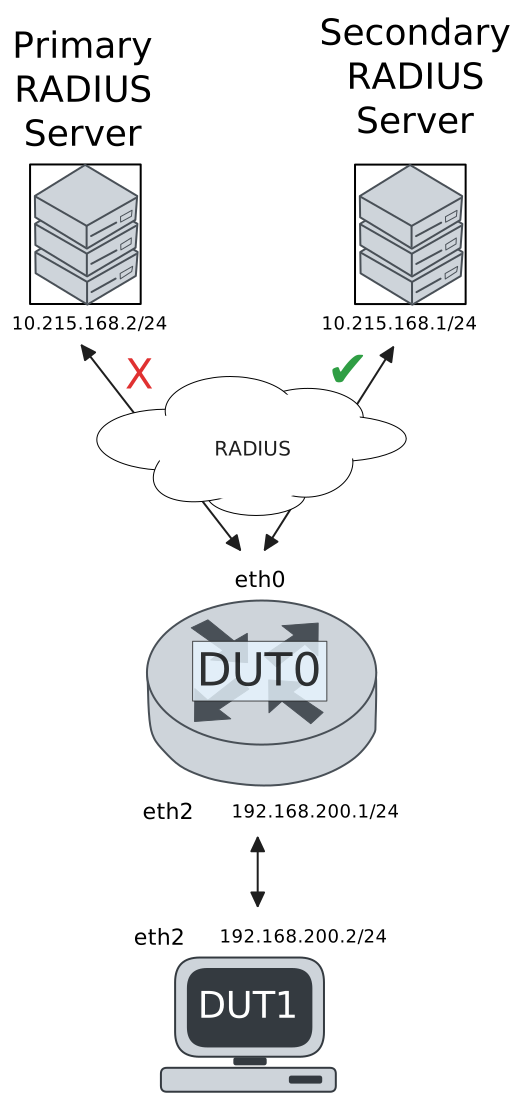
This scenario shows different Network Access Server (NAS) configurations: server failover and VRF-aware communication.
Test 802.1X Authentication Against NAS Through a VRF-Aware Interface
Description
This scenario shows how to configure 802.1X authentication. It focuses on Authenticator/NAS communication, when performed via an VRF-aware Ethernet interface.
Scenario
Step 1: Set the following configuration in DUT0 :
set interfaces ethernet eth0 address 10.215.168.64/24
set interfaces ethernet eth0 vrf WAN
set interfaces ethernet eth2 address 192.168.100.1/24
set interfaces ethernet eth2 authenticator 802.1x max-retransmissions 2
set interfaces ethernet eth2 authenticator aaa authentication list1
set interfaces ethernet eth2 authenticator log-level debug
set interfaces ethernet eth2 authenticator mode only-802.1x
set interfaces ethernet eth2 authenticator quiet-period 60
set interfaces ethernet eth2 authenticator reauth-period 0
set system aaa group radius radgroup1 local-vrf WAN
set system aaa group radius radgroup1 server serv1
set system aaa list list1 method 1 group radius radgroup1
set system aaa server radius serv1 address 10.215.168.1
set system aaa server radius serv1 encrypted-key U2FsdGVkX1+q/0V2dsnx2iFBLNcucsCsHWFEl56hZUPizf4BunurIUZodhFfmWnlkeivT5z0dzXfusA9SZP79w==
set system login user admin authentication encrypted-password '$6$GSjsCj8gHLv$/VcqU6FLi6CT2Oxn0MJQ2C2tqnRDrYKNF8HIYWJp68nvXvPdFccDsT04.WtigUONbKYrgKg8d6rEs8PjljMkH0'
set system vrf WAN
Step 2: Ping IP address 10.215.168.1 from DUT0:
admin@DUT0$ ping 10.215.168.1 vrf WAN count 1 size 56 timeout 1Show output
ping: Warning: source address might be selected on device other than: WAN
PING 10.215.168.1 (10.215.168.1) from 10.215.168.64 WAN: 56(84) bytes of data.
64 bytes from 10.215.168.1: icmp_seq=1 ttl=64 time=0.299 ms

--- 10.215.168.1 ping statistics ---
1 packets transmitted, 1 received, 0% packet loss, time 0ms
rtt min/avg/max/mdev = 0.299/0.299/0.299/0.000 ms
Step 3: Set the following configuration in DUT1 :
set interfaces ethernet eth2 address 192.168.100.2/24
set interfaces ethernet eth2 supplicant encrypted-password U2FsdGVkX19noylm9Zr1DxLSn9ixH53IPb4yYcL1XfQ=
set interfaces ethernet eth2 supplicant username testing
set system login user admin authentication encrypted-password '$6$GSjsCj8gHLv$/VcqU6FLi6CT2Oxn0MJQ2C2tqnRDrYKNF8HIYWJp68nvXvPdFccDsT04.WtigUONbKYrgKg8d6rEs8PjljMkH0'
Step 4: Run command interfaces ethernet eth2 supplicant show status at DUT1 and check if output contains the following tokens:
AuthorizedShow output
---------------------------------------------------
        Field                      Value
---------------------------------------------------
EAP State                                   SUCCESS
EAP TLS Cipher          ECDHE-RSA-AES256-GCM-SHA384
EAP TLS Version                             TLSv1.2
PAE State                             AUTHENTICATED
Supplicant Port Status                   Authorized
WPA State                                 COMPLETED
Step 5: Run command interfaces ethernet eth2 supplicant show stats at DUT1 and check if output matches the following regular expressions:
Port Status\s+AuthorizedShow output
-------------------------------
       Field           Value
-------------------------------
EAPoL Frames (Rx)            11
EAPoL Frames (Tx)            11
Invalid Frames (Rx)           0
Logoff Frames (Tx)            0
Port Status          Authorized
Req Frames (Rx)               9
Req ID Frames (Rx)            1
Resp Frames (Tx)             10
Start Frames (Tx)             1
Step 6: Run command interfaces ethernet eth2 authenticator show stats at DUT0 and check if output matches the following regular expressions:
Authentication Successes\s+1
Authentication Mode\s+802\.1X
Show output
---------------------------------------------
         Field                   Value
---------------------------------------------
Access Challenges                           9
Authentication Backend                 RADIUS
Authentication Failures                     0
Authentication Mode                    802.1X
Authentication Status     Authorized (802.1X)
Authentication Successes                    1
EAPoL frames (Rx)                          11
EAPoL frames (Tx)                          11
Quiet Period                               60
Reauthenticate                          FALSE
Reauthenticate Period                       0
Session Time                                0
Session User MAC            de:ad:be:ef:6c:12
Session User Name                     testing
Step 7: Ping IP address 192.168.100.1 from DUT1:
admin@DUT1$ ping 192.168.100.1 count 1 size 56 timeout 1Show output
PING 192.168.100.1 (192.168.100.1) 56(84) bytes of data.
64 bytes from 192.168.100.1: icmp_seq=1 ttl=64 time=3.81 ms

--- 192.168.100.1 ping statistics ---
1 packets transmitted, 1 received, 0% packet loss, time 0ms
rtt min/avg/max/mdev = 3.808/3.808/3.808/0.000 ms
Test MAB Authentication Against NAS Through a VRF-Aware Interface
Description
This scenario shows how to configure MAB authentication. It focuses on Authenticator/NAS communication, when performed via an VRF-aware Ethernet interface.
Scenario
Step 1: Set the following configuration in DUT0 :
set interfaces ethernet eth0 address 10.215.168.64/24
set interfaces ethernet eth0 vrf WAN
set interfaces ethernet eth2 address 192.168.100.1/24
set interfaces ethernet eth2 authenticator aaa authentication list1
set interfaces ethernet eth2 authenticator log-level debug
set interfaces ethernet eth2 authenticator mode only-MAB
set interfaces ethernet eth2 authenticator quiet-period 60
set interfaces ethernet eth2 authenticator reauth-period 0
set system aaa group radius radgroup1 local-vrf WAN
set system aaa group radius radgroup1 server serv1
set system aaa list list1 method 1 group radius radgroup1
set system aaa server radius serv1 address 10.215.168.1
set system aaa server radius serv1 encrypted-key U2FsdGVkX1/iOZ8UDMrx1AGQIB8i3ljV3nGqMJZ9gZ2CtseJpgy4d3EshuUFnpwFreaLb7Idh4Prt1qojHQo8A==
set system login user admin authentication encrypted-password '$6$GSjsCj8gHLv$/VcqU6FLi6CT2Oxn0MJQ2C2tqnRDrYKNF8HIYWJp68nvXvPdFccDsT04.WtigUONbKYrgKg8d6rEs8PjljMkH0'
set system vrf WAN
Step 2: Ping IP address 10.215.168.1 from DUT0:
admin@DUT0$ ping 10.215.168.1 vrf WAN count 1 size 56 timeout 1Show output
ping: Warning: source address might be selected on device other than: WAN
PING 10.215.168.1 (10.215.168.1) from 10.215.168.64 WAN: 56(84) bytes of data.
64 bytes from 10.215.168.1: icmp_seq=1 ttl=64 time=0.304 ms

--- 10.215.168.1 ping statistics ---
1 packets transmitted, 1 received, 0% packet loss, time 0ms
rtt min/avg/max/mdev = 0.304/0.304/0.304/0.000 ms
Step 3: Set the following configuration in DUT1 :
set interfaces ethernet eth2 address 192.168.100.2/24
set system login user admin authentication encrypted-password '$6$GSjsCj8gHLv$/VcqU6FLi6CT2Oxn0MJQ2C2tqnRDrYKNF8HIYWJp68nvXvPdFccDsT04.WtigUONbKYrgKg8d6rEs8PjljMkH0'
Step 4: Ping IP address 192.168.100.1 from DUT1:
admin@DUT1$ ping 192.168.100.1 count 1 size 56 timeout 1Show output
PING 192.168.100.1 (192.168.100.1) 56(84) bytes of data.
64 bytes from 192.168.100.1: icmp_seq=1 ttl=64 time=0.550 ms

--- 192.168.100.1 ping statistics ---
1 packets transmitted, 1 received, 0% packet loss, time 0ms
rtt min/avg/max/mdev = 0.550/0.550/0.550/0.000 ms
Step 5: Run command interfaces ethernet eth2 authenticator show stats at DUT0 and check if output matches the following regular expressions:
Authentication Successes\s+1
Authentication Mode\s+MAB
Show output
-------------------------------------------
         Field                  Value
-------------------------------------------
Access Challenges                         0
Authentication Backend               RADIUS
Authentication Failures                   0
Authentication Mode                     MAB
Authentication Status      Authorized (MAB)
Authentication Successes                  1
EAPoL frames (Rx)                         0
EAPoL frames (Tx)                         0
Quiet Period                             60
Reauthenticate                        FALSE
Reauthenticate Period                     0
Session Time                              0
Session User MAC          de:ad:be:ef:6c:12
Session User Name                       N/A
Step 6: Ping IP address 192.168.100.1 from DUT1:
admin@DUT1$ ping 192.168.100.1 count 1 size 56 timeout 1Show output
PING 192.168.100.1 (192.168.100.1) 56(84) bytes of data.
64 bytes from 192.168.100.1: icmp_seq=1 ttl=64 time=0.336 ms

--- 192.168.100.1 ping statistics ---
1 packets transmitted, 1 received, 0% packet loss, time 0ms
rtt min/avg/max/mdev = 0.336/0.336/0.336/0.000 ms
Test 802.1X Authentication With Server Failover
Description
This scenario shows how to configure 802.1X authentication. The primary Nework Access Server is not reachable, so the secondary one is used instead.
Scenario
Step 1: Set the following configuration in DUT0 :
set interfaces ethernet eth0 address 10.215.168.64/24
set interfaces ethernet eth0 vrf WAN
set interfaces ethernet eth2 address 192.168.100.1/24
set interfaces ethernet eth2 authenticator 802.1x max-retransmissions 2
set interfaces ethernet eth2 authenticator aaa authentication list1
set interfaces ethernet eth2 authenticator log-level debug
set interfaces ethernet eth2 authenticator mode only-802.1x
set interfaces ethernet eth2 authenticator quiet-period 60
set interfaces ethernet eth2 authenticator reauth-period 0
set system aaa group radius radgroup0 local-vrf WAN
set system aaa group radius radgroup0 server MAIN
set system aaa group radius radgroup1 local-vrf WAN
set system aaa group radius radgroup1 server serv1
set system aaa list list1 method 0 group radius radgroup0
set system aaa list list1 method 1 group radius radgroup1
set system aaa server radius MAIN address 10.215.168.2
set system aaa server radius MAIN encrypted-key U2FsdGVkX196kIa25W6mG/+O1rbHAEjjAQ2/1YKmcQ1bfNH125xhepgqPGM04bRXgfiT+lQn/XpFQBWjx52zUQ==
set system aaa server radius serv1 address 10.215.168.1
set system aaa server radius serv1 encrypted-key U2FsdGVkX1/bZftkREJNPt3YGVsMmNUHab3xPSDMHTcH4Gp+5P54G59eb0DmU04eQt7MCAUALveTyd22YuGSWw==
set system login user admin authentication encrypted-password '$6$GSjsCj8gHLv$/VcqU6FLi6CT2Oxn0MJQ2C2tqnRDrYKNF8HIYWJp68nvXvPdFccDsT04.WtigUONbKYrgKg8d6rEs8PjljMkH0'
set system vrf WAN
Step 2: Ping IP address 10.215.168.1 from DUT0:
admin@DUT0$ ping 10.215.168.1 vrf WAN count 1 size 56 timeout 1Show output
ping: Warning: source address might be selected on device other than: WAN
PING 10.215.168.1 (10.215.168.1) from 10.215.168.64 WAN: 56(84) bytes of data.
64 bytes from 10.215.168.1: icmp_seq=1 ttl=64 time=1.11 ms

--- 10.215.168.1 ping statistics ---
1 packets transmitted, 1 received, 0% packet loss, time 0ms
rtt min/avg/max/mdev = 1.110/1.110/1.110/0.000 ms
Step 3: Set the following configuration in DUT1 :
set interfaces ethernet eth2 address 192.168.100.2/24
set interfaces ethernet eth2 supplicant encrypted-password U2FsdGVkX1/rBOii1Gvp/Gghi0qZ0l7Q9TKJIZFG0fA=
set interfaces ethernet eth2 supplicant username testing
set system login user admin authentication encrypted-password '$6$GSjsCj8gHLv$/VcqU6FLi6CT2Oxn0MJQ2C2tqnRDrYKNF8HIYWJp68nvXvPdFccDsT04.WtigUONbKYrgKg8d6rEs8PjljMkH0'
Step 4: Run command interfaces ethernet eth2 supplicant show status at DUT1 and check if output contains the following tokens:
AuthorizedShow output
---------------------------------------------------
        Field                      Value
---------------------------------------------------
EAP State                                   SUCCESS
EAP TLS Cipher          ECDHE-RSA-AES256-GCM-SHA384
EAP TLS Version                             TLSv1.2
PAE State                             AUTHENTICATED
Supplicant Port Status                   Authorized
WPA State                                 COMPLETED
Step 5: Run command interfaces ethernet eth2 supplicant show stats at DUT1 and check if output matches the following regular expressions:
Port Status\s+AuthorizedShow output
-------------------------------
       Field           Value
-------------------------------
EAPoL Frames (Rx)            11
EAPoL Frames (Tx)            11
Invalid Frames (Rx)           0
Logoff Frames (Tx)            0
Port Status          Authorized
Req Frames (Rx)               9
Req ID Frames (Rx)            1
Resp Frames (Tx)             10
Start Frames (Tx)             1
Step 6: Run command interfaces ethernet eth2 authenticator show stats at DUT0 and check if output matches the following regular expressions:
Authentication Successes\s+1
Authentication Mode\s+802\.1X
Show output
---------------------------------------------
         Field                   Value
---------------------------------------------
Access Challenges                           9
Authentication Backend                 RADIUS
Authentication Failures                     0
Authentication Mode                    802.1X
Authentication Status     Authorized (802.1X)
Authentication Successes                    1
EAPoL frames (Rx)                          11
EAPoL frames (Tx)                          11
Quiet Period                               60
Reauthenticate                          FALSE
Reauthenticate Period                       0
Session Time                                0
Session User MAC            de:ad:be:ef:6c:12
Session User Name                     testing
Step 7: Ping IP address 192.168.100.1 from DUT1:
admin@DUT1$ ping 192.168.100.1 count 1 size 56 timeout 1Show output
PING 192.168.100.1 (192.168.100.1) 56(84) bytes of data.
64 bytes from 192.168.100.1: icmp_seq=1 ttl=64 time=0.831 ms

--- 192.168.100.1 ping statistics ---
1 packets transmitted, 1 received, 0% packet loss, time 0ms
rtt min/avg/max/mdev = 0.831/0.831/0.831/0.000 ms
Step 8: Run command system journal show | grep "osdx hostapd" at DUT0 and check if output contains the following tokens:
No response from Authentication server 10.215.168.2Show output
Apr 16 23:44:01.287391 osdx hostapd[1085396]: eth2: IEEE 802.11 Fetching hardware channel/rate support not supported.
Apr 16 23:44:01.287409 osdx hostapd[1085396]: eth2: RADIUS Authentication server 10.215.168.2:1812
Apr 16 23:44:01.287768 osdx hostapd[1085396]: connect[radius]: No route to host
Apr 16 23:44:01.287475 osdx hostapd[1085396]: eth2: IEEE 802.1X Initializing IEEE 802.1X: mode=802.1X, eap_server=0, eap_quiet_period=60, eap_max_retrans=2
Apr 16 23:44:01.287479 osdx hostapd[1085396]: eth2: IEEE 802.1X IEEE 802.1X: Enabling packet capture discovery mode
Apr 16 23:44:01.308558 osdx hostapd[1085396]: Discovery mode enabled on eth2
Apr 16 23:44:01.308558 osdx hostapd[1085396]: eth2: interface state UNINITIALIZED->ENABLED
Apr 16 23:44:01.308558 osdx hostapd[1085396]: eth2: AP-ENABLED
Apr 16 23:44:05.023186 osdx hostapd[1085397]: eth2: STA de:ad:be:ef:6c:12 IEEE 802.1X: New STA de:ad:be:ef:6c:12 added
Apr 16 23:44:05.023204 osdx hostapd[1085397]: eth2: IEEE 802.1X IEEE 802.1X: Disabling packet capture discovery mode
Apr 16 23:44:05.039289 osdx hostapd[1085397]: eth2: STA de:ad:be:ef:6c:12 IEEE 802.1X: start authentication
Apr 16 23:44:05.039331 osdx hostapd[1085397]: eth2: STA 01:80:c2:00:00:03 IEEE 802.1X: disabling transmission of periodic EAP-Request frames
Apr 16 23:44:05.039356 osdx hostapd[1085397]: eth2: STA de:ad:be:ef:6c:12 IEEE 802.1X: received EAPOL-Start from STA
Apr 16 23:44:05.039372 osdx hostapd[1085397]: eth2: STA de:ad:be:ef:6c:12 IEEE 802.1X: unauthorizing port
Apr 16 23:44:05.039384 osdx hostapd[1085397]: eth2: STA 01:80:c2:00:00:03 IEEE 802.1X: Trying RADIUS authentication
Apr 16 23:44:05.039415 osdx hostapd[1085397]: eth2: STA de:ad:be:ef:6c:12 IEEE 802.1X: Sending EAP Packet (identifier 119)
Apr 16 23:44:05.043125 osdx hostapd[1085397]: eth2: STA de:ad:be:ef:6c:12 IEEE 802.1X: received EAP packet (code=2 id=119 len=12) from STA: EAP Response-Identity (1)
Apr 16 23:44:05.043137 osdx hostapd[1085397]: eth2: STA de:ad:be:ef:6c:12 IEEE 802.1X: STA identity 'testing'
Apr 16 23:44:05.043186 osdx hostapd[1085397]: eth2: RADIUS Authentication server 10.215.168.2:1812
Apr 16 23:44:05.045700 osdx hostapd[1085397]: eth2: RADIUS Sending RADIUS message to authentication server
Apr 16 23:44:05.046098 osdx hostapd[1085397]: eth2: RADIUS Next RADIUS client retransmit in 1 seconds
Apr 16 23:44:06.046202 osdx hostapd[1085397]: eth2: STA de:ad:be:ef:6c:12 RADIUS: Resending RADIUS message (id=0)
Apr 16 23:44:06.046235 osdx hostapd[1085397]: eth2: RADIUS Next RADIUS client retransmit in 2 seconds
Apr 16 23:44:08.046333 osdx hostapd[1085397]: eth2: STA de:ad:be:ef:6c:12 RADIUS: Resending RADIUS message (id=0)
Apr 16 23:44:08.046368 osdx hostapd[1085397]: eth2: RADIUS Next RADIUS client retransmit in 4 seconds
Apr 16 23:44:12.046451 osdx hostapd[1085397]: eth2: RADIUS No response from Authentication server 10.215.168.2:1812 - failover (1º round)
Apr 16 23:44:12.046460 osdx hostapd[1085397]: eth2: RADIUS Authentication server 10.215.168.1:1812
Apr 16 23:44:12.046500 osdx hostapd[1085397]: eth2: STA de:ad:be:ef:6c:12 RADIUS: Resending RADIUS message (id=0)
Apr 16 23:44:12.046527 osdx hostapd[1085397]: eth2: RADIUS Next RADIUS client retransmit in 2 seconds
Apr 16 23:44:12.046807 osdx hostapd[1085397]: eth2: RADIUS Received 80 bytes from RADIUS server
Apr 16 23:44:12.046812 osdx hostapd[1085397]: eth2: RADIUS Received RADIUS message
Apr 16 23:44:12.046815 osdx hostapd[1085397]: eth2: STA de:ad:be:ef:6c:12 RADIUS: Received RADIUS packet matched with a pending request, round trip time 0.00 sec
Apr 16 23:44:12.046862 osdx hostapd[1085397]: eth2: STA de:ad:be:ef:6c:12 IEEE 802.1X: decapsulated EAP packet (code=1 id=120 len=22) from RADIUS server: EAP-Request-MD5 (4)
Apr 16 23:44:12.046868 osdx hostapd[1085397]: eth2: STA de:ad:be:ef:6c:12 IEEE 802.1X: Sending EAP Packet (identifier 120)
Apr 16 23:44:12.047180 osdx hostapd[1085397]: eth2: STA de:ad:be:ef:6c:12 IEEE 802.1X: received EAP packet (code=2 id=120 len=6) from STA: EAP Response-unknown (3)
Apr 16 23:44:12.047230 osdx hostapd[1085397]: eth2: RADIUS Sending RADIUS message to authentication server
Apr 16 23:44:12.047242 osdx hostapd[1085397]: eth2: RADIUS Next RADIUS client retransmit in 1 seconds
Apr 16 23:44:12.047467 osdx hostapd[1085397]: eth2: RADIUS Received 64 bytes from RADIUS server
Apr 16 23:44:12.047473 osdx hostapd[1085397]: eth2: RADIUS Received RADIUS message
Apr 16 23:44:12.047476 osdx hostapd[1085397]: eth2: STA de:ad:be:ef:6c:12 RADIUS: Received RADIUS packet matched with a pending request, round trip time 0.00 sec
Apr 16 23:44:12.047494 osdx hostapd[1085397]: eth2: STA de:ad:be:ef:6c:12 IEEE 802.1X: decapsulated EAP packet (code=1 id=121 len=6) from RADIUS server: EAP-Request-PEAP (25)
Apr 16 23:44:12.047501 osdx hostapd[1085397]: eth2: STA de:ad:be:ef:6c:12 IEEE 802.1X: Sending EAP Packet (identifier 121)
Apr 16 23:44:12.047938 osdx hostapd[1085397]: eth2: STA de:ad:be:ef:6c:12 IEEE 802.1X: received EAP packet (code=2 id=121 len=194) from STA: EAP Response-PEAP (25)
Apr 16 23:44:12.047974 osdx hostapd[1085397]: eth2: RADIUS Sending RADIUS message to authentication server
Apr 16 23:44:12.047985 osdx hostapd[1085397]: eth2: RADIUS Next RADIUS client retransmit in 1 seconds
Apr 16 23:44:12.049042 osdx hostapd[1085397]: eth2: RADIUS Received 1068 bytes from RADIUS server
Apr 16 23:44:12.049048 osdx hostapd[1085397]: eth2: RADIUS Received RADIUS message
Apr 16 23:44:12.049051 osdx hostapd[1085397]: eth2: STA de:ad:be:ef:6c:12 RADIUS: Received RADIUS packet matched with a pending request, round trip time 0.00 sec
Apr 16 23:44:12.049067 osdx hostapd[1085397]: eth2: STA de:ad:be:ef:6c:12 IEEE 802.1X: decapsulated EAP packet (code=1 id=122 len=1004) from RADIUS server: EAP-Request-PEAP (25)
Apr 16 23:44:12.049072 osdx hostapd[1085397]: eth2: STA de:ad:be:ef:6c:12 IEEE 802.1X: Sending EAP Packet (identifier 122)
Apr 16 23:44:12.049246 osdx hostapd[1085397]: eth2: STA de:ad:be:ef:6c:12 IEEE 802.1X: received EAP packet (code=2 id=122 len=6) from STA: EAP Response-PEAP (25)
Apr 16 23:44:12.049290 osdx hostapd[1085397]: eth2: RADIUS Sending RADIUS message to authentication server
Apr 16 23:44:12.049302 osdx hostapd[1085397]: eth2: RADIUS Next RADIUS client retransmit in 1 seconds
Apr 16 23:44:12.049460 osdx hostapd[1085397]: eth2: RADIUS Received 229 bytes from RADIUS server
Apr 16 23:44:12.049464 osdx hostapd[1085397]: eth2: RADIUS Received RADIUS message
Apr 16 23:44:12.049467 osdx hostapd[1085397]: eth2: STA de:ad:be:ef:6c:12 RADIUS: Received RADIUS packet matched with a pending request, round trip time 0.00 sec
Apr 16 23:44:12.049480 osdx hostapd[1085397]: eth2: STA de:ad:be:ef:6c:12 IEEE 802.1X: decapsulated EAP packet (code=1 id=123 len=171) from RADIUS server: EAP-Request-PEAP (25)
Apr 16 23:44:12.049486 osdx hostapd[1085397]: eth2: STA de:ad:be:ef:6c:12 IEEE 802.1X: Sending EAP Packet (identifier 123)
Apr 16 23:44:12.050872 osdx hostapd[1085397]: eth2: STA de:ad:be:ef:6c:12 IEEE 802.1X: received EAP packet (code=2 id=123 len=103) from STA: EAP Response-PEAP (25)
Apr 16 23:44:12.050923 osdx hostapd[1085397]: eth2: RADIUS Sending RADIUS message to authentication server
Apr 16 23:44:12.050936 osdx hostapd[1085397]: eth2: RADIUS Next RADIUS client retransmit in 1 seconds
Apr 16 23:44:12.051238 osdx hostapd[1085397]: eth2: RADIUS Received 115 bytes from RADIUS server
Apr 16 23:44:12.051242 osdx hostapd[1085397]: eth2: RADIUS Received RADIUS message
Apr 16 23:44:12.051245 osdx hostapd[1085397]: eth2: STA de:ad:be:ef:6c:12 RADIUS: Received RADIUS packet matched with a pending request, round trip time 0.00 sec
Apr 16 23:44:12.051274 osdx hostapd[1085397]: eth2: STA de:ad:be:ef:6c:12 IEEE 802.1X: decapsulated EAP packet (code=1 id=124 len=57) from RADIUS server: EAP-Request-PEAP (25)
Apr 16 23:44:12.051280 osdx hostapd[1085397]: eth2: STA de:ad:be:ef:6c:12 IEEE 802.1X: Sending EAP Packet (identifier 124)
Apr 16 23:44:12.051529 osdx hostapd[1085397]: eth2: STA de:ad:be:ef:6c:12 IEEE 802.1X: received EAP packet (code=2 id=124 len=6) from STA: EAP Response-PEAP (25)
Apr 16 23:44:12.051563 osdx hostapd[1085397]: eth2: RADIUS Sending RADIUS message to authentication server
Apr 16 23:44:12.051576 osdx hostapd[1085397]: eth2: RADIUS Next RADIUS client retransmit in 1 seconds
Apr 16 23:44:12.051726 osdx hostapd[1085397]: eth2: RADIUS Received 98 bytes from RADIUS server
Apr 16 23:44:12.051731 osdx hostapd[1085397]: eth2: RADIUS Received RADIUS message
Apr 16 23:44:12.051735 osdx hostapd[1085397]: eth2: STA de:ad:be:ef:6c:12 RADIUS: Received RADIUS packet matched with a pending request, round trip time 0.00 sec
Apr 16 23:44:12.051749 osdx hostapd[1085397]: eth2: STA de:ad:be:ef:6c:12 IEEE 802.1X: decapsulated EAP packet (code=1 id=125 len=40) from RADIUS server: EAP-Request-PEAP (25)
Apr 16 23:44:12.051755 osdx hostapd[1085397]: eth2: STA de:ad:be:ef:6c:12 IEEE 802.1X: Sending EAP Packet (identifier 125)
Apr 16 23:44:12.051908 osdx hostapd[1085397]: eth2: STA de:ad:be:ef:6c:12 IEEE 802.1X: received EAP packet (code=2 id=125 len=43) from STA: EAP Response-PEAP (25)
Apr 16 23:44:12.051935 osdx hostapd[1085397]: eth2: RADIUS Sending RADIUS message to authentication server
Apr 16 23:44:12.051945 osdx hostapd[1085397]: eth2: RADIUS Next RADIUS client retransmit in 1 seconds
Apr 16 23:44:12.052075 osdx hostapd[1085397]: eth2: RADIUS Received 131 bytes from RADIUS server
Apr 16 23:44:12.052080 osdx hostapd[1085397]: eth2: RADIUS Received RADIUS message
Apr 16 23:44:12.052083 osdx hostapd[1085397]: eth2: STA de:ad:be:ef:6c:12 RADIUS: Received RADIUS packet matched with a pending request, round trip time 0.00 sec
Apr 16 23:44:12.052095 osdx hostapd[1085397]: eth2: STA de:ad:be:ef:6c:12 IEEE 802.1X: decapsulated EAP packet (code=1 id=126 len=73) from RADIUS server: EAP-Request-PEAP (25)
Apr 16 23:44:12.052100 osdx hostapd[1085397]: eth2: STA de:ad:be:ef:6c:12 IEEE 802.1X: Sending EAP Packet (identifier 126)
Apr 16 23:44:12.052289 osdx hostapd[1085397]: eth2: STA de:ad:be:ef:6c:12 IEEE 802.1X: received EAP packet (code=2 id=126 len=97) from STA: EAP Response-PEAP (25)
Apr 16 23:44:12.052323 osdx hostapd[1085397]: eth2: RADIUS Sending RADIUS message to authentication server
Apr 16 23:44:12.052332 osdx hostapd[1085397]: eth2: RADIUS Next RADIUS client retransmit in 1 seconds
Apr 16 23:44:12.052501 osdx hostapd[1085397]: eth2: RADIUS Received 140 bytes from RADIUS server
Apr 16 23:44:12.052505 osdx hostapd[1085397]: eth2: RADIUS Received RADIUS message
Apr 16 23:44:12.052508 osdx hostapd[1085397]: eth2: STA de:ad:be:ef:6c:12 RADIUS: Received RADIUS packet matched with a pending request, round trip time 0.00 sec
Apr 16 23:44:12.052521 osdx hostapd[1085397]: eth2: STA de:ad:be:ef:6c:12 IEEE 802.1X: decapsulated EAP packet (code=1 id=127 len=82) from RADIUS server: EAP-Request-PEAP (25)
Apr 16 23:44:12.052526 osdx hostapd[1085397]: eth2: STA de:ad:be:ef:6c:12 IEEE 802.1X: Sending EAP Packet (identifier 127)
Apr 16 23:44:12.052710 osdx hostapd[1085397]: eth2: STA de:ad:be:ef:6c:12 IEEE 802.1X: received EAP packet (code=2 id=127 len=37) from STA: EAP Response-PEAP (25)
Apr 16 23:44:12.052740 osdx hostapd[1085397]: eth2: RADIUS Sending RADIUS message to authentication server
Apr 16 23:44:12.052749 osdx hostapd[1085397]: eth2: RADIUS Next RADIUS client retransmit in 1 seconds
Apr 16 23:44:12.052898 osdx hostapd[1085397]: eth2: RADIUS Received 104 bytes from RADIUS server
Apr 16 23:44:12.052903 osdx hostapd[1085397]: eth2: RADIUS Received RADIUS message
Apr 16 23:44:12.052905 osdx hostapd[1085397]: eth2: STA de:ad:be:ef:6c:12 RADIUS: Received RADIUS packet matched with a pending request, round trip time 0.00 sec
Apr 16 23:44:12.052918 osdx hostapd[1085397]: eth2: STA de:ad:be:ef:6c:12 IEEE 802.1X: decapsulated EAP packet (code=1 id=128 len=46) from RADIUS server: EAP-Request-PEAP (25)
Apr 16 23:44:12.052923 osdx hostapd[1085397]: eth2: STA de:ad:be:ef:6c:12 IEEE 802.1X: Sending EAP Packet (identifier 128)
Apr 16 23:44:12.053127 osdx hostapd[1085397]: eth2: STA de:ad:be:ef:6c:12 IEEE 802.1X: received EAP packet (code=2 id=128 len=46) from STA: EAP Response-PEAP (25)
Apr 16 23:44:12.053157 osdx hostapd[1085397]: eth2: RADIUS Sending RADIUS message to authentication server
Apr 16 23:44:12.053166 osdx hostapd[1085397]: eth2: RADIUS Next RADIUS client retransmit in 1 seconds
Apr 16 23:44:12.053368 osdx hostapd[1085397]: eth2: RADIUS Received 175 bytes from RADIUS server
Apr 16 23:44:12.053373 osdx hostapd[1085397]: eth2: RADIUS Received RADIUS message
Apr 16 23:44:12.053376 osdx hostapd[1085397]: eth2: STA de:ad:be:ef:6c:12 RADIUS: Received RADIUS packet matched with a pending request, round trip time 0.00 sec
Apr 16 23:44:12.053396 osdx hostapd[1085397]: eth2: STA de:ad:be:ef:6c:12 IEEE 802.1X: old identity 'testing' updated with User-Name from Access-Accept 'testing'
Apr 16 23:44:12.053400 osdx hostapd[1085397]: eth2: STA de:ad:be:ef:6c:12 IEEE 802.1X: decapsulated EAP packet (code=3 id=128 len=4) from RADIUS server: EAP Success
Apr 16 23:44:12.053414 osdx hostapd[1085397]: eth2: STA de:ad:be:ef:6c:12 IEEE 802.1X: Sending EAP Packet (identifier 128)
Apr 16 23:44:12.053433 osdx hostapd[1085397]: eth2: STA de:ad:be:ef:6c:12 IEEE 802.1X: authorizing port
Apr 16 23:44:12.053436 osdx hostapd[1085397]: eth2: STA de:ad:be:ef:6c:12 RADIUS: starting accounting session 8123E6A4FE3A00B3
Apr 16 23:44:12.053440 osdx hostapd[1085397]: eth2: STA de:ad:be:ef:6c:12 IEEE 802.1X: authenticated - EAP type: 25 (PEAP)
Test MAB Authentication With Server Failover
Description
This scenario shows how to configure MAB authentication. The primary Nework Access Server is not reachable, so the secondary one is used instead.
Scenario
Step 1: Set the following configuration in DUT0 :
set interfaces ethernet eth0 address 10.215.168.64/24
set interfaces ethernet eth0 vrf WAN
set interfaces ethernet eth2 address 192.168.100.1/24
set interfaces ethernet eth2 authenticator aaa authentication list1
set interfaces ethernet eth2 authenticator log-level debug
set interfaces ethernet eth2 authenticator mode only-MAB
set interfaces ethernet eth2 authenticator quiet-period 60
set interfaces ethernet eth2 authenticator reauth-period 0
set system aaa group radius radgroup0 local-vrf WAN
set system aaa group radius radgroup0 server MAIN
set system aaa group radius radgroup1 local-vrf WAN
set system aaa group radius radgroup1 server serv1
set system aaa list list1 method 0 group radius radgroup0
set system aaa list list1 method 1 group radius radgroup1
set system aaa server radius MAIN address 10.215.168.2
set system aaa server radius MAIN encrypted-key U2FsdGVkX1+3Y4zTEusDyLQABDkjK+STu0naCy9u8aHnKeAb3rJMcZFfAzMzWZgpGpQORY9mATfjW9dKYaGY9g==
set system aaa server radius serv1 address 10.215.168.1
set system aaa server radius serv1 encrypted-key U2FsdGVkX1+ZiNayr5/SKGmdJYFUN/ddhaE/KufpknmWmYtUG433sD31jfAZDgEB4x4lWVpJK8vzBnAS41N0Ug==
set system login user admin authentication encrypted-password '$6$GSjsCj8gHLv$/VcqU6FLi6CT2Oxn0MJQ2C2tqnRDrYKNF8HIYWJp68nvXvPdFccDsT04.WtigUONbKYrgKg8d6rEs8PjljMkH0'
set system vrf WAN
Step 2: Ping IP address 10.215.168.1 from DUT0:
admin@DUT0$ ping 10.215.168.1 vrf WAN count 1 size 56 timeout 1Show output
ping: Warning: source address might be selected on device other than: WAN
PING 10.215.168.1 (10.215.168.1) from 10.215.168.64 WAN: 56(84) bytes of data.
64 bytes from 10.215.168.1: icmp_seq=1 ttl=64 time=0.193 ms

--- 10.215.168.1 ping statistics ---
1 packets transmitted, 1 received, 0% packet loss, time 0ms
rtt min/avg/max/mdev = 0.193/0.193/0.193/0.000 ms
Step 3: Set the following configuration in DUT1 :
set interfaces ethernet eth2 address 192.168.100.2/24
set system login user admin authentication encrypted-password '$6$GSjsCj8gHLv$/VcqU6FLi6CT2Oxn0MJQ2C2tqnRDrYKNF8HIYWJp68nvXvPdFccDsT04.WtigUONbKYrgKg8d6rEs8PjljMkH0'
Step 4: Run command interfaces ethernet eth2 authenticator show stats at DUT0 and check if output matches the following regular expressions:
Authentication Successes\s+1
Authentication Mode\s+MAB
Show output
-------------------------------------------
         Field                  Value
-------------------------------------------
Access Challenges                         0
Authentication Backend               RADIUS
Authentication Failures                   0
Authentication Mode                     MAB
Authentication Status      Authorized (MAB)
Authentication Successes                  1
EAPoL frames (Rx)                         0
EAPoL frames (Tx)                         0
Quiet Period                             60
Reauthenticate                        FALSE
Reauthenticate Period                     0
Session Time                              0
Session User MAC          de:ad:be:ef:6c:12
Session User Name                       N/A
Step 5: Ping IP address 192.168.100.1 from DUT1:
admin@DUT1$ ping 192.168.100.1 count 1 size 56 timeout 1Show output
PING 192.168.100.1 (192.168.100.1) 56(84) bytes of data.
64 bytes from 192.168.100.1: icmp_seq=1 ttl=64 time=0.321 ms

--- 192.168.100.1 ping statistics ---
1 packets transmitted, 1 received, 0% packet loss, time 0ms
rtt min/avg/max/mdev = 0.321/0.321/0.321/0.000 ms
Step 6: Run command system journal show | grep "osdx hostapd" at DUT0 and check if output contains the following tokens:
No response from Authentication server 10.215.168.2Show output
Apr 16 23:44:22.317436 osdx hostapd[1086044]: eth2: IEEE 802.11 Fetching hardware channel/rate support not supported.
Apr 16 23:44:22.317453 osdx hostapd[1086044]: eth2: RADIUS Authentication server 10.215.168.2:1812
Apr 16 23:44:22.317703 osdx hostapd[1086044]: connect[radius]: No route to host
Apr 16 23:44:22.317510 osdx hostapd[1086044]: eth2: IEEE 802.1X Initializing IEEE 802.1X: mode=MAB-only, eap_server=0, eap_quiet_period=60, eap_max_retrans=5
Apr 16 23:44:22.317514 osdx hostapd[1086044]: eth2: IEEE 802.1X IEEE 802.1X: Enabling packet capture discovery mode
Apr 16 23:44:22.345296 osdx hostapd[1086044]: Discovery mode enabled on eth2
Apr 16 23:44:22.345600 osdx hostapd[1086044]: eth2: interface state UNINITIALIZED->ENABLED
Apr 16 23:44:22.345600 osdx hostapd[1086044]: eth2: AP-ENABLED
Apr 16 23:44:27.345623 osdx hostapd[1086045]: eth2: STA de:ad:be:ef:6c:12 DRIVER: Device discovered, triggering MAB authentication
Apr 16 23:44:27.345670 osdx hostapd[1086045]: eth2: STA de:ad:be:ef:6c:12 IEEE 802.1X: New STA de:ad:be:ef:6c:12 added
Apr 16 23:44:27.345680 osdx hostapd[1086045]: eth2: IEEE 802.1X IEEE 802.1X: Disabling packet capture discovery mode
Apr 16 23:44:27.361346 osdx hostapd[1086045]: eth2: STA de:ad:be:ef:6c:12 IEEE 802.1X: MAB-only mode: Starting MAB authentication
Apr 16 23:44:27.361383 osdx hostapd[1086045]: eth2: STA de:ad:be:ef:6c:12 IEEE 802.1X: MAB: Starting RADIUS query
Apr 16 23:44:27.361405 osdx hostapd[1086045]: eth2: STA de:ad:be:ef:6c:12 IEEE 802.1X: MAB: User-Name = de:ad:be:ef:6c:12
Apr 16 23:44:27.363833 osdx hostapd[1086045]: eth2: STA de:ad:be:ef:6c:12 IEEE 802.1X: MAB: User-Password = de:ad:be:ef:6c:12
Apr 16 23:44:27.363847 osdx hostapd[1086045]: eth2: RADIUS Authentication server 10.215.168.2:1812
Apr 16 23:44:27.363941 osdx hostapd[1086045]: eth2: RADIUS Sending RADIUS message to authentication server
Apr 16 23:44:27.363983 osdx hostapd[1086045]: eth2: RADIUS Next RADIUS client retransmit in 1 seconds
Apr 16 23:44:28.364071 osdx hostapd[1086045]: eth2: STA de:ad:be:ef:6c:12 RADIUS: Resending RADIUS message (id=128)
Apr 16 23:44:28.364102 osdx hostapd[1086045]: eth2: RADIUS Next RADIUS client retransmit in 2 seconds
Apr 16 23:44:30.364183 osdx hostapd[1086045]: eth2: STA de:ad:be:ef:6c:12 RADIUS: Resending RADIUS message (id=128)
Apr 16 23:44:30.364208 osdx hostapd[1086045]: eth2: RADIUS Next RADIUS client retransmit in 4 seconds
Apr 16 23:44:34.364571 osdx hostapd[1086045]: eth2: RADIUS No response from Authentication server 10.215.168.2:1812 - failover (1º round)
Apr 16 23:44:34.364584 osdx hostapd[1086045]: eth2: RADIUS Authentication server 10.215.168.1:1812
Apr 16 23:44:34.364640 osdx hostapd[1086045]: eth2: STA de:ad:be:ef:6c:12 RADIUS: Resending RADIUS message (id=128)
Apr 16 23:44:34.364682 osdx hostapd[1086045]: eth2: RADIUS Next RADIUS client retransmit in 2 seconds
Apr 16 23:44:34.365025 osdx hostapd[1086045]: eth2: RADIUS Received 20 bytes from RADIUS server
Apr 16 23:44:34.365032 osdx hostapd[1086045]: eth2: RADIUS Received RADIUS message
Apr 16 23:44:34.365037 osdx hostapd[1086045]: eth2: STA de:ad:be:ef:6c:12 RADIUS: Received RADIUS packet matched with a pending request, round trip time 0.00 sec
Apr 16 23:44:34.365042 osdx hostapd[1086045]: eth2: STA de:ad:be:ef:6c:12 IEEE 802.1X: MAB: Processing RADIUS response
Apr 16 23:44:34.365079 osdx hostapd[1086045]: eth2: STA de:ad:be:ef:6c:12 IEEE 802.1X: MAB: Identity set to 'de:ad:be:ef:6c:12'
Apr 16 23:44:34.365099 osdx hostapd[1086045]: eth2: STA de:ad:be:ef:6c:12 IEEE 802.1X: MAB: station successfully authenticated
Apr 16 23:44:34.365103 osdx hostapd[1086045]: eth2: IEEE 802.1X IEEE 802.1X: Discovery already disabled
Apr 16 23:44:34.365119 osdx hostapd[1086045]: eth2: STA de:ad:be:ef:6c:12 IEEE 802.1X: authorizing port
Apr 16 23:44:34.365123 osdx hostapd[1086045]: eth2: STA de:ad:be:ef:6c:12 RADIUS: starting accounting session E15098F660D78B51