Relay
This scenario shows how to configure service dhcp-relay. The
relay agent must be used when the DHCP server and the DHCP
clients are not connected to the same layer 2 domain.
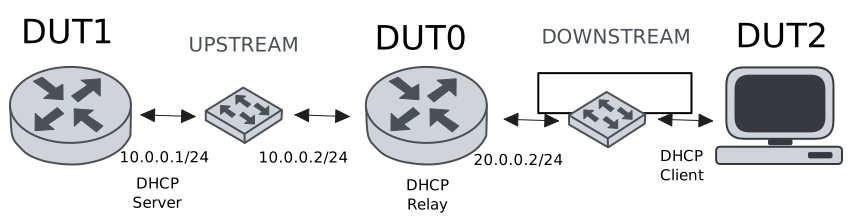
Test DHCP Relay
Description
This example demonstrates how to configure a DHCP relay instance in DUT0 to forward DHCP requests from DUT2 to DUT1.
Scenario
Step 1: Set the following configuration in DUT0 :
set interfaces ethernet eth0 vif 100 address 10.0.0.2/24
set interfaces ethernet eth1 vif 200 address 20.0.0.2/24
set service dhcp-relay INS downstream-interface eth1.200
set service dhcp-relay INS server 10.0.0.1
set service dhcp-relay INS upstream-interface eth0.100
set system login user admin authentication encrypted-password '$6$GSjsCj8gHLv$/VcqU6FLi6CT2Oxn0MJQ2C2tqnRDrYKNF8HIYWJp68nvXvPdFccDsT04.WtigUONbKYrgKg8d6rEs8PjljMkH0'
Step 2: Set the following configuration in DUT1 :
set interfaces ethernet eth0 vif 100 address 10.0.0.1/24
set protocols static route 0.0.0.0/0 next-hop 10.0.0.2
set service dhcp-server shared-network dummy subnet 10.0.0.1/32
set service dhcp-server shared-network remote subnet 20.0.0.0/24 start 20.0.0.50 stop 20.0.0.50
set system login user admin authentication encrypted-password '$6$GSjsCj8gHLv$/VcqU6FLi6CT2Oxn0MJQ2C2tqnRDrYKNF8HIYWJp68nvXvPdFccDsT04.WtigUONbKYrgKg8d6rEs8PjljMkH0'
Step 3: Set the following configuration in DUT2 :
set interfaces ethernet eth0 vif 200 address dhcp
set system login user admin authentication encrypted-password '$6$GSjsCj8gHLv$/VcqU6FLi6CT2Oxn0MJQ2C2tqnRDrYKNF8HIYWJp68nvXvPdFccDsT04.WtigUONbKYrgKg8d6rEs8PjljMkH0'
Step 4: Ping IP address 10.0.0.1 from DUT0:
admin@DUT0$ ping 10.0.0.1 count 1 size 56 timeout 1Show output
PING 10.0.0.1 (10.0.0.1) 56(84) bytes of data.
64 bytes from 10.0.0.1: icmp_seq=1 ttl=64 time=0.203 ms

--- 10.0.0.1 ping statistics ---
1 packets transmitted, 1 received, 0% packet loss, time 0ms
rtt min/avg/max/mdev = 0.203/0.203/0.203/0.000 ms
Step 5: Run command interfaces ethernet show at DUT2 and check if output contains the following tokens:
20.0.0.50Show output
---------------------------------------------------------------------
  Name             IP Address           Admin  Oper  Vrf  Description
---------------------------------------------------------------------
    eth0  fe80::dcad:beff:feef:6c20/64  up     up
eth0.200  20.0.0.50/24                  up     up
          fe80::dcad:beff:feef:6c20/64
    eth1                                down   down
    eth2                                down   down
    eth3                                down   down
Test DHCP Relay With Giaddr
Description
This example demonstrates how to set the gateway IP address (giaddr) in the IP address. This value must be set in an IP address that the DHCP server can reach.
Scenario
Step 1: Set the following configuration in DUT0 :
set interfaces ethernet eth0 vif 100 address 10.0.0.2/24
set interfaces ethernet eth1 vif 200 address 20.0.0.2/24
set interfaces ethernet eth1 vif 200 address 20.0.0.3/24
set service dhcp-relay INS downstream-interface eth1.200
set service dhcp-relay INS server 10.0.0.1 giaddr 20.0.0.3
set service dhcp-relay INS upstream-interface eth0.100
set system login user admin authentication encrypted-password '$6$GSjsCj8gHLv$/VcqU6FLi6CT2Oxn0MJQ2C2tqnRDrYKNF8HIYWJp68nvXvPdFccDsT04.WtigUONbKYrgKg8d6rEs8PjljMkH0'
Step 2: Set the following configuration in DUT1 :
set interfaces ethernet eth0 vif 100 address 10.0.0.1/24
set protocols static route 0.0.0.0/0 next-hop 10.0.0.2
set service dhcp-server shared-network dummy subnet 10.0.0.1/32
set service dhcp-server shared-network remote subnet 20.0.0.0/24 start 20.0.0.50 stop 20.0.0.50
set system login user admin authentication encrypted-password '$6$GSjsCj8gHLv$/VcqU6FLi6CT2Oxn0MJQ2C2tqnRDrYKNF8HIYWJp68nvXvPdFccDsT04.WtigUONbKYrgKg8d6rEs8PjljMkH0'
Step 3: Set the following configuration in DUT2 :
set interfaces ethernet eth0 vif 200 address dhcp
set system login user admin authentication encrypted-password '$6$GSjsCj8gHLv$/VcqU6FLi6CT2Oxn0MJQ2C2tqnRDrYKNF8HIYWJp68nvXvPdFccDsT04.WtigUONbKYrgKg8d6rEs8PjljMkH0'
Step 4: Ping IP address 10.0.0.1 from DUT0:
admin@DUT0$ ping 10.0.0.1 count 1 size 56 timeout 1Show output
PING 10.0.0.1 (10.0.0.1) 56(84) bytes of data.
64 bytes from 10.0.0.1: icmp_seq=1 ttl=64 time=0.848 ms

--- 10.0.0.1 ping statistics ---
1 packets transmitted, 1 received, 0% packet loss, time 0ms
rtt min/avg/max/mdev = 0.848/0.848/0.848/0.000 ms
Step 5: Run command interfaces ethernet show at DUT2 and check if output contains the following tokens:
20.0.0.50Show output
---------------------------------------------------------------------
  Name             IP Address           Admin  Oper  Vrf  Description
---------------------------------------------------------------------
    eth0  fe80::dcad:beff:feef:6c20/64  up     up
eth0.200  20.0.0.50/24                  up     up
          fe80::dcad:beff:feef:6c20/64
    eth1                                down   down
    eth2                                down   down
    eth3                                down   down
Step 6: Run command system journal show | cat at DUT1 and check if output matches the following regular expressions:
DHCPACK on 20.0.0.50 to [^\)]+\) via 20.0.0.3Show output
Apr 16 20:49:37.287173 osdx systemd-journald[1990]: Runtime Journal (/run/log/journal/17bae56bc8a84fa2b76db35ef5e507be) is 932.0K, max 6.4M, 5.5M free.
Apr 16 20:49:37.290856 osdx systemd-journald[1990]: Received client request to rotate journal, rotating.
Apr 16 20:49:37.290909 osdx systemd-journald[1990]: Vacuuming done, freed 0B of archived journals from /run/log/journal/17bae56bc8a84fa2b76db35ef5e507be.
Apr 16 20:49:37.296810 osdx OSDxCLI[110216]: User 'admin' executed a new command: 'system journal clear'.
Apr 16 20:49:37.495660 osdx OSDxCLI[110216]: User 'admin' executed a new command: 'system coredump delete all'.
Apr 16 20:49:39.088770 osdx OSDxCLI[110216]: User 'admin' entered the configuration menu.
Apr 16 20:49:39.188391 osdx OSDxCLI[110216]: User 'admin' added a new cfg line: 'set interfaces eth0.100 address 10.0.0.1/24'.
Apr 16 20:49:39.251238 osdx OSDxCLI[110216]: User 'admin' added a new cfg line: 'set service dhcp-server shared-network dummy subnet 10.0.0.1/32'.
Apr 16 20:49:39.336844 osdx OSDxCLI[110216]: User 'admin' added a new cfg line: 'set service dhcp-server shared-network remote subnet 20.0.0.0/24 start 20.0.0.50 stop 20.0.0.50'.
Apr 16 20:49:39.392063 osdx OSDxCLI[110216]: User 'admin' added a new cfg line: 'set protocols static route 0.0.0.0/0 next-hop 10.0.0.2'.
Apr 16 20:49:39.499588 osdx OSDxCLI[110216]: User 'admin' added a new cfg line: 'show working'.
Apr 16 20:49:39.557893 osdx ubnt-cfgd[492325]: inactive
Apr 16 20:49:39.588215 osdx INFO[492335]: FRR daemons did not change
Apr 16 20:49:39.618867 osdx kernel: 8021q: adding VLAN 0 to HW filter on device eth0
Apr 16 20:49:39.634287 osdx WARNING[492375]: No supported link modes on interface eth0
Apr 16 20:49:39.635907 osdx modulelauncher[492375]: osdx.utils.xos cmd error: /sbin/ethtool -A eth0 autoneg on
Apr 16 20:49:39.635919 osdx modulelauncher[492375]: Command '/sbin/ethtool -A eth0 autoneg on' returned non-zero exit status 76.
Apr 16 20:49:39.637136 osdx modulelauncher[492375]: osdx.utils.xos cmd error: /sbin/ethtool -s eth0 autoneg on advertise Pause off Asym_Pause off --
Apr 16 20:49:39.637145 osdx modulelauncher[492375]: Command '/sbin/ethtool -s eth0 autoneg on advertise Pause off Asym_Pause off --' returned non-zero exit status 75.
Apr 16 20:49:39.651193 osdx (udev-worker)[492394]: Network interface NamePolicy= disabled on kernel command line.
Apr 16 20:49:39.805405 osdx dhcpd[492477]: Wrote 0 leases to leases file.
Apr 16 20:49:39.803241 osdx systemd[1]: Started dhcpd@main.service - "DHCP Server Service instance main".
Apr 16 20:49:39.807845 osdx cfgd[1626]: [110216]Completed change to active configuration
Apr 16 20:49:39.820388 osdx OSDxCLI[110216]: User 'admin' committed the configuration.
Apr 16 20:49:39.832913 osdx dhcpd[492477]:
Apr 16 20:49:39.832922 osdx dhcpd[492477]: No subnet declaration for eth0 (no IPv4 addresses).
Apr 16 20:49:39.832924 osdx dhcpd[492477]: ** Ignoring requests on eth0.  If this is not what
Apr 16 20:49:39.832926 osdx dhcpd[492477]:    you want, please write a subnet declaration
Apr 16 20:49:39.832928 osdx dhcpd[492477]:    in your dhcpd.conf file for the network segment
Apr 16 20:49:39.832930 osdx dhcpd[492477]:    to which interface eth0 is attached. **
Apr 16 20:49:39.832932 osdx dhcpd[492477]:
Apr 16 20:49:39.850997 osdx dhcpd[492477]: Server starting service.
Apr 16 20:49:39.858571 osdx OSDxCLI[110216]: User 'admin' left the configuration menu.
Apr 16 20:49:40.554334 osdx dhcpd[492477]: DHCPDISCOVER from de:ad:be:ef:6c:20 via 20.0.0.3
Apr 16 20:49:41.555194 osdx dhcpd[492477]: DHCPOFFER on 20.0.0.50 to de:ad:be:ef:6c:20 (osdx) via 20.0.0.3
Apr 16 20:49:41.555911 osdx dhcpd[492477]: DHCPREQUEST for 20.0.0.50 (10.0.0.1) from de:ad:be:ef:6c:20 (osdx) via 20.0.0.3
Apr 16 20:49:41.569354 osdx dhcpd[492477]: DHCPACK on 20.0.0.50 to de:ad:be:ef:6c:20 (osdx) via 20.0.0.3
Test DHCP Relay With GRE Tunnel
Description
This example demonstrates how to configure a DHCP relay that forwards DHCP requests to the DHCP server through a GRE tunnel (upstream).
Scenario
Step 1: Set the following configuration in DUT0 :
set interfaces ethernet eth0 vif 100 address 10.0.0.2/24
set interfaces ethernet eth1 vif 200 address 20.0.0.2/24
set interfaces tunnel tun1 address 1.0.0.2/32
set interfaces tunnel tun1 encapsulation gre
set interfaces tunnel tun1 local-address 10.0.0.2
set interfaces tunnel tun1 local-interface eth0.100
set interfaces tunnel tun1 nhrp holdtime 5
set interfaces tunnel tun1 nhrp nhs 1.0.0.1 nbma 10.0.0.1
set service dhcp-relay INS downstream-interface eth1.200
set service dhcp-relay INS server 1.0.0.1
set service dhcp-relay INS upstream-interface eth0.100
set service dhcp-relay INS upstream-interface tun1
set system login user admin authentication encrypted-password '$6$GSjsCj8gHLv$/VcqU6FLi6CT2Oxn0MJQ2C2tqnRDrYKNF8HIYWJp68nvXvPdFccDsT04.WtigUONbKYrgKg8d6rEs8PjljMkH0'
Step 2: Set the following configuration in DUT1 :
set interfaces ethernet eth0 vif 100 address 10.0.0.1/24
set interfaces tunnel tun1 address 1.0.0.1/32
set interfaces tunnel tun1 encapsulation gre
set interfaces tunnel tun1 local-address 10.0.0.1
set interfaces tunnel tun1 local-interface eth0.100
set interfaces tunnel tun1 nhrp
set protocols static route 0.0.0.0/0 next-hop 10.0.0.2
set protocols static route 20.0.0.0/24 next-hop 1.0.0.2
set service dhcp-server shared-network dummy subnet 1.0.0.1/32
set service dhcp-server shared-network remote subnet 20.0.0.0/24 start 20.0.0.50 stop 20.0.0.50
set system login user admin authentication encrypted-password '$6$GSjsCj8gHLv$/VcqU6FLi6CT2Oxn0MJQ2C2tqnRDrYKNF8HIYWJp68nvXvPdFccDsT04.WtigUONbKYrgKg8d6rEs8PjljMkH0'
Step 3: Set the following configuration in DUT2 :
set interfaces ethernet eth0 vif 200 address dhcp
set system login user admin authentication encrypted-password '$6$GSjsCj8gHLv$/VcqU6FLi6CT2Oxn0MJQ2C2tqnRDrYKNF8HIYWJp68nvXvPdFccDsT04.WtigUONbKYrgKg8d6rEs8PjljMkH0'
Step 4: Ping IP address 10.0.0.1 from DUT0:
admin@DUT0$ ping 10.0.0.1 count 1 size 56 timeout 1Show output
PING 10.0.0.1 (10.0.0.1) 56(84) bytes of data.
64 bytes from 10.0.0.1: icmp_seq=1 ttl=64 time=0.607 ms

--- 10.0.0.1 ping statistics ---
1 packets transmitted, 1 received, 0% packet loss, time 0ms
rtt min/avg/max/mdev = 0.607/0.607/0.607/0.000 ms
Step 5: Ping IP address 1.0.0.1 from DUT0:
admin@DUT0$ ping 1.0.0.1 count 1 size 56 timeout 1Show output
PING 1.0.0.1 (1.0.0.1) 56(84) bytes of data.
64 bytes from 1.0.0.1: icmp_seq=1 ttl=64 time=0.327 ms

--- 1.0.0.1 ping statistics ---
1 packets transmitted, 1 received, 0% packet loss, time 0ms
rtt min/avg/max/mdev = 0.327/0.327/0.327/0.000 ms
Step 6: Run command interfaces ethernet show at DUT2 and check if output contains the following tokens:
20.0.0.50Show output
---------------------------------------------------------------------
  Name             IP Address           Admin  Oper  Vrf  Description
---------------------------------------------------------------------
    eth0  fe80::dcad:beff:feef:6c20/64  up     up
eth0.200  20.0.0.50/24                  up     up
          fe80::dcad:beff:feef:6c20/64
    eth1                                down   down
    eth2                                down   down
    eth3                                down   down
Test DHCP Relay With Multiple Instances
Description
This example demonstrates how to configure multiple DHCP relay instances.
Scenario
Step 1: Set the following configuration in DUT0 :
set interfaces ethernet eth0 vif 100 address 10.0.0.2/24
set interfaces ethernet eth1 vif 200 address 20.0.0.2/24
set interfaces ethernet eth1 vif 300 address 30.0.0.2/24
set service dhcp-relay INS downstream-interface eth1.200
set service dhcp-relay INS server 10.0.0.1
set service dhcp-relay INS upstream-interface eth0.100
set service dhcp-relay INS2 downstream-interface eth1.300
set service dhcp-relay INS2 server 10.0.0.1
set service dhcp-relay INS2 upstream-interface eth0.100
set system login user admin authentication encrypted-password '$6$GSjsCj8gHLv$/VcqU6FLi6CT2Oxn0MJQ2C2tqnRDrYKNF8HIYWJp68nvXvPdFccDsT04.WtigUONbKYrgKg8d6rEs8PjljMkH0'
Step 2: Set the following configuration in DUT1 :
set interfaces ethernet eth0 vif 100 address 10.0.0.1/24
set protocols static route 0.0.0.0/0 next-hop 10.0.0.2
set service dhcp-server shared-network dummy subnet 10.0.0.1/32
set service dhcp-server shared-network remote subnet 20.0.0.0/24 start 20.0.0.50 stop 20.0.0.50
set service dhcp-server shared-network remote2 subnet 30.0.0.0/24 start 30.0.0.50 stop 30.0.0.50
set system login user admin authentication encrypted-password '$6$GSjsCj8gHLv$/VcqU6FLi6CT2Oxn0MJQ2C2tqnRDrYKNF8HIYWJp68nvXvPdFccDsT04.WtigUONbKYrgKg8d6rEs8PjljMkH0'
Step 3: Set the following configuration in DUT2 :
set interfaces ethernet eth0 vif 200 address dhcp
set interfaces ethernet eth0 vif 300 address dhcp
set system login user admin authentication encrypted-password '$6$GSjsCj8gHLv$/VcqU6FLi6CT2Oxn0MJQ2C2tqnRDrYKNF8HIYWJp68nvXvPdFccDsT04.WtigUONbKYrgKg8d6rEs8PjljMkH0'
Step 4: Ping IP address 10.0.0.1 from DUT0:
admin@DUT0$ ping 10.0.0.1 count 1 size 56 timeout 1Show output
PING 10.0.0.1 (10.0.0.1) 56(84) bytes of data.
64 bytes from 10.0.0.1: icmp_seq=1 ttl=64 time=0.254 ms

--- 10.0.0.1 ping statistics ---
1 packets transmitted, 1 received, 0% packet loss, time 0ms
rtt min/avg/max/mdev = 0.254/0.254/0.254/0.000 ms
Step 5: Run command interfaces ethernet show at DUT2 and check if output contains the following tokens:
20.0.0.50Show output
---------------------------------------------------------------------
  Name             IP Address           Admin  Oper  Vrf  Description
---------------------------------------------------------------------
    eth0  fe80::dcad:beff:feef:6c20/64  up     up
eth0.200  20.0.0.50/24                  up     up
          fe80::dcad:beff:feef:6c20/64
eth0.300  30.0.0.50/24                  up     up
          fe80::dcad:beff:feef:6c20/64
    eth1                                down   down
    eth2                                down   down
    eth3                                down   down
Step 6: Run command interfaces ethernet show at DUT2 and check if output contains the following tokens:
30.0.0.50Show output
---------------------------------------------------------------------
  Name             IP Address           Admin  Oper  Vrf  Description
---------------------------------------------------------------------
    eth0  fe80::dcad:beff:feef:6c20/64  up     up
eth0.200  20.0.0.50/24                  up     up
          fe80::dcad:beff:feef:6c20/64
eth0.300  30.0.0.50/24                  up     up
          fe80::dcad:beff:feef:6c20/64
    eth1                                down   down
    eth2                                down   down
    eth3                                down   down
Step 7: Run command system journal show | cat at DUT1 and check if output matches the following regular expressions:
DHCPACK on 20.0.0.50 to [^\)]+\) via 20.0.0.2
DHCPACK on 30.0.0.50 to [^\)]+\) via 30.0.0.2
Show output
Apr 16 20:50:10.264411 osdx systemd-journald[1990]: Runtime Journal (/run/log/journal/17bae56bc8a84fa2b76db35ef5e507be) is 932.0K, max 6.4M, 5.5M free.
Apr 16 20:50:10.268280 osdx systemd-journald[1990]: Received client request to rotate journal, rotating.
Apr 16 20:50:10.268352 osdx systemd-journald[1990]: Vacuuming done, freed 0B of archived journals from /run/log/journal/17bae56bc8a84fa2b76db35ef5e507be.
Apr 16 20:50:10.276837 osdx OSDxCLI[110216]: User 'admin' executed a new command: 'system journal clear'.
Apr 16 20:50:10.475860 osdx OSDxCLI[110216]: User 'admin' executed a new command: 'system coredump delete all'.
Apr 16 20:50:12.338186 osdx OSDxCLI[110216]: User 'admin' entered the configuration menu.
Apr 16 20:50:12.506528 osdx OSDxCLI[110216]: User 'admin' added a new cfg line: 'set interfaces eth0.100 address 10.0.0.1/24'.
Apr 16 20:50:12.604529 osdx OSDxCLI[110216]: User 'admin' added a new cfg line: 'set service dhcp-server shared-network dummy subnet 10.0.0.1/32'.
Apr 16 20:50:12.750427 osdx OSDxCLI[110216]: User 'admin' added a new cfg line: 'set service dhcp-server shared-network remote subnet 20.0.0.0/24 start 20.0.0.50 stop 20.0.0.50'.
Apr 16 20:50:12.877544 osdx OSDxCLI[110216]: User 'admin' added a new cfg line: 'set protocols static route 0.0.0.0/0 next-hop 10.0.0.2'.
Apr 16 20:50:12.975740 osdx OSDxCLI[110216]: User 'admin' added a new cfg line: 'set service dhcp-server shared-network remote2 subnet 30.0.0.0/24 start 30.0.0.50 stop 30.0.0.50'.
Apr 16 20:50:13.122448 osdx OSDxCLI[110216]: User 'admin' added a new cfg line: 'show working'.
Apr 16 20:50:13.212779 osdx ubnt-cfgd[493375]: inactive
Apr 16 20:50:13.257318 osdx INFO[493387]: FRR daemons did not change
Apr 16 20:50:13.404281 osdx kernel: 8021q: adding VLAN 0 to HW filter on device eth0
Apr 16 20:50:13.430192 osdx WARNING[493427]: No supported link modes on interface eth0
Apr 16 20:50:13.432704 osdx modulelauncher[493427]: osdx.utils.xos cmd error: /sbin/ethtool -A eth0 autoneg on
Apr 16 20:50:13.432717 osdx modulelauncher[493427]: Command '/sbin/ethtool -A eth0 autoneg on' returned non-zero exit status 76.
Apr 16 20:50:13.435134 osdx modulelauncher[493427]: osdx.utils.xos cmd error: /sbin/ethtool -s eth0 autoneg on advertise Pause off Asym_Pause off --
Apr 16 20:50:13.435148 osdx modulelauncher[493427]: Command '/sbin/ethtool -s eth0 autoneg on advertise Pause off Asym_Pause off --' returned non-zero exit status 75.
Apr 16 20:50:13.457727 osdx (udev-worker)[493448]: Network interface NamePolicy= disabled on kernel command line.
Apr 16 20:50:13.629342 osdx systemd[1]: Started dhcpd@main.service - "DHCP Server Service instance main".
Apr 16 20:50:13.636221 osdx cfgd[1626]: [110216]Completed change to active configuration
Apr 16 20:50:13.639655 osdx dhcpd[493529]: Wrote 0 leases to leases file.
Apr 16 20:50:13.655410 osdx OSDxCLI[110216]: User 'admin' committed the configuration.
Apr 16 20:50:13.667238 osdx dhcpd[493529]:
Apr 16 20:50:13.667246 osdx dhcpd[493529]: No subnet declaration for eth0 (no IPv4 addresses).
Apr 16 20:50:13.667249 osdx dhcpd[493529]: ** Ignoring requests on eth0.  If this is not what
Apr 16 20:50:13.667251 osdx dhcpd[493529]:    you want, please write a subnet declaration
Apr 16 20:50:13.667253 osdx dhcpd[493529]:    in your dhcpd.conf file for the network segment
Apr 16 20:50:13.667255 osdx dhcpd[493529]:    to which interface eth0 is attached. **
Apr 16 20:50:13.667257 osdx dhcpd[493529]:
Apr 16 20:50:13.676857 osdx dhcpd[493529]: Server starting service.
Apr 16 20:50:13.691068 osdx OSDxCLI[110216]: User 'admin' left the configuration menu.
Apr 16 20:50:14.604373 osdx dhcpd[493529]: DHCPDISCOVER from de:ad:be:ef:6c:20 via 30.0.0.2
Apr 16 20:50:14.823427 osdx dhcpd[493529]: DHCPDISCOVER from de:ad:be:ef:6c:20 via 20.0.0.2
Apr 16 20:50:15.604579 osdx dhcpd[493529]: DHCPOFFER on 30.0.0.50 to de:ad:be:ef:6c:20 (osdx) via 30.0.0.2
Apr 16 20:50:15.605138 osdx dhcpd[493529]: DHCPREQUEST for 30.0.0.50 (10.0.0.1) from de:ad:be:ef:6c:20 (osdx) via 30.0.0.2
Apr 16 20:50:15.627068 osdx dhcpd[493529]: DHCPACK on 30.0.0.50 to de:ad:be:ef:6c:20 (osdx) via 30.0.0.2
Apr 16 20:50:15.823574 osdx dhcpd[493529]: DHCPOFFER on 20.0.0.50 to de:ad:be:ef:6c:20 (osdx) via 20.0.0.2
Apr 16 20:50:15.824292 osdx dhcpd[493529]: DHCPREQUEST for 20.0.0.50 (10.0.0.1) from de:ad:be:ef:6c:20 (osdx) via 20.0.0.2
Apr 16 20:50:15.855710 osdx dhcpd[493529]: DHCPACK on 20.0.0.50 to de:ad:be:ef:6c:20 (osdx) via 20.0.0.2