Check-Mac-Address
These scenarios show how the
check-mac-address feature works for the DHCP server
Test Check MAC Address
Description
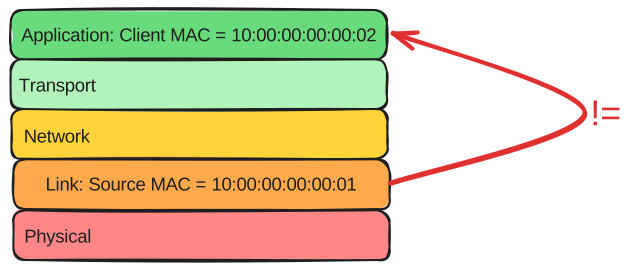
The check-mac-address option filters packets if there are differences between the MAC address found at the ethernet header and the MAC address found in the DHCP packet.
To check this option, you should send packets with these differences and enable this option to see if warnings appear in your logs.
Also, this test checks how the server behaves under normal conditions.
Scenario
Step 1: Set the following configuration in DUT0 :
set interfaces ethernet eth0 address 10.0.0.1/24
set service dhcp-server shared-network dhcp subnet 10.0.0.0/24 start 10.0.0.5 stop 10.0.0.5
set system login user admin authentication encrypted-password '$6$GSjsCj8gHLv$/VcqU6FLi6CT2Oxn0MJQ2C2tqnRDrYKNF8HIYWJp68nvXvPdFccDsT04.WtigUONbKYrgKg8d6rEs8PjljMkH0'
Step 2: Run command system journal show | tail at DUT0 and check if output contains the following tokens:
DHCPDISCOVER from 10:00:00:00:00:02 via eth0Show output
Apr 16 21:22:11.604736 osdx dhcpd[843383]: Wrote 0 leases to leases file.
Apr 16 21:22:11.605355 osdx cfgd[1833]: [840897]Completed change to active configuration
Apr 16 21:22:11.622720 osdx OSDxCLI[840897]: User 'admin' committed the configuration.
Apr 16 21:22:11.654310 osdx OSDxCLI[840897]: User 'admin' left the configuration menu.
Apr 16 21:22:11.659557 osdx dhcpd[843383]: Server starting service.
Apr 16 21:22:11.809647 osdx OSDxCLI[840897]: User 'admin' executed a new command: 'system journal show | tail'.
Apr 16 21:22:12.468060 osdx dhcpd[843383]: DHCPDISCOVER from 10:00:00:00:00:02 via eth0
Apr 16 21:22:13.468745 osdx dhcpd[843383]: DHCPOFFER on 10.0.0.5 to 10:00:00:00:00:02 via eth0
Apr 16 21:22:13.527916 osdx dhcpd[843383]: DHCPDISCOVER from 10:00:00:00:00:02 via eth0
Apr 16 21:22:13.527941 osdx dhcpd[843383]: DHCPOFFER on 10.0.0.5 to 10:00:00:00:00:02 via eth0
Step 3: Modify the following configuration lines in DUT0 :
set service dhcp-server check-mac-address
Step 4: Run command system journal clear at DUT0.
Step 5: Run command system journal show | tail at DUT0 and check if output does not contain the following tokens:
DHCPDISCOVER from 10:00:00:00:00:02 via eth0Show output
Apr 16 21:22:14.584701 osdx systemd-journald[126917]: Runtime Journal (/run/log/journal/a3fecc5be5e949c7a083b0adeea4bb21) is 1.8M, max 13.8M, 11.9M free.
Apr 16 21:22:14.587399 osdx systemd-journald[126917]: Received client request to rotate journal, rotating.
Apr 16 21:22:14.587450 osdx systemd-journald[126917]: Vacuuming done, freed 0B of archived journals from /run/log/journal/a3fecc5be5e949c7a083b0adeea4bb21.
Apr 16 21:22:14.588209 osdx dhcpd[843440]: MAC received in DHCP packet (10:00:00:00:00:02) is different than source MAC in ethernet header (10:00:00:00:00:01)
Apr 16 21:22:14.596493 osdx OSDxCLI[840897]: User 'admin' executed a new command: 'system journal clear'.
Step 6: Run command system journal show | tail at DUT0 and check if output contains the following tokens:
MAC received in DHCP packet (10:00:00:00:00:02) is different than source MAC in ethernet header (10:00:00:00:00:01)Show output
Apr 16 21:22:14.584701 osdx systemd-journald[126917]: Runtime Journal (/run/log/journal/a3fecc5be5e949c7a083b0adeea4bb21) is 1.8M, max 13.8M, 11.9M free.
Apr 16 21:22:14.587399 osdx systemd-journald[126917]: Received client request to rotate journal, rotating.
Apr 16 21:22:14.587450 osdx systemd-journald[126917]: Vacuuming done, freed 0B of archived journals from /run/log/journal/a3fecc5be5e949c7a083b0adeea4bb21.
Apr 16 21:22:14.588209 osdx dhcpd[843440]: MAC received in DHCP packet (10:00:00:00:00:02) is different than source MAC in ethernet header (10:00:00:00:00:01)
Apr 16 21:22:14.596493 osdx OSDxCLI[840897]: User 'admin' executed a new command: 'system journal clear'.
Apr 16 21:22:14.669921 osdx OSDxCLI[840897]: User 'admin' executed a new command: 'system journal show | tail'.
Step 7: Set the following configuration in DUT1 :
set interfaces ethernet eth0 mac '10:00:00:00:00:05'
set system login user admin authentication encrypted-password '$6$GSjsCj8gHLv$/VcqU6FLi6CT2Oxn0MJQ2C2tqnRDrYKNF8HIYWJp68nvXvPdFccDsT04.WtigUONbKYrgKg8d6rEs8PjljMkH0'
Step 8: Modify the following configuration lines in DUT1 :
set interfaces ethernet eth0 address dhcp
Step 9: Run command interfaces ethernet eth0 show at DUT1 and check if output contains the following tokens:
10.0.0.5Show output
-----------------------------------------------------------------
Name           IP Address           Admin  Oper  Vrf  Description
-----------------------------------------------------------------
eth0  10.0.0.5/24                   up     up
      fe80::dcad:beff:feef:6c10/64
Step 10: Run command service dhcp-server show leases main | grep 10.0.0.5 at DUT0 and check if output contains the following tokens:
10:00:00:00:00:05Show output
10.0.0.5 10:00:00:00:00:05 2026/04/16 21:22:17 2026/04/17 09:22:17 2026/04/16 21:22:17
Test Check MAC Address VRF
Description
This scenario configures a DHCP server with VRF instead of regular interfaces and checks the check-mac-address option.
To check this option, you will need to send packets with differences in the Source MAC for the link layer and the client MAC from the application layer.
Scenario
Step 1: Set the following configuration in DUT0 :
set interfaces ethernet eth0 address 10.0.0.1/24
set interfaces ethernet eth0 vrf VRF0
set service dhcp-server shared-network dhcp local-vrf VRF0
set service dhcp-server shared-network dhcp subnet 10.0.0.0/24 start 10.0.0.5 stop 10.0.0.6
set system login user admin authentication encrypted-password '$6$GSjsCj8gHLv$/VcqU6FLi6CT2Oxn0MJQ2C2tqnRDrYKNF8HIYWJp68nvXvPdFccDsT04.WtigUONbKYrgKg8d6rEs8PjljMkH0'
set system vrf VRF0
Step 2: Run command system journal show | tail at DUT0 and check if output contains the following tokens:
DHCPDISCOVER from 10:00:00:00:00:02 via eth0Show output
Apr 16 21:22:24.950111 osdx cfgd[1833]: [840897]Completed change to active configuration
Apr 16 21:22:24.950670 osdx dhcpd[843814]: Wrote 0 leases to leases file.
Apr 16 21:22:24.968686 osdx OSDxCLI[840897]: User 'admin' committed the configuration.
Apr 16 21:22:24.990549 osdx OSDxCLI[840897]: User 'admin' left the configuration menu.
Apr 16 21:22:25.003328 osdx dhcpd[843814]: Server starting service.
Apr 16 21:22:25.148427 osdx OSDxCLI[840897]: User 'admin' executed a new command: 'system journal show | tail'.
Apr 16 21:22:25.439377 osdx dhcpd[843814]: DHCPDISCOVER from 10:00:00:00:00:02 via eth0
Apr 16 21:22:26.440522 osdx dhcpd[843814]: DHCPOFFER on 10.0.0.5 to 10:00:00:00:00:02 via eth0
Apr 16 21:22:26.503263 osdx dhcpd[843814]: DHCPDISCOVER from 10:00:00:00:00:02 via eth0
Apr 16 21:22:26.503301 osdx dhcpd[843814]: DHCPOFFER on 10.0.0.5 to 10:00:00:00:00:02 via eth0
Step 3: Modify the following configuration lines in DUT0 :
set service dhcp-server check-mac-address
Step 4: Run command system journal clear at DUT0.
Step 5: Run command system journal show | tail at DUT0 and check if output does not contain the following tokens:
DHCPDISCOVER from 10:00:00:00:00:02 via eth0Show output
Apr 16 21:22:28.076801 osdx systemd-journald[126917]: Runtime Journal (/run/log/journal/a3fecc5be5e949c7a083b0adeea4bb21) is 1.8M, max 13.8M, 11.9M free.
Apr 16 21:22:28.079143 osdx systemd-journald[126917]: Received client request to rotate journal, rotating.
Apr 16 21:22:28.079239 osdx systemd-journald[126917]: Vacuuming done, freed 0B of archived journals from /run/log/journal/a3fecc5be5e949c7a083b0adeea4bb21.
Apr 16 21:22:28.094161 osdx OSDxCLI[840897]: User 'admin' executed a new command: 'system journal clear'.
Step 6: Run command system journal show | tail at DUT0 and check if output contains the following tokens:
MAC received in DHCP packet (10:00:00:00:00:02) is different than source MAC in ethernet header (10:00:00:00:00:01)Show output
Apr 16 21:22:28.076801 osdx systemd-journald[126917]: Runtime Journal (/run/log/journal/a3fecc5be5e949c7a083b0adeea4bb21) is 1.8M, max 13.8M, 11.9M free.
Apr 16 21:22:28.079143 osdx systemd-journald[126917]: Received client request to rotate journal, rotating.
Apr 16 21:22:28.079239 osdx systemd-journald[126917]: Vacuuming done, freed 0B of archived journals from /run/log/journal/a3fecc5be5e949c7a083b0adeea4bb21.
Apr 16 21:22:28.094161 osdx OSDxCLI[840897]: User 'admin' executed a new command: 'system journal clear'.
Apr 16 21:22:28.234282 osdx OSDxCLI[840897]: User 'admin' executed a new command: 'system journal show | tail'.
Apr 16 21:22:28.361446 osdx OSDxCLI[840897]: User 'admin' executed a new command: 'system journal show | tail'.
Apr 16 21:22:28.623401 osdx dhcpd[843871]: MAC received in DHCP packet (10:00:00:00:00:02) is different than source MAC in ethernet header (10:00:00:00:00:01)
Apr 16 21:22:29.695283 osdx dhcpd[843871]: MAC received in DHCP packet (10:00:00:00:00:02) is different than source MAC in ethernet header (10:00:00:00:00:01)
Step 7: Set the following configuration in DUT1 :
set interfaces ethernet eth0 mac '10:00:00:00:00:05'
set system login user admin authentication encrypted-password '$6$GSjsCj8gHLv$/VcqU6FLi6CT2Oxn0MJQ2C2tqnRDrYKNF8HIYWJp68nvXvPdFccDsT04.WtigUONbKYrgKg8d6rEs8PjljMkH0'
Step 8: Modify the following configuration lines in DUT1 :
set interfaces ethernet eth0 address dhcp
Step 9: Run command interfaces ethernet eth0 show at DUT1 and check if output contains the following tokens:
10.0.0.5Show output
-----------------------------------------------------------------
Name           IP Address           Admin  Oper  Vrf  Description
-----------------------------------------------------------------
eth0  10.0.0.5/24                   up     up
      fe80::dcad:beff:feef:6c10/64
Step 10: Run command service dhcp-server show leases VRF0 | grep 10.0.0.5 at DUT0 and check if output contains the following tokens:
10:00:00:00:00:05Show output
10.0.0.5 10:00:00:00:00:05 2026/04/16 21:22:32 2026/04/17 09:22:32 2026/04/16 21:22:32