Scep
These scenarios show how to configure the SCEP protocol to retrieve certificates from a PKI server.
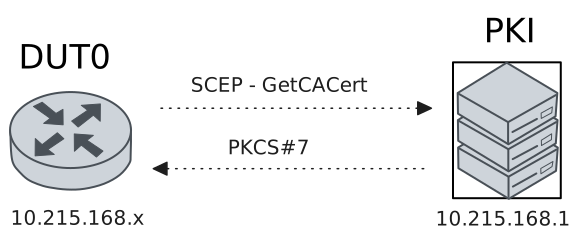
Test SCEP Protocol With Linux PKI
Description
In this scenario, the SCEP protocol is used to retrieve digital certificates (X509) from a Linux PKI server.
Scenario
Step 1: Set the following configuration in DUT0 :
set interfaces ethernet eth0 address 10.215.168.64/24
set protocols static route 192.168.212.0/22 next-hop 10.215.168.1
set system certificate scep csr CSR cgi-path /scep
set system certificate scep csr CSR cipher aes
set system certificate scep csr CSR digest sha256
set system certificate scep csr CSR distinguished-names CN=MyUserCert
set system certificate scep csr CSR encrypted-password U2FsdGVkX19P8MYjQLXrIvBEOMDHUJ1TWkNFRAs31/g=
set system certificate scep csr CSR port 8080
set system certificate scep csr CSR url 'http://10.215.168.1'
set system login user admin authentication encrypted-password '$6$GSjsCj8gHLv$/VcqU6FLi6CT2Oxn0MJQ2C2tqnRDrYKNF8HIYWJp68nvXvPdFccDsT04.WtigUONbKYrgKg8d6rEs8PjljMkH0'
Step 2: Ping IP address 10.215.168.1 from DUT0:
admin@DUT0$ ping 10.215.168.1 count 1 size 56 timeout 1Show output
PING 10.215.168.1 (10.215.168.1) 56(84) bytes of data.
64 bytes from 10.215.168.1: icmp_seq=1 ttl=64 time=0.147 ms

--- 10.215.168.1 ping statistics ---
1 packets transmitted, 1 received, 0% packet loss, time 0ms
rtt min/avg/max/mdev = 0.147/0.147/0.147/0.000 ms
Step 3: Run command pki scep show CSR at DUT0 and check if output matches the following regular expressions:
ca\s+Valid
usercert\s+Valid
Show output
-------------------------------------------------------------------------------------------------
Certificate  Status           Usage                   NotBefore                  NotAfter
-------------------------------------------------------------------------------------------------
ca           Valid   Encipherment & Signature  Apr 16 09:19:39 2025 GMT  Apr 11 09:19:39 2045 GMT
usercert     Valid   -                         Apr 16 15:44:24 2026 GMT  Apr 16 15:44:24 2027 GMT
Step 4: Run command pki show certificate running://auth/certificates/scep/CSR/ca/ca.der at DUT0 and check if output contains the following tokens:
Subject: CN = Teldat-PKI, O = Teldat, L = Madrid, C = ESShow output
Certificate:
    Data:
        Version: 3 (0x2)
        Serial Number:
            7c:28:60:8a:6f:42:5d:c8:44:f0:10:0d:61:e5:ca:40:11:bc:ea:f2
        Signature Algorithm: sha256WithRSAEncryption
        Issuer: CN = Teldat-PKI, O = Teldat, L = Madrid, C = ES
        Validity
            Not Before: Apr 16 09:19:39 2025 GMT
            Not After : Apr 11 09:19:39 2045 GMT
        Subject: CN = Teldat-PKI, O = Teldat, L = Madrid, C = ES
        Subject Public Key Info:
            Public Key Algorithm: rsaEncryption
                Public-Key: (2048 bit)
                Modulus:
                    00:de:b7:3b:d9:9b:e3:d3:57:9b:b0:33:67:c0:40:
                    4f:45:84:ea:c2:35:a6:08:3b:3a:fd:6d:fa:d7:2b:
                    3d:7f:1c:a1:92:15:08:8b:5c:02:ec:6a:66:46:c5:
                    6f:7f:9b:9d:c3:86:e1:97:47:9b:5e:ea:96:5b:bf:
                    68:35:96:4f:6e:64:c6:7d:f6:da:6b:f9:bf:98:b1:
                    32:63:ae:f4:5b:2f:cd:6d:d7:ef:db:01:12:b0:a4:
                    54:95:6e:e8:84:4a:0a:f1:13:83:13:a1:7a:1d:f4:
                    06:3f:e3:53:5d:9f:68:a1:a0:5c:51:05:ba:8c:da:
                    00:11:64:4b:e8:37:c3:70:43:9c:16:dd:46:fb:34:
                    e4:3c:ae:a4:9a:a1:da:cf:a1:f5:93:13:a6:0e:68:
                    51:31:f7:26:63:a3:8b:47:c3:94:e4:34:d2:b0:36:
                    cf:22:e5:81:dd:a4:01:e8:79:08:37:ad:7a:b9:da:
                    24:37:cc:53:f4:51:f8:b5:67:09:15:63:52:60:7f:
                    b0:e2:f0:38:cd:3c:13:42:81:5f:e2:dd:e2:c5:37:
                    f3:ef:05:8c:85:2f:2a:0a:f4:94:2f:70:56:7f:7d:
                    a9:f6:ca:69:0b:a7:40:e1:fa:bc:f0:f4:01:7a:76:
                    55:f4:2a:57:43:8b:f1:87:58:f2:f4:db:23:26:33:
                    f8:4f
                Exponent: 65537 (0x10001)
        X509v3 extensions:
            X509v3 Subject Key Identifier:
                D3:97:2E:56:37:6A:89:77:01:D4:E3:42:0D:EC:E7:10:79:9C:E8:7C
            X509v3 Authority Key Identifier:
                keyid:D3:97:2E:56:37:6A:89:77:01:D4:E3:42:0D:EC:E7:10:79:9C:E8:7C
                DirName:/CN=Teldat-PKI/O=Teldat/L=Madrid/C=ES
                serial:7C:28:60:8A:6F:42:5D:C8:44:F0:10:0D:61:E5:CA:40:11:BC:EA:F2
            X509v3 Basic Constraints: critical
                CA:TRUE, pathlen:0
            X509v3 Key Usage: critical
                Digital Signature, Key Encipherment, Certificate Sign, CRL Sign
    Signature Algorithm: sha256WithRSAEncryption
    Signature Value:
        5e:0d:47:96:a2:24:38:fa:62:5b:0c:c2:4e:59:23:79:40:1b:
        88:d1:63:11:0b:ce:bc:63:46:cd:70:33:52:75:4b:85:c1:39:
        be:3c:ce:7c:66:53:63:b4:39:07:ec:ef:52:fe:fa:dc:c1:fb:
        e4:51:61:28:58:4f:90:71:83:50:7d:62:a9:16:fa:45:89:08:
        5f:39:43:6a:b1:bb:ad:4e:6f:50:bc:07:4f:1c:5b:07:df:63:
        ec:44:20:48:b6:97:00:e2:9d:8e:42:9e:96:5f:71:7a:43:96:
        de:fd:66:6b:45:85:5d:e4:dc:bf:e9:34:64:4f:3a:7b:33:a0:
        54:80:3b:9a:5b:1f:3f:3f:1c:09:a3:8e:d8:b6:2a:ba:b2:07:
        87:fa:0f:a5:69:41:06:b1:14:6f:09:4f:bb:88:60:87:70:83:
        31:73:ed:2a:03:ca:3c:19:0a:b2:24:61:c6:ce:09:97:ac:6e:
        da:cb:47:88:c5:f5:a7:74:d2:96:e0:cc:c3:b6:b7:f6:64:9f:
        ad:1c:7f:36:fd:39:7c:57:54:a5:e9:8a:82:90:4d:cd:74:99:
        27:4d:f6:62:a6:96:c5:6e:d3:02:ec:c1:4d:5f:46:b6:82:75:
        12:61:d7:a3:d6:70:f6:35:9d:9c:30:06:84:af:b2:cb:a5:a0:
        5e:d3:1d:6c
Step 5: Run command pki show certificate running://auth/certificates/scep/CSR/user/cert at DUT0 and check if output contains the following tokens:
Subject: CN = MyUserCertShow output
Certificate:
    Data:
        Version: 3 (0x2)
        Serial Number: 2 (0x2)
        Signature Algorithm: sha256WithRSAEncryption
        Issuer: CN = Teldat-PKI, O = Teldat, L = Madrid, C = ES
        Validity
            Not Before: Apr 16 15:44:24 2026 GMT
            Not After : Apr 16 15:44:24 2027 GMT
        Subject: CN = MyUserCert
        Subject Public Key Info:
            Public Key Algorithm: rsaEncryption
                Public-Key: (2048 bit)
                Modulus:
                    00:c3:f9:97:e3:ca:a1:f2:1b:5e:c6:0c:d6:7d:31:
                    79:90:79:ae:ad:ee:f1:b5:89:57:b7:ec:a2:a9:fc:
                    fd:1f:a3:83:a0:23:54:d2:be:8d:f5:28:ce:b9:b9:
                    5f:2f:a8:d6:39:68:55:c0:42:d1:20:5c:03:6a:97:
                    fd:2e:15:01:cd:5c:68:de:51:ce:d4:0f:37:e6:30:
                    c1:39:ff:8a:5c:2c:13:45:e0:d4:4c:24:fe:ab:4e:
                    a7:b6:8a:bd:b2:68:cc:d4:c8:38:01:6b:54:1d:23:
                    c4:7f:b2:d5:ec:71:4b:07:4a:49:2b:30:74:64:33:
                    aa:08:7a:40:e1:09:10:00:7f:b4:24:aa:f6:18:63:
                    a2:59:0b:c8:e1:9b:92:e5:00:cd:2e:55:c9:8e:04:
                    70:b4:d8:5e:54:17:6a:c8:14:90:0b:aa:2e:9f:e2:
                    ed:a9:62:6a:ff:1a:c4:39:2f:90:1b:c3:1f:df:ce:
                    c3:b6:60:51:89:c1:77:fa:c3:e2:f5:1d:9c:30:0a:
                    57:18:63:03:c5:dc:87:28:88:3a:8b:d0:30:6b:94:
                    64:67:b5:e3:45:cf:96:e7:bf:2d:29:55:4f:b7:9c:
                    ca:9b:8e:a7:2f:5c:fe:e1:a7:03:c7:2a:b9:b0:94:
                    df:59:b2:e5:7e:0d:98:11:81:15:ec:ee:12:4a:ee:
                    87:6d
                Exponent: 65537 (0x10001)
        X509v3 extensions:
            X509v3 Key Usage: critical
                Digital Signature
            X509v3 Extended Key Usage:
                TLS Web Client Authentication
            X509v3 Subject Key Identifier:
                09:21:B8:7B:C4:16:01:BF:FD:BD:07:55:18:F2:F2:D1:D8:4C:C9:CE
            X509v3 Authority Key Identifier:
                D3:97:2E:56:37:6A:89:77:01:D4:E3:42:0D:EC:E7:10:79:9C:E8:7C
    Signature Algorithm: sha256WithRSAEncryption
    Signature Value:
        a8:59:15:06:9a:6d:e9:e8:4b:7e:5e:ac:07:3a:cc:42:c7:50:
        e7:48:da:a7:f5:c8:12:92:d7:c9:52:9b:79:c2:af:07:c6:8e:
        b9:01:30:94:2c:dc:15:2f:ed:b1:b6:46:5c:c1:4f:b5:d2:ff:
        df:6d:cb:38:70:93:c6:c8:74:6c:df:5c:16:b5:30:68:13:c4:
        61:10:e2:50:a6:73:0e:e4:e8:60:f3:a6:ed:6b:a5:aa:7a:a8:
        52:e5:b7:f4:30:4b:61:82:c2:0f:7c:1e:cd:32:9c:ce:49:b7:
        11:f1:06:6a:a5:5f:f0:e4:c2:de:7a:21:2d:7d:a1:d5:bf:50:
        26:48:9b:7a:86:30:c7:db:1f:35:8c:7a:9a:fc:68:b4:09:4f:
        10:34:fc:37:52:e1:76:43:6e:12:0e:2f:92:1c:80:a7:9a:aa:
        d0:83:e0:4f:7d:c0:6c:6a:b2:46:c8:72:94:67:b0:40:5d:3f:
        d7:88:29:fc:51:94:b6:78:3e:de:0f:f6:67:e3:06:74:f3:f9:
        ae:22:f7:bf:60:f7:14:68:85:7a:46:41:6b:e0:c5:0d:95:40:
        36:7b:f0:d0:eb:04:d4:2d:50:dc:b5:60:5c:ce:47:96:08:1e:
        92:1a:96:7d:64:5f:57:e2:c7:64:61:2d:77:58:cc:98:e3:c8:
        55:62:2d:64
Test SCEP Protocol With Windows Server PKI
Description
In this scenario, the SCEP protocol is used to retrieve digital certificates (X509) from a Windows PKI server.
Scenario
Step 1: Set the following configuration in DUT0 :
set interfaces ethernet eth0 address 10.215.168.64/24
set protocols static route 192.168.212.0/22 next-hop 10.215.168.1
set system certificate scep csr CSR cgi-path CertSrv/mscep/mscep.dll/pkiclient.exe
set system certificate scep csr CSR distinguished-names CN=MyUserCert
set system certificate scep csr CSR encrypted-password U2FsdGVkX1/cpKs60XW8glHBeDwbuldY39EE0iQqd2oH+aYMvhespzahhtjG9BVkN0r2s1k3scwkW82sbk6EpA==
set system certificate scep csr CSR url 'http://192.168.213.25/'
set system login user admin authentication encrypted-password '$6$GSjsCj8gHLv$/VcqU6FLi6CT2Oxn0MJQ2C2tqnRDrYKNF8HIYWJp68nvXvPdFccDsT04.WtigUONbKYrgKg8d6rEs8PjljMkH0'
Step 2: Ping IP address 10.215.168.1 from DUT0:
admin@DUT0$ ping 10.215.168.1 count 1 size 56 timeout 1Show output
PING 10.215.168.1 (10.215.168.1) 56(84) bytes of data.
64 bytes from 10.215.168.1: icmp_seq=1 ttl=64 time=0.211 ms

--- 10.215.168.1 ping statistics ---
1 packets transmitted, 1 received, 0% packet loss, time 0ms
rtt min/avg/max/mdev = 0.211/0.211/0.211/0.000 ms
Step 3: Ping IP address 192.168.213.25 from DUT0:
admin@DUT0$ ping 192.168.213.25 count 1 size 56 timeout 1Show output
PING 192.168.213.25 (192.168.213.25) 56(84) bytes of data.
64 bytes from 192.168.213.25: icmp_seq=1 ttl=126 time=0.527 ms

--- 192.168.213.25 ping statistics ---
1 packets transmitted, 1 received, 0% packet loss, time 0ms
rtt min/avg/max/mdev = 0.527/0.527/0.527/0.000 ms
Step 4: Run command pki scep show CSR at DUT0 and check if output matches the following regular expressions:
ca\s+Valid
usercert\s+Valid
Show output
-------------------------------------------------------------------------------------
Certificate  Status     Usage             NotBefore                  NotAfter
-------------------------------------------------------------------------------------
ca           Valid   Signature     Jan  9 09:34:41 2026 GMT  Jan  9 09:44:41 2056 GMT
ra           Valid   Encipherment  Jan  9 09:37:26 2026 GMT  Jan  9 09:37:26 2028 GMT
ra-2         Valid   Signature     Jan  9 09:37:25 2026 GMT  Jan  9 09:37:25 2028 GMT
usercert     Valid   -             Apr 16 15:14:04 2026 GMT  Apr 16 15:24:04 2028 GMT
Step 5: Run command pki show certificate running://auth/certificates/scep/CSR/ca/ca.der at DUT0 and check if output contains the following tokens:
Subject: DC = com, DC = scep, CN = scep-TELDATPKI-CAShow output
Certificate:
    Data:
        Version: 3 (0x2)
        Serial Number:
            2e:aa:77:9e:fd:8d:47:8d:42:5f:96:57:64:8a:da:d1
        Signature Algorithm: sha256WithRSAEncryption
        Issuer: DC = com, DC = scep, CN = scep-TELDATPKI-CA
        Validity
            Not Before: Jan  9 09:34:41 2026 GMT
            Not After : Jan  9 09:44:41 2056 GMT
        Subject: DC = com, DC = scep, CN = scep-TELDATPKI-CA
        Subject Public Key Info:
            Public Key Algorithm: rsaEncryption
                Public-Key: (2048 bit)
                Modulus:
                    00:be:22:9c:cd:53:99:06:1b:31:57:cd:72:1b:d7:
                    5d:99:b4:e2:e1:88:80:d4:40:53:49:be:ff:e0:5b:
                    8b:41:8c:96:e8:99:cd:19:ab:98:4c:99:77:ad:01:
                    fc:51:cf:ea:d8:43:fc:5b:d2:dd:b5:05:04:ae:01:
                    28:e9:53:5d:bb:d2:65:71:d9:69:3c:04:4d:6b:6e:
                    8b:95:92:e4:e7:84:57:90:b3:5e:1f:76:34:7f:15:
                    e2:fb:c0:78:bb:ec:a5:be:2f:33:9e:98:06:f1:4c:
                    1f:cc:ee:85:c2:f1:8f:3c:23:52:a2:94:af:0e:b8:
                    d2:e3:0c:b7:07:49:b9:91:87:3e:76:89:61:f0:88:
                    4c:2f:da:6b:b9:75:93:6e:e4:e2:f1:19:48:00:f7:
                    af:1b:70:19:15:2b:30:b3:78:24:dc:14:c4:e8:a0:
                    61:f9:68:09:7d:e9:3e:6f:e0:a3:44:d5:43:f8:78:
                    aa:5f:a8:7a:3a:7c:2c:4e:21:69:24:be:2f:cb:57:
                    bd:60:e8:b9:a5:3b:ad:0c:7b:d9:8d:82:3e:13:96:
                    8b:59:5a:2b:ec:b6:63:33:21:69:a5:30:b6:bb:84:
                    e9:80:8d:db:3c:94:f7:52:05:76:6a:ed:d6:03:24:
                    d8:97:46:a4:15:41:4d:17:98:7d:20:64:ac:fb:e9:
                    30:1d
                Exponent: 65537 (0x10001)
        X509v3 extensions:
            1.3.6.1.4.1.311.20.2:
                ...C.A
            X509v3 Key Usage: critical
                Digital Signature, Certificate Sign, CRL Sign
            X509v3 Basic Constraints: critical
                CA:TRUE
            X509v3 Subject Key Identifier:
                18:DA:43:2C:11:47:FC:1A:DA:19:D4:6C:8B:2D:58:AA:75:ED:17:94
            1.3.6.1.4.1.311.21.1:
                ...
    Signature Algorithm: sha256WithRSAEncryption
    Signature Value:
        3b:f8:53:b9:17:78:98:fa:4a:63:a8:5b:57:bc:f6:67:d8:47:
        48:8a:22:2f:d8:39:22:44:c9:f8:aa:fd:e8:81:13:c4:5f:9b:
        b2:72:0a:35:b1:0c:64:ff:ff:89:05:f0:d7:2a:e4:5f:da:6b:
        7b:90:88:5e:6c:77:e5:17:83:19:43:10:35:f8:b5:e3:b8:b5:
        16:c1:79:5e:cc:71:00:91:6a:aa:b7:7e:e8:35:99:b3:74:c1:
        b7:d9:93:8c:6b:4e:64:5a:0a:aa:09:ce:00:d6:f2:f0:f6:87:
        ec:cd:dc:d0:07:d5:cb:6d:7f:34:72:80:7b:8c:71:f3:d8:f6:
        a4:38:45:0e:19:79:bd:07:d6:91:a0:4f:4f:2e:55:f1:ca:f7:
        f3:b1:94:33:7b:f0:76:2b:10:d6:9b:49:ef:96:83:f3:f5:2e:
        b3:c4:48:13:2f:19:f3:18:7f:4c:7a:09:79:3b:52:94:d9:86:
        65:58:32:34:ba:89:6e:54:99:ab:12:7b:f5:3d:61:f3:39:22:
        08:ef:7b:77:ba:95:7e:8e:ca:51:4d:80:45:2b:43:d8:b1:37:
        fb:0c:69:7a:c8:5c:dc:4c:16:5f:a1:09:5c:d6:85:ed:93:76:
        fa:56:67:fe:fc:97:3c:8d:f8:3c:39:d7:31:07:e6:69:42:3d:
        3d:d2:86:1e
Step 6: Run command pki show certificate running://auth/certificates/scep/CSR/user/cert at DUT0 and check if output contains the following tokens:
Subject: CN = MyUserCertShow output
Certificate:
    Data:
        Version: 3 (0x2)
        Serial Number:
            11:00:00:14:23:23:1d:0d:07:f7:13:88:4e:00:00:00:00:14:23
        Signature Algorithm: sha256WithRSAEncryption
        Issuer: DC = com, DC = scep, CN = scep-TELDATPKI-CA
        Validity
            Not Before: Apr 16 15:14:04 2026 GMT
            Not After : Apr 16 15:24:04 2028 GMT
        Subject: CN = MyUserCert
        Subject Public Key Info:
            Public Key Algorithm: rsaEncryption
                Public-Key: (2048 bit)
                Modulus:
                    00:bb:cc:e9:71:08:64:c3:f9:83:76:52:db:b6:62:
                    56:5d:a4:c2:9d:f3:25:98:6e:92:bb:79:f3:30:7d:
                    38:84:80:b2:b0:ad:51:a1:a3:7c:e6:78:f1:64:66:
                    14:af:f6:48:36:4d:55:a5:11:2d:61:17:ea:09:0b:
                    c5:ec:dc:8e:c3:f4:be:84:0c:de:32:0e:f6:0a:fd:
                    9d:6a:71:85:32:d2:33:58:f4:0b:fc:da:00:6a:eb:
                    32:9c:cc:7d:cf:b8:63:3c:dd:8c:82:bb:db:51:c8:
                    39:4e:a3:0a:71:bf:6e:59:95:d9:a4:98:31:a5:a2:
                    27:b5:a1:b6:40:ec:f6:67:08:00:78:05:f7:fa:1b:
                    e5:6f:35:8a:a0:40:60:32:92:50:a7:05:fa:7d:7f:
                    16:55:28:f7:7a:d9:a2:d0:f8:70:07:52:3e:08:25:
                    72:98:59:80:95:ee:d1:33:92:4f:12:df:3a:30:84:
                    02:c4:24:7e:88:b0:9e:63:1b:8b:d9:59:26:8a:73:
                    79:01:89:16:86:47:9b:c2:03:15:2f:52:3f:e9:02:
                    91:b3:e4:df:78:99:a5:6d:b9:f9:44:36:f9:27:7b:
                    87:88:d1:7f:94:2f:82:4f:2c:a3:3b:59:88:49:3c:
                    14:87:fb:9b:3c:71:a8:d6:7e:eb:dd:d3:19:84:dd:
                    cc:e5
                Exponent: 65537 (0x10001)
        X509v3 extensions:
            X509v3 Subject Key Identifier:
                B1:F1:7C:E2:C0:C7:35:C2:02:62:68:0E:B0:08:15:29:3E:B4:D1:2B
            X509v3 Authority Key Identifier:
                18:DA:43:2C:11:47:FC:1A:DA:19:D4:6C:8B:2D:58:AA:75:ED:17:94
            X509v3 CRL Distribution Points:
                Full Name:
                  URI:ldap:///CN=scep-TELDATPKI-CA,CN=TeldatPKI,CN=CDP,CN=Public%20Key%20Services,CN=Services,CN=Configuration,DC=scep,DC=com?certificateRevocationList?base?objectClass=cRLDistributionPoint
            Authority Information Access:
                CA Issuers - URI:ldap:///CN=scep-TELDATPKI-CA,CN=AIA,CN=Public%20Key%20Services,CN=Services,CN=Configuration,DC=scep,DC=com?cACertificate?base?objectClass=certificationAuthority
            X509v3 Key Usage: critical
                Digital Signature, Key Encipherment, Data Encipherment
            1.3.6.1.4.1.311.21.7:
                0..&+.....7.....3......./...(...f<...[...]..d...
            X509v3 Extended Key Usage:
                1.3.6.1.4.1.311.20.1, Microsoft Encrypted File System, Code Signing, Any Extended Key Usage, TLS Web Server Authentication, Signing KDC Response, TLS Web Client Authentication, 1.3.6.1.4.1.311.21.5, 1.3.6.1.4.1.311.20.2.1, 1.3.6.1.5.5.8.2.2
            1.3.6.1.4.1.311.21.10:
                0y0...+.....7..0..
+.....7
..0
..+.......0...U.%.0
..+.......0...+......0
..+.......0...+.....7..0..
+.....7...0
..+.......
            S/MIME Capabilities:
                050...*.H..
......0...*.H..
......0...+....0
..*.H..
..
    Signature Algorithm: sha256WithRSAEncryption
    Signature Value:
        24:70:1c:91:e7:f6:93:a0:8d:94:df:0f:a5:c5:92:10:b8:08:
        1c:81:26:22:cd:63:a5:44:82:c7:28:93:7b:fa:6f:b6:da:33:
        0b:7b:54:bd:37:21:92:d7:ea:ed:22:5b:96:de:7e:f2:4a:d2:
        0a:1b:06:89:24:b5:79:d0:f3:64:0b:ee:20:00:0c:f5:88:ab:
        51:d8:d7:37:58:36:96:a3:85:90:a0:bd:62:aa:23:87:fb:e1:
        f5:cb:4a:93:99:8b:aa:16:83:f2:d7:46:26:26:44:d2:d2:4d:
        df:e1:c2:77:36:ff:f6:a8:6c:ac:26:68:04:8b:ce:a2:8a:35:
        1e:30:f0:69:9e:e5:38:a0:4a:3a:d3:7d:69:13:20:69:17:27:
        15:6e:7d:22:ea:ca:40:fd:66:05:c3:e3:b8:cb:cb:69:92:46:
        f5:d5:45:00:e0:d8:f6:7f:95:69:e8:02:87:13:f8:74:98:7b:
        36:9c:6c:cc:f5:f0:03:97:62:cb:eb:e6:3d:5f:6d:f2:88:94:
        7d:83:81:69:24:9a:62:da:75:34:b5:ff:b8:74:76:de:04:f0:
        11:37:b7:c2:72:5b:b3:6d:61:d9:2f:f8:f4:2e:a1:88:b5:fd:
        29:cb:64:95:c0:c3:25:0f:7f:49:10:02:43:85:64:11:8e:bd:
        04:b6:24:ec