Check Connection
This scenario shows how to create a bridge interface and enable offloading to perform the forward processing in the hardware switch.
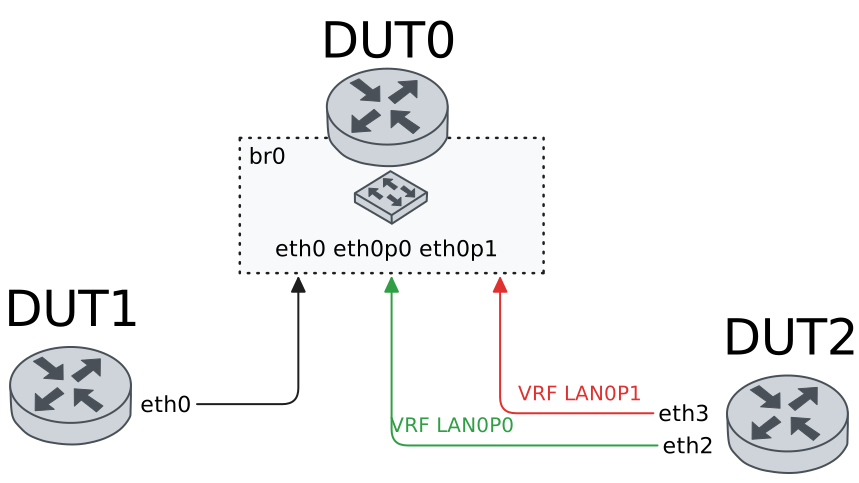
Test Hardware Bridge With Default VLAN
Description
In these scenarios, no VLAN are configured.
Scenario
Example 1
Step 1: Set the following configuration in DUT0 :
set interfaces bridge br0
set interfaces ethernet eth0p0 bridge-group bridge br0
set interfaces ethernet eth0p1 bridge-group bridge br0
set interfaces ethernet eth1 bridge-group bridge br0
set system login user admin authentication encrypted-password '$6$GSjsCj8gHLv$/VcqU6FLi6CT2Oxn0MJQ2C2tqnRDrYKNF8HIYWJp68nvXvPdFccDsT04.WtigUONbKYrgKg8d6rEs8PjljMkH0'
Step 2: Set the following configuration in DUT1 :
set interfaces ethernet eth0 address 192.168.1.2/24
set system login user admin authentication encrypted-password '$6$GSjsCj8gHLv$/VcqU6FLi6CT2Oxn0MJQ2C2tqnRDrYKNF8HIYWJp68nvXvPdFccDsT04.WtigUONbKYrgKg8d6rEs8PjljMkH0'
Step 3: Set the following configuration in DUT2 :
set interfaces ethernet eth2 address 192.168.1.3/24
set interfaces ethernet eth2 vrf LAN_PORT0
set interfaces ethernet eth3 address 192.168.1.4/24
set interfaces ethernet eth3 vrf LAN_PORT1
set system login user admin authentication encrypted-password '$6$GSjsCj8gHLv$/VcqU6FLi6CT2Oxn0MJQ2C2tqnRDrYKNF8HIYWJp68nvXvPdFccDsT04.WtigUONbKYrgKg8d6rEs8PjljMkH0'
set system vrf LAN_PORT0
set system vrf LAN_PORT1
Step 4: Ping IP address 192.168.1.4 from DUT2:
admin@DUT2$ ping 192.168.1.4 vrf LAN_PORT0 count 1 size 56 timeout 1Show output
ping: Warning: source address might be selected on device other than: LAN_PORT0
PING 192.168.1.4 (192.168.1.4) from 192.168.1.3 LAN_PORT0: 56(84) bytes of data.
64 bytes from 192.168.1.4: icmp_seq=1 ttl=64 time=0.951 ms

--- 192.168.1.4 ping statistics ---
1 packets transmitted, 1 received, 0% packet loss, time 0ms
rtt min/avg/max/mdev = 0.951/0.951/0.951/0.000 ms
Step 5: Ping IP address 192.168.1.3 from DUT1:
admin@DUT1$ ping 192.168.1.3 count 1 size 56 timeout 1Show output
PING 192.168.1.3 (192.168.1.3) 56(84) bytes of data.
64 bytes from 192.168.1.3: icmp_seq=1 ttl=64 time=0.546 ms

--- 192.168.1.3 ping statistics ---
1 packets transmitted, 1 received, 0% packet loss, time 0ms
rtt min/avg/max/mdev = 0.546/0.546/0.546/0.000 ms
Step 6: Ping IP address 192.168.1.4 from DUT1:
admin@DUT1$ ping 192.168.1.4 count 1 size 56 timeout 1Show output
PING 192.168.1.4 (192.168.1.4) 56(84) bytes of data.
64 bytes from 192.168.1.4: icmp_seq=1 ttl=64 time=0.940 ms

--- 192.168.1.4 ping statistics ---
1 packets transmitted, 1 received, 0% packet loss, time 0ms
rtt min/avg/max/mdev = 0.940/0.940/0.940/0.000 ms
Example 2
Step 1: Set the following configuration in DUT0 :
set interfaces bridge br0 hardware-offload eth0
set interfaces ethernet eth0p0 bridge-group bridge br0
set interfaces ethernet eth0p1 bridge-group bridge br0
set interfaces ethernet eth1 bridge-group bridge br0
set system login user admin authentication encrypted-password '$6$GSjsCj8gHLv$/VcqU6FLi6CT2Oxn0MJQ2C2tqnRDrYKNF8HIYWJp68nvXvPdFccDsT04.WtigUONbKYrgKg8d6rEs8PjljMkH0'
Step 2: Set the following configuration in DUT1 :
set interfaces ethernet eth0 address 192.168.1.2/24
set system login user admin authentication encrypted-password '$6$GSjsCj8gHLv$/VcqU6FLi6CT2Oxn0MJQ2C2tqnRDrYKNF8HIYWJp68nvXvPdFccDsT04.WtigUONbKYrgKg8d6rEs8PjljMkH0'
Step 3: Set the following configuration in DUT2 :
set interfaces ethernet eth2 address 192.168.1.3/24
set interfaces ethernet eth2 vrf LAN_PORT0
set interfaces ethernet eth3 address 192.168.1.4/24
set interfaces ethernet eth3 vrf LAN_PORT1
set system login user admin authentication encrypted-password '$6$GSjsCj8gHLv$/VcqU6FLi6CT2Oxn0MJQ2C2tqnRDrYKNF8HIYWJp68nvXvPdFccDsT04.WtigUONbKYrgKg8d6rEs8PjljMkH0'
set system vrf LAN_PORT0
set system vrf LAN_PORT1
Step 4: Ping IP address 192.168.1.4 from DUT2:
admin@DUT2$ ping 192.168.1.4 vrf LAN_PORT0 count 1 size 56 timeout 1Show output
ping: Warning: source address might be selected on device other than: LAN_PORT0
PING 192.168.1.4 (192.168.1.4) from 192.168.1.3 LAN_PORT0: 56(84) bytes of data.
64 bytes from 192.168.1.4: icmp_seq=1 ttl=64 time=1.63 ms

--- 192.168.1.4 ping statistics ---
1 packets transmitted, 1 received, 0% packet loss, time 0ms
rtt min/avg/max/mdev = 1.633/1.633/1.633/0.000 ms
Step 5: Ping IP address 192.168.1.3 from DUT1:
admin@DUT1$ ping 192.168.1.3 count 1 size 56 timeout 1Show output
PING 192.168.1.3 (192.168.1.3) 56(84) bytes of data.
64 bytes from 192.168.1.3: icmp_seq=1 ttl=64 time=0.579 ms

--- 192.168.1.3 ping statistics ---
1 packets transmitted, 1 received, 0% packet loss, time 0ms
rtt min/avg/max/mdev = 0.579/0.579/0.579/0.000 ms
Step 6: Ping IP address 192.168.1.4 from DUT1:
admin@DUT1$ ping 192.168.1.4 count 1 size 56 timeout 1Show output
PING 192.168.1.4 (192.168.1.4) 56(84) bytes of data.
64 bytes from 192.168.1.4: icmp_seq=1 ttl=64 time=1.14 ms

--- 192.168.1.4 ping statistics ---
1 packets transmitted, 1 received, 0% packet loss, time 0ms
rtt min/avg/max/mdev = 1.140/1.140/1.140/0.000 ms
Example 3
Step 1: Set the following configuration in DUT0 :
set interfaces bridge br0 address 192.168.1.1/24
set interfaces ethernet eth0p0 bridge-group bridge br0
set interfaces ethernet eth0p1 bridge-group bridge br0
set interfaces ethernet eth1 bridge-group bridge br0
set system login user admin authentication encrypted-password '$6$GSjsCj8gHLv$/VcqU6FLi6CT2Oxn0MJQ2C2tqnRDrYKNF8HIYWJp68nvXvPdFccDsT04.WtigUONbKYrgKg8d6rEs8PjljMkH0'
Step 2: Set the following configuration in DUT1 :
set interfaces ethernet eth0 address 192.168.1.2/24
set system login user admin authentication encrypted-password '$6$GSjsCj8gHLv$/VcqU6FLi6CT2Oxn0MJQ2C2tqnRDrYKNF8HIYWJp68nvXvPdFccDsT04.WtigUONbKYrgKg8d6rEs8PjljMkH0'
Step 3: Set the following configuration in DUT2 :
set interfaces ethernet eth2 address 192.168.1.3/24
set interfaces ethernet eth2 vrf LAN_PORT0
set interfaces ethernet eth3 address 192.168.1.4/24
set interfaces ethernet eth3 vrf LAN_PORT1
set system login user admin authentication encrypted-password '$6$GSjsCj8gHLv$/VcqU6FLi6CT2Oxn0MJQ2C2tqnRDrYKNF8HIYWJp68nvXvPdFccDsT04.WtigUONbKYrgKg8d6rEs8PjljMkH0'
set system vrf LAN_PORT0
set system vrf LAN_PORT1
Step 4: Ping IP address 192.168.1.4 from DUT2:
admin@DUT2$ ping 192.168.1.4 vrf LAN_PORT0 count 1 size 56 timeout 1Show output
ping: Warning: source address might be selected on device other than: LAN_PORT0
PING 192.168.1.4 (192.168.1.4) from 192.168.1.3 LAN_PORT0: 56(84) bytes of data.
64 bytes from 192.168.1.4: icmp_seq=1 ttl=64 time=0.914 ms

--- 192.168.1.4 ping statistics ---
1 packets transmitted, 1 received, 0% packet loss, time 0ms
rtt min/avg/max/mdev = 0.914/0.914/0.914/0.000 ms
Step 5: Ping IP address 192.168.1.3 from DUT1:
admin@DUT1$ ping 192.168.1.3 count 1 size 56 timeout 1Show output
PING 192.168.1.3 (192.168.1.3) 56(84) bytes of data.
64 bytes from 192.168.1.3: icmp_seq=1 ttl=64 time=0.537 ms

--- 192.168.1.3 ping statistics ---
1 packets transmitted, 1 received, 0% packet loss, time 0ms
rtt min/avg/max/mdev = 0.537/0.537/0.537/0.000 ms
Step 6: Ping IP address 192.168.1.4 from DUT1:
admin@DUT1$ ping 192.168.1.4 count 1 size 56 timeout 1Show output
PING 192.168.1.4 (192.168.1.4) 56(84) bytes of data.
64 bytes from 192.168.1.4: icmp_seq=1 ttl=64 time=1.22 ms

--- 192.168.1.4 ping statistics ---
1 packets transmitted, 1 received, 0% packet loss, time 0ms
rtt min/avg/max/mdev = 1.222/1.222/1.222/0.000 ms
Step 7: Ping IP address 192.168.1.1 from DUT2:
admin@DUT2$ ping 192.168.1.1 vrf LAN_PORT0 count 1 size 56 timeout 1Show output
ping: Warning: source address might be selected on device other than: LAN_PORT0
PING 192.168.1.1 (192.168.1.1) from 192.168.1.3 LAN_PORT0: 56(84) bytes of data.
64 bytes from 192.168.1.1: icmp_seq=1 ttl=64 time=1.31 ms

--- 192.168.1.1 ping statistics ---
1 packets transmitted, 1 received, 0% packet loss, time 0ms
rtt min/avg/max/mdev = 1.306/1.306/1.306/0.000 ms
Step 8: Ping IP address 192.168.1.1 from DUT2:
admin@DUT2$ ping 192.168.1.1 vrf LAN_PORT1 count 1 size 56 timeout 1Show output
ping: Warning: source address might be selected on device other than: LAN_PORT1
PING 192.168.1.1 (192.168.1.1) from 192.168.1.4 LAN_PORT1: 56(84) bytes of data.
64 bytes from 192.168.1.1: icmp_seq=1 ttl=64 time=0.937 ms

--- 192.168.1.1 ping statistics ---
1 packets transmitted, 1 received, 0% packet loss, time 0ms
rtt min/avg/max/mdev = 0.937/0.937/0.937/0.000 ms
Step 9: Ping IP address 192.168.1.1 from DUT1:
admin@DUT1$ ping 192.168.1.1 count 1 size 56 timeout 1Show output
PING 192.168.1.1 (192.168.1.1) 56(84) bytes of data.
64 bytes from 192.168.1.1: icmp_seq=1 ttl=64 time=0.865 ms

--- 192.168.1.1 ping statistics ---
1 packets transmitted, 1 received, 0% packet loss, time 0ms
rtt min/avg/max/mdev = 0.865/0.865/0.865/0.000 ms
Example 4
Step 1: Set the following configuration in DUT0 :
set interfaces bridge br0 address 192.168.1.1/24
set interfaces bridge br0 hardware-offload eth0
set interfaces ethernet eth0p0 bridge-group bridge br0
set interfaces ethernet eth0p1 bridge-group bridge br0
set interfaces ethernet eth1 bridge-group bridge br0
set system login user admin authentication encrypted-password '$6$GSjsCj8gHLv$/VcqU6FLi6CT2Oxn0MJQ2C2tqnRDrYKNF8HIYWJp68nvXvPdFccDsT04.WtigUONbKYrgKg8d6rEs8PjljMkH0'
Step 2: Set the following configuration in DUT1 :
set interfaces ethernet eth0 address 192.168.1.2/24
set system login user admin authentication encrypted-password '$6$GSjsCj8gHLv$/VcqU6FLi6CT2Oxn0MJQ2C2tqnRDrYKNF8HIYWJp68nvXvPdFccDsT04.WtigUONbKYrgKg8d6rEs8PjljMkH0'
Step 3: Set the following configuration in DUT2 :
set interfaces ethernet eth2 address 192.168.1.3/24
set interfaces ethernet eth2 vrf LAN_PORT0
set interfaces ethernet eth3 address 192.168.1.4/24
set interfaces ethernet eth3 vrf LAN_PORT1
set system login user admin authentication encrypted-password '$6$GSjsCj8gHLv$/VcqU6FLi6CT2Oxn0MJQ2C2tqnRDrYKNF8HIYWJp68nvXvPdFccDsT04.WtigUONbKYrgKg8d6rEs8PjljMkH0'
set system vrf LAN_PORT0
set system vrf LAN_PORT1
Step 4: Ping IP address 192.168.1.4 from DUT2:
admin@DUT2$ ping 192.168.1.4 vrf LAN_PORT0 count 1 size 56 timeout 1Show output
ping: Warning: source address might be selected on device other than: LAN_PORT0
PING 192.168.1.4 (192.168.1.4) from 192.168.1.3 LAN_PORT0: 56(84) bytes of data.
64 bytes from 192.168.1.4: icmp_seq=1 ttl=64 time=1.18 ms

--- 192.168.1.4 ping statistics ---
1 packets transmitted, 1 received, 0% packet loss, time 0ms
rtt min/avg/max/mdev = 1.178/1.178/1.178/0.000 ms
Step 5: Ping IP address 192.168.1.3 from DUT1:
admin@DUT1$ ping 192.168.1.3 count 1 size 56 timeout 1Show output
PING 192.168.1.3 (192.168.1.3) 56(84) bytes of data.
64 bytes from 192.168.1.3: icmp_seq=1 ttl=64 time=0.957 ms

--- 192.168.1.3 ping statistics ---
1 packets transmitted, 1 received, 0% packet loss, time 0ms
rtt min/avg/max/mdev = 0.957/0.957/0.957/0.000 ms
Step 6: Ping IP address 192.168.1.4 from DUT1:
admin@DUT1$ ping 192.168.1.4 count 1 size 56 timeout 1Show output
PING 192.168.1.4 (192.168.1.4) 56(84) bytes of data.
64 bytes from 192.168.1.4: icmp_seq=1 ttl=64 time=1.00 ms

--- 192.168.1.4 ping statistics ---
1 packets transmitted, 1 received, 0% packet loss, time 0ms
rtt min/avg/max/mdev = 1.001/1.001/1.001/0.000 ms
Step 7: Ping IP address 192.168.1.1 from DUT2:
admin@DUT2$ ping 192.168.1.1 vrf LAN_PORT0 count 1 size 56 timeout 1Show output
ping: Warning: source address might be selected on device other than: LAN_PORT0
PING 192.168.1.1 (192.168.1.1) from 192.168.1.3 LAN_PORT0: 56(84) bytes of data.
64 bytes from 192.168.1.1: icmp_seq=1 ttl=64 time=0.549 ms

--- 192.168.1.1 ping statistics ---
1 packets transmitted, 1 received, 0% packet loss, time 0ms
rtt min/avg/max/mdev = 0.549/0.549/0.549/0.000 ms
Step 8: Ping IP address 192.168.1.1 from DUT2:
admin@DUT2$ ping 192.168.1.1 vrf LAN_PORT1 count 1 size 56 timeout 1Show output
ping: Warning: source address might be selected on device other than: LAN_PORT1
PING 192.168.1.1 (192.168.1.1) from 192.168.1.4 LAN_PORT1: 56(84) bytes of data.
64 bytes from 192.168.1.1: icmp_seq=1 ttl=64 time=1.13 ms

--- 192.168.1.1 ping statistics ---
1 packets transmitted, 1 received, 0% packet loss, time 0ms
rtt min/avg/max/mdev = 1.130/1.130/1.130/0.000 ms
Step 9: Ping IP address 192.168.1.1 from DUT1:
admin@DUT1$ ping 192.168.1.1 count 1 size 56 timeout 1Show output
PING 192.168.1.1 (192.168.1.1) 56(84) bytes of data.
64 bytes from 192.168.1.1: icmp_seq=1 ttl=64 time=0.843 ms

--- 192.168.1.1 ping statistics ---
1 packets transmitted, 1 received, 0% packet loss, time 0ms
rtt min/avg/max/mdev = 0.843/0.843/0.843/0.000 ms
Test Hardware Bridge VLAN Aware
Description
In these scenarios, both DUT1 and DUT2 send tagged traffic (a VLAN-aware bridge is needed).
Scenario
Example 1
Step 1: Set the following configuration in DUT0 :
set interfaces bridge br0
set interfaces ethernet eth0p0 bridge-group bridge br0
set interfaces ethernet eth0p0 bridge-group vlan 100
set interfaces ethernet eth0p1 bridge-group bridge br0
set interfaces ethernet eth0p1 bridge-group vlan 100
set interfaces ethernet eth1 bridge-group bridge br0
set interfaces ethernet eth1 bridge-group vlan 100
set system login user admin authentication encrypted-password '$6$GSjsCj8gHLv$/VcqU6FLi6CT2Oxn0MJQ2C2tqnRDrYKNF8HIYWJp68nvXvPdFccDsT04.WtigUONbKYrgKg8d6rEs8PjljMkH0'
Step 2: Set the following configuration in DUT1 :
set interfaces ethernet eth0 vif 100 address 192.168.1.2/24
set system login user admin authentication encrypted-password '$6$GSjsCj8gHLv$/VcqU6FLi6CT2Oxn0MJQ2C2tqnRDrYKNF8HIYWJp68nvXvPdFccDsT04.WtigUONbKYrgKg8d6rEs8PjljMkH0'
Step 3: Set the following configuration in DUT2 :
set interfaces ethernet eth2 vif 100 address 192.168.1.3/24
set interfaces ethernet eth2 vif 100 vrf LAN_PORT0
set interfaces ethernet eth3 vif 100 address 192.168.1.4/24
set interfaces ethernet eth3 vif 100 vrf LAN_PORT1
set system login user admin authentication encrypted-password '$6$GSjsCj8gHLv$/VcqU6FLi6CT2Oxn0MJQ2C2tqnRDrYKNF8HIYWJp68nvXvPdFccDsT04.WtigUONbKYrgKg8d6rEs8PjljMkH0'
set system vrf LAN_PORT0
set system vrf LAN_PORT1
Step 4: Ping IP address 192.168.1.4 from DUT2:
admin@DUT2$ ping 192.168.1.4 vrf LAN_PORT0 count 1 size 56 timeout 1Show output
ping: Warning: source address might be selected on device other than: LAN_PORT0
PING 192.168.1.4 (192.168.1.4) from 192.168.1.3 LAN_PORT0: 56(84) bytes of data.
64 bytes from 192.168.1.4: icmp_seq=1 ttl=64 time=1.51 ms

--- 192.168.1.4 ping statistics ---
1 packets transmitted, 1 received, 0% packet loss, time 0ms
rtt min/avg/max/mdev = 1.505/1.505/1.505/0.000 ms
Step 5: Ping IP address 192.168.1.3 from DUT1:
admin@DUT1$ ping 192.168.1.3 count 1 size 56 timeout 1Show output
PING 192.168.1.3 (192.168.1.3) 56(84) bytes of data.
64 bytes from 192.168.1.3: icmp_seq=1 ttl=64 time=0.598 ms

--- 192.168.1.3 ping statistics ---
1 packets transmitted, 1 received, 0% packet loss, time 0ms
rtt min/avg/max/mdev = 0.598/0.598/0.598/0.000 ms
Step 6: Ping IP address 192.168.1.4 from DUT1:
admin@DUT1$ ping 192.168.1.4 count 1 size 56 timeout 1Show output
PING 192.168.1.4 (192.168.1.4) 56(84) bytes of data.
64 bytes from 192.168.1.4: icmp_seq=1 ttl=64 time=1.12 ms

--- 192.168.1.4 ping statistics ---
1 packets transmitted, 1 received, 0% packet loss, time 0ms
rtt min/avg/max/mdev = 1.121/1.121/1.121/0.000 ms
Example 2
Step 1: Set the following configuration in DUT0 :
set interfaces bridge br0 hardware-offload eth0
set interfaces ethernet eth0p0 bridge-group bridge br0
set interfaces ethernet eth0p0 bridge-group vlan 100
set interfaces ethernet eth0p1 bridge-group bridge br0
set interfaces ethernet eth0p1 bridge-group vlan 100
set interfaces ethernet eth1 bridge-group bridge br0
set interfaces ethernet eth1 bridge-group vlan 100
set system login user admin authentication encrypted-password '$6$GSjsCj8gHLv$/VcqU6FLi6CT2Oxn0MJQ2C2tqnRDrYKNF8HIYWJp68nvXvPdFccDsT04.WtigUONbKYrgKg8d6rEs8PjljMkH0'
Step 2: Set the following configuration in DUT1 :
set interfaces ethernet eth0 vif 100 address 192.168.1.2/24
set system login user admin authentication encrypted-password '$6$GSjsCj8gHLv$/VcqU6FLi6CT2Oxn0MJQ2C2tqnRDrYKNF8HIYWJp68nvXvPdFccDsT04.WtigUONbKYrgKg8d6rEs8PjljMkH0'
Step 3: Set the following configuration in DUT2 :
set interfaces ethernet eth2 vif 100 address 192.168.1.3/24
set interfaces ethernet eth2 vif 100 vrf LAN_PORT0
set interfaces ethernet eth3 vif 100 address 192.168.1.4/24
set interfaces ethernet eth3 vif 100 vrf LAN_PORT1
set system login user admin authentication encrypted-password '$6$GSjsCj8gHLv$/VcqU6FLi6CT2Oxn0MJQ2C2tqnRDrYKNF8HIYWJp68nvXvPdFccDsT04.WtigUONbKYrgKg8d6rEs8PjljMkH0'
set system vrf LAN_PORT0
set system vrf LAN_PORT1
Step 4: Ping IP address 192.168.1.4 from DUT2:
admin@DUT2$ ping 192.168.1.4 vrf LAN_PORT0 count 1 size 56 timeout 1Show output
ping: Warning: source address might be selected on device other than: LAN_PORT0
PING 192.168.1.4 (192.168.1.4) from 192.168.1.3 LAN_PORT0: 56(84) bytes of data.
64 bytes from 192.168.1.4: icmp_seq=1 ttl=64 time=1.51 ms

--- 192.168.1.4 ping statistics ---
1 packets transmitted, 1 received, 0% packet loss, time 0ms
rtt min/avg/max/mdev = 1.513/1.513/1.513/0.000 ms
Step 5: Ping IP address 192.168.1.3 from DUT1:
admin@DUT1$ ping 192.168.1.3 count 1 size 56 timeout 1Show output
PING 192.168.1.3 (192.168.1.3) 56(84) bytes of data.
64 bytes from 192.168.1.3: icmp_seq=1 ttl=64 time=0.774 ms

--- 192.168.1.3 ping statistics ---
1 packets transmitted, 1 received, 0% packet loss, time 0ms
rtt min/avg/max/mdev = 0.774/0.774/0.774/0.000 ms
Step 6: Ping IP address 192.168.1.4 from DUT1:
admin@DUT1$ ping 192.168.1.4 count 1 size 56 timeout 1Show output
PING 192.168.1.4 (192.168.1.4) 56(84) bytes of data.
64 bytes from 192.168.1.4: icmp_seq=1 ttl=64 time=0.902 ms

--- 192.168.1.4 ping statistics ---
1 packets transmitted, 1 received, 0% packet loss, time 0ms
rtt min/avg/max/mdev = 0.902/0.902/0.902/0.000 ms
Example 3
Step 1: Set the following configuration in DUT0 :
set interfaces bridge br0 vif 100 address 192.168.1.1/24
set interfaces bridge br0 vlan 100
set interfaces ethernet eth0p0 bridge-group bridge br0
set interfaces ethernet eth0p0 bridge-group vlan 100
set interfaces ethernet eth0p1 bridge-group bridge br0
set interfaces ethernet eth0p1 bridge-group vlan 100
set interfaces ethernet eth1 bridge-group bridge br0
set interfaces ethernet eth1 bridge-group vlan 100
set system login user admin authentication encrypted-password '$6$GSjsCj8gHLv$/VcqU6FLi6CT2Oxn0MJQ2C2tqnRDrYKNF8HIYWJp68nvXvPdFccDsT04.WtigUONbKYrgKg8d6rEs8PjljMkH0'
Step 2: Set the following configuration in DUT1 :
set interfaces ethernet eth0 vif 100 address 192.168.1.2/24
set system login user admin authentication encrypted-password '$6$GSjsCj8gHLv$/VcqU6FLi6CT2Oxn0MJQ2C2tqnRDrYKNF8HIYWJp68nvXvPdFccDsT04.WtigUONbKYrgKg8d6rEs8PjljMkH0'
Step 3: Set the following configuration in DUT2 :
set interfaces ethernet eth2 vif 100 address 192.168.1.3/24
set interfaces ethernet eth2 vif 100 vrf LAN_PORT0
set interfaces ethernet eth3 vif 100 address 192.168.1.4/24
set interfaces ethernet eth3 vif 100 vrf LAN_PORT1
set system login user admin authentication encrypted-password '$6$GSjsCj8gHLv$/VcqU6FLi6CT2Oxn0MJQ2C2tqnRDrYKNF8HIYWJp68nvXvPdFccDsT04.WtigUONbKYrgKg8d6rEs8PjljMkH0'
set system vrf LAN_PORT0
set system vrf LAN_PORT1
Step 4: Ping IP address 192.168.1.4 from DUT2:
admin@DUT2$ ping 192.168.1.4 vrf LAN_PORT0 count 1 size 56 timeout 1Show output
ping: Warning: source address might be selected on device other than: LAN_PORT0
PING 192.168.1.4 (192.168.1.4) from 192.168.1.3 LAN_PORT0: 56(84) bytes of data.
64 bytes from 192.168.1.4: icmp_seq=1 ttl=64 time=1.81 ms

--- 192.168.1.4 ping statistics ---
1 packets transmitted, 1 received, 0% packet loss, time 0ms
rtt min/avg/max/mdev = 1.808/1.808/1.808/0.000 ms
Step 5: Ping IP address 192.168.1.3 from DUT1:
admin@DUT1$ ping 192.168.1.3 count 1 size 56 timeout 1Show output
PING 192.168.1.3 (192.168.1.3) 56(84) bytes of data.
64 bytes from 192.168.1.3: icmp_seq=1 ttl=64 time=1.24 ms

--- 192.168.1.3 ping statistics ---
1 packets transmitted, 1 received, 0% packet loss, time 0ms
rtt min/avg/max/mdev = 1.238/1.238/1.238/0.000 ms
Step 6: Ping IP address 192.168.1.4 from DUT1:
admin@DUT1$ ping 192.168.1.4 count 1 size 56 timeout 1Show output
PING 192.168.1.4 (192.168.1.4) 56(84) bytes of data.
64 bytes from 192.168.1.4: icmp_seq=1 ttl=64 time=0.997 ms

--- 192.168.1.4 ping statistics ---
1 packets transmitted, 1 received, 0% packet loss, time 0ms
rtt min/avg/max/mdev = 0.997/0.997/0.997/0.000 ms
Step 7: Ping IP address 192.168.1.1 from DUT2:
admin@DUT2$ ping 192.168.1.1 vrf LAN_PORT0 count 1 size 56 timeout 1Show output
ping: Warning: source address might be selected on device other than: LAN_PORT0
PING 192.168.1.1 (192.168.1.1) from 192.168.1.3 LAN_PORT0: 56(84) bytes of data.
64 bytes from 192.168.1.1: icmp_seq=1 ttl=64 time=0.606 ms

--- 192.168.1.1 ping statistics ---
1 packets transmitted, 1 received, 0% packet loss, time 0ms
rtt min/avg/max/mdev = 0.606/0.606/0.606/0.000 ms
Step 8: Ping IP address 192.168.1.1 from DUT2:
admin@DUT2$ ping 192.168.1.1 vrf LAN_PORT1 count 1 size 56 timeout 1Show output
ping: Warning: source address might be selected on device other than: LAN_PORT1
PING 192.168.1.1 (192.168.1.1) from 192.168.1.4 LAN_PORT1: 56(84) bytes of data.
64 bytes from 192.168.1.1: icmp_seq=1 ttl=64 time=1.02 ms

--- 192.168.1.1 ping statistics ---
1 packets transmitted, 1 received, 0% packet loss, time 0ms
rtt min/avg/max/mdev = 1.018/1.018/1.018/0.000 ms
Step 9: Ping IP address 192.168.1.1 from DUT1:
admin@DUT1$ ping 192.168.1.1 count 1 size 56 timeout 1Show output
PING 192.168.1.1 (192.168.1.1) 56(84) bytes of data.
64 bytes from 192.168.1.1: icmp_seq=1 ttl=64 time=0.653 ms

--- 192.168.1.1 ping statistics ---
1 packets transmitted, 1 received, 0% packet loss, time 0ms
rtt min/avg/max/mdev = 0.653/0.653/0.653/0.000 ms
Example 4
Step 1: Set the following configuration in DUT0 :
set interfaces bridge br0 hardware-offload eth0
set interfaces bridge br0 vif 100 address 192.168.1.1/24
set interfaces bridge br0 vlan 100
set interfaces ethernet eth0p0 bridge-group bridge br0
set interfaces ethernet eth0p0 bridge-group vlan 100
set interfaces ethernet eth0p1 bridge-group bridge br0
set interfaces ethernet eth0p1 bridge-group vlan 100
set interfaces ethernet eth1 bridge-group bridge br0
set interfaces ethernet eth1 bridge-group vlan 100
set system login user admin authentication encrypted-password '$6$GSjsCj8gHLv$/VcqU6FLi6CT2Oxn0MJQ2C2tqnRDrYKNF8HIYWJp68nvXvPdFccDsT04.WtigUONbKYrgKg8d6rEs8PjljMkH0'
Step 2: Set the following configuration in DUT1 :
set interfaces ethernet eth0 vif 100 address 192.168.1.2/24
set system login user admin authentication encrypted-password '$6$GSjsCj8gHLv$/VcqU6FLi6CT2Oxn0MJQ2C2tqnRDrYKNF8HIYWJp68nvXvPdFccDsT04.WtigUONbKYrgKg8d6rEs8PjljMkH0'
Step 3: Set the following configuration in DUT2 :
set interfaces ethernet eth2 vif 100 address 192.168.1.3/24
set interfaces ethernet eth2 vif 100 vrf LAN_PORT0
set interfaces ethernet eth3 vif 100 address 192.168.1.4/24
set interfaces ethernet eth3 vif 100 vrf LAN_PORT1
set system login user admin authentication encrypted-password '$6$GSjsCj8gHLv$/VcqU6FLi6CT2Oxn0MJQ2C2tqnRDrYKNF8HIYWJp68nvXvPdFccDsT04.WtigUONbKYrgKg8d6rEs8PjljMkH0'
set system vrf LAN_PORT0
set system vrf LAN_PORT1
Step 4: Ping IP address 192.168.1.4 from DUT2:
admin@DUT2$ ping 192.168.1.4 vrf LAN_PORT0 count 1 size 56 timeout 1Show output
ping: Warning: source address might be selected on device other than: LAN_PORT0
PING 192.168.1.4 (192.168.1.4) from 192.168.1.3 LAN_PORT0: 56(84) bytes of data.
64 bytes from 192.168.1.4: icmp_seq=1 ttl=64 time=1.22 ms

--- 192.168.1.4 ping statistics ---
1 packets transmitted, 1 received, 0% packet loss, time 0ms
rtt min/avg/max/mdev = 1.219/1.219/1.219/0.000 ms
Step 5: Ping IP address 192.168.1.3 from DUT1:
admin@DUT1$ ping 192.168.1.3 count 1 size 56 timeout 1Show output
PING 192.168.1.3 (192.168.1.3) 56(84) bytes of data.
64 bytes from 192.168.1.3: icmp_seq=1 ttl=64 time=1.01 ms

--- 192.168.1.3 ping statistics ---
1 packets transmitted, 1 received, 0% packet loss, time 0ms
rtt min/avg/max/mdev = 1.010/1.010/1.010/0.000 ms
Step 6: Ping IP address 192.168.1.4 from DUT1:
admin@DUT1$ ping 192.168.1.4 count 1 size 56 timeout 1Show output
PING 192.168.1.4 (192.168.1.4) 56(84) bytes of data.
64 bytes from 192.168.1.4: icmp_seq=1 ttl=64 time=1.00 ms

--- 192.168.1.4 ping statistics ---
1 packets transmitted, 1 received, 0% packet loss, time 0ms
rtt min/avg/max/mdev = 1.004/1.004/1.004/0.000 ms
Step 7: Ping IP address 192.168.1.1 from DUT2:
admin@DUT2$ ping 192.168.1.1 vrf LAN_PORT0 count 1 size 56 timeout 1Show output
ping: Warning: source address might be selected on device other than: LAN_PORT0
PING 192.168.1.1 (192.168.1.1) from 192.168.1.3 LAN_PORT0: 56(84) bytes of data.
64 bytes from 192.168.1.1: icmp_seq=1 ttl=64 time=1.68 ms

--- 192.168.1.1 ping statistics ---
1 packets transmitted, 1 received, 0% packet loss, time 0ms
rtt min/avg/max/mdev = 1.683/1.683/1.683/0.000 ms
Step 8: Ping IP address 192.168.1.1 from DUT2:
admin@DUT2$ ping 192.168.1.1 vrf LAN_PORT1 count 1 size 56 timeout 1Show output
ping: Warning: source address might be selected on device other than: LAN_PORT1
PING 192.168.1.1 (192.168.1.1) from 192.168.1.4 LAN_PORT1: 56(84) bytes of data.
64 bytes from 192.168.1.1: icmp_seq=1 ttl=64 time=0.686 ms

--- 192.168.1.1 ping statistics ---
1 packets transmitted, 1 received, 0% packet loss, time 0ms
rtt min/avg/max/mdev = 0.686/0.686/0.686/0.000 ms
Step 9: Ping IP address 192.168.1.1 from DUT1:
admin@DUT1$ ping 192.168.1.1 count 1 size 56 timeout 1Show output
PING 192.168.1.1 (192.168.1.1) 56(84) bytes of data.
64 bytes from 192.168.1.1: icmp_seq=1 ttl=64 time=0.502 ms

--- 192.168.1.1 ping statistics ---
1 packets transmitted, 1 received, 0% packet loss, time 0ms
rtt min/avg/max/mdev = 0.502/0.502/0.502/0.000 ms
Test Hardware Bridge With PVID And Untagged
Description
In these scenarios, DUT2 sends tagged traffic, but DUT1 does not use VLANs.
Scenario
Example 1
Step 1: Set the following configuration in DUT0 :
set interfaces bridge br0
set interfaces ethernet eth0p0 bridge-group bridge br0
set interfaces ethernet eth0p0 bridge-group vlan 100
set interfaces ethernet eth0p1 bridge-group bridge br0
set interfaces ethernet eth0p1 bridge-group vlan 100
set interfaces ethernet eth1 bridge-group bridge br0
set interfaces ethernet eth1 bridge-group vlan 100 pvid
set interfaces ethernet eth1 bridge-group vlan 100 untagged
set system login user admin authentication encrypted-password '$6$GSjsCj8gHLv$/VcqU6FLi6CT2Oxn0MJQ2C2tqnRDrYKNF8HIYWJp68nvXvPdFccDsT04.WtigUONbKYrgKg8d6rEs8PjljMkH0'
Step 2: Set the following configuration in DUT1 :
set interfaces ethernet eth0 address 192.168.1.2/24
set system login user admin authentication encrypted-password '$6$GSjsCj8gHLv$/VcqU6FLi6CT2Oxn0MJQ2C2tqnRDrYKNF8HIYWJp68nvXvPdFccDsT04.WtigUONbKYrgKg8d6rEs8PjljMkH0'
Step 3: Set the following configuration in DUT2 :
set interfaces ethernet eth2 vif 100 address 192.168.1.3/24
set interfaces ethernet eth2 vif 100 vrf LAN_PORT0
set interfaces ethernet eth3 vif 100 address 192.168.1.4/24
set interfaces ethernet eth3 vif 100 vrf LAN_PORT1
set system login user admin authentication encrypted-password '$6$GSjsCj8gHLv$/VcqU6FLi6CT2Oxn0MJQ2C2tqnRDrYKNF8HIYWJp68nvXvPdFccDsT04.WtigUONbKYrgKg8d6rEs8PjljMkH0'
set system vrf LAN_PORT0
set system vrf LAN_PORT1
Step 4: Ping IP address 192.168.1.4 from DUT2:
admin@DUT2$ ping 192.168.1.4 vrf LAN_PORT0 count 1 size 56 timeout 1Show output
ping: Warning: source address might be selected on device other than: LAN_PORT0
PING 192.168.1.4 (192.168.1.4) from 192.168.1.3 LAN_PORT0: 56(84) bytes of data.
64 bytes from 192.168.1.4: icmp_seq=1 ttl=64 time=1.55 ms

--- 192.168.1.4 ping statistics ---
1 packets transmitted, 1 received, 0% packet loss, time 0ms
rtt min/avg/max/mdev = 1.548/1.548/1.548/0.000 ms
Step 5: Ping IP address 192.168.1.3 from DUT1:
admin@DUT1$ ping 192.168.1.3 count 1 size 56 timeout 1Show output
PING 192.168.1.3 (192.168.1.3) 56(84) bytes of data.
64 bytes from 192.168.1.3: icmp_seq=1 ttl=64 time=0.569 ms

--- 192.168.1.3 ping statistics ---
1 packets transmitted, 1 received, 0% packet loss, time 0ms
rtt min/avg/max/mdev = 0.569/0.569/0.569/0.000 ms
Step 6: Ping IP address 192.168.1.4 from DUT1:
admin@DUT1$ ping 192.168.1.4 count 1 size 56 timeout 1Show output
PING 192.168.1.4 (192.168.1.4) 56(84) bytes of data.
64 bytes from 192.168.1.4: icmp_seq=1 ttl=64 time=0.897 ms

--- 192.168.1.4 ping statistics ---
1 packets transmitted, 1 received, 0% packet loss, time 0ms
rtt min/avg/max/mdev = 0.897/0.897/0.897/0.000 ms
Example 2
Step 1: Set the following configuration in DUT0 :
set interfaces bridge br0 hardware-offload eth0
set interfaces ethernet eth0p0 bridge-group bridge br0
set interfaces ethernet eth0p0 bridge-group vlan 100
set interfaces ethernet eth0p1 bridge-group bridge br0
set interfaces ethernet eth0p1 bridge-group vlan 100
set interfaces ethernet eth1 bridge-group bridge br0
set interfaces ethernet eth1 bridge-group vlan 100 pvid
set interfaces ethernet eth1 bridge-group vlan 100 untagged
set system login user admin authentication encrypted-password '$6$GSjsCj8gHLv$/VcqU6FLi6CT2Oxn0MJQ2C2tqnRDrYKNF8HIYWJp68nvXvPdFccDsT04.WtigUONbKYrgKg8d6rEs8PjljMkH0'
Step 2: Set the following configuration in DUT1 :
set interfaces ethernet eth0 address 192.168.1.2/24
set system login user admin authentication encrypted-password '$6$GSjsCj8gHLv$/VcqU6FLi6CT2Oxn0MJQ2C2tqnRDrYKNF8HIYWJp68nvXvPdFccDsT04.WtigUONbKYrgKg8d6rEs8PjljMkH0'
Step 3: Set the following configuration in DUT2 :
set interfaces ethernet eth2 vif 100 address 192.168.1.3/24
set interfaces ethernet eth2 vif 100 vrf LAN_PORT0
set interfaces ethernet eth3 vif 100 address 192.168.1.4/24
set interfaces ethernet eth3 vif 100 vrf LAN_PORT1
set system login user admin authentication encrypted-password '$6$GSjsCj8gHLv$/VcqU6FLi6CT2Oxn0MJQ2C2tqnRDrYKNF8HIYWJp68nvXvPdFccDsT04.WtigUONbKYrgKg8d6rEs8PjljMkH0'
set system vrf LAN_PORT0
set system vrf LAN_PORT1
Step 4: Ping IP address 192.168.1.4 from DUT2:
admin@DUT2$ ping 192.168.1.4 vrf LAN_PORT0 count 1 size 56 timeout 1Show output
ping: Warning: source address might be selected on device other than: LAN_PORT0
PING 192.168.1.4 (192.168.1.4) from 192.168.1.3 LAN_PORT0: 56(84) bytes of data.
64 bytes from 192.168.1.4: icmp_seq=1 ttl=64 time=1.25 ms

--- 192.168.1.4 ping statistics ---
1 packets transmitted, 1 received, 0% packet loss, time 0ms
rtt min/avg/max/mdev = 1.253/1.253/1.253/0.000 ms
Step 5: Ping IP address 192.168.1.3 from DUT1:
admin@DUT1$ ping 192.168.1.3 count 1 size 56 timeout 1Show output
PING 192.168.1.3 (192.168.1.3) 56(84) bytes of data.
64 bytes from 192.168.1.3: icmp_seq=1 ttl=64 time=0.607 ms

--- 192.168.1.3 ping statistics ---
1 packets transmitted, 1 received, 0% packet loss, time 0ms
rtt min/avg/max/mdev = 0.607/0.607/0.607/0.000 ms
Step 6: Ping IP address 192.168.1.4 from DUT1:
admin@DUT1$ ping 192.168.1.4 count 1 size 56 timeout 1Show output
PING 192.168.1.4 (192.168.1.4) 56(84) bytes of data.
64 bytes from 192.168.1.4: icmp_seq=1 ttl=64 time=1.08 ms

--- 192.168.1.4 ping statistics ---
1 packets transmitted, 1 received, 0% packet loss, time 0ms
rtt min/avg/max/mdev = 1.084/1.084/1.084/0.000 ms
Example 3
Step 1: Set the following configuration in DUT0 :
set interfaces bridge br0 vif 100 address 192.168.1.1/24
set interfaces bridge br0 vlan 100
set interfaces ethernet eth0p0 bridge-group bridge br0
set interfaces ethernet eth0p0 bridge-group vlan 100
set interfaces ethernet eth0p1 bridge-group bridge br0
set interfaces ethernet eth0p1 bridge-group vlan 100
set interfaces ethernet eth1 bridge-group bridge br0
set interfaces ethernet eth1 bridge-group vlan 100 pvid
set interfaces ethernet eth1 bridge-group vlan 100 untagged
set system login user admin authentication encrypted-password '$6$GSjsCj8gHLv$/VcqU6FLi6CT2Oxn0MJQ2C2tqnRDrYKNF8HIYWJp68nvXvPdFccDsT04.WtigUONbKYrgKg8d6rEs8PjljMkH0'
Step 2: Set the following configuration in DUT1 :
set interfaces ethernet eth0 address 192.168.1.2/24
set system login user admin authentication encrypted-password '$6$GSjsCj8gHLv$/VcqU6FLi6CT2Oxn0MJQ2C2tqnRDrYKNF8HIYWJp68nvXvPdFccDsT04.WtigUONbKYrgKg8d6rEs8PjljMkH0'
Step 3: Set the following configuration in DUT2 :
set interfaces ethernet eth2 vif 100 address 192.168.1.3/24
set interfaces ethernet eth2 vif 100 vrf LAN_PORT0
set interfaces ethernet eth3 vif 100 address 192.168.1.4/24
set interfaces ethernet eth3 vif 100 vrf LAN_PORT1
set system login user admin authentication encrypted-password '$6$GSjsCj8gHLv$/VcqU6FLi6CT2Oxn0MJQ2C2tqnRDrYKNF8HIYWJp68nvXvPdFccDsT04.WtigUONbKYrgKg8d6rEs8PjljMkH0'
set system vrf LAN_PORT0
set system vrf LAN_PORT1
Step 4: Ping IP address 192.168.1.4 from DUT2:
admin@DUT2$ ping 192.168.1.4 vrf LAN_PORT0 count 1 size 56 timeout 1Show output
ping: Warning: source address might be selected on device other than: LAN_PORT0
PING 192.168.1.4 (192.168.1.4) from 192.168.1.3 LAN_PORT0: 56(84) bytes of data.
64 bytes from 192.168.1.4: icmp_seq=1 ttl=64 time=1.24 ms

--- 192.168.1.4 ping statistics ---
1 packets transmitted, 1 received, 0% packet loss, time 0ms
rtt min/avg/max/mdev = 1.237/1.237/1.237/0.000 ms
Step 5: Ping IP address 192.168.1.3 from DUT1:
admin@DUT1$ ping 192.168.1.3 count 1 size 56 timeout 1Show output
PING 192.168.1.3 (192.168.1.3) 56(84) bytes of data.
64 bytes from 192.168.1.3: icmp_seq=1 ttl=64 time=1.02 ms

--- 192.168.1.3 ping statistics ---
1 packets transmitted, 1 received, 0% packet loss, time 0ms
rtt min/avg/max/mdev = 1.018/1.018/1.018/0.000 ms
Step 6: Ping IP address 192.168.1.4 from DUT1:
admin@DUT1$ ping 192.168.1.4 count 1 size 56 timeout 1Show output
PING 192.168.1.4 (192.168.1.4) 56(84) bytes of data.
64 bytes from 192.168.1.4: icmp_seq=1 ttl=64 time=0.966 ms

--- 192.168.1.4 ping statistics ---
1 packets transmitted, 1 received, 0% packet loss, time 0ms
rtt min/avg/max/mdev = 0.966/0.966/0.966/0.000 ms
Step 7: Ping IP address 192.168.1.1 from DUT2:
admin@DUT2$ ping 192.168.1.1 vrf LAN_PORT0 count 1 size 56 timeout 1Show output
ping: Warning: source address might be selected on device other than: LAN_PORT0
PING 192.168.1.1 (192.168.1.1) from 192.168.1.3 LAN_PORT0: 56(84) bytes of data.
64 bytes from 192.168.1.1: icmp_seq=1 ttl=64 time=0.608 ms

--- 192.168.1.1 ping statistics ---
1 packets transmitted, 1 received, 0% packet loss, time 0ms
rtt min/avg/max/mdev = 0.608/0.608/0.608/0.000 ms
Step 8: Ping IP address 192.168.1.1 from DUT2:
admin@DUT2$ ping 192.168.1.1 vrf LAN_PORT1 count 1 size 56 timeout 1Show output
ping: Warning: source address might be selected on device other than: LAN_PORT1
PING 192.168.1.1 (192.168.1.1) from 192.168.1.4 LAN_PORT1: 56(84) bytes of data.
64 bytes from 192.168.1.1: icmp_seq=1 ttl=64 time=1.33 ms

--- 192.168.1.1 ping statistics ---
1 packets transmitted, 1 received, 0% packet loss, time 0ms
rtt min/avg/max/mdev = 1.331/1.331/1.331/0.000 ms
Step 9: Ping IP address 192.168.1.1 from DUT1:
admin@DUT1$ ping 192.168.1.1 count 1 size 56 timeout 1Show output
PING 192.168.1.1 (192.168.1.1) 56(84) bytes of data.
64 bytes from 192.168.1.1: icmp_seq=1 ttl=64 time=0.823 ms

--- 192.168.1.1 ping statistics ---
1 packets transmitted, 1 received, 0% packet loss, time 0ms
rtt min/avg/max/mdev = 0.823/0.823/0.823/0.000 ms
Example 4
Step 1: Set the following configuration in DUT0 :
set interfaces bridge br0 hardware-offload eth0
set interfaces bridge br0 vif 100 address 192.168.1.1/24
set interfaces bridge br0 vlan 100
set interfaces ethernet eth0p0 bridge-group bridge br0
set interfaces ethernet eth0p0 bridge-group vlan 100
set interfaces ethernet eth0p1 bridge-group bridge br0
set interfaces ethernet eth0p1 bridge-group vlan 100
set interfaces ethernet eth1 bridge-group bridge br0
set interfaces ethernet eth1 bridge-group vlan 100 pvid
set interfaces ethernet eth1 bridge-group vlan 100 untagged
set system login user admin authentication encrypted-password '$6$GSjsCj8gHLv$/VcqU6FLi6CT2Oxn0MJQ2C2tqnRDrYKNF8HIYWJp68nvXvPdFccDsT04.WtigUONbKYrgKg8d6rEs8PjljMkH0'
Step 2: Set the following configuration in DUT1 :
set interfaces ethernet eth0 address 192.168.1.2/24
set system login user admin authentication encrypted-password '$6$GSjsCj8gHLv$/VcqU6FLi6CT2Oxn0MJQ2C2tqnRDrYKNF8HIYWJp68nvXvPdFccDsT04.WtigUONbKYrgKg8d6rEs8PjljMkH0'
Step 3: Set the following configuration in DUT2 :
set interfaces ethernet eth2 vif 100 address 192.168.1.3/24
set interfaces ethernet eth2 vif 100 vrf LAN_PORT0
set interfaces ethernet eth3 vif 100 address 192.168.1.4/24
set interfaces ethernet eth3 vif 100 vrf LAN_PORT1
set system login user admin authentication encrypted-password '$6$GSjsCj8gHLv$/VcqU6FLi6CT2Oxn0MJQ2C2tqnRDrYKNF8HIYWJp68nvXvPdFccDsT04.WtigUONbKYrgKg8d6rEs8PjljMkH0'
set system vrf LAN_PORT0
set system vrf LAN_PORT1
Step 4: Ping IP address 192.168.1.4 from DUT2:
admin@DUT2$ ping 192.168.1.4 vrf LAN_PORT0 count 1 size 56 timeout 1Show output
ping: Warning: source address might be selected on device other than: LAN_PORT0
PING 192.168.1.4 (192.168.1.4) from 192.168.1.3 LAN_PORT0: 56(84) bytes of data.
64 bytes from 192.168.1.4: icmp_seq=1 ttl=64 time=1.54 ms

--- 192.168.1.4 ping statistics ---
1 packets transmitted, 1 received, 0% packet loss, time 0ms
rtt min/avg/max/mdev = 1.542/1.542/1.542/0.000 ms
Step 5: Ping IP address 192.168.1.3 from DUT1:
admin@DUT1$ ping 192.168.1.3 count 1 size 56 timeout 1Show output
PING 192.168.1.3 (192.168.1.3) 56(84) bytes of data.
64 bytes from 192.168.1.3: icmp_seq=1 ttl=64 time=1.34 ms

--- 192.168.1.3 ping statistics ---
1 packets transmitted, 1 received, 0% packet loss, time 0ms
rtt min/avg/max/mdev = 1.341/1.341/1.341/0.000 ms
Step 6: Ping IP address 192.168.1.4 from DUT1:
admin@DUT1$ ping 192.168.1.4 count 1 size 56 timeout 1Show output
PING 192.168.1.4 (192.168.1.4) 56(84) bytes of data.
64 bytes from 192.168.1.4: icmp_seq=1 ttl=64 time=1.02 ms

--- 192.168.1.4 ping statistics ---
1 packets transmitted, 1 received, 0% packet loss, time 0ms
rtt min/avg/max/mdev = 1.016/1.016/1.016/0.000 ms
Step 7: Ping IP address 192.168.1.1 from DUT2:
admin@DUT2$ ping 192.168.1.1 vrf LAN_PORT0 count 1 size 56 timeout 1Show output
ping: Warning: source address might be selected on device other than: LAN_PORT0
PING 192.168.1.1 (192.168.1.1) from 192.168.1.3 LAN_PORT0: 56(84) bytes of data.
64 bytes from 192.168.1.1: icmp_seq=1 ttl=64 time=1.63 ms

--- 192.168.1.1 ping statistics ---
1 packets transmitted, 1 received, 0% packet loss, time 0ms
rtt min/avg/max/mdev = 1.629/1.629/1.629/0.000 ms
Step 8: Ping IP address 192.168.1.1 from DUT2:
admin@DUT2$ ping 192.168.1.1 vrf LAN_PORT1 count 1 size 56 timeout 1Show output
ping: Warning: source address might be selected on device other than: LAN_PORT1
PING 192.168.1.1 (192.168.1.1) from 192.168.1.4 LAN_PORT1: 56(84) bytes of data.
64 bytes from 192.168.1.1: icmp_seq=1 ttl=64 time=1.56 ms

--- 192.168.1.1 ping statistics ---
1 packets transmitted, 1 received, 0% packet loss, time 0ms
rtt min/avg/max/mdev = 1.564/1.564/1.564/0.000 ms
Step 9: Ping IP address 192.168.1.1 from DUT1:
admin@DUT1$ ping 192.168.1.1 count 1 size 56 timeout 1Show output
PING 192.168.1.1 (192.168.1.1) 56(84) bytes of data.
64 bytes from 192.168.1.1: icmp_seq=1 ttl=64 time=0.768 ms

--- 192.168.1.1 ping statistics ---
1 packets transmitted, 1 received, 0% packet loss, time 0ms
rtt min/avg/max/mdev = 0.768/0.768/0.768/0.000 ms