Network Access Server
This scenario shows different Network Access Server (NAS) configurations: server failover and VRF-aware communication.
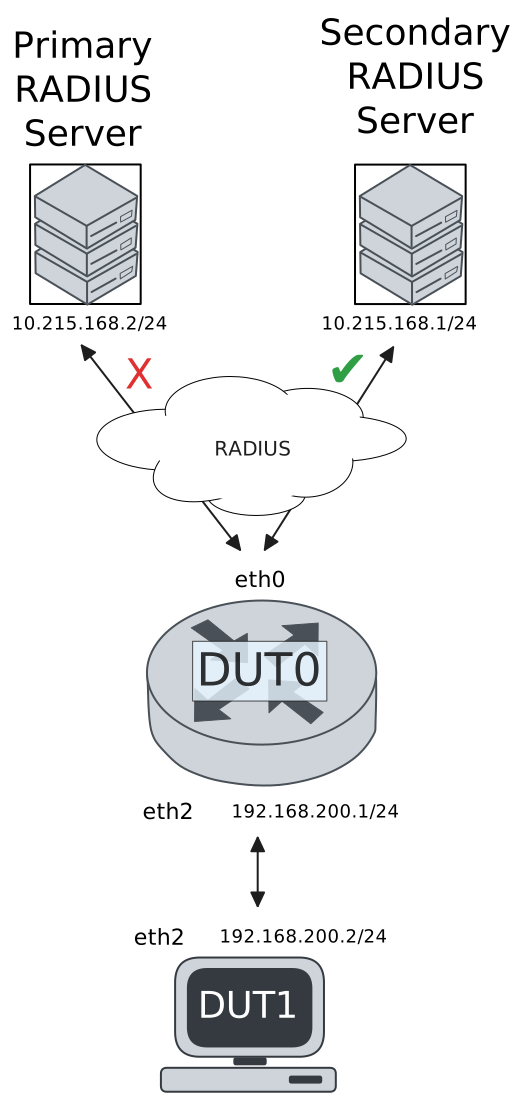
Test 802.1X Authentication Against NAS Through a VRF-Aware Interface
Description
This scenario shows how to configure 802.1X authentication. It focuses on Authenticator/NAS communication, when performed via an VRF-aware Ethernet interface.
Scenario
Step 1: Set the following configuration in DUT0 :
set interfaces ethernet eth0 address 10.215.168.64/24
set interfaces ethernet eth0 vrf WAN
set interfaces ethernet eth2 address 192.168.100.1/24
set interfaces ethernet eth2 authenticator 802.1x max-retransmissions 2
set interfaces ethernet eth2 authenticator aaa authentication list1
set interfaces ethernet eth2 authenticator log-level debug
set interfaces ethernet eth2 authenticator mode only-802.1x
set interfaces ethernet eth2 authenticator quiet-period 60
set interfaces ethernet eth2 authenticator reauth-period 0
set system aaa group radius radgroup1 local-vrf WAN
set system aaa group radius radgroup1 server serv1
set system aaa list list1 method 1 group radius radgroup1
set system aaa server radius serv1 address 10.215.168.1
set system aaa server radius serv1 encrypted-key U2FsdGVkX18c92kmX6mKn28HQuBDJjZ1TY72CQT9/JpLQ4tR8c65899t53uLiW6xafTzpIaRRMGZHd7yTDtELA==
set system login user admin authentication encrypted-password '$6$GSjsCj8gHLv$/VcqU6FLi6CT2Oxn0MJQ2C2tqnRDrYKNF8HIYWJp68nvXvPdFccDsT04.WtigUONbKYrgKg8d6rEs8PjljMkH0'
set system vrf WAN
Step 2: Ping IP address 10.215.168.1 from DUT0:
admin@DUT0$ ping 10.215.168.1 vrf WAN count 1 size 56 timeout 1Show output
ping: Warning: source address might be selected on device other than: WAN
PING 10.215.168.1 (10.215.168.1) from 10.215.168.64 WAN: 56(84) bytes of data.
64 bytes from 10.215.168.1: icmp_seq=1 ttl=64 time=0.203 ms

--- 10.215.168.1 ping statistics ---
1 packets transmitted, 1 received, 0% packet loss, time 0ms
rtt min/avg/max/mdev = 0.203/0.203/0.203/0.000 ms
Step 3: Set the following configuration in DUT1 :
set interfaces ethernet eth2 address 192.168.100.2/24
set interfaces ethernet eth2 supplicant encrypted-password U2FsdGVkX182cyIhWx4TW3zLuu0TE3+FQac/eEJol8c=
set interfaces ethernet eth2 supplicant username testing
set system login user admin authentication encrypted-password '$6$GSjsCj8gHLv$/VcqU6FLi6CT2Oxn0MJQ2C2tqnRDrYKNF8HIYWJp68nvXvPdFccDsT04.WtigUONbKYrgKg8d6rEs8PjljMkH0'
Step 4: Run command interfaces ethernet eth2 supplicant show status at DUT1 and check if output contains the following tokens:
AuthorizedShow output
---------------------------------------------------
        Field                      Value
---------------------------------------------------
EAP State                                   SUCCESS
EAP TLS Cipher          ECDHE-RSA-AES256-GCM-SHA384
EAP TLS Version                             TLSv1.2
PAE State                             AUTHENTICATED
Supplicant Port Status                   Authorized
WPA State                                 COMPLETED
Step 5: Run command interfaces ethernet eth2 supplicant show stats at DUT1 and check if output matches the following regular expressions:
Port Status\s+AuthorizedShow output
-------------------------------
       Field           Value
-------------------------------
EAPoL Frames (Rx)            11
EAPoL Frames (Tx)            11
Invalid Frames (Rx)           0
Logoff Frames (Tx)            0
Port Status          Authorized
Req Frames (Rx)               9
Req ID Frames (Rx)            1
Resp Frames (Tx)             10
Start Frames (Tx)             1
Step 6: Run command interfaces ethernet eth2 authenticator show stats at DUT0 and check if output matches the following regular expressions:
Authentication Successes\s+1
Authentication Mode\s+802\.1X
Show output
---------------------------------------------
         Field                   Value
---------------------------------------------
Access Challenges                           9
Authentication Backend                 RADIUS
Authentication Failures                     0
Authentication Mode                    802.1X
Authentication Status     Authorized (802.1X)
Authentication Successes                    1
EAPoL frames (Rx)                          11
EAPoL frames (Tx)                          11
Quiet Period                               60
Reauthenticate                          FALSE
Reauthenticate Period                       0
Session Time                                0
Session User MAC            de:ad:be:ef:6c:12
Session User Name                     testing
Step 7: Ping IP address 192.168.100.1 from DUT1:
admin@DUT1$ ping 192.168.100.1 count 1 size 56 timeout 1Show output
PING 192.168.100.1 (192.168.100.1) 56(84) bytes of data.
64 bytes from 192.168.100.1: icmp_seq=1 ttl=64 time=0.645 ms

--- 192.168.100.1 ping statistics ---
1 packets transmitted, 1 received, 0% packet loss, time 0ms
rtt min/avg/max/mdev = 0.645/0.645/0.645/0.000 ms
Test MAB Authentication Against NAS Through a VRF-Aware Interface
Description
This scenario shows how to configure MAB authentication. It focuses on Authenticator/NAS communication, when performed via an VRF-aware Ethernet interface.
Scenario
Step 1: Set the following configuration in DUT0 :
set interfaces ethernet eth0 address 10.215.168.64/24
set interfaces ethernet eth0 vrf WAN
set interfaces ethernet eth2 address 192.168.100.1/24
set interfaces ethernet eth2 authenticator aaa authentication list1
set interfaces ethernet eth2 authenticator log-level debug
set interfaces ethernet eth2 authenticator mode only-MAB
set interfaces ethernet eth2 authenticator quiet-period 60
set interfaces ethernet eth2 authenticator reauth-period 0
set system aaa group radius radgroup1 local-vrf WAN
set system aaa group radius radgroup1 server serv1
set system aaa list list1 method 1 group radius radgroup1
set system aaa server radius serv1 address 10.215.168.1
set system aaa server radius serv1 encrypted-key U2FsdGVkX19QO6TVYx0LSGfdlsRzuggZ4taCrlPITBceLRHfgmAEBZlKwxLawsYqyw19s+5uLNQ7aKmGdlaxhw==
set system login user admin authentication encrypted-password '$6$GSjsCj8gHLv$/VcqU6FLi6CT2Oxn0MJQ2C2tqnRDrYKNF8HIYWJp68nvXvPdFccDsT04.WtigUONbKYrgKg8d6rEs8PjljMkH0'
set system vrf WAN
Step 2: Ping IP address 10.215.168.1 from DUT0:
admin@DUT0$ ping 10.215.168.1 vrf WAN count 1 size 56 timeout 1Show output
ping: Warning: source address might be selected on device other than: WAN
PING 10.215.168.1 (10.215.168.1) from 10.215.168.64 WAN: 56(84) bytes of data.
64 bytes from 10.215.168.1: icmp_seq=1 ttl=64 time=0.275 ms

--- 10.215.168.1 ping statistics ---
1 packets transmitted, 1 received, 0% packet loss, time 0ms
rtt min/avg/max/mdev = 0.275/0.275/0.275/0.000 ms
Step 3: Set the following configuration in DUT1 :
set interfaces ethernet eth2 address 192.168.100.2/24
set system login user admin authentication encrypted-password '$6$GSjsCj8gHLv$/VcqU6FLi6CT2Oxn0MJQ2C2tqnRDrYKNF8HIYWJp68nvXvPdFccDsT04.WtigUONbKYrgKg8d6rEs8PjljMkH0'
Step 4: Ping IP address 192.168.100.1 from DUT1:
admin@DUT1$ ping 192.168.100.1 count 1 size 56 timeout 1Show output
PING 192.168.100.1 (192.168.100.1) 56(84) bytes of data.
64 bytes from 192.168.100.1: icmp_seq=1 ttl=64 time=0.317 ms

--- 192.168.100.1 ping statistics ---
1 packets transmitted, 1 received, 0% packet loss, time 0ms
rtt min/avg/max/mdev = 0.317/0.317/0.317/0.000 ms
Step 5: Run command interfaces ethernet eth2 authenticator show stats at DUT0 and check if output matches the following regular expressions:
Authentication Successes\s+1
Authentication Mode\s+MAB
Show output
-------------------------------------------
         Field                  Value
-------------------------------------------
Access Challenges                         0
Authentication Backend               RADIUS
Authentication Failures                   0
Authentication Mode                     MAB
Authentication Status      Authorized (MAB)
Authentication Successes                  1
EAPoL frames (Rx)                         0
EAPoL frames (Tx)                         0
Quiet Period                             60
Reauthenticate                        FALSE
Reauthenticate Period                     0
Session Time                              0
Session User MAC          de:ad:be:ef:6c:12
Session User Name                       N/A
Step 6: Ping IP address 192.168.100.1 from DUT1:
admin@DUT1$ ping 192.168.100.1 count 1 size 56 timeout 1Show output
PING 192.168.100.1 (192.168.100.1) 56(84) bytes of data.
64 bytes from 192.168.100.1: icmp_seq=1 ttl=64 time=0.290 ms

--- 192.168.100.1 ping statistics ---
1 packets transmitted, 1 received, 0% packet loss, time 0ms
rtt min/avg/max/mdev = 0.290/0.290/0.290/0.000 ms
Test 802.1X Authentication With Server Failover
Description
This scenario shows how to configure 802.1X authentication. The primary Nework Access Server is not reachable, so the secondary one is used instead.
Scenario
Step 1: Set the following configuration in DUT0 :
set interfaces ethernet eth0 address 10.215.168.64/24
set interfaces ethernet eth0 vrf WAN
set interfaces ethernet eth2 address 192.168.100.1/24
set interfaces ethernet eth2 authenticator 802.1x max-retransmissions 2
set interfaces ethernet eth2 authenticator aaa authentication list1
set interfaces ethernet eth2 authenticator log-level debug
set interfaces ethernet eth2 authenticator mode only-802.1x
set interfaces ethernet eth2 authenticator quiet-period 60
set interfaces ethernet eth2 authenticator reauth-period 0
set system aaa group radius radgroup0 local-vrf WAN
set system aaa group radius radgroup0 server MAIN
set system aaa group radius radgroup1 local-vrf WAN
set system aaa group radius radgroup1 server serv1
set system aaa list list1 method 0 group radius radgroup0
set system aaa list list1 method 1 group radius radgroup1
set system aaa server radius MAIN address 10.215.168.2
set system aaa server radius MAIN encrypted-key U2FsdGVkX1979KoseRHzAaekqz8t02XSOI4U2nnZeIxsqM046uG6djTXqpiRNE1+hgv1MmSw6K6ucukTXjBdVw==
set system aaa server radius serv1 address 10.215.168.1
set system aaa server radius serv1 encrypted-key U2FsdGVkX1+q6RYJ0+3Cq/ozq4np+1jEbp21bBiprbD9ZUSwvNs2nzxC5kIXdB1DlTbmGKo5Frw3S7dGtn2H3A==
set system login user admin authentication encrypted-password '$6$GSjsCj8gHLv$/VcqU6FLi6CT2Oxn0MJQ2C2tqnRDrYKNF8HIYWJp68nvXvPdFccDsT04.WtigUONbKYrgKg8d6rEs8PjljMkH0'
set system vrf WAN
Step 2: Ping IP address 10.215.168.1 from DUT0:
admin@DUT0$ ping 10.215.168.1 vrf WAN count 1 size 56 timeout 1Show output
ping: Warning: source address might be selected on device other than: WAN
PING 10.215.168.1 (10.215.168.1) from 10.215.168.64 WAN: 56(84) bytes of data.
64 bytes from 10.215.168.1: icmp_seq=1 ttl=64 time=0.913 ms

--- 10.215.168.1 ping statistics ---
1 packets transmitted, 1 received, 0% packet loss, time 0ms
rtt min/avg/max/mdev = 0.913/0.913/0.913/0.000 ms
Step 3: Set the following configuration in DUT1 :
set interfaces ethernet eth2 address 192.168.100.2/24
set interfaces ethernet eth2 supplicant encrypted-password U2FsdGVkX19p3Goe9trU5nPGZbOKcWM5tbCIGt7Sfec=
set interfaces ethernet eth2 supplicant username testing
set system login user admin authentication encrypted-password '$6$GSjsCj8gHLv$/VcqU6FLi6CT2Oxn0MJQ2C2tqnRDrYKNF8HIYWJp68nvXvPdFccDsT04.WtigUONbKYrgKg8d6rEs8PjljMkH0'
Step 4: Run command interfaces ethernet eth2 supplicant show status at DUT1 and check if output contains the following tokens:
AuthorizedShow output
---------------------------------------------------
        Field                      Value
---------------------------------------------------
EAP State                                   SUCCESS
EAP TLS Cipher          ECDHE-RSA-AES256-GCM-SHA384
EAP TLS Version                             TLSv1.2
PAE State                             AUTHENTICATED
Supplicant Port Status                   Authorized
WPA State                                 COMPLETED
Step 5: Run command interfaces ethernet eth2 supplicant show stats at DUT1 and check if output matches the following regular expressions:
Port Status\s+AuthorizedShow output
-------------------------------
       Field           Value
-------------------------------
EAPoL Frames (Rx)            11
EAPoL Frames (Tx)            11
Invalid Frames (Rx)           0
Logoff Frames (Tx)            0
Port Status          Authorized
Req Frames (Rx)               9
Req ID Frames (Rx)            1
Resp Frames (Tx)             10
Start Frames (Tx)             1
Step 6: Run command interfaces ethernet eth2 authenticator show stats at DUT0 and check if output matches the following regular expressions:
Authentication Successes\s+1
Authentication Mode\s+802\.1X
Show output
---------------------------------------------
         Field                   Value
---------------------------------------------
Access Challenges                           9
Authentication Backend                 RADIUS
Authentication Failures                     0
Authentication Mode                    802.1X
Authentication Status     Authorized (802.1X)
Authentication Successes                    1
EAPoL frames (Rx)                          11
EAPoL frames (Tx)                          11
Quiet Period                               60
Reauthenticate                          FALSE
Reauthenticate Period                       0
Session Time                                0
Session User MAC            de:ad:be:ef:6c:12
Session User Name                     testing
Step 7: Ping IP address 192.168.100.1 from DUT1:
admin@DUT1$ ping 192.168.100.1 count 1 size 56 timeout 1Show output
PING 192.168.100.1 (192.168.100.1) 56(84) bytes of data.
64 bytes from 192.168.100.1: icmp_seq=1 ttl=64 time=0.347 ms

--- 192.168.100.1 ping statistics ---
1 packets transmitted, 1 received, 0% packet loss, time 0ms
rtt min/avg/max/mdev = 0.347/0.347/0.347/0.000 ms
Step 8: Run command system journal show | grep "osdx hostapd" at DUT0 and check if output contains the following tokens:
No response from Authentication server 10.215.168.2Show output
May 04 18:16:33.954896 osdx hostapd[63126]: eth2: IEEE 802.11 Fetching hardware channel/rate support not supported.
May 04 18:16:33.954907 osdx hostapd[63126]: eth2: RADIUS Authentication server 10.215.168.2:1812
May 04 18:16:33.955143 osdx hostapd[63126]: connect[radius]: No route to host
May 04 18:16:33.954941 osdx hostapd[63126]: eth2: IEEE 802.1X Initializing IEEE 802.1X: mode=802.1X, eap_server=0, eap_quiet_period=60, eap_max_retrans=2
May 04 18:16:33.954944 osdx hostapd[63126]: eth2: IEEE 802.1X IEEE 802.1X: Enabling packet capture discovery mode
May 04 18:16:33.974804 osdx hostapd[63126]: Discovery mode enabled on eth2
May 04 18:16:33.974855 osdx hostapd[63126]: eth2: interface state UNINITIALIZED->ENABLED
May 04 18:16:33.974855 osdx hostapd[63126]: eth2: AP-ENABLED
May 04 18:16:37.156214 osdx hostapd[63127]: eth2: STA de:ad:be:ef:6c:12 IEEE 802.1X: New STA de:ad:be:ef:6c:12 added
May 04 18:16:37.156230 osdx hostapd[63127]: eth2: IEEE 802.1X IEEE 802.1X: Disabling packet capture discovery mode
May 04 18:16:37.174896 osdx hostapd[63127]: eth2: STA de:ad:be:ef:6c:12 IEEE 802.1X: start authentication
May 04 18:16:37.174923 osdx hostapd[63127]: eth2: STA 01:80:c2:00:00:03 IEEE 802.1X: disabling transmission of periodic EAP-Request frames
May 04 18:16:37.174940 osdx hostapd[63127]: eth2: STA de:ad:be:ef:6c:12 IEEE 802.1X: received EAPOL-Start from STA
May 04 18:16:37.174949 osdx hostapd[63127]: eth2: STA de:ad:be:ef:6c:12 IEEE 802.1X: unauthorizing port
May 04 18:16:37.174957 osdx hostapd[63127]: eth2: STA 01:80:c2:00:00:03 IEEE 802.1X: Trying RADIUS authentication
May 04 18:16:37.174972 osdx hostapd[63127]: eth2: STA de:ad:be:ef:6c:12 IEEE 802.1X: Sending EAP Packet (identifier 131)
May 04 18:16:37.175280 osdx hostapd[63127]: eth2: STA de:ad:be:ef:6c:12 IEEE 802.1X: received EAP packet (code=2 id=131 len=12) from STA: EAP Response-Identity (1)
May 04 18:16:37.175294 osdx hostapd[63127]: eth2: STA de:ad:be:ef:6c:12 IEEE 802.1X: STA identity 'testing'
May 04 18:16:37.175314 osdx hostapd[63127]: eth2: RADIUS Authentication server 10.215.168.2:1812
May 04 18:16:37.177067 osdx hostapd[63127]: eth2: RADIUS Sending RADIUS message to authentication server
May 04 18:16:37.177103 osdx hostapd[63127]: eth2: RADIUS Next RADIUS client retransmit in 1 seconds
May 04 18:16:38.177194 osdx hostapd[63127]: eth2: STA de:ad:be:ef:6c:12 RADIUS: Resending RADIUS message (id=0)
May 04 18:16:38.177217 osdx hostapd[63127]: eth2: RADIUS Next RADIUS client retransmit in 2 seconds
May 04 18:16:40.177301 osdx hostapd[63127]: eth2: STA de:ad:be:ef:6c:12 RADIUS: Resending RADIUS message (id=0)
May 04 18:16:40.177324 osdx hostapd[63127]: eth2: RADIUS Next RADIUS client retransmit in 4 seconds
May 04 18:16:44.177639 osdx hostapd[63127]: eth2: RADIUS No response from Authentication server 10.215.168.2:1812 - failover (1º round)
May 04 18:16:44.177651 osdx hostapd[63127]: eth2: RADIUS Authentication server 10.215.168.1:1812
May 04 18:16:44.177704 osdx hostapd[63127]: eth2: STA de:ad:be:ef:6c:12 RADIUS: Resending RADIUS message (id=0)
May 04 18:16:44.177740 osdx hostapd[63127]: eth2: RADIUS Next RADIUS client retransmit in 2 seconds
May 04 18:16:44.178026 osdx hostapd[63127]: eth2: RADIUS Received 80 bytes from RADIUS server
May 04 18:16:44.178033 osdx hostapd[63127]: eth2: RADIUS Received RADIUS message
May 04 18:16:44.178038 osdx hostapd[63127]: eth2: STA de:ad:be:ef:6c:12 RADIUS: Received RADIUS packet matched with a pending request, round trip time 0.00 sec
May 04 18:16:44.178103 osdx hostapd[63127]: eth2: STA de:ad:be:ef:6c:12 IEEE 802.1X: decapsulated EAP packet (code=1 id=132 len=22) from RADIUS server: EAP-Request-MD5 (4)
May 04 18:16:44.178113 osdx hostapd[63127]: eth2: STA de:ad:be:ef:6c:12 IEEE 802.1X: Sending EAP Packet (identifier 132)
May 04 18:16:44.178438 osdx hostapd[63127]: eth2: STA de:ad:be:ef:6c:12 IEEE 802.1X: received EAP packet (code=2 id=132 len=6) from STA: EAP Response-unknown (3)
May 04 18:16:44.178515 osdx hostapd[63127]: eth2: RADIUS Sending RADIUS message to authentication server
May 04 18:16:44.178536 osdx hostapd[63127]: eth2: RADIUS Next RADIUS client retransmit in 1 seconds
May 04 18:16:44.178752 osdx hostapd[63127]: eth2: RADIUS Received 64 bytes from RADIUS server
May 04 18:16:44.178758 osdx hostapd[63127]: eth2: RADIUS Received RADIUS message
May 04 18:16:44.178763 osdx hostapd[63127]: eth2: STA de:ad:be:ef:6c:12 RADIUS: Received RADIUS packet matched with a pending request, round trip time 0.00 sec
May 04 18:16:44.178792 osdx hostapd[63127]: eth2: STA de:ad:be:ef:6c:12 IEEE 802.1X: decapsulated EAP packet (code=1 id=133 len=6) from RADIUS server: EAP-Request-PEAP (25)
May 04 18:16:44.178804 osdx hostapd[63127]: eth2: STA de:ad:be:ef:6c:12 IEEE 802.1X: Sending EAP Packet (identifier 133)
May 04 18:16:44.179185 osdx hostapd[63127]: eth2: STA de:ad:be:ef:6c:12 IEEE 802.1X: received EAP packet (code=2 id=133 len=194) from STA: EAP Response-PEAP (25)
May 04 18:16:44.179236 osdx hostapd[63127]: eth2: RADIUS Sending RADIUS message to authentication server
May 04 18:16:44.179252 osdx hostapd[63127]: eth2: RADIUS Next RADIUS client retransmit in 1 seconds
May 04 18:16:44.180268 osdx hostapd[63127]: eth2: RADIUS Received 1068 bytes from RADIUS server
May 04 18:16:44.180274 osdx hostapd[63127]: eth2: RADIUS Received RADIUS message
May 04 18:16:44.180279 osdx hostapd[63127]: eth2: STA de:ad:be:ef:6c:12 RADIUS: Received RADIUS packet matched with a pending request, round trip time 0.00 sec
May 04 18:16:44.180299 osdx hostapd[63127]: eth2: STA de:ad:be:ef:6c:12 IEEE 802.1X: decapsulated EAP packet (code=1 id=134 len=1004) from RADIUS server: EAP-Request-PEAP (25)
May 04 18:16:44.180311 osdx hostapd[63127]: eth2: STA de:ad:be:ef:6c:12 IEEE 802.1X: Sending EAP Packet (identifier 134)
May 04 18:16:44.180493 osdx hostapd[63127]: eth2: STA de:ad:be:ef:6c:12 IEEE 802.1X: received EAP packet (code=2 id=134 len=6) from STA: EAP Response-PEAP (25)
May 04 18:16:44.180546 osdx hostapd[63127]: eth2: RADIUS Sending RADIUS message to authentication server
May 04 18:16:44.180562 osdx hostapd[63127]: eth2: RADIUS Next RADIUS client retransmit in 1 seconds
May 04 18:16:44.180666 osdx hostapd[63127]: eth2: RADIUS Received 229 bytes from RADIUS server
May 04 18:16:44.180672 osdx hostapd[63127]: eth2: RADIUS Received RADIUS message
May 04 18:16:44.180676 osdx hostapd[63127]: eth2: STA de:ad:be:ef:6c:12 RADIUS: Received RADIUS packet matched with a pending request, round trip time 0.00 sec
May 04 18:16:44.180691 osdx hostapd[63127]: eth2: STA de:ad:be:ef:6c:12 IEEE 802.1X: decapsulated EAP packet (code=1 id=135 len=171) from RADIUS server: EAP-Request-PEAP (25)
May 04 18:16:44.180697 osdx hostapd[63127]: eth2: STA de:ad:be:ef:6c:12 IEEE 802.1X: Sending EAP Packet (identifier 135)
May 04 18:16:44.182645 osdx hostapd[63127]: eth2: STA de:ad:be:ef:6c:12 IEEE 802.1X: received EAP packet (code=2 id=135 len=103) from STA: EAP Response-PEAP (25)
May 04 18:16:44.182693 osdx hostapd[63127]: eth2: RADIUS Sending RADIUS message to authentication server
May 04 18:16:44.182705 osdx hostapd[63127]: eth2: RADIUS Next RADIUS client retransmit in 1 seconds
May 04 18:16:44.182997 osdx hostapd[63127]: eth2: RADIUS Received 115 bytes from RADIUS server
May 04 18:16:44.183005 osdx hostapd[63127]: eth2: RADIUS Received RADIUS message
May 04 18:16:44.183010 osdx hostapd[63127]: eth2: STA de:ad:be:ef:6c:12 RADIUS: Received RADIUS packet matched with a pending request, round trip time 0.00 sec
May 04 18:16:44.183035 osdx hostapd[63127]: eth2: STA de:ad:be:ef:6c:12 IEEE 802.1X: decapsulated EAP packet (code=1 id=136 len=57) from RADIUS server: EAP-Request-PEAP (25)
May 04 18:16:44.183043 osdx hostapd[63127]: eth2: STA de:ad:be:ef:6c:12 IEEE 802.1X: Sending EAP Packet (identifier 136)
May 04 18:16:44.183264 osdx hostapd[63127]: eth2: STA de:ad:be:ef:6c:12 IEEE 802.1X: received EAP packet (code=2 id=136 len=6) from STA: EAP Response-PEAP (25)
May 04 18:16:44.183305 osdx hostapd[63127]: eth2: RADIUS Sending RADIUS message to authentication server
May 04 18:16:44.183320 osdx hostapd[63127]: eth2: RADIUS Next RADIUS client retransmit in 1 seconds
May 04 18:16:44.183414 osdx hostapd[63127]: eth2: RADIUS Received 98 bytes from RADIUS server
May 04 18:16:44.183420 osdx hostapd[63127]: eth2: RADIUS Received RADIUS message
May 04 18:16:44.183424 osdx hostapd[63127]: eth2: STA de:ad:be:ef:6c:12 RADIUS: Received RADIUS packet matched with a pending request, round trip time 0.00 sec
May 04 18:16:44.183438 osdx hostapd[63127]: eth2: STA de:ad:be:ef:6c:12 IEEE 802.1X: decapsulated EAP packet (code=1 id=137 len=40) from RADIUS server: EAP-Request-PEAP (25)
May 04 18:16:44.183445 osdx hostapd[63127]: eth2: STA de:ad:be:ef:6c:12 IEEE 802.1X: Sending EAP Packet (identifier 137)
May 04 18:16:44.183563 osdx hostapd[63127]: eth2: STA de:ad:be:ef:6c:12 IEEE 802.1X: received EAP packet (code=2 id=137 len=43) from STA: EAP Response-PEAP (25)
May 04 18:16:44.183596 osdx hostapd[63127]: eth2: RADIUS Sending RADIUS message to authentication server
May 04 18:16:44.183606 osdx hostapd[63127]: eth2: RADIUS Next RADIUS client retransmit in 1 seconds
May 04 18:16:44.183733 osdx hostapd[63127]: eth2: RADIUS Received 131 bytes from RADIUS server
May 04 18:16:44.183739 osdx hostapd[63127]: eth2: RADIUS Received RADIUS message
May 04 18:16:44.183743 osdx hostapd[63127]: eth2: STA de:ad:be:ef:6c:12 RADIUS: Received RADIUS packet matched with a pending request, round trip time 0.00 sec
May 04 18:16:44.183756 osdx hostapd[63127]: eth2: STA de:ad:be:ef:6c:12 IEEE 802.1X: decapsulated EAP packet (code=1 id=138 len=73) from RADIUS server: EAP-Request-PEAP (25)
May 04 18:16:44.183762 osdx hostapd[63127]: eth2: STA de:ad:be:ef:6c:12 IEEE 802.1X: Sending EAP Packet (identifier 138)
May 04 18:16:44.184003 osdx hostapd[63127]: eth2: STA de:ad:be:ef:6c:12 IEEE 802.1X: received EAP packet (code=2 id=138 len=97) from STA: EAP Response-PEAP (25)
May 04 18:16:44.184035 osdx hostapd[63127]: eth2: RADIUS Sending RADIUS message to authentication server
May 04 18:16:44.184047 osdx hostapd[63127]: eth2: RADIUS Next RADIUS client retransmit in 1 seconds
May 04 18:16:44.184220 osdx hostapd[63127]: eth2: RADIUS Received 140 bytes from RADIUS server
May 04 18:16:44.184226 osdx hostapd[63127]: eth2: RADIUS Received RADIUS message
May 04 18:16:44.184229 osdx hostapd[63127]: eth2: STA de:ad:be:ef:6c:12 RADIUS: Received RADIUS packet matched with a pending request, round trip time 0.00 sec
May 04 18:16:44.184242 osdx hostapd[63127]: eth2: STA de:ad:be:ef:6c:12 IEEE 802.1X: decapsulated EAP packet (code=1 id=139 len=82) from RADIUS server: EAP-Request-PEAP (25)
May 04 18:16:44.184248 osdx hostapd[63127]: eth2: STA de:ad:be:ef:6c:12 IEEE 802.1X: Sending EAP Packet (identifier 139)
May 04 18:16:44.184382 osdx hostapd[63127]: eth2: STA de:ad:be:ef:6c:12 IEEE 802.1X: received EAP packet (code=2 id=139 len=37) from STA: EAP Response-PEAP (25)
May 04 18:16:44.184414 osdx hostapd[63127]: eth2: RADIUS Sending RADIUS message to authentication server
May 04 18:16:44.184425 osdx hostapd[63127]: eth2: RADIUS Next RADIUS client retransmit in 1 seconds
May 04 18:16:44.184534 osdx hostapd[63127]: eth2: RADIUS Received 104 bytes from RADIUS server
May 04 18:16:44.184540 osdx hostapd[63127]: eth2: RADIUS Received RADIUS message
May 04 18:16:44.184543 osdx hostapd[63127]: eth2: STA de:ad:be:ef:6c:12 RADIUS: Received RADIUS packet matched with a pending request, round trip time 0.00 sec
May 04 18:16:44.184556 osdx hostapd[63127]: eth2: STA de:ad:be:ef:6c:12 IEEE 802.1X: decapsulated EAP packet (code=1 id=140 len=46) from RADIUS server: EAP-Request-PEAP (25)
May 04 18:16:44.184562 osdx hostapd[63127]: eth2: STA de:ad:be:ef:6c:12 IEEE 802.1X: Sending EAP Packet (identifier 140)
May 04 18:16:44.184681 osdx hostapd[63127]: eth2: STA de:ad:be:ef:6c:12 IEEE 802.1X: received EAP packet (code=2 id=140 len=46) from STA: EAP Response-PEAP (25)
May 04 18:16:44.184713 osdx hostapd[63127]: eth2: RADIUS Sending RADIUS message to authentication server
May 04 18:16:44.184723 osdx hostapd[63127]: eth2: RADIUS Next RADIUS client retransmit in 1 seconds
May 04 18:16:44.184848 osdx hostapd[63127]: eth2: RADIUS Received 175 bytes from RADIUS server
May 04 18:16:44.184853 osdx hostapd[63127]: eth2: RADIUS Received RADIUS message
May 04 18:16:44.184857 osdx hostapd[63127]: eth2: STA de:ad:be:ef:6c:12 RADIUS: Received RADIUS packet matched with a pending request, round trip time 0.00 sec
May 04 18:16:44.184879 osdx hostapd[63127]: eth2: STA de:ad:be:ef:6c:12 IEEE 802.1X: old identity 'testing' updated with User-Name from Access-Accept 'testing'
May 04 18:16:44.184883 osdx hostapd[63127]: eth2: STA de:ad:be:ef:6c:12 IEEE 802.1X: decapsulated EAP packet (code=3 id=140 len=4) from RADIUS server: EAP Success
May 04 18:16:44.184898 osdx hostapd[63127]: eth2: STA de:ad:be:ef:6c:12 IEEE 802.1X: Sending EAP Packet (identifier 140)
May 04 18:16:44.184913 osdx hostapd[63127]: eth2: STA de:ad:be:ef:6c:12 IEEE 802.1X: authorizing port
May 04 18:16:44.184917 osdx hostapd[63127]: eth2: STA de:ad:be:ef:6c:12 RADIUS: starting accounting session 8DAEB9AC13187E0D
May 04 18:16:44.184921 osdx hostapd[63127]: eth2: STA de:ad:be:ef:6c:12 IEEE 802.1X: authenticated - EAP type: 25 (PEAP)
Test MAB Authentication With Server Failover
Description
This scenario shows how to configure MAB authentication. The primary Nework Access Server is not reachable, so the secondary one is used instead.
Scenario
Step 1: Set the following configuration in DUT0 :
set interfaces ethernet eth0 address 10.215.168.64/24
set interfaces ethernet eth0 vrf WAN
set interfaces ethernet eth2 address 192.168.100.1/24
set interfaces ethernet eth2 authenticator aaa authentication list1
set interfaces ethernet eth2 authenticator log-level debug
set interfaces ethernet eth2 authenticator mode only-MAB
set interfaces ethernet eth2 authenticator quiet-period 60
set interfaces ethernet eth2 authenticator reauth-period 0
set system aaa group radius radgroup0 local-vrf WAN
set system aaa group radius radgroup0 server MAIN
set system aaa group radius radgroup1 local-vrf WAN
set system aaa group radius radgroup1 server serv1
set system aaa list list1 method 0 group radius radgroup0
set system aaa list list1 method 1 group radius radgroup1
set system aaa server radius MAIN address 10.215.168.2
set system aaa server radius MAIN encrypted-key U2FsdGVkX196mGseajwvzOzOSpm2dmXy/OiSs6ZTeczRkDOD0rgy0xomPCGPnxkIMjJ2AzPv2ysqNl0ocdBafQ==
set system aaa server radius serv1 address 10.215.168.1
set system aaa server radius serv1 encrypted-key U2FsdGVkX1/pksXCR1Qct8hfcbGcQftroni4yKFffIFX19iPTpSmkB3+LSXj3Cm3tQkZ/svG5GVGxMHEM3v9tA==
set system login user admin authentication encrypted-password '$6$GSjsCj8gHLv$/VcqU6FLi6CT2Oxn0MJQ2C2tqnRDrYKNF8HIYWJp68nvXvPdFccDsT04.WtigUONbKYrgKg8d6rEs8PjljMkH0'
set system vrf WAN
Step 2: Ping IP address 10.215.168.1 from DUT0:
admin@DUT0$ ping 10.215.168.1 vrf WAN count 1 size 56 timeout 1Show output
ping: Warning: source address might be selected on device other than: WAN
PING 10.215.168.1 (10.215.168.1) from 10.215.168.64 WAN: 56(84) bytes of data.
64 bytes from 10.215.168.1: icmp_seq=1 ttl=64 time=1.03 ms

--- 10.215.168.1 ping statistics ---
1 packets transmitted, 1 received, 0% packet loss, time 0ms
rtt min/avg/max/mdev = 1.028/1.028/1.028/0.000 ms
Step 3: Set the following configuration in DUT1 :
set interfaces ethernet eth2 address 192.168.100.2/24
set system login user admin authentication encrypted-password '$6$GSjsCj8gHLv$/VcqU6FLi6CT2Oxn0MJQ2C2tqnRDrYKNF8HIYWJp68nvXvPdFccDsT04.WtigUONbKYrgKg8d6rEs8PjljMkH0'
Step 4: Run command interfaces ethernet eth2 authenticator show stats at DUT0 and check if output matches the following regular expressions:
Authentication Successes\s+1
Authentication Mode\s+MAB
Show output
-------------------------------------------
         Field                  Value
-------------------------------------------
Access Challenges                         0
Authentication Backend               RADIUS
Authentication Failures                   0
Authentication Mode                     MAB
Authentication Status      Authorized (MAB)
Authentication Successes                  1
EAPoL frames (Rx)                         0
EAPoL frames (Tx)                         0
Quiet Period                             60
Reauthenticate                        FALSE
Reauthenticate Period                     0
Session Time                              0
Session User MAC          de:ad:be:ef:6c:12
Session User Name                       N/A
Step 5: Ping IP address 192.168.100.1 from DUT1:
admin@DUT1$ ping 192.168.100.1 count 1 size 56 timeout 1Show output
PING 192.168.100.1 (192.168.100.1) 56(84) bytes of data.
64 bytes from 192.168.100.1: icmp_seq=1 ttl=64 time=0.269 ms

--- 192.168.100.1 ping statistics ---
1 packets transmitted, 1 received, 0% packet loss, time 0ms
rtt min/avg/max/mdev = 0.269/0.269/0.269/0.000 ms
Step 6: Run command system journal show | grep "osdx hostapd" at DUT0 and check if output contains the following tokens:
No response from Authentication server 10.215.168.2Show output
May 04 18:16:53.995437 osdx hostapd[63771]: eth2: IEEE 802.11 Fetching hardware channel/rate support not supported.
May 04 18:16:53.995453 osdx hostapd[63771]: eth2: RADIUS Authentication server 10.215.168.2:1812
May 04 18:16:53.995677 osdx hostapd[63771]: connect[radius]: No route to host
May 04 18:16:53.995497 osdx hostapd[63771]: eth2: IEEE 802.1X Initializing IEEE 802.1X: mode=MAB-only, eap_server=0, eap_quiet_period=60, eap_max_retrans=5
May 04 18:16:53.995501 osdx hostapd[63771]: eth2: IEEE 802.1X IEEE 802.1X: Enabling packet capture discovery mode
May 04 18:16:54.015187 osdx hostapd[63771]: Discovery mode enabled on eth2
May 04 18:16:54.015246 osdx hostapd[63771]: eth2: interface state UNINITIALIZED->ENABLED
May 04 18:16:54.015246 osdx hostapd[63771]: eth2: AP-ENABLED
May 04 18:16:59.015555 osdx hostapd[63772]: eth2: STA de:ad:be:ef:6c:12 DRIVER: Device discovered, triggering MAB authentication
May 04 18:16:59.015600 osdx hostapd[63772]: eth2: STA de:ad:be:ef:6c:12 IEEE 802.1X: New STA de:ad:be:ef:6c:12 added
May 04 18:16:59.015608 osdx hostapd[63772]: eth2: IEEE 802.1X IEEE 802.1X: Disabling packet capture discovery mode
May 04 18:16:59.031262 osdx hostapd[63772]: eth2: STA de:ad:be:ef:6c:12 IEEE 802.1X: MAB-only mode: Starting MAB authentication
May 04 18:16:59.031301 osdx hostapd[63772]: eth2: STA de:ad:be:ef:6c:12 IEEE 802.1X: MAB: Starting RADIUS query
May 04 18:16:59.031316 osdx hostapd[63772]: eth2: STA de:ad:be:ef:6c:12 IEEE 802.1X: MAB: User-Name = de:ad:be:ef:6c:12
May 04 18:16:59.033096 osdx hostapd[63772]: eth2: STA de:ad:be:ef:6c:12 IEEE 802.1X: MAB: User-Password = de:ad:be:ef:6c:12
May 04 18:16:59.033110 osdx hostapd[63772]: eth2: RADIUS Authentication server 10.215.168.2:1812
May 04 18:16:59.033198 osdx hostapd[63772]: eth2: RADIUS Sending RADIUS message to authentication server
May 04 18:16:59.033235 osdx hostapd[63772]: eth2: RADIUS Next RADIUS client retransmit in 1 seconds
May 04 18:17:00.033325 osdx hostapd[63772]: eth2: STA de:ad:be:ef:6c:12 RADIUS: Resending RADIUS message (id=128)
May 04 18:17:00.033362 osdx hostapd[63772]: eth2: RADIUS Next RADIUS client retransmit in 2 seconds
May 04 18:17:02.033523 osdx hostapd[63772]: eth2: STA de:ad:be:ef:6c:12 RADIUS: Resending RADIUS message (id=128)
May 04 18:17:02.033549 osdx hostapd[63772]: eth2: RADIUS Next RADIUS client retransmit in 4 seconds
May 04 18:17:06.034519 osdx hostapd[63772]: eth2: RADIUS No response from Authentication server 10.215.168.2:1812 - failover (1º round)
May 04 18:17:06.034529 osdx hostapd[63772]: eth2: RADIUS Authentication server 10.215.168.1:1812
May 04 18:17:06.034576 osdx hostapd[63772]: eth2: STA de:ad:be:ef:6c:12 RADIUS: Resending RADIUS message (id=128)
May 04 18:17:06.034605 osdx hostapd[63772]: eth2: RADIUS Next RADIUS client retransmit in 2 seconds
May 04 18:17:06.034954 osdx hostapd[63772]: eth2: RADIUS Received 20 bytes from RADIUS server
May 04 18:17:06.034960 osdx hostapd[63772]: eth2: RADIUS Received RADIUS message
May 04 18:17:06.034964 osdx hostapd[63772]: eth2: STA de:ad:be:ef:6c:12 RADIUS: Received RADIUS packet matched with a pending request, round trip time 0.00 sec
May 04 18:17:06.034968 osdx hostapd[63772]: eth2: STA de:ad:be:ef:6c:12 IEEE 802.1X: MAB: Processing RADIUS response
May 04 18:17:06.035005 osdx hostapd[63772]: eth2: STA de:ad:be:ef:6c:12 IEEE 802.1X: MAB: Identity set to 'de:ad:be:ef:6c:12'
May 04 18:17:06.035026 osdx hostapd[63772]: eth2: STA de:ad:be:ef:6c:12 IEEE 802.1X: MAB: station successfully authenticated
May 04 18:17:06.035034 osdx hostapd[63772]: eth2: IEEE 802.1X IEEE 802.1X: Discovery already disabled
May 04 18:17:06.035045 osdx hostapd[63772]: eth2: STA de:ad:be:ef:6c:12 IEEE 802.1X: authorizing port
May 04 18:17:06.035049 osdx hostapd[63772]: eth2: STA de:ad:be:ef:6c:12 RADIUS: starting accounting session E0830285A1DED7BB