Relay
This scenario shows how to configure service dhcp-relay. The
relay agent must be used when the DHCP server and the DHCP
clients are not connected to the same layer 2 domain.
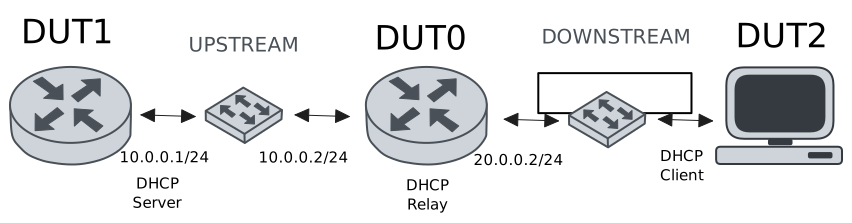
Test DHCP Relay
Description
This example demonstrates how to configure a DHCP relay instance in DUT0 to forward DHCP requests from DUT2 to DUT1.
Scenario
Step 1: Set the following configuration in DUT0 :
set interfaces ethernet eth0 vif 100 address 10.0.0.2/24
set interfaces ethernet eth1 vif 200 address 20.0.0.2/24
set service dhcp-relay INS downstream-interface eth1.200
set service dhcp-relay INS server 10.0.0.1
set service dhcp-relay INS upstream-interface eth0.100
set system login user admin authentication encrypted-password '$6$GSjsCj8gHLv$/VcqU6FLi6CT2Oxn0MJQ2C2tqnRDrYKNF8HIYWJp68nvXvPdFccDsT04.WtigUONbKYrgKg8d6rEs8PjljMkH0'
Step 2: Set the following configuration in DUT1 :
set interfaces ethernet eth0 vif 100 address 10.0.0.1/24
set protocols static route 0.0.0.0/0 next-hop 10.0.0.2
set service dhcp-server shared-network dummy subnet 10.0.0.1/32
set service dhcp-server shared-network remote subnet 20.0.0.0/24 start 20.0.0.50 stop 20.0.0.50
set system login user admin authentication encrypted-password '$6$GSjsCj8gHLv$/VcqU6FLi6CT2Oxn0MJQ2C2tqnRDrYKNF8HIYWJp68nvXvPdFccDsT04.WtigUONbKYrgKg8d6rEs8PjljMkH0'
Step 3: Set the following configuration in DUT2 :
set interfaces ethernet eth0 vif 200 address dhcp
set system login user admin authentication encrypted-password '$6$GSjsCj8gHLv$/VcqU6FLi6CT2Oxn0MJQ2C2tqnRDrYKNF8HIYWJp68nvXvPdFccDsT04.WtigUONbKYrgKg8d6rEs8PjljMkH0'
Step 4: Ping IP address 10.0.0.1 from DUT0:
admin@DUT0$ ping 10.0.0.1 count 1 size 56 timeout 1Show output
PING 10.0.0.1 (10.0.0.1) 56(84) bytes of data.
64 bytes from 10.0.0.1: icmp_seq=1 ttl=64 time=0.380 ms

--- 10.0.0.1 ping statistics ---
1 packets transmitted, 1 received, 0% packet loss, time 0ms
rtt min/avg/max/mdev = 0.380/0.380/0.380/0.000 ms
Step 5: Run command interfaces ethernet show at DUT2 and check if output contains the following tokens:
20.0.0.50Show output
---------------------------------------------------------------------
  Name             IP Address           Admin  Oper  Vrf  Description
---------------------------------------------------------------------
    eth0  fe80::dcad:beff:feef:6c20/64  up     up
eth0.200  20.0.0.50/24                  up     up
          fe80::dcad:beff:feef:6c20/64
    eth1                                down   down
    eth2                                down   down
    eth3                                down   down
Test DHCP Relay With Giaddr
Description
This example demonstrates how to set the gateway IP address (giaddr) in the IP address. This value must be set in an IP address that the DHCP server can reach.
Scenario
Step 1: Set the following configuration in DUT0 :
set interfaces ethernet eth0 vif 100 address 10.0.0.2/24
set interfaces ethernet eth1 vif 200 address 20.0.0.2/24
set interfaces ethernet eth1 vif 200 address 20.0.0.3/24
set service dhcp-relay INS downstream-interface eth1.200
set service dhcp-relay INS server 10.0.0.1 giaddr 20.0.0.3
set service dhcp-relay INS upstream-interface eth0.100
set system login user admin authentication encrypted-password '$6$GSjsCj8gHLv$/VcqU6FLi6CT2Oxn0MJQ2C2tqnRDrYKNF8HIYWJp68nvXvPdFccDsT04.WtigUONbKYrgKg8d6rEs8PjljMkH0'
Step 2: Set the following configuration in DUT1 :
set interfaces ethernet eth0 vif 100 address 10.0.0.1/24
set protocols static route 0.0.0.0/0 next-hop 10.0.0.2
set service dhcp-server shared-network dummy subnet 10.0.0.1/32
set service dhcp-server shared-network remote subnet 20.0.0.0/24 start 20.0.0.50 stop 20.0.0.50
set system login user admin authentication encrypted-password '$6$GSjsCj8gHLv$/VcqU6FLi6CT2Oxn0MJQ2C2tqnRDrYKNF8HIYWJp68nvXvPdFccDsT04.WtigUONbKYrgKg8d6rEs8PjljMkH0'
Step 3: Set the following configuration in DUT2 :
set interfaces ethernet eth0 vif 200 address dhcp
set system login user admin authentication encrypted-password '$6$GSjsCj8gHLv$/VcqU6FLi6CT2Oxn0MJQ2C2tqnRDrYKNF8HIYWJp68nvXvPdFccDsT04.WtigUONbKYrgKg8d6rEs8PjljMkH0'
Step 4: Ping IP address 10.0.0.1 from DUT0:
admin@DUT0$ ping 10.0.0.1 count 1 size 56 timeout 1Show output
PING 10.0.0.1 (10.0.0.1) 56(84) bytes of data.
64 bytes from 10.0.0.1: icmp_seq=1 ttl=64 time=0.521 ms

--- 10.0.0.1 ping statistics ---
1 packets transmitted, 1 received, 0% packet loss, time 0ms
rtt min/avg/max/mdev = 0.521/0.521/0.521/0.000 ms
Step 5: Run command interfaces ethernet show at DUT2 and check if output contains the following tokens:
20.0.0.50Show output
---------------------------------------------------------------------
  Name             IP Address           Admin  Oper  Vrf  Description
---------------------------------------------------------------------
    eth0  fe80::dcad:beff:feef:6c20/64  up     up
eth0.200  20.0.0.50/24                  up     up
          fe80::dcad:beff:feef:6c20/64
    eth1                                down   down
    eth2                                down   down
    eth3                                down   down
Step 6: Run command system journal show | cat at DUT1 and check if output matches the following regular expressions:
DHCPACK on 20.0.0.50 to [^\)]+\) via 20.0.0.3Show output
May 04 22:00:12.249747 osdx systemd-journald[1804]: Runtime Journal (/run/log/journal/535ba18673ea4b63ad160634860bb768) is 968.0K, max 6.4M, 5.5M free.
May 04 22:00:12.252326 osdx systemd-journald[1804]: Received client request to rotate journal, rotating.
May 04 22:00:12.252380 osdx systemd-journald[1804]: Vacuuming done, freed 0B of archived journals from /run/log/journal/535ba18673ea4b63ad160634860bb768.
May 04 22:00:12.258986 osdx OSDxCLI[2148]: User 'admin' executed a new command: 'system journal clear'.
May 04 22:00:12.436598 osdx OSDxCLI[2148]: User 'admin' executed a new command: 'system coredump delete all'.
May 04 22:00:13.690698 osdx OSDxCLI[2148]: User 'admin' entered the configuration menu.
May 04 22:00:13.768859 osdx OSDxCLI[2148]: User 'admin' added a new cfg line: 'set interfaces eth0.100 address 10.0.0.1/24'.
May 04 22:00:13.838308 osdx OSDxCLI[2148]: User 'admin' added a new cfg line: 'set service dhcp-server shared-network dummy subnet 10.0.0.1/32'.
May 04 22:00:13.926536 osdx OSDxCLI[2148]: User 'admin' added a new cfg line: 'set service dhcp-server shared-network remote subnet 20.0.0.0/24 start 20.0.0.50 stop 20.0.0.50'.
May 04 22:00:13.978363 osdx OSDxCLI[2148]: User 'admin' added a new cfg line: 'set protocols static route 0.0.0.0/0 next-hop 10.0.0.2'.
May 04 22:00:14.078653 osdx OSDxCLI[2148]: User 'admin' added a new cfg line: 'show working'.
May 04 22:00:14.136333 osdx ubnt-cfgd[416347]: inactive
May 04 22:00:14.162042 osdx INFO[416357]: FRR daemons did not change
May 04 22:00:14.192463 osdx kernel: 8021q: adding VLAN 0 to HW filter on device eth0
May 04 22:00:14.206125 osdx WARNING[416397]: No supported link modes on interface eth0
May 04 22:00:14.207428 osdx modulelauncher[416397]: osdx.utils.xos cmd error: /sbin/ethtool -A eth0 autoneg on
May 04 22:00:14.207439 osdx modulelauncher[416397]: Command '/sbin/ethtool -A eth0 autoneg on' returned non-zero exit status 76.
May 04 22:00:14.208633 osdx modulelauncher[416397]: osdx.utils.xos cmd error: /sbin/ethtool -s eth0 autoneg on advertise Asym_Pause off Pause off --
May 04 22:00:14.208643 osdx modulelauncher[416397]: Command '/sbin/ethtool -s eth0 autoneg on advertise Asym_Pause off Pause off --' returned non-zero exit status 75.
May 04 22:00:14.220633 osdx (udev-worker)[416417]: Network interface NamePolicy= disabled on kernel command line.
May 04 22:00:14.356680 osdx systemd[1]: Started dhcpd@main.service - "DHCP Server Service instance main".
May 04 22:00:14.360294 osdx dhcpd[416499]: Wrote 0 leases to leases file.
May 04 22:00:14.363692 osdx cfgd[1440]: [2148]Completed change to active configuration
May 04 22:00:14.376886 osdx OSDxCLI[2148]: User 'admin' committed the configuration.
May 04 22:00:14.392163 osdx OSDxCLI[2148]: User 'admin' left the configuration menu.
May 04 22:00:14.393059 osdx dhcpd[416499]:
May 04 22:00:14.393065 osdx dhcpd[416499]: No subnet declaration for eth0 (no IPv4 addresses).
May 04 22:00:14.393068 osdx dhcpd[416499]: ** Ignoring requests on eth0.  If this is not what
May 04 22:00:14.393071 osdx dhcpd[416499]:    you want, please write a subnet declaration
May 04 22:00:14.393073 osdx dhcpd[416499]:    in your dhcpd.conf file for the network segment
May 04 22:00:14.393076 osdx dhcpd[416499]:    to which interface eth0 is attached. **
May 04 22:00:14.393078 osdx dhcpd[416499]:
May 04 22:00:14.412463 osdx dhcpd[416499]: Server starting service.
May 04 22:00:14.967199 osdx dhcpd[416499]: DHCPDISCOVER from de:ad:be:ef:6c:20 via 20.0.0.3
May 04 22:00:15.967373 osdx dhcpd[416499]: DHCPOFFER on 20.0.0.50 to de:ad:be:ef:6c:20 (osdx) via 20.0.0.3
May 04 22:00:15.968703 osdx dhcpd[416499]: DHCPREQUEST for 20.0.0.50 (10.0.0.1) from de:ad:be:ef:6c:20 (osdx) via 20.0.0.3
May 04 22:00:15.990188 osdx dhcpd[416499]: DHCPACK on 20.0.0.50 to de:ad:be:ef:6c:20 (osdx) via 20.0.0.3
Test DHCP Relay With GRE Tunnel
Description
This example demonstrates how to configure a DHCP relay that forwards DHCP requests to the DHCP server through a GRE tunnel (upstream).
Scenario
Step 1: Set the following configuration in DUT0 :
set interfaces ethernet eth0 vif 100 address 10.0.0.2/24
set interfaces ethernet eth1 vif 200 address 20.0.0.2/24
set interfaces tunnel tun1 address 1.0.0.2/32
set interfaces tunnel tun1 encapsulation gre
set interfaces tunnel tun1 local-address 10.0.0.2
set interfaces tunnel tun1 local-interface eth0.100
set interfaces tunnel tun1 nhrp holdtime 5
set interfaces tunnel tun1 nhrp nhs 1.0.0.1 nbma 10.0.0.1
set service dhcp-relay INS downstream-interface eth1.200
set service dhcp-relay INS server 1.0.0.1
set service dhcp-relay INS upstream-interface eth0.100
set service dhcp-relay INS upstream-interface tun1
set system login user admin authentication encrypted-password '$6$GSjsCj8gHLv$/VcqU6FLi6CT2Oxn0MJQ2C2tqnRDrYKNF8HIYWJp68nvXvPdFccDsT04.WtigUONbKYrgKg8d6rEs8PjljMkH0'
Step 2: Set the following configuration in DUT1 :
set interfaces ethernet eth0 vif 100 address 10.0.0.1/24
set interfaces tunnel tun1 address 1.0.0.1/32
set interfaces tunnel tun1 encapsulation gre
set interfaces tunnel tun1 local-address 10.0.0.1
set interfaces tunnel tun1 local-interface eth0.100
set interfaces tunnel tun1 nhrp
set protocols static route 0.0.0.0/0 next-hop 10.0.0.2
set protocols static route 20.0.0.0/24 next-hop 1.0.0.2
set service dhcp-server shared-network dummy subnet 1.0.0.1/32
set service dhcp-server shared-network remote subnet 20.0.0.0/24 start 20.0.0.50 stop 20.0.0.50
set system login user admin authentication encrypted-password '$6$GSjsCj8gHLv$/VcqU6FLi6CT2Oxn0MJQ2C2tqnRDrYKNF8HIYWJp68nvXvPdFccDsT04.WtigUONbKYrgKg8d6rEs8PjljMkH0'
Step 3: Set the following configuration in DUT2 :
set interfaces ethernet eth0 vif 200 address dhcp
set system login user admin authentication encrypted-password '$6$GSjsCj8gHLv$/VcqU6FLi6CT2Oxn0MJQ2C2tqnRDrYKNF8HIYWJp68nvXvPdFccDsT04.WtigUONbKYrgKg8d6rEs8PjljMkH0'
Step 4: Ping IP address 10.0.0.1 from DUT0:
admin@DUT0$ ping 10.0.0.1 count 1 size 56 timeout 1Show output
PING 10.0.0.1 (10.0.0.1) 56(84) bytes of data.
64 bytes from 10.0.0.1: icmp_seq=1 ttl=64 time=0.452 ms

--- 10.0.0.1 ping statistics ---
1 packets transmitted, 1 received, 0% packet loss, time 0ms
rtt min/avg/max/mdev = 0.452/0.452/0.452/0.000 ms
Step 5: Ping IP address 1.0.0.1 from DUT0:
admin@DUT0$ ping 1.0.0.1 count 1 size 56 timeout 1Show output
PING 1.0.0.1 (1.0.0.1) 56(84) bytes of data.
64 bytes from 1.0.0.1: icmp_seq=1 ttl=64 time=0.254 ms

--- 1.0.0.1 ping statistics ---
1 packets transmitted, 1 received, 0% packet loss, time 0ms
rtt min/avg/max/mdev = 0.254/0.254/0.254/0.000 ms
Step 6: Run command interfaces ethernet show at DUT2 and check if output contains the following tokens:
20.0.0.50Show output
---------------------------------------------------------------------
  Name             IP Address           Admin  Oper  Vrf  Description
---------------------------------------------------------------------
    eth0  fe80::dcad:beff:feef:6c20/64  up     up
eth0.200  20.0.0.50/24                  up     up
          fe80::dcad:beff:feef:6c20/64
    eth1                                down   down
    eth2                                down   down
    eth3                                down   down
Test DHCP Relay With Multiple Instances
Description
This example demonstrates how to configure multiple DHCP relay instances.
Scenario
Step 1: Set the following configuration in DUT0 :
set interfaces ethernet eth0 vif 100 address 10.0.0.2/24
set interfaces ethernet eth1 vif 200 address 20.0.0.2/24
set interfaces ethernet eth1 vif 300 address 30.0.0.2/24
set service dhcp-relay INS downstream-interface eth1.200
set service dhcp-relay INS server 10.0.0.1
set service dhcp-relay INS upstream-interface eth0.100
set service dhcp-relay INS2 downstream-interface eth1.300
set service dhcp-relay INS2 server 10.0.0.1
set service dhcp-relay INS2 upstream-interface eth0.100
set system login user admin authentication encrypted-password '$6$GSjsCj8gHLv$/VcqU6FLi6CT2Oxn0MJQ2C2tqnRDrYKNF8HIYWJp68nvXvPdFccDsT04.WtigUONbKYrgKg8d6rEs8PjljMkH0'
Step 2: Set the following configuration in DUT1 :
set interfaces ethernet eth0 vif 100 address 10.0.0.1/24
set protocols static route 0.0.0.0/0 next-hop 10.0.0.2
set service dhcp-server shared-network dummy subnet 10.0.0.1/32
set service dhcp-server shared-network remote subnet 20.0.0.0/24 start 20.0.0.50 stop 20.0.0.50
set service dhcp-server shared-network remote2 subnet 30.0.0.0/24 start 30.0.0.50 stop 30.0.0.50
set system login user admin authentication encrypted-password '$6$GSjsCj8gHLv$/VcqU6FLi6CT2Oxn0MJQ2C2tqnRDrYKNF8HIYWJp68nvXvPdFccDsT04.WtigUONbKYrgKg8d6rEs8PjljMkH0'
Step 3: Set the following configuration in DUT2 :
set interfaces ethernet eth0 vif 200 address dhcp
set interfaces ethernet eth0 vif 300 address dhcp
set system login user admin authentication encrypted-password '$6$GSjsCj8gHLv$/VcqU6FLi6CT2Oxn0MJQ2C2tqnRDrYKNF8HIYWJp68nvXvPdFccDsT04.WtigUONbKYrgKg8d6rEs8PjljMkH0'
Step 4: Ping IP address 10.0.0.1 from DUT0:
admin@DUT0$ ping 10.0.0.1 count 1 size 56 timeout 1Show output
PING 10.0.0.1 (10.0.0.1) 56(84) bytes of data.
64 bytes from 10.0.0.1: icmp_seq=1 ttl=64 time=0.514 ms

--- 10.0.0.1 ping statistics ---
1 packets transmitted, 1 received, 0% packet loss, time 0ms
rtt min/avg/max/mdev = 0.514/0.514/0.514/0.000 ms
Step 5: Run command interfaces ethernet show at DUT2 and check if output contains the following tokens:
20.0.0.50Show output
---------------------------------------------------------------------
  Name             IP Address           Admin  Oper  Vrf  Description
---------------------------------------------------------------------
    eth0  fe80::dcad:beff:feef:6c20/64  up     up
eth0.200  20.0.0.50/24                  up     up
          fe80::dcad:beff:feef:6c20/64
eth0.300  30.0.0.50/24                  up     up
          fe80::dcad:beff:feef:6c20/64
    eth1                                down   down
    eth2                                down   down
    eth3                                down   down
Step 6: Run command interfaces ethernet show at DUT2 and check if output contains the following tokens:
30.0.0.50Show output
---------------------------------------------------------------------
  Name             IP Address           Admin  Oper  Vrf  Description
---------------------------------------------------------------------
    eth0  fe80::dcad:beff:feef:6c20/64  up     up
eth0.200  20.0.0.50/24                  up     up
          fe80::dcad:beff:feef:6c20/64
eth0.300  30.0.0.50/24                  up     up
          fe80::dcad:beff:feef:6c20/64
    eth1                                down   down
    eth2                                down   down
    eth3                                down   down
Step 7: Run command system journal show | cat at DUT1 and check if output matches the following regular expressions:
DHCPACK on 20.0.0.50 to [^\)]+\) via 20.0.0.2
DHCPACK on 30.0.0.50 to [^\)]+\) via 30.0.0.2
Show output
May 04 22:00:35.269465 osdx systemd-journald[1804]: Runtime Journal (/run/log/journal/535ba18673ea4b63ad160634860bb768) is 932.0K, max 6.4M, 5.5M free.
May 04 22:00:35.273568 osdx systemd-journald[1804]: Received client request to rotate journal, rotating.
May 04 22:00:35.273630 osdx systemd-journald[1804]: Vacuuming done, freed 0B of archived journals from /run/log/journal/535ba18673ea4b63ad160634860bb768.
May 04 22:00:35.280279 osdx OSDxCLI[2148]: User 'admin' executed a new command: 'system journal clear'.
May 04 22:00:35.478318 osdx OSDxCLI[2148]: User 'admin' executed a new command: 'system coredump delete all'.
May 04 22:00:37.012863 osdx OSDxCLI[2148]: User 'admin' entered the configuration menu.
May 04 22:00:37.087607 osdx OSDxCLI[2148]: User 'admin' added a new cfg line: 'set interfaces eth0.100 address 10.0.0.1/24'.
May 04 22:00:37.158158 osdx OSDxCLI[2148]: User 'admin' added a new cfg line: 'set service dhcp-server shared-network dummy subnet 10.0.0.1/32'.
May 04 22:00:37.211205 osdx OSDxCLI[2148]: User 'admin' added a new cfg line: 'set service dhcp-server shared-network remote subnet 20.0.0.0/24 start 20.0.0.50 stop 20.0.0.50'.
May 04 22:00:37.303088 osdx OSDxCLI[2148]: User 'admin' added a new cfg line: 'set protocols static route 0.0.0.0/0 next-hop 10.0.0.2'.
May 04 22:00:37.357400 osdx OSDxCLI[2148]: User 'admin' added a new cfg line: 'set service dhcp-server shared-network remote2 subnet 30.0.0.0/24 start 30.0.0.50 stop 30.0.0.50'.
May 04 22:00:37.455100 osdx OSDxCLI[2148]: User 'admin' added a new cfg line: 'show working'.
May 04 22:00:37.518895 osdx ubnt-cfgd[417400]: inactive
May 04 22:00:37.546156 osdx INFO[417412]: FRR daemons did not change
May 04 22:00:37.576011 osdx kernel: 8021q: adding VLAN 0 to HW filter on device eth0
May 04 22:00:37.591840 osdx WARNING[417452]: No supported link modes on interface eth0
May 04 22:00:37.593174 osdx modulelauncher[417452]: osdx.utils.xos cmd error: /sbin/ethtool -A eth0 autoneg on
May 04 22:00:37.593184 osdx modulelauncher[417452]: Command '/sbin/ethtool -A eth0 autoneg on' returned non-zero exit status 76.
May 04 22:00:37.594345 osdx modulelauncher[417452]: osdx.utils.xos cmd error: /sbin/ethtool -s eth0 autoneg on advertise Asym_Pause off Pause off --
May 04 22:00:37.594352 osdx modulelauncher[417452]: Command '/sbin/ethtool -s eth0 autoneg on advertise Asym_Pause off Pause off --' returned non-zero exit status 75.
May 04 22:00:37.608922 osdx (udev-worker)[417471]: Network interface NamePolicy= disabled on kernel command line.
May 04 22:00:37.776371 osdx systemd[1]: Started dhcpd@main.service - "DHCP Server Service instance main".
May 04 22:00:37.783802 osdx cfgd[1440]: [2148]Completed change to active configuration
May 04 22:00:37.786192 osdx dhcpd[417554]: Wrote 0 leases to leases file.
May 04 22:00:37.804737 osdx dhcpd[417554]:
May 04 22:00:37.804753 osdx dhcpd[417554]: No subnet declaration for eth0 (no IPv4 addresses).
May 04 22:00:37.804762 osdx dhcpd[417554]: ** Ignoring requests on eth0.  If this is not what
May 04 22:00:37.804770 osdx dhcpd[417554]:    you want, please write a subnet declaration
May 04 22:00:37.804779 osdx dhcpd[417554]:    in your dhcpd.conf file for the network segment
May 04 22:00:37.804788 osdx dhcpd[417554]:    to which interface eth0 is attached. **
May 04 22:00:37.804796 osdx dhcpd[417554]:
May 04 22:00:37.811879 osdx OSDxCLI[2148]: User 'admin' committed the configuration.
May 04 22:00:37.819873 osdx dhcpd[417554]: Server starting service.
May 04 22:00:37.831130 osdx OSDxCLI[2148]: User 'admin' left the configuration menu.
May 04 22:00:38.486728 osdx dhcpd[417554]: DHCPDISCOVER from de:ad:be:ef:6c:20 via 30.0.0.2
May 04 22:00:38.634451 osdx dhcpd[417554]: DHCPDISCOVER from de:ad:be:ef:6c:20 via 20.0.0.2
May 04 22:00:39.487502 osdx dhcpd[417554]: DHCPOFFER on 30.0.0.50 to de:ad:be:ef:6c:20 (osdx) via 30.0.0.2
May 04 22:00:39.488159 osdx dhcpd[417554]: DHCPREQUEST for 30.0.0.50 (10.0.0.1) from de:ad:be:ef:6c:20 (osdx) via 30.0.0.2
May 04 22:00:39.512571 osdx dhcpd[417554]: DHCPACK on 30.0.0.50 to de:ad:be:ef:6c:20 (osdx) via 30.0.0.2
May 04 22:00:39.634742 osdx dhcpd[417554]: DHCPOFFER on 20.0.0.50 to de:ad:be:ef:6c:20 (osdx) via 20.0.0.2
May 04 22:00:39.636066 osdx dhcpd[417554]: DHCPREQUEST for 20.0.0.50 (10.0.0.1) from de:ad:be:ef:6c:20 (osdx) via 20.0.0.2
May 04 22:00:39.649933 osdx dhcpd[417554]: DHCPACK on 20.0.0.50 to de:ad:be:ef:6c:20 (osdx) via 20.0.0.2