Xfrm-Interface
Test suite to check IPsec with xfrm interface
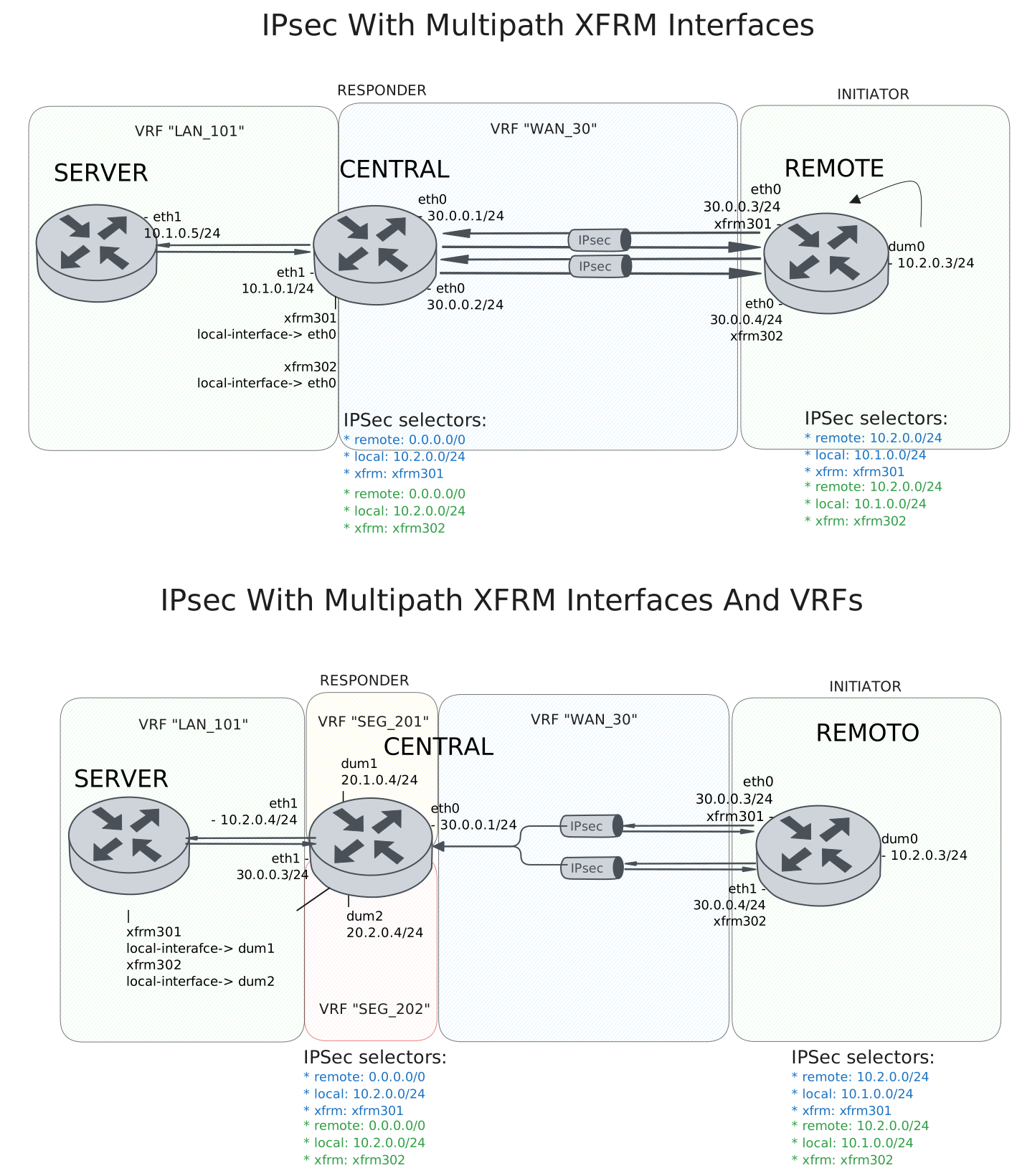
Test IPsec With Multipath XFRM Interfaces
Description
DUT0 and DUT1 are connected to each other through multiple IPsec tunnels with the same local and remote prefixes.
In this test case, we will check IPsec tunnels are correctly installing through two peers directly connected to the DUT0 and DUT1 devices.
Scenario
Step 1: Set the following configuration in DUT0 :
set interfaces ethernet eth0 address 30.0.0.1/24
set interfaces ethernet eth0 address 30.0.0.2/24
set interfaces ethernet eth0 vrf WAN_30
set interfaces ethernet eth1 address 10.1.0.1/24
set interfaces ethernet eth1 vrf LAN_101
set interfaces xfrm xfrm301 local-interface eth0
set interfaces xfrm xfrm301 mtu 1400
set interfaces xfrm xfrm301 multipath traffic-steering reverse
set interfaces xfrm xfrm301 vrf LAN_101
set interfaces xfrm xfrm302 local-interface eth0
set interfaces xfrm xfrm302 mtu 1400
set interfaces xfrm xfrm302 multipath traffic-steering reverse
set interfaces xfrm xfrm302 vrf LAN_101
set protocols vrf WAN_30 static route 10.1.0.0/24 next-hop-vrf LAN_101
set service ssh
set system login user admin authentication encrypted-password '$6$GSjsCj8gHLv$/VcqU6FLi6CT2Oxn0MJQ2C2tqnRDrYKNF8HIYWJp68nvXvPdFccDsT04.WtigUONbKYrgKg8d6rEs8PjljMkH0'
set system vrf LAN_101
set system vrf WAN_30
set system vrf main
set vpn ipsec auth-profile AUTH-SA global-secrets ike-psk test encrypted-secret U2FsdGVkX193Mm6nY3Pd6hhNjF4AFSGaA+ZAeg84/4Q=
set vpn ipsec auth-profile AUTH-SA local auth ike-psk id test
set vpn ipsec auth-profile AUTH-SA remote auth ike-psk id %any
set vpn ipsec esp-group CHILD-SA mode tunnel
set vpn ipsec esp-group CHILD-SA proposal 1 encryption aes256gcm128
set vpn ipsec esp-group CHILD-SA proposal 1 pfs dh-group19
set vpn ipsec ike-group IKE-SA key-exchange ikev2
set vpn ipsec ike-group IKE-SA proposal 1 dh-group 19
set vpn ipsec ike-group IKE-SA proposal 1 encryption aes256gcm128
set vpn ipsec ike-group IKE-SA proposal 1 hash sha256
set vpn ipsec site-to-site peer PEER301 auth-profile AUTH-SA
set vpn ipsec site-to-site peer PEER301 connection-type respond
set vpn ipsec site-to-site peer PEER301 default-esp-group CHILD-SA
set vpn ipsec site-to-site peer PEER301 ike-group IKE-SA
set vpn ipsec site-to-site peer PEER301 local-address 30.0.0.1
set vpn ipsec site-to-site peer PEER301 remote-address %any
set vpn ipsec site-to-site peer PEER301 tunnel 1 install-routes LAN_101
set vpn ipsec site-to-site peer PEER301 tunnel 1 local prefix 10.1.0.0/24
set vpn ipsec site-to-site peer PEER301 tunnel 1 remote prefix 0.0.0.0/0
set vpn ipsec site-to-site peer PEER301 tunnel 1 xfrm-interface-out xfrm301
set vpn ipsec site-to-site peer PEER302 auth-profile AUTH-SA
set vpn ipsec site-to-site peer PEER302 connection-type respond
set vpn ipsec site-to-site peer PEER302 default-esp-group CHILD-SA
set vpn ipsec site-to-site peer PEER302 ike-group IKE-SA
set vpn ipsec site-to-site peer PEER302 local-address 30.0.0.2
set vpn ipsec site-to-site peer PEER302 remote-address %any
set vpn ipsec site-to-site peer PEER302 tunnel 1 install-routes LAN_101
set vpn ipsec site-to-site peer PEER302 tunnel 1 local prefix 10.1.0.0/24
set vpn ipsec site-to-site peer PEER302 tunnel 1 remote prefix 0.0.0.0/0
set vpn ipsec site-to-site peer PEER302 tunnel 1 xfrm-interface-out xfrm302
Step 2: Set the following configuration in DUT1 :
set interfaces dummy dum0 address 10.2.0.3/24
set interfaces ethernet eth0 address 30.0.0.3/24
set interfaces ethernet eth0 address 30.0.0.4/24
set interfaces xfrm xfrm301 mtu 1400
set interfaces xfrm xfrm302 mtu 1400
set service ssh
set system login user admin authentication encrypted-password '$6$GSjsCj8gHLv$/VcqU6FLi6CT2Oxn0MJQ2C2tqnRDrYKNF8HIYWJp68nvXvPdFccDsT04.WtigUONbKYrgKg8d6rEs8PjljMkH0'
set system vrf main
set vpn ipsec auth-profile AUTH-SA global-secrets ike-psk test encrypted-secret U2FsdGVkX1/2acO+2uRpTrF8gAovnp2do6l/JjmZzD0=
set vpn ipsec auth-profile AUTH-SA local auth ike-psk id test
set vpn ipsec auth-profile AUTH-SA remote auth ike-psk id %any
set vpn ipsec esp-group CHILD-SA mode tunnel
set vpn ipsec esp-group CHILD-SA proposal 1 encryption aes256gcm128
set vpn ipsec esp-group CHILD-SA proposal 1 pfs dh-group19
set vpn ipsec ike-group IKE-SA key-exchange ikev2
set vpn ipsec ike-group IKE-SA proposal 1 dh-group 19
set vpn ipsec ike-group IKE-SA proposal 1 encryption aes256gcm128
set vpn ipsec ike-group IKE-SA proposal 1 hash sha256
set vpn ipsec site-to-site peer PEER301 auth-profile AUTH-SA
set vpn ipsec site-to-site peer PEER301 connection-type initiate
set vpn ipsec site-to-site peer PEER301 default-esp-group CHILD-SA
set vpn ipsec site-to-site peer PEER301 ike-group IKE-SA
set vpn ipsec site-to-site peer PEER301 local-address 30.0.0.3
set vpn ipsec site-to-site peer PEER301 remote-address 30.0.0.1
set vpn ipsec site-to-site peer PEER301 tunnel 1 install-routes main
set vpn ipsec site-to-site peer PEER301 tunnel 1 local prefix 10.2.0.0/24
set vpn ipsec site-to-site peer PEER301 tunnel 1 remote prefix 10.1.0.0/24
set vpn ipsec site-to-site peer PEER301 tunnel 1 xfrm-interface-out xfrm301
set vpn ipsec site-to-site peer PEER302 auth-profile AUTH-SA
set vpn ipsec site-to-site peer PEER302 connection-type initiate
set vpn ipsec site-to-site peer PEER302 default-esp-group CHILD-SA
set vpn ipsec site-to-site peer PEER302 ike-group IKE-SA
set vpn ipsec site-to-site peer PEER302 local-address 30.0.0.4
set vpn ipsec site-to-site peer PEER302 remote-address 30.0.0.2
set vpn ipsec site-to-site peer PEER302 tunnel 1 install-routes main
set vpn ipsec site-to-site peer PEER302 tunnel 1 local prefix 10.2.0.0/24
set vpn ipsec site-to-site peer PEER302 tunnel 1 remote prefix 10.1.0.0/24
set vpn ipsec site-to-site peer PEER302 tunnel 1 xfrm-interface-out xfrm302
Step 3: Set the following configuration in DUT2 :
set interfaces ethernet eth1 address 10.1.0.5/24
set protocols static route 10.2.0.0/24 next-hop 10.1.0.1
set service ssh
set system login user admin authentication encrypted-password '$6$GSjsCj8gHLv$/VcqU6FLi6CT2Oxn0MJQ2C2tqnRDrYKNF8HIYWJp68nvXvPdFccDsT04.WtigUONbKYrgKg8d6rEs8PjljMkH0'
Note
Check that the IPsec tunnels are established and the routes are installed. The routes should be installed in the VRF LAN_101.
Step 4: Run command protocols vrf LAN_101 ip show route at DUT0 and check if output matches the following regular expressions:
K>\* 10\.2\.0\.0/24 \[0\/0\] is directly connected.*xfrm\d+.*\n.*xfrm\d+Show output
Codes: K - kernel route, C - connected, L - local, S - static,
       R - RIP, O - OSPF, I - IS-IS, B - BGP, E - EIGRP, N - NHRP,
       T - Table, v - VNC, V - VNC-Direct, A - Babel, F - PBR,
       f - OpenFabric, t - Table-Direct,
       > - selected route, * - FIB route, q - queued, r - rejected, b - backup
       t - trapped, o - offload failure

IPv4 unicast VRF LAN_101:
K>* 0.0.0.0/0 [255/8192] unreachable (ICMP unreachable), weight 1, 00:00:05
C>* 10.1.0.0/24 is directly connected, eth1, weight 1, 00:00:05
L>* 10.1.0.1/32 is directly connected, eth1, weight 1, 00:00:05
K>* 10.2.0.0/24 [0/0] is directly connected, xfrm302, weight 1, 00:00:01
  *                   is directly connected, xfrm301, weight 1, 00:00:01
K>* 127.0.0.0/8 [0/0] is directly connected, LAN_101, weight 1, 00:00:05
Note
Check that both IPsec tunnels are established and traffic steering is working as expected. Once the remote client is trying to connect randomly from either of the two tunnels, hub always responds with the same tunnel.
Step 5: Run command vpn ipsec clear sa at DUT0 and expect this output:
Show output
Deleting IPSec SAs... 100.00%
Closed tunnels: 2
Step 6: Init an SSH connection from DUT1 to IP address 10.1.0.5 with the user admin:
admin@DUT1$ ssh admin@10.1.0.5 option StrictHostKeyChecking=no option UserKnownHostsFile=/dev/null local-address 10.2.0.3Show output
Warning: Permanently added '10.1.0.5' (ECDSA) to the list of known hosts.
admin@10.1.0.5's password:
Welcome to Teldat OSDx v4.2.9.3

This system includes free software.
Contact Teldat for licenses information and source code.

Last login: Mon May  4 22:05:18 2026 from 40.0.0.2
admin@osdx$
Step 7: Run command vpn ipsec show sa at DUT0 and expect this output:
Show output
vpn-peer-PEER302: #3, ESTABLISHED, IKEv2, 21c783ffbcda3381_i 472754d049866744_r*
  local  'test' @ 30.0.0.2[500]
  remote 'test' @ 30.0.0.4[500]
  AES_GCM_16-256/PRF_HMAC_SHA2_256/ECP_256
  established 1s ago, rekeying in 19857s
  peer-PEER302-tunnel-1: #3, reqid 1, INSTALLED, TUNNEL, ESP:AES_GCM_16-256
    installed 1s ago, rekeying in 3410s, expires in 3959s
    in  c88a61b4 (-|0x0000012f),   5059 bytes,    24 packets,     0s ago
    out c68d7f87 (-|0x0000012f),   4963 bytes,    22 packets,     0s ago
    local  10.1.0.0/24
    remote 10.2.0.0/24
vpn-peer-PEER301: #4, ESTABLISHED, IKEv2, 6e787b950a86a8fc_i 1a71bafdb28a0fd8_r*
  local  'test' @ 30.0.0.1[500]
  remote 'test' @ 30.0.0.3[500]
  AES_GCM_16-256/PRF_HMAC_SHA2_256/ECP_256
  established 1s ago, rekeying in 16763s
  peer-PEER301-tunnel-1: #4, reqid 2, INSTALLED, TUNNEL, ESP:AES_GCM_16-256
    installed 1s ago, rekeying in 3291s, expires in 3959s
    in  c4b3c89a (-|0x0000012e),      0 bytes,     0 packets
    out c1c91733 (-|0x0000012e),      0 bytes,     0 packets
    local  10.1.0.0/24
    remote 10.2.0.0/24
Step 8: Run command vpn ipsec clear sa at DUT0 and expect this output:
Show output
Deleting IPSec SAs... 100.00%
Closed tunnels: 2
Step 9: Init an SSH connection from DUT1 to IP address 10.1.0.5 with the user admin:
admin@DUT1$ ssh admin@10.1.0.5 option StrictHostKeyChecking=no option UserKnownHostsFile=/dev/null local-address 10.2.0.3Show output
Warning: Permanently added '10.1.0.5' (ECDSA) to the list of known hosts.
admin@10.1.0.5's password:
Welcome to Teldat OSDx v4.2.9.3

This system includes free software.
Contact Teldat for licenses information and source code.

Last login: Tue May  5 01:16:35 2026 from 10.2.0.3
admin@osdx$
Step 10: Run command vpn ipsec show sa at DUT0 and expect this output:
Show output
vpn-peer-PEER301: #6, ESTABLISHED, IKEv2, 1f031b8df90611cf_i 2053e97143d18fb7_r*
  local  'test' @ 30.0.0.1[500]
  remote 'test' @ 30.0.0.3[500]
  AES_GCM_16-256/PRF_HMAC_SHA2_256/ECP_256
  established 0s ago, rekeying in 21175s
  peer-PEER301-tunnel-1: #6, reqid 2, INSTALLED, TUNNEL, ESP:AES_GCM_16-256
    installed 0s ago, rekeying in 3356s, expires in 3960s
    in  c643a3e9 (-|0x0000012e),      0 bytes,     0 packets
    out c6e11e8d (-|0x0000012e),      0 bytes,     0 packets
    local  10.1.0.0/24
    remote 10.2.0.0/24
vpn-peer-PEER302: #5, ESTABLISHED, IKEv2, 0d01b2b2b10e1508_i bc45e20293c40a27_r*
  local  'test' @ 30.0.0.2[500]
  remote 'test' @ 30.0.0.4[500]
  AES_GCM_16-256/PRF_HMAC_SHA2_256/ECP_256
  established 0s ago, rekeying in 20575s
  peer-PEER302-tunnel-1: #5, reqid 1, INSTALLED, TUNNEL, ESP:AES_GCM_16-256
    installed 0s ago, rekeying in 3428s, expires in 3960s
    in  c8f1a3da (-|0x0000012f),   5059 bytes,    24 packets,     0s ago
    out ced404f6 (-|0x0000012f),   4795 bytes,    20 packets,     0s ago
    local  10.1.0.0/24
    remote 10.2.0.0/24
Note
Testing the traffic from the hub to the spoke. The difference is that the IPsec tunnel chosen by the hub not always the same as the one chosen by the spoke. So if the spoke responds to the hub through the another tunnel, the hub needs to change the tunnel to the one used by the spoke.
Step 11: Run command vpn ipsec clear sa at DUT0 and expect this output:
Show output
Deleting IPSec SAs... 100.00%
Closed tunnels: 2
Step 12: Init an SSH connection from DUT2 to IP address 10.2.0.3 with the user admin:
admin@DUT2$ ssh admin@10.2.0.3 option StrictHostKeyChecking=no option UserKnownHostsFile=/dev/null local-address 10.1.0.5Show output
Warning: Permanently added '10.2.0.3' (ECDSA) to the list of known hosts.
admin@10.2.0.3's password:
Welcome to Teldat OSDx v4.2.9.3

This system includes free software.
Contact Teldat for licenses information and source code.

Last login: Mon May  4 22:48:48 2026
admin@osdx$
Step 13: Run command vpn ipsec show sa at DUT0 and expect this output:
Show output
vpn-peer-PEER302: #8, ESTABLISHED, IKEv2, bbb6792a471d5c4a_i f18c65fa92e44640_r*
  local  'test' @ 30.0.0.2[500]
  remote 'test' @ 30.0.0.4[500]
  AES_GCM_16-256/PRF_HMAC_SHA2_256/ECP_256
  established 1s ago, rekeying in 16565s
  peer-PEER302-tunnel-1: #8, reqid 1, INSTALLED, TUNNEL, ESP:AES_GCM_16-256
    installed 1s ago, rekeying in 3246s, expires in 3959s
    in  c2a3d140 (-|0x0000012f),   5019 bytes,    23 packets,     0s ago
    out c7aeb1c3 (-|0x0000012f),   5375 bytes,    26 packets,     0s ago
    local  10.1.0.0/24
    remote 10.2.0.0/24
vpn-peer-PEER301: #7, ESTABLISHED, IKEv2, c044f9fe59d19ced_i 5bd34c2e03f93374_r*
  local  'test' @ 30.0.0.1[500]
  remote 'test' @ 30.0.0.3[500]
  AES_GCM_16-256/PRF_HMAC_SHA2_256/ECP_256
  established 1s ago, rekeying in 15167s
  peer-PEER301-tunnel-1: #7, reqid 2, INSTALLED, TUNNEL, ESP:AES_GCM_16-256
    installed 1s ago, rekeying in 3346s, expires in 3959s
    in  c5225100 (-|0x0000012e),      0 bytes,     0 packets
    out c77087be (-|0x0000012e),      0 bytes,     0 packets
    local  10.1.0.0/24
    remote 10.2.0.0/24
Step 14: Run command vpn ipsec clear sa at DUT0 and expect this output:
Show output
Deleting IPSec SAs... 100.00%
Closed tunnels: 2
Step 15: Init an SSH connection from DUT2 to IP address 10.2.0.3 with the user admin:
admin@DUT2$ ssh admin@10.2.0.3 option StrictHostKeyChecking=no option UserKnownHostsFile=/dev/null local-address 10.1.0.5Show output
Warning: Permanently added '10.2.0.3' (ECDSA) to the list of known hosts.
admin@10.2.0.3's password:
Welcome to Teldat OSDx v4.2.9.3

This system includes free software.
Contact Teldat for licenses information and source code.

Last login: Tue May  5 01:16:37 2026 from 10.1.0.5
admin@osdx$
Step 16: Run command vpn ipsec show sa at DUT0 and expect this output:
Show output
vpn-peer-PEER302: #9, ESTABLISHED, IKEv2, 15b0caed329e5663_i b481d88a7e1d4bac_r*
  local  'test' @ 30.0.0.2[500]
  remote 'test' @ 30.0.0.4[500]
  AES_GCM_16-256/PRF_HMAC_SHA2_256/ECP_256
  established 0s ago, rekeying in 25426s
  peer-PEER302-tunnel-1: #9, reqid 1, INSTALLED, TUNNEL, ESP:AES_GCM_16-256
    installed 0s ago, rekeying in 3308s, expires in 3960s
    in  c9571a9a (-|0x0000012f),      0 bytes,     0 packets
    out c7b32f1e (-|0x0000012f),     60 bytes,     1 packets,     1s ago
    local  10.1.0.0/24
    remote 10.2.0.0/24
vpn-peer-PEER301: #10, ESTABLISHED, IKEv2, a627ea8938b89f21_i 889b01bb9c4c3b7a_r*
  local  'test' @ 30.0.0.1[500]
  remote 'test' @ 30.0.0.3[500]
  AES_GCM_16-256/PRF_HMAC_SHA2_256/ECP_256
  established 0s ago, rekeying in 24447s
  peer-PEER301-tunnel-1: #10, reqid 2, INSTALLED, TUNNEL, ESP:AES_GCM_16-256
    installed 0s ago, rekeying in 3446s, expires in 3960s
    in  c125a497 (-|0x0000012e),   4795 bytes,    20 packets,     0s ago
    out cfa798ab (-|0x0000012e),   4947 bytes,    22 packets,     0s ago
    local  10.1.0.0/24
    remote 10.2.0.0/24
Test IPsec With Multipath XFRM Interfaces And VRFs
Description
The difference here is that the hub peer has its addresses behind the VRFs, it is not directly connected like in the previous test case.
Scenario
Step 1: Set the following configuration in DUT0 :
set interfaces dummy dum1 address 20.1.0.1/24
set interfaces dummy dum1 vrf SEG_201
set interfaces dummy dum2 address 20.2.0.1/24
set interfaces dummy dum2 vrf SEG_202
set interfaces ethernet eth0 address 30.0.0.1/24
set interfaces ethernet eth0 vrf WAN_30
set interfaces ethernet eth1 address 10.1.0.1/24
set interfaces ethernet eth1 vrf LAN_101
set interfaces xfrm xfrm301 local-interface dum1
set interfaces xfrm xfrm301 mtu 1400
set interfaces xfrm xfrm301 multipath traffic-steering reverse
set interfaces xfrm xfrm301 vrf LAN_101
set interfaces xfrm xfrm302 local-interface dum2
set interfaces xfrm xfrm302 mtu 1400
set interfaces xfrm xfrm302 multipath traffic-steering reverse
set interfaces xfrm xfrm302 vrf LAN_101
set protocols vrf SEG_201 static route 0.0.0.0/0 next-hop-vrf WAN_30
set protocols vrf SEG_201 static route 10.1.0.0/24 next-hop-vrf LAN_101
set protocols vrf SEG_202 static route 0.0.0.0/0 next-hop-vrf WAN_30
set protocols vrf SEG_202 static route 10.1.0.0/24 next-hop-vrf LAN_101
set protocols vrf WAN_30 static route 20.1.0.0/24 next-hop-vrf SEG_201
set protocols vrf WAN_30 static route 20.2.0.0/24 next-hop-vrf SEG_202
set service ssh
set system login user admin authentication encrypted-password '$6$GSjsCj8gHLv$/VcqU6FLi6CT2Oxn0MJQ2C2tqnRDrYKNF8HIYWJp68nvXvPdFccDsT04.WtigUONbKYrgKg8d6rEs8PjljMkH0'
set system vrf LAN_101
set system vrf SEG_201
set system vrf SEG_202
set system vrf WAN_30
set system vrf main
set vpn ipsec auth-profile AUTH-SA global-secrets ike-psk test encrypted-secret U2FsdGVkX19aI0PyAzx3IJ20bI+NnH8Bvw8N4HhJRuE=
set vpn ipsec auth-profile AUTH-SA local auth ike-psk id test
set vpn ipsec auth-profile AUTH-SA remote auth ike-psk id %any
set vpn ipsec esp-group CHILD-SA mode tunnel
set vpn ipsec esp-group CHILD-SA proposal 1 encryption aes256gcm128
set vpn ipsec esp-group CHILD-SA proposal 1 pfs dh-group19
set vpn ipsec ike-group IKE-SA key-exchange ikev2
set vpn ipsec ike-group IKE-SA proposal 1 dh-group 19
set vpn ipsec ike-group IKE-SA proposal 1 encryption aes256gcm128
set vpn ipsec ike-group IKE-SA proposal 1 hash sha256
set vpn ipsec site-to-site peer PEER301 auth-profile AUTH-SA
set vpn ipsec site-to-site peer PEER301 connection-type respond
set vpn ipsec site-to-site peer PEER301 default-esp-group CHILD-SA
set vpn ipsec site-to-site peer PEER301 ike-group IKE-SA
set vpn ipsec site-to-site peer PEER301 local-address 20.1.0.1
set vpn ipsec site-to-site peer PEER301 remote-address %any
set vpn ipsec site-to-site peer PEER301 tunnel 1 install-routes LAN_101
set vpn ipsec site-to-site peer PEER301 tunnel 1 local prefix 10.1.0.0/24
set vpn ipsec site-to-site peer PEER301 tunnel 1 remote prefix 0.0.0.0/0
set vpn ipsec site-to-site peer PEER301 tunnel 1 xfrm-interface-out xfrm301
set vpn ipsec site-to-site peer PEER302 auth-profile AUTH-SA
set vpn ipsec site-to-site peer PEER302 connection-type respond
set vpn ipsec site-to-site peer PEER302 default-esp-group CHILD-SA
set vpn ipsec site-to-site peer PEER302 ike-group IKE-SA
set vpn ipsec site-to-site peer PEER302 local-address 20.2.0.1
set vpn ipsec site-to-site peer PEER302 remote-address %any
set vpn ipsec site-to-site peer PEER302 tunnel 1 install-routes LAN_101
set vpn ipsec site-to-site peer PEER302 tunnel 1 local prefix 10.1.0.0/24
set vpn ipsec site-to-site peer PEER302 tunnel 1 remote prefix 0.0.0.0/0
set vpn ipsec site-to-site peer PEER302 tunnel 1 xfrm-interface-out xfrm302
Step 2: Set the following configuration in DUT1 :
set interfaces dummy dum0 address 10.2.0.3/24
set interfaces ethernet eth0 address 30.0.0.3/24
set interfaces ethernet eth0 address 30.0.0.4/24
set interfaces xfrm xfrm301 mtu 1400
set interfaces xfrm xfrm302 mtu 1400
set protocols static route 20.1.0.0/24 next-hop 30.0.0.1
set protocols static route 20.2.0.0/24 next-hop 30.0.0.1
set service ssh
set system login user admin authentication encrypted-password '$6$GSjsCj8gHLv$/VcqU6FLi6CT2Oxn0MJQ2C2tqnRDrYKNF8HIYWJp68nvXvPdFccDsT04.WtigUONbKYrgKg8d6rEs8PjljMkH0'
set system vrf main
set vpn ipsec auth-profile AUTH-SA global-secrets ike-psk test encrypted-secret U2FsdGVkX1/3gHmM4t7uV/78KZCL/kZj6JRBe2Tidas=
set vpn ipsec auth-profile AUTH-SA local auth ike-psk id test
set vpn ipsec auth-profile AUTH-SA remote auth ike-psk id %any
set vpn ipsec esp-group CHILD-SA mode tunnel
set vpn ipsec esp-group CHILD-SA proposal 1 encryption aes256gcm128
set vpn ipsec esp-group CHILD-SA proposal 1 pfs dh-group19
set vpn ipsec ike-group IKE-SA key-exchange ikev2
set vpn ipsec ike-group IKE-SA proposal 1 dh-group 19
set vpn ipsec ike-group IKE-SA proposal 1 encryption aes256gcm128
set vpn ipsec ike-group IKE-SA proposal 1 hash sha256
set vpn ipsec site-to-site peer PEER301 auth-profile AUTH-SA
set vpn ipsec site-to-site peer PEER301 connection-type initiate
set vpn ipsec site-to-site peer PEER301 default-esp-group CHILD-SA
set vpn ipsec site-to-site peer PEER301 ike-group IKE-SA
set vpn ipsec site-to-site peer PEER301 local-address 30.0.0.3
set vpn ipsec site-to-site peer PEER301 remote-address 20.1.0.1
set vpn ipsec site-to-site peer PEER301 tunnel 1 install-routes main
set vpn ipsec site-to-site peer PEER301 tunnel 1 local prefix 10.2.0.0/24
set vpn ipsec site-to-site peer PEER301 tunnel 1 remote prefix 10.1.0.0/24
set vpn ipsec site-to-site peer PEER301 tunnel 1 xfrm-interface-out xfrm301
set vpn ipsec site-to-site peer PEER302 auth-profile AUTH-SA
set vpn ipsec site-to-site peer PEER302 connection-type initiate
set vpn ipsec site-to-site peer PEER302 default-esp-group CHILD-SA
set vpn ipsec site-to-site peer PEER302 ike-group IKE-SA
set vpn ipsec site-to-site peer PEER302 local-address 30.0.0.4
set vpn ipsec site-to-site peer PEER302 remote-address 20.2.0.1
set vpn ipsec site-to-site peer PEER302 tunnel 1 install-routes main
set vpn ipsec site-to-site peer PEER302 tunnel 1 local prefix 10.2.0.0/24
set vpn ipsec site-to-site peer PEER302 tunnel 1 remote prefix 10.1.0.0/24
set vpn ipsec site-to-site peer PEER302 tunnel 1 xfrm-interface-out xfrm302
Step 3: Set the following configuration in DUT2 :
set interfaces ethernet eth1 address 10.1.0.5/24
set protocols static route 10.2.0.0/24 next-hop 10.1.0.1
set service ssh
set system login user admin authentication encrypted-password '$6$GSjsCj8gHLv$/VcqU6FLi6CT2Oxn0MJQ2C2tqnRDrYKNF8HIYWJp68nvXvPdFccDsT04.WtigUONbKYrgKg8d6rEs8PjljMkH0'
Note
Check that the IPsec tunnels are established and the routes are installed. The routes should be installed in the VRF LAN_101.
Step 4: Run command protocols vrf LAN_101 ip show route at DUT0 and check if output matches the following regular expressions:
K>\* 10\.2\.0\.0/24 \[0\/0\] is directly connected.*xfrm\d+.*\n.*xfrm\d+Show output
Codes: K - kernel route, C - connected, L - local, S - static,
       R - RIP, O - OSPF, I - IS-IS, B - BGP, E - EIGRP, N - NHRP,
       T - Table, v - VNC, V - VNC-Direct, A - Babel, F - PBR,
       f - OpenFabric, t - Table-Direct,
       > - selected route, * - FIB route, q - queued, r - rejected, b - backup
       t - trapped, o - offload failure

IPv4 unicast VRF LAN_101:
K>* 0.0.0.0/0 [255/8192] unreachable (ICMP unreachable), weight 1, 00:00:05
C>* 10.1.0.0/24 is directly connected, eth1, weight 1, 00:00:05
L>* 10.1.0.1/32 is directly connected, eth1, weight 1, 00:00:05
K>* 10.2.0.0/24 [0/0] is directly connected, xfrm302, weight 1, 00:00:01
  *                   is directly connected, xfrm301, weight 1, 00:00:01
K>* 127.0.0.0/8 [0/0] is directly connected, LAN_101, weight 1, 00:00:05
Note
Check that both IPsec tunnels are established and traffic steering is working as expected. Once the remote client is trying to connect randomly from either of the two tunnels, hub always responds with the same tunnel.
Step 5: Run command vpn ipsec clear sa at DUT0 and expect this output:
Show output
Deleting IPSec SAs... 100.00%
Closed tunnels: 2
Step 6: Init an SSH connection from DUT1 to IP address 10.1.0.5 with the user admin:
admin@DUT1$ ssh admin@10.1.0.5 option StrictHostKeyChecking=no option UserKnownHostsFile=/dev/null local-address 10.2.0.3Show output
Warning: Permanently added '10.1.0.5' (ECDSA) to the list of known hosts.
admin@10.1.0.5's password:
Welcome to Teldat OSDx v4.2.9.3

This system includes free software.
Contact Teldat for licenses information and source code.

Last login: Tue May  5 01:16:36 2026 from 10.2.0.3
admin@osdx$
Step 7: Run command vpn ipsec show sa at DUT0 and expect this output:
Show output
vpn-peer-PEER302: #4, ESTABLISHED, IKEv2, 90833382ad34ec0a_i 905ab68a836aead0_r*
  local  'test' @ 20.2.0.1[500]
  remote 'test' @ 30.0.0.4[500]
  AES_GCM_16-256/PRF_HMAC_SHA2_256/ECP_256
  established 0s ago, rekeying in 19345s
  peer-PEER302-tunnel-1: #4, reqid 2, INSTALLED, TUNNEL, ESP:AES_GCM_16-256
    installed 0s ago, rekeying in 3520s, expires in 3960s
    in  c9d5d646 (-|0x0000012f),   5007 bytes,    23 packets,     0s ago
    out c1def0ac (-|0x0000012f),   4891 bytes,    21 packets,     0s ago
    local  10.1.0.0/24
    remote 10.2.0.0/24
vpn-peer-PEER301: #3, ESTABLISHED, IKEv2, a405a9805e6db028_i d1e40a06b27beda8_r*
  local  'test' @ 20.1.0.1[500]
  remote 'test' @ 30.0.0.3[500]
  AES_GCM_16-256/PRF_HMAC_SHA2_256/ECP_256
  established 0s ago, rekeying in 23018s
  peer-PEER301-tunnel-1: #3, reqid 1, INSTALLED, TUNNEL, ESP:AES_GCM_16-256
    installed 0s ago, rekeying in 3251s, expires in 3960s
    in  c80aad8a (-|0x0000012e),      0 bytes,     0 packets
    out cc6d0b3d (-|0x0000012e),      0 bytes,     0 packets
    local  10.1.0.0/24
    remote 10.2.0.0/24
Step 8: Run command vpn ipsec clear sa at DUT0 and expect this output:
Show output
Deleting IPSec SAs... 100.00%
Closed tunnels: 2
Step 9: Init an SSH connection from DUT1 to IP address 10.1.0.5 with the user admin:
admin@DUT1$ ssh admin@10.1.0.5 option StrictHostKeyChecking=no option UserKnownHostsFile=/dev/null local-address 10.2.0.3Show output
Warning: Permanently added '10.1.0.5' (ECDSA) to the list of known hosts.
admin@10.1.0.5's password:
Welcome to Teldat OSDx v4.2.9.3

This system includes free software.
Contact Teldat for licenses information and source code.

Last login: Tue May  5 01:16:53 2026 from 10.2.0.3
admin@osdx$
Step 10: Run command vpn ipsec show sa at DUT0 and expect this output:
Show output
vpn-peer-PEER302: #5, ESTABLISHED, IKEv2, 7c4d547632318f35_i e0e2c2243f16dd42_r*
  local  'test' @ 20.2.0.1[500]
  remote 'test' @ 30.0.0.4[500]
  AES_GCM_16-256/PRF_HMAC_SHA2_256/ECP_256
  established 1s ago, rekeying in 14877s
  peer-PEER302-tunnel-1: #5, reqid 2, INSTALLED, TUNNEL, ESP:AES_GCM_16-256
    installed 1s ago, rekeying in 3355s, expires in 3959s
    in  ccbad522 (-|0x0000012f),      0 bytes,     0 packets
    out c62e63dc (-|0x0000012f),      0 bytes,     0 packets
    local  10.1.0.0/24
    remote 10.2.0.0/24
vpn-peer-PEER301: #6, ESTABLISHED, IKEv2, 9c986d06abc3aea3_i 8c9ec886a6ea68d9_r*
  local  'test' @ 20.1.0.1[500]
  remote 'test' @ 30.0.0.3[500]
  AES_GCM_16-256/PRF_HMAC_SHA2_256/ECP_256
  established 1s ago, rekeying in 24141s
  peer-PEER301-tunnel-1: #6, reqid 1, INSTALLED, TUNNEL, ESP:AES_GCM_16-256
    installed 1s ago, rekeying in 3271s, expires in 3959s
    in  cb0e68be (-|0x0000012e),   5111 bytes,    25 packets,     0s ago
    out cef4ab94 (-|0x0000012e),   4971 bytes,    22 packets,     0s ago
    local  10.1.0.0/24
    remote 10.2.0.0/24
Note
Testing the traffic from the hub to the spoke. The difference is that the IPsec tunnel chosen by the hub not always the same as the one chosen by the spoke. So if the spoke responds to the hub through the another tunnel, the hub needs to change the tunnel to the one used by the spoke.
Step 11: Run command vpn ipsec clear sa at DUT0 and expect this output:
Show output
Deleting IPSec SAs... 100.00%
Closed tunnels: 2
Step 12: Init an SSH connection from DUT2 to IP address 10.2.0.3 with the user admin:
admin@DUT2$ ssh admin@10.2.0.3 option StrictHostKeyChecking=no option UserKnownHostsFile=/dev/null local-address 10.1.0.5Show output
Warning: Permanently added '10.2.0.3' (ECDSA) to the list of known hosts.
admin@10.2.0.3's password:
Welcome to Teldat OSDx v4.2.9.3

This system includes free software.
Contact Teldat for licenses information and source code.

Last login: Tue May  5 01:16:37 2026 from 10.1.0.5
admin@osdx$
Step 13: Run command vpn ipsec show sa at DUT0 and expect this output:
Show output
vpn-peer-PEER301: #8, ESTABLISHED, IKEv2, 0c88b780429a021b_i 71e495a7a5705579_r*
  local  'test' @ 20.1.0.1[500]
  remote 'test' @ 30.0.0.3[500]
  AES_GCM_16-256/PRF_HMAC_SHA2_256/ECP_256
  established 0s ago, rekeying in 18523s
  peer-PEER301-tunnel-1: #8, reqid 1, INSTALLED, TUNNEL, ESP:AES_GCM_16-256
    installed 0s ago, rekeying in 3505s, expires in 3960s
    in  c558ee3c (-|0x0000012e),      0 bytes,     0 packets
    out caccd688 (-|0x0000012e),      0 bytes,     0 packets
    local  10.1.0.0/24
    remote 10.2.0.0/24
vpn-peer-PEER302: #7, ESTABLISHED, IKEv2, 0f0635d49fc82b94_i 04310b421ea7bae1_r*
  local  'test' @ 20.2.0.1[500]
  remote 'test' @ 30.0.0.4[500]
  AES_GCM_16-256/PRF_HMAC_SHA2_256/ECP_256
  established 0s ago, rekeying in 19601s
  peer-PEER302-tunnel-1: #7, reqid 2, INSTALLED, TUNNEL, ESP:AES_GCM_16-256
    installed 0s ago, rekeying in 3514s, expires in 3960s
    in  c5308042 (-|0x0000012f),   4795 bytes,    20 packets,     0s ago
    out c4a70eff (-|0x0000012f),   5111 bytes,    25 packets,     0s ago
    local  10.1.0.0/24
    remote 10.2.0.0/24
Step 14: Run command vpn ipsec clear sa at DUT0 and expect this output:
Show output
Deleting IPSec SAs... 100.00%
Closed tunnels: 2
Step 15: Init an SSH connection from DUT2 to IP address 10.2.0.3 with the user admin:
admin@DUT2$ ssh admin@10.2.0.3 option StrictHostKeyChecking=no option UserKnownHostsFile=/dev/null local-address 10.1.0.5Show output
Warning: Permanently added '10.2.0.3' (ECDSA) to the list of known hosts.
admin@10.2.0.3's password:
Welcome to Teldat OSDx v4.2.9.3

This system includes free software.
Contact Teldat for licenses information and source code.

Last login: Tue May  5 01:16:54 2026 from 10.1.0.5
admin@osdx$
Step 16: Run command vpn ipsec show sa at DUT0 and expect this output:
Show output
vpn-peer-PEER302: #10, ESTABLISHED, IKEv2, 8ae0ab298aafe2ac_i 953fcd1cf5ef771c_r*
  local  'test' @ 20.2.0.1[500]
  remote 'test' @ 30.0.0.4[500]
  AES_GCM_16-256/PRF_HMAC_SHA2_256/ECP_256
  established 1s ago, rekeying in 19312s
  peer-PEER302-tunnel-1: #10, reqid 2, INSTALLED, TUNNEL, ESP:AES_GCM_16-256
    installed 1s ago, rekeying in 3475s, expires in 3959s
    in  cb8474ef (-|0x0000012f),   4875 bytes,    21 packets,     1s ago
    out cbf42b60 (-|0x0000012f),   5059 bytes,    24 packets,     1s ago
    local  10.1.0.0/24
    remote 10.2.0.0/24
vpn-peer-PEER301: #9, ESTABLISHED, IKEv2, f38e456424dbd038_i 9b392c070f34733b_r*
  local  'test' @ 20.1.0.1[500]
  remote 'test' @ 30.0.0.3[500]
  AES_GCM_16-256/PRF_HMAC_SHA2_256/ECP_256
  established 1s ago, rekeying in 18714s
  peer-PEER301-tunnel-1: #9, reqid 1, INSTALLED, TUNNEL, ESP:AES_GCM_16-256
    installed 1s ago, rekeying in 3302s, expires in 3959s
    in  c6d84984 (-|0x0000012e),      0 bytes,     0 packets
    out c198c27d (-|0x0000012e),      0 bytes,     0 packets
    local  10.1.0.0/24
    remote 10.2.0.0/24