Relay
This scenario shows how to configure service dhcp-relay. The
relay agent must be used when the DHCP server and the DHCP
clients are not connected to the same layer 2 domain.
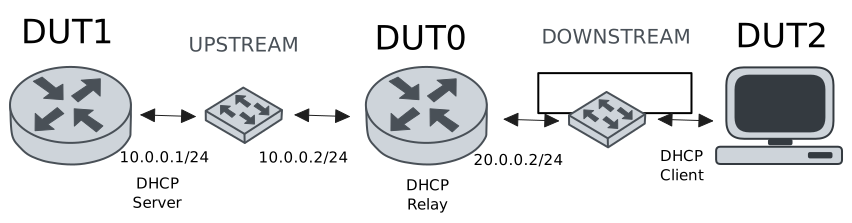
Test DHCP Relay
Description
This example demonstrates how to configure a DHCP relay instance in DUT0 to forward DHCP requests from DUT2 to DUT1.
Scenario
Step 1: Set the following configuration in DUT0 :
set interfaces ethernet eth0 vif 100 address 10.0.0.2/24
set interfaces ethernet eth1 vif 200 address 20.0.0.2/24
set service dhcp-relay INS downstream-interface eth1.200
set service dhcp-relay INS server 10.0.0.1
set service dhcp-relay INS upstream-interface eth0.100
set system login user admin authentication encrypted-password '$6$GSjsCj8gHLv$/VcqU6FLi6CT2Oxn0MJQ2C2tqnRDrYKNF8HIYWJp68nvXvPdFccDsT04.WtigUONbKYrgKg8d6rEs8PjljMkH0'
Step 2: Set the following configuration in DUT1 :
set interfaces ethernet eth0 vif 100 address 10.0.0.1/24
set protocols static route 0.0.0.0/0 next-hop 10.0.0.2
set service dhcp-server shared-network dummy subnet 10.0.0.1/32
set service dhcp-server shared-network remote subnet 20.0.0.0/24 start 20.0.0.50 stop 20.0.0.50
set system login user admin authentication encrypted-password '$6$GSjsCj8gHLv$/VcqU6FLi6CT2Oxn0MJQ2C2tqnRDrYKNF8HIYWJp68nvXvPdFccDsT04.WtigUONbKYrgKg8d6rEs8PjljMkH0'
Step 3: Set the following configuration in DUT2 :
set interfaces ethernet eth0 vif 200 address dhcp
set system login user admin authentication encrypted-password '$6$GSjsCj8gHLv$/VcqU6FLi6CT2Oxn0MJQ2C2tqnRDrYKNF8HIYWJp68nvXvPdFccDsT04.WtigUONbKYrgKg8d6rEs8PjljMkH0'
Step 4: Ping IP address 10.0.0.1 from DUT0:
admin@DUT0$ ping 10.0.0.1 count 1 size 56 timeout 1Show output
PING 10.0.0.1 (10.0.0.1) 56(84) bytes of data.
64 bytes from 10.0.0.1: icmp_seq=1 ttl=64 time=0.204 ms

--- 10.0.0.1 ping statistics ---
1 packets transmitted, 1 received, 0% packet loss, time 0ms
rtt min/avg/max/mdev = 0.204/0.204/0.204/0.000 ms
Step 5: Run command interfaces ethernet show at DUT2 and check if output contains the following tokens:
20.0.0.50Show output
---------------------------------------------------------------------
  Name             IP Address           Admin  Oper  Vrf  Description
---------------------------------------------------------------------
    eth0  fe80::dcad:beff:feef:6c20/64  up     up
eth0.200  20.0.0.50/24                  up     up
          fe80::dcad:beff:feef:6c20/64
    eth1                                down   down
    eth2                                down   down
    eth3                                down   down
Test DHCP Relay With Giaddr
Description
This example demonstrates how to set the gateway IP address (giaddr) in the IP address. This value must be set in an IP address that the DHCP server can reach.
Scenario
Step 1: Set the following configuration in DUT0 :
set interfaces ethernet eth0 vif 100 address 10.0.0.2/24
set interfaces ethernet eth1 vif 200 address 20.0.0.2/24
set interfaces ethernet eth1 vif 200 address 20.0.0.3/24
set service dhcp-relay INS downstream-interface eth1.200
set service dhcp-relay INS server 10.0.0.1 giaddr 20.0.0.3
set service dhcp-relay INS upstream-interface eth0.100
set system login user admin authentication encrypted-password '$6$GSjsCj8gHLv$/VcqU6FLi6CT2Oxn0MJQ2C2tqnRDrYKNF8HIYWJp68nvXvPdFccDsT04.WtigUONbKYrgKg8d6rEs8PjljMkH0'
Step 2: Set the following configuration in DUT1 :
set interfaces ethernet eth0 vif 100 address 10.0.0.1/24
set protocols static route 0.0.0.0/0 next-hop 10.0.0.2
set service dhcp-server shared-network dummy subnet 10.0.0.1/32
set service dhcp-server shared-network remote subnet 20.0.0.0/24 start 20.0.0.50 stop 20.0.0.50
set system login user admin authentication encrypted-password '$6$GSjsCj8gHLv$/VcqU6FLi6CT2Oxn0MJQ2C2tqnRDrYKNF8HIYWJp68nvXvPdFccDsT04.WtigUONbKYrgKg8d6rEs8PjljMkH0'
Step 3: Set the following configuration in DUT2 :
set interfaces ethernet eth0 vif 200 address dhcp
set system login user admin authentication encrypted-password '$6$GSjsCj8gHLv$/VcqU6FLi6CT2Oxn0MJQ2C2tqnRDrYKNF8HIYWJp68nvXvPdFccDsT04.WtigUONbKYrgKg8d6rEs8PjljMkH0'
Step 4: Ping IP address 10.0.0.1 from DUT0:
admin@DUT0$ ping 10.0.0.1 count 1 size 56 timeout 1Show output
PING 10.0.0.1 (10.0.0.1) 56(84) bytes of data.
64 bytes from 10.0.0.1: icmp_seq=1 ttl=64 time=0.260 ms

--- 10.0.0.1 ping statistics ---
1 packets transmitted, 1 received, 0% packet loss, time 0ms
rtt min/avg/max/mdev = 0.260/0.260/0.260/0.000 ms
Step 5: Run command interfaces ethernet show at DUT2 and check if output contains the following tokens:
20.0.0.50Show output
---------------------------------------------------------------------
  Name             IP Address           Admin  Oper  Vrf  Description
---------------------------------------------------------------------
    eth0  fe80::dcad:beff:feef:6c20/64  up     up
eth0.200  20.0.0.50/24                  up     up
          fe80::dcad:beff:feef:6c20/64
    eth1                                down   down
    eth2                                down   down
    eth3                                down   down
Step 6: Run command system journal show | cat at DUT1 and check if output matches the following regular expressions:
DHCPACK on 20.0.0.50 to [^\)]+\) via 20.0.0.3Show output
Jun 04 16:49:39.256166 osdx systemd-journald[1992]: Runtime Journal (/run/log/journal/8ce304953175416aa09f22e2dd03a8cc) is 900.0K, max 6.4M, 5.6M free.
Jun 04 16:49:39.259872 osdx systemd-journald[1992]: Received client request to rotate journal, rotating.
Jun 04 16:49:39.259921 osdx systemd-journald[1992]: Vacuuming done, freed 0B of archived journals from /run/log/journal/8ce304953175416aa09f22e2dd03a8cc.
Jun 04 16:49:39.265907 osdx OSDxCLI[459825]: User 'admin' executed a new command: 'system journal clear'.
Jun 04 16:49:39.461495 osdx OSDxCLI[459825]: User 'admin' executed a new command: 'system coredump delete all'.
Jun 04 16:49:40.933980 osdx OSDxCLI[459825]: User 'admin' entered the configuration menu.
Jun 04 16:49:41.066395 osdx OSDxCLI[459825]: User 'admin' added a new cfg line: 'set interfaces eth0.100 address 10.0.0.1/24'.
Jun 04 16:49:41.128456 osdx OSDxCLI[459825]: User 'admin' added a new cfg line: 'set service dhcp-server shared-network dummy subnet 10.0.0.1/32'.
Jun 04 16:49:41.244075 osdx OSDxCLI[459825]: User 'admin' added a new cfg line: 'set service dhcp-server shared-network remote subnet 20.0.0.0/24 start 20.0.0.50 stop 20.0.0.50'.
Jun 04 16:49:41.300122 osdx OSDxCLI[459825]: User 'admin' added a new cfg line: 'set protocols static route 0.0.0.0/0 next-hop 10.0.0.2'.
Jun 04 16:49:41.410243 osdx OSDxCLI[459825]: User 'admin' added a new cfg line: 'show working'.
Jun 04 16:49:41.474634 osdx ubnt-cfgd[557362]: inactive
Jun 04 16:49:41.502423 osdx INFO[557372]: FRR daemons did not change
Jun 04 16:49:41.531893 osdx kernel: 8021q: adding VLAN 0 to HW filter on device eth0
Jun 04 16:49:41.546977 osdx WARNING[557412]: No supported link modes on interface eth0
Jun 04 16:49:41.548446 osdx modulelauncher[557412]: osdx.utils.xos cmd error: /sbin/ethtool -A eth0 autoneg on
Jun 04 16:49:41.548460 osdx modulelauncher[557412]: Command '/sbin/ethtool -A eth0 autoneg on' returned non-zero exit status 76.
Jun 04 16:49:41.549745 osdx modulelauncher[557412]: osdx.utils.xos cmd error: /sbin/ethtool -s eth0 autoneg on advertise Pause off Asym_Pause off --
Jun 04 16:49:41.549756 osdx modulelauncher[557412]: Command '/sbin/ethtool -s eth0 autoneg on advertise Pause off Asym_Pause off --' returned non-zero exit status 75.
Jun 04 16:49:41.563030 osdx (udev-worker)[557431]: Network interface NamePolicy= disabled on kernel command line.
Jun 04 16:49:41.724214 osdx systemd[1]: Started dhcpd@main.service - "DHCP Server Service instance main".
Jun 04 16:49:41.726711 osdx cfgd[1711]: [459825]Completed change to active configuration
Jun 04 16:49:41.727483 osdx dhcpd[557514]: Wrote 0 static lease entries.
Jun 04 16:49:41.727650 osdx dhcpd[557514]: Wrote 0 leases to leases file.
Jun 04 16:49:41.738035 osdx dhcpd[557514]:
Jun 04 16:49:41.738147 osdx dhcpd[557514]: No subnet declaration for eth0 (no IPv4 addresses).
Jun 04 16:49:41.738194 osdx dhcpd[557514]: ** Ignoring requests on eth0.  If this is not what
Jun 04 16:49:41.738228 osdx dhcpd[557514]:    you want, please write a subnet declaration
Jun 04 16:49:41.738303 osdx dhcpd[557514]:    in your dhcpd.conf file for the network segment
Jun 04 16:49:41.738305 osdx dhcpd[557514]:    to which interface eth0 is attached. **
Jun 04 16:49:41.738308 osdx dhcpd[557514]:
Jun 04 16:49:41.738796 osdx OSDxCLI[459825]: User 'admin' committed the configuration.
Jun 04 16:49:41.748043 osdx dhcpd[557514]: Server starting service.
Jun 04 16:49:41.753619 osdx OSDxCLI[459825]: User 'admin' left the configuration menu.
Jun 04 16:49:42.421726 osdx dhcpd[557514]: DHCPDISCOVER from de:ad:be:ef:6c:20 via 20.0.0.3
Jun 04 16:49:43.422489 osdx dhcpd[557514]: DHCPOFFER on 20.0.0.50 to de:ad:be:ef:6c:20 (osdx) via 20.0.0.3
Jun 04 16:49:43.423132 osdx dhcpd[557514]: DHCPREQUEST for 20.0.0.50 (10.0.0.1) from de:ad:be:ef:6c:20 (osdx) via 20.0.0.3
Jun 04 16:49:43.456840 osdx dhcpd[557514]: DHCPACK on 20.0.0.50 to de:ad:be:ef:6c:20 (osdx) via 20.0.0.3
Test DHCP Relay With GRE Tunnel
Description
This example demonstrates how to configure a DHCP relay that forwards DHCP requests to the DHCP server through a GRE tunnel (upstream).
Scenario
Step 1: Set the following configuration in DUT0 :
set interfaces ethernet eth0 vif 100 address 10.0.0.2/24
set interfaces ethernet eth1 vif 200 address 20.0.0.2/24
set interfaces tunnel tun1 address 1.0.0.2/32
set interfaces tunnel tun1 encapsulation gre
set interfaces tunnel tun1 local-address 10.0.0.2
set interfaces tunnel tun1 local-interface eth0.100
set interfaces tunnel tun1 nhrp holdtime 5
set interfaces tunnel tun1 nhrp nhs 1.0.0.1 nbma 10.0.0.1
set service dhcp-relay INS downstream-interface eth1.200
set service dhcp-relay INS server 1.0.0.1
set service dhcp-relay INS upstream-interface eth0.100
set service dhcp-relay INS upstream-interface tun1
set system login user admin authentication encrypted-password '$6$GSjsCj8gHLv$/VcqU6FLi6CT2Oxn0MJQ2C2tqnRDrYKNF8HIYWJp68nvXvPdFccDsT04.WtigUONbKYrgKg8d6rEs8PjljMkH0'
Step 2: Set the following configuration in DUT1 :
set interfaces ethernet eth0 vif 100 address 10.0.0.1/24
set interfaces tunnel tun1 address 1.0.0.1/32
set interfaces tunnel tun1 encapsulation gre
set interfaces tunnel tun1 local-address 10.0.0.1
set interfaces tunnel tun1 local-interface eth0.100
set interfaces tunnel tun1 nhrp
set protocols static route 0.0.0.0/0 next-hop 10.0.0.2
set protocols static route 20.0.0.0/24 next-hop 1.0.0.2
set service dhcp-server shared-network dummy subnet 1.0.0.1/32
set service dhcp-server shared-network remote subnet 20.0.0.0/24 start 20.0.0.50 stop 20.0.0.50
set system login user admin authentication encrypted-password '$6$GSjsCj8gHLv$/VcqU6FLi6CT2Oxn0MJQ2C2tqnRDrYKNF8HIYWJp68nvXvPdFccDsT04.WtigUONbKYrgKg8d6rEs8PjljMkH0'
Step 3: Set the following configuration in DUT2 :
set interfaces ethernet eth0 vif 200 address dhcp
set system login user admin authentication encrypted-password '$6$GSjsCj8gHLv$/VcqU6FLi6CT2Oxn0MJQ2C2tqnRDrYKNF8HIYWJp68nvXvPdFccDsT04.WtigUONbKYrgKg8d6rEs8PjljMkH0'
Step 4: Ping IP address 10.0.0.1 from DUT0:
admin@DUT0$ ping 10.0.0.1 count 1 size 56 timeout 1Show output
PING 10.0.0.1 (10.0.0.1) 56(84) bytes of data.
64 bytes from 10.0.0.1: icmp_seq=1 ttl=64 time=0.451 ms

--- 10.0.0.1 ping statistics ---
1 packets transmitted, 1 received, 0% packet loss, time 0ms
rtt min/avg/max/mdev = 0.451/0.451/0.451/0.000 ms
Step 5: Ping IP address 1.0.0.1 from DUT0:
admin@DUT0$ ping 1.0.0.1 count 1 size 56 timeout 1Show output
PING 1.0.0.1 (1.0.0.1) 56(84) bytes of data.
64 bytes from 1.0.0.1: icmp_seq=1 ttl=64 time=0.284 ms

--- 1.0.0.1 ping statistics ---
1 packets transmitted, 1 received, 0% packet loss, time 0ms
rtt min/avg/max/mdev = 0.284/0.284/0.284/0.000 ms
Step 6: Run command interfaces ethernet show at DUT2 and check if output contains the following tokens:
20.0.0.50Show output
---------------------------------------------------------------------
  Name             IP Address           Admin  Oper  Vrf  Description
---------------------------------------------------------------------
    eth0  fe80::dcad:beff:feef:6c20/64  up     up
eth0.200  20.0.0.50/24                  up     up
          fe80::dcad:beff:feef:6c20/64
    eth1                                down   down
    eth2                                down   down
    eth3                                down   down
Test DHCP Relay With Multiple Instances
Description
This example demonstrates how to configure multiple DHCP relay instances.
Scenario
Step 1: Set the following configuration in DUT0 :
set interfaces ethernet eth0 vif 100 address 10.0.0.2/24
set interfaces ethernet eth1 vif 200 address 20.0.0.2/24
set interfaces ethernet eth1 vif 300 address 30.0.0.2/24
set service dhcp-relay INS downstream-interface eth1.200
set service dhcp-relay INS server 10.0.0.1
set service dhcp-relay INS upstream-interface eth0.100
set service dhcp-relay INS2 downstream-interface eth1.300
set service dhcp-relay INS2 server 10.0.0.1
set service dhcp-relay INS2 upstream-interface eth0.100
set system login user admin authentication encrypted-password '$6$GSjsCj8gHLv$/VcqU6FLi6CT2Oxn0MJQ2C2tqnRDrYKNF8HIYWJp68nvXvPdFccDsT04.WtigUONbKYrgKg8d6rEs8PjljMkH0'
Step 2: Set the following configuration in DUT1 :
set interfaces ethernet eth0 vif 100 address 10.0.0.1/24
set protocols static route 0.0.0.0/0 next-hop 10.0.0.2
set service dhcp-server shared-network dummy subnet 10.0.0.1/32
set service dhcp-server shared-network remote subnet 20.0.0.0/24 start 20.0.0.50 stop 20.0.0.50
set service dhcp-server shared-network remote2 subnet 30.0.0.0/24 start 30.0.0.50 stop 30.0.0.50
set system login user admin authentication encrypted-password '$6$GSjsCj8gHLv$/VcqU6FLi6CT2Oxn0MJQ2C2tqnRDrYKNF8HIYWJp68nvXvPdFccDsT04.WtigUONbKYrgKg8d6rEs8PjljMkH0'
Step 3: Set the following configuration in DUT2 :
set interfaces ethernet eth0 vif 200 address dhcp
set interfaces ethernet eth0 vif 300 address dhcp
set system login user admin authentication encrypted-password '$6$GSjsCj8gHLv$/VcqU6FLi6CT2Oxn0MJQ2C2tqnRDrYKNF8HIYWJp68nvXvPdFccDsT04.WtigUONbKYrgKg8d6rEs8PjljMkH0'
Step 4: Ping IP address 10.0.0.1 from DUT0:
admin@DUT0$ ping 10.0.0.1 count 1 size 56 timeout 1Show output
PING 10.0.0.1 (10.0.0.1) 56(84) bytes of data.
64 bytes from 10.0.0.1: icmp_seq=1 ttl=64 time=0.329 ms

--- 10.0.0.1 ping statistics ---
1 packets transmitted, 1 received, 0% packet loss, time 0ms
rtt min/avg/max/mdev = 0.329/0.329/0.329/0.000 ms
Step 5: Run command interfaces ethernet show at DUT2 and check if output contains the following tokens:
20.0.0.50Show output
---------------------------------------------------------------------
  Name             IP Address           Admin  Oper  Vrf  Description
---------------------------------------------------------------------
    eth0  fe80::dcad:beff:feef:6c20/64  up     up
eth0.200  20.0.0.50/24                  up     up
          fe80::dcad:beff:feef:6c20/64
eth0.300  30.0.0.50/24                  up     up
          fe80::dcad:beff:feef:6c20/64
    eth1                                down   down
    eth2                                down   down
    eth3                                down   down
Step 6: Run command interfaces ethernet show at DUT2 and check if output contains the following tokens:
30.0.0.50Show output
---------------------------------------------------------------------
  Name             IP Address           Admin  Oper  Vrf  Description
---------------------------------------------------------------------
    eth0  fe80::dcad:beff:feef:6c20/64  up     up
eth0.200  20.0.0.50/24                  up     up
          fe80::dcad:beff:feef:6c20/64
eth0.300  30.0.0.50/24                  up     up
          fe80::dcad:beff:feef:6c20/64
    eth1                                down   down
    eth2                                down   down
    eth3                                down   down
Step 7: Run command system journal show | cat at DUT1 and check if output matches the following regular expressions:
DHCPACK on 20.0.0.50 to [^\)]+\) via 20.0.0.2
DHCPACK on 30.0.0.50 to [^\)]+\) via 30.0.0.2
Show output
Jun 04 16:50:03.249111 osdx systemd-journald[1992]: Runtime Journal (/run/log/journal/8ce304953175416aa09f22e2dd03a8cc) is 936.0K, max 6.4M, 5.5M free.
Jun 04 16:50:03.251145 osdx systemd-journald[1992]: Received client request to rotate journal, rotating.
Jun 04 16:50:03.251220 osdx systemd-journald[1992]: Vacuuming done, freed 0B of archived journals from /run/log/journal/8ce304953175416aa09f22e2dd03a8cc.
Jun 04 16:50:03.259215 osdx OSDxCLI[459825]: User 'admin' executed a new command: 'system journal clear'.
Jun 04 16:50:03.452232 osdx OSDxCLI[459825]: User 'admin' executed a new command: 'system coredump delete all'.
Jun 04 16:50:05.104942 osdx OSDxCLI[459825]: User 'admin' entered the configuration menu.
Jun 04 16:50:05.204194 osdx OSDxCLI[459825]: User 'admin' added a new cfg line: 'set interfaces eth0.100 address 10.0.0.1/24'.
Jun 04 16:50:05.305257 osdx OSDxCLI[459825]: User 'admin' added a new cfg line: 'set service dhcp-server shared-network dummy subnet 10.0.0.1/32'.
Jun 04 16:50:05.374016 osdx OSDxCLI[459825]: User 'admin' added a new cfg line: 'set service dhcp-server shared-network remote subnet 20.0.0.0/24 start 20.0.0.50 stop 20.0.0.50'.
Jun 04 16:50:05.483662 osdx OSDxCLI[459825]: User 'admin' added a new cfg line: 'set protocols static route 0.0.0.0/0 next-hop 10.0.0.2'.
Jun 04 16:50:05.546443 osdx OSDxCLI[459825]: User 'admin' added a new cfg line: 'set service dhcp-server shared-network remote2 subnet 30.0.0.0/24 start 30.0.0.50 stop 30.0.0.50'.
Jun 04 16:50:05.650270 osdx OSDxCLI[459825]: User 'admin' added a new cfg line: 'show working'.
Jun 04 16:50:05.715181 osdx ubnt-cfgd[558424]: inactive
Jun 04 16:50:05.749116 osdx INFO[558436]: FRR daemons did not change
Jun 04 16:50:05.787165 osdx kernel: 8021q: adding VLAN 0 to HW filter on device eth0
Jun 04 16:50:05.808054 osdx WARNING[558476]: No supported link modes on interface eth0
Jun 04 16:50:05.809721 osdx modulelauncher[558476]: osdx.utils.xos cmd error: /sbin/ethtool -A eth0 autoneg on
Jun 04 16:50:05.809736 osdx modulelauncher[558476]: Command '/sbin/ethtool -A eth0 autoneg on' returned non-zero exit status 76.
Jun 04 16:50:05.811028 osdx modulelauncher[558476]: osdx.utils.xos cmd error: /sbin/ethtool -s eth0 autoneg on advertise Pause off Asym_Pause off --
Jun 04 16:50:05.811040 osdx modulelauncher[558476]: Command '/sbin/ethtool -s eth0 autoneg on advertise Pause off Asym_Pause off --' returned non-zero exit status 75.
Jun 04 16:50:05.829880 osdx (udev-worker)[558497]: Network interface NamePolicy= disabled on kernel command line.
Jun 04 16:50:06.003602 osdx systemd[1]: Started dhcpd@main.service - "DHCP Server Service instance main".
Jun 04 16:50:06.006260 osdx dhcpd[558578]: Wrote 0 static lease entries.
Jun 04 16:50:06.006272 osdx dhcpd[558578]: Wrote 0 leases to leases file.
Jun 04 16:50:06.008260 osdx cfgd[1711]: [459825]Completed change to active configuration
Jun 04 16:50:06.021372 osdx OSDxCLI[459825]: User 'admin' committed the configuration.
Jun 04 16:50:06.025586 osdx dhcpd[558578]:
Jun 04 16:50:06.025592 osdx dhcpd[558578]: No subnet declaration for eth0 (no IPv4 addresses).
Jun 04 16:50:06.025595 osdx dhcpd[558578]: ** Ignoring requests on eth0.  If this is not what
Jun 04 16:50:06.025598 osdx dhcpd[558578]:    you want, please write a subnet declaration
Jun 04 16:50:06.025601 osdx dhcpd[558578]:    in your dhcpd.conf file for the network segment
Jun 04 16:50:06.025604 osdx dhcpd[558578]:    to which interface eth0 is attached. **
Jun 04 16:50:06.025606 osdx dhcpd[558578]:
Jun 04 16:50:06.043286 osdx OSDxCLI[459825]: User 'admin' left the configuration menu.
Jun 04 16:50:06.044161 osdx dhcpd[558578]: Server starting service.
Jun 04 16:50:06.756899 osdx dhcpd[558578]: DHCPDISCOVER from de:ad:be:ef:6c:20 via 30.0.0.2
Jun 04 16:50:06.932790 osdx dhcpd[558578]: DHCPDISCOVER from de:ad:be:ef:6c:20 via 20.0.0.2
Jun 04 16:50:07.757670 osdx dhcpd[558578]: DHCPOFFER on 30.0.0.50 to de:ad:be:ef:6c:20 (osdx) via 30.0.0.2
Jun 04 16:50:07.758342 osdx dhcpd[558578]: DHCPREQUEST for 30.0.0.50 (10.0.0.1) from de:ad:be:ef:6c:20 (osdx) via 30.0.0.2
Jun 04 16:50:07.788575 osdx dhcpd[558578]: DHCPACK on 30.0.0.50 to de:ad:be:ef:6c:20 (osdx) via 30.0.0.2
Jun 04 16:50:07.933032 osdx dhcpd[558578]: DHCPOFFER on 20.0.0.50 to de:ad:be:ef:6c:20 (osdx) via 20.0.0.2
Jun 04 16:50:07.933729 osdx dhcpd[558578]: DHCPREQUEST for 20.0.0.50 (10.0.0.1) from de:ad:be:ef:6c:20 (osdx) via 20.0.0.2
Jun 04 16:50:07.960032 osdx dhcpd[558578]: DHCPACK on 20.0.0.50 to de:ad:be:ef:6c:20 (osdx) via 20.0.0.2