Network Access Server
This scenario shows different Network Access Server (NAS) configurations: server failover and VRF-aware communication.
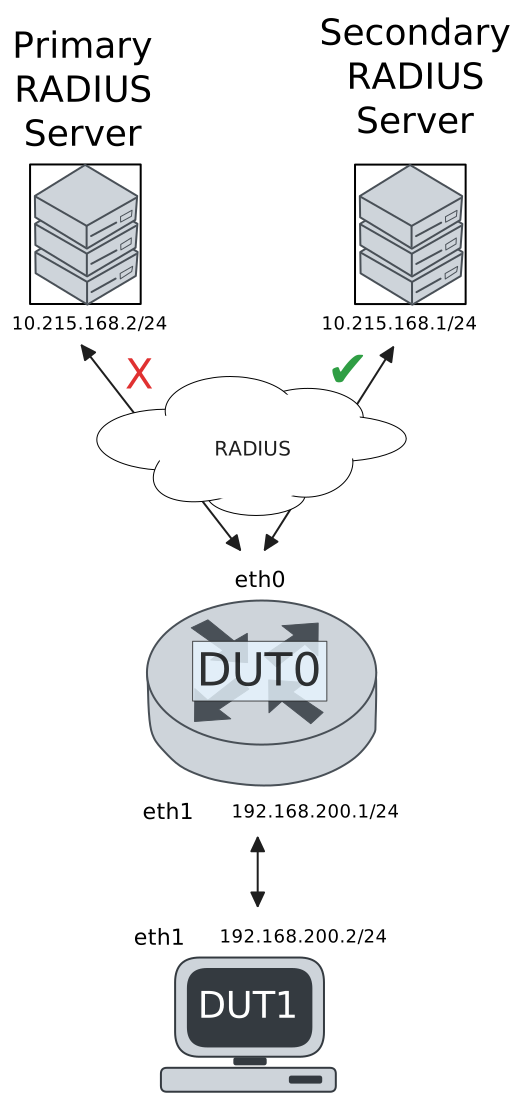
Test 802.1X Authentication Against NAS Through a VRF-Aware Interface
Description
This scenario shows how to configure 802.1X authentication. It focuses on Authenticator/NAS communication, when performed via an VRF-aware Ethernet interface.
Scenario
Step 1: Set the following configuration in DUT0 :
set interfaces ethernet eth0 address 10.215.168.64/24
set interfaces ethernet eth0 vrf WAN
set interfaces ethernet eth1 address 192.168.100.1/24
set interfaces ethernet eth1 authenticator 802.1x max-retransmissions 2
set interfaces ethernet eth1 authenticator aaa authentication list1
set interfaces ethernet eth1 authenticator log-level debug
set interfaces ethernet eth1 authenticator mode only-802.1x
set interfaces ethernet eth1 authenticator quiet-period 60
set interfaces ethernet eth1 authenticator reauth-period 0
set system aaa group radius radgroup1 local-vrf WAN
set system aaa group radius radgroup1 server serv1
set system aaa list list1 method 1 group radius radgroup1
set system aaa server radius serv1 address 10.215.168.1
set system aaa server radius serv1 encrypted-key U2FsdGVkX18Nk3Ws3pUbfr15AO06lF8bFnwYQgGYHalQ2O8ay7nJharCLM4CB2yh0yAAi9FufRBn2OA5kt6ZEQ==
set system login user admin authentication encrypted-password '$6$GSjsCj8gHLv$/VcqU6FLi6CT2Oxn0MJQ2C2tqnRDrYKNF8HIYWJp68nvXvPdFccDsT04.WtigUONbKYrgKg8d6rEs8PjljMkH0'
set system vrf WAN
Step 2: Ping the IP address 10.215.168.1 from DUT0:
admin@DUT0$ ping 10.215.168.1 vrf WAN count 1 size 56 timeout 1Show output
ping: Warning: source address might be selected on device other than: WAN
PING 10.215.168.1 (10.215.168.1) from 10.215.168.64 WAN: 56(84) bytes of data.
64 bytes from 10.215.168.1: icmp_seq=1 ttl=64 time=0.261 ms

--- 10.215.168.1 ping statistics ---
1 packets transmitted, 1 received, 0% packet loss, time 0ms
rtt min/avg/max/mdev = 0.261/0.261/0.261/0.000 ms
Step 3: Set the following configuration in DUT1 :
set interfaces ethernet eth1 address 192.168.100.2/24
set interfaces ethernet eth1 supplicant encrypted-password U2FsdGVkX18ScnF8w/KQUVqRBvijWwJdyzB1WVnMNak=
set interfaces ethernet eth1 supplicant username testing
set system login user admin authentication encrypted-password '$6$GSjsCj8gHLv$/VcqU6FLi6CT2Oxn0MJQ2C2tqnRDrYKNF8HIYWJp68nvXvPdFccDsT04.WtigUONbKYrgKg8d6rEs8PjljMkH0'
Step 4: Run the command interfaces ethernet eth1 supplicant show status on DUT1 and check whether the output contains the following tokens:
AuthorizedShow output
---------------------------------------------------
        Field                      Value
---------------------------------------------------
EAP State                                   SUCCESS
EAP TLS Cipher          ECDHE-RSA-AES256-GCM-SHA384
EAP TLS Version                             TLSv1.2
PAE State                             AUTHENTICATED
Supplicant Port Status                   Authorized
WPA State                                 COMPLETED
Step 5: Run the command interfaces ethernet eth1 supplicant show stats on DUT1 and check whether the output matches the following regular expressions:
Port Status\s+AuthorizedShow output
-------------------------------
       Field           Value
-------------------------------
EAPoL Frames (Rx)            11
EAPoL Frames (Tx)            11
Invalid Frames (Rx)           0
Logoff Frames (Tx)            0
Port Status          Authorized
Req Frames (Rx)               9
Req ID Frames (Rx)            1
Resp Frames (Tx)             10
Start Frames (Tx)             1
Step 6: Run the command interfaces ethernet eth1 authenticator show stats on DUT0 and check whether the output matches the following regular expressions:
Authentication Successes\s+1
Authentication Mode\s+802\.1X
Show output
---------------------------------------------
         Field                   Value
---------------------------------------------
Access Challenges                           9
Authentication Backend                 RADIUS
Authentication Failures                     0
Authentication Mode                    802.1X
Authentication Status     Authorized (802.1X)
Authentication Successes                    1
EAPoL frames (Rx)                          11
EAPoL frames (Tx)                          11
Quiet Period                               60
Reauthenticate                          FALSE
Reauthenticate Period                       0
Session Time                                0
Session User MAC            de:ad:be:ef:6c:11
Session User Name                     testing
Step 7: Ping the IP address 192.168.100.1 from DUT1:
admin@DUT1$ ping 192.168.100.1 count 1 size 56 timeout 1Show output
PING 192.168.100.1 (192.168.100.1) 56(84) bytes of data.
64 bytes from 192.168.100.1: icmp_seq=1 ttl=64 time=0.350 ms

--- 192.168.100.1 ping statistics ---
1 packets transmitted, 1 received, 0% packet loss, time 0ms
rtt min/avg/max/mdev = 0.350/0.350/0.350/0.000 ms
Test MAB Authentication Against NAS Through a VRF-Aware Interface
Description
This scenario shows how to configure MAB authentication. It focuses on Authenticator/NAS communication, when performed via an VRF-aware Ethernet interface.
Scenario
Step 1: Set the following configuration in DUT0 :
set interfaces ethernet eth0 address 10.215.168.64/24
set interfaces ethernet eth0 vrf WAN
set interfaces ethernet eth1 address 192.168.100.1/24
set interfaces ethernet eth1 authenticator aaa authentication list1
set interfaces ethernet eth1 authenticator log-level debug
set interfaces ethernet eth1 authenticator mode only-MAB
set interfaces ethernet eth1 authenticator quiet-period 60
set interfaces ethernet eth1 authenticator reauth-period 0
set system aaa group radius radgroup1 local-vrf WAN
set system aaa group radius radgroup1 server serv1
set system aaa list list1 method 1 group radius radgroup1
set system aaa server radius serv1 address 10.215.168.1
set system aaa server radius serv1 encrypted-key U2FsdGVkX19VUGKNQfc1vdCpdmCEH//Wc6PaYi2qRKxJqW2UrIWiccypbKtvZNmtS1BFF1EVCUDr7jJqcLxypA==
set system login user admin authentication encrypted-password '$6$GSjsCj8gHLv$/VcqU6FLi6CT2Oxn0MJQ2C2tqnRDrYKNF8HIYWJp68nvXvPdFccDsT04.WtigUONbKYrgKg8d6rEs8PjljMkH0'
set system vrf WAN
Step 2: Ping the IP address 10.215.168.1 from DUT0:
admin@DUT0$ ping 10.215.168.1 vrf WAN count 1 size 56 timeout 1Show output
ping: Warning: source address might be selected on device other than: WAN
PING 10.215.168.1 (10.215.168.1) from 10.215.168.64 WAN: 56(84) bytes of data.
64 bytes from 10.215.168.1: icmp_seq=1 ttl=64 time=0.233 ms

--- 10.215.168.1 ping statistics ---
1 packets transmitted, 1 received, 0% packet loss, time 0ms
rtt min/avg/max/mdev = 0.233/0.233/0.233/0.000 ms
Step 3: Set the following configuration in DUT1 :
set interfaces ethernet eth1 address 192.168.100.2/24
set system login user admin authentication encrypted-password '$6$GSjsCj8gHLv$/VcqU6FLi6CT2Oxn0MJQ2C2tqnRDrYKNF8HIYWJp68nvXvPdFccDsT04.WtigUONbKYrgKg8d6rEs8PjljMkH0'
Step 4: Ping the IP address 192.168.100.1 from DUT1:
admin@DUT1$ ping 192.168.100.1 count 1 size 56 timeout 1Show output
PING 192.168.100.1 (192.168.100.1) 56(84) bytes of data.
64 bytes from 192.168.100.1: icmp_seq=1 ttl=64 time=0.882 ms

--- 192.168.100.1 ping statistics ---
1 packets transmitted, 1 received, 0% packet loss, time 0ms
rtt min/avg/max/mdev = 0.882/0.882/0.882/0.000 ms
Step 5: Run the command interfaces ethernet eth1 authenticator show stats on DUT0 and check whether the output matches the following regular expressions:
Authentication Successes\s+1
Authentication Mode\s+MAB
Show output
-------------------------------------------
         Field                  Value
-------------------------------------------
Access Challenges                         0
Authentication Backend               RADIUS
Authentication Failures                   0
Authentication Mode                     MAB
Authentication Status      Authorized (MAB)
Authentication Successes                  1
EAPoL frames (Rx)                         0
EAPoL frames (Tx)                         0
Quiet Period                             60
Reauthenticate                        FALSE
Reauthenticate Period                     0
Session Time                              0
Session User MAC          de:ad:be:ef:6c:11
Session User Name                       N/A
Step 6: Ping the IP address 192.168.100.1 from DUT1:
admin@DUT1$ ping 192.168.100.1 count 1 size 56 timeout 1Show output
PING 192.168.100.1 (192.168.100.1) 56(84) bytes of data.
64 bytes from 192.168.100.1: icmp_seq=1 ttl=64 time=0.458 ms

--- 192.168.100.1 ping statistics ---
1 packets transmitted, 1 received, 0% packet loss, time 0ms
rtt min/avg/max/mdev = 0.458/0.458/0.458/0.000 ms
Test 802.1X Authentication With Server Failover
Description
This scenario shows how to configure 802.1X authentication. The primary Nework Access Server is not reachable, so the secondary one is used instead.
Scenario
Step 1: Set the following configuration in DUT0 :
set interfaces ethernet eth0 address 10.215.168.64/24
set interfaces ethernet eth0 vrf WAN
set interfaces ethernet eth1 address 192.168.100.1/24
set interfaces ethernet eth1 authenticator 802.1x max-retransmissions 2
set interfaces ethernet eth1 authenticator aaa authentication list1
set interfaces ethernet eth1 authenticator log-level debug
set interfaces ethernet eth1 authenticator mode only-802.1x
set interfaces ethernet eth1 authenticator quiet-period 60
set interfaces ethernet eth1 authenticator reauth-period 0
set system aaa group radius radgroup0 local-vrf WAN
set system aaa group radius radgroup0 server MAIN
set system aaa group radius radgroup1 local-vrf WAN
set system aaa group radius radgroup1 server serv1
set system aaa list list1 method 0 group radius radgroup0
set system aaa list list1 method 1 group radius radgroup1
set system aaa server radius MAIN address 10.215.168.2
set system aaa server radius MAIN encrypted-key U2FsdGVkX1/gWBmourHmzwZNU2D6dFSv4Rubx8vqinogi/d4XW3gYQIxlZFE9/D7/fVrsZahpV72U/uJ/4bwDg==
set system aaa server radius serv1 address 10.215.168.1
set system aaa server radius serv1 encrypted-key U2FsdGVkX1+ZXQbEbusbYeFq0nhVF6PynOebItEkEz8ykLv7aujsEdGUPZcbx4H1gE9OxEgNOYIZ+YZuCT0A6g==
set system login user admin authentication encrypted-password '$6$GSjsCj8gHLv$/VcqU6FLi6CT2Oxn0MJQ2C2tqnRDrYKNF8HIYWJp68nvXvPdFccDsT04.WtigUONbKYrgKg8d6rEs8PjljMkH0'
set system vrf WAN
Step 2: Ping the IP address 10.215.168.1 from DUT0:
admin@DUT0$ ping 10.215.168.1 vrf WAN count 1 size 56 timeout 1Show output
ping: Warning: source address might be selected on device other than: WAN
PING 10.215.168.1 (10.215.168.1) from 10.215.168.64 WAN: 56(84) bytes of data.
64 bytes from 10.215.168.1: icmp_seq=1 ttl=64 time=0.524 ms

--- 10.215.168.1 ping statistics ---
1 packets transmitted, 1 received, 0% packet loss, time 0ms
rtt min/avg/max/mdev = 0.524/0.524/0.524/0.000 ms
Step 3: Set the following configuration in DUT1 :
set interfaces ethernet eth1 address 192.168.100.2/24
set interfaces ethernet eth1 supplicant encrypted-password U2FsdGVkX1+TitahgFo0UCkOTVc5A07SGJWu5GYuYjg=
set interfaces ethernet eth1 supplicant username testing
set system login user admin authentication encrypted-password '$6$GSjsCj8gHLv$/VcqU6FLi6CT2Oxn0MJQ2C2tqnRDrYKNF8HIYWJp68nvXvPdFccDsT04.WtigUONbKYrgKg8d6rEs8PjljMkH0'
Step 4: Run the command interfaces ethernet eth1 supplicant show status on DUT1 and check whether the output contains the following tokens:
AuthorizedShow output
---------------------------------------------------
        Field                      Value
---------------------------------------------------
EAP State                                   SUCCESS
EAP TLS Cipher          ECDHE-RSA-AES256-GCM-SHA384
EAP TLS Version                             TLSv1.2
PAE State                             AUTHENTICATED
Supplicant Port Status                   Authorized
WPA State                                 COMPLETED
Step 5: Run the command interfaces ethernet eth1 supplicant show stats on DUT1 and check whether the output matches the following regular expressions:
Port Status\s+AuthorizedShow output
-------------------------------
       Field           Value
-------------------------------
EAPoL Frames (Rx)            11
EAPoL Frames (Tx)            11
Invalid Frames (Rx)           0
Logoff Frames (Tx)            0
Port Status          Authorized
Req Frames (Rx)               9
Req ID Frames (Rx)            1
Resp Frames (Tx)             10
Start Frames (Tx)             1
Step 6: Run the command interfaces ethernet eth1 authenticator show stats on DUT0 and check whether the output matches the following regular expressions:
Authentication Successes\s+1
Authentication Mode\s+802\.1X
Show output
---------------------------------------------
         Field                   Value
---------------------------------------------
Access Challenges                           9
Authentication Backend                 RADIUS
Authentication Failures                     0
Authentication Mode                    802.1X
Authentication Status     Authorized (802.1X)
Authentication Successes                    1
EAPoL frames (Rx)                          11
EAPoL frames (Tx)                          11
Quiet Period                               60
Reauthenticate                          FALSE
Reauthenticate Period                       0
Session Time                                0
Session User MAC            de:ad:be:ef:6c:11
Session User Name                     testing
Step 7: Ping the IP address 192.168.100.1 from DUT1:
admin@DUT1$ ping 192.168.100.1 count 1 size 56 timeout 1Show output
PING 192.168.100.1 (192.168.100.1) 56(84) bytes of data.
64 bytes from 192.168.100.1: icmp_seq=1 ttl=64 time=0.294 ms

--- 192.168.100.1 ping statistics ---
1 packets transmitted, 1 received, 0% packet loss, time 0ms
rtt min/avg/max/mdev = 0.294/0.294/0.294/0.000 ms
Step 8: Run the command system journal show | grep "osdx hostapd" on DUT0 and check whether the output contains the following tokens:
No response from Authentication server 10.215.168.2Show output
May 19 21:04:12.622741 osdx hostapd[116910]: eth1: IEEE 802.11 Fetching hardware channel/rate support not supported.
May 19 21:04:12.622762 osdx hostapd[116910]: eth1: RADIUS Authentication server 10.215.168.2:1812
May 19 21:04:12.623075 osdx hostapd[116910]: connect[radius]: No route to host
May 19 21:04:12.622815 osdx hostapd[116910]: eth1: IEEE 802.1X Initializing IEEE 802.1X: mode=802.1X, eap_server=0, eap_quiet_period=60, eap_max_retrans=2
May 19 21:04:12.622819 osdx hostapd[116910]: eth1: IEEE 802.1X IEEE 802.1X: Enabling packet capture discovery mode
May 19 21:04:12.638612 osdx hostapd[116910]: Discovery mode enabled on eth1
May 19 21:04:12.638727 osdx hostapd[116910]: eth1: interface state UNINITIALIZED->ENABLED
May 19 21:04:12.638787 osdx hostapd[116910]: eth1: AP-ENABLED
May 19 21:04:15.907337 osdx hostapd[116911]: eth1: STA de:ad:be:ef:6c:11 IEEE 802.1X: New STA de:ad:be:ef:6c:11 added
May 19 21:04:15.907363 osdx hostapd[116911]: eth1: IEEE 802.1X IEEE 802.1X: Disabling packet capture discovery mode
May 19 21:04:15.926611 osdx hostapd[116911]: eth1: STA de:ad:be:ef:6c:11 IEEE 802.1X: start authentication
May 19 21:04:15.926633 osdx hostapd[116911]: eth1: STA 01:80:c2:00:00:03 IEEE 802.1X: disabling transmission of periodic EAP-Request frames
May 19 21:04:15.926640 osdx hostapd[116911]: eth1: STA de:ad:be:ef:6c:11 IEEE 802.1X: received EAPOL-Start from STA
May 19 21:04:15.926646 osdx hostapd[116911]: eth1: STA de:ad:be:ef:6c:11 IEEE 802.1X: unauthorizing port
May 19 21:04:15.926654 osdx hostapd[116911]: eth1: STA 01:80:c2:00:00:03 IEEE 802.1X: Trying RADIUS authentication
May 19 21:04:15.926670 osdx hostapd[116911]: IEEE 802.1X: OSDX-EAP: getDecision: no identity known yet -> CONTINUE
May 19 21:04:15.926686 osdx hostapd[116911]: eth1: STA de:ad:be:ef:6c:11 IEEE 802.1X: Sending EAP Packet (identifier 64)
May 19 21:04:15.926881 osdx hostapd[116911]: eth1: STA de:ad:be:ef:6c:11 IEEE 802.1X: received EAP packet (code=2 id=64 len=12) from STA: EAP Response-Identity (1)
May 19 21:04:15.926888 osdx hostapd[116911]: IEEE 802.1X: OSDX-EAP: getDecision: -> PASSTHROUGH
May 19 21:04:15.926891 osdx hostapd[116911]: eth1: STA de:ad:be:ef:6c:11 IEEE 802.1X: STA identity 'testing'
May 19 21:04:15.926910 osdx hostapd[116911]: eth1: RADIUS Authentication server 10.215.168.2:1812
May 19 21:04:15.928601 osdx hostapd[116911]: eth1: RADIUS Sending RADIUS message to authentication server
May 19 21:04:15.928630 osdx hostapd[116911]: eth1: RADIUS Next RADIUS client retransmit in 1 seconds
May 19 21:04:16.928743 osdx hostapd[116911]: eth1: STA de:ad:be:ef:6c:11 RADIUS: Resending RADIUS message (id=0)
May 19 21:04:16.928798 osdx hostapd[116911]: eth1: RADIUS Next RADIUS client retransmit in 2 seconds
May 19 21:04:18.928946 osdx hostapd[116911]: eth1: STA de:ad:be:ef:6c:11 RADIUS: Resending RADIUS message (id=0)
May 19 21:04:18.928983 osdx hostapd[116911]: eth1: RADIUS Next RADIUS client retransmit in 4 seconds
May 19 21:04:22.929346 osdx hostapd[116911]: eth1: RADIUS No response from Authentication server 10.215.168.2:1812 - failover (1º round)
May 19 21:04:22.929365 osdx hostapd[116911]: eth1: RADIUS Authentication server 10.215.168.1:1812
May 19 21:04:22.929423 osdx hostapd[116911]: eth1: STA de:ad:be:ef:6c:11 RADIUS: Resending RADIUS message (id=0)
May 19 21:04:22.929459 osdx hostapd[116911]: eth1: RADIUS Next RADIUS client retransmit in 2 seconds
May 19 21:04:22.929976 osdx hostapd[116911]: eth1: RADIUS Received 80 bytes from RADIUS server
May 19 21:04:22.929985 osdx hostapd[116911]: eth1: RADIUS Received RADIUS message
May 19 21:04:22.929989 osdx hostapd[116911]: eth1: STA de:ad:be:ef:6c:11 RADIUS: Received RADIUS packet matched with a pending request, round trip time 0.00 sec
May 19 21:04:22.930052 osdx hostapd[116911]: eth1: STA de:ad:be:ef:6c:11 IEEE 802.1X: decapsulated EAP packet (code=1 id=65 len=22) from RADIUS server: EAP-Request-MD5 (4)
May 19 21:04:22.930063 osdx hostapd[116911]: eth1: STA de:ad:be:ef:6c:11 IEEE 802.1X: Sending EAP Packet (identifier 65)
May 19 21:04:22.930504 osdx hostapd[116911]: eth1: STA de:ad:be:ef:6c:11 IEEE 802.1X: received EAP packet (code=2 id=65 len=6) from STA: EAP Response-unknown (3)
May 19 21:04:22.930592 osdx hostapd[116911]: eth1: RADIUS Sending RADIUS message to authentication server
May 19 21:04:22.930607 osdx hostapd[116911]: eth1: RADIUS Next RADIUS client retransmit in 1 seconds
May 19 21:04:22.930900 osdx hostapd[116911]: eth1: RADIUS Received 64 bytes from RADIUS server
May 19 21:04:22.930907 osdx hostapd[116911]: eth1: RADIUS Received RADIUS message
May 19 21:04:22.930911 osdx hostapd[116911]: eth1: STA de:ad:be:ef:6c:11 RADIUS: Received RADIUS packet matched with a pending request, round trip time 0.00 sec
May 19 21:04:22.930930 osdx hostapd[116911]: eth1: STA de:ad:be:ef:6c:11 IEEE 802.1X: decapsulated EAP packet (code=1 id=66 len=6) from RADIUS server: EAP-Request-PEAP (25)
May 19 21:04:22.930938 osdx hostapd[116911]: eth1: STA de:ad:be:ef:6c:11 IEEE 802.1X: Sending EAP Packet (identifier 66)
May 19 21:04:22.931446 osdx hostapd[116911]: eth1: STA de:ad:be:ef:6c:11 IEEE 802.1X: received EAP packet (code=2 id=66 len=194) from STA: EAP Response-PEAP (25)
May 19 21:04:22.931495 osdx hostapd[116911]: eth1: RADIUS Sending RADIUS message to authentication server
May 19 21:04:22.931512 osdx hostapd[116911]: eth1: RADIUS Next RADIUS client retransmit in 1 seconds
May 19 21:04:22.933873 osdx hostapd[116911]: eth1: RADIUS Received 1068 bytes from RADIUS server
May 19 21:04:22.933881 osdx hostapd[116911]: eth1: RADIUS Received RADIUS message
May 19 21:04:22.933885 osdx hostapd[116911]: eth1: STA de:ad:be:ef:6c:11 RADIUS: Received RADIUS packet matched with a pending request, round trip time 0.00 sec
May 19 21:04:22.933913 osdx hostapd[116911]: eth1: STA de:ad:be:ef:6c:11 IEEE 802.1X: decapsulated EAP packet (code=1 id=67 len=1004) from RADIUS server: EAP-Request-PEAP (25)
May 19 21:04:22.933921 osdx hostapd[116911]: eth1: STA de:ad:be:ef:6c:11 IEEE 802.1X: Sending EAP Packet (identifier 67)
May 19 21:04:22.934173 osdx hostapd[116911]: eth1: STA de:ad:be:ef:6c:11 IEEE 802.1X: received EAP packet (code=2 id=67 len=6) from STA: EAP Response-PEAP (25)
May 19 21:04:22.934228 osdx hostapd[116911]: eth1: RADIUS Sending RADIUS message to authentication server
May 19 21:04:22.934244 osdx hostapd[116911]: eth1: RADIUS Next RADIUS client retransmit in 1 seconds
May 19 21:04:22.934424 osdx hostapd[116911]: eth1: RADIUS Received 229 bytes from RADIUS server
May 19 21:04:22.934432 osdx hostapd[116911]: eth1: RADIUS Received RADIUS message
May 19 21:04:22.934436 osdx hostapd[116911]: eth1: STA de:ad:be:ef:6c:11 RADIUS: Received RADIUS packet matched with a pending request, round trip time 0.00 sec
May 19 21:04:22.934461 osdx hostapd[116911]: eth1: STA de:ad:be:ef:6c:11 IEEE 802.1X: decapsulated EAP packet (code=1 id=68 len=171) from RADIUS server: EAP-Request-PEAP (25)
May 19 21:04:22.934470 osdx hostapd[116911]: eth1: STA de:ad:be:ef:6c:11 IEEE 802.1X: Sending EAP Packet (identifier 68)
May 19 21:04:22.936619 osdx hostapd[116911]: eth1: STA de:ad:be:ef:6c:11 IEEE 802.1X: received EAP packet (code=2 id=68 len=103) from STA: EAP Response-PEAP (25)
May 19 21:04:22.936675 osdx hostapd[116911]: eth1: RADIUS Sending RADIUS message to authentication server
May 19 21:04:22.936692 osdx hostapd[116911]: eth1: RADIUS Next RADIUS client retransmit in 1 seconds
May 19 21:04:22.937232 osdx hostapd[116911]: eth1: RADIUS Received 115 bytes from RADIUS server
May 19 21:04:22.937240 osdx hostapd[116911]: eth1: RADIUS Received RADIUS message
May 19 21:04:22.937245 osdx hostapd[116911]: eth1: STA de:ad:be:ef:6c:11 RADIUS: Received RADIUS packet matched with a pending request, round trip time 0.00 sec
May 19 21:04:22.937268 osdx hostapd[116911]: eth1: STA de:ad:be:ef:6c:11 IEEE 802.1X: decapsulated EAP packet (code=1 id=69 len=57) from RADIUS server: EAP-Request-PEAP (25)
May 19 21:04:22.937277 osdx hostapd[116911]: eth1: STA de:ad:be:ef:6c:11 IEEE 802.1X: Sending EAP Packet (identifier 69)
May 19 21:04:22.937633 osdx hostapd[116911]: eth1: STA de:ad:be:ef:6c:11 IEEE 802.1X: received EAP packet (code=2 id=69 len=6) from STA: EAP Response-PEAP (25)
May 19 21:04:22.937684 osdx hostapd[116911]: eth1: RADIUS Sending RADIUS message to authentication server
May 19 21:04:22.937701 osdx hostapd[116911]: eth1: RADIUS Next RADIUS client retransmit in 1 seconds
May 19 21:04:22.937908 osdx hostapd[116911]: eth1: RADIUS Received 98 bytes from RADIUS server
May 19 21:04:22.937917 osdx hostapd[116911]: eth1: RADIUS Received RADIUS message
May 19 21:04:22.937922 osdx hostapd[116911]: eth1: STA de:ad:be:ef:6c:11 RADIUS: Received RADIUS packet matched with a pending request, round trip time 0.00 sec
May 19 21:04:22.937951 osdx hostapd[116911]: eth1: STA de:ad:be:ef:6c:11 IEEE 802.1X: decapsulated EAP packet (code=1 id=70 len=40) from RADIUS server: EAP-Request-PEAP (25)
May 19 21:04:22.937964 osdx hostapd[116911]: eth1: STA de:ad:be:ef:6c:11 IEEE 802.1X: Sending EAP Packet (identifier 70)
May 19 21:04:22.938214 osdx hostapd[116911]: eth1: STA de:ad:be:ef:6c:11 IEEE 802.1X: received EAP packet (code=2 id=70 len=43) from STA: EAP Response-PEAP (25)
May 19 21:04:22.938277 osdx hostapd[116911]: eth1: RADIUS Sending RADIUS message to authentication server
May 19 21:04:22.938298 osdx hostapd[116911]: eth1: RADIUS Next RADIUS client retransmit in 1 seconds
May 19 21:04:22.938531 osdx hostapd[116911]: eth1: RADIUS Received 131 bytes from RADIUS server
May 19 21:04:22.938540 osdx hostapd[116911]: eth1: RADIUS Received RADIUS message
May 19 21:04:22.938544 osdx hostapd[116911]: eth1: STA de:ad:be:ef:6c:11 RADIUS: Received RADIUS packet matched with a pending request, round trip time 0.00 sec
May 19 21:04:22.938585 osdx hostapd[116911]: eth1: STA de:ad:be:ef:6c:11 IEEE 802.1X: decapsulated EAP packet (code=1 id=71 len=73) from RADIUS server: EAP-Request-PEAP (25)
May 19 21:04:22.938594 osdx hostapd[116911]: eth1: STA de:ad:be:ef:6c:11 IEEE 802.1X: Sending EAP Packet (identifier 71)
May 19 21:04:22.938951 osdx hostapd[116911]: eth1: STA de:ad:be:ef:6c:11 IEEE 802.1X: received EAP packet (code=2 id=71 len=97) from STA: EAP Response-PEAP (25)
May 19 21:04:22.939004 osdx hostapd[116911]: eth1: RADIUS Sending RADIUS message to authentication server
May 19 21:04:22.939021 osdx hostapd[116911]: eth1: RADIUS Next RADIUS client retransmit in 1 seconds
May 19 21:04:22.939311 osdx hostapd[116911]: eth1: RADIUS Received 140 bytes from RADIUS server
May 19 21:04:22.939319 osdx hostapd[116911]: eth1: RADIUS Received RADIUS message
May 19 21:04:22.939324 osdx hostapd[116911]: eth1: STA de:ad:be:ef:6c:11 RADIUS: Received RADIUS packet matched with a pending request, round trip time 0.00 sec
May 19 21:04:22.939345 osdx hostapd[116911]: eth1: STA de:ad:be:ef:6c:11 IEEE 802.1X: decapsulated EAP packet (code=1 id=72 len=82) from RADIUS server: EAP-Request-PEAP (25)
May 19 21:04:22.939353 osdx hostapd[116911]: eth1: STA de:ad:be:ef:6c:11 IEEE 802.1X: Sending EAP Packet (identifier 72)
May 19 21:04:22.939581 osdx hostapd[116911]: eth1: STA de:ad:be:ef:6c:11 IEEE 802.1X: received EAP packet (code=2 id=72 len=37) from STA: EAP Response-PEAP (25)
May 19 21:04:22.939651 osdx hostapd[116911]: eth1: RADIUS Sending RADIUS message to authentication server
May 19 21:04:22.939673 osdx hostapd[116911]: eth1: RADIUS Next RADIUS client retransmit in 1 seconds
May 19 21:04:22.940004 osdx hostapd[116911]: eth1: RADIUS Received 104 bytes from RADIUS server
May 19 21:04:22.940016 osdx hostapd[116911]: eth1: RADIUS Received RADIUS message
May 19 21:04:22.940022 osdx hostapd[116911]: eth1: STA de:ad:be:ef:6c:11 RADIUS: Received RADIUS packet matched with a pending request, round trip time 0.00 sec
May 19 21:04:22.940051 osdx hostapd[116911]: eth1: STA de:ad:be:ef:6c:11 IEEE 802.1X: decapsulated EAP packet (code=1 id=73 len=46) from RADIUS server: EAP-Request-PEAP (25)
May 19 21:04:22.940062 osdx hostapd[116911]: eth1: STA de:ad:be:ef:6c:11 IEEE 802.1X: Sending EAP Packet (identifier 73)
May 19 21:04:22.940413 osdx hostapd[116911]: eth1: STA de:ad:be:ef:6c:11 IEEE 802.1X: received EAP packet (code=2 id=73 len=46) from STA: EAP Response-PEAP (25)
May 19 21:04:22.940508 osdx hostapd[116911]: eth1: RADIUS Sending RADIUS message to authentication server
May 19 21:04:22.940535 osdx hostapd[116911]: eth1: RADIUS Next RADIUS client retransmit in 1 seconds
May 19 21:04:22.940914 osdx hostapd[116911]: eth1: RADIUS Received 175 bytes from RADIUS server
May 19 21:04:22.940926 osdx hostapd[116911]: eth1: RADIUS Received RADIUS message
May 19 21:04:22.940933 osdx hostapd[116911]: eth1: STA de:ad:be:ef:6c:11 RADIUS: Received RADIUS packet matched with a pending request, round trip time 0.00 sec
May 19 21:04:22.940989 osdx hostapd[116911]: eth1: STA de:ad:be:ef:6c:11 IEEE 802.1X: old identity 'testing' updated with User-Name from Access-Accept 'testing'
May 19 21:04:22.940998 osdx hostapd[116911]: eth1: STA de:ad:be:ef:6c:11 IEEE 802.1X: decapsulated EAP packet (code=3 id=73 len=4) from RADIUS server: EAP Success
May 19 21:04:22.941034 osdx hostapd[116911]: eth1: STA de:ad:be:ef:6c:11 IEEE 802.1X: Sending EAP Packet (identifier 73)
May 19 21:04:22.941073 osdx hostapd[116911]: eth1: STA de:ad:be:ef:6c:11 IEEE 802.1X: authorizing port
May 19 21:04:22.941084 osdx hostapd[116911]: eth1: STA de:ad:be:ef:6c:11 RADIUS: starting accounting session 19CBFE852FE872F4
May 19 21:04:22.941094 osdx hostapd[116911]: eth1: STA de:ad:be:ef:6c:11 IEEE 802.1X: authenticated - EAP type: 25 (PEAP)
Test MAB Authentication With Server Failover
Description
This scenario shows how to configure MAB authentication. The primary Nework Access Server is not reachable, so the secondary one is used instead.
Scenario
Step 1: Set the following configuration in DUT0 :
set interfaces ethernet eth0 address 10.215.168.64/24
set interfaces ethernet eth0 vrf WAN
set interfaces ethernet eth1 address 192.168.100.1/24
set interfaces ethernet eth1 authenticator aaa authentication list1
set interfaces ethernet eth1 authenticator log-level debug
set interfaces ethernet eth1 authenticator mode only-MAB
set interfaces ethernet eth1 authenticator quiet-period 60
set interfaces ethernet eth1 authenticator reauth-period 0
set system aaa group radius radgroup0 local-vrf WAN
set system aaa group radius radgroup0 server MAIN
set system aaa group radius radgroup1 local-vrf WAN
set system aaa group radius radgroup1 server serv1
set system aaa list list1 method 0 group radius radgroup0
set system aaa list list1 method 1 group radius radgroup1
set system aaa server radius MAIN address 10.215.168.2
set system aaa server radius MAIN encrypted-key U2FsdGVkX1+uDxavm2TaZd20fl1XdXCu2jX/sBTjIaH45fziEyrdlMmgZE+gGwMe7SFaSqNQtDWzQA//cEum7w==
set system aaa server radius serv1 address 10.215.168.1
set system aaa server radius serv1 encrypted-key U2FsdGVkX18O70SbLVNWAhyUXGf12KBmquAItYJZaVvtwulOEa8B5Y4ulyD3c26FFVmGBizZgKV3vD8mbvy2rA==
set system login user admin authentication encrypted-password '$6$GSjsCj8gHLv$/VcqU6FLi6CT2Oxn0MJQ2C2tqnRDrYKNF8HIYWJp68nvXvPdFccDsT04.WtigUONbKYrgKg8d6rEs8PjljMkH0'
set system vrf WAN
Step 2: Ping the IP address 10.215.168.1 from DUT0:
admin@DUT0$ ping 10.215.168.1 vrf WAN count 1 size 56 timeout 1Show output
ping: Warning: source address might be selected on device other than: WAN
PING 10.215.168.1 (10.215.168.1) from 10.215.168.64 WAN: 56(84) bytes of data.
64 bytes from 10.215.168.1: icmp_seq=1 ttl=64 time=0.193 ms

--- 10.215.168.1 ping statistics ---
1 packets transmitted, 1 received, 0% packet loss, time 0ms
rtt min/avg/max/mdev = 0.193/0.193/0.193/0.000 ms
Step 3: Set the following configuration in DUT1 :
set interfaces ethernet eth1 address 192.168.100.2/24
set system login user admin authentication encrypted-password '$6$GSjsCj8gHLv$/VcqU6FLi6CT2Oxn0MJQ2C2tqnRDrYKNF8HIYWJp68nvXvPdFccDsT04.WtigUONbKYrgKg8d6rEs8PjljMkH0'
Step 4: Run the command interfaces ethernet eth1 authenticator show stats on DUT0 and check whether the output matches the following regular expressions:
Authentication Successes\s+1
Authentication Mode\s+MAB
Show output
-------------------------------------------
         Field                  Value
-------------------------------------------
Access Challenges                         0
Authentication Backend               RADIUS
Authentication Failures                   0
Authentication Mode                     MAB
Authentication Status      Authorized (MAB)
Authentication Successes                  1
EAPoL frames (Rx)                         0
EAPoL frames (Tx)                         0
Quiet Period                             60
Reauthenticate                        FALSE
Reauthenticate Period                     0
Session Time                              0
Session User MAC          de:ad:be:ef:6c:11
Session User Name                       N/A
Step 5: Ping the IP address 192.168.100.1 from DUT1:
admin@DUT1$ ping 192.168.100.1 count 1 size 56 timeout 1Show output
PING 192.168.100.1 (192.168.100.1) 56(84) bytes of data.
64 bytes from 192.168.100.1: icmp_seq=1 ttl=64 time=0.355 ms

--- 192.168.100.1 ping statistics ---
1 packets transmitted, 1 received, 0% packet loss, time 0ms
rtt min/avg/max/mdev = 0.355/0.355/0.355/0.000 ms
Step 6: Run the command system journal show | grep "osdx hostapd" on DUT0 and check whether the output contains the following tokens:
No response from Authentication server 10.215.168.2Show output
May 19 21:04:32.601064 osdx hostapd[117601]: eth1: IEEE 802.11 Fetching hardware channel/rate support not supported.
May 19 21:04:32.601110 osdx hostapd[117601]: eth1: RADIUS Authentication server 10.215.168.2:1812
May 19 21:04:32.601583 osdx hostapd[117601]: connect[radius]: No route to host
May 19 21:04:32.601198 osdx hostapd[117601]: eth1: IEEE 802.1X Initializing IEEE 802.1X: mode=MAB-only, eap_server=0, eap_quiet_period=60, eap_max_retrans=5
May 19 21:04:32.601206 osdx hostapd[117601]: eth1: IEEE 802.1X IEEE 802.1X: Enabling packet capture discovery mode
May 19 21:04:32.616791 osdx hostapd[117601]: Discovery mode enabled on eth1
May 19 21:04:32.616835 osdx hostapd[117601]: eth1: interface state UNINITIALIZED->ENABLED
May 19 21:04:32.616858 osdx hostapd[117601]: eth1: AP-ENABLED
May 19 21:04:37.617220 osdx hostapd[117602]: eth1: STA de:ad:be:ef:6c:11 DRIVER: Device discovered, triggering MAB authentication
May 19 21:04:37.617288 osdx hostapd[117602]: eth1: STA de:ad:be:ef:6c:11 IEEE 802.1X: New STA de:ad:be:ef:6c:11 added
May 19 21:04:37.617303 osdx hostapd[117602]: eth1: IEEE 802.1X IEEE 802.1X: Disabling packet capture discovery mode
May 19 21:04:37.640881 osdx hostapd[117602]: eth1: STA de:ad:be:ef:6c:11 IEEE 802.1X: MAB-only mode: Starting MAB authentication
May 19 21:04:37.640939 osdx hostapd[117602]: eth1: STA de:ad:be:ef:6c:11 IEEE 802.1X: MAB: Starting RADIUS query
May 19 21:04:37.640978 osdx hostapd[117602]: eth1: STA de:ad:be:ef:6c:11 IEEE 802.1X: MAB: User-Name = de:ad:be:ef:6c:11
May 19 21:04:37.645371 osdx hostapd[117602]: eth1: STA de:ad:be:ef:6c:11 IEEE 802.1X: MAB: User-Password = de:ad:be:ef:6c:11
May 19 21:04:37.645395 osdx hostapd[117602]: eth1: RADIUS Authentication server 10.215.168.2:1812
May 19 21:04:37.645562 osdx hostapd[117602]: eth1: RADIUS Sending RADIUS message to authentication server
May 19 21:04:37.645636 osdx hostapd[117602]: eth1: RADIUS Next RADIUS client retransmit in 1 seconds
May 19 21:04:38.645732 osdx hostapd[117602]: eth1: STA de:ad:be:ef:6c:11 RADIUS: Resending RADIUS message (id=128)
May 19 21:04:38.645771 osdx hostapd[117602]: eth1: RADIUS Next RADIUS client retransmit in 2 seconds
May 19 21:04:40.645875 osdx hostapd[117602]: eth1: STA de:ad:be:ef:6c:11 RADIUS: Resending RADIUS message (id=128)
May 19 21:04:40.645921 osdx hostapd[117602]: eth1: RADIUS Next RADIUS client retransmit in 4 seconds
May 19 21:04:44.646193 osdx hostapd[117602]: eth1: RADIUS No response from Authentication server 10.215.168.2:1812 - failover (1º round)
May 19 21:04:44.646228 osdx hostapd[117602]: eth1: RADIUS Authentication server 10.215.168.1:1812
May 19 21:04:44.646314 osdx hostapd[117602]: eth1: STA de:ad:be:ef:6c:11 RADIUS: Resending RADIUS message (id=128)
May 19 21:04:44.646369 osdx hostapd[117602]: eth1: RADIUS Next RADIUS client retransmit in 2 seconds
May 19 21:04:44.646941 osdx hostapd[117602]: eth1: RADIUS Received 20 bytes from RADIUS server
May 19 21:04:44.646953 osdx hostapd[117602]: eth1: RADIUS Received RADIUS message
May 19 21:04:44.646965 osdx hostapd[117602]: eth1: STA de:ad:be:ef:6c:11 RADIUS: Received RADIUS packet matched with a pending request, round trip time 0.00 sec
May 19 21:04:44.646975 osdx hostapd[117602]: eth1: STA de:ad:be:ef:6c:11 IEEE 802.1X: MAB: Processing RADIUS response
May 19 21:04:44.647042 osdx hostapd[117602]: eth1: STA de:ad:be:ef:6c:11 IEEE 802.1X: MAB: Identity set to 'de:ad:be:ef:6c:11'
May 19 21:04:44.647098 osdx hostapd[117602]: eth1: STA de:ad:be:ef:6c:11 IEEE 802.1X: MAB: station successfully authenticated
May 19 21:04:44.647107 osdx hostapd[117602]: eth1: IEEE 802.1X IEEE 802.1X: Discovery already disabled
May 19 21:04:44.647136 osdx hostapd[117602]: eth1: STA de:ad:be:ef:6c:11 IEEE 802.1X: authorizing port
May 19 21:04:44.647145 osdx hostapd[117602]: eth1: STA de:ad:be:ef:6c:11 RADIUS: starting accounting session AA8780E41CCBD568