Dnat
These scenarios show how to configure DNAT (Destination Network Address Translation) on OSDx.
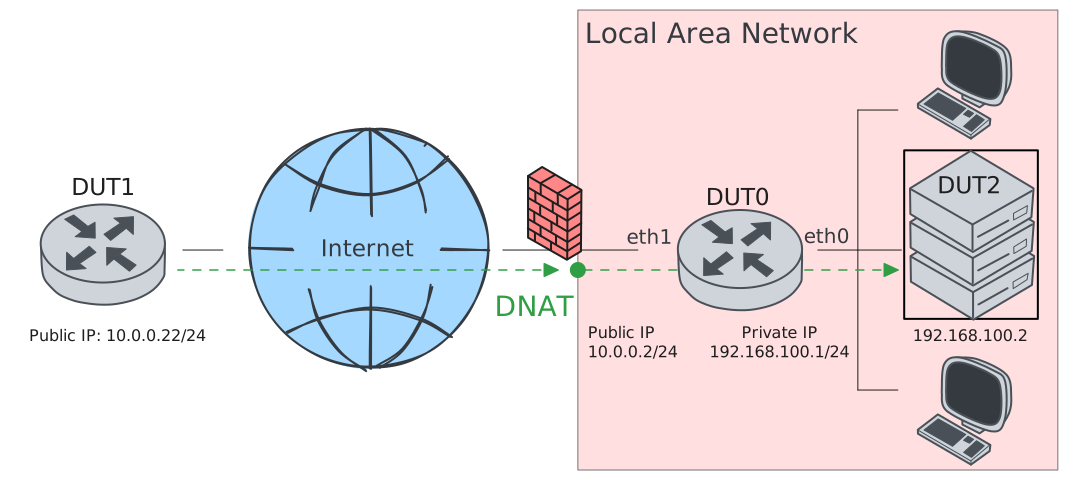
Test DNAT
Description
In this scenario, DUT0 modifies the destination
address of incoming packets generated at the WAN
side. The address is translated to a custom one:
192.168.100.2.
Scenario
Step 1: Set the following configuration in DUT0 :
set interfaces ethernet eth0 address 192.168.100.1/24
set interfaces ethernet eth1 address 10.0.0.2/24
set interfaces ethernet eth1 traffic nat destination rule 1 address 192.168.100.2
set interfaces ethernet eth1 traffic nat destination rule 1 selector SEL
set system login user admin authentication encrypted-password '$6$GSjsCj8gHLv$/VcqU6FLi6CT2Oxn0MJQ2C2tqnRDrYKNF8HIYWJp68nvXvPdFccDsT04.WtigUONbKYrgKg8d6rEs8PjljMkH0'
set traffic selector SEL rule 1 protocol tcp,udp
Step 2: Set the following configuration in DUT1 :
set interfaces ethernet eth1 address 10.0.0.22/24
set protocols static route 0.0.0.0/0 next-hop 10.0.0.2
set system login user admin authentication encrypted-password '$6$GSjsCj8gHLv$/VcqU6FLi6CT2Oxn0MJQ2C2tqnRDrYKNF8HIYWJp68nvXvPdFccDsT04.WtigUONbKYrgKg8d6rEs8PjljMkH0'
Step 3: Set the following configuration in DUT2 :
set interfaces ethernet eth0 address 192.168.100.2/24
set protocols static route 0.0.0.0/0 next-hop 192.168.100.1
set system login user admin authentication encrypted-password '$6$GSjsCj8gHLv$/VcqU6FLi6CT2Oxn0MJQ2C2tqnRDrYKNF8HIYWJp68nvXvPdFccDsT04.WtigUONbKYrgKg8d6rEs8PjljMkH0'
Step 4: Ping the IP address 192.168.100.2 from DUT0:
admin@DUT0$ ping 192.168.100.2 count 1 size 56 timeout 1Show output
PING 192.168.100.2 (192.168.100.2) 56(84) bytes of data.
64 bytes from 192.168.100.2: icmp_seq=1 ttl=64 time=0.509 ms

--- 192.168.100.2 ping statistics ---
1 packets transmitted, 1 received, 0% packet loss, time 0ms
rtt min/avg/max/mdev = 0.509/0.509/0.509/0.000 ms
Step 5: Ping the IP address 10.0.0.22 from DUT0:
admin@DUT0$ ping 10.0.0.22 count 1 size 56 timeout 1Show output
PING 10.0.0.22 (10.0.0.22) 56(84) bytes of data.
64 bytes from 10.0.0.22: icmp_seq=1 ttl=64 time=0.591 ms

--- 10.0.0.22 ping statistics ---
1 packets transmitted, 1 received, 0% packet loss, time 0ms
rtt min/avg/max/mdev = 0.591/0.591/0.591/0.000 ms
Step 6: Initiate a tcp connection from DUT1 to DUT2 and exchange messages between both endpoints
admin@DUT2$ monitor test connection server 8080 tcp
admin@DUT1$ monitor test connection client 10.0.0.2 8080 tcp
Step 7: Initiate a udp connection from DUT1 to DUT2 and exchange messages between both endpoints
admin@DUT2$ monitor test connection server 5050 udp
admin@DUT1$ monitor test connection client 10.0.0.2 5050 udp
Step 8: Run the command system conntrack show nat on DUT0 and check whether the output contains the following tokens:
src=10.0.0.22 dst=10.0.0.2
src=192.168.100.2 dst=10.0.0.22
Show output
tcp      6 src=10.0.0.22 dst=10.0.0.2 sport=54936 dport=8080 packets=10 bytes=628 src=192.168.100.2 dst=10.0.0.22 sport=8080 dport=54936 packets=11 bytes=680 [ASSURED] [OFFLOAD, packets=6 bytes=412 packets=8 bytes=516] mark=0 use=2
udp      17 src=10.0.0.22 dst=10.0.0.2 sport=41301 dport=5050 packets=5 bytes=240 src=192.168.100.2 dst=10.0.0.22 sport=5050 dport=41301 packets=5 bytes=240 [OFFLOAD, packets=3 bytes=144 packets=4 bytes=192] mark=0 use=2
icmp     1 24 src=10.0.0.2 dst=10.0.0.22 type=8 code=0 id=726 packets=1 bytes=84 src=10.0.0.22 dst=10.0.0.2 type=0 code=0 id=726 packets=1 bytes=84 mark=0 use=1
icmp     1 24 src=192.168.100.1 dst=192.168.100.2 type=8 code=0 id=725 packets=1 bytes=84 src=192.168.100.2 dst=192.168.100.1 type=0 code=0 id=725 packets=1 bytes=84 mark=0 use=1
conntrack v1.4.7 (conntrack-tools): 4 flow entries have been shown.
Test DNAT Redirect
Description
This scenario is similar to the previous one, but when redirect is specified the destination address is NATed to the interface IP.
Scenario
Step 1: Set the following configuration in DUT0 :
set interfaces ethernet eth0 address 192.168.100.1/24
set interfaces ethernet eth1 address 10.0.0.2/24
set interfaces ethernet eth1 traffic nat destination rule 1 address redirect
set interfaces ethernet eth1 traffic nat destination rule 1 selector SEL
set system login user admin authentication encrypted-password '$6$GSjsCj8gHLv$/VcqU6FLi6CT2Oxn0MJQ2C2tqnRDrYKNF8HIYWJp68nvXvPdFccDsT04.WtigUONbKYrgKg8d6rEs8PjljMkH0'
set traffic selector SEL rule 1 protocol tcp,udp
Step 2: Set the following configuration in DUT1 :
set interfaces ethernet eth1 address 10.0.0.22/24
set protocols static route 0.0.0.0/0 next-hop 10.0.0.2
set system login user admin authentication encrypted-password '$6$GSjsCj8gHLv$/VcqU6FLi6CT2Oxn0MJQ2C2tqnRDrYKNF8HIYWJp68nvXvPdFccDsT04.WtigUONbKYrgKg8d6rEs8PjljMkH0'
Step 3: Ping the IP address 10.0.0.22 from DUT0:
admin@DUT0$ ping 10.0.0.22 count 1 size 56 timeout 1Show output
PING 10.0.0.22 (10.0.0.22) 56(84) bytes of data.
64 bytes from 10.0.0.22: icmp_seq=1 ttl=64 time=0.396 ms

--- 10.0.0.22 ping statistics ---
1 packets transmitted, 1 received, 0% packet loss, time 0ms
rtt min/avg/max/mdev = 0.396/0.396/0.396/0.000 ms
Step 4: Initiate a tcp connection from DUT1 to DUT0 and exchange messages between both endpoints
admin@DUT0$ monitor test connection server 8080 tcp
admin@DUT1$ monitor test connection client 192.168.100.3 8080 tcp
Step 5: Initiate a udp connection from DUT1 to DUT0 and exchange messages between both endpoints
admin@DUT0$ monitor test connection server 5050 udp
admin@DUT1$ monitor test connection client 192.168.100.3 5050 udp
Step 6: Run the command system conntrack show nat on DUT0 and check whether the output contains the following tokens:
src=10.0.0.22 dst=192.168.100.3
src=10.0.0.2 dst=10.0.0.22
Show output
tcp      6 17 TIME_WAIT src=10.0.0.22 dst=192.168.100.3 sport=57450 dport=8080 packets=12 bytes=732 src=10.0.0.2 dst=10.0.0.22 sport=8080 dport=57450 packets=13 bytes=784 [ASSURED] mark=0 use=1
udp      17 29 src=10.0.0.22 dst=192.168.100.3 sport=45349 dport=5050 packets=5 bytes=240 src=10.0.0.2 dst=10.0.0.22 sport=5050 dport=45349 packets=5 bytes=240 mark=0 use=1
icmp     1 24 src=10.0.0.2 dst=10.0.0.22 type=8 code=0 id=727 packets=1 bytes=84 src=10.0.0.22 dst=10.0.0.2 type=0 code=0 id=727 packets=1 bytes=84 mark=0 use=1
conntrack v1.4.7 (conntrack-tools): 3 flow entries have been shown.
Test DNAT Port Forwarding
Description
In this scenario, DNAT forwards incoming TCP
traffic destined to a specific port. Requests
arriving at 10.0.0.2:80 are translated to
192.168.100.2:8080.
Scenario
Step 1: Set the following configuration in DUT0 :
set interfaces ethernet eth0 address 192.168.100.1/24
set interfaces ethernet eth1 address 10.0.0.2/24
set interfaces ethernet eth1 traffic nat destination rule 1 address 192.168.100.2
set interfaces ethernet eth1 traffic nat destination rule 1 port 8080
set interfaces ethernet eth1 traffic nat destination rule 1 protocol tcp
set interfaces ethernet eth1 traffic nat destination rule 1 selector SEL
set system login user admin authentication encrypted-password '$6$GSjsCj8gHLv$/VcqU6FLi6CT2Oxn0MJQ2C2tqnRDrYKNF8HIYWJp68nvXvPdFccDsT04.WtigUONbKYrgKg8d6rEs8PjljMkH0'
set traffic selector SEL rule 1 destination port 80
set traffic selector SEL rule 1 protocol tcp
Step 2: Set the following configuration in DUT1 :
set interfaces ethernet eth1 address 10.0.0.22/24
set protocols static route 0.0.0.0/0 next-hop 10.0.0.2
set system login user admin authentication encrypted-password '$6$GSjsCj8gHLv$/VcqU6FLi6CT2Oxn0MJQ2C2tqnRDrYKNF8HIYWJp68nvXvPdFccDsT04.WtigUONbKYrgKg8d6rEs8PjljMkH0'
Step 3: Set the following configuration in DUT2 :
set interfaces ethernet eth0 address 192.168.100.2/24
set protocols static route 0.0.0.0/0 next-hop 192.168.100.1
set system login user admin authentication encrypted-password '$6$GSjsCj8gHLv$/VcqU6FLi6CT2Oxn0MJQ2C2tqnRDrYKNF8HIYWJp68nvXvPdFccDsT04.WtigUONbKYrgKg8d6rEs8PjljMkH0'
Step 4: Ping the IP address 192.168.100.2 from DUT0:
admin@DUT0$ ping 192.168.100.2 count 1 size 56 timeout 1Show output
PING 192.168.100.2 (192.168.100.2) 56(84) bytes of data.
64 bytes from 192.168.100.2: icmp_seq=1 ttl=64 time=0.422 ms

--- 192.168.100.2 ping statistics ---
1 packets transmitted, 1 received, 0% packet loss, time 0ms
rtt min/avg/max/mdev = 0.422/0.422/0.422/0.000 ms
Step 5: Ping the IP address 10.0.0.22 from DUT0:
admin@DUT0$ ping 10.0.0.22 count 1 size 56 timeout 1Show output
PING 10.0.0.22 (10.0.0.22) 56(84) bytes of data.
64 bytes from 10.0.0.22: icmp_seq=1 ttl=64 time=0.658 ms

--- 10.0.0.22 ping statistics ---
1 packets transmitted, 1 received, 0% packet loss, time 0ms
rtt min/avg/max/mdev = 0.658/0.658/0.658/0.000 ms
Step 6: Initiate a tcp connection from DUT1 to DUT2 and exchange messages between both endpoints
admin@DUT2$ monitor test connection server 8080 tcp
admin@DUT1$ monitor test connection client 10.0.0.2 80 tcp
Step 7: Run the command system conntrack show nat on DUT0 and check whether the output contains the following tokens:
src=10.0.0.22 dst=10.0.0.2
src=192.168.100.2 dst=10.0.0.22
dport=80
sport=8080
Show output
icmp     1 27 src=192.168.100.1 dst=192.168.100.2 type=8 code=0 id=731 packets=1 bytes=84 src=192.168.100.2 dst=192.168.100.1 type=0 code=0 id=731 packets=1 bytes=84 mark=0 use=1
icmp     1 27 src=10.0.0.2 dst=10.0.0.22 type=8 code=0 id=732 packets=1 bytes=84 src=10.0.0.22 dst=10.0.0.2 type=0 code=0 id=732 packets=1 bytes=84 mark=0 use=1
tcp      6 src=10.0.0.22 dst=10.0.0.2 sport=48330 dport=80 packets=10 bytes=628 src=192.168.100.2 dst=10.0.0.22 sport=8080 dport=48330 packets=9 bytes=576 [ASSURED] [OFFLOAD, packets=6 bytes=412 packets=6 bytes=412] mark=0 use=2
conntrack v1.4.7 (conntrack-tools): 3 flow entries have been shown.
Test DNAT Address Pool
Description
In this scenario, DNAT translates the destination of incoming packets to one address from a pool. The kernel selects the target address per connection.
Scenario
Step 1: Set the following configuration in DUT0 :
set interfaces ethernet eth0 address 192.168.100.1/24
set interfaces ethernet eth1 address 10.0.0.2/24
set interfaces ethernet eth1 traffic nat destination rule 1 address 192.168.100.2-192.168.100.3
set interfaces ethernet eth1 traffic nat destination rule 1 selector SEL
set system login user admin authentication encrypted-password '$6$GSjsCj8gHLv$/VcqU6FLi6CT2Oxn0MJQ2C2tqnRDrYKNF8HIYWJp68nvXvPdFccDsT04.WtigUONbKYrgKg8d6rEs8PjljMkH0'
set traffic selector SEL rule 1 protocol tcp,udp
Step 2: Set the following configuration in DUT1 :
set interfaces ethernet eth1 address 10.0.0.22/24
set protocols static route 0.0.0.0/0 next-hop 10.0.0.2
set system login user admin authentication encrypted-password '$6$GSjsCj8gHLv$/VcqU6FLi6CT2Oxn0MJQ2C2tqnRDrYKNF8HIYWJp68nvXvPdFccDsT04.WtigUONbKYrgKg8d6rEs8PjljMkH0'
Step 3: Set the following configuration in DUT2 :
set interfaces ethernet eth0 address 192.168.100.2/24
set interfaces ethernet eth0 address 192.168.100.3/24
set protocols static route 0.0.0.0/0 next-hop 192.168.100.1
set system login user admin authentication encrypted-password '$6$GSjsCj8gHLv$/VcqU6FLi6CT2Oxn0MJQ2C2tqnRDrYKNF8HIYWJp68nvXvPdFccDsT04.WtigUONbKYrgKg8d6rEs8PjljMkH0'
Step 4: Ping the IP address 192.168.100.2 from DUT0:
admin@DUT0$ ping 192.168.100.2 count 1 size 56 timeout 1Show output
PING 192.168.100.2 (192.168.100.2) 56(84) bytes of data.
64 bytes from 192.168.100.2: icmp_seq=1 ttl=64 time=0.351 ms

--- 192.168.100.2 ping statistics ---
1 packets transmitted, 1 received, 0% packet loss, time 0ms
rtt min/avg/max/mdev = 0.351/0.351/0.351/0.000 ms
Step 5: Ping the IP address 192.168.100.3 from DUT0:
admin@DUT0$ ping 192.168.100.3 count 1 size 56 timeout 1Show output
PING 192.168.100.3 (192.168.100.3) 56(84) bytes of data.
64 bytes from 192.168.100.3: icmp_seq=1 ttl=64 time=0.478 ms

--- 192.168.100.3 ping statistics ---
1 packets transmitted, 1 received, 0% packet loss, time 0ms
rtt min/avg/max/mdev = 0.478/0.478/0.478/0.000 ms
Step 6: Ping the IP address 10.0.0.22 from DUT0:
admin@DUT0$ ping 10.0.0.22 count 1 size 56 timeout 1Show output
PING 10.0.0.22 (10.0.0.22) 56(84) bytes of data.
64 bytes from 10.0.0.22: icmp_seq=1 ttl=64 time=0.371 ms

--- 10.0.0.22 ping statistics ---
1 packets transmitted, 1 received, 0% packet loss, time 0ms
rtt min/avg/max/mdev = 0.371/0.371/0.371/0.000 ms
Step 7: Initiate a tcp connection from DUT1 to DUT2 and exchange messages between both endpoints
admin@DUT2$ monitor test connection server 8080 tcp
admin@DUT1$ monitor test connection client 10.0.0.2 8080 tcp
Step 8: Initiate a udp connection from DUT1 to DUT2 and exchange messages between both endpoints
admin@DUT2$ monitor test connection server 5050 udp
admin@DUT1$ monitor test connection client 10.0.0.2 5050 udp
Step 9: Run the command system conntrack show nat on DUT0 and check whether the output matches the following regular expressions:
src=10.0.0.22 dst=10.0.0.2
src=192.168.100.[23] dst=10.0.0.22
Show output
tcp      6 src=10.0.0.22 dst=10.0.0.2 sport=34268 dport=8080 packets=10 bytes=628 src=192.168.100.2 dst=10.0.0.22 sport=8080 dport=34268 packets=9 bytes=576 [ASSURED] [OFFLOAD, packets=6 bytes=412 packets=6 bytes=412] mark=0 use=2
icmp     1 24 src=192.168.100.1 dst=192.168.100.2 type=8 code=0 id=733 packets=1 bytes=84 src=192.168.100.2 dst=192.168.100.1 type=0 code=0 id=733 packets=1 bytes=84 mark=0 use=1
udp      17 src=10.0.0.22 dst=10.0.0.2 sport=57902 dport=5050 packets=5 bytes=240 src=192.168.100.2 dst=10.0.0.22 sport=5050 dport=57902 packets=5 bytes=240 [OFFLOAD, packets=3 bytes=144 packets=4 bytes=192] mark=0 use=2
icmp     1 24 src=192.168.100.1 dst=192.168.100.3 type=8 code=0 id=734 packets=1 bytes=84 src=192.168.100.3 dst=192.168.100.1 type=0 code=0 id=734 packets=1 bytes=84 mark=0 use=1
icmp     1 24 src=10.0.0.2 dst=10.0.0.22 type=8 code=0 id=735 packets=1 bytes=84 src=10.0.0.22 dst=10.0.0.2 type=0 code=0 id=735 packets=1 bytes=84 mark=0 use=1
conntrack v1.4.7 (conntrack-tools): 5 flow entries have been shown.
Test DNAT Network Prefix
Description
In this scenario, DNAT translates the destination using a network prefix. The host part of the original IP address is kept, but the network part is mangled using a subnet prefix.
Scenario
Step 1: Set the following configuration in DUT0 :
set interfaces ethernet eth0 address 192.168.100.1/24
set interfaces ethernet eth1 address 10.0.0.2/24
set interfaces ethernet eth1 traffic nat destination rule 1 network 192.168.100.0/24
set interfaces ethernet eth1 traffic nat destination rule 1 selector SEL
set system login user admin authentication encrypted-password '$6$GSjsCj8gHLv$/VcqU6FLi6CT2Oxn0MJQ2C2tqnRDrYKNF8HIYWJp68nvXvPdFccDsT04.WtigUONbKYrgKg8d6rEs8PjljMkH0'
set traffic selector SEL rule 1 protocol tcp,udp
Step 2: Set the following configuration in DUT1 :
set interfaces ethernet eth1 address 10.0.0.22/24
set protocols static route 0.0.0.0/0 next-hop 10.0.0.2
set system login user admin authentication encrypted-password '$6$GSjsCj8gHLv$/VcqU6FLi6CT2Oxn0MJQ2C2tqnRDrYKNF8HIYWJp68nvXvPdFccDsT04.WtigUONbKYrgKg8d6rEs8PjljMkH0'
Step 3: Set the following configuration in DUT2 :
set interfaces ethernet eth0 address 192.168.100.2/24
set protocols static route 0.0.0.0/0 next-hop 192.168.100.1
set system login user admin authentication encrypted-password '$6$GSjsCj8gHLv$/VcqU6FLi6CT2Oxn0MJQ2C2tqnRDrYKNF8HIYWJp68nvXvPdFccDsT04.WtigUONbKYrgKg8d6rEs8PjljMkH0'
Step 4: Ping the IP address 192.168.100.2 from DUT0:
admin@DUT0$ ping 192.168.100.2 count 1 size 56 timeout 1Show output
PING 192.168.100.2 (192.168.100.2) 56(84) bytes of data.
64 bytes from 192.168.100.2: icmp_seq=1 ttl=64 time=0.759 ms

--- 192.168.100.2 ping statistics ---
1 packets transmitted, 1 received, 0% packet loss, time 0ms
rtt min/avg/max/mdev = 0.759/0.759/0.759/0.000 ms
Step 5: Ping the IP address 10.0.0.22 from DUT0:
admin@DUT0$ ping 10.0.0.22 count 1 size 56 timeout 1Show output
PING 10.0.0.22 (10.0.0.22) 56(84) bytes of data.
64 bytes from 10.0.0.22: icmp_seq=1 ttl=64 time=0.763 ms

--- 10.0.0.22 ping statistics ---
1 packets transmitted, 1 received, 0% packet loss, time 0ms
rtt min/avg/max/mdev = 0.763/0.763/0.763/0.000 ms
Step 6: Initiate a tcp connection from DUT1 to DUT2 and exchange messages between both endpoints
admin@DUT2$ monitor test connection server 8080 tcp
admin@DUT1$ monitor test connection client 10.0.0.2 8080 tcp
Step 7: Initiate a udp connection from DUT1 to DUT2 and exchange messages between both endpoints
admin@DUT2$ monitor test connection server 5050 udp
admin@DUT1$ monitor test connection client 10.0.0.2 5050 udp
Step 8: Run the command system conntrack show nat on DUT0 and check whether the output contains the following tokens:
src=10.0.0.22 dst=10.0.0.2
src=192.168.100.2 dst=10.0.0.22
Show output
icmp     1 24 src=192.168.100.1 dst=192.168.100.2 type=8 code=0 id=736 packets=1 bytes=84 src=192.168.100.2 dst=192.168.100.1 type=0 code=0 id=736 packets=1 bytes=84 mark=0 use=1
tcp      6 src=10.0.0.22 dst=10.0.0.2 sport=50390 dport=8080 packets=10 bytes=628 src=192.168.100.2 dst=10.0.0.22 sport=8080 dport=50390 packets=9 bytes=576 [ASSURED] [OFFLOAD, packets=6 bytes=412 packets=6 bytes=412] mark=0 use=2
udp      17 src=10.0.0.22 dst=10.0.0.2 sport=47874 dport=5050 packets=5 bytes=240 src=192.168.100.2 dst=10.0.0.22 sport=5050 dport=47874 packets=5 bytes=240 [OFFLOAD, packets=3 bytes=144 packets=4 bytes=192] mark=0 use=2
icmp     1 24 src=10.0.0.2 dst=10.0.0.22 type=8 code=0 id=737 packets=1 bytes=84 src=10.0.0.22 dst=10.0.0.2 type=0 code=0 id=737 packets=1 bytes=84 mark=0 use=1
conntrack v1.4.7 (conntrack-tools): 4 flow entries have been shown.