Snat
These scenarios show how to configure SNAT (Source Network Address Translation) on OSDx.
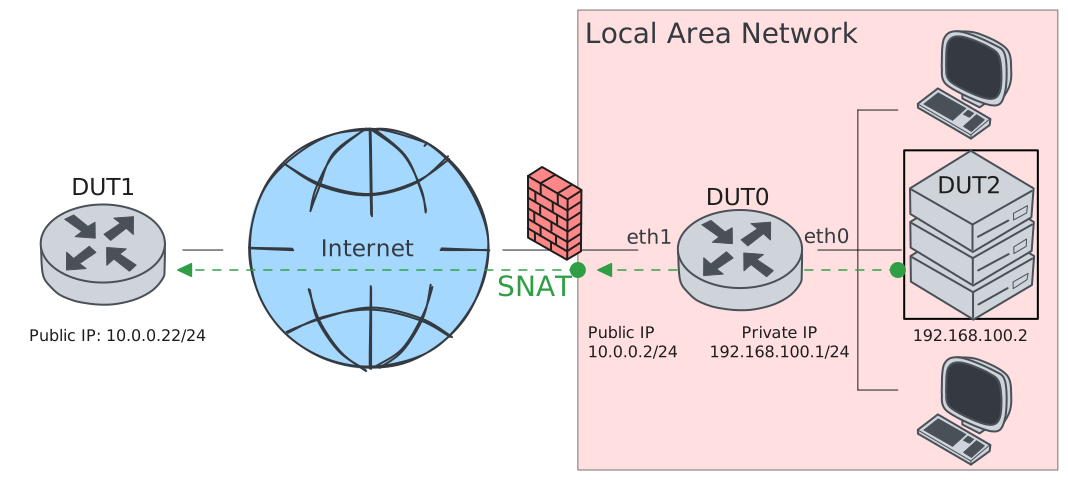
Test SNAT
Description
In this scenario, DUT0 modifies the source address
of outgoing packets generated at the LAN side. The
address is translated to a custom one: 10.0.0.1.
Scenario
Step 1: Set the following configuration in DUT0 :
set interfaces ethernet eth0 address 192.168.100.1/24
set interfaces ethernet eth1 address 10.0.0.2/24
set interfaces ethernet eth1 traffic nat source rule 1 address 10.0.0.2
set interfaces ethernet eth1 traffic nat source rule 1 selector SEL
set system login user admin authentication encrypted-password '$6$GSjsCj8gHLv$/VcqU6FLi6CT2Oxn0MJQ2C2tqnRDrYKNF8HIYWJp68nvXvPdFccDsT04.WtigUONbKYrgKg8d6rEs8PjljMkH0'
set traffic selector SEL rule 1 protocol tcp,udp
Step 2: Set the following configuration in DUT1 :
set interfaces ethernet eth1 address 10.0.0.22/24
set system login user admin authentication encrypted-password '$6$GSjsCj8gHLv$/VcqU6FLi6CT2Oxn0MJQ2C2tqnRDrYKNF8HIYWJp68nvXvPdFccDsT04.WtigUONbKYrgKg8d6rEs8PjljMkH0'
Step 3: Set the following configuration in DUT2 :
set interfaces ethernet eth0 address 192.168.100.2/24
set protocols static route 0.0.0.0/0 next-hop 192.168.100.1
set system login user admin authentication encrypted-password '$6$GSjsCj8gHLv$/VcqU6FLi6CT2Oxn0MJQ2C2tqnRDrYKNF8HIYWJp68nvXvPdFccDsT04.WtigUONbKYrgKg8d6rEs8PjljMkH0'
Step 4: Ping the IP address 192.168.100.2 from DUT0:
admin@DUT0$ ping 192.168.100.2 count 1 size 56 timeout 1Show output
PING 192.168.100.2 (192.168.100.2) 56(84) bytes of data.
64 bytes from 192.168.100.2: icmp_seq=1 ttl=64 time=0.399 ms

--- 192.168.100.2 ping statistics ---
1 packets transmitted, 1 received, 0% packet loss, time 0ms
rtt min/avg/max/mdev = 0.399/0.399/0.399/0.000 ms
Step 5: Ping the IP address 10.0.0.22 from DUT0:
admin@DUT0$ ping 10.0.0.22 count 1 size 56 timeout 1Show output
PING 10.0.0.22 (10.0.0.22) 56(84) bytes of data.
64 bytes from 10.0.0.22: icmp_seq=1 ttl=64 time=0.492 ms

--- 10.0.0.22 ping statistics ---
1 packets transmitted, 1 received, 0% packet loss, time 0ms
rtt min/avg/max/mdev = 0.492/0.492/0.492/0.000 ms
Step 6: Initiate a tcp connection from DUT2 to DUT1 and exchange messages between both endpoints
admin@DUT1$ monitor test connection server 8080 tcp
admin@DUT2$ monitor test connection client 10.0.0.22 8080 tcp
Step 7: Initiate a udp connection from DUT2 to DUT1 and exchange messages between both endpoints
admin@DUT1$ monitor test connection server 5050 udp
admin@DUT2$ monitor test connection client 10.0.0.22 5050 udp
Step 8: Run the command system conntrack show nat on DUT0 and check whether the output contains the following tokens:
src=192.168.100.2 dst=10.0.0.22
src=10.0.0.22 dst=10.0.0.2
Show output
tcp      6 src=192.168.100.2 dst=10.0.0.22 sport=42828 dport=8080 packets=10 bytes=628 src=10.0.0.22 dst=10.0.0.2 sport=8080 dport=42828 packets=11 bytes=680 [ASSURED] [OFFLOAD, packets=6 bytes=412 packets=8 bytes=516] mark=0 use=2
icmp     1 24 src=192.168.100.1 dst=192.168.100.2 type=8 code=0 id=738 packets=1 bytes=84 src=192.168.100.2 dst=192.168.100.1 type=0 code=0 id=738 packets=1 bytes=84 mark=0 use=1
icmp     1 24 src=10.0.0.2 dst=10.0.0.22 type=8 code=0 id=739 packets=1 bytes=84 src=10.0.0.22 dst=10.0.0.2 type=0 code=0 id=739 packets=1 bytes=84 mark=0 use=1
udp      17 src=192.168.100.2 dst=10.0.0.22 sport=58192 dport=5050 packets=5 bytes=240 src=10.0.0.22 dst=10.0.0.2 sport=5050 dport=58192 packets=5 bytes=240 [OFFLOAD, packets=3 bytes=144 packets=4 bytes=192] mark=0 use=2
conntrack v1.4.7 (conntrack-tools): 4 flow entries have been shown.
Test SNAT Masquerade
Description
This scenario is similar to the previous one, but when masquerade is specified, the route uses the IP address of the outgoing interface. Therefore, masquerading should be configured if the outgoing interface uses a dynamic IP address.
Scenario
Step 1: Set the following configuration in DUT0 :
set interfaces ethernet eth0 address 192.168.100.1/24
set interfaces ethernet eth1 address 10.0.0.2/24
set interfaces ethernet eth1 traffic nat source rule 1 address masquerade
set interfaces ethernet eth1 traffic nat source rule 1 selector SEL
set system login user admin authentication encrypted-password '$6$GSjsCj8gHLv$/VcqU6FLi6CT2Oxn0MJQ2C2tqnRDrYKNF8HIYWJp68nvXvPdFccDsT04.WtigUONbKYrgKg8d6rEs8PjljMkH0'
set traffic selector SEL rule 1 protocol tcp,udp
Step 2: Set the following configuration in DUT1 :
set interfaces ethernet eth1 address 10.0.0.22/24
set system login user admin authentication encrypted-password '$6$GSjsCj8gHLv$/VcqU6FLi6CT2Oxn0MJQ2C2tqnRDrYKNF8HIYWJp68nvXvPdFccDsT04.WtigUONbKYrgKg8d6rEs8PjljMkH0'
Step 3: Set the following configuration in DUT2 :
set interfaces ethernet eth0 address 192.168.100.2/24
set protocols static route 0.0.0.0/0 next-hop 192.168.100.1
set system login user admin authentication encrypted-password '$6$GSjsCj8gHLv$/VcqU6FLi6CT2Oxn0MJQ2C2tqnRDrYKNF8HIYWJp68nvXvPdFccDsT04.WtigUONbKYrgKg8d6rEs8PjljMkH0'
Step 4: Ping the IP address 192.168.100.2 from DUT0:
admin@DUT0$ ping 192.168.100.2 count 1 size 56 timeout 1Show output
PING 192.168.100.2 (192.168.100.2) 56(84) bytes of data.
64 bytes from 192.168.100.2: icmp_seq=1 ttl=64 time=0.716 ms

--- 192.168.100.2 ping statistics ---
1 packets transmitted, 1 received, 0% packet loss, time 0ms
rtt min/avg/max/mdev = 0.716/0.716/0.716/0.000 ms
Step 5: Ping the IP address 10.0.0.22 from DUT0:
admin@DUT0$ ping 10.0.0.22 count 1 size 56 timeout 1Show output
PING 10.0.0.22 (10.0.0.22) 56(84) bytes of data.
64 bytes from 10.0.0.22: icmp_seq=1 ttl=64 time=0.467 ms

--- 10.0.0.22 ping statistics ---
1 packets transmitted, 1 received, 0% packet loss, time 0ms
rtt min/avg/max/mdev = 0.467/0.467/0.467/0.000 ms
Step 6: Initiate a tcp connection from DUT2 to DUT1 and exchange messages between both endpoints
admin@DUT1$ monitor test connection server 8080 tcp
admin@DUT2$ monitor test connection client 10.0.0.22 8080 tcp
Step 7: Initiate a udp connection from DUT2 to DUT1 and exchange messages between both endpoints
admin@DUT1$ monitor test connection server 5050 udp
admin@DUT2$ monitor test connection client 10.0.0.22 5050 udp
Step 8: Run the command system conntrack show nat on DUT0 and check whether the output contains the following tokens:
src=192.168.100.2 dst=10.0.0.22
src=10.0.0.22 dst=10.0.0.2
Show output
tcp      6 src=192.168.100.2 dst=10.0.0.22 sport=53164 dport=8080 packets=12 bytes=732 src=10.0.0.22 dst=10.0.0.2 sport=8080 dport=53164 packets=11 bytes=680 [ASSURED] [OFFLOAD, packets=8 bytes=516 packets=8 bytes=516] mark=0 use=2
icmp     1 24 src=192.168.100.1 dst=192.168.100.2 type=8 code=0 id=740 packets=1 bytes=84 src=192.168.100.2 dst=192.168.100.1 type=0 code=0 id=740 packets=1 bytes=84 mark=0 use=1
udp      17 src=192.168.100.2 dst=10.0.0.22 sport=41537 dport=5050 packets=5 bytes=240 src=10.0.0.22 dst=10.0.0.2 sport=5050 dport=41537 packets=5 bytes=240 [OFFLOAD, packets=3 bytes=144 packets=4 bytes=192] mark=0 use=2
icmp     1 24 src=10.0.0.2 dst=10.0.0.22 type=8 code=0 id=741 packets=1 bytes=84 src=10.0.0.22 dst=10.0.0.2 type=0 code=0 id=741 packets=1 bytes=84 mark=0 use=1
conntrack v1.4.7 (conntrack-tools): 4 flow entries have been shown.
Test SNAT Port Pool
Description
In this scenario, the translation is performed using masquerade with a pool of 3 ports. If at any time there are 3 active connections, the next one will be rejected.
Scenario
Step 1: Set the following configuration in DUT0 :
set interfaces ethernet eth0 address 192.168.100.1/24
set interfaces ethernet eth1 address 10.0.0.2/24
set interfaces ethernet eth1 traffic nat source rule 1 address masquerade
set interfaces ethernet eth1 traffic nat source rule 1 port 1000-1003
set interfaces ethernet eth1 traffic nat source rule 1 protocol tcp
set interfaces ethernet eth1 traffic nat source rule 1 selector SEL
set interfaces ethernet eth1 traffic nat source rule 2 address masquerade
set interfaces ethernet eth1 traffic nat source rule 2 port 1000-1003
set interfaces ethernet eth1 traffic nat source rule 2 protocol udp
set system login user admin authentication encrypted-password '$6$GSjsCj8gHLv$/VcqU6FLi6CT2Oxn0MJQ2C2tqnRDrYKNF8HIYWJp68nvXvPdFccDsT04.WtigUONbKYrgKg8d6rEs8PjljMkH0'
set traffic selector SEL rule 1 protocol tcp,udp
Step 2: Set the following configuration in DUT1 :
set interfaces ethernet eth1 address 10.0.0.22/24
set system login user admin authentication encrypted-password '$6$GSjsCj8gHLv$/VcqU6FLi6CT2Oxn0MJQ2C2tqnRDrYKNF8HIYWJp68nvXvPdFccDsT04.WtigUONbKYrgKg8d6rEs8PjljMkH0'
Step 3: Set the following configuration in DUT2 :
set interfaces ethernet eth0 address 192.168.100.2/24
set protocols static route 0.0.0.0/0 next-hop 192.168.100.1
set system login user admin authentication encrypted-password '$6$GSjsCj8gHLv$/VcqU6FLi6CT2Oxn0MJQ2C2tqnRDrYKNF8HIYWJp68nvXvPdFccDsT04.WtigUONbKYrgKg8d6rEs8PjljMkH0'
Step 4: Ping the IP address 192.168.100.2 from DUT0:
admin@DUT0$ ping 192.168.100.2 count 1 size 56 timeout 1Show output
PING 192.168.100.2 (192.168.100.2) 56(84) bytes of data.
64 bytes from 192.168.100.2: icmp_seq=1 ttl=64 time=0.748 ms

--- 192.168.100.2 ping statistics ---
1 packets transmitted, 1 received, 0% packet loss, time 0ms
rtt min/avg/max/mdev = 0.748/0.748/0.748/0.000 ms
Step 5: Ping the IP address 10.0.0.22 from DUT0:
admin@DUT0$ ping 10.0.0.22 count 1 size 56 timeout 1Show output
PING 10.0.0.22 (10.0.0.22) 56(84) bytes of data.
64 bytes from 10.0.0.22: icmp_seq=1 ttl=64 time=0.716 ms

--- 10.0.0.22 ping statistics ---
1 packets transmitted, 1 received, 0% packet loss, time 0ms
rtt min/avg/max/mdev = 0.716/0.716/0.716/0.000 ms
Step 6: Initiate a tcp connection from DUT2 to DUT1 and exchange messages between both endpoints
admin@DUT1$ monitor test connection server 8080 tcp
admin@DUT2$ monitor test connection client 10.0.0.22 8080 tcp
Step 7: Initiate a udp connection from DUT2 to DUT1 and exchange messages between both endpoints
admin@DUT1$ monitor test connection server 5050 udp
admin@DUT2$ monitor test connection client 10.0.0.22 5050 udp
Step 8: Run the command system conntrack show nat on DUT0 and check whether the output contains the following tokens:
src=192.168.100.2 dst=10.0.0.22
src=10.0.0.22 dst=10.0.0.2
Show output
udp      17 src=192.168.100.2 dst=10.0.0.22 sport=50689 dport=5050 packets=5 bytes=240 src=10.0.0.22 dst=10.0.0.2 sport=5050 dport=1001 packets=5 bytes=240 [OFFLOAD, packets=3 bytes=144 packets=4 bytes=192] mark=0 use=2
icmp     1 24 src=10.0.0.2 dst=10.0.0.22 type=8 code=0 id=743 packets=1 bytes=84 src=10.0.0.22 dst=10.0.0.2 type=0 code=0 id=743 packets=1 bytes=84 mark=0 use=1
icmp     1 24 src=192.168.100.1 dst=192.168.100.2 type=8 code=0 id=742 packets=1 bytes=84 src=192.168.100.2 dst=192.168.100.1 type=0 code=0 id=742 packets=1 bytes=84 mark=0 use=1
tcp      6 src=192.168.100.2 dst=10.0.0.22 sport=52588 dport=8080 packets=11 bytes=680 src=10.0.0.22 dst=10.0.0.2 sport=8080 dport=1002 packets=10 bytes=628 [ASSURED] [OFFLOAD, packets=7 bytes=464 packets=7 bytes=464] mark=0 use=2
conntrack v1.4.7 (conntrack-tools): 4 flow entries have been shown.
Test SNAT Network Prefix
Description
In this scenario, the translation is performed using a network prefix. The host part of the original IP address is kept, but the network part is mangled using a subnet prefix.
Scenario
Step 1: Set the following configuration in DUT0 :
set interfaces ethernet eth0 address 192.168.100.1/24
set interfaces ethernet eth1 address 10.0.0.2/24
set interfaces ethernet eth1 traffic nat source rule 1 network 10.0.0.0/24
set interfaces ethernet eth1 traffic nat source rule 1 selector SEL
set system login user admin authentication encrypted-password '$6$GSjsCj8gHLv$/VcqU6FLi6CT2Oxn0MJQ2C2tqnRDrYKNF8HIYWJp68nvXvPdFccDsT04.WtigUONbKYrgKg8d6rEs8PjljMkH0'
set traffic selector SEL rule 1 protocol tcp,udp
Step 2: Set the following configuration in DUT1 :
set interfaces ethernet eth1 address 10.0.0.22/24
set system login user admin authentication encrypted-password '$6$GSjsCj8gHLv$/VcqU6FLi6CT2Oxn0MJQ2C2tqnRDrYKNF8HIYWJp68nvXvPdFccDsT04.WtigUONbKYrgKg8d6rEs8PjljMkH0'
Step 3: Set the following configuration in DUT2 :
set interfaces ethernet eth0 address 192.168.100.2/24
set protocols static route 0.0.0.0/0 next-hop 192.168.100.1
set system login user admin authentication encrypted-password '$6$GSjsCj8gHLv$/VcqU6FLi6CT2Oxn0MJQ2C2tqnRDrYKNF8HIYWJp68nvXvPdFccDsT04.WtigUONbKYrgKg8d6rEs8PjljMkH0'
Step 4: Ping the IP address 192.168.100.2 from DUT0:
admin@DUT0$ ping 192.168.100.2 count 1 size 56 timeout 1Show output
PING 192.168.100.2 (192.168.100.2) 56(84) bytes of data.
64 bytes from 192.168.100.2: icmp_seq=1 ttl=64 time=0.478 ms

--- 192.168.100.2 ping statistics ---
1 packets transmitted, 1 received, 0% packet loss, time 0ms
rtt min/avg/max/mdev = 0.478/0.478/0.478/0.000 ms
Step 5: Ping the IP address 10.0.0.22 from DUT0:
admin@DUT0$ ping 10.0.0.22 count 1 size 56 timeout 1Show output
PING 10.0.0.22 (10.0.0.22) 56(84) bytes of data.
64 bytes from 10.0.0.22: icmp_seq=1 ttl=64 time=0.442 ms

--- 10.0.0.22 ping statistics ---
1 packets transmitted, 1 received, 0% packet loss, time 0ms
rtt min/avg/max/mdev = 0.442/0.442/0.442/0.000 ms
Step 6: Initiate a tcp connection from DUT2 to DUT1 and exchange messages between both endpoints
admin@DUT1$ monitor test connection server 8080 tcp
admin@DUT2$ monitor test connection client 10.0.0.22 8080 tcp
Step 7: Initiate a udp connection from DUT2 to DUT1 and exchange messages between both endpoints
admin@DUT1$ monitor test connection server 5050 udp
admin@DUT2$ monitor test connection client 10.0.0.22 5050 udp
Step 8: Run the command system conntrack show nat on DUT0 and check whether the output contains the following tokens:
src=192.168.100.2 dst=10.0.0.22
src=10.0.0.22 dst=10.0.0.2
Show output
icmp     1 24 src=10.0.0.2 dst=10.0.0.22 type=8 code=0 id=745 packets=1 bytes=84 src=10.0.0.22 dst=10.0.0.2 type=0 code=0 id=745 packets=1 bytes=84 mark=0 use=1
icmp     1 24 src=192.168.100.1 dst=192.168.100.2 type=8 code=0 id=744 packets=1 bytes=84 src=192.168.100.2 dst=192.168.100.1 type=0 code=0 id=744 packets=1 bytes=84 mark=0 use=1
udp      17 src=192.168.100.2 dst=10.0.0.22 sport=41764 dport=5050 packets=5 bytes=240 src=10.0.0.22 dst=10.0.0.2 sport=5050 dport=41764 packets=5 bytes=240 [OFFLOAD, packets=3 bytes=144 packets=4 bytes=192] mark=0 use=2
tcp      6 src=192.168.100.2 dst=10.0.0.22 sport=38314 dport=8080 packets=10 bytes=628 src=10.0.0.22 dst=10.0.0.2 sport=8080 dport=38314 packets=9 bytes=576 [ASSURED] [OFFLOAD, packets=6 bytes=412 packets=6 bytes=412] mark=0 use=2
conntrack v1.4.7 (conntrack-tools): 4 flow entries have been shown.
Test SNAT Address Pool
Description
In this scenario, the translation is performed using a pool of IP addresses. The kernel picks one address from the pool per connection based on a hash of the source flow.
Scenario
Step 1: Set the following configuration in DUT0 :
set interfaces ethernet eth0 address 192.168.100.1/24
set interfaces ethernet eth1 address 10.0.0.2/24
set interfaces ethernet eth1 address 10.0.0.3/24
set interfaces ethernet eth1 traffic nat source rule 1 address 10.0.0.2-10.0.0.3
set interfaces ethernet eth1 traffic nat source rule 1 selector SEL
set system login user admin authentication encrypted-password '$6$GSjsCj8gHLv$/VcqU6FLi6CT2Oxn0MJQ2C2tqnRDrYKNF8HIYWJp68nvXvPdFccDsT04.WtigUONbKYrgKg8d6rEs8PjljMkH0'
set traffic selector SEL rule 1 protocol tcp,udp
Step 2: Set the following configuration in DUT1 :
set interfaces ethernet eth1 address 10.0.0.22/24
set system login user admin authentication encrypted-password '$6$GSjsCj8gHLv$/VcqU6FLi6CT2Oxn0MJQ2C2tqnRDrYKNF8HIYWJp68nvXvPdFccDsT04.WtigUONbKYrgKg8d6rEs8PjljMkH0'
Step 3: Set the following configuration in DUT2 :
set interfaces ethernet eth0 address 192.168.100.2/24
set protocols static route 0.0.0.0/0 next-hop 192.168.100.1
set system login user admin authentication encrypted-password '$6$GSjsCj8gHLv$/VcqU6FLi6CT2Oxn0MJQ2C2tqnRDrYKNF8HIYWJp68nvXvPdFccDsT04.WtigUONbKYrgKg8d6rEs8PjljMkH0'
Step 4: Ping the IP address 192.168.100.2 from DUT0:
admin@DUT0$ ping 192.168.100.2 count 1 size 56 timeout 1Show output
PING 192.168.100.2 (192.168.100.2) 56(84) bytes of data.
64 bytes from 192.168.100.2: icmp_seq=1 ttl=64 time=0.536 ms

--- 192.168.100.2 ping statistics ---
1 packets transmitted, 1 received, 0% packet loss, time 0ms
rtt min/avg/max/mdev = 0.536/0.536/0.536/0.000 ms
Step 5: Ping the IP address 10.0.0.22 from DUT0:
admin@DUT0$ ping 10.0.0.22 count 1 size 56 timeout 1Show output
PING 10.0.0.22 (10.0.0.22) 56(84) bytes of data.
64 bytes from 10.0.0.22: icmp_seq=1 ttl=64 time=0.572 ms

--- 10.0.0.22 ping statistics ---
1 packets transmitted, 1 received, 0% packet loss, time 0ms
rtt min/avg/max/mdev = 0.572/0.572/0.572/0.000 ms
Step 6: Initiate a tcp connection from DUT2 to DUT1 and exchange messages between both endpoints
admin@DUT1$ monitor test connection server 8080 tcp
admin@DUT2$ monitor test connection client 10.0.0.22 8080 tcp
Step 7: Initiate a udp connection from DUT2 to DUT1 and exchange messages between both endpoints
admin@DUT1$ monitor test connection server 5050 udp
admin@DUT2$ monitor test connection client 10.0.0.22 5050 udp
Step 8: Run the command system conntrack show nat on DUT0 and check whether the output matches the following regular expressions:
src=192.168.100.2 dst=10.0.0.22
src=10.0.0.22 dst=10.0.0.[23]
Show output
udp      17 src=192.168.100.2 dst=10.0.0.22 sport=48254 dport=5050 packets=5 bytes=240 src=10.0.0.22 dst=10.0.0.2 sport=5050 dport=48254 packets=5 bytes=240 [OFFLOAD, packets=3 bytes=144 packets=4 bytes=192] mark=0 use=2
icmp     1 24 src=10.0.0.2 dst=10.0.0.22 type=8 code=0 id=747 packets=1 bytes=84 src=10.0.0.22 dst=10.0.0.2 type=0 code=0 id=747 packets=1 bytes=84 mark=0 use=1
icmp     1 24 src=192.168.100.1 dst=192.168.100.2 type=8 code=0 id=746 packets=1 bytes=84 src=192.168.100.2 dst=192.168.100.1 type=0 code=0 id=746 packets=1 bytes=84 mark=0 use=1
tcp      6 src=192.168.100.2 dst=10.0.0.22 sport=49566 dport=8080 packets=10 bytes=628 src=10.0.0.22 dst=10.0.0.2 sport=8080 dport=49566 packets=9 bytes=576 [ASSURED] [OFFLOAD, packets=6 bytes=412 packets=6 bytes=412] mark=0 use=2
conntrack v1.4.7 (conntrack-tools): 4 flow entries have been shown.