Connlimit
The following scenario shows how to filter packets based on the number of simultaneous connections.
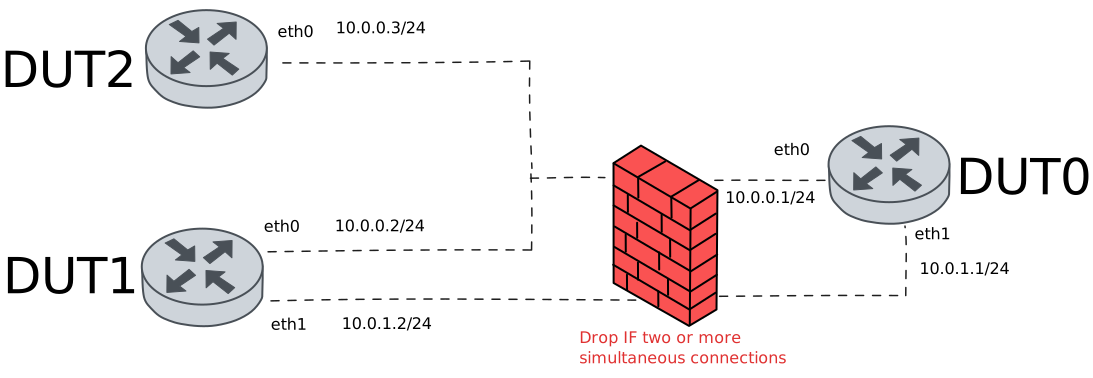
Test System Drop Over Connections
Description
This scenario shows how to limit the number of simultaneous system connections using traffic selectors
Scenario
Note
In the example below, we use NSM operation on both DUT1 and DUT2 devices to establish two ICMP connections.
Step 1: Set the following configuration in DUT0 :
set interfaces ethernet eth0 address 10.0.0.1/24
set interfaces ethernet eth1 address 10.0.1.1/24
set system login user admin authentication encrypted-password '$6$GSjsCj8gHLv$/VcqU6FLi6CT2Oxn0MJQ2C2tqnRDrYKNF8HIYWJp68nvXvPdFccDsT04.WtigUONbKYrgKg8d6rEs8PjljMkH0'
set system traffic policy local-in DROP_CONNLIMIT
set traffic policy DROP_CONNLIMIT rule 1 action drop
set traffic policy DROP_CONNLIMIT rule 1 selector CONNLIMIT_SEL
set traffic selector CONNLIMIT_SEL rule 1 connlimit 2
set traffic selector CONNLIMIT_SEL rule 1 protocol icmp
set traffic selector CONNLIMIT_SEL rule 1 state new
Step 2: Set the following configuration in DUT1 :
set interfaces ethernet eth0 address 10.0.0.2/24
set interfaces ethernet eth1 address 10.0.1.2/24
set service nsm operation TEST_OPER_1 destination-address 10.0.0.1
set service nsm operation TEST_OPER_1 interval 0.10
set service nsm operation TEST_OPER_1 type icmp
set system login user admin authentication encrypted-password '$6$GSjsCj8gHLv$/VcqU6FLi6CT2Oxn0MJQ2C2tqnRDrYKNF8HIYWJp68nvXvPdFccDsT04.WtigUONbKYrgKg8d6rEs8PjljMkH0'
Step 3: Set the following configuration in DUT2 :
set interfaces ethernet eth0 address 10.0.0.3/24
set service nsm operation TEST_OPER_1 destination-address 10.0.0.1
set service nsm operation TEST_OPER_1 interval 0.10
set service nsm operation TEST_OPER_1 type icmp
set system login user admin authentication encrypted-password '$6$GSjsCj8gHLv$/VcqU6FLi6CT2Oxn0MJQ2C2tqnRDrYKNF8HIYWJp68nvXvPdFccDsT04.WtigUONbKYrgKg8d6rEs8PjljMkH0'
Step 4: Run the command system conntrack show protocol icmp destination 10.0.0.1 on DUT1 and expect the following output:
Show output
icmp     1 30 src=10.0.0.2 dst=10.0.0.1 type=8 code=0 id=26211 packets=17 bytes=544 src=10.0.0.1 dst=10.0.0.2 type=0 code=0 id=26211 packets=17 bytes=544 mark=0 use=1
conntrack v1.4.7 (conntrack-tools): 1 flow entries have been shown.
Step 5: Run the command service nsm operation show on DUT1 and expect the following output:
Show output
-------------------------------------------------------------------------------------------
 Operation   Alarm  Status    RTT(s)    Jitter(s)   Loss(%)   Window  Toggled  Prev-toggled
-------------------------------------------------------------------------------------------
TEST_OPER_1  ---    ---     0.000179    0.000060    0.000000  2/2     ---      ---
Step 6: Run the command system conntrack show protocol icmp destination 10.0.0.1 on DUT2 and expect the following output:
Show output
icmp     1 29 src=10.0.0.3 dst=10.0.0.1 type=8 code=0 id=7683 packets=8 bytes=256 src=10.0.0.1 dst=10.0.0.3 type=0 code=0 id=7683 packets=8 bytes=256 mark=0 use=1
conntrack v1.4.7 (conntrack-tools): 1 flow entries have been shown.
Step 7: Run the command service nsm operation show on DUT2 and expect the following output:
Show output
-------------------------------------------------------------------------------------------
 Operation   Alarm  Status    RTT(s)    Jitter(s)   Loss(%)   Window  Toggled  Prev-toggled
-------------------------------------------------------------------------------------------
TEST_OPER_1  ---    ---     0.000314    0.000050    0.000000  2/2     ---      ---
Step 8: Expect a failure in the following command:
Ping the IP address 10.0.0.1 from DUT1:
admin@DUT1$ ping 10.0.0.1 count 5 size 56 timeout 1Show output
PING 10.0.0.1 (10.0.0.1) 56(84) bytes of data.

--- 10.0.0.1 ping statistics ---
5 packets transmitted, 0 received, 100% packet loss, time 4090ms
Step 9: Expect a failure in the following command:
Ping the IP address 10.0.1.1 from DUT1:
admin@DUT1$ ping 10.0.1.1 count 5 size 56 timeout 1Show output
PING 10.0.1.1 (10.0.1.1) 56(84) bytes of data.

--- 10.0.1.1 ping statistics ---
5 packets transmitted, 0 received, 100% packet loss, time 4093ms
Note
In this case, both pings fail because the policy is applied at system level.
Test Interface Drop Over Connections
Description
This scenario shows how to limit the number of simultaneous interface connections using traffic selectors
Scenario
Note
In the example below, we use NSM operation on both DUT1 and DUT2 devices to establish two ICMP connections.
Step 1: Set the following configuration in DUT0 :
set interfaces ethernet eth0 address 10.0.0.1/24
set interfaces ethernet eth0 traffic policy local-in DROP_CONNLIMIT
set interfaces ethernet eth1 address 10.0.1.1/24
set system login user admin authentication encrypted-password '$6$GSjsCj8gHLv$/VcqU6FLi6CT2Oxn0MJQ2C2tqnRDrYKNF8HIYWJp68nvXvPdFccDsT04.WtigUONbKYrgKg8d6rEs8PjljMkH0'
set traffic policy DROP_CONNLIMIT rule 1 action drop
set traffic policy DROP_CONNLIMIT rule 1 selector CONNLIMIT_SEL
set traffic selector CONNLIMIT_SEL rule 1 connlimit 2
set traffic selector CONNLIMIT_SEL rule 1 protocol icmp
set traffic selector CONNLIMIT_SEL rule 1 state new
Step 2: Set the following configuration in DUT1 :
set interfaces ethernet eth0 address 10.0.0.2/24
set interfaces ethernet eth1 address 10.0.1.2/24
set service nsm operation TEST_OPER_1 destination-address 10.0.0.1
set service nsm operation TEST_OPER_1 interval 0.10
set service nsm operation TEST_OPER_1 type icmp
set system login user admin authentication encrypted-password '$6$GSjsCj8gHLv$/VcqU6FLi6CT2Oxn0MJQ2C2tqnRDrYKNF8HIYWJp68nvXvPdFccDsT04.WtigUONbKYrgKg8d6rEs8PjljMkH0'
Step 3: Set the following configuration in DUT2 :
set interfaces ethernet eth0 address 10.0.0.3/24
set service nsm operation TEST_OPER_1 destination-address 10.0.0.1
set service nsm operation TEST_OPER_1 interval 0.10
set service nsm operation TEST_OPER_1 type icmp
set system login user admin authentication encrypted-password '$6$GSjsCj8gHLv$/VcqU6FLi6CT2Oxn0MJQ2C2tqnRDrYKNF8HIYWJp68nvXvPdFccDsT04.WtigUONbKYrgKg8d6rEs8PjljMkH0'
Step 4: Run the command system conntrack show protocol icmp destination 10.0.0.1 on DUT1 and expect the following output:
Show output
icmp     1 30 src=10.0.0.2 dst=10.0.0.1 type=8 code=0 id=26711 packets=20 bytes=640 src=10.0.0.1 dst=10.0.0.2 type=0 code=0 id=26711 packets=20 bytes=640 mark=0 use=1
conntrack v1.4.7 (conntrack-tools): 1 flow entries have been shown.
Step 5: Run the command service nsm operation show on DUT1 and expect the following output:
Show output
-------------------------------------------------------------------------------------------
 Operation   Alarm  Status    RTT(s)    Jitter(s)   Loss(%)   Window  Toggled  Prev-toggled
-------------------------------------------------------------------------------------------
TEST_OPER_1  ---    ---     0.000375    0.000134    0.000000  2/2     ---      ---
Step 6: Run the command system conntrack show protocol icmp destination 10.0.0.1 on DUT2 and expect the following output:
Show output
icmp     1 29 src=10.0.0.3 dst=10.0.0.1 type=8 code=0 id=8062 packets=10 bytes=320 src=10.0.0.1 dst=10.0.0.3 type=0 code=0 id=8062 packets=10 bytes=320 mark=0 use=1
conntrack v1.4.7 (conntrack-tools): 1 flow entries have been shown.
Step 7: Run the command service nsm operation show on DUT2 and expect the following output:
Show output
-------------------------------------------------------------------------------------------
 Operation   Alarm  Status    RTT(s)    Jitter(s)   Loss(%)   Window  Toggled  Prev-toggled
-------------------------------------------------------------------------------------------
TEST_OPER_1  ---    ---     0.003904    0.003551    0.000000  2/2     ---      ---
Step 8: Expect a failure in the following command:
Ping the IP address 10.0.0.1 from DUT1:
admin@DUT1$ ping 10.0.0.1 count 5 size 56 timeout 1Show output
PING 10.0.0.1 (10.0.0.1) 56(84) bytes of data.

--- 10.0.0.1 ping statistics ---
5 packets transmitted, 0 received, 100% packet loss, time 4085ms
Step 9: Ping the IP address 10.0.1.1 from DUT1:
admin@DUT1$ ping 10.0.1.1 count 5 size 56 timeout 1Show output
PING 10.0.1.1 (10.0.1.1) 56(84) bytes of data.
64 bytes from 10.0.1.1: icmp_seq=1 ttl=64 time=0.374 ms
64 bytes from 10.0.1.1: icmp_seq=2 ttl=64 time=0.263 ms
64 bytes from 10.0.1.1: icmp_seq=3 ttl=64 time=0.254 ms
64 bytes from 10.0.1.1: icmp_seq=4 ttl=64 time=0.274 ms
64 bytes from 10.0.1.1: icmp_seq=5 ttl=64 time=0.239 ms

--- 10.0.1.1 ping statistics ---
5 packets transmitted, 5 received, 0% packet loss, time 4083ms
rtt min/avg/max/mdev = 0.239/0.280/0.374/0.047 ms
Note
In this case, the second ping succeeds because the policy is applied at interface level.
Test Interface Log Under Connections
Description
This scenario shows how to log new incomming connections using traffic selectors
Scenario
Note
In the example below, we use NSM operation on both DUT1 and DUT2 devices to establish two ICMP connections.
Step 1: Set the following configuration in DUT0 :
set interfaces ethernet eth0 address 10.0.0.1/24
set interfaces ethernet eth0 traffic policy local-in DROP_CONNLIMIT
set interfaces ethernet eth1 address 10.0.1.1/24
set system login user admin authentication encrypted-password '$6$GSjsCj8gHLv$/VcqU6FLi6CT2Oxn0MJQ2C2tqnRDrYKNF8HIYWJp68nvXvPdFccDsT04.WtigUONbKYrgKg8d6rEs8PjljMkH0'
set traffic policy DROP_CONNLIMIT rule 1 action accept
set traffic policy DROP_CONNLIMIT rule 1 log prefix Incomming_connection
set traffic policy DROP_CONNLIMIT rule 1 selector CONNLIMIT_SEL
set traffic selector CONNLIMIT_SEL rule 1 not connlimit 2
set traffic selector CONNLIMIT_SEL rule 1 protocol icmp
set traffic selector CONNLIMIT_SEL rule 1 state new
Step 2: Set the following configuration in DUT1 :
set interfaces ethernet eth0 address 10.0.0.2/24
set interfaces ethernet eth1 address 10.0.1.2/24
set service nsm operation TEST_OPER_1 destination-address 10.0.0.1
set service nsm operation TEST_OPER_1 interval 0.10
set service nsm operation TEST_OPER_1 type icmp
set system login user admin authentication encrypted-password '$6$GSjsCj8gHLv$/VcqU6FLi6CT2Oxn0MJQ2C2tqnRDrYKNF8HIYWJp68nvXvPdFccDsT04.WtigUONbKYrgKg8d6rEs8PjljMkH0'
Step 3: Set the following configuration in DUT2 :
set interfaces ethernet eth0 address 10.0.0.3/24
set service nsm operation TEST_OPER_1 destination-address 10.0.0.1
set service nsm operation TEST_OPER_1 interval 0.10
set service nsm operation TEST_OPER_1 type icmp
set system login user admin authentication encrypted-password '$6$GSjsCj8gHLv$/VcqU6FLi6CT2Oxn0MJQ2C2tqnRDrYKNF8HIYWJp68nvXvPdFccDsT04.WtigUONbKYrgKg8d6rEs8PjljMkH0'
Step 4: Run the command system conntrack show protocol icmp destination 10.0.0.1 on DUT1 and expect the following output:
Show output
icmp     1 29 src=10.0.0.2 dst=10.0.0.1 type=8 code=0 id=27277 packets=10 bytes=320 src=10.0.0.1 dst=10.0.0.2 type=0 code=0 id=27277 packets=10 bytes=320 mark=0 use=1
conntrack v1.4.7 (conntrack-tools): 1 flow entries have been shown.
Step 5: Run the command service nsm operation show on DUT1 and expect the following output:
Show output
-------------------------------------------------------------------------------------------
 Operation   Alarm  Status    RTT(s)    Jitter(s)   Loss(%)   Window  Toggled  Prev-toggled
-------------------------------------------------------------------------------------------
TEST_OPER_1  ---    ---     0.000292    0.000041    0.000000  2/2     ---      ---
Step 6: Run the command system conntrack show protocol icmp destination 10.0.0.1 on DUT2 and expect the following output:
Show output
icmp     1 29 src=10.0.0.3 dst=10.0.0.1 type=8 code=0 id=8499 packets=3 bytes=96 src=10.0.0.1 dst=10.0.0.3 type=0 code=0 id=8499 packets=3 bytes=96 mark=0 use=1
conntrack v1.4.7 (conntrack-tools): 1 flow entries have been shown.
Step 7: Run the command service nsm operation show on DUT2 and expect the following output:
Show output
-------------------------------------------------------------------------------------------
 Operation   Alarm  Status    RTT(s)    Jitter(s)   Loss(%)   Window  Toggled  Prev-toggled
-------------------------------------------------------------------------------------------
TEST_OPER_1  ---    ---     0.000285    0.000020    0.000000  2/2     ---      ---
Step 8: Ping the IP address 10.0.1.1 from DUT1:
admin@DUT1$ ping 10.0.1.1 count 5 size 56 timeout 1Show output
PING 10.0.1.1 (10.0.1.1) 56(84) bytes of data.
64 bytes from 10.0.1.1: icmp_seq=1 ttl=64 time=0.687 ms
64 bytes from 10.0.1.1: icmp_seq=2 ttl=64 time=0.296 ms
64 bytes from 10.0.1.1: icmp_seq=3 ttl=64 time=0.244 ms
64 bytes from 10.0.1.1: icmp_seq=4 ttl=64 time=0.288 ms
64 bytes from 10.0.1.1: icmp_seq=5 ttl=64 time=0.283 ms

--- 10.0.1.1 ping statistics ---
5 packets transmitted, 5 received, 0% packet loss, time 4083ms
rtt min/avg/max/mdev = 0.244/0.359/0.687/0.164 ms
Step 9: Run the command system journal show | grep "kernel:.*Incomming_connection-1.*ACCEPT" on DUT0 and expect the following output:
Show output
Jul 24 17:11:21.262520 osdx kernel: [Incomming_connection-1] ACCEPT IN=eth0 OUT= MAC=de:ad:be:ef:6c:00:de:ad:be:ef:6c:10:08:00 SRC=10.0.0.2 DST=10.0.0.1 LEN=32 TOS=0x00 PREC=0x00 TTL=64 ID=4189 DF PROTO=ICMP TYPE=8 CODE=0 ID=27277 SEQ=1
Jul 24 17:11:22.009893 osdx kernel: [Incomming_connection-1] ACCEPT IN=eth0 OUT= MAC=de:ad:be:ef:6c:00:de:ad:be:ef:6c:20:08:00 SRC=10.0.0.3 DST=10.0.0.1 LEN=32 TOS=0x00 PREC=0x00 TTL=64 ID=17712 DF PROTO=ICMP TYPE=8 CODE=0 ID=8499 SEQ=1
Note
As you can see in the output of the previous command, only the first two incoming connections are logged in the journal.