X509
These scenarios show how to establish a VPN IPsec site-to-site connection between two end-points using X.509 certificates.
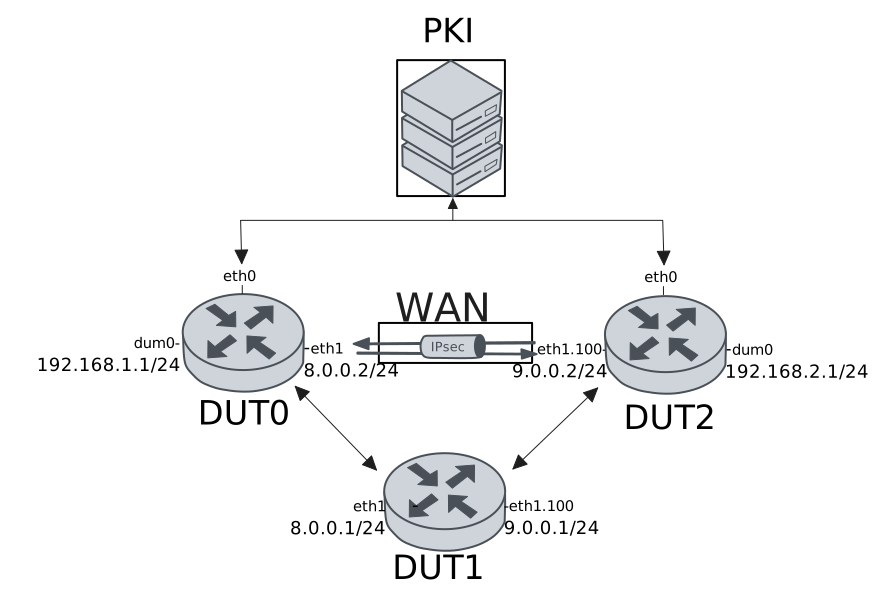
Test Local And Remote Auth With X509 Files
Description
In this scenario, both devices use pre-installed X.509 certificate files for local and remote authentication.
Scenario
Step 1: Set the following configuration in DUT1 :
set interfaces ethernet eth1 address 8.0.0.1/24
set interfaces ethernet eth1 vif 100 address 9.0.0.1/24
set system login user admin authentication encrypted-password '$6$GSjsCj8gHLv$/VcqU6FLi6CT2Oxn0MJQ2C2tqnRDrYKNF8HIYWJp68nvXvPdFccDsT04.WtigUONbKYrgKg8d6rEs8PjljMkH0'
Step 2: Set the following configuration in DUT2 :
set interfaces dummy dum0 address 192.168.2.1/24
set interfaces ethernet eth0 address 10.215.168.66/24
set interfaces ethernet eth1 vif 100 address 9.0.0.2/24
set protocols static route 0.0.0.0/0 next-hop 9.0.0.1
set system login user admin authentication encrypted-password '$6$GSjsCj8gHLv$/VcqU6FLi6CT2Oxn0MJQ2C2tqnRDrYKNF8HIYWJp68nvXvPdFccDsT04.WtigUONbKYrgKg8d6rEs8PjljMkH0'
set vpn ipsec auth-profile AUTH local ca-cert-file 'running://ca.pem'
set vpn ipsec auth-profile AUTH local ca-cert-file 'running://root.pem'
set vpn ipsec auth-profile AUTH local cert-file 'running://dut2.pem'
set vpn ipsec auth-profile AUTH local key file 'running://dut2.key'
set vpn ipsec auth-profile AUTH mirror-config false
set vpn ipsec auth-profile AUTH mode x509
set vpn ipsec auth-profile AUTH remote ca-cert-file 'running://ca.pem'
set vpn ipsec auth-profile AUTH remote ca-cert-file 'running://root.pem'
set vpn ipsec esp-group ESP-POLICY lifetime 28800
set vpn ipsec esp-group ESP-POLICY proposal 1 encryption null
set vpn ipsec esp-group ESP-POLICY proposal 1 hash sha1
set vpn ipsec esp-group ESP-POLICY proposal 1 pfs dh-group15
set vpn ipsec ike-group IKE-POLICY key-exchange ikev2
set vpn ipsec ike-group IKE-POLICY lifetime 28800
set vpn ipsec ike-group IKE-POLICY proposal 1 dh-group 15
set vpn ipsec ike-group IKE-POLICY proposal 1 encryption null
set vpn ipsec ike-group IKE-POLICY proposal 1 hash sha1
set vpn ipsec logging log-types any log-level 1
set vpn ipsec site-to-site peer PEER auth-profile AUTH
set vpn ipsec site-to-site peer PEER connection-type respond
set vpn ipsec site-to-site peer PEER ike-group IKE-POLICY
set vpn ipsec site-to-site peer PEER local-address 9.0.0.2
set vpn ipsec site-to-site peer PEER remote-address 8.0.0.2
set vpn ipsec site-to-site peer PEER tunnel 1 esp-group ESP-POLICY
set vpn ipsec site-to-site peer PEER tunnel 1 local prefix 192.168.2.0/24
set vpn ipsec site-to-site peer PEER tunnel 1 remote prefix 192.168.1.0/24
Step 3: Ping the IP address 9.0.0.1 from DUT2:
admin@DUT2$ ping 9.0.0.1 count 1 size 56 timeout 1Show output
PING 9.0.0.1 (9.0.0.1) 56(84) bytes of data.
64 bytes from 9.0.0.1: icmp_seq=1 ttl=64 time=0.668 ms

--- 9.0.0.1 ping statistics ---
1 packets transmitted, 1 received, 0% packet loss, time 0ms
rtt min/avg/max/mdev = 0.668/0.668/0.668/0.000 ms
Step 4: Set the following configuration in DUT0 :
set interfaces dummy dum0 address 192.168.1.1/24
set interfaces ethernet eth0 address 10.215.168.64/24
set interfaces ethernet eth1 address 8.0.0.2/24
set protocols static route 0.0.0.0/0 next-hop 8.0.0.1
set system login user admin authentication encrypted-password '$6$GSjsCj8gHLv$/VcqU6FLi6CT2Oxn0MJQ2C2tqnRDrYKNF8HIYWJp68nvXvPdFccDsT04.WtigUONbKYrgKg8d6rEs8PjljMkH0'
set vpn ipsec auth-profile AUTH local ca-cert-file 'running://ca.pem'
set vpn ipsec auth-profile AUTH local ca-cert-file 'running://root.pem'
set vpn ipsec auth-profile AUTH local cert-file 'running://dut0.pem'
set vpn ipsec auth-profile AUTH local key file 'running://dut0.key'
set vpn ipsec auth-profile AUTH mirror-config false
set vpn ipsec auth-profile AUTH mode x509
set vpn ipsec auth-profile AUTH remote ca-cert-file 'running://ca.pem'
set vpn ipsec auth-profile AUTH remote ca-cert-file 'running://root.pem'
set vpn ipsec esp-group ESP-POLICY lifetime 28800
set vpn ipsec esp-group ESP-POLICY proposal 1 encryption null
set vpn ipsec esp-group ESP-POLICY proposal 1 hash sha1
set vpn ipsec esp-group ESP-POLICY proposal 1 pfs dh-group15
set vpn ipsec ike-group IKE-POLICY key-exchange ikev2
set vpn ipsec ike-group IKE-POLICY lifetime 28800
set vpn ipsec ike-group IKE-POLICY proposal 1 dh-group 15
set vpn ipsec ike-group IKE-POLICY proposal 1 encryption null
set vpn ipsec ike-group IKE-POLICY proposal 1 hash sha1
set vpn ipsec logging log-types any log-level 1
set vpn ipsec site-to-site peer PEER auth-profile AUTH
set vpn ipsec site-to-site peer PEER connection-type on-demand
set vpn ipsec site-to-site peer PEER ike-group IKE-POLICY
set vpn ipsec site-to-site peer PEER local-address 8.0.0.2
set vpn ipsec site-to-site peer PEER remote-address 9.0.0.2
set vpn ipsec site-to-site peer PEER tunnel 1 esp-group ESP-POLICY
set vpn ipsec site-to-site peer PEER tunnel 1 local prefix 192.168.1.0/24
set vpn ipsec site-to-site peer PEER tunnel 1 remote prefix 192.168.2.0/24
Step 5: Ping the IP address 8.0.0.1 from DUT0:
admin@DUT0$ ping 8.0.0.1 count 1 size 56 timeout 1Show output
PING 8.0.0.1 (8.0.0.1) 56(84) bytes of data.
64 bytes from 8.0.0.1: icmp_seq=1 ttl=64 time=0.472 ms

--- 8.0.0.1 ping statistics ---
1 packets transmitted, 1 received, 0% packet loss, time 0ms
rtt min/avg/max/mdev = 0.472/0.472/0.472/0.000 ms
Step 6: Ping the IP address 192.168.2.1 from DUT0:
admin@DUT0$ ping 192.168.2.1 local-address 192.168.1.1 count 1 size 56 timeout 1Show output
PING 192.168.2.1 (192.168.2.1) from 192.168.1.1 : 56(84) bytes of data.
64 bytes from 192.168.2.1: icmp_seq=1 ttl=64 time=0.978 ms

--- 192.168.2.1 ping statistics ---
1 packets transmitted, 1 received, 0% packet loss, time 0ms
rtt min/avg/max/mdev = 0.978/0.978/0.978/0.000 ms
Step 7: Ping the IP address 192.168.1.1 from DUT2:
admin@DUT2$ ping 192.168.1.1 local-address 192.168.2.1 count 1 size 56 timeout 1Show output
PING 192.168.1.1 (192.168.1.1) from 192.168.2.1 : 56(84) bytes of data.
64 bytes from 192.168.1.1: icmp_seq=1 ttl=64 time=0.975 ms

--- 192.168.1.1 ping statistics ---
1 packets transmitted, 1 received, 0% packet loss, time 0ms
rtt min/avg/max/mdev = 0.975/0.975/0.975/0.000 ms
Step 8: Run the command vpn ipsec show sa on DUT0 and check whether the output matches the following regular expressions:
vpn-peer-PEER: \#\d, ESTABLISHED, IKEv2
[1-9]\d* packets,
Show output
vpn-peer-PEER: #1, ESTABLISHED, IKEv2, f0b42354fa27dbb6_i* f6b151641b844174_r
local  'C=ES, O=Teldat, CN=DUT0' @ 8.0.0.2[500]
remote 'C=ES, O=Teldat, CN=DUT2' @ 9.0.0.2[500]
NULL/HMAC_SHA1_96/PRF_HMAC_SHA1/MODP_3072
established 2s ago, rekeying in 19924s
peer-PEER-tunnel-1: #2, reqid 1, INSTALLED, TUNNEL, ESP:NULL/HMAC_SHA1_96
installed 2s ago, rekeying in 21979s, expires in 28798s
in  c892d0ef,    168 bytes,     2 packets,     0s ago
out c7ae689b,    168 bytes,     2 packets,     0s ago
local  192.168.1.0/24
remote 192.168.2.0/24
Test Local Auth With SCEP And Remote Auth With X509 Files
Description
In this scenario, DUT0 uses SCEP for local authentication, while the remote peer is authenticated using X.509 certificate files.
Scenario
Step 1: Set the following configuration in DUT1 :
set interfaces ethernet eth1 address 8.0.0.1/24
set interfaces ethernet eth1 vif 100 address 9.0.0.1/24
set system login user admin authentication encrypted-password '$6$GSjsCj8gHLv$/VcqU6FLi6CT2Oxn0MJQ2C2tqnRDrYKNF8HIYWJp68nvXvPdFccDsT04.WtigUONbKYrgKg8d6rEs8PjljMkH0'
Step 2: Set the following configuration in DUT2 :
set interfaces dummy dum0 address 192.168.2.1/24
set interfaces ethernet eth0 address 10.215.168.66/24
set interfaces ethernet eth1 vif 100 address 9.0.0.2/24
set protocols static route 0.0.0.0/0 next-hop 9.0.0.1
set system certificate scep csr CSR cgi-path /scep
set system certificate scep csr CSR cipher aes
set system certificate scep csr CSR distinguished-names CN=DUT2
set system certificate scep csr CSR encrypted-password U2FsdGVkX18k4qVqqrkPqNrAoZx1/3laxdQcYwkQ7H4=
set system certificate scep csr CSR port 8080
set system certificate scep csr CSR url 'http://10.215.168.1'
set system login user admin authentication encrypted-password '$6$GSjsCj8gHLv$/VcqU6FLi6CT2Oxn0MJQ2C2tqnRDrYKNF8HIYWJp68nvXvPdFccDsT04.WtigUONbKYrgKg8d6rEs8PjljMkH0'
set vpn ipsec auth-profile AUTH local ca-cert-file 'running://ca.pem'
set vpn ipsec auth-profile AUTH local ca-cert-file 'running://root.pem'
set vpn ipsec auth-profile AUTH local cert-file 'running://dut2.pem'
set vpn ipsec auth-profile AUTH local key file 'running://dut2.key'
set vpn ipsec auth-profile AUTH mirror-config false
set vpn ipsec auth-profile AUTH mode x509
set vpn ipsec auth-profile AUTH remote csr CSR
set vpn ipsec esp-group ESP-POLICY lifetime 28800
set vpn ipsec esp-group ESP-POLICY proposal 1 encryption null
set vpn ipsec esp-group ESP-POLICY proposal 1 hash sha1
set vpn ipsec esp-group ESP-POLICY proposal 1 pfs dh-group15
set vpn ipsec ike-group IKE-POLICY key-exchange ikev2
set vpn ipsec ike-group IKE-POLICY lifetime 28800
set vpn ipsec ike-group IKE-POLICY proposal 1 dh-group 15
set vpn ipsec ike-group IKE-POLICY proposal 1 encryption null
set vpn ipsec ike-group IKE-POLICY proposal 1 hash sha1
set vpn ipsec logging log-types any log-level 1
set vpn ipsec site-to-site peer PEER auth-profile AUTH
set vpn ipsec site-to-site peer PEER connection-type respond
set vpn ipsec site-to-site peer PEER ike-group IKE-POLICY
set vpn ipsec site-to-site peer PEER local-address 9.0.0.2
set vpn ipsec site-to-site peer PEER remote-address 8.0.0.2
set vpn ipsec site-to-site peer PEER tunnel 1 esp-group ESP-POLICY
set vpn ipsec site-to-site peer PEER tunnel 1 local prefix 192.168.2.0/24
set vpn ipsec site-to-site peer PEER tunnel 1 remote prefix 192.168.1.0/24
Step 3: Ping the IP address 9.0.0.1 from DUT2:
admin@DUT2$ ping 9.0.0.1 count 1 size 56 timeout 1Show output
PING 9.0.0.1 (9.0.0.1) 56(84) bytes of data.
64 bytes from 9.0.0.1: icmp_seq=1 ttl=64 time=0.403 ms

--- 9.0.0.1 ping statistics ---
1 packets transmitted, 1 received, 0% packet loss, time 0ms
rtt min/avg/max/mdev = 0.403/0.403/0.403/0.000 ms
Step 4: Run the command pki scep show CSR on DUT2 and check whether the output matches the following regular expressions:
ca\s+Valid
usercert\s+Valid
Show output
-------------------------------------------------------------------------------------------------
Certificate  Status           Usage                   NotBefore                  NotAfter
-------------------------------------------------------------------------------------------------
ca           Valid   Encipherment & Signature  Apr 16 09:19:39 2025 GMT  Apr 11 09:19:39 2045 GMT
usercert     Valid   -                         Jul 24 17:35:09 2026 GMT  Jul 24 17:35:09 2027 GMT
Step 5: Set the following configuration in DUT0 :
set interfaces dummy dum0 address 192.168.1.1/24
set interfaces ethernet eth0 address 10.215.168.64/24
set interfaces ethernet eth1 address 8.0.0.2/24
set protocols static route 0.0.0.0/0 next-hop 8.0.0.1
set system certificate scep csr CSR cgi-path /scep
set system certificate scep csr CSR cipher aes
set system certificate scep csr CSR distinguished-names CN=DUT0
set system certificate scep csr CSR encrypted-password U2FsdGVkX19T13T91RUk+CTz1bXV05K7uXmqh4DDB34=
set system certificate scep csr CSR port 8080
set system certificate scep csr CSR url 'http://10.215.168.1'
set system login user admin authentication encrypted-password '$6$GSjsCj8gHLv$/VcqU6FLi6CT2Oxn0MJQ2C2tqnRDrYKNF8HIYWJp68nvXvPdFccDsT04.WtigUONbKYrgKg8d6rEs8PjljMkH0'
set vpn ipsec auth-profile AUTH local csr CSR
set vpn ipsec auth-profile AUTH mirror-config false
set vpn ipsec auth-profile AUTH mode x509
set vpn ipsec auth-profile AUTH remote ca-cert-file 'running://ca.pem'
set vpn ipsec auth-profile AUTH remote ca-cert-file 'running://root.pem'
set vpn ipsec esp-group ESP-POLICY lifetime 28800
set vpn ipsec esp-group ESP-POLICY proposal 1 encryption null
set vpn ipsec esp-group ESP-POLICY proposal 1 hash sha1
set vpn ipsec esp-group ESP-POLICY proposal 1 pfs dh-group15
set vpn ipsec ike-group IKE-POLICY key-exchange ikev2
set vpn ipsec ike-group IKE-POLICY lifetime 28800
set vpn ipsec ike-group IKE-POLICY proposal 1 dh-group 15
set vpn ipsec ike-group IKE-POLICY proposal 1 encryption null
set vpn ipsec ike-group IKE-POLICY proposal 1 hash sha1
set vpn ipsec logging log-types any log-level 1
set vpn ipsec site-to-site peer PEER auth-profile AUTH
set vpn ipsec site-to-site peer PEER connection-type on-demand
set vpn ipsec site-to-site peer PEER ike-group IKE-POLICY
set vpn ipsec site-to-site peer PEER local-address 8.0.0.2
set vpn ipsec site-to-site peer PEER remote-address 9.0.0.2
set vpn ipsec site-to-site peer PEER tunnel 1 esp-group ESP-POLICY
set vpn ipsec site-to-site peer PEER tunnel 1 local prefix 192.168.1.0/24
set vpn ipsec site-to-site peer PEER tunnel 1 remote prefix 192.168.2.0/24
Step 6: Ping the IP address 8.0.0.1 from DUT0:
admin@DUT0$ ping 8.0.0.1 count 1 size 56 timeout 1Show output
PING 8.0.0.1 (8.0.0.1) 56(84) bytes of data.
64 bytes from 8.0.0.1: icmp_seq=1 ttl=64 time=1.15 ms

--- 8.0.0.1 ping statistics ---
1 packets transmitted, 1 received, 0% packet loss, time 0ms
rtt min/avg/max/mdev = 1.153/1.153/1.153/0.000 ms
Step 7: Run the command pki scep show CSR on DUT0 and check whether the output matches the following regular expressions:
ca\s+Valid
usercert\s+Valid
Show output
-------------------------------------------------------------------------------------------------
Certificate  Status           Usage                   NotBefore                  NotAfter
-------------------------------------------------------------------------------------------------
ca           Valid   Encipherment & Signature  Apr 16 09:19:39 2025 GMT  Apr 11 09:19:39 2045 GMT
usercert     Valid   -                         Jul 24 17:35:49 2026 GMT  Jul 24 17:35:49 2027 GMT
Step 8: Ping the IP address 192.168.2.1 from DUT0:
admin@DUT0$ ping 192.168.2.1 local-address 192.168.1.1 count 1 size 56 timeout 1Show output
PING 192.168.2.1 (192.168.2.1) from 192.168.1.1 : 56(84) bytes of data.
64 bytes from 192.168.2.1: icmp_seq=1 ttl=64 time=1.05 ms

--- 192.168.2.1 ping statistics ---
1 packets transmitted, 1 received, 0% packet loss, time 0ms
rtt min/avg/max/mdev = 1.048/1.048/1.048/0.000 ms
Step 9: Ping the IP address 192.168.1.1 from DUT2:
admin@DUT2$ ping 192.168.1.1 local-address 192.168.2.1 count 1 size 56 timeout 1Show output
PING 192.168.1.1 (192.168.1.1) from 192.168.2.1 : 56(84) bytes of data.
64 bytes from 192.168.1.1: icmp_seq=1 ttl=64 time=3.98 ms

--- 192.168.1.1 ping statistics ---
1 packets transmitted, 1 received, 0% packet loss, time 0ms
rtt min/avg/max/mdev = 3.978/3.978/3.978/0.000 ms
Step 10: Run the command vpn ipsec show sa on DUT0 and check whether the output matches the following regular expressions:
vpn-peer-PEER: \#\d, ESTABLISHED, IKEv2
[1-9]\d* packets,
Show output
vpn-peer-PEER: #1, ESTABLISHED, IKEv2, 18756f39a658effd_i* df8d3e6230de4ecc_r
local  'CN=DUT0' @ 8.0.0.2[500]
remote 'C=ES, O=Teldat, CN=DUT2' @ 9.0.0.2[500]
NULL/HMAC_SHA1_96/PRF_HMAC_SHA1/MODP_3072
established 2s ago, rekeying in 17681s
peer-PEER-tunnel-1: #2, reqid 1, INSTALLED, TUNNEL, ESP:NULL/HMAC_SHA1_96
installed 2s ago, rekeying in 21270s, expires in 28798s
in  cb52fbf6,    168 bytes,     2 packets,     0s ago
out c71260ca,    168 bytes,     2 packets,     0s ago
local  192.168.1.0/24
remote 192.168.2.0/24
Test Local Auth With X509 Files And Remote Auth With SCEP
Description
In this scenario, DUT0 uses SCEP for remote authentication, while local authentication relies on X.509 certificate files.
Scenario
Step 1: Set the following configuration in DUT1 :
set interfaces ethernet eth1 address 8.0.0.1/24
set interfaces ethernet eth1 vif 100 address 9.0.0.1/24
set system login user admin authentication encrypted-password '$6$GSjsCj8gHLv$/VcqU6FLi6CT2Oxn0MJQ2C2tqnRDrYKNF8HIYWJp68nvXvPdFccDsT04.WtigUONbKYrgKg8d6rEs8PjljMkH0'
Step 2: Set the following configuration in DUT2 :
set interfaces dummy dum0 address 192.168.2.1/24
set interfaces ethernet eth0 address 10.215.168.66/24
set interfaces ethernet eth1 vif 100 address 9.0.0.2/24
set protocols static route 0.0.0.0/0 next-hop 9.0.0.1
set system certificate scep csr CSR cgi-path /scep
set system certificate scep csr CSR cipher aes
set system certificate scep csr CSR distinguished-names CN=DUT2
set system certificate scep csr CSR encrypted-password U2FsdGVkX19MFZpvuYZIQmSTTmrKXMiiZFNanJPqnSY=
set system certificate scep csr CSR port 8080
set system certificate scep csr CSR url 'http://10.215.168.1'
set system login user admin authentication encrypted-password '$6$GSjsCj8gHLv$/VcqU6FLi6CT2Oxn0MJQ2C2tqnRDrYKNF8HIYWJp68nvXvPdFccDsT04.WtigUONbKYrgKg8d6rEs8PjljMkH0'
set vpn ipsec auth-profile AUTH local csr CSR
set vpn ipsec auth-profile AUTH mirror-config false
set vpn ipsec auth-profile AUTH mode x509
set vpn ipsec auth-profile AUTH remote ca-cert-file 'running://ca.pem'
set vpn ipsec auth-profile AUTH remote ca-cert-file 'running://root.pem'
set vpn ipsec esp-group ESP-POLICY lifetime 28800
set vpn ipsec esp-group ESP-POLICY proposal 1 encryption null
set vpn ipsec esp-group ESP-POLICY proposal 1 hash sha1
set vpn ipsec esp-group ESP-POLICY proposal 1 pfs dh-group15
set vpn ipsec ike-group IKE-POLICY key-exchange ikev2
set vpn ipsec ike-group IKE-POLICY lifetime 28800
set vpn ipsec ike-group IKE-POLICY proposal 1 dh-group 15
set vpn ipsec ike-group IKE-POLICY proposal 1 encryption null
set vpn ipsec ike-group IKE-POLICY proposal 1 hash sha1
set vpn ipsec logging log-types any log-level 1
set vpn ipsec site-to-site peer PEER auth-profile AUTH
set vpn ipsec site-to-site peer PEER connection-type respond
set vpn ipsec site-to-site peer PEER ike-group IKE-POLICY
set vpn ipsec site-to-site peer PEER local-address 9.0.0.2
set vpn ipsec site-to-site peer PEER remote-address 8.0.0.2
set vpn ipsec site-to-site peer PEER tunnel 1 esp-group ESP-POLICY
set vpn ipsec site-to-site peer PEER tunnel 1 local prefix 192.168.2.0/24
set vpn ipsec site-to-site peer PEER tunnel 1 remote prefix 192.168.1.0/24
Step 3: Ping the IP address 9.0.0.1 from DUT2:
admin@DUT2$ ping 9.0.0.1 count 1 size 56 timeout 1Show output
PING 9.0.0.1 (9.0.0.1) 56(84) bytes of data.
64 bytes from 9.0.0.1: icmp_seq=1 ttl=64 time=0.343 ms

--- 9.0.0.1 ping statistics ---
1 packets transmitted, 1 received, 0% packet loss, time 0ms
rtt min/avg/max/mdev = 0.343/0.343/0.343/0.000 ms
Step 4: Run the command pki scep show CSR on DUT2 and check whether the output matches the following regular expressions:
ca\s+Valid
usercert\s+Valid
Show output
-------------------------------------------------------------------------------------------------
Certificate  Status           Usage                   NotBefore                  NotAfter
-------------------------------------------------------------------------------------------------
ca           Valid   Encipherment & Signature  Apr 16 09:19:39 2025 GMT  Apr 11 09:19:39 2045 GMT
usercert     Valid   -                         Jul 24 17:36:38 2026 GMT  Jul 24 17:36:38 2027 GMT
Step 5: Set the following configuration in DUT0 :
set interfaces dummy dum0 address 192.168.1.1/24
set interfaces ethernet eth0 address 10.215.168.64/24
set interfaces ethernet eth1 address 8.0.0.2/24
set protocols static route 0.0.0.0/0 next-hop 8.0.0.1
set system certificate scep csr CSR cgi-path /scep
set system certificate scep csr CSR cipher aes
set system certificate scep csr CSR distinguished-names CN=DUT0
set system certificate scep csr CSR encrypted-password U2FsdGVkX19Poep0FPU7jUk88keksDj7fYgH5IGAp1Q=
set system certificate scep csr CSR port 8080
set system certificate scep csr CSR url 'http://10.215.168.1'
set system login user admin authentication encrypted-password '$6$GSjsCj8gHLv$/VcqU6FLi6CT2Oxn0MJQ2C2tqnRDrYKNF8HIYWJp68nvXvPdFccDsT04.WtigUONbKYrgKg8d6rEs8PjljMkH0'
set vpn ipsec auth-profile AUTH local ca-cert-file 'running://ca.pem'
set vpn ipsec auth-profile AUTH local ca-cert-file 'running://root.pem'
set vpn ipsec auth-profile AUTH local cert-file 'running://dut0.pem'
set vpn ipsec auth-profile AUTH local key file 'running://dut0.key'
set vpn ipsec auth-profile AUTH mirror-config false
set vpn ipsec auth-profile AUTH mode x509
set vpn ipsec auth-profile AUTH remote csr CSR
set vpn ipsec esp-group ESP-POLICY lifetime 28800
set vpn ipsec esp-group ESP-POLICY proposal 1 encryption null
set vpn ipsec esp-group ESP-POLICY proposal 1 hash sha1
set vpn ipsec esp-group ESP-POLICY proposal 1 pfs dh-group15
set vpn ipsec ike-group IKE-POLICY key-exchange ikev2
set vpn ipsec ike-group IKE-POLICY lifetime 28800
set vpn ipsec ike-group IKE-POLICY proposal 1 dh-group 15
set vpn ipsec ike-group IKE-POLICY proposal 1 encryption null
set vpn ipsec ike-group IKE-POLICY proposal 1 hash sha1
set vpn ipsec logging log-types any log-level 1
set vpn ipsec site-to-site peer PEER auth-profile AUTH
set vpn ipsec site-to-site peer PEER connection-type on-demand
set vpn ipsec site-to-site peer PEER ike-group IKE-POLICY
set vpn ipsec site-to-site peer PEER local-address 8.0.0.2
set vpn ipsec site-to-site peer PEER remote-address 9.0.0.2
set vpn ipsec site-to-site peer PEER tunnel 1 esp-group ESP-POLICY
set vpn ipsec site-to-site peer PEER tunnel 1 local prefix 192.168.1.0/24
set vpn ipsec site-to-site peer PEER tunnel 1 remote prefix 192.168.2.0/24
Step 6: Ping the IP address 8.0.0.1 from DUT0:
admin@DUT0$ ping 8.0.0.1 count 1 size 56 timeout 1Show output
PING 8.0.0.1 (8.0.0.1) 56(84) bytes of data.
64 bytes from 8.0.0.1: icmp_seq=1 ttl=64 time=1.10 ms

--- 8.0.0.1 ping statistics ---
1 packets transmitted, 1 received, 0% packet loss, time 0ms
rtt min/avg/max/mdev = 1.101/1.101/1.101/0.000 ms
Step 7: Run the command pki scep show CSR on DUT0 and check whether the output matches the following regular expressions:
ca\s+Valid
usercert\s+Valid
Show output
-------------------------------------------------------------------------------------------------
Certificate  Status           Usage                   NotBefore                  NotAfter
-------------------------------------------------------------------------------------------------
ca           Valid   Encipherment & Signature  Apr 16 09:19:39 2025 GMT  Apr 11 09:19:39 2045 GMT
usercert     Valid   -                         Jul 24 17:37:19 2026 GMT  Jul 24 17:37:19 2027 GMT
Step 8: Ping the IP address 192.168.2.1 from DUT0:
admin@DUT0$ ping 192.168.2.1 local-address 192.168.1.1 count 1 size 56 timeout 1Show output
PING 192.168.2.1 (192.168.2.1) from 192.168.1.1 : 56(84) bytes of data.
64 bytes from 192.168.2.1: icmp_seq=1 ttl=64 time=0.523 ms

--- 192.168.2.1 ping statistics ---
1 packets transmitted, 1 received, 0% packet loss, time 0ms
rtt min/avg/max/mdev = 0.523/0.523/0.523/0.000 ms
Step 9: Ping the IP address 192.168.1.1 from DUT2:
admin@DUT2$ ping 192.168.1.1 local-address 192.168.2.1 count 1 size 56 timeout 1Show output
PING 192.168.1.1 (192.168.1.1) from 192.168.2.1 : 56(84) bytes of data.
64 bytes from 192.168.1.1: icmp_seq=1 ttl=64 time=0.532 ms

--- 192.168.1.1 ping statistics ---
1 packets transmitted, 1 received, 0% packet loss, time 0ms
rtt min/avg/max/mdev = 0.532/0.532/0.532/0.000 ms
Step 10: Run the command vpn ipsec show sa on DUT0 and check whether the output matches the following regular expressions:
vpn-peer-PEER: \#\d, ESTABLISHED, IKEv2
[1-9]\d* packets,
Show output
vpn-peer-PEER: #1, ESTABLISHED, IKEv2, dd13a808cc8af8c9_i* 45a694e0ff7f2d79_r
local  'C=ES, O=Teldat, CN=DUT0' @ 8.0.0.2[500]
remote 'CN=DUT2' @ 9.0.0.2[500]
NULL/HMAC_SHA1_96/PRF_HMAC_SHA1/MODP_3072
established 2s ago, rekeying in 24152s
peer-PEER-tunnel-1: #2, reqid 1, INSTALLED, TUNNEL, ESP:NULL/HMAC_SHA1_96
installed 2s ago, rekeying in 14481s, expires in 28798s
in  c4b6aa6b,    168 bytes,     2 packets,     0s ago
out c37b0c9a,    168 bytes,     2 packets,     0s ago
local  192.168.1.0/24
remote 192.168.2.0/24
Test Local And Remote Auth With SCEP
Description
In this scenario, both devices use SCEP for local and remote authentication.
Scenario
Step 1: Set the following configuration in DUT1 :
set interfaces ethernet eth1 address 8.0.0.1/24
set interfaces ethernet eth1 vif 100 address 9.0.0.1/24
set system login user admin authentication encrypted-password '$6$GSjsCj8gHLv$/VcqU6FLi6CT2Oxn0MJQ2C2tqnRDrYKNF8HIYWJp68nvXvPdFccDsT04.WtigUONbKYrgKg8d6rEs8PjljMkH0'
Step 2: Set the following configuration in DUT2 :
set interfaces dummy dum0 address 192.168.2.1/24
set interfaces ethernet eth0 address 10.215.168.66/24
set interfaces ethernet eth1 vif 100 address 9.0.0.2/24
set protocols static route 0.0.0.0/0 next-hop 9.0.0.1
set system certificate scep csr CSR cgi-path /scep
set system certificate scep csr CSR cipher aes
set system certificate scep csr CSR distinguished-names CN=DUT2
set system certificate scep csr CSR encrypted-password U2FsdGVkX19VeuQzGIJDnaWqD93G4e/EyJH63w6lTh4=
set system certificate scep csr CSR port 8080
set system certificate scep csr CSR url 'http://10.215.168.1'
set system login user admin authentication encrypted-password '$6$GSjsCj8gHLv$/VcqU6FLi6CT2Oxn0MJQ2C2tqnRDrYKNF8HIYWJp68nvXvPdFccDsT04.WtigUONbKYrgKg8d6rEs8PjljMkH0'
set vpn ipsec auth-profile AUTH local csr CSR
set vpn ipsec auth-profile AUTH mirror-config false
set vpn ipsec auth-profile AUTH mode x509
set vpn ipsec auth-profile AUTH remote csr CSR
set vpn ipsec esp-group ESP-POLICY lifetime 28800
set vpn ipsec esp-group ESP-POLICY proposal 1 encryption null
set vpn ipsec esp-group ESP-POLICY proposal 1 hash sha1
set vpn ipsec esp-group ESP-POLICY proposal 1 pfs dh-group15
set vpn ipsec ike-group IKE-POLICY key-exchange ikev2
set vpn ipsec ike-group IKE-POLICY lifetime 28800
set vpn ipsec ike-group IKE-POLICY proposal 1 dh-group 15
set vpn ipsec ike-group IKE-POLICY proposal 1 encryption null
set vpn ipsec ike-group IKE-POLICY proposal 1 hash sha1
set vpn ipsec logging log-types any log-level 1
set vpn ipsec site-to-site peer PEER auth-profile AUTH
set vpn ipsec site-to-site peer PEER connection-type respond
set vpn ipsec site-to-site peer PEER ike-group IKE-POLICY
set vpn ipsec site-to-site peer PEER local-address 9.0.0.2
set vpn ipsec site-to-site peer PEER remote-address 8.0.0.2
set vpn ipsec site-to-site peer PEER tunnel 1 esp-group ESP-POLICY
set vpn ipsec site-to-site peer PEER tunnel 1 local prefix 192.168.2.0/24
set vpn ipsec site-to-site peer PEER tunnel 1 remote prefix 192.168.1.0/24
Step 3: Ping the IP address 9.0.0.1 from DUT2:
admin@DUT2$ ping 9.0.0.1 count 1 size 56 timeout 1Show output
PING 9.0.0.1 (9.0.0.1) 56(84) bytes of data.
64 bytes from 9.0.0.1: icmp_seq=1 ttl=64 time=0.335 ms

--- 9.0.0.1 ping statistics ---
1 packets transmitted, 1 received, 0% packet loss, time 0ms
rtt min/avg/max/mdev = 0.335/0.335/0.335/0.000 ms
Step 4: Run the command pki scep show CSR on DUT2 and check whether the output matches the following regular expressions:
ca\s+Valid
usercert\s+Valid
Show output
-------------------------------------------------------------------------------------------------
Certificate  Status           Usage                   NotBefore                  NotAfter
-------------------------------------------------------------------------------------------------
ca           Valid   Encipherment & Signature  Apr 16 09:19:39 2025 GMT  Apr 11 09:19:39 2045 GMT
usercert     Valid   -                         Jul 24 17:38:07 2026 GMT  Jul 24 17:38:07 2027 GMT
Step 5: Set the following configuration in DUT0 :
set interfaces dummy dum0 address 192.168.1.1/24
set interfaces ethernet eth0 address 10.215.168.64/24
set interfaces ethernet eth1 address 8.0.0.2/24
set protocols static route 0.0.0.0/0 next-hop 8.0.0.1
set system certificate scep csr CSR cgi-path /scep
set system certificate scep csr CSR cipher aes
set system certificate scep csr CSR distinguished-names CN=DUT0
set system certificate scep csr CSR encrypted-password U2FsdGVkX1+s7Dxf2s2ZE+Peh7Nr34yTgP38ExjGR70=
set system certificate scep csr CSR port 8080
set system certificate scep csr CSR url 'http://10.215.168.1'
set system login user admin authentication encrypted-password '$6$GSjsCj8gHLv$/VcqU6FLi6CT2Oxn0MJQ2C2tqnRDrYKNF8HIYWJp68nvXvPdFccDsT04.WtigUONbKYrgKg8d6rEs8PjljMkH0'
set vpn ipsec auth-profile AUTH local csr CSR
set vpn ipsec auth-profile AUTH mirror-config false
set vpn ipsec auth-profile AUTH mode x509
set vpn ipsec auth-profile AUTH remote csr CSR
set vpn ipsec esp-group ESP-POLICY lifetime 28800
set vpn ipsec esp-group ESP-POLICY proposal 1 encryption null
set vpn ipsec esp-group ESP-POLICY proposal 1 hash sha1
set vpn ipsec esp-group ESP-POLICY proposal 1 pfs dh-group15
set vpn ipsec ike-group IKE-POLICY key-exchange ikev2
set vpn ipsec ike-group IKE-POLICY lifetime 28800
set vpn ipsec ike-group IKE-POLICY proposal 1 dh-group 15
set vpn ipsec ike-group IKE-POLICY proposal 1 encryption null
set vpn ipsec ike-group IKE-POLICY proposal 1 hash sha1
set vpn ipsec logging log-types any log-level 1
set vpn ipsec site-to-site peer PEER auth-profile AUTH
set vpn ipsec site-to-site peer PEER connection-type on-demand
set vpn ipsec site-to-site peer PEER ike-group IKE-POLICY
set vpn ipsec site-to-site peer PEER local-address 8.0.0.2
set vpn ipsec site-to-site peer PEER remote-address 9.0.0.2
set vpn ipsec site-to-site peer PEER tunnel 1 esp-group ESP-POLICY
set vpn ipsec site-to-site peer PEER tunnel 1 local prefix 192.168.1.0/24
set vpn ipsec site-to-site peer PEER tunnel 1 remote prefix 192.168.2.0/24
Step 6: Ping the IP address 8.0.0.1 from DUT0:
admin@DUT0$ ping 8.0.0.1 count 1 size 56 timeout 1Show output
PING 8.0.0.1 (8.0.0.1) 56(84) bytes of data.
64 bytes from 8.0.0.1: icmp_seq=1 ttl=64 time=0.702 ms

--- 8.0.0.1 ping statistics ---
1 packets transmitted, 1 received, 0% packet loss, time 0ms
rtt min/avg/max/mdev = 0.702/0.702/0.702/0.000 ms
Step 7: Run the command pki scep show CSR on DUT0 and check whether the output matches the following regular expressions:
ca\s+Valid
usercert\s+Valid
Show output
-------------------------------------------------------------------------------------------------
Certificate  Status           Usage                   NotBefore                  NotAfter
-------------------------------------------------------------------------------------------------
ca           Valid   Encipherment & Signature  Apr 16 09:19:39 2025 GMT  Apr 11 09:19:39 2045 GMT
usercert     Valid   -                         Jul 24 17:38:47 2026 GMT  Jul 24 17:38:47 2027 GMT
Step 8: Ping the IP address 192.168.2.1 from DUT0:
admin@DUT0$ ping 192.168.2.1 local-address 192.168.1.1 count 1 size 56 timeout 1Show output
PING 192.168.2.1 (192.168.2.1) from 192.168.1.1 : 56(84) bytes of data.
64 bytes from 192.168.2.1: icmp_seq=1 ttl=64 time=0.838 ms

--- 192.168.2.1 ping statistics ---
1 packets transmitted, 1 received, 0% packet loss, time 0ms
rtt min/avg/max/mdev = 0.838/0.838/0.838/0.000 ms
Step 9: Ping the IP address 192.168.1.1 from DUT2:
admin@DUT2$ ping 192.168.1.1 local-address 192.168.2.1 count 1 size 56 timeout 1Show output
PING 192.168.1.1 (192.168.1.1) from 192.168.2.1 : 56(84) bytes of data.
64 bytes from 192.168.1.1: icmp_seq=1 ttl=64 time=0.521 ms

--- 192.168.1.1 ping statistics ---
1 packets transmitted, 1 received, 0% packet loss, time 0ms
rtt min/avg/max/mdev = 0.521/0.521/0.521/0.000 ms
Step 10: Run the command vpn ipsec show sa on DUT0 and check whether the output matches the following regular expressions:
vpn-peer-PEER: \#\d, ESTABLISHED, IKEv2
[1-9]\d* packets,
Show output
vpn-peer-PEER: #1, ESTABLISHED, IKEv2, ccf62a86fa6e00cc_i* 2d8b0ed94d181e23_r
local  'CN=DUT0' @ 8.0.0.2[500]
remote 'CN=DUT2' @ 9.0.0.2[500]
NULL/HMAC_SHA1_96/PRF_HMAC_SHA1/MODP_3072
established 1s ago, rekeying in 18562s
peer-PEER-tunnel-1: #2, reqid 1, INSTALLED, TUNNEL, ESP:NULL/HMAC_SHA1_96
installed 1s ago, rekeying in 14863s, expires in 28799s
in  c0c49947,    168 bytes,     2 packets,     0s ago
out c9facea9,    168 bytes,     2 packets,     0s ago
local  192.168.1.0/24
remote 192.168.2.0/24