Xauth
This scenario shows how to configure and connect two subnets with each other through a VPN tunnel using different xauth methods
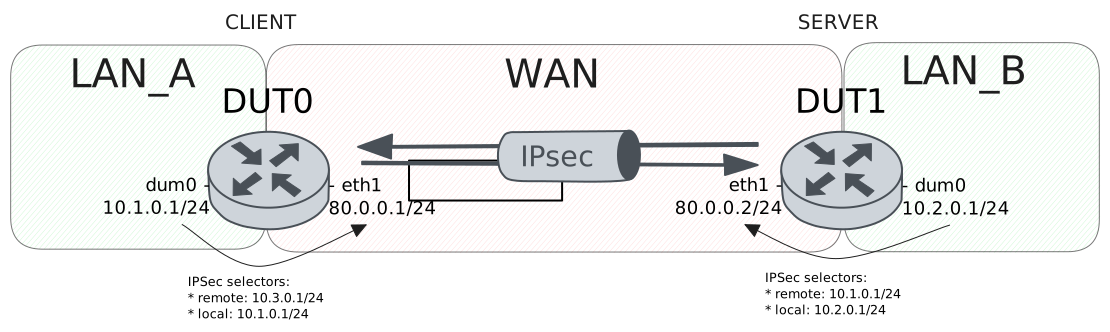
Test XAuth PSK Configuration
Description
VPN site-to-site configuration with XAuth-PSK for DUT0 (client) and pre shared secret for DUT1 (server), this last one delegates the authentication to a radius server.
Scenario
Step 1: Set the following configuration in DUT0 :
set interfaces dummy dum0 address 10.1.0.1/24
set interfaces ethernet eth0 address 10.215.168.2/24
set interfaces ethernet eth1 address 80.0.0.1/24
set protocols static route 10.2.0.0/24 interface dum0
set protocols static route 10.3.0.0/24 interface dum0
set system aaa group radius radgroup1 server serv1
set system aaa list list1 method 1 group radius radgroup1
set system aaa server radius serv1 address 10.215.168.1
set system aaa server radius serv1 encrypted-key U2FsdGVkX18bf0HR9NPiB4TOr1NMKSWfyr2ILZpyZaP0zhEfDzkGQ8CxrzcE+RdNnCQuFv9JI8UErTu7hySVSA==
set system login user admin authentication encrypted-password '$6$GSjsCj8gHLv$/VcqU6FLi6CT2Oxn0MJQ2C2tqnRDrYKNF8HIYWJp68nvXvPdFccDsT04.WtigUONbKYrgKg8d6rEs8PjljMkH0'
set vpn ipsec auth-profile AUTH-SA global-secrets ike-psk test encrypted-secret U2FsdGVkX1+Wq/6pnuB1JLxJ2hhRj+iZerli/hqDZPqbifRaPxvREM29gC+CabQxUFo2rpu9y9//ZowRVPuJYw==
set vpn ipsec auth-profile AUTH-SA local auth ike-psk id test
set vpn ipsec auth-profile AUTH-SA mirror-config false
set vpn ipsec auth-profile AUTH-SA remote auth ike-psk id %any
set vpn ipsec auth-profile AUTH-SA remote xauth radius
set vpn ipsec esp-group CHILD-SA mode tunnel
set vpn ipsec esp-group CHILD-SA proposal 1 encryption aes256gcm128
set vpn ipsec esp-group CHILD-SA proposal 1 pfs dh-group19
set vpn ipsec ike-group IKE-SA key-exchange ikev1
set vpn ipsec ike-group IKE-SA proposal 1 dh-group 19
set vpn ipsec ike-group IKE-SA proposal 1 encryption aes256
set vpn ipsec ike-group IKE-SA proposal 1 hash sha256
set vpn ipsec logging log-types any log-level 1
set vpn ipsec radius authentication-list list1
set vpn ipsec site-to-site peer PEER auth-profile AUTH-SA
set vpn ipsec site-to-site peer PEER connection-type respond
set vpn ipsec site-to-site peer PEER default-esp-group CHILD-SA
set vpn ipsec site-to-site peer PEER ike-group IKE-SA
set vpn ipsec site-to-site peer PEER local-address 80.0.0.1
set vpn ipsec site-to-site peer PEER tunnel 1 local prefix 10.1.0.0/24
set vpn ipsec site-to-site peer PEER tunnel 1 local-interface dum0
Step 2: Set the following configuration in DUT1 :
set interfaces dummy dum0 address 10.2.0.1/24
set interfaces ethernet eth0 address 10.215.168.2/24
set interfaces ethernet eth1 address 80.0.0.2/24
set protocols static route 10.1.0.0/24 interface dum0
set system login user admin authentication encrypted-password '$6$GSjsCj8gHLv$/VcqU6FLi6CT2Oxn0MJQ2C2tqnRDrYKNF8HIYWJp68nvXvPdFccDsT04.WtigUONbKYrgKg8d6rEs8PjljMkH0'
set vpn ipsec auth-profile AUTH-SA global-secrets ike-psk test encrypted-secret U2FsdGVkX18IH4HifrCwHBSzyDMG8XPb4Wr1h6pUbTQZ1fUdKk762elkYFDRS0eCOUjveYGe9qYZ+DJqs03dvQ==
set vpn ipsec auth-profile AUTH-SA global-secrets xauth testing encrypted-secret U2FsdGVkX19gQ79nNIkYFK8CWIY8ZZHvgwBjmoqwdMk=
set vpn ipsec auth-profile AUTH-SA local auth ike-psk id test
set vpn ipsec auth-profile AUTH-SA local xauth id testing
set vpn ipsec auth-profile AUTH-SA mirror-config false
set vpn ipsec auth-profile AUTH-SA remote auth ike-psk id %any
set vpn ipsec esp-group CHILD-SA mode tunnel
set vpn ipsec esp-group CHILD-SA proposal 1 encryption aes256gcm128
set vpn ipsec esp-group CHILD-SA proposal 1 pfs dh-group19
set vpn ipsec ike-group IKE-SA key-exchange ikev1
set vpn ipsec ike-group IKE-SA proposal 1 dh-group 19
set vpn ipsec ike-group IKE-SA proposal 1 encryption aes256
set vpn ipsec ike-group IKE-SA proposal 1 hash sha256
set vpn ipsec logging log-types any log-level 1
set vpn ipsec site-to-site peer PEER auth-profile AUTH-SA
set vpn ipsec site-to-site peer PEER connection-type initiate
set vpn ipsec site-to-site peer PEER default-esp-group CHILD-SA
set vpn ipsec site-to-site peer PEER ike-group IKE-SA
set vpn ipsec site-to-site peer PEER local-address 80.0.0.2
set vpn ipsec site-to-site peer PEER remote-address 80.0.0.1
set vpn ipsec site-to-site peer PEER tunnel 1 local prefix 10.2.0.0/24
set vpn ipsec site-to-site peer PEER tunnel 1 local-interface dum0
set vpn ipsec site-to-site peer PEER tunnel 1 remote prefix 10.1.0.0/24
Step 3: Ping the IP address 80.0.0.2 from DUT1:
admin@DUT1$ ping 80.0.0.2 count 1 size 56 timeout 1Show output
PING 80.0.0.2 (80.0.0.2) 56(84) bytes of data.
64 bytes from 80.0.0.2: icmp_seq=1 ttl=64 time=0.031 ms

--- 80.0.0.2 ping statistics ---
1 packets transmitted, 1 received, 0% packet loss, time 0ms
rtt min/avg/max/mdev = 0.031/0.031/0.031/0.000 ms
Step 4: Ping the IP address 80.0.0.1 from DUT0:
admin@DUT0$ ping 80.0.0.1 count 1 size 56 timeout 1Show output
PING 80.0.0.1 (80.0.0.1) 56(84) bytes of data.
64 bytes from 80.0.0.1: icmp_seq=1 ttl=64 time=0.031 ms

--- 80.0.0.1 ping statistics ---
1 packets transmitted, 1 received, 0% packet loss, time 0ms
rtt min/avg/max/mdev = 0.031/0.031/0.031/0.000 ms
Step 5: Run the command vpn ipsec show sa on DUT0 and check whether the output matches the following regular expressions:
peer-PEER-tunnel-\d+.+INSTALLEDShow output
vpn-peer-PEER: #1, ESTABLISHED, IKEv1, e18ea012a0dac730_i 73e472115223af0d_r*
local  'test' @ 80.0.0.1[500]
remote 'test' @ 80.0.0.2[500] XAuth: 'testing'
AES_CBC-256/HMAC_SHA2_256_128/PRF_HMAC_SHA2_256/ECP_256
established 0s ago, rekeying in 14079s
peer-PEER-tunnel-1: #1, reqid 1, INSTALLED, TUNNEL, ESP:AES_GCM_16-256/ECP_256
installed 0s ago, rekeying in 3301s, expires in 3960s
in  c240a7fa,      0 bytes,     0 packets
out cf1d4a50,      0 bytes,     0 packets
local  10.1.0.0/24
remote 10.2.0.0/24
Step 6: Ping the IP address 10.2.0.1 from DUT0:
admin@DUT0$ ping 10.2.0.1 local-address 10.1.0.1 count 1 size 56 timeout 1Show output
PING 10.2.0.1 (10.2.0.1) from 10.1.0.1 : 56(84) bytes of data.
64 bytes from 10.2.0.1: icmp_seq=1 ttl=64 time=14.5 ms

--- 10.2.0.1 ping statistics ---
1 packets transmitted, 1 received, 0% packet loss, time 0ms
rtt min/avg/max/mdev = 14.465/14.465/14.465/0.000 ms
Step 7: Ping the IP address 10.1.0.1 from DUT1:
admin@DUT1$ ping 10.1.0.1 local-address 10.2.0.1 count 1 size 56 timeout 1Show output
PING 10.1.0.1 (10.1.0.1) from 10.2.0.1 : 56(84) bytes of data.
64 bytes from 10.1.0.1: icmp_seq=1 ttl=64 time=0.763 ms

--- 10.1.0.1 ping statistics ---
1 packets transmitted, 1 received, 0% packet loss, time 0ms
rtt min/avg/max/mdev = 0.763/0.763/0.763/0.000 ms
Step 8: Run the command vpn ipsec show sa on DUT0 and check whether the output matches the following regular expressions:
[1-9]\d? packetsShow output
vpn-peer-PEER: #1, ESTABLISHED, IKEv1, e18ea012a0dac730_i 73e472115223af0d_r*
local  'test' @ 80.0.0.1[500]
remote 'test' @ 80.0.0.2[500] XAuth: 'testing'
AES_CBC-256/HMAC_SHA2_256_128/PRF_HMAC_SHA2_256/ECP_256
established 1s ago, rekeying in 14078s
peer-PEER-tunnel-1: #1, reqid 1, INSTALLED, TUNNEL, ESP:AES_GCM_16-256/ECP_256
installed 1s ago, rekeying in 3300s, expires in 3959s
in  c240a7fa,    168 bytes,     2 packets,     0s ago
out cf1d4a50,    168 bytes,     2 packets,     0s ago
local  10.1.0.0/24
remote 10.2.0.0/24
Test XAuth RSA Configuration
Description
Simple VPN site-to-site configuration with an authentication based on RSA signatures followed by extended authentication (XAUTH).
Scenario
Step 1: Set the following configuration in DUT0 :
set interfaces dummy dum0 address 10.1.0.1/24
set interfaces ethernet eth0 address 10.215.168.2/24
set interfaces ethernet eth1 address 80.0.0.1/24
set protocols static route 10.2.0.0/24 interface dum0
set protocols static route 10.3.0.0/24 interface dum0
set system login user admin authentication encrypted-password '$6$GSjsCj8gHLv$/VcqU6FLi6CT2Oxn0MJQ2C2tqnRDrYKNF8HIYWJp68nvXvPdFccDsT04.WtigUONbKYrgKg8d6rEs8PjljMkH0'
set vpn ipsec auth-profile AUTH-SA global-secrets xauth teldat-carol encrypted-secret U2FsdGVkX193ONNMhOQR3eh2ZrOwb/MC19wWwi9wDjc=
set vpn ipsec auth-profile AUTH-SA local cert-file 'running://server.crt'
set vpn ipsec auth-profile AUTH-SA local id CN=moon.teldat.org
set vpn ipsec auth-profile AUTH-SA local key file 'running://server.priv.pem'
set vpn ipsec auth-profile AUTH-SA mirror-config false
set vpn ipsec auth-profile AUTH-SA remote ca-cert-file 'running://ca.crt'
set vpn ipsec auth-profile AUTH-SA remote xauth id teldat-carol
set vpn ipsec esp-group CHILD-SA mode tunnel
set vpn ipsec esp-group CHILD-SA proposal 1 encryption aes256gcm128
set vpn ipsec esp-group CHILD-SA proposal 1 pfs dh-group19
set vpn ipsec ike-group IKE-SA key-exchange ikev1
set vpn ipsec ike-group IKE-SA proposal 1 dh-group 19
set vpn ipsec ike-group IKE-SA proposal 1 encryption aes256
set vpn ipsec ike-group IKE-SA proposal 1 hash sha256
set vpn ipsec logging log-types any log-level 1
set vpn ipsec site-to-site peer PEER auth-profile AUTH-SA
set vpn ipsec site-to-site peer PEER connection-type respond
set vpn ipsec site-to-site peer PEER default-esp-group CHILD-SA
set vpn ipsec site-to-site peer PEER ike-group IKE-SA
set vpn ipsec site-to-site peer PEER local-address 80.0.0.1
set vpn ipsec site-to-site peer PEER tunnel 1 local prefix 10.1.0.0/24
set vpn ipsec site-to-site peer PEER tunnel 1 local-interface dum0
Step 2: Set the following configuration in DUT1 :
set interfaces dummy dum0 address 10.2.0.1/24
set interfaces ethernet eth0 address 10.215.168.3/24
set interfaces ethernet eth1 address 80.0.0.2/24
set protocols static route 10.1.0.0/24 interface dum0
set system login user admin authentication encrypted-password '$6$GSjsCj8gHLv$/VcqU6FLi6CT2Oxn0MJQ2C2tqnRDrYKNF8HIYWJp68nvXvPdFccDsT04.WtigUONbKYrgKg8d6rEs8PjljMkH0'
set vpn ipsec auth-profile AUTH-SA global-secrets xauth teldat-carol encrypted-secret U2FsdGVkX18ePrImizypxzPLddgUZaTIR4hIDSRnaZs=
set vpn ipsec auth-profile AUTH-SA local cert-file 'running://client.crt'
set vpn ipsec auth-profile AUTH-SA local id CN=carol.teldat.org
set vpn ipsec auth-profile AUTH-SA local key file 'running://client.priv.pem'
set vpn ipsec auth-profile AUTH-SA local xauth id teldat-carol
set vpn ipsec auth-profile AUTH-SA mirror-config false
set vpn ipsec auth-profile AUTH-SA remote ca-cert-file 'running://ca.crt'
set vpn ipsec auth-profile AUTH-SA remote id CN=moon.teldat.org
set vpn ipsec esp-group CHILD-SA mode tunnel
set vpn ipsec esp-group CHILD-SA proposal 1 encryption aes256gcm128
set vpn ipsec esp-group CHILD-SA proposal 1 pfs dh-group19
set vpn ipsec ike-group IKE-SA key-exchange ikev1
set vpn ipsec ike-group IKE-SA proposal 1 dh-group 19
set vpn ipsec ike-group IKE-SA proposal 1 encryption aes256
set vpn ipsec ike-group IKE-SA proposal 1 hash sha256
set vpn ipsec logging log-types any log-level 1
set vpn ipsec site-to-site peer PEER auth-profile AUTH-SA
set vpn ipsec site-to-site peer PEER connection-type initiate
set vpn ipsec site-to-site peer PEER default-esp-group CHILD-SA
set vpn ipsec site-to-site peer PEER ike-group IKE-SA
set vpn ipsec site-to-site peer PEER local-address 80.0.0.2
set vpn ipsec site-to-site peer PEER remote-address 80.0.0.1
set vpn ipsec site-to-site peer PEER tunnel 1 local prefix 10.2.0.0/24
set vpn ipsec site-to-site peer PEER tunnel 1 local-interface dum0
set vpn ipsec site-to-site peer PEER tunnel 1 remote prefix 10.1.0.0/24
Step 3: Ping the IP address 80.0.0.2 from DUT1:
admin@DUT1$ ping 80.0.0.2 count 1 size 56 timeout 1Show output
PING 80.0.0.2 (80.0.0.2) 56(84) bytes of data.
64 bytes from 80.0.0.2: icmp_seq=1 ttl=64 time=0.033 ms

--- 80.0.0.2 ping statistics ---
1 packets transmitted, 1 received, 0% packet loss, time 0ms
rtt min/avg/max/mdev = 0.033/0.033/0.033/0.000 ms
Step 4: Ping the IP address 80.0.0.1 from DUT0:
admin@DUT0$ ping 80.0.0.1 count 1 size 56 timeout 1Show output
PING 80.0.0.1 (80.0.0.1) 56(84) bytes of data.
64 bytes from 80.0.0.1: icmp_seq=1 ttl=64 time=0.036 ms

--- 80.0.0.1 ping statistics ---
1 packets transmitted, 1 received, 0% packet loss, time 0ms
rtt min/avg/max/mdev = 0.036/0.036/0.036/0.000 ms
Step 5: Run the command vpn ipsec show sa on DUT0 and check whether the output matches the following regular expressions:
peer-PEER-tunnel-\d+.+INSTALLEDShow output
vpn-peer-PEER: #1, ESTABLISHED, IKEv1, e25a3e9b777d5ed3_i b7158a8959480af6_r*
local  'CN=moon.teldat.org' @ 80.0.0.1[500]
remote 'CN=carol.teldat.org' @ 80.0.0.2[500] XAuth: 'teldat-carol'
AES_CBC-256/HMAC_SHA2_256_128/PRF_HMAC_SHA2_256/ECP_256
established 1s ago, rekeying in 21437s
peer-PEER-tunnel-1: #1, reqid 1, INSTALLED, TUNNEL, ESP:AES_GCM_16-256/ECP_256
installed 1s ago, rekeying in 3353s, expires in 3959s
in  c0192ece,      0 bytes,     0 packets
out c8f681fb,      0 bytes,     0 packets
local  10.1.0.0/24
remote 10.2.0.0/24
Step 6: Ping the IP address 10.2.0.1 from DUT0:
admin@DUT0$ ping 10.2.0.1 local-address 10.1.0.1 count 1 size 56 timeout 1Show output
PING 10.2.0.1 (10.2.0.1) from 10.1.0.1 : 56(84) bytes of data.
64 bytes from 10.2.0.1: icmp_seq=1 ttl=64 time=0.809 ms

--- 10.2.0.1 ping statistics ---
1 packets transmitted, 1 received, 0% packet loss, time 0ms
rtt min/avg/max/mdev = 0.809/0.809/0.809/0.000 ms
Step 7: Ping the IP address 10.1.0.1 from DUT1:
admin@DUT1$ ping 10.1.0.1 local-address 10.2.0.1 count 1 size 56 timeout 1Show output
PING 10.1.0.1 (10.1.0.1) from 10.2.0.1 : 56(84) bytes of data.
64 bytes from 10.1.0.1: icmp_seq=1 ttl=64 time=0.644 ms

--- 10.1.0.1 ping statistics ---
1 packets transmitted, 1 received, 0% packet loss, time 0ms
rtt min/avg/max/mdev = 0.644/0.644/0.644/0.000 ms
Step 8: Run the command vpn ipsec show sa on DUT0 and check whether the output matches the following regular expressions:
[1-9]\d? packetsShow output
vpn-peer-PEER: #1, ESTABLISHED, IKEv1, e25a3e9b777d5ed3_i b7158a8959480af6_r*
local  'CN=moon.teldat.org' @ 80.0.0.1[500]
remote 'CN=carol.teldat.org' @ 80.0.0.2[500] XAuth: 'teldat-carol'
AES_CBC-256/HMAC_SHA2_256_128/PRF_HMAC_SHA2_256/ECP_256
established 1s ago, rekeying in 21437s
peer-PEER-tunnel-1: #1, reqid 1, INSTALLED, TUNNEL, ESP:AES_GCM_16-256/ECP_256
installed 1s ago, rekeying in 3353s, expires in 3959s
in  c0192ece,    168 bytes,     2 packets,     0s ago
out c8f681fb,    168 bytes,     2 packets,     0s ago
local  10.1.0.0/24
remote 10.2.0.0/24
Test XAuth With Multiple Remotes
Description
Test with multiple remotes using the same XAuth method and different secrets.
Scenario
Step 1: Set the following configuration in DUT0 :
set interfaces dummy dum0 address 10.1.0.1/24
set interfaces ethernet eth0 address 10.215.168.2/24
set interfaces ethernet eth1 address 80.0.0.1/24
set protocols static route 10.2.0.0/24 interface dum0
set protocols static route 10.3.0.0/24 interface dum0
set system login user admin authentication encrypted-password '$6$GSjsCj8gHLv$/VcqU6FLi6CT2Oxn0MJQ2C2tqnRDrYKNF8HIYWJp68nvXvPdFccDsT04.WtigUONbKYrgKg8d6rEs8PjljMkH0'
set vpn ipsec auth-profile AUTH-SA global-secrets xauth teldat-carol encrypted-secret U2FsdGVkX19/z3GjoDHioqS9xwjodOw2/XsFqgaZFsw=
set vpn ipsec auth-profile AUTH-SA global-secrets xauth teldat-dave encrypted-secret U2FsdGVkX19Udh/EeKPOFUuLvidSrVhc83hG2ZnT+Jk=
set vpn ipsec auth-profile AUTH-SA local cert-file 'running://server.crt'
set vpn ipsec auth-profile AUTH-SA local id CN=moon.teldat.org
set vpn ipsec auth-profile AUTH-SA local key file 'running://server.priv.pem'
set vpn ipsec auth-profile AUTH-SA mirror-config false
set vpn ipsec auth-profile AUTH-SA remote ca-cert-file 'running://ca.crt'
set vpn ipsec auth-profile AUTH-SA remote xauth id 'keyid:^teldat-.*$'
set vpn ipsec esp-group CHILD-SA mode tunnel
set vpn ipsec esp-group CHILD-SA proposal 1 encryption aes256gcm128
set vpn ipsec esp-group CHILD-SA proposal 1 pfs dh-group19
set vpn ipsec ike-group IKE-SA key-exchange ikev1
set vpn ipsec ike-group IKE-SA proposal 1 dh-group 19
set vpn ipsec ike-group IKE-SA proposal 1 encryption aes256
set vpn ipsec ike-group IKE-SA proposal 1 hash sha256
set vpn ipsec logging log-types any log-level 1
set vpn ipsec site-to-site peer PEER auth-profile AUTH-SA
set vpn ipsec site-to-site peer PEER connection-type respond
set vpn ipsec site-to-site peer PEER default-esp-group CHILD-SA
set vpn ipsec site-to-site peer PEER ike-group IKE-SA
set vpn ipsec site-to-site peer PEER local-address 80.0.0.1
set vpn ipsec site-to-site peer PEER tunnel 1 local prefix 10.1.0.0/24
set vpn ipsec site-to-site peer PEER tunnel 1 local-interface dum0
Step 2: Set the following configuration in DUT1 :
set interfaces dummy dum0 address 10.2.0.1/24
set interfaces ethernet eth0 address 10.215.168.3/24
set interfaces ethernet eth1 address 80.0.0.2/24
set protocols static route 10.1.0.0/24 interface dum0
set system login user admin authentication encrypted-password '$6$GSjsCj8gHLv$/VcqU6FLi6CT2Oxn0MJQ2C2tqnRDrYKNF8HIYWJp68nvXvPdFccDsT04.WtigUONbKYrgKg8d6rEs8PjljMkH0'
set vpn ipsec auth-profile AUTH-SA global-secrets xauth teldat-carol encrypted-secret U2FsdGVkX1/neKBF4tI1+rrZuD7p1IlkTckJM2tzkXU=
set vpn ipsec auth-profile AUTH-SA local cert-file 'running://client.crt'
set vpn ipsec auth-profile AUTH-SA local id CN=carol.teldat.org
set vpn ipsec auth-profile AUTH-SA local key file 'running://client.priv.pem'
set vpn ipsec auth-profile AUTH-SA local xauth id teldat-carol
set vpn ipsec auth-profile AUTH-SA mirror-config false
set vpn ipsec auth-profile AUTH-SA remote ca-cert-file 'running://ca.crt'
set vpn ipsec auth-profile AUTH-SA remote id CN=moon.teldat.org
set vpn ipsec esp-group CHILD-SA mode tunnel
set vpn ipsec esp-group CHILD-SA proposal 1 encryption aes256gcm128
set vpn ipsec esp-group CHILD-SA proposal 1 pfs dh-group19
set vpn ipsec ike-group IKE-SA key-exchange ikev1
set vpn ipsec ike-group IKE-SA proposal 1 dh-group 19
set vpn ipsec ike-group IKE-SA proposal 1 encryption aes256
set vpn ipsec ike-group IKE-SA proposal 1 hash sha256
set vpn ipsec logging log-types any log-level 1
set vpn ipsec site-to-site peer PEER auth-profile AUTH-SA
set vpn ipsec site-to-site peer PEER connection-type initiate
set vpn ipsec site-to-site peer PEER default-esp-group CHILD-SA
set vpn ipsec site-to-site peer PEER ike-group IKE-SA
set vpn ipsec site-to-site peer PEER local-address 80.0.0.2
set vpn ipsec site-to-site peer PEER remote-address 80.0.0.1
set vpn ipsec site-to-site peer PEER tunnel 1 local prefix 10.2.0.0/24
set vpn ipsec site-to-site peer PEER tunnel 1 local-interface dum0
set vpn ipsec site-to-site peer PEER tunnel 1 remote prefix 10.1.0.0/24
Step 3: Ping the IP address 80.0.0.2 from DUT1:
admin@DUT1$ ping 80.0.0.2 count 1 size 56 timeout 1Show output
PING 80.0.0.2 (80.0.0.2) 56(84) bytes of data.
64 bytes from 80.0.0.2: icmp_seq=1 ttl=64 time=0.332 ms

--- 80.0.0.2 ping statistics ---
1 packets transmitted, 1 received, 0% packet loss, time 0ms
rtt min/avg/max/mdev = 0.332/0.332/0.332/0.000 ms
Step 4: Ping the IP address 80.0.0.1 from DUT0:
admin@DUT0$ ping 80.0.0.1 count 1 size 56 timeout 1Show output
PING 80.0.0.1 (80.0.0.1) 56(84) bytes of data.
64 bytes from 80.0.0.1: icmp_seq=1 ttl=64 time=0.028 ms

--- 80.0.0.1 ping statistics ---
1 packets transmitted, 1 received, 0% packet loss, time 0ms
rtt min/avg/max/mdev = 0.028/0.028/0.028/0.000 ms
Step 5: Run the command vpn ipsec show sa on DUT0 and check whether the output matches the following regular expressions:
peer-PEER-tunnel-\d+.+INSTALLEDShow output
vpn-peer-PEER: #1, ESTABLISHED, IKEv1, 08fb19bc7fc719b8_i 81b06e081125de99_r*
local  'CN=moon.teldat.org' @ 80.0.0.1[500]
remote 'CN=carol.teldat.org' @ 80.0.0.2[500] XAuth: 'teldat-carol'
AES_CBC-256/HMAC_SHA2_256_128/PRF_HMAC_SHA2_256/ECP_256
established 0s ago, rekeying in 23045s
peer-PEER-tunnel-1: #1, reqid 1, INSTALLED, TUNNEL, ESP:AES_GCM_16-256/ECP_256
installed 0s ago, rekeying in 3379s, expires in 3960s
in  ced2ba40,      0 bytes,     0 packets
out c84394bf,      0 bytes,     0 packets
local  10.1.0.0/24
remote 10.2.0.0/24
Step 6: Ping the IP address 10.2.0.1 from DUT0:
admin@DUT0$ ping 10.2.0.1 local-address 10.1.0.1 count 1 size 56 timeout 1Show output
PING 10.2.0.1 (10.2.0.1) from 10.1.0.1 : 56(84) bytes of data.
64 bytes from 10.2.0.1: icmp_seq=1 ttl=64 time=0.411 ms

--- 10.2.0.1 ping statistics ---
1 packets transmitted, 1 received, 0% packet loss, time 0ms
rtt min/avg/max/mdev = 0.411/0.411/0.411/0.000 ms
Step 7: Ping the IP address 10.1.0.1 from DUT1:
admin@DUT1$ ping 10.1.0.1 local-address 10.2.0.1 count 1 size 56 timeout 1Show output
PING 10.1.0.1 (10.1.0.1) from 10.2.0.1 : 56(84) bytes of data.
64 bytes from 10.1.0.1: icmp_seq=1 ttl=64 time=0.648 ms

--- 10.1.0.1 ping statistics ---
1 packets transmitted, 1 received, 0% packet loss, time 0ms
rtt min/avg/max/mdev = 0.648/0.648/0.648/0.000 ms
Step 8: Run the command vpn ipsec show sa on DUT0 and check whether the output matches the following regular expressions:
[1-9]\d? packetsShow output
vpn-peer-PEER: #1, ESTABLISHED, IKEv1, 08fb19bc7fc719b8_i 81b06e081125de99_r*
local  'CN=moon.teldat.org' @ 80.0.0.1[500]
remote 'CN=carol.teldat.org' @ 80.0.0.2[500] XAuth: 'teldat-carol'
AES_CBC-256/HMAC_SHA2_256_128/PRF_HMAC_SHA2_256/ECP_256
established 0s ago, rekeying in 23045s
peer-PEER-tunnel-1: #1, reqid 1, INSTALLED, TUNNEL, ESP:AES_GCM_16-256/ECP_256
installed 0s ago, rekeying in 3379s, expires in 3960s
in  ced2ba40,    168 bytes,     2 packets,     0s ago
out c84394bf,    168 bytes,     2 packets,     0s ago
local  10.1.0.0/24
remote 10.2.0.0/24
Step 9: Modify the following configuration lines in DUT1 :
delete vpn ipsec auth-profile AUTH-SA global-secrets xauth teldat-carol
set vpn ipsec auth-profile AUTH-SA global-secrets xauth teldat-dave encrypted-secret U2FsdGVkX18Yll7CjFr6Q8BF2kP7LTKBORkC/pk4CRg=
set vpn ipsec auth-profile AUTH-SA local xauth id teldat-dave
Step 10: Run the command vpn ipsec clear sa on DUT1 and expect the following output:
Show output
Deleting IPSec SAs... 100.00%
Closed tunnels: 1
Step 11: Run the command vpn ipsec initiate peer PEER on DUT1 and expect the following output:
Show output
Initiating IPSec SAs... 100.00%
Initiated tunnels: 1
Step 12: Run the command vpn ipsec show sa on DUT0 and check whether the output matches the following regular expressions:
peer-PEER-tunnel-\d+.+INSTALLEDShow output
vpn-peer-PEER: #3, ESTABLISHED, IKEv1, 915527c9de2d677d_i 6237762b5bd50f18_r*
local  'CN=moon.teldat.org' @ 80.0.0.1[500]
remote 'CN=carol.teldat.org' @ 80.0.0.2[500] XAuth: 'teldat-dave'
AES_CBC-256/HMAC_SHA2_256_128/PRF_HMAC_SHA2_256/ECP_256
established 0s ago, rekeying in 19285s
peer-PEER-tunnel-1: #3, reqid 1, INSTALLED, TUNNEL, ESP:AES_GCM_16-256/ECP_256
installed 0s ago, rekeying in 3415s, expires in 3960s
in  ce0ef351,      0 bytes,     0 packets
out cb235014,      0 bytes,     0 packets
local  10.1.0.0/24
remote 10.2.0.0/24
Step 13: Ping the IP address 10.2.0.1 from DUT0:
admin@DUT0$ ping 10.2.0.1 local-address 10.1.0.1 count 1 size 56 timeout 1Show output
PING 10.2.0.1 (10.2.0.1) from 10.1.0.1 : 56(84) bytes of data.
64 bytes from 10.2.0.1: icmp_seq=1 ttl=64 time=0.394 ms

--- 10.2.0.1 ping statistics ---
1 packets transmitted, 1 received, 0% packet loss, time 0ms
rtt min/avg/max/mdev = 0.394/0.394/0.394/0.000 ms
Step 14: Ping the IP address 10.1.0.1 from DUT1:
admin@DUT1$ ping 10.1.0.1 local-address 10.2.0.1 count 1 size 56 timeout 1Show output
PING 10.1.0.1 (10.1.0.1) from 10.2.0.1 : 56(84) bytes of data.
64 bytes from 10.1.0.1: icmp_seq=1 ttl=64 time=0.407 ms

--- 10.1.0.1 ping statistics ---
1 packets transmitted, 1 received, 0% packet loss, time 0ms
rtt min/avg/max/mdev = 0.407/0.407/0.407/0.000 ms
Step 15: Run the command vpn ipsec show sa on DUT0 and check whether the output matches the following regular expressions:
[1-9]\d? packetsShow output
vpn-peer-PEER: #3, ESTABLISHED, IKEv1, 915527c9de2d677d_i 6237762b5bd50f18_r*
local  'CN=moon.teldat.org' @ 80.0.0.1[500]
remote 'CN=carol.teldat.org' @ 80.0.0.2[500] XAuth: 'teldat-dave'
AES_CBC-256/HMAC_SHA2_256_128/PRF_HMAC_SHA2_256/ECP_256
established 0s ago, rekeying in 19285s
peer-PEER-tunnel-1: #3, reqid 1, INSTALLED, TUNNEL, ESP:AES_GCM_16-256/ECP_256
installed 0s ago, rekeying in 3415s, expires in 3960s
in  ce0ef351,    168 bytes,     2 packets,     0s ago
out cb235014,    168 bytes,     2 packets,     0s ago
local  10.1.0.0/24
remote 10.2.0.0/24