Local-Address
This scenario shows how to configure a DHCP relay agent to
forward DHCP requests. By default, the local-address option uses
a custom local IP as source address for upstream traffic.
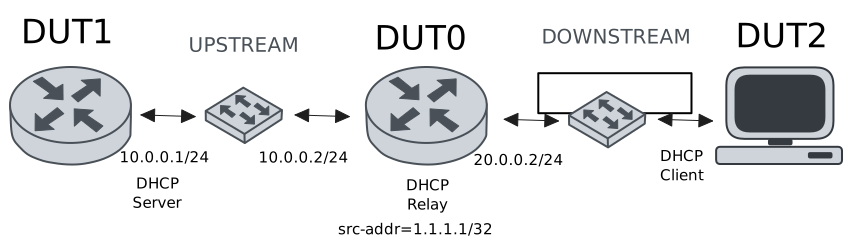
Test DHCP Relay With Local-Address
Description
This example shows how to configure the
local-address option. This command can be used
to set the source address for upstream traffic.
Scenario
Step 1: Set the following configuration in DUT0 :
set interfaces dummy dum0 address 1.1.1.1/32
set interfaces ethernet eth0 address 10.0.0.2/24
set interfaces ethernet eth1 vif 200 address 20.0.0.2/24
set service dhcp-relay INS downstream-interface eth1.200
set service dhcp-relay INS local-address 1.1.1.1
set service dhcp-relay INS server 10.0.0.1
set service dhcp-relay INS upstream-interface eth0
set system login user admin authentication encrypted-password '$6$GSjsCj8gHLv$/VcqU6FLi6CT2Oxn0MJQ2C2tqnRDrYKNF8HIYWJp68nvXvPdFccDsT04.WtigUONbKYrgKg8d6rEs8PjljMkH0'
Step 2: Set the following configuration in DUT1 :
set interfaces ethernet eth0 address 10.0.0.1/24
set interfaces ethernet eth0 traffic policy in LOGGER
set protocols static route 0.0.0.0/0 next-hop 10.0.0.2
set service dhcp-server shared-network dummy subnet 10.0.0.1/32
set service dhcp-server shared-network remote subnet 20.0.0.0/24 start 20.0.0.50 stop 20.0.0.50
set system login user admin authentication encrypted-password '$6$GSjsCj8gHLv$/VcqU6FLi6CT2Oxn0MJQ2C2tqnRDrYKNF8HIYWJp68nvXvPdFccDsT04.WtigUONbKYrgKg8d6rEs8PjljMkH0'
set traffic policy LOGGER rule 1 log prefix DHCP_
set traffic policy LOGGER rule 1 selector UDP
set traffic selector UDP rule 1 destination port 67
set traffic selector UDP rule 1 protocol udp
Step 3: Set the following configuration in DUT2 :
set interfaces ethernet eth1 vif 200 address dhcp
set system login user admin authentication encrypted-password '$6$GSjsCj8gHLv$/VcqU6FLi6CT2Oxn0MJQ2C2tqnRDrYKNF8HIYWJp68nvXvPdFccDsT04.WtigUONbKYrgKg8d6rEs8PjljMkH0'
Step 4: Ping the IP address 10.0.0.1 from DUT0:
admin@DUT0$ ping 10.0.0.1 count 1 size 56 timeout 1Show output
PING 10.0.0.1 (10.0.0.1) 56(84) bytes of data.
64 bytes from 10.0.0.1: icmp_seq=1 ttl=64 time=0.250 ms

--- 10.0.0.1 ping statistics ---
1 packets transmitted, 1 received, 0% packet loss, time 0ms
rtt min/avg/max/mdev = 0.250/0.250/0.250/0.000 ms
Step 5: Run the command interfaces ethernet show on DUT2 and check whether the output contains the following tokens:
20.0.0.50Show output
---------------------------------------------------------------------
Name             IP Address           Admin  Oper  Vrf  Description
---------------------------------------------------------------------
eth0                                down   down
eth1  fe80::dcad:beff:feef:6c21/64  up     up
eth1.200  20.0.0.50/24                  up     up
fe80::dcad:beff:feef:6c21/64
eth2                                down   down
eth3                                down   down
Step 6: Run the command system journal show | cat on DUT1 and check whether the output matches the following regular expressions:
SRC=1.1.1.1 DST=10.0.0.1Show output
Sep 16 23:59:55.327650 osdx systemd-journald[2055]: Runtime Journal (/run/log/journal/db82908865474f16bd4eb2f983136eff) is 964.0K, max 6.4M, 5.5M free.
Sep 16 23:59:55.330676 osdx systemd-journald[2055]: Received client request to rotate journal, rotating.
Sep 16 23:59:55.330751 osdx systemd-journald[2055]: Vacuuming done, freed 0B of archived journals from /run/log/journal/db82908865474f16bd4eb2f983136eff.
Sep 16 23:59:55.340965 osdx OSDxCLI[663347]: User 'admin' executed a new command: 'system journal clear'.
Sep 16 23:59:55.575608 osdx OSDxCLI[663347]: User 'admin' executed a new command: 'system coredump delete all'.
Sep 16 23:59:57.797071 osdx OSDxCLI[663347]: User 'admin' entered the configuration menu.
Sep 16 23:59:57.960971 osdx OSDxCLI[663347]: User 'admin' added a new cfg line: 'set interfaces eth0 address 10.0.0.1/24'.
Sep 16 23:59:58.031079 osdx OSDxCLI[663347]: User 'admin' added a new cfg line: 'set service dhcp-server shared-network dummy subnet 10.0.0.1/32'.
Sep 16 23:59:58.165549 osdx OSDxCLI[663347]: User 'admin' added a new cfg line: 'set service dhcp-server shared-network remote subnet 20.0.0.0/24 start 20.0.0.50 stop 20.0.0.50'.
Sep 16 23:59:58.232365 osdx OSDxCLI[663347]: User 'admin' added a new cfg line: 'set protocols static route 0.0.0.0/0 next-hop 10.0.0.2'.
Sep 16 23:59:58.350706 osdx OSDxCLI[663347]: User 'admin' added a new cfg line: 'set traffic policy LOGGER rule 1 log prefix DHCP_'.
Sep 16 23:59:58.415531 osdx OSDxCLI[663347]: User 'admin' added a new cfg line: 'set traffic policy LOGGER rule 1 selector UDP'.
Sep 16 23:59:58.519652 osdx OSDxCLI[663347]: User 'admin' added a new cfg line: 'set traffic selector UDP rule 1 protocol udp'.
Sep 16 23:59:58.596490 osdx OSDxCLI[663347]: User 'admin' added a new cfg line: 'set traffic selector UDP rule 1 destination port 67'.
Sep 16 23:59:58.691502 osdx OSDxCLI[663347]: User 'admin' added a new cfg line: 'set interfaces eth0 traffic policy in LOGGER'.
Sep 16 23:59:58.781652 osdx OSDxCLI[663347]: User 'admin' added a new cfg line: 'show working'.
Sep 16 23:59:58.883986 osdx ubnt-cfgd[833397]: inactive
Sep 16 23:59:58.964362 osdx INFO[833433]: FRR daemons did not change
Sep 16 23:59:58.994657 osdx kernel: 8021q: adding VLAN 0 to HW filter on device eth0
Sep 16 23:59:59.052722 osdx WARNING[833506]: No supported link modes on interface eth0
Sep 16 23:59:59.054434 osdx modulelauncher[833506]: osdx.utils.xos cmd error: /sbin/ethtool -A eth0 autoneg on
Sep 16 23:59:59.054447 osdx modulelauncher[833506]: Command '/sbin/ethtool -A eth0 autoneg on' returned non-zero exit status 76.
Sep 16 23:59:59.055646 osdx modulelauncher[833506]: osdx.utils.xos cmd error: /sbin/ethtool -s eth0 autoneg on advertise Asym_Pause off Pause off --
Sep 16 23:59:59.055653 osdx modulelauncher[833506]: Command '/sbin/ethtool -s eth0 autoneg on advertise Asym_Pause off Pause off --' returned non-zero exit status 75.
Sep 16 23:59:59.315182 osdx systemd[1]: Started dhcpd@main.service - "DHCP Server Service instance main".
Sep 16 23:59:59.317987 osdx dhcpd[833576]: Wrote 0 leases to leases file.
Sep 16 23:59:59.347320 osdx dhcpd[833576]: Server starting service.
Sep 16 23:59:59.495638 osdx cfgd[1770]: [663347]Completed change to active configuration
Sep 16 23:59:59.496320 osdx OSDxCLI[663347]: User 'admin' committed the configuration.
Sep 16 23:59:59.511158 osdx OSDxCLI[663347]: User 'admin' left the configuration menu.
Sep 17 00:00:00.138363 osdx kernel: [DHCP_-1] ACCEPT IN=eth0 OUT= MAC=de:ad:be:ef:6c:10:de:ad:be:ef:6c:00:08:00 SRC=1.1.1.1 DST=10.0.0.1 LEN=328 TOS=0x00 PREC=0x00 TTL=64 ID=21950 DF PROTO=UDP SPT=67 DPT=67 LEN=308
Sep 17 00:00:00.138363 osdx dhcpd[833576]: DHCPDISCOVER from de:ad:be:ef:6c:21 via 20.0.0.2
Sep 17 00:00:01.139117 osdx dhcpd[833576]: DHCPOFFER on 20.0.0.50 to de:ad:be:ef:6c:21 (osdx) via 20.0.0.2
Sep 17 00:00:01.139979 osdx dhcpd[833576]: DHCPREQUEST for 20.0.0.50 (10.0.0.1) from de:ad:be:ef:6c:21 (osdx) via 20.0.0.2
Sep 17 00:00:01.142643 osdx kernel: [DHCP_-1] ACCEPT IN=eth0 OUT= MAC=de:ad:be:ef:6c:10:de:ad:be:ef:6c:00:08:00 SRC=1.1.1.1 DST=10.0.0.1 LEN=328 TOS=0x00 PREC=0x00 TTL=64 ID=22173 DF PROTO=UDP SPT=67 DPT=67 LEN=308
Sep 17 00:00:01.172263 osdx dhcpd[833576]: DHCPACK on 20.0.0.50 to de:ad:be:ef:6c:21 (osdx) via 20.0.0.2
Sep 17 00:00:02.759161 osdx systemd[1]: Starting dpkg-db-backup.service - Daily dpkg database backup service...
Sep 17 00:00:02.761526 osdx systemd[1]: Starting logrotate.service - Rotate log files...