Basic
The following scenario shows how to configure a HTB qdisc.
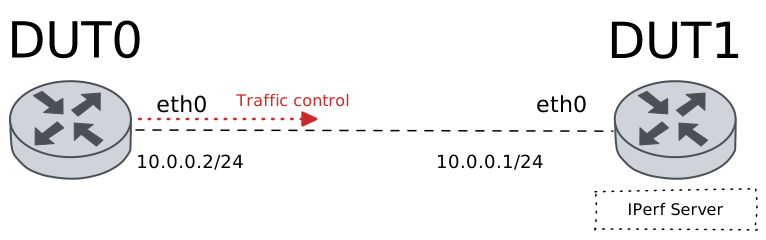
Test HTB QDisc
Description
In this scenario, a Hierarchy Token Bucket (HTB) qdisc is configured in DUT0 (‘eth0’ interface) to achieve linksharing among a hierarchy of classes. Three classes are created with different matches (filters). Each match is allocated to a single class and evaluated in order.
Scenario
Step 1: Set the following configuration in DUT0 :
set interfaces ethernet eth0 address 10.0.0.2/24
set interfaces ethernet eth0 traffic control out QDISC
set system login user admin authentication encrypted-password '$6$GSjsCj8gHLv$/VcqU6FLi6CT2Oxn0MJQ2C2tqnRDrYKNF8HIYWJp68nvXvPdFccDsT04.WtigUONbKYrgKg8d6rEs8PjljMkH0'
set traffic control QDISC type htb bandwidth 100
set traffic control QDISC type htb class 1 bandwidth percentage 50
set traffic control QDISC type htb class 1 ceiling percentage 100
set traffic control QDISC type htb class 2 bandwidth percentage 20
set traffic control QDISC type htb class 2 ceiling percentage 0
set traffic control QDISC type htb class 3 bandwidth percentage 10
set traffic control QDISC type htb class 3 ceiling percentage 0
set traffic control QDISC type htb default-class 3
set traffic control QDISC type htb match 1 class 1
set traffic control QDISC type htb match 1 ip destination port 8080
set traffic control QDISC type htb match 2 class 2
set traffic control QDISC type htb match 2 ip protocol tcp
Step 2: Set the following configuration in DUT1 :
set interfaces ethernet eth0 address 10.0.0.1/24
set system login user admin authentication encrypted-password '$6$GSjsCj8gHLv$/VcqU6FLi6CT2Oxn0MJQ2C2tqnRDrYKNF8HIYWJp68nvXvPdFccDsT04.WtigUONbKYrgKg8d6rEs8PjljMkH0'
Step 3: Ping the IP address 10.0.0.1 from DUT0:
admin@DUT0$ ping 10.0.0.1 count 1 size 56 timeout 1Show output
PING 10.0.0.1 (10.0.0.1) 56(84) bytes of data.
64 bytes from 10.0.0.1: icmp_seq=1 ttl=64 time=0.439 ms

--- 10.0.0.1 ping statistics ---
1 packets transmitted, 1 received, 0% packet loss, time 0ms
rtt min/avg/max/mdev = 0.439/0.439/0.439/0.000 ms
Step 4: Initiate a bandwidth test from DUT0 to DUT1
admin@DUT1$ monitor test performance server port 8080
admin@DUT0$ monitor test performance client 10.0.0.1 duration 5 port 8080 parallel 1
Expect the following output on
DUT0:Connecting to host 10.0.0.1, port 8080 [ 5] local 10.0.0.2 port 49774 connected to 10.0.0.1 port 8080 [ ID] Interval Transfer Bitrate Retr Cwnd [ 5] 0.00-1.00 sec 13.7 MBytes 115 Mbits/sec 150 83.4 KBytes [ 5] 1.00-2.00 sec 11.3 MBytes 94.9 Mbits/sec 71 90.5 KBytes [ 5] 2.00-3.00 sec 11.8 MBytes 99.0 Mbits/sec 74 97.6 KBytes [ 5] 3.00-4.00 sec 11.3 MBytes 94.9 Mbits/sec 87 77.8 KBytes [ 5] 4.00-5.00 sec 11.3 MBytes 94.9 Mbits/sec 70 83.4 KBytes - - - - - - - - - - - - - - - - - - - - - - - - - [ ID] Interval Transfer Bitrate Retr [ 5] 0.00-5.00 sec 59.5 MBytes 99.8 Mbits/sec 452 sender [ 5] 0.00-5.00 sec 58.4 MBytes 98.0 Mbits/sec receiver iperf Done.
Step 5: Initiate a bandwidth test from DUT0 to DUT1
admin@DUT1$ monitor test performance server port 1234
admin@DUT0$ monitor test performance client 10.0.0.1 duration 5 port 1234 parallel 1
Expect the following output on
DUT0:Connecting to host 10.0.0.1, port 1234 [ 5] local 10.0.0.2 port 48604 connected to 10.0.0.1 port 1234 [ ID] Interval Transfer Bitrate Retr Cwnd [ 5] 0.00-1.00 sec 2.48 MBytes 20.8 Mbits/sec 62 19.8 KBytes [ 5] 1.00-2.00 sec 2.36 MBytes 19.8 Mbits/sec 51 21.2 KBytes [ 5] 2.00-3.00 sec 2.24 MBytes 18.8 Mbits/sec 63 17.0 KBytes [ 5] 3.00-4.00 sec 2.24 MBytes 18.8 Mbits/sec 50 26.9 KBytes [ 5] 4.00-5.00 sec 2.36 MBytes 19.8 Mbits/sec 55 19.8 KBytes - - - - - - - - - - - - - - - - - - - - - - - - - [ ID] Interval Transfer Bitrate Retr [ 5] 0.00-5.00 sec 11.7 MBytes 19.6 Mbits/sec 281 sender [ 5] 0.00-5.00 sec 11.4 MBytes 19.1 Mbits/sec receiver iperf Done.
Step 6: Run the command traffic control show on DUT0 and check whether the output contains the following tokens:
class 1
class 2
class 3 (default)
Show output
Traffic control for interface 'eth0' - 'egress' mode

------------------------------------------------------------------------------------
ID   traffic control        type         parent  bytes sent  pkts sent  pkts dropped
------------------------------------------------------------------------------------
1:0  QDISC            htb                root      76670613      50688            56
1:1  QDISC            class 1            1:0       64153154      42394             0
1:2  QDISC            class 2            1:0       12516473       8285             0
1:3  QDISC            class 3 (default)  1:0            986          9             0
2:0  -                htb                1:1       64153154      42394            18
3:0  -                htb                1:2       12516473       8285            38
4:0  -                htb                1:3            986          9             0
Attention
The previous command output should include packets for the different
HTB classes. If not, obtaining debugging information may prove usuful.
This can be achieved by setting the following configuration commands:
set traffic control <NAME> type htb match 1 log <PREFIX> or
set traffic policy <NAME> rule 1 log prefix <PREFIX>.
After generating some traffic, the system journal monitor command
can be used to review log messages.