Mqprio
The following scenario shows how to configure a MQPRIO qdisc. MQPRIO is a hardware-offloaded multiqueue priority scheduling qdisc that requires external packet classification via traffic policies. This test verifies packet classification across multiple traffic classes including the default class.
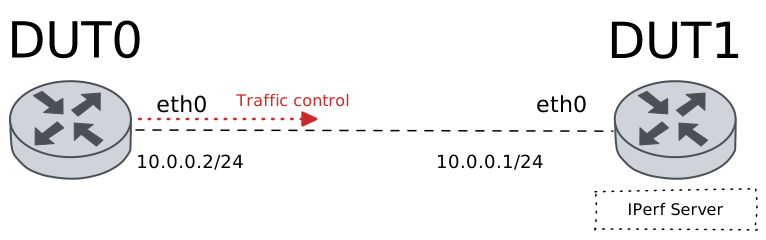
Test MQPRIO QDisc
Description
In this scenario, a MQPRIO qdisc is configured in DUT0
(eth0 interface) to achieve hardware-offloaded
multiqueue priority scheduling. Since MQPRIO does not support
software matches, external classification is performed via
traffic policies that set the class ID for packets.
- Multiple traffic classes are configured and tested:
Class 1: TCP packets destined to port 8080
Class 2: UDP packets destined to port 9090
Class 3: ICMP packets
Class 4: TCP packets destined to port 7070 (no bandwidth limit)
Class 6: Default class for unmatched traffic
Each class is tested individually to verify correct packet classification and counter updates.
Scenario
Step 1: Set the following configuration in DUT0 :
set interfaces ethernet eth0 address 10.0.0.2/24
set interfaces ethernet eth0 traffic control out QDISC
set interfaces ethernet eth0 traffic policy link-out CLASSIFIER
set system login user admin authentication encrypted-password '$6$GSjsCj8gHLv$/VcqU6FLi6CT2Oxn0MJQ2C2tqnRDrYKNF8HIYWJp68nvXvPdFccDsT04.WtigUONbKYrgKg8d6rEs8PjljMkH0'
set traffic control QDISC type mqprio class 1 bandwidth rate 150
set traffic control QDISC type mqprio class 1 description PORT_8080
set traffic control QDISC type mqprio class 2 bandwidth rate 300
set traffic control QDISC type mqprio class 2 description PORT_9090_TCP
set traffic control QDISC type mqprio class 3 bandwidth rate 200
set traffic control QDISC type mqprio class 3 description ICMP
set traffic control QDISC type mqprio class 4 description NO_BANDWIDTH_LIMIT
set traffic control QDISC type mqprio class 6 description DEFAULT
set traffic control QDISC type mqprio default-class 6
set traffic policy CLASSIFIER rule 1 selector PORT_8080
set traffic policy CLASSIFIER rule 1 set class 1
set traffic policy CLASSIFIER rule 2 selector PORT_9090
set traffic policy CLASSIFIER rule 2 set class 2
set traffic policy CLASSIFIER rule 3 selector ICMP
set traffic policy CLASSIFIER rule 3 set class 3
set traffic policy CLASSIFIER rule 4 selector PORT_7070
set traffic policy CLASSIFIER rule 4 set class 4
set traffic selector ICMP rule 1 protocol icmp
set traffic selector PORT_7070 rule 1 destination port 7070
set traffic selector PORT_7070 rule 1 protocol tcp
set traffic selector PORT_8080 rule 1 destination port 8080
set traffic selector PORT_8080 rule 1 protocol tcp
set traffic selector PORT_9090 rule 1 destination port 9090
set traffic selector PORT_9090 rule 1 protocol udp
Step 2: Set the following configuration in DUT1 :
set interfaces ethernet eth0 address 10.0.0.1/24
set system login user admin authentication encrypted-password '$6$GSjsCj8gHLv$/VcqU6FLi6CT2Oxn0MJQ2C2tqnRDrYKNF8HIYWJp68nvXvPdFccDsT04.WtigUONbKYrgKg8d6rEs8PjljMkH0'
Step 3: Ping the IP address 10.0.0.1 from DUT0:
admin@DUT0$ ping 10.0.0.1 count 1 size 56 timeout 1Show output
PING 10.0.0.1 (10.0.0.1) 56(84) bytes of data.
64 bytes from 10.0.0.1: icmp_seq=1 ttl=64 time=0.428 ms

--- 10.0.0.1 ping statistics ---
1 packets transmitted, 1 received, 0% packet loss, time 0ms
rtt min/avg/max/mdev = 0.428/0.428/0.428/0.000 ms
Note
MQPRIO requires external classification. Traffic policies are used to set the class ID for packets before they reach the MQPRIO qdisc.
Step 4: Run the command traffic control clear on DUT0.
Step 5: Initiate a bandwidth test from DUT0 to DUT1
admin@DUT1$ monitor test performance server port 8080
admin@DUT0$ monitor test performance client 10.0.0.1 duration 2 port 8080 parallel 1
Expect the following output on
DUT0:Connecting to host 10.0.0.1, port 8080 [ 5] local 10.0.0.2 port 46046 connected to 10.0.0.1 port 8080 [ ID] Interval Transfer Bitrate Retr Cwnd [ 5] 0.00-1.00 sec 19.0 MBytes 159 Mbits/sec 0 255 KBytes [ 5] 1.00-2.00 sec 17.9 MBytes 150 Mbits/sec 0 255 KBytes - - - - - - - - - - - - - - - - - - - - - - - - - [ ID] Interval Transfer Bitrate Retr [ 5] 0.00-2.00 sec 36.9 MBytes 155 Mbits/sec 0 sender [ 5] 0.00-2.00 sec 35.6 MBytes 149 Mbits/sec receiver iperf Done.
Step 6: Run the command traffic control show on DUT0 and expect the following output:
Show output
Traffic control for interface 'eth0' - 'egress' mode

------------------------------------------------------------------------------------
ID   traffic control        type         parent  bytes sent  pkts sent  pkts dropped
------------------------------------------------------------------------------------
1:0  QDISC            mqprio             root      39126641      25862             0
1:1  QDISC            class 1            1:0       39126551      25861             0
1:2  QDISC            class 2            1:0              0          0             0
1:3  QDISC            class 3            1:0              0          0             0
1:4  QDISC            class 4            1:0              0          0             0
1:6  QDISC            class 6 (default)  1:0             90          1             0
Note
TCP traffic to port 8080 should be classified to class 1. The counters for class 1 should show packets/bytes.
Step 7: Run the command traffic control clear on DUT0.
Step 8: Initiate a bandwidth test from DUT0 to DUT1
admin@DUT1$ monitor test performance server port 9090
admin@DUT0$ monitor test performance client 10.0.0.1 duration 2 udp port 9090 parallel 1 bandwidth 500M
Expect the following output on
DUT0:Connecting to host 10.0.0.1, port 9090 [ 5] local 10.0.0.2 port 55603 connected to 10.0.0.1 port 9090 [ ID] Interval Transfer Bitrate Total Datagrams [ 5] 0.00-1.00 sec 36.1 MBytes 303 Mbits/sec 26164 [ 5] 1.00-2.00 sec 36.0 MBytes 302 Mbits/sec 26085 - - - - - - - - - - - - - - - - - - - - - - - - - [ ID] Interval Transfer Bitrate Jitter Lost/Total Datagrams [ 5] 0.00-2.00 sec 72.2 MBytes 303 Mbits/sec 0.000 ms 0/52249 (0%) sender [ 5] 0.00-2.00 sec 71.9 MBytes 302 Mbits/sec 0.071 ms 114/52200 (0.22%) receiver iperf Done.
Step 9: Run the command traffic control show on DUT0 and expect the following output:
Show output
Traffic control for interface 'eth0' - 'egress' mode

------------------------------------------------------------------------------------
ID   traffic control        type         parent  bytes sent  pkts sent  pkts dropped
------------------------------------------------------------------------------------
1:0  QDISC            mqprio             root      77852589      52266             0
1:1  QDISC            class 1            1:0              0          0             0
1:2  QDISC            class 2            1:0       77851056      52250             0
1:3  QDISC            class 3            1:0              0          0             0
1:4  QDISC            class 4            1:0              0          0             0
1:6  QDISC            class 6 (default)  1:0           1533         16             0
Note
UDP traffic to port 9090 should be classified to class 2.
Step 10: Run the command traffic control clear on DUT0.
Step 11: Ping the IP address 10.0.0.2 from DUT1:
admin@DUT1$ ping 10.0.0.2 count 10 size 56 timeout 1 interval 0.1Show output
PING 10.0.0.2 (10.0.0.2) 56(84) bytes of data.
64 bytes from 10.0.0.2: icmp_seq=1 ttl=64 time=0.529 ms
64 bytes from 10.0.0.2: icmp_seq=2 ttl=64 time=0.297 ms
64 bytes from 10.0.0.2: icmp_seq=3 ttl=64 time=0.283 ms
64 bytes from 10.0.0.2: icmp_seq=4 ttl=64 time=0.337 ms
64 bytes from 10.0.0.2: icmp_seq=5 ttl=64 time=0.272 ms
64 bytes from 10.0.0.2: icmp_seq=6 ttl=64 time=0.294 ms
64 bytes from 10.0.0.2: icmp_seq=7 ttl=64 time=0.300 ms
64 bytes from 10.0.0.2: icmp_seq=8 ttl=64 time=0.348 ms
64 bytes from 10.0.0.2: icmp_seq=9 ttl=64 time=0.406 ms
64 bytes from 10.0.0.2: icmp_seq=10 ttl=64 time=0.277 ms

--- 10.0.0.2 ping statistics ---
10 packets transmitted, 10 received, 0% packet loss, time 936ms
rtt min/avg/max/mdev = 0.272/0.334/0.529/0.075 ms
Step 12: Run the command traffic control show on DUT0 and expect the following output:
Show output
Traffic control for interface 'eth0' - 'egress' mode

------------------------------------------------------------------------------------
ID   traffic control        type         parent  bytes sent  pkts sent  pkts dropped
------------------------------------------------------------------------------------
1:0  QDISC            mqprio             root           980         10             0
1:1  QDISC            class 1            1:0              0          0             0
1:2  QDISC            class 2            1:0              0          0             0
1:3  QDISC            class 3            1:0            980         10             0
1:4  QDISC            class 4            1:0              0          0             0
1:6  QDISC            class 6 (default)  1:0              0          0             0
Note
ICMP packets should be classified to class 3.
Step 13: Run the command traffic control clear on DUT0.
Step 14: Initiate a bandwidth test from DUT0 to DUT1
admin@DUT1$ monitor test performance server port 7070
admin@DUT0$ monitor test performance client 10.0.0.1 duration 2 port 7070 parallel 1
Expect the following output on
DUT0:Connecting to host 10.0.0.1, port 7070 [ 5] local 10.0.0.2 port 56770 connected to 10.0.0.1 port 7070 [ ID] Interval Transfer Bitrate Retr Cwnd [ 5] 0.00-1.00 sec 115 MBytes 964 Mbits/sec 0 641 KBytes [ 5] 1.00-2.00 sec 112 MBytes 944 Mbits/sec 0 901 KBytes - - - - - - - - - - - - - - - - - - - - - - - - - [ ID] Interval Transfer Bitrate Retr [ 5] 0.00-2.00 sec 227 MBytes 954 Mbits/sec 0 sender [ 5] 0.00-2.01 sec 225 MBytes 939 Mbits/sec receiver iperf Done.
Step 15: Run the command traffic control show on DUT0 and expect the following output:
Show output
Traffic control for interface 'eth0' - 'egress' mode

------------------------------------------------------------------------------------
ID   traffic control        type         parent  bytes sent  pkts sent  pkts dropped
------------------------------------------------------------------------------------
1:0  QDISC            mqprio             root     246982650     163151             0
1:1  QDISC            class 1            1:0              0          0             0
1:2  QDISC            class 2            1:0              0          0             0
1:3  QDISC            class 3            1:0              0          0             0
1:4  QDISC            class 4            1:0      246982650     163151             0
1:6  QDISC            class 6 (default)  1:0              0          0             0
Note
TCP traffic to port 7070 should be classified to class 4, which has no bandwidth limit configured.
Step 16: Run the command traffic control clear on DUT0.
Step 17: Initiate a bandwidth test from DUT0 to DUT1
admin@DUT1$ monitor test performance server port 5555
admin@DUT0$ monitor test performance client 10.0.0.1 duration 2 port 5555 parallel 1
Expect the following output on
DUT0:Connecting to host 10.0.0.1, port 5555 [ 5] local 10.0.0.2 port 44488 connected to 10.0.0.1 port 5555 [ ID] Interval Transfer Bitrate Retr Cwnd [ 5] 0.00-1.00 sec 114 MBytes 954 Mbits/sec 0 648 KBytes [ 5] 1.00-2.00 sec 110 MBytes 923 Mbits/sec 0 1.04 MBytes - - - - - - - - - - - - - - - - - - - - - - - - - [ ID] Interval Transfer Bitrate Retr [ 5] 0.00-2.00 sec 224 MBytes 938 Mbits/sec 0 sender [ 5] 0.00-2.00 sec 221 MBytes 925 Mbits/sec receiver iperf Done.
Step 18: Run the command traffic control show on DUT0 and expect the following output:
Show output
Traffic control for interface 'eth0' - 'egress' mode

------------------------------------------------------------------------------------
ID   traffic control        type         parent  bytes sent  pkts sent  pkts dropped
------------------------------------------------------------------------------------
1:0  QDISC            mqprio             root     242498164     160189             0
1:1  QDISC            class 1            1:0              0          0             0
1:2  QDISC            class 2            1:0              0          0             0
1:3  QDISC            class 3            1:0              0          0             0
1:4  QDISC            class 4            1:0              0          0             0
1:6  QDISC            class 6 (default)  1:0      242498164     160189             0
Note
TCP traffic to port 5555 (which doesn’t match any rule) should be classified to the default class (class 6).