Eap
This scenario shows how to configure and connect two subnets with each other through a VPN tunnel using different eap methods
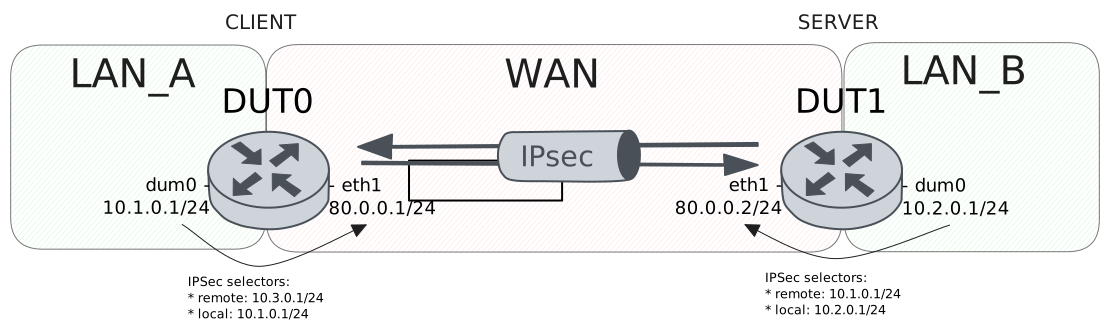
Test MD5 Method
Description
Simple VPN site-to-site configuration with md5 authentication for DUT1 (client) and pre shared secret for DUT0 (server)
Scenario
Step 1: Set the following configuration in DUT0 :
set interfaces dummy dum0 address 10.1.0.1/24
set interfaces ethernet eth1 address 80.0.0.1/24
set protocols static route 10.2.0.0/24 interface dum0
set protocols static route 10.3.0.0/24 interface dum0
set system login user admin authentication encrypted-password '$6$GSjsCj8gHLv$/VcqU6FLi6CT2Oxn0MJQ2C2tqnRDrYKNF8HIYWJp68nvXvPdFccDsT04.WtigUONbKYrgKg8d6rEs8PjljMkH0'
set vpn ipsec auth-profile AUTH-SA global-secrets eap dut0 encrypted-secret U2FsdGVkX1/5MX49wY4v0YqK2O8+fkxxCj3eT/dHjbM=
set vpn ipsec auth-profile AUTH-SA global-secrets ike-psk test_psk encrypted-secret U2FsdGVkX1/VzInIdurlW7kJhwvKcFDcCP9hsYZ50UY=
set vpn ipsec auth-profile AUTH-SA local auth ike-psk id test_psk
set vpn ipsec auth-profile AUTH-SA mirror-config false
set vpn ipsec auth-profile AUTH-SA remote auth eap dut0 type md5
set vpn ipsec esp-group CHILD-SA mode tunnel
set vpn ipsec esp-group CHILD-SA proposal 1 encryption aes256gcm128
set vpn ipsec esp-group CHILD-SA proposal 1 pfs dh-group19
set vpn ipsec ike-group IKE-SA key-exchange ikev2
set vpn ipsec ike-group IKE-SA proposal 1 dh-group 19
set vpn ipsec ike-group IKE-SA proposal 1 encryption aes256gcm128
set vpn ipsec ike-group IKE-SA proposal 1 hash sha256
set vpn ipsec logging log-types any log-level 1
set vpn ipsec site-to-site peer PEER auth-profile AUTH-SA
set vpn ipsec site-to-site peer PEER connection-type respond
set vpn ipsec site-to-site peer PEER default-esp-group CHILD-SA
set vpn ipsec site-to-site peer PEER ike-group IKE-SA
set vpn ipsec site-to-site peer PEER local-address 80.0.0.1
set vpn ipsec site-to-site peer PEER tunnel 1 local prefix 10.1.0.0/24
set vpn ipsec site-to-site peer PEER tunnel 1 local-interface dum0
Step 2: Set the following configuration in DUT1 :
set interfaces dummy dum0 address 10.2.0.1/24
set interfaces ethernet eth1 address 80.0.0.2/24
set protocols static route 10.1.0.0/24 interface dum0
set system login user admin authentication encrypted-password '$6$GSjsCj8gHLv$/VcqU6FLi6CT2Oxn0MJQ2C2tqnRDrYKNF8HIYWJp68nvXvPdFccDsT04.WtigUONbKYrgKg8d6rEs8PjljMkH0'
set vpn ipsec auth-profile AUTH-SA global-secrets eap dut0 encrypted-secret U2FsdGVkX19UF7uC9OlZ1mHvmi/nHVJoA//duZVnH5I=
set vpn ipsec auth-profile AUTH-SA global-secrets ike-psk test_psk encrypted-secret U2FsdGVkX1/Uo8zPyBOYzP/JHIaxnNHxor9RBr82UHc=
set vpn ipsec auth-profile AUTH-SA local auth eap dut0 type md5
set vpn ipsec auth-profile AUTH-SA local id dut0
set vpn ipsec auth-profile AUTH-SA mirror-config false
set vpn ipsec auth-profile AUTH-SA remote auth ike-psk id %any
set vpn ipsec esp-group CHILD-SA mode tunnel
set vpn ipsec esp-group CHILD-SA proposal 1 encryption aes256gcm128
set vpn ipsec esp-group CHILD-SA proposal 1 pfs dh-group19
set vpn ipsec ike-group IKE-SA key-exchange ikev2
set vpn ipsec ike-group IKE-SA proposal 1 dh-group 19
set vpn ipsec ike-group IKE-SA proposal 1 encryption aes256gcm128
set vpn ipsec ike-group IKE-SA proposal 1 hash sha256
set vpn ipsec logging log-types any log-level 1
set vpn ipsec site-to-site peer PEER auth-profile AUTH-SA
set vpn ipsec site-to-site peer PEER connection-type initiate
set vpn ipsec site-to-site peer PEER default-esp-group CHILD-SA
set vpn ipsec site-to-site peer PEER ike-group IKE-SA
set vpn ipsec site-to-site peer PEER local-address 80.0.0.2
set vpn ipsec site-to-site peer PEER remote-address 80.0.0.1
set vpn ipsec site-to-site peer PEER tunnel 1 local prefix 10.2.0.0/24
set vpn ipsec site-to-site peer PEER tunnel 1 local-interface dum0
set vpn ipsec site-to-site peer PEER tunnel 1 remote prefix 10.1.0.0/24
Step 3: Ping the IP address 80.0.0.2 from DUT1:
admin@DUT1$ ping 80.0.0.2 count 1 size 56 timeout 1Show output
PING 80.0.0.2 (80.0.0.2) 56(84) bytes of data.
64 bytes from 80.0.0.2: icmp_seq=1 ttl=64 time=0.038 ms

--- 80.0.0.2 ping statistics ---
1 packets transmitted, 1 received, 0% packet loss, time 0ms
rtt min/avg/max/mdev = 0.038/0.038/0.038/0.000 ms
Step 4: Ping the IP address 80.0.0.1 from DUT0:
admin@DUT0$ ping 80.0.0.1 count 1 size 56 timeout 1Show output
PING 80.0.0.1 (80.0.0.1) 56(84) bytes of data.
64 bytes from 80.0.0.1: icmp_seq=1 ttl=64 time=0.040 ms

--- 80.0.0.1 ping statistics ---
1 packets transmitted, 1 received, 0% packet loss, time 0ms
rtt min/avg/max/mdev = 0.040/0.040/0.040/0.000 ms
Step 5: Run the command vpn ipsec show sa on DUT0 and check whether the output matches the following regular expressions:
peer-PEER-tunnel-\d+.+INSTALLEDShow output
vpn-peer-PEER: #1, ESTABLISHED, IKEv2, 3bbc4ee844b943a3_i 0884f092c54b4ffb_r*
local  'test_psk' @ 80.0.0.1[500]
remote 'dut0' @ 80.0.0.2[500]
AES_GCM_16-256/PRF_HMAC_SHA2_256/ECP_256
established 1s ago, rekeying in 21016s
peer-PEER-tunnel-1: #1, reqid 1, INSTALLED, TUNNEL, ESP:AES_GCM_16-256
installed 1s ago, rekeying in 3257s, expires in 3959s
in  cae35e92,      0 bytes,     0 packets
out c5b3489d,      0 bytes,     0 packets
local  10.1.0.0/24
remote 10.2.0.0/24
Step 6: Ping the IP address 10.2.0.1 from DUT0:
admin@DUT0$ ping 10.2.0.1 local-address 10.1.0.1 count 1 size 56 timeout 1Show output
PING 10.2.0.1 (10.2.0.1) from 10.1.0.1 : 56(84) bytes of data.
64 bytes from 10.2.0.1: icmp_seq=1 ttl=64 time=0.339 ms

--- 10.2.0.1 ping statistics ---
1 packets transmitted, 1 received, 0% packet loss, time 0ms
rtt min/avg/max/mdev = 0.339/0.339/0.339/0.000 ms
Step 7: Ping the IP address 10.1.0.1 from DUT1:
admin@DUT1$ ping 10.1.0.1 local-address 10.2.0.1 count 1 size 56 timeout 1Show output
PING 10.1.0.1 (10.1.0.1) from 10.2.0.1 : 56(84) bytes of data.
64 bytes from 10.1.0.1: icmp_seq=1 ttl=64 time=0.349 ms

--- 10.1.0.1 ping statistics ---
1 packets transmitted, 1 received, 0% packet loss, time 0ms
rtt min/avg/max/mdev = 0.349/0.349/0.349/0.000 ms
Step 8: Run the command vpn ipsec show sa on DUT0 and check whether the output matches the following regular expressions:
[1-9]\d? packetsShow output
vpn-peer-PEER: #1, ESTABLISHED, IKEv2, 3bbc4ee844b943a3_i 0884f092c54b4ffb_r*
local  'test_psk' @ 80.0.0.1[500]
remote 'dut0' @ 80.0.0.2[500]
AES_GCM_16-256/PRF_HMAC_SHA2_256/ECP_256
established 1s ago, rekeying in 21016s
peer-PEER-tunnel-1: #1, reqid 1, INSTALLED, TUNNEL, ESP:AES_GCM_16-256
installed 1s ago, rekeying in 3257s, expires in 3959s
in  cae35e92,    168 bytes,     2 packets,     0s ago
out c5b3489d,    168 bytes,     2 packets,     0s ago
local  10.1.0.0/24
remote 10.2.0.0/24
Test TLS Method
Description
Simple VPN site-to-site configuration with tls authentication in both sides
Scenario
Step 1: Set the following configuration in DUT0 :
set interfaces dummy dum0 address 10.1.0.1/24
set interfaces ethernet eth1 address 80.0.0.1/24
set protocols static route 10.2.0.0/24 interface dum0
set protocols static route 10.3.0.0/24 interface dum0
set system login user admin authentication encrypted-password '$6$GSjsCj8gHLv$/VcqU6FLi6CT2Oxn0MJQ2C2tqnRDrYKNF8HIYWJp68nvXvPdFccDsT04.WtigUONbKYrgKg8d6rEs8PjljMkH0'
set vpn ipsec auth-profile AUTH-SA local auth eap dut1 type tls
set vpn ipsec auth-profile AUTH-SA local cert-file 'running://server.crt'
set vpn ipsec auth-profile AUTH-SA local key file 'running://server.priv.pem'
set vpn ipsec auth-profile AUTH-SA mirror-config false
set vpn ipsec auth-profile AUTH-SA remote auth eap dut0 type tls
set vpn ipsec auth-profile AUTH-SA remote ca-cert-file 'running://ca.crt'
set vpn ipsec esp-group CHILD-SA mode tunnel
set vpn ipsec esp-group CHILD-SA proposal 1 encryption aes256gcm128
set vpn ipsec esp-group CHILD-SA proposal 1 pfs dh-group19
set vpn ipsec ike-group IKE-SA key-exchange ikev2
set vpn ipsec ike-group IKE-SA proposal 1 dh-group 19
set vpn ipsec ike-group IKE-SA proposal 1 encryption aes256gcm128
set vpn ipsec ike-group IKE-SA proposal 1 hash sha256
set vpn ipsec logging log-types any log-level 1
set vpn ipsec site-to-site peer PEER auth-profile AUTH-SA
set vpn ipsec site-to-site peer PEER connection-type respond
set vpn ipsec site-to-site peer PEER default-esp-group CHILD-SA
set vpn ipsec site-to-site peer PEER ike-group IKE-SA
set vpn ipsec site-to-site peer PEER local-address 80.0.0.1
set vpn ipsec site-to-site peer PEER tunnel 1 local prefix 10.1.0.0/24
set vpn ipsec site-to-site peer PEER tunnel 1 local-interface dum0
Step 2: Set the following configuration in DUT1 :
set interfaces dummy dum0 address 10.2.0.1/24
set interfaces ethernet eth1 address 80.0.0.2/24
set protocols static route 10.1.0.0/24 interface dum0
set system login user admin authentication encrypted-password '$6$GSjsCj8gHLv$/VcqU6FLi6CT2Oxn0MJQ2C2tqnRDrYKNF8HIYWJp68nvXvPdFccDsT04.WtigUONbKYrgKg8d6rEs8PjljMkH0'
set vpn ipsec auth-profile AUTH-SA local auth eap dut0 type tls
set vpn ipsec auth-profile AUTH-SA local cert-file 'running://client.crt'
set vpn ipsec auth-profile AUTH-SA local key file 'running://client.priv.pem'
set vpn ipsec auth-profile AUTH-SA mirror-config false
set vpn ipsec auth-profile AUTH-SA remote auth eap dut1 type tls
set vpn ipsec auth-profile AUTH-SA remote ca-cert-file 'running://ca.crt'
set vpn ipsec auth-profile AUTH-SA remote id CN=Server
set vpn ipsec esp-group CHILD-SA mode tunnel
set vpn ipsec esp-group CHILD-SA proposal 1 encryption aes256gcm128
set vpn ipsec esp-group CHILD-SA proposal 1 pfs dh-group19
set vpn ipsec ike-group IKE-SA key-exchange ikev2
set vpn ipsec ike-group IKE-SA proposal 1 dh-group 19
set vpn ipsec ike-group IKE-SA proposal 1 encryption aes256gcm128
set vpn ipsec ike-group IKE-SA proposal 1 hash sha256
set vpn ipsec logging log-types any log-level 1
set vpn ipsec site-to-site peer PEER auth-profile AUTH-SA
set vpn ipsec site-to-site peer PEER connection-type initiate
set vpn ipsec site-to-site peer PEER default-esp-group CHILD-SA
set vpn ipsec site-to-site peer PEER ike-group IKE-SA
set vpn ipsec site-to-site peer PEER local-address 80.0.0.2
set vpn ipsec site-to-site peer PEER remote-address 80.0.0.1
set vpn ipsec site-to-site peer PEER tunnel 1 local prefix 10.2.0.0/24
set vpn ipsec site-to-site peer PEER tunnel 1 local-interface dum0
set vpn ipsec site-to-site peer PEER tunnel 1 remote prefix 10.1.0.0/24
Step 3: Ping the IP address 80.0.0.2 from DUT1:
admin@DUT1$ ping 80.0.0.2 count 1 size 56 timeout 1Show output
PING 80.0.0.2 (80.0.0.2) 56(84) bytes of data.
64 bytes from 80.0.0.2: icmp_seq=1 ttl=64 time=0.377 ms

--- 80.0.0.2 ping statistics ---
1 packets transmitted, 1 received, 0% packet loss, time 0ms
rtt min/avg/max/mdev = 0.377/0.377/0.377/0.000 ms
Step 4: Ping the IP address 80.0.0.1 from DUT0:
admin@DUT0$ ping 80.0.0.1 count 1 size 56 timeout 1Show output
PING 80.0.0.1 (80.0.0.1) 56(84) bytes of data.
64 bytes from 80.0.0.1: icmp_seq=1 ttl=64 time=0.027 ms

--- 80.0.0.1 ping statistics ---
1 packets transmitted, 1 received, 0% packet loss, time 0ms
rtt min/avg/max/mdev = 0.027/0.027/0.027/0.000 ms
Step 5: Run the command vpn ipsec show sa on DUT0 and check whether the output matches the following regular expressions:
peer-PEER-tunnel-\d+.+INSTALLEDShow output
vpn-peer-PEER: #1, ESTABLISHED, IKEv2, 0d8101a35eac2ee5_i f0737930ebd3be44_r*
local  'CN=Server' @ 80.0.0.1[500]
remote 'CN=Client' @ 80.0.0.2[500]
AES_GCM_16-256/PRF_HMAC_SHA2_256/ECP_256
established 1s ago, rekeying in 14465s
peer-PEER-tunnel-1: #1, reqid 1, INSTALLED, TUNNEL, ESP:AES_GCM_16-256
installed 1s ago, rekeying in 3494s, expires in 3959s
in  c87ecdeb,      0 bytes,     0 packets
out ccc2e065,      0 bytes,     0 packets
local  10.1.0.0/24
remote 10.2.0.0/24
Step 6: Ping the IP address 10.2.0.1 from DUT0:
admin@DUT0$ ping 10.2.0.1 local-address 10.1.0.1 count 1 size 56 timeout 1Show output
PING 10.2.0.1 (10.2.0.1) from 10.1.0.1 : 56(84) bytes of data.
64 bytes from 10.2.0.1: icmp_seq=1 ttl=64 time=0.341 ms

--- 10.2.0.1 ping statistics ---
1 packets transmitted, 1 received, 0% packet loss, time 0ms
rtt min/avg/max/mdev = 0.341/0.341/0.341/0.000 ms
Step 7: Ping the IP address 10.1.0.1 from DUT1:
admin@DUT1$ ping 10.1.0.1 local-address 10.2.0.1 count 1 size 56 timeout 1Show output
PING 10.1.0.1 (10.1.0.1) from 10.2.0.1 : 56(84) bytes of data.
64 bytes from 10.1.0.1: icmp_seq=1 ttl=64 time=0.404 ms

--- 10.1.0.1 ping statistics ---
1 packets transmitted, 1 received, 0% packet loss, time 0ms
rtt min/avg/max/mdev = 0.404/0.404/0.404/0.000 ms
Step 8: Run the command vpn ipsec show sa on DUT0 and check whether the output matches the following regular expressions:
[1-9]\d? packetsShow output
vpn-peer-PEER: #1, ESTABLISHED, IKEv2, 0d8101a35eac2ee5_i f0737930ebd3be44_r*
local  'CN=Server' @ 80.0.0.1[500]
remote 'CN=Client' @ 80.0.0.2[500]
AES_GCM_16-256/PRF_HMAC_SHA2_256/ECP_256
established 1s ago, rekeying in 14465s
peer-PEER-tunnel-1: #1, reqid 1, INSTALLED, TUNNEL, ESP:AES_GCM_16-256
installed 1s ago, rekeying in 3494s, expires in 3959s
in  c87ecdeb,    168 bytes,     2 packets,     0s ago
out ccc2e065,    168 bytes,     2 packets,     0s ago
local  10.1.0.0/24
remote 10.2.0.0/24
Test MSCHAPV2 Method
Description
Simple VPN site-to-site configuration with mschapv2 authentication for DUT1 (client) and X.509 certificate for DUT0 (server)
Scenario
Step 1: Set the following configuration in DUT0 :
set interfaces dummy dum0 address 10.1.0.1/24
set interfaces ethernet eth1 address 80.0.0.1/24
set protocols static route 10.2.0.0/24 interface dum0
set protocols static route 10.3.0.0/24 interface dum0
set system login user admin authentication encrypted-password '$6$GSjsCj8gHLv$/VcqU6FLi6CT2Oxn0MJQ2C2tqnRDrYKNF8HIYWJp68nvXvPdFccDsT04.WtigUONbKYrgKg8d6rEs8PjljMkH0'
set vpn ipsec auth-profile AUTH-SA global-secrets eap dut0 encrypted-secret U2FsdGVkX1+HQtqp3wmASP29hdkFEfyzAMTltssJocY=
set vpn ipsec auth-profile AUTH-SA local cert-file 'running://server.crt'
set vpn ipsec auth-profile AUTH-SA local key file 'running://server.priv.pem'
set vpn ipsec auth-profile AUTH-SA mirror-config false
set vpn ipsec auth-profile AUTH-SA remote auth eap %any type mschapv2
set vpn ipsec esp-group CHILD-SA mode tunnel
set vpn ipsec esp-group CHILD-SA proposal 1 encryption aes256gcm128
set vpn ipsec esp-group CHILD-SA proposal 1 pfs dh-group19
set vpn ipsec ike-group IKE-SA key-exchange ikev2
set vpn ipsec ike-group IKE-SA proposal 1 dh-group 19
set vpn ipsec ike-group IKE-SA proposal 1 encryption aes256gcm128
set vpn ipsec ike-group IKE-SA proposal 1 hash sha256
set vpn ipsec logging log-types any log-level 1
set vpn ipsec site-to-site peer PEER auth-profile AUTH-SA
set vpn ipsec site-to-site peer PEER connection-type respond
set vpn ipsec site-to-site peer PEER default-esp-group CHILD-SA
set vpn ipsec site-to-site peer PEER ike-group IKE-SA
set vpn ipsec site-to-site peer PEER local-address 80.0.0.1
set vpn ipsec site-to-site peer PEER tunnel 1 local prefix 10.1.0.0/24
set vpn ipsec site-to-site peer PEER tunnel 1 local-interface dum0
Step 2: Set the following configuration in DUT1 :
set interfaces dummy dum0 address 10.2.0.1/24
set interfaces ethernet eth1 address 80.0.0.2/24
set protocols static route 10.1.0.0/24 interface dum0
set system login user admin authentication encrypted-password '$6$GSjsCj8gHLv$/VcqU6FLi6CT2Oxn0MJQ2C2tqnRDrYKNF8HIYWJp68nvXvPdFccDsT04.WtigUONbKYrgKg8d6rEs8PjljMkH0'
set vpn ipsec auth-profile AUTH-SA global-secrets eap dut0 encrypted-secret U2FsdGVkX19TdQO5QxCi40o7vY0Ds1m2rk9uy8IAO/8=
set vpn ipsec auth-profile AUTH-SA local auth eap dut0 type mschapv2
set vpn ipsec auth-profile AUTH-SA mirror-config false
set vpn ipsec auth-profile AUTH-SA remote ca-cert-file 'running://ca.crt'
set vpn ipsec auth-profile AUTH-SA remote id CN=Server
set vpn ipsec esp-group CHILD-SA mode tunnel
set vpn ipsec esp-group CHILD-SA proposal 1 encryption aes256gcm128
set vpn ipsec esp-group CHILD-SA proposal 1 pfs dh-group19
set vpn ipsec ike-group IKE-SA key-exchange ikev2
set vpn ipsec ike-group IKE-SA proposal 1 dh-group 19
set vpn ipsec ike-group IKE-SA proposal 1 encryption aes256gcm128
set vpn ipsec ike-group IKE-SA proposal 1 hash sha256
set vpn ipsec logging log-types any log-level 1
set vpn ipsec site-to-site peer PEER auth-profile AUTH-SA
set vpn ipsec site-to-site peer PEER connection-type initiate
set vpn ipsec site-to-site peer PEER default-esp-group CHILD-SA
set vpn ipsec site-to-site peer PEER ike-group IKE-SA
set vpn ipsec site-to-site peer PEER local-address 80.0.0.2
set vpn ipsec site-to-site peer PEER remote-address 80.0.0.1
set vpn ipsec site-to-site peer PEER tunnel 1 local prefix 10.2.0.0/24
set vpn ipsec site-to-site peer PEER tunnel 1 local-interface dum0
set vpn ipsec site-to-site peer PEER tunnel 1 remote prefix 10.1.0.0/24
Step 3: Ping the IP address 80.0.0.2 from DUT1:
admin@DUT1$ ping 80.0.0.2 count 1 size 56 timeout 1Show output
PING 80.0.0.2 (80.0.0.2) 56(84) bytes of data.
64 bytes from 80.0.0.2: icmp_seq=1 ttl=64 time=0.036 ms

--- 80.0.0.2 ping statistics ---
1 packets transmitted, 1 received, 0% packet loss, time 0ms
rtt min/avg/max/mdev = 0.036/0.036/0.036/0.000 ms
Step 4: Ping the IP address 80.0.0.1 from DUT0:
admin@DUT0$ ping 80.0.0.1 count 1 size 56 timeout 1Show output
PING 80.0.0.1 (80.0.0.1) 56(84) bytes of data.
64 bytes from 80.0.0.1: icmp_seq=1 ttl=64 time=0.033 ms

--- 80.0.0.1 ping statistics ---
1 packets transmitted, 1 received, 0% packet loss, time 0ms
rtt min/avg/max/mdev = 0.033/0.033/0.033/0.000 ms
Step 5: Run the command vpn ipsec show sa on DUT0 and check whether the output matches the following regular expressions:
peer-PEER-tunnel-\d+.+INSTALLEDShow output
vpn-peer-PEER: #1, ESTABLISHED, IKEv2, aba13f67847f0891_i f900b0595d78d31e_r*
local  'CN=Server' @ 80.0.0.1[500]
remote '80.0.0.2' @ 80.0.0.2[500] EAP: 'dut0'
AES_GCM_16-256/PRF_HMAC_SHA2_256/ECP_256
established 1s ago, rekeying in 17516s
peer-PEER-tunnel-1: #1, reqid 1, INSTALLED, TUNNEL, ESP:AES_GCM_16-256
installed 1s ago, rekeying in 3298s, expires in 3959s
in  c91c97ba,      0 bytes,     0 packets
out cdfcdcc1,      0 bytes,     0 packets
local  10.1.0.0/24
remote 10.2.0.0/24
Step 6: Ping the IP address 10.2.0.1 from DUT0:
admin@DUT0$ ping 10.2.0.1 local-address 10.1.0.1 count 1 size 56 timeout 1Show output
PING 10.2.0.1 (10.2.0.1) from 10.1.0.1 : 56(84) bytes of data.
64 bytes from 10.2.0.1: icmp_seq=1 ttl=64 time=0.350 ms

--- 10.2.0.1 ping statistics ---
1 packets transmitted, 1 received, 0% packet loss, time 0ms
rtt min/avg/max/mdev = 0.350/0.350/0.350/0.000 ms
Step 7: Ping the IP address 10.1.0.1 from DUT1:
admin@DUT1$ ping 10.1.0.1 local-address 10.2.0.1 count 1 size 56 timeout 1Show output
PING 10.1.0.1 (10.1.0.1) from 10.2.0.1 : 56(84) bytes of data.
64 bytes from 10.1.0.1: icmp_seq=1 ttl=64 time=0.382 ms

--- 10.1.0.1 ping statistics ---
1 packets transmitted, 1 received, 0% packet loss, time 0ms
rtt min/avg/max/mdev = 0.382/0.382/0.382/0.000 ms
Step 8: Run the command vpn ipsec show sa on DUT0 and check whether the output matches the following regular expressions:
[1-9]\d? packetsShow output
vpn-peer-PEER: #1, ESTABLISHED, IKEv2, aba13f67847f0891_i f900b0595d78d31e_r*
local  'CN=Server' @ 80.0.0.1[500]
remote '80.0.0.2' @ 80.0.0.2[500] EAP: 'dut0'
AES_GCM_16-256/PRF_HMAC_SHA2_256/ECP_256
established 1s ago, rekeying in 17516s
peer-PEER-tunnel-1: #1, reqid 1, INSTALLED, TUNNEL, ESP:AES_GCM_16-256
installed 1s ago, rekeying in 3298s, expires in 3959s
in  c91c97ba,    168 bytes,     2 packets,     0s ago
out cdfcdcc1,    168 bytes,     2 packets,     0s ago
local  10.1.0.0/24
remote 10.2.0.0/24
Test TTLS Method
Description
Simple VPN site-to-site configuration with ttls authentication in both sides, but DUT1 (client) using a secret password and DUT0 (server) a X.509 certificate
Scenario
Step 1: Set the following configuration in DUT0 :
set interfaces dummy dum0 address 10.1.0.1/24
set interfaces ethernet eth1 address 80.0.0.1/24
set protocols static route 10.2.0.0/24 interface dum0
set protocols static route 10.3.0.0/24 interface dum0
set system login user admin authentication encrypted-password '$6$GSjsCj8gHLv$/VcqU6FLi6CT2Oxn0MJQ2C2tqnRDrYKNF8HIYWJp68nvXvPdFccDsT04.WtigUONbKYrgKg8d6rEs8PjljMkH0'
set vpn ipsec auth-profile AUTH-SA global-secrets eap dut0 encrypted-secret U2FsdGVkX1/C+BJSawSHRt5Cm8Tu9QOJQ87BAB2xCYo=
set vpn ipsec auth-profile AUTH-SA local auth eap dut1 type ttls
set vpn ipsec auth-profile AUTH-SA local cert-file 'running://server.crt'
set vpn ipsec auth-profile AUTH-SA local key file 'running://server.priv.pem'
set vpn ipsec auth-profile AUTH-SA mirror-config false
set vpn ipsec auth-profile AUTH-SA remote auth eap dut0 type ttls
set vpn ipsec esp-group CHILD-SA mode tunnel
set vpn ipsec esp-group CHILD-SA proposal 1 encryption aes256gcm128
set vpn ipsec esp-group CHILD-SA proposal 1 pfs dh-group19
set vpn ipsec ike-group IKE-SA key-exchange ikev2
set vpn ipsec ike-group IKE-SA proposal 1 dh-group 19
set vpn ipsec ike-group IKE-SA proposal 1 encryption aes256gcm128
set vpn ipsec ike-group IKE-SA proposal 1 hash sha256
set vpn ipsec logging log-types any log-level 1
set vpn ipsec site-to-site peer PEER auth-profile AUTH-SA
set vpn ipsec site-to-site peer PEER connection-type respond
set vpn ipsec site-to-site peer PEER default-esp-group CHILD-SA
set vpn ipsec site-to-site peer PEER ike-group IKE-SA
set vpn ipsec site-to-site peer PEER local-address 80.0.0.1
set vpn ipsec site-to-site peer PEER tunnel 1 local prefix 10.1.0.0/24
set vpn ipsec site-to-site peer PEER tunnel 1 local-interface dum0
Step 2: Set the following configuration in DUT1 :
set interfaces dummy dum0 address 10.2.0.1/24
set interfaces ethernet eth1 address 80.0.0.2/24
set protocols static route 10.1.0.0/24 interface dum0
set system login user admin authentication encrypted-password '$6$GSjsCj8gHLv$/VcqU6FLi6CT2Oxn0MJQ2C2tqnRDrYKNF8HIYWJp68nvXvPdFccDsT04.WtigUONbKYrgKg8d6rEs8PjljMkH0'
set vpn ipsec auth-profile AUTH-SA global-secrets eap dut0 encrypted-secret U2FsdGVkX1+a52cXvQJVFPqIN+OioRl7Phl0pBJEgFQ=
set vpn ipsec auth-profile AUTH-SA local auth eap dut0 type ttls
set vpn ipsec auth-profile AUTH-SA local id dut0
set vpn ipsec auth-profile AUTH-SA mirror-config false
set vpn ipsec auth-profile AUTH-SA remote auth eap dut1 type ttls
set vpn ipsec auth-profile AUTH-SA remote ca-cert-file 'running://ca.crt'
set vpn ipsec auth-profile AUTH-SA remote id CN=Server
set vpn ipsec esp-group CHILD-SA mode tunnel
set vpn ipsec esp-group CHILD-SA proposal 1 encryption aes256gcm128
set vpn ipsec esp-group CHILD-SA proposal 1 pfs dh-group19
set vpn ipsec ike-group IKE-SA key-exchange ikev2
set vpn ipsec ike-group IKE-SA proposal 1 dh-group 19
set vpn ipsec ike-group IKE-SA proposal 1 encryption aes256gcm128
set vpn ipsec ike-group IKE-SA proposal 1 hash sha256
set vpn ipsec logging log-types any log-level 1
set vpn ipsec site-to-site peer PEER auth-profile AUTH-SA
set vpn ipsec site-to-site peer PEER connection-type initiate
set vpn ipsec site-to-site peer PEER default-esp-group CHILD-SA
set vpn ipsec site-to-site peer PEER ike-group IKE-SA
set vpn ipsec site-to-site peer PEER local-address 80.0.0.2
set vpn ipsec site-to-site peer PEER remote-address 80.0.0.1
set vpn ipsec site-to-site peer PEER tunnel 1 local prefix 10.2.0.0/24
set vpn ipsec site-to-site peer PEER tunnel 1 local-interface dum0
set vpn ipsec site-to-site peer PEER tunnel 1 remote prefix 10.1.0.0/24
Step 3: Ping the IP address 80.0.0.2 from DUT1:
admin@DUT1$ ping 80.0.0.2 count 1 size 56 timeout 1Show output
PING 80.0.0.2 (80.0.0.2) 56(84) bytes of data.
64 bytes from 80.0.0.2: icmp_seq=1 ttl=64 time=0.365 ms

--- 80.0.0.2 ping statistics ---
1 packets transmitted, 1 received, 0% packet loss, time 0ms
rtt min/avg/max/mdev = 0.365/0.365/0.365/0.000 ms
Step 4: Ping the IP address 80.0.0.1 from DUT0:
admin@DUT0$ ping 80.0.0.1 count 1 size 56 timeout 1Show output
PING 80.0.0.1 (80.0.0.1) 56(84) bytes of data.
64 bytes from 80.0.0.1: icmp_seq=1 ttl=64 time=0.031 ms

--- 80.0.0.1 ping statistics ---
1 packets transmitted, 1 received, 0% packet loss, time 0ms
rtt min/avg/max/mdev = 0.031/0.031/0.031/0.000 ms
Step 5: Run the command vpn ipsec show sa on DUT0 and check whether the output matches the following regular expressions:
peer-PEER-tunnel-\d+.+INSTALLEDShow output
vpn-peer-PEER: #1, ESTABLISHED, IKEv2, 65dcb0188b47cf77_i a6286572b714b045_r*
local  'CN=Server' @ 80.0.0.1[500]
remote 'dut0' @ 80.0.0.2[500]
AES_GCM_16-256/PRF_HMAC_SHA2_256/ECP_256
established 0s ago, rekeying in 24007s
peer-PEER-tunnel-1: #1, reqid 1, INSTALLED, TUNNEL, ESP:AES_GCM_16-256
installed 0s ago, rekeying in 3376s, expires in 3960s
in  cfcc8f20,      0 bytes,     0 packets
out c863851f,      0 bytes,     0 packets
local  10.1.0.0/24
remote 10.2.0.0/24
Step 6: Ping the IP address 10.2.0.1 from DUT0:
admin@DUT0$ ping 10.2.0.1 local-address 10.1.0.1 count 1 size 56 timeout 1Show output
PING 10.2.0.1 (10.2.0.1) from 10.1.0.1 : 56(84) bytes of data.
64 bytes from 10.2.0.1: icmp_seq=1 ttl=64 time=0.476 ms

--- 10.2.0.1 ping statistics ---
1 packets transmitted, 1 received, 0% packet loss, time 0ms
rtt min/avg/max/mdev = 0.476/0.476/0.476/0.000 ms
Step 7: Ping the IP address 10.1.0.1 from DUT1:
admin@DUT1$ ping 10.1.0.1 local-address 10.2.0.1 count 1 size 56 timeout 1Show output
PING 10.1.0.1 (10.1.0.1) from 10.2.0.1 : 56(84) bytes of data.
64 bytes from 10.1.0.1: icmp_seq=1 ttl=64 time=0.714 ms

--- 10.1.0.1 ping statistics ---
1 packets transmitted, 1 received, 0% packet loss, time 0ms
rtt min/avg/max/mdev = 0.714/0.714/0.714/0.000 ms
Step 8: Run the command vpn ipsec show sa on DUT0 and check whether the output matches the following regular expressions:
[1-9]\d? packetsShow output
vpn-peer-PEER: #1, ESTABLISHED, IKEv2, 65dcb0188b47cf77_i a6286572b714b045_r*
local  'CN=Server' @ 80.0.0.1[500]
remote 'dut0' @ 80.0.0.2[500]
AES_GCM_16-256/PRF_HMAC_SHA2_256/ECP_256
established 1s ago, rekeying in 24006s
peer-PEER-tunnel-1: #1, reqid 1, INSTALLED, TUNNEL, ESP:AES_GCM_16-256
installed 1s ago, rekeying in 3375s, expires in 3959s
in  cfcc8f20,    168 bytes,     2 packets,     1s ago
out c863851f,    168 bytes,     2 packets,     1s ago
local  10.1.0.0/24
remote 10.2.0.0/24
Test EAP With Multiple Remotes
Description
Test with multiple remotes using the same EAP method and different secrets.
Scenario
Step 1: Set the following configuration in DUT0 :
set interfaces dummy dum0 address 10.1.0.1/24
set interfaces ethernet eth1 address 80.0.0.1/24
set protocols static route 10.2.0.0/24 interface dum0
set protocols static route 10.3.0.0/24 interface dum0
set system login user admin authentication encrypted-password '$6$GSjsCj8gHLv$/VcqU6FLi6CT2Oxn0MJQ2C2tqnRDrYKNF8HIYWJp68nvXvPdFccDsT04.WtigUONbKYrgKg8d6rEs8PjljMkH0'
set vpn ipsec auth-profile AUTH-SA global-secrets eap dut0 encrypted-secret U2FsdGVkX18BEEdmOk5J29gU17zCnkkjK+QYxZomG5Q=
set vpn ipsec auth-profile AUTH-SA global-secrets eap dut1 encrypted-secret U2FsdGVkX1+P9MtUkoE1Uar5JUmVTaVx41LWdBxOKr8=
set vpn ipsec auth-profile AUTH-SA global-secrets ike-psk test_psk encrypted-secret U2FsdGVkX18Mh578fmRsEZdbI8EN2RTKs35lfq3lZzs=
set vpn ipsec auth-profile AUTH-SA local auth ike-psk id test_psk
set vpn ipsec auth-profile AUTH-SA mirror-config false
set vpn ipsec auth-profile AUTH-SA remote auth eap %any type md5
set vpn ipsec esp-group CHILD-SA mode tunnel
set vpn ipsec esp-group CHILD-SA proposal 1 encryption aes256gcm128
set vpn ipsec esp-group CHILD-SA proposal 1 pfs dh-group19
set vpn ipsec ike-group IKE-SA key-exchange ikev2
set vpn ipsec ike-group IKE-SA proposal 1 dh-group 19
set vpn ipsec ike-group IKE-SA proposal 1 encryption aes256gcm128
set vpn ipsec ike-group IKE-SA proposal 1 hash sha256
set vpn ipsec logging log-types any log-level 1
set vpn ipsec site-to-site peer PEER auth-profile AUTH-SA
set vpn ipsec site-to-site peer PEER connection-type respond
set vpn ipsec site-to-site peer PEER default-esp-group CHILD-SA
set vpn ipsec site-to-site peer PEER ike-group IKE-SA
set vpn ipsec site-to-site peer PEER local-address 80.0.0.1
set vpn ipsec site-to-site peer PEER tunnel 1 local prefix 10.1.0.0/24
set vpn ipsec site-to-site peer PEER tunnel 1 local-interface dum0
Step 2: Set the following configuration in DUT1 :
set interfaces dummy dum0 address 10.2.0.1/24
set interfaces ethernet eth1 address 80.0.0.2/24
set protocols static route 10.1.0.0/24 interface dum0
set system login user admin authentication encrypted-password '$6$GSjsCj8gHLv$/VcqU6FLi6CT2Oxn0MJQ2C2tqnRDrYKNF8HIYWJp68nvXvPdFccDsT04.WtigUONbKYrgKg8d6rEs8PjljMkH0'
set vpn ipsec auth-profile AUTH-SA global-secrets eap dut0 encrypted-secret U2FsdGVkX190mS1A/fRZzBWabUybCPNk7a0LbqpBX8M=
set vpn ipsec auth-profile AUTH-SA global-secrets ike-psk test_psk encrypted-secret U2FsdGVkX19yXGRtS00e4Y4w+Bsncdq5WjK1ntPEJ0M=
set vpn ipsec auth-profile AUTH-SA local auth eap dut0 type md5
set vpn ipsec auth-profile AUTH-SA local id dut0
set vpn ipsec auth-profile AUTH-SA mirror-config false
set vpn ipsec auth-profile AUTH-SA remote auth ike-psk id %any
set vpn ipsec esp-group CHILD-SA mode tunnel
set vpn ipsec esp-group CHILD-SA proposal 1 encryption aes256gcm128
set vpn ipsec esp-group CHILD-SA proposal 1 pfs dh-group19
set vpn ipsec ike-group IKE-SA key-exchange ikev2
set vpn ipsec ike-group IKE-SA proposal 1 dh-group 19
set vpn ipsec ike-group IKE-SA proposal 1 encryption aes256gcm128
set vpn ipsec ike-group IKE-SA proposal 1 hash sha256
set vpn ipsec logging log-types any log-level 1
set vpn ipsec site-to-site peer PEER auth-profile AUTH-SA
set vpn ipsec site-to-site peer PEER connection-type initiate
set vpn ipsec site-to-site peer PEER default-esp-group CHILD-SA
set vpn ipsec site-to-site peer PEER ike-group IKE-SA
set vpn ipsec site-to-site peer PEER local-address 80.0.0.2
set vpn ipsec site-to-site peer PEER remote-address 80.0.0.1
set vpn ipsec site-to-site peer PEER tunnel 1 local prefix 10.2.0.0/24
set vpn ipsec site-to-site peer PEER tunnel 1 local-interface dum0
set vpn ipsec site-to-site peer PEER tunnel 1 remote prefix 10.1.0.0/24
Step 3: Ping the IP address 80.0.0.2 from DUT1:
admin@DUT1$ ping 80.0.0.2 count 1 size 56 timeout 1Show output
PING 80.0.0.2 (80.0.0.2) 56(84) bytes of data.
64 bytes from 80.0.0.2: icmp_seq=1 ttl=64 time=0.038 ms

--- 80.0.0.2 ping statistics ---
1 packets transmitted, 1 received, 0% packet loss, time 0ms
rtt min/avg/max/mdev = 0.038/0.038/0.038/0.000 ms
Step 4: Ping the IP address 80.0.0.1 from DUT0:
admin@DUT0$ ping 80.0.0.1 count 1 size 56 timeout 1Show output
PING 80.0.0.1 (80.0.0.1) 56(84) bytes of data.
64 bytes from 80.0.0.1: icmp_seq=1 ttl=64 time=0.041 ms

--- 80.0.0.1 ping statistics ---
1 packets transmitted, 1 received, 0% packet loss, time 0ms
rtt min/avg/max/mdev = 0.041/0.041/0.041/0.000 ms
Step 5: Run the command vpn ipsec show sa on DUT0 and check whether the output matches the following regular expressions:
peer-PEER-tunnel-\d+.+INSTALLEDShow output
vpn-peer-PEER: #1, ESTABLISHED, IKEv2, 6f79f37c5c6339de_i 4c70d6e48e1d1550_r*
local  'test_psk' @ 80.0.0.1[500]
remote 'dut0' @ 80.0.0.2[500]
AES_GCM_16-256/PRF_HMAC_SHA2_256/ECP_256
established 0s ago, rekeying in 16855s
peer-PEER-tunnel-1: #1, reqid 1, INSTALLED, TUNNEL, ESP:AES_GCM_16-256
installed 0s ago, rekeying in 3418s, expires in 3960s
in  c490e05b,      0 bytes,     0 packets
out cbe710c3,      0 bytes,     0 packets
local  10.1.0.0/24
remote 10.2.0.0/24
Step 6: Ping the IP address 10.2.0.1 from DUT0:
admin@DUT0$ ping 10.2.0.1 local-address 10.1.0.1 count 1 size 56 timeout 1Show output
PING 10.2.0.1 (10.2.0.1) from 10.1.0.1 : 56(84) bytes of data.
64 bytes from 10.2.0.1: icmp_seq=1 ttl=64 time=0.365 ms

--- 10.2.0.1 ping statistics ---
1 packets transmitted, 1 received, 0% packet loss, time 0ms
rtt min/avg/max/mdev = 0.365/0.365/0.365/0.000 ms
Step 7: Ping the IP address 10.1.0.1 from DUT1:
admin@DUT1$ ping 10.1.0.1 local-address 10.2.0.1 count 1 size 56 timeout 1Show output
PING 10.1.0.1 (10.1.0.1) from 10.2.0.1 : 56(84) bytes of data.
64 bytes from 10.1.0.1: icmp_seq=1 ttl=64 time=0.441 ms

--- 10.1.0.1 ping statistics ---
1 packets transmitted, 1 received, 0% packet loss, time 0ms
rtt min/avg/max/mdev = 0.441/0.441/0.441/0.000 ms
Step 8: Run the command vpn ipsec show sa on DUT0 and check whether the output matches the following regular expressions:
[1-9]\d? packetsShow output
vpn-peer-PEER: #1, ESTABLISHED, IKEv2, 6f79f37c5c6339de_i 4c70d6e48e1d1550_r*
local  'test_psk' @ 80.0.0.1[500]
remote 'dut0' @ 80.0.0.2[500]
AES_GCM_16-256/PRF_HMAC_SHA2_256/ECP_256
established 1s ago, rekeying in 16854s
peer-PEER-tunnel-1: #1, reqid 1, INSTALLED, TUNNEL, ESP:AES_GCM_16-256
installed 1s ago, rekeying in 3417s, expires in 3959s
in  c490e05b,    168 bytes,     2 packets,     0s ago
out cbe710c3,    168 bytes,     2 packets,     0s ago
local  10.1.0.0/24
remote 10.2.0.0/24
Step 9: Modify the following configuration lines in DUT1 :
delete vpn ipsec auth-profile AUTH-SA global-secrets eap dut0
delete vpn ipsec auth-profile AUTH-SA local auth eap dut0
set vpn ipsec auth-profile AUTH-SA global-secrets eap dut1 encrypted-secret U2FsdGVkX18/mxA0bvj50ej2eEFS4/SUelo7yAbmVdA=
set vpn ipsec auth-profile AUTH-SA local auth eap dut1 type md5
set vpn ipsec auth-profile AUTH-SA local id dut1
Step 10: Run the command vpn ipsec clear sa on DUT1 and expect the following output:
Show output
Closed tunnels: 1
Step 11: Run the command vpn ipsec initiate peer PEER on DUT1 and expect the following output:
Show output
Initiated tunnels: 1
Step 12: Run the command vpn ipsec show sa on DUT0 and check whether the output matches the following regular expressions:
peer-PEER-tunnel-\d+.+INSTALLEDShow output
vpn-peer-PEER: #3, ESTABLISHED, IKEv2, 8f328d36e0581585_i 64b5142a4cdd8262_r*
local  'test_psk' @ 80.0.0.1[500]
remote 'dut1' @ 80.0.0.2[500]
AES_GCM_16-256/PRF_HMAC_SHA2_256/ECP_256
established 0s ago, rekeying in 20489s
peer-PEER-tunnel-1: #3, reqid 1, INSTALLED, TUNNEL, ESP:AES_GCM_16-256
installed 0s ago, rekeying in 3306s, expires in 3960s
in  c03edc17,      0 bytes,     0 packets
out cbb3c0cf,      0 bytes,     0 packets
local  10.1.0.0/24
remote 10.2.0.0/24
Step 13: Ping the IP address 10.2.0.1 from DUT0:
admin@DUT0$ ping 10.2.0.1 local-address 10.1.0.1 count 1 size 56 timeout 1Show output
PING 10.2.0.1 (10.2.0.1) from 10.1.0.1 : 56(84) bytes of data.
64 bytes from 10.2.0.1: icmp_seq=1 ttl=64 time=0.413 ms

--- 10.2.0.1 ping statistics ---
1 packets transmitted, 1 received, 0% packet loss, time 0ms
rtt min/avg/max/mdev = 0.413/0.413/0.413/0.000 ms
Step 14: Ping the IP address 10.1.0.1 from DUT1:
admin@DUT1$ ping 10.1.0.1 local-address 10.2.0.1 count 1 size 56 timeout 1Show output
PING 10.1.0.1 (10.1.0.1) from 10.2.0.1 : 56(84) bytes of data.
64 bytes from 10.1.0.1: icmp_seq=1 ttl=64 time=0.364 ms

--- 10.1.0.1 ping statistics ---
1 packets transmitted, 1 received, 0% packet loss, time 0ms
rtt min/avg/max/mdev = 0.364/0.364/0.364/0.000 ms
Step 15: Run the command vpn ipsec show sa on DUT0 and check whether the output matches the following regular expressions:
[1-9]\d? packetsShow output
vpn-peer-PEER: #3, ESTABLISHED, IKEv2, 8f328d36e0581585_i 64b5142a4cdd8262_r*
local  'test_psk' @ 80.0.0.1[500]
remote 'dut1' @ 80.0.0.2[500]
AES_GCM_16-256/PRF_HMAC_SHA2_256/ECP_256
established 1s ago, rekeying in 20488s
peer-PEER-tunnel-1: #3, reqid 1, INSTALLED, TUNNEL, ESP:AES_GCM_16-256
installed 1s ago, rekeying in 3305s, expires in 3959s
in  c03edc17,    168 bytes,     2 packets,     0s ago
out cbb3c0cf,    168 bytes,     2 packets,     0s ago
local  10.1.0.0/24
remote 10.2.0.0/24