Xauth
This scenario shows how to configure and connect two subnets with each other through a VPN tunnel using different xauth methods
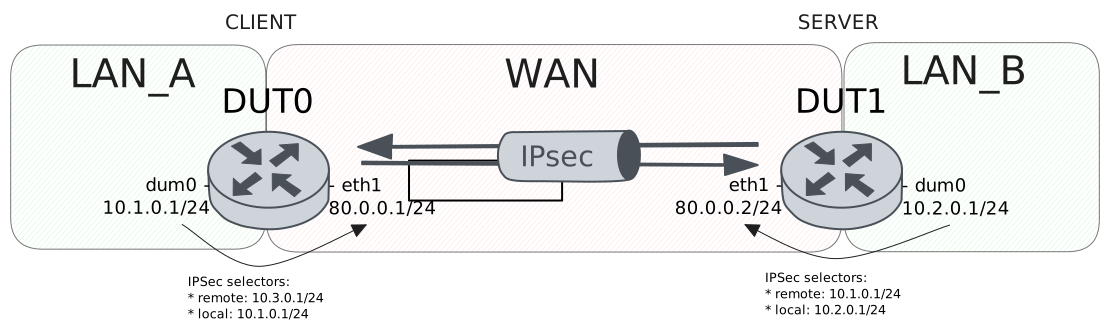
Test XAuth PSK Configuration
Description
VPN site-to-site configuration with XAuth-PSK for DUT0 (client) and pre shared secret for DUT1 (server), this last one delegates the authentication to a radius server.
Scenario
Step 1: Set the following configuration in DUT0 :
set interfaces dummy dum0 address 10.1.0.1/24
set interfaces ethernet eth0 address 10.215.168.2/24
set interfaces ethernet eth1 address 80.0.0.1/24
set protocols static route 10.2.0.0/24 interface dum0
set protocols static route 10.3.0.0/24 interface dum0
set system aaa group radius radgroup1 server serv1
set system aaa list list1 method 1 group radius radgroup1
set system aaa server radius serv1 address 10.215.168.1
set system aaa server radius serv1 encrypted-key U2FsdGVkX1/Umou2XB+lNAHPrwZbFb6h6yktx8gD/imue87xRxRuQnr7bEB+H26c2Mg1NWwDaTIeVHW3HnVVyQ==
set system login user admin authentication encrypted-password '$6$GSjsCj8gHLv$/VcqU6FLi6CT2Oxn0MJQ2C2tqnRDrYKNF8HIYWJp68nvXvPdFccDsT04.WtigUONbKYrgKg8d6rEs8PjljMkH0'
set vpn ipsec auth-profile AUTH-SA global-secrets ike-psk test encrypted-secret U2FsdGVkX19a1pwHkdUk41th32uf8Hy22bSjj97FOt43vftu6UXor0zcCi9PpMg6XtSuce08MXu0rcti3Un4Yg==
set vpn ipsec auth-profile AUTH-SA local auth ike-psk id test
set vpn ipsec auth-profile AUTH-SA mirror-config false
set vpn ipsec auth-profile AUTH-SA remote auth ike-psk id %any
set vpn ipsec auth-profile AUTH-SA remote xauth radius
set vpn ipsec esp-group CHILD-SA mode tunnel
set vpn ipsec esp-group CHILD-SA proposal 1 encryption aes256gcm128
set vpn ipsec esp-group CHILD-SA proposal 1 pfs dh-group19
set vpn ipsec ike-group IKE-SA key-exchange ikev1
set vpn ipsec ike-group IKE-SA proposal 1 dh-group 19
set vpn ipsec ike-group IKE-SA proposal 1 encryption aes256
set vpn ipsec ike-group IKE-SA proposal 1 hash sha256
set vpn ipsec logging log-types any log-level 1
set vpn ipsec radius authentication-list list1
set vpn ipsec site-to-site peer PEER auth-profile AUTH-SA
set vpn ipsec site-to-site peer PEER connection-type respond
set vpn ipsec site-to-site peer PEER default-esp-group CHILD-SA
set vpn ipsec site-to-site peer PEER ike-group IKE-SA
set vpn ipsec site-to-site peer PEER local-address 80.0.0.1
set vpn ipsec site-to-site peer PEER tunnel 1 local prefix 10.1.0.0/24
set vpn ipsec site-to-site peer PEER tunnel 1 local-interface dum0
Step 2: Set the following configuration in DUT1 :
set interfaces dummy dum0 address 10.2.0.1/24
set interfaces ethernet eth0 address 10.215.168.2/24
set interfaces ethernet eth1 address 80.0.0.2/24
set protocols static route 10.1.0.0/24 interface dum0
set system login user admin authentication encrypted-password '$6$GSjsCj8gHLv$/VcqU6FLi6CT2Oxn0MJQ2C2tqnRDrYKNF8HIYWJp68nvXvPdFccDsT04.WtigUONbKYrgKg8d6rEs8PjljMkH0'
set vpn ipsec auth-profile AUTH-SA global-secrets ike-psk test encrypted-secret U2FsdGVkX1/v+Ea0Sd0FWLTCF0vMbDa/U4z1tjvuhqhml8L7aWb+NVy89A7u+fw7dM/H3TKKw79LHUY5QSvpCw==
set vpn ipsec auth-profile AUTH-SA global-secrets xauth testing encrypted-secret U2FsdGVkX19Ysm3Tb9qwPOUeY3zKPoB1jFA8DNvWGb0=
set vpn ipsec auth-profile AUTH-SA local auth ike-psk id test
set vpn ipsec auth-profile AUTH-SA local xauth id testing
set vpn ipsec auth-profile AUTH-SA mirror-config false
set vpn ipsec auth-profile AUTH-SA remote auth ike-psk id %any
set vpn ipsec esp-group CHILD-SA mode tunnel
set vpn ipsec esp-group CHILD-SA proposal 1 encryption aes256gcm128
set vpn ipsec esp-group CHILD-SA proposal 1 pfs dh-group19
set vpn ipsec ike-group IKE-SA key-exchange ikev1
set vpn ipsec ike-group IKE-SA proposal 1 dh-group 19
set vpn ipsec ike-group IKE-SA proposal 1 encryption aes256
set vpn ipsec ike-group IKE-SA proposal 1 hash sha256
set vpn ipsec logging log-types any log-level 1
set vpn ipsec site-to-site peer PEER auth-profile AUTH-SA
set vpn ipsec site-to-site peer PEER connection-type initiate
set vpn ipsec site-to-site peer PEER default-esp-group CHILD-SA
set vpn ipsec site-to-site peer PEER ike-group IKE-SA
set vpn ipsec site-to-site peer PEER local-address 80.0.0.2
set vpn ipsec site-to-site peer PEER remote-address 80.0.0.1
set vpn ipsec site-to-site peer PEER tunnel 1 local prefix 10.2.0.0/24
set vpn ipsec site-to-site peer PEER tunnel 1 local-interface dum0
set vpn ipsec site-to-site peer PEER tunnel 1 remote prefix 10.1.0.0/24
Step 3: Ping the IP address 80.0.0.2 from DUT1:
admin@DUT1$ ping 80.0.0.2 count 1 size 56 timeout 1Show output
PING 80.0.0.2 (80.0.0.2) 56(84) bytes of data.
64 bytes from 80.0.0.2: icmp_seq=1 ttl=64 time=0.030 ms

--- 80.0.0.2 ping statistics ---
1 packets transmitted, 1 received, 0% packet loss, time 0ms
rtt min/avg/max/mdev = 0.030/0.030/0.030/0.000 ms
Step 4: Ping the IP address 80.0.0.1 from DUT0:
admin@DUT0$ ping 80.0.0.1 count 1 size 56 timeout 1Show output
PING 80.0.0.1 (80.0.0.1) 56(84) bytes of data.
64 bytes from 80.0.0.1: icmp_seq=1 ttl=64 time=0.027 ms

--- 80.0.0.1 ping statistics ---
1 packets transmitted, 1 received, 0% packet loss, time 0ms
rtt min/avg/max/mdev = 0.027/0.027/0.027/0.000 ms
Step 5: Ping the IP address 10.215.168.1 from DUT0:
admin@DUT0$ ping 10.215.168.1 count 1 size 56 timeout 1Show output
PING 10.215.168.1 (10.215.168.1) 56(84) bytes of data.
64 bytes from 10.215.168.1: icmp_seq=1 ttl=64 time=0.579 ms

--- 10.215.168.1 ping statistics ---
1 packets transmitted, 1 received, 0% packet loss, time 0ms
rtt min/avg/max/mdev = 0.579/0.579/0.579/0.000 ms
Step 6: Run the command vpn ipsec clear sa on DUT1 and expect the following output:
Show output
Closed tunnels: 1
Step 7: Run the command vpn ipsec initiate peer PEER on DUT1 and expect the following output:
Show output
Initiated tunnels: 1
Step 8: Run the command vpn ipsec show sa on DUT0 and check whether the output matches the following regular expressions:
peer-PEER-tunnel-\d+.+INSTALLEDShow output
vpn-peer-PEER: #2, ESTABLISHED, IKEv1, 0ab671a494b35c2a_i 1059372d8c35f849_r*
local  'test' @ 80.0.0.1[500]
remote 'test' @ 80.0.0.2[500] XAuth: 'testing'
AES_CBC-256/HMAC_SHA2_256_128/PRF_HMAC_SHA2_256/ECP_256
established 0s ago, rekeying in 23795s
peer-PEER-tunnel-1: #2, reqid 1, INSTALLED, TUNNEL, ESP:AES_GCM_16-256/ECP_256
installed 0s ago, rekeying in 3280s, expires in 3960s
in  cf11e87d,      0 bytes,     0 packets
out cb0299b8,      0 bytes,     0 packets
local  10.1.0.0/24
remote 10.2.0.0/24
Step 9: Ping the IP address 10.2.0.1 from DUT0:
admin@DUT0$ ping 10.2.0.1 local-address 10.1.0.1 count 1 size 56 timeout 1Show output
PING 10.2.0.1 (10.2.0.1) from 10.1.0.1 : 56(84) bytes of data.
64 bytes from 10.2.0.1: icmp_seq=1 ttl=64 time=0.822 ms

--- 10.2.0.1 ping statistics ---
1 packets transmitted, 1 received, 0% packet loss, time 0ms
rtt min/avg/max/mdev = 0.822/0.822/0.822/0.000 ms
Step 10: Ping the IP address 10.1.0.1 from DUT1:
admin@DUT1$ ping 10.1.0.1 local-address 10.2.0.1 count 1 size 56 timeout 1Show output
PING 10.1.0.1 (10.1.0.1) from 10.2.0.1 : 56(84) bytes of data.
64 bytes from 10.1.0.1: icmp_seq=1 ttl=64 time=0.355 ms

--- 10.1.0.1 ping statistics ---
1 packets transmitted, 1 received, 0% packet loss, time 0ms
rtt min/avg/max/mdev = 0.355/0.355/0.355/0.000 ms
Step 11: Run the command vpn ipsec show sa on DUT0 and check whether the output matches the following regular expressions:
[1-9]\d? packetsShow output
vpn-peer-PEER: #2, ESTABLISHED, IKEv1, 0ab671a494b35c2a_i 1059372d8c35f849_r*
local  'test' @ 80.0.0.1[500]
remote 'test' @ 80.0.0.2[500] XAuth: 'testing'
AES_CBC-256/HMAC_SHA2_256_128/PRF_HMAC_SHA2_256/ECP_256
established 1s ago, rekeying in 23794s
peer-PEER-tunnel-1: #2, reqid 1, INSTALLED, TUNNEL, ESP:AES_GCM_16-256/ECP_256
installed 1s ago, rekeying in 3279s, expires in 3959s
in  cf11e87d,    168 bytes,     2 packets,     0s ago
out cb0299b8,    168 bytes,     2 packets,     0s ago
local  10.1.0.0/24
remote 10.2.0.0/24
Test XAuth RSA Configuration
Description
Simple VPN site-to-site configuration with an authentication based on RSA signatures followed by extended authentication (XAUTH).
Scenario
Step 1: Set the following configuration in DUT0 :
set interfaces dummy dum0 address 10.1.0.1/24
set interfaces ethernet eth0 address 10.215.168.2/24
set interfaces ethernet eth1 address 80.0.0.1/24
set protocols static route 10.2.0.0/24 interface dum0
set protocols static route 10.3.0.0/24 interface dum0
set system login user admin authentication encrypted-password '$6$GSjsCj8gHLv$/VcqU6FLi6CT2Oxn0MJQ2C2tqnRDrYKNF8HIYWJp68nvXvPdFccDsT04.WtigUONbKYrgKg8d6rEs8PjljMkH0'
set vpn ipsec auth-profile AUTH-SA global-secrets xauth teldat-carol encrypted-secret U2FsdGVkX1/OGrR4NwKJXZdkN1oL0Ln9re+2FHgQBLA=
set vpn ipsec auth-profile AUTH-SA local cert-file 'running://server.crt'
set vpn ipsec auth-profile AUTH-SA local id CN=moon.teldat.org
set vpn ipsec auth-profile AUTH-SA local key file 'running://server.priv.pem'
set vpn ipsec auth-profile AUTH-SA mirror-config false
set vpn ipsec auth-profile AUTH-SA remote ca-cert-file 'running://ca.crt'
set vpn ipsec auth-profile AUTH-SA remote xauth id teldat-carol
set vpn ipsec esp-group CHILD-SA mode tunnel
set vpn ipsec esp-group CHILD-SA proposal 1 encryption aes256gcm128
set vpn ipsec esp-group CHILD-SA proposal 1 pfs dh-group19
set vpn ipsec ike-group IKE-SA key-exchange ikev1
set vpn ipsec ike-group IKE-SA proposal 1 dh-group 19
set vpn ipsec ike-group IKE-SA proposal 1 encryption aes256
set vpn ipsec ike-group IKE-SA proposal 1 hash sha256
set vpn ipsec logging log-types any log-level 1
set vpn ipsec site-to-site peer PEER auth-profile AUTH-SA
set vpn ipsec site-to-site peer PEER connection-type respond
set vpn ipsec site-to-site peer PEER default-esp-group CHILD-SA
set vpn ipsec site-to-site peer PEER ike-group IKE-SA
set vpn ipsec site-to-site peer PEER local-address 80.0.0.1
set vpn ipsec site-to-site peer PEER tunnel 1 local prefix 10.1.0.0/24
set vpn ipsec site-to-site peer PEER tunnel 1 local-interface dum0
Step 2: Set the following configuration in DUT1 :
set interfaces dummy dum0 address 10.2.0.1/24
set interfaces ethernet eth0 address 10.215.168.3/24
set interfaces ethernet eth1 address 80.0.0.2/24
set protocols static route 10.1.0.0/24 interface dum0
set system login user admin authentication encrypted-password '$6$GSjsCj8gHLv$/VcqU6FLi6CT2Oxn0MJQ2C2tqnRDrYKNF8HIYWJp68nvXvPdFccDsT04.WtigUONbKYrgKg8d6rEs8PjljMkH0'
set vpn ipsec auth-profile AUTH-SA global-secrets xauth teldat-carol encrypted-secret U2FsdGVkX186vni7SH1pl3LJHOgypKYTdXxo6SXmxao=
set vpn ipsec auth-profile AUTH-SA local cert-file 'running://client.crt'
set vpn ipsec auth-profile AUTH-SA local id CN=carol.teldat.org
set vpn ipsec auth-profile AUTH-SA local key file 'running://client.priv.pem'
set vpn ipsec auth-profile AUTH-SA local xauth id teldat-carol
set vpn ipsec auth-profile AUTH-SA mirror-config false
set vpn ipsec auth-profile AUTH-SA remote ca-cert-file 'running://ca.crt'
set vpn ipsec auth-profile AUTH-SA remote id CN=moon.teldat.org
set vpn ipsec esp-group CHILD-SA mode tunnel
set vpn ipsec esp-group CHILD-SA proposal 1 encryption aes256gcm128
set vpn ipsec esp-group CHILD-SA proposal 1 pfs dh-group19
set vpn ipsec ike-group IKE-SA key-exchange ikev1
set vpn ipsec ike-group IKE-SA proposal 1 dh-group 19
set vpn ipsec ike-group IKE-SA proposal 1 encryption aes256
set vpn ipsec ike-group IKE-SA proposal 1 hash sha256
set vpn ipsec logging log-types any log-level 1
set vpn ipsec site-to-site peer PEER auth-profile AUTH-SA
set vpn ipsec site-to-site peer PEER connection-type initiate
set vpn ipsec site-to-site peer PEER default-esp-group CHILD-SA
set vpn ipsec site-to-site peer PEER ike-group IKE-SA
set vpn ipsec site-to-site peer PEER local-address 80.0.0.2
set vpn ipsec site-to-site peer PEER remote-address 80.0.0.1
set vpn ipsec site-to-site peer PEER tunnel 1 local prefix 10.2.0.0/24
set vpn ipsec site-to-site peer PEER tunnel 1 local-interface dum0
set vpn ipsec site-to-site peer PEER tunnel 1 remote prefix 10.1.0.0/24
Step 3: Ping the IP address 80.0.0.2 from DUT1:
admin@DUT1$ ping 80.0.0.2 count 1 size 56 timeout 1Show output
PING 80.0.0.2 (80.0.0.2) 56(84) bytes of data.
64 bytes from 80.0.0.2: icmp_seq=1 ttl=64 time=0.033 ms

--- 80.0.0.2 ping statistics ---
1 packets transmitted, 1 received, 0% packet loss, time 0ms
rtt min/avg/max/mdev = 0.033/0.033/0.033/0.000 ms
Step 4: Ping the IP address 80.0.0.1 from DUT0:
admin@DUT0$ ping 80.0.0.1 count 1 size 56 timeout 1Show output
PING 80.0.0.1 (80.0.0.1) 56(84) bytes of data.
64 bytes from 80.0.0.1: icmp_seq=1 ttl=64 time=0.030 ms

--- 80.0.0.1 ping statistics ---
1 packets transmitted, 1 received, 0% packet loss, time 0ms
rtt min/avg/max/mdev = 0.030/0.030/0.030/0.000 ms
Step 5: Run the command vpn ipsec show sa on DUT0 and check whether the output matches the following regular expressions:
peer-PEER-tunnel-\d+.+INSTALLEDShow output
vpn-peer-PEER: #1, ESTABLISHED, IKEv1, f6c80fa53aaabdf5_i eefd1a6e0df7890f_r*
local  'CN=moon.teldat.org' @ 80.0.0.1[500]
remote 'CN=carol.teldat.org' @ 80.0.0.2[500] XAuth: 'teldat-carol'
AES_CBC-256/HMAC_SHA2_256_128/PRF_HMAC_SHA2_256/ECP_256
established 0s ago, rekeying in 18539s
peer-PEER-tunnel-1: #1, reqid 1, INSTALLED, TUNNEL, ESP:AES_GCM_16-256/ECP_256
installed 0s ago, rekeying in 3491s, expires in 3960s
in  c9dc67f5,      0 bytes,     0 packets
out c96ccdfc,      0 bytes,     0 packets
local  10.1.0.0/24
remote 10.2.0.0/24
Step 6: Ping the IP address 10.2.0.1 from DUT0:
admin@DUT0$ ping 10.2.0.1 local-address 10.1.0.1 count 1 size 56 timeout 1Show output
PING 10.2.0.1 (10.2.0.1) from 10.1.0.1 : 56(84) bytes of data.
64 bytes from 10.2.0.1: icmp_seq=1 ttl=64 time=0.323 ms

--- 10.2.0.1 ping statistics ---
1 packets transmitted, 1 received, 0% packet loss, time 0ms
rtt min/avg/max/mdev = 0.323/0.323/0.323/0.000 ms
Step 7: Ping the IP address 10.1.0.1 from DUT1:
admin@DUT1$ ping 10.1.0.1 local-address 10.2.0.1 count 1 size 56 timeout 1Show output
PING 10.1.0.1 (10.1.0.1) from 10.2.0.1 : 56(84) bytes of data.
64 bytes from 10.1.0.1: icmp_seq=1 ttl=64 time=0.377 ms

--- 10.1.0.1 ping statistics ---
1 packets transmitted, 1 received, 0% packet loss, time 0ms
rtt min/avg/max/mdev = 0.377/0.377/0.377/0.000 ms
Step 8: Run the command vpn ipsec show sa on DUT0 and check whether the output matches the following regular expressions:
[1-9]\d? packetsShow output
vpn-peer-PEER: #1, ESTABLISHED, IKEv1, f6c80fa53aaabdf5_i eefd1a6e0df7890f_r*
local  'CN=moon.teldat.org' @ 80.0.0.1[500]
remote 'CN=carol.teldat.org' @ 80.0.0.2[500] XAuth: 'teldat-carol'
AES_CBC-256/HMAC_SHA2_256_128/PRF_HMAC_SHA2_256/ECP_256
established 1s ago, rekeying in 18538s
peer-PEER-tunnel-1: #1, reqid 1, INSTALLED, TUNNEL, ESP:AES_GCM_16-256/ECP_256
installed 1s ago, rekeying in 3490s, expires in 3959s
in  c9dc67f5,    168 bytes,     2 packets,     0s ago
out c96ccdfc,    168 bytes,     2 packets,     0s ago
local  10.1.0.0/24
remote 10.2.0.0/24
Test XAuth With Multiple Remotes
Description
Test with multiple remotes using the same XAuth method and different secrets.
Scenario
Step 1: Set the following configuration in DUT0 :
set interfaces dummy dum0 address 10.1.0.1/24
set interfaces ethernet eth0 address 10.215.168.2/24
set interfaces ethernet eth1 address 80.0.0.1/24
set protocols static route 10.2.0.0/24 interface dum0
set protocols static route 10.3.0.0/24 interface dum0
set system login user admin authentication encrypted-password '$6$GSjsCj8gHLv$/VcqU6FLi6CT2Oxn0MJQ2C2tqnRDrYKNF8HIYWJp68nvXvPdFccDsT04.WtigUONbKYrgKg8d6rEs8PjljMkH0'
set vpn ipsec auth-profile AUTH-SA global-secrets xauth teldat-carol encrypted-secret U2FsdGVkX1+v8efNking2xqwRayFqPp2a40DULVUCYw=
set vpn ipsec auth-profile AUTH-SA global-secrets xauth teldat-dave encrypted-secret U2FsdGVkX1/6K1d8vg2TpqPk8NPbTExrL3NDT45hrsI=
set vpn ipsec auth-profile AUTH-SA local cert-file 'running://server.crt'
set vpn ipsec auth-profile AUTH-SA local id CN=moon.teldat.org
set vpn ipsec auth-profile AUTH-SA local key file 'running://server.priv.pem'
set vpn ipsec auth-profile AUTH-SA mirror-config false
set vpn ipsec auth-profile AUTH-SA remote ca-cert-file 'running://ca.crt'
set vpn ipsec auth-profile AUTH-SA remote xauth id 'keyid:^teldat-.*$'
set vpn ipsec esp-group CHILD-SA mode tunnel
set vpn ipsec esp-group CHILD-SA proposal 1 encryption aes256gcm128
set vpn ipsec esp-group CHILD-SA proposal 1 pfs dh-group19
set vpn ipsec ike-group IKE-SA key-exchange ikev1
set vpn ipsec ike-group IKE-SA proposal 1 dh-group 19
set vpn ipsec ike-group IKE-SA proposal 1 encryption aes256
set vpn ipsec ike-group IKE-SA proposal 1 hash sha256
set vpn ipsec logging log-types any log-level 1
set vpn ipsec site-to-site peer PEER auth-profile AUTH-SA
set vpn ipsec site-to-site peer PEER connection-type respond
set vpn ipsec site-to-site peer PEER default-esp-group CHILD-SA
set vpn ipsec site-to-site peer PEER ike-group IKE-SA
set vpn ipsec site-to-site peer PEER local-address 80.0.0.1
set vpn ipsec site-to-site peer PEER tunnel 1 local prefix 10.1.0.0/24
set vpn ipsec site-to-site peer PEER tunnel 1 local-interface dum0
Step 2: Set the following configuration in DUT1 :
set interfaces dummy dum0 address 10.2.0.1/24
set interfaces ethernet eth0 address 10.215.168.3/24
set interfaces ethernet eth1 address 80.0.0.2/24
set protocols static route 10.1.0.0/24 interface dum0
set system login user admin authentication encrypted-password '$6$GSjsCj8gHLv$/VcqU6FLi6CT2Oxn0MJQ2C2tqnRDrYKNF8HIYWJp68nvXvPdFccDsT04.WtigUONbKYrgKg8d6rEs8PjljMkH0'
set vpn ipsec auth-profile AUTH-SA global-secrets xauth teldat-carol encrypted-secret U2FsdGVkX1+1BoSHhLf7OviiQf/cfTBbpRvKwXGAO1w=
set vpn ipsec auth-profile AUTH-SA local cert-file 'running://client.crt'
set vpn ipsec auth-profile AUTH-SA local id CN=carol.teldat.org
set vpn ipsec auth-profile AUTH-SA local key file 'running://client.priv.pem'
set vpn ipsec auth-profile AUTH-SA local xauth id teldat-carol
set vpn ipsec auth-profile AUTH-SA mirror-config false
set vpn ipsec auth-profile AUTH-SA remote ca-cert-file 'running://ca.crt'
set vpn ipsec auth-profile AUTH-SA remote id CN=moon.teldat.org
set vpn ipsec esp-group CHILD-SA mode tunnel
set vpn ipsec esp-group CHILD-SA proposal 1 encryption aes256gcm128
set vpn ipsec esp-group CHILD-SA proposal 1 pfs dh-group19
set vpn ipsec ike-group IKE-SA key-exchange ikev1
set vpn ipsec ike-group IKE-SA proposal 1 dh-group 19
set vpn ipsec ike-group IKE-SA proposal 1 encryption aes256
set vpn ipsec ike-group IKE-SA proposal 1 hash sha256
set vpn ipsec logging log-types any log-level 1
set vpn ipsec site-to-site peer PEER auth-profile AUTH-SA
set vpn ipsec site-to-site peer PEER connection-type initiate
set vpn ipsec site-to-site peer PEER default-esp-group CHILD-SA
set vpn ipsec site-to-site peer PEER ike-group IKE-SA
set vpn ipsec site-to-site peer PEER local-address 80.0.0.2
set vpn ipsec site-to-site peer PEER remote-address 80.0.0.1
set vpn ipsec site-to-site peer PEER tunnel 1 local prefix 10.2.0.0/24
set vpn ipsec site-to-site peer PEER tunnel 1 local-interface dum0
set vpn ipsec site-to-site peer PEER tunnel 1 remote prefix 10.1.0.0/24
Step 3: Ping the IP address 80.0.0.2 from DUT1:
admin@DUT1$ ping 80.0.0.2 count 1 size 56 timeout 1Show output
PING 80.0.0.2 (80.0.0.2) 56(84) bytes of data.
64 bytes from 80.0.0.2: icmp_seq=1 ttl=64 time=0.032 ms

--- 80.0.0.2 ping statistics ---
1 packets transmitted, 1 received, 0% packet loss, time 0ms
rtt min/avg/max/mdev = 0.032/0.032/0.032/0.000 ms
Step 4: Ping the IP address 80.0.0.1 from DUT0:
admin@DUT0$ ping 80.0.0.1 count 1 size 56 timeout 1Show output
PING 80.0.0.1 (80.0.0.1) 56(84) bytes of data.
64 bytes from 80.0.0.1: icmp_seq=1 ttl=64 time=0.033 ms

--- 80.0.0.1 ping statistics ---
1 packets transmitted, 1 received, 0% packet loss, time 0ms
rtt min/avg/max/mdev = 0.033/0.033/0.033/0.000 ms
Step 5: Run the command vpn ipsec show sa on DUT0 and check whether the output matches the following regular expressions:
peer-PEER-tunnel-\d+.+INSTALLEDShow output
vpn-peer-PEER: #1, ESTABLISHED, IKEv1, 0ca6d52715e8301a_i cb3ac082ee177966_r*
local  'CN=moon.teldat.org' @ 80.0.0.1[500]
remote 'CN=carol.teldat.org' @ 80.0.0.2[500] XAuth: 'teldat-carol'
AES_CBC-256/HMAC_SHA2_256_128/PRF_HMAC_SHA2_256/ECP_256
established 0s ago, rekeying in 17329s
peer-PEER-tunnel-1: #1, reqid 1, INSTALLED, TUNNEL, ESP:AES_GCM_16-256/ECP_256
installed 0s ago, rekeying in 3370s, expires in 3960s
in  c5b600c6,      0 bytes,     0 packets
out c67270af,      0 bytes,     0 packets
local  10.1.0.0/24
remote 10.2.0.0/24
Step 6: Ping the IP address 10.2.0.1 from DUT0:
admin@DUT0$ ping 10.2.0.1 local-address 10.1.0.1 count 1 size 56 timeout 1Show output
PING 10.2.0.1 (10.2.0.1) from 10.1.0.1 : 56(84) bytes of data.
64 bytes from 10.2.0.1: icmp_seq=1 ttl=64 time=0.650 ms

--- 10.2.0.1 ping statistics ---
1 packets transmitted, 1 received, 0% packet loss, time 0ms
rtt min/avg/max/mdev = 0.650/0.650/0.650/0.000 ms
Step 7: Ping the IP address 10.1.0.1 from DUT1:
admin@DUT1$ ping 10.1.0.1 local-address 10.2.0.1 count 1 size 56 timeout 1Show output
PING 10.1.0.1 (10.1.0.1) from 10.2.0.1 : 56(84) bytes of data.
64 bytes from 10.1.0.1: icmp_seq=1 ttl=64 time=0.681 ms

--- 10.1.0.1 ping statistics ---
1 packets transmitted, 1 received, 0% packet loss, time 0ms
rtt min/avg/max/mdev = 0.681/0.681/0.681/0.000 ms
Step 8: Run the command vpn ipsec show sa on DUT0 and check whether the output matches the following regular expressions:
[1-9]\d? packetsShow output
vpn-peer-PEER: #1, ESTABLISHED, IKEv1, 0ca6d52715e8301a_i cb3ac082ee177966_r*
local  'CN=moon.teldat.org' @ 80.0.0.1[500]
remote 'CN=carol.teldat.org' @ 80.0.0.2[500] XAuth: 'teldat-carol'
AES_CBC-256/HMAC_SHA2_256_128/PRF_HMAC_SHA2_256/ECP_256
established 1s ago, rekeying in 17328s
peer-PEER-tunnel-1: #1, reqid 1, INSTALLED, TUNNEL, ESP:AES_GCM_16-256/ECP_256
installed 1s ago, rekeying in 3369s, expires in 3959s
in  c5b600c6,    168 bytes,     2 packets,     0s ago
out c67270af,    168 bytes,     2 packets,     0s ago
local  10.1.0.0/24
remote 10.2.0.0/24
Step 9: Modify the following configuration lines in DUT1 :
delete vpn ipsec auth-profile AUTH-SA global-secrets xauth teldat-carol
set vpn ipsec auth-profile AUTH-SA global-secrets xauth teldat-dave encrypted-secret U2FsdGVkX19hGituVlvY8f0sKnjyHFLe/waADE/rU7A=
set vpn ipsec auth-profile AUTH-SA local xauth id teldat-dave
Step 10: Run the command vpn ipsec clear sa on DUT1 and expect the following output:
Show output
Closed tunnels: 1
Step 11: Run the command vpn ipsec initiate peer PEER on DUT1 and expect the following output:
Show output
Initiated tunnels: 1
Step 12: Run the command vpn ipsec show sa on DUT0 and check whether the output matches the following regular expressions:
peer-PEER-tunnel-\d+.+INSTALLEDShow output
vpn-peer-PEER: #3, ESTABLISHED, IKEv1, 4b0d2c7190500b08_i 3e4e1d12bed0ef9c_r*
local  'CN=moon.teldat.org' @ 80.0.0.1[500]
remote 'CN=carol.teldat.org' @ 80.0.0.2[500] XAuth: 'teldat-dave'
AES_CBC-256/HMAC_SHA2_256_128/PRF_HMAC_SHA2_256/ECP_256
established 0s ago, rekeying in 24872s
peer-PEER-tunnel-1: #3, reqid 1, INSTALLED, TUNNEL, ESP:AES_GCM_16-256/ECP_256
installed 0s ago, rekeying in 3547s, expires in 3960s
in  c7b98db6,      0 bytes,     0 packets
out c5bcab43,      0 bytes,     0 packets
local  10.1.0.0/24
remote 10.2.0.0/24
Step 13: Ping the IP address 10.2.0.1 from DUT0:
admin@DUT0$ ping 10.2.0.1 local-address 10.1.0.1 count 1 size 56 timeout 1Show output
PING 10.2.0.1 (10.2.0.1) from 10.1.0.1 : 56(84) bytes of data.
64 bytes from 10.2.0.1: icmp_seq=1 ttl=64 time=0.447 ms

--- 10.2.0.1 ping statistics ---
1 packets transmitted, 1 received, 0% packet loss, time 0ms
rtt min/avg/max/mdev = 0.447/0.447/0.447/0.000 ms
Step 14: Ping the IP address 10.1.0.1 from DUT1:
admin@DUT1$ ping 10.1.0.1 local-address 10.2.0.1 count 1 size 56 timeout 1Show output
PING 10.1.0.1 (10.1.0.1) from 10.2.0.1 : 56(84) bytes of data.
64 bytes from 10.1.0.1: icmp_seq=1 ttl=64 time=0.360 ms

--- 10.1.0.1 ping statistics ---
1 packets transmitted, 1 received, 0% packet loss, time 0ms
rtt min/avg/max/mdev = 0.360/0.360/0.360/0.000 ms
Step 15: Run the command vpn ipsec show sa on DUT0 and check whether the output matches the following regular expressions:
[1-9]\d? packetsShow output
vpn-peer-PEER: #3, ESTABLISHED, IKEv1, 4b0d2c7190500b08_i 3e4e1d12bed0ef9c_r*
local  'CN=moon.teldat.org' @ 80.0.0.1[500]
remote 'CN=carol.teldat.org' @ 80.0.0.2[500] XAuth: 'teldat-dave'
AES_CBC-256/HMAC_SHA2_256_128/PRF_HMAC_SHA2_256/ECP_256
established 0s ago, rekeying in 24872s
peer-PEER-tunnel-1: #3, reqid 1, INSTALLED, TUNNEL, ESP:AES_GCM_16-256/ECP_256
installed 0s ago, rekeying in 3547s, expires in 3960s
in  c7b98db6,    168 bytes,     2 packets,     0s ago
out c5bcab43,    168 bytes,     2 packets,     0s ago
local  10.1.0.0/24
remote 10.2.0.0/24