X509
These scenarios show how to establish a VPN IPsec site-to-site connection between two end-points using X.509 certificates.
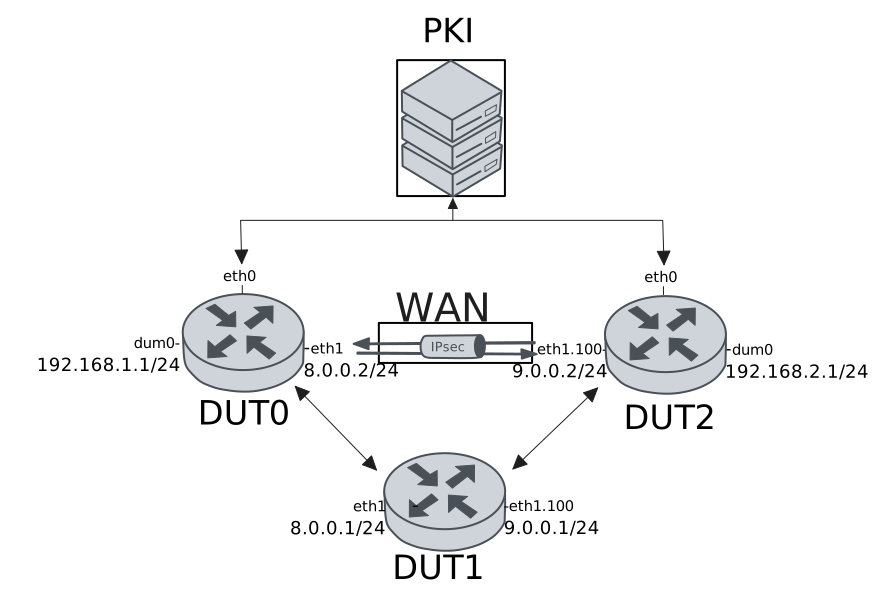
Test Local And Remote Auth With X509 Files
Description
In this scenario, both devices use pre-installed X.509 certificate files for local and remote authentication.
Scenario
Step 1: Set the following configuration in DUT1 :
set interfaces ethernet eth1 address 8.0.0.1/24
set interfaces ethernet eth1 vif 100 address 9.0.0.1/24
set system login user admin authentication encrypted-password '$6$GSjsCj8gHLv$/VcqU6FLi6CT2Oxn0MJQ2C2tqnRDrYKNF8HIYWJp68nvXvPdFccDsT04.WtigUONbKYrgKg8d6rEs8PjljMkH0'
Step 2: Set the following configuration in DUT2 :
set interfaces dummy dum0 address 192.168.2.1/24
set interfaces ethernet eth0 address 10.215.168.66/24
set interfaces ethernet eth1 vif 100 address 9.0.0.2/24
set protocols static route 0.0.0.0/0 next-hop 9.0.0.1
set system login user admin authentication encrypted-password '$6$GSjsCj8gHLv$/VcqU6FLi6CT2Oxn0MJQ2C2tqnRDrYKNF8HIYWJp68nvXvPdFccDsT04.WtigUONbKYrgKg8d6rEs8PjljMkH0'
set vpn ipsec auth-profile AUTH local ca-cert-file 'running://ca.pem'
set vpn ipsec auth-profile AUTH local ca-cert-file 'running://root.pem'
set vpn ipsec auth-profile AUTH local cert-file 'running://dut2.pem'
set vpn ipsec auth-profile AUTH local key file 'running://dut2.key'
set vpn ipsec auth-profile AUTH mirror-config false
set vpn ipsec auth-profile AUTH mode x509
set vpn ipsec auth-profile AUTH remote ca-cert-file 'running://ca.pem'
set vpn ipsec auth-profile AUTH remote ca-cert-file 'running://root.pem'
set vpn ipsec esp-group ESP-POLICY lifetime 28800
set vpn ipsec esp-group ESP-POLICY proposal 1 encryption null
set vpn ipsec esp-group ESP-POLICY proposal 1 hash sha1
set vpn ipsec esp-group ESP-POLICY proposal 1 pfs dh-group15
set vpn ipsec ike-group IKE-POLICY key-exchange ikev2
set vpn ipsec ike-group IKE-POLICY lifetime 28800
set vpn ipsec ike-group IKE-POLICY proposal 1 dh-group 15
set vpn ipsec ike-group IKE-POLICY proposal 1 encryption null
set vpn ipsec ike-group IKE-POLICY proposal 1 hash sha1
set vpn ipsec logging log-types any log-level 1
set vpn ipsec site-to-site peer PEER auth-profile AUTH
set vpn ipsec site-to-site peer PEER connection-type respond
set vpn ipsec site-to-site peer PEER ike-group IKE-POLICY
set vpn ipsec site-to-site peer PEER local-address 9.0.0.2
set vpn ipsec site-to-site peer PEER remote-address 8.0.0.2
set vpn ipsec site-to-site peer PEER tunnel 1 esp-group ESP-POLICY
set vpn ipsec site-to-site peer PEER tunnel 1 local prefix 192.168.2.0/24
set vpn ipsec site-to-site peer PEER tunnel 1 remote prefix 192.168.1.0/24
Step 3: Ping the IP address 9.0.0.1 from DUT2:
admin@DUT2$ ping 9.0.0.1 count 1 size 56 timeout 1Show output
PING 9.0.0.1 (9.0.0.1) 56(84) bytes of data.
64 bytes from 9.0.0.1: icmp_seq=1 ttl=64 time=0.367 ms

--- 9.0.0.1 ping statistics ---
1 packets transmitted, 1 received, 0% packet loss, time 0ms
rtt min/avg/max/mdev = 0.367/0.367/0.367/0.000 ms
Step 4: Set the following configuration in DUT0 :
set interfaces dummy dum0 address 192.168.1.1/24
set interfaces ethernet eth0 address 10.215.168.64/24
set interfaces ethernet eth1 address 8.0.0.2/24
set protocols static route 0.0.0.0/0 next-hop 8.0.0.1
set system login user admin authentication encrypted-password '$6$GSjsCj8gHLv$/VcqU6FLi6CT2Oxn0MJQ2C2tqnRDrYKNF8HIYWJp68nvXvPdFccDsT04.WtigUONbKYrgKg8d6rEs8PjljMkH0'
set vpn ipsec auth-profile AUTH local ca-cert-file 'running://ca.pem'
set vpn ipsec auth-profile AUTH local ca-cert-file 'running://root.pem'
set vpn ipsec auth-profile AUTH local cert-file 'running://dut0.pem'
set vpn ipsec auth-profile AUTH local key file 'running://dut0.key'
set vpn ipsec auth-profile AUTH mirror-config false
set vpn ipsec auth-profile AUTH mode x509
set vpn ipsec auth-profile AUTH remote ca-cert-file 'running://ca.pem'
set vpn ipsec auth-profile AUTH remote ca-cert-file 'running://root.pem'
set vpn ipsec esp-group ESP-POLICY lifetime 28800
set vpn ipsec esp-group ESP-POLICY proposal 1 encryption null
set vpn ipsec esp-group ESP-POLICY proposal 1 hash sha1
set vpn ipsec esp-group ESP-POLICY proposal 1 pfs dh-group15
set vpn ipsec ike-group IKE-POLICY key-exchange ikev2
set vpn ipsec ike-group IKE-POLICY lifetime 28800
set vpn ipsec ike-group IKE-POLICY proposal 1 dh-group 15
set vpn ipsec ike-group IKE-POLICY proposal 1 encryption null
set vpn ipsec ike-group IKE-POLICY proposal 1 hash sha1
set vpn ipsec logging log-types any log-level 1
set vpn ipsec site-to-site peer PEER auth-profile AUTH
set vpn ipsec site-to-site peer PEER connection-type on-demand
set vpn ipsec site-to-site peer PEER ike-group IKE-POLICY
set vpn ipsec site-to-site peer PEER local-address 8.0.0.2
set vpn ipsec site-to-site peer PEER remote-address 9.0.0.2
set vpn ipsec site-to-site peer PEER tunnel 1 esp-group ESP-POLICY
set vpn ipsec site-to-site peer PEER tunnel 1 local prefix 192.168.1.0/24
set vpn ipsec site-to-site peer PEER tunnel 1 remote prefix 192.168.2.0/24
Step 5: Ping the IP address 8.0.0.1 from DUT0:
admin@DUT0$ ping 8.0.0.1 count 1 size 56 timeout 1Show output
PING 8.0.0.1 (8.0.0.1) 56(84) bytes of data.
64 bytes from 8.0.0.1: icmp_seq=1 ttl=64 time=0.786 ms

--- 8.0.0.1 ping statistics ---
1 packets transmitted, 1 received, 0% packet loss, time 0ms
rtt min/avg/max/mdev = 0.786/0.786/0.786/0.000 ms
Step 6: Ping the IP address 192.168.2.1 from DUT0:
admin@DUT0$ ping 192.168.2.1 local-address 192.168.1.1 count 1 size 56 timeout 1Show output
PING 192.168.2.1 (192.168.2.1) from 192.168.1.1 : 56(84) bytes of data.
64 bytes from 192.168.2.1: icmp_seq=1 ttl=64 time=0.502 ms

--- 192.168.2.1 ping statistics ---
1 packets transmitted, 1 received, 0% packet loss, time 0ms
rtt min/avg/max/mdev = 0.502/0.502/0.502/0.000 ms
Step 7: Ping the IP address 192.168.1.1 from DUT2:
admin@DUT2$ ping 192.168.1.1 local-address 192.168.2.1 count 1 size 56 timeout 1Show output
PING 192.168.1.1 (192.168.1.1) from 192.168.2.1 : 56(84) bytes of data.
64 bytes from 192.168.1.1: icmp_seq=1 ttl=64 time=0.513 ms

--- 192.168.1.1 ping statistics ---
1 packets transmitted, 1 received, 0% packet loss, time 0ms
rtt min/avg/max/mdev = 0.513/0.513/0.513/0.000 ms
Step 8: Run the command vpn ipsec show sa on DUT0 and check whether the output matches the following regular expressions:
vpn-peer-PEER: \#\d, ESTABLISHED, IKEv2
[1-9]\d* packets,
Show output
vpn-peer-PEER: #1, ESTABLISHED, IKEv2, ab5fcd03b018c227_i* 4fd065e9f1229801_r
local  'C=ES, O=Teldat, CN=DUT0' @ 8.0.0.2[500]
remote 'C=ES, O=Teldat, CN=DUT2' @ 9.0.0.2[500]
NULL/HMAC_SHA1_96/PRF_HMAC_SHA1/MODP_3072
established 2s ago, rekeying in 22213s
peer-PEER-tunnel-1: #2, reqid 1, INSTALLED, TUNNEL, ESP:NULL/HMAC_SHA1_96
installed 2s ago, rekeying in 22841s, expires in 28798s
in  c97eb14e,    168 bytes,     2 packets,     0s ago
out cd010f44,    168 bytes,     2 packets,     0s ago
local  192.168.1.0/24
remote 192.168.2.0/24
Test Local Auth With SCEP And Remote Auth With X509 Files
Description
In this scenario, DUT0 uses SCEP for local authentication, while the remote peer is authenticated using X.509 certificate files.
Scenario
Step 1: Set the following configuration in DUT1 :
set interfaces ethernet eth1 address 8.0.0.1/24
set interfaces ethernet eth1 vif 100 address 9.0.0.1/24
set system login user admin authentication encrypted-password '$6$GSjsCj8gHLv$/VcqU6FLi6CT2Oxn0MJQ2C2tqnRDrYKNF8HIYWJp68nvXvPdFccDsT04.WtigUONbKYrgKg8d6rEs8PjljMkH0'
Step 2: Set the following configuration in DUT2 :
set interfaces dummy dum0 address 192.168.2.1/24
set interfaces ethernet eth0 address 10.215.168.66/24
set interfaces ethernet eth1 vif 100 address 9.0.0.2/24
set protocols static route 0.0.0.0/0 next-hop 9.0.0.1
set system certificate scep csr CSR cgi-path /scep
set system certificate scep csr CSR cipher aes
set system certificate scep csr CSR distinguished-names CN=DUT2
set system certificate scep csr CSR encrypted-password U2FsdGVkX1/hXmgfDqfeZpQlcp++77XNZkCI9T5fuNo=
set system certificate scep csr CSR port 8080
set system certificate scep csr CSR url 'http://10.215.168.1'
set system login user admin authentication encrypted-password '$6$GSjsCj8gHLv$/VcqU6FLi6CT2Oxn0MJQ2C2tqnRDrYKNF8HIYWJp68nvXvPdFccDsT04.WtigUONbKYrgKg8d6rEs8PjljMkH0'
set vpn ipsec auth-profile AUTH local ca-cert-file 'running://ca.pem'
set vpn ipsec auth-profile AUTH local ca-cert-file 'running://root.pem'
set vpn ipsec auth-profile AUTH local cert-file 'running://dut2.pem'
set vpn ipsec auth-profile AUTH local key file 'running://dut2.key'
set vpn ipsec auth-profile AUTH mirror-config false
set vpn ipsec auth-profile AUTH mode x509
set vpn ipsec auth-profile AUTH remote csr CSR
set vpn ipsec esp-group ESP-POLICY lifetime 28800
set vpn ipsec esp-group ESP-POLICY proposal 1 encryption null
set vpn ipsec esp-group ESP-POLICY proposal 1 hash sha1
set vpn ipsec esp-group ESP-POLICY proposal 1 pfs dh-group15
set vpn ipsec ike-group IKE-POLICY key-exchange ikev2
set vpn ipsec ike-group IKE-POLICY lifetime 28800
set vpn ipsec ike-group IKE-POLICY proposal 1 dh-group 15
set vpn ipsec ike-group IKE-POLICY proposal 1 encryption null
set vpn ipsec ike-group IKE-POLICY proposal 1 hash sha1
set vpn ipsec logging log-types any log-level 1
set vpn ipsec site-to-site peer PEER auth-profile AUTH
set vpn ipsec site-to-site peer PEER connection-type respond
set vpn ipsec site-to-site peer PEER ike-group IKE-POLICY
set vpn ipsec site-to-site peer PEER local-address 9.0.0.2
set vpn ipsec site-to-site peer PEER remote-address 8.0.0.2
set vpn ipsec site-to-site peer PEER tunnel 1 esp-group ESP-POLICY
set vpn ipsec site-to-site peer PEER tunnel 1 local prefix 192.168.2.0/24
set vpn ipsec site-to-site peer PEER tunnel 1 remote prefix 192.168.1.0/24
Step 3: Ping the IP address 9.0.0.1 from DUT2:
admin@DUT2$ ping 9.0.0.1 count 1 size 56 timeout 1Show output
PING 9.0.0.1 (9.0.0.1) 56(84) bytes of data.
64 bytes from 9.0.0.1: icmp_seq=1 ttl=64 time=0.392 ms

--- 9.0.0.1 ping statistics ---
1 packets transmitted, 1 received, 0% packet loss, time 0ms
rtt min/avg/max/mdev = 0.392/0.392/0.392/0.000 ms
Step 4: Run the command pki scep show CSR on DUT2 and check whether the output matches the following regular expressions:
ca\s+Valid
usercert\s+Valid
Show output
-------------------------------------------------------------------------------------------------
Certificate  Status           Usage                   NotBefore                  NotAfter
-------------------------------------------------------------------------------------------------
ca           Valid   Encipherment & Signature  Apr 16 09:19:39 2025 GMT  Apr 11 09:19:39 2045 GMT
usercert     Valid   -                         Sep 16 19:11:06 2026 GMT  Sep 16 19:11:06 2027 GMT
Step 5: Set the following configuration in DUT0 :
set interfaces dummy dum0 address 192.168.1.1/24
set interfaces ethernet eth0 address 10.215.168.64/24
set interfaces ethernet eth1 address 8.0.0.2/24
set protocols static route 0.0.0.0/0 next-hop 8.0.0.1
set system certificate scep csr CSR cgi-path /scep
set system certificate scep csr CSR cipher aes
set system certificate scep csr CSR distinguished-names CN=DUT0
set system certificate scep csr CSR encrypted-password U2FsdGVkX1+ZgtIsOlQPpRk6HzPGu+5pREGFl1P81RE=
set system certificate scep csr CSR port 8080
set system certificate scep csr CSR url 'http://10.215.168.1'
set system login user admin authentication encrypted-password '$6$GSjsCj8gHLv$/VcqU6FLi6CT2Oxn0MJQ2C2tqnRDrYKNF8HIYWJp68nvXvPdFccDsT04.WtigUONbKYrgKg8d6rEs8PjljMkH0'
set vpn ipsec auth-profile AUTH local csr CSR
set vpn ipsec auth-profile AUTH mirror-config false
set vpn ipsec auth-profile AUTH mode x509
set vpn ipsec auth-profile AUTH remote ca-cert-file 'running://ca.pem'
set vpn ipsec auth-profile AUTH remote ca-cert-file 'running://root.pem'
set vpn ipsec esp-group ESP-POLICY lifetime 28800
set vpn ipsec esp-group ESP-POLICY proposal 1 encryption null
set vpn ipsec esp-group ESP-POLICY proposal 1 hash sha1
set vpn ipsec esp-group ESP-POLICY proposal 1 pfs dh-group15
set vpn ipsec ike-group IKE-POLICY key-exchange ikev2
set vpn ipsec ike-group IKE-POLICY lifetime 28800
set vpn ipsec ike-group IKE-POLICY proposal 1 dh-group 15
set vpn ipsec ike-group IKE-POLICY proposal 1 encryption null
set vpn ipsec ike-group IKE-POLICY proposal 1 hash sha1
set vpn ipsec logging log-types any log-level 1
set vpn ipsec site-to-site peer PEER auth-profile AUTH
set vpn ipsec site-to-site peer PEER connection-type on-demand
set vpn ipsec site-to-site peer PEER ike-group IKE-POLICY
set vpn ipsec site-to-site peer PEER local-address 8.0.0.2
set vpn ipsec site-to-site peer PEER remote-address 9.0.0.2
set vpn ipsec site-to-site peer PEER tunnel 1 esp-group ESP-POLICY
set vpn ipsec site-to-site peer PEER tunnel 1 local prefix 192.168.1.0/24
set vpn ipsec site-to-site peer PEER tunnel 1 remote prefix 192.168.2.0/24
Step 6: Ping the IP address 8.0.0.1 from DUT0:
admin@DUT0$ ping 8.0.0.1 count 1 size 56 timeout 1Show output
PING 8.0.0.1 (8.0.0.1) 56(84) bytes of data.
64 bytes from 8.0.0.1: icmp_seq=1 ttl=64 time=0.465 ms

--- 8.0.0.1 ping statistics ---
1 packets transmitted, 1 received, 0% packet loss, time 0ms
rtt min/avg/max/mdev = 0.465/0.465/0.465/0.000 ms
Step 7: Run the command pki scep show CSR on DUT0 and check whether the output matches the following regular expressions:
ca\s+Valid
usercert\s+Valid
Show output
-------------------------------------------------------------------------------------------------
Certificate  Status           Usage                   NotBefore                  NotAfter
-------------------------------------------------------------------------------------------------
ca           Valid   Encipherment & Signature  Apr 16 09:19:39 2025 GMT  Apr 11 09:19:39 2045 GMT
usercert     Valid   -                         Sep 16 19:11:45 2026 GMT  Sep 16 19:11:45 2027 GMT
Step 8: Ping the IP address 192.168.2.1 from DUT0:
admin@DUT0$ ping 192.168.2.1 local-address 192.168.1.1 count 1 size 56 timeout 1Show output
PING 192.168.2.1 (192.168.2.1) from 192.168.1.1 : 56(84) bytes of data.
64 bytes from 192.168.2.1: icmp_seq=1 ttl=64 time=0.646 ms

--- 192.168.2.1 ping statistics ---
1 packets transmitted, 1 received, 0% packet loss, time 0ms
rtt min/avg/max/mdev = 0.646/0.646/0.646/0.000 ms
Step 9: Ping the IP address 192.168.1.1 from DUT2:
admin@DUT2$ ping 192.168.1.1 local-address 192.168.2.1 count 1 size 56 timeout 1Show output
PING 192.168.1.1 (192.168.1.1) from 192.168.2.1 : 56(84) bytes of data.
64 bytes from 192.168.1.1: icmp_seq=1 ttl=64 time=0.586 ms

--- 192.168.1.1 ping statistics ---
1 packets transmitted, 1 received, 0% packet loss, time 0ms
rtt min/avg/max/mdev = 0.586/0.586/0.586/0.000 ms
Step 10: Run the command vpn ipsec show sa on DUT0 and check whether the output matches the following regular expressions:
vpn-peer-PEER: \#\d, ESTABLISHED, IKEv2
[1-9]\d* packets,
Show output
vpn-peer-PEER: #1, ESTABLISHED, IKEv2, d733835c82cf23d7_i* 485aec6f18a7c3ae_r
local  'CN=DUT0' @ 8.0.0.2[500]
remote 'C=ES, O=Teldat, CN=DUT2' @ 9.0.0.2[500]
NULL/HMAC_SHA1_96/PRF_HMAC_SHA1/MODP_3072
established 2s ago, rekeying in 19907s
peer-PEER-tunnel-1: #2, reqid 1, INSTALLED, TUNNEL, ESP:NULL/HMAC_SHA1_96
installed 2s ago, rekeying in 14935s, expires in 28798s
in  c7f8282d,    168 bytes,     2 packets,     0s ago
out c44316db,    168 bytes,     2 packets,     0s ago
local  192.168.1.0/24
remote 192.168.2.0/24
Test Local Auth With X509 Files And Remote Auth With SCEP
Description
In this scenario, DUT0 uses SCEP for remote authentication, while local authentication relies on X.509 certificate files.
Scenario
Step 1: Set the following configuration in DUT1 :
set interfaces ethernet eth1 address 8.0.0.1/24
set interfaces ethernet eth1 vif 100 address 9.0.0.1/24
set system login user admin authentication encrypted-password '$6$GSjsCj8gHLv$/VcqU6FLi6CT2Oxn0MJQ2C2tqnRDrYKNF8HIYWJp68nvXvPdFccDsT04.WtigUONbKYrgKg8d6rEs8PjljMkH0'
Step 2: Set the following configuration in DUT2 :
set interfaces dummy dum0 address 192.168.2.1/24
set interfaces ethernet eth0 address 10.215.168.66/24
set interfaces ethernet eth1 vif 100 address 9.0.0.2/24
set protocols static route 0.0.0.0/0 next-hop 9.0.0.1
set system certificate scep csr CSR cgi-path /scep
set system certificate scep csr CSR cipher aes
set system certificate scep csr CSR distinguished-names CN=DUT2
set system certificate scep csr CSR encrypted-password U2FsdGVkX19+nK+tBKsLCwyT5LyjYEWaqZRNP+fu6Qo=
set system certificate scep csr CSR port 8080
set system certificate scep csr CSR url 'http://10.215.168.1'
set system login user admin authentication encrypted-password '$6$GSjsCj8gHLv$/VcqU6FLi6CT2Oxn0MJQ2C2tqnRDrYKNF8HIYWJp68nvXvPdFccDsT04.WtigUONbKYrgKg8d6rEs8PjljMkH0'
set vpn ipsec auth-profile AUTH local csr CSR
set vpn ipsec auth-profile AUTH mirror-config false
set vpn ipsec auth-profile AUTH mode x509
set vpn ipsec auth-profile AUTH remote ca-cert-file 'running://ca.pem'
set vpn ipsec auth-profile AUTH remote ca-cert-file 'running://root.pem'
set vpn ipsec esp-group ESP-POLICY lifetime 28800
set vpn ipsec esp-group ESP-POLICY proposal 1 encryption null
set vpn ipsec esp-group ESP-POLICY proposal 1 hash sha1
set vpn ipsec esp-group ESP-POLICY proposal 1 pfs dh-group15
set vpn ipsec ike-group IKE-POLICY key-exchange ikev2
set vpn ipsec ike-group IKE-POLICY lifetime 28800
set vpn ipsec ike-group IKE-POLICY proposal 1 dh-group 15
set vpn ipsec ike-group IKE-POLICY proposal 1 encryption null
set vpn ipsec ike-group IKE-POLICY proposal 1 hash sha1
set vpn ipsec logging log-types any log-level 1
set vpn ipsec site-to-site peer PEER auth-profile AUTH
set vpn ipsec site-to-site peer PEER connection-type respond
set vpn ipsec site-to-site peer PEER ike-group IKE-POLICY
set vpn ipsec site-to-site peer PEER local-address 9.0.0.2
set vpn ipsec site-to-site peer PEER remote-address 8.0.0.2
set vpn ipsec site-to-site peer PEER tunnel 1 esp-group ESP-POLICY
set vpn ipsec site-to-site peer PEER tunnel 1 local prefix 192.168.2.0/24
set vpn ipsec site-to-site peer PEER tunnel 1 remote prefix 192.168.1.0/24
Step 3: Ping the IP address 9.0.0.1 from DUT2:
admin@DUT2$ ping 9.0.0.1 count 1 size 56 timeout 1Show output
PING 9.0.0.1 (9.0.0.1) 56(84) bytes of data.
64 bytes from 9.0.0.1: icmp_seq=1 ttl=64 time=0.363 ms

--- 9.0.0.1 ping statistics ---
1 packets transmitted, 1 received, 0% packet loss, time 0ms
rtt min/avg/max/mdev = 0.363/0.363/0.363/0.000 ms
Step 4: Run the command pki scep show CSR on DUT2 and check whether the output matches the following regular expressions:
ca\s+Valid
usercert\s+Valid
Show output
-------------------------------------------------------------------------------------------------
Certificate  Status           Usage                   NotBefore                  NotAfter
-------------------------------------------------------------------------------------------------
ca           Valid   Encipherment & Signature  Apr 16 09:19:39 2025 GMT  Apr 11 09:19:39 2045 GMT
usercert     Valid   -                         Sep 16 19:12:35 2026 GMT  Sep 16 19:12:35 2027 GMT
Step 5: Set the following configuration in DUT0 :
set interfaces dummy dum0 address 192.168.1.1/24
set interfaces ethernet eth0 address 10.215.168.64/24
set interfaces ethernet eth1 address 8.0.0.2/24
set protocols static route 0.0.0.0/0 next-hop 8.0.0.1
set system certificate scep csr CSR cgi-path /scep
set system certificate scep csr CSR cipher aes
set system certificate scep csr CSR distinguished-names CN=DUT0
set system certificate scep csr CSR encrypted-password U2FsdGVkX18Ff1tBgDP7G613wAd0TTetW235fpdOTZM=
set system certificate scep csr CSR port 8080
set system certificate scep csr CSR url 'http://10.215.168.1'
set system login user admin authentication encrypted-password '$6$GSjsCj8gHLv$/VcqU6FLi6CT2Oxn0MJQ2C2tqnRDrYKNF8HIYWJp68nvXvPdFccDsT04.WtigUONbKYrgKg8d6rEs8PjljMkH0'
set vpn ipsec auth-profile AUTH local ca-cert-file 'running://ca.pem'
set vpn ipsec auth-profile AUTH local ca-cert-file 'running://root.pem'
set vpn ipsec auth-profile AUTH local cert-file 'running://dut0.pem'
set vpn ipsec auth-profile AUTH local key file 'running://dut0.key'
set vpn ipsec auth-profile AUTH mirror-config false
set vpn ipsec auth-profile AUTH mode x509
set vpn ipsec auth-profile AUTH remote csr CSR
set vpn ipsec esp-group ESP-POLICY lifetime 28800
set vpn ipsec esp-group ESP-POLICY proposal 1 encryption null
set vpn ipsec esp-group ESP-POLICY proposal 1 hash sha1
set vpn ipsec esp-group ESP-POLICY proposal 1 pfs dh-group15
set vpn ipsec ike-group IKE-POLICY key-exchange ikev2
set vpn ipsec ike-group IKE-POLICY lifetime 28800
set vpn ipsec ike-group IKE-POLICY proposal 1 dh-group 15
set vpn ipsec ike-group IKE-POLICY proposal 1 encryption null
set vpn ipsec ike-group IKE-POLICY proposal 1 hash sha1
set vpn ipsec logging log-types any log-level 1
set vpn ipsec site-to-site peer PEER auth-profile AUTH
set vpn ipsec site-to-site peer PEER connection-type on-demand
set vpn ipsec site-to-site peer PEER ike-group IKE-POLICY
set vpn ipsec site-to-site peer PEER local-address 8.0.0.2
set vpn ipsec site-to-site peer PEER remote-address 9.0.0.2
set vpn ipsec site-to-site peer PEER tunnel 1 esp-group ESP-POLICY
set vpn ipsec site-to-site peer PEER tunnel 1 local prefix 192.168.1.0/24
set vpn ipsec site-to-site peer PEER tunnel 1 remote prefix 192.168.2.0/24
Step 6: Ping the IP address 8.0.0.1 from DUT0:
admin@DUT0$ ping 8.0.0.1 count 1 size 56 timeout 1Show output
PING 8.0.0.1 (8.0.0.1) 56(84) bytes of data.
64 bytes from 8.0.0.1: icmp_seq=1 ttl=64 time=1.66 ms

--- 8.0.0.1 ping statistics ---
1 packets transmitted, 1 received, 0% packet loss, time 0ms
rtt min/avg/max/mdev = 1.660/1.660/1.660/0.000 ms
Step 7: Run the command pki scep show CSR on DUT0 and check whether the output matches the following regular expressions:
ca\s+Valid
usercert\s+Valid
Show output
-------------------------------------------------------------------------------------------------
Certificate  Status           Usage                   NotBefore                  NotAfter
-------------------------------------------------------------------------------------------------
ca           Valid   Encipherment & Signature  Apr 16 09:19:39 2025 GMT  Apr 11 09:19:39 2045 GMT
usercert     Valid   -                         Sep 16 19:13:15 2026 GMT  Sep 16 19:13:15 2027 GMT
Step 8: Ping the IP address 192.168.2.1 from DUT0:
admin@DUT0$ ping 192.168.2.1 local-address 192.168.1.1 count 1 size 56 timeout 1Show output
PING 192.168.2.1 (192.168.2.1) from 192.168.1.1 : 56(84) bytes of data.
64 bytes from 192.168.2.1: icmp_seq=1 ttl=64 time=0.591 ms

--- 192.168.2.1 ping statistics ---
1 packets transmitted, 1 received, 0% packet loss, time 0ms
rtt min/avg/max/mdev = 0.591/0.591/0.591/0.000 ms
Step 9: Ping the IP address 192.168.1.1 from DUT2:
admin@DUT2$ ping 192.168.1.1 local-address 192.168.2.1 count 1 size 56 timeout 1Show output
PING 192.168.1.1 (192.168.1.1) from 192.168.2.1 : 56(84) bytes of data.
64 bytes from 192.168.1.1: icmp_seq=1 ttl=64 time=0.512 ms

--- 192.168.1.1 ping statistics ---
1 packets transmitted, 1 received, 0% packet loss, time 0ms
rtt min/avg/max/mdev = 0.512/0.512/0.512/0.000 ms
Step 10: Run the command vpn ipsec show sa on DUT0 and check whether the output matches the following regular expressions:
vpn-peer-PEER: \#\d, ESTABLISHED, IKEv2
[1-9]\d* packets,
Show output
vpn-peer-PEER: #1, ESTABLISHED, IKEv2, fdc61f884245d59e_i* c534e5924a2d4964_r
local  'C=ES, O=Teldat, CN=DUT0' @ 8.0.0.2[500]
remote 'CN=DUT2' @ 9.0.0.2[500]
NULL/HMAC_SHA1_96/PRF_HMAC_SHA1/MODP_3072
established 2s ago, rekeying in 20474s
peer-PEER-tunnel-1: #2, reqid 1, INSTALLED, TUNNEL, ESP:NULL/HMAC_SHA1_96
installed 2s ago, rekeying in 17174s, expires in 28798s
in  cbfbcffe,    168 bytes,     2 packets,     1s ago
out c3948c01,    168 bytes,     2 packets,     1s ago
local  192.168.1.0/24
remote 192.168.2.0/24
Test Local And Remote Auth With SCEP
Description
In this scenario, both devices use SCEP for local and remote authentication.
Scenario
Step 1: Set the following configuration in DUT1 :
set interfaces ethernet eth1 address 8.0.0.1/24
set interfaces ethernet eth1 vif 100 address 9.0.0.1/24
set system login user admin authentication encrypted-password '$6$GSjsCj8gHLv$/VcqU6FLi6CT2Oxn0MJQ2C2tqnRDrYKNF8HIYWJp68nvXvPdFccDsT04.WtigUONbKYrgKg8d6rEs8PjljMkH0'
Step 2: Set the following configuration in DUT2 :
set interfaces dummy dum0 address 192.168.2.1/24
set interfaces ethernet eth0 address 10.215.168.66/24
set interfaces ethernet eth1 vif 100 address 9.0.0.2/24
set protocols static route 0.0.0.0/0 next-hop 9.0.0.1
set system certificate scep csr CSR cgi-path /scep
set system certificate scep csr CSR cipher aes
set system certificate scep csr CSR distinguished-names CN=DUT2
set system certificate scep csr CSR encrypted-password U2FsdGVkX192IyLO7lK2Paoc7J08lI0AlmESL5Vhn88=
set system certificate scep csr CSR port 8080
set system certificate scep csr CSR url 'http://10.215.168.1'
set system login user admin authentication encrypted-password '$6$GSjsCj8gHLv$/VcqU6FLi6CT2Oxn0MJQ2C2tqnRDrYKNF8HIYWJp68nvXvPdFccDsT04.WtigUONbKYrgKg8d6rEs8PjljMkH0'
set vpn ipsec auth-profile AUTH local csr CSR
set vpn ipsec auth-profile AUTH mirror-config false
set vpn ipsec auth-profile AUTH mode x509
set vpn ipsec auth-profile AUTH remote csr CSR
set vpn ipsec esp-group ESP-POLICY lifetime 28800
set vpn ipsec esp-group ESP-POLICY proposal 1 encryption null
set vpn ipsec esp-group ESP-POLICY proposal 1 hash sha1
set vpn ipsec esp-group ESP-POLICY proposal 1 pfs dh-group15
set vpn ipsec ike-group IKE-POLICY key-exchange ikev2
set vpn ipsec ike-group IKE-POLICY lifetime 28800
set vpn ipsec ike-group IKE-POLICY proposal 1 dh-group 15
set vpn ipsec ike-group IKE-POLICY proposal 1 encryption null
set vpn ipsec ike-group IKE-POLICY proposal 1 hash sha1
set vpn ipsec logging log-types any log-level 1
set vpn ipsec site-to-site peer PEER auth-profile AUTH
set vpn ipsec site-to-site peer PEER connection-type respond
set vpn ipsec site-to-site peer PEER ike-group IKE-POLICY
set vpn ipsec site-to-site peer PEER local-address 9.0.0.2
set vpn ipsec site-to-site peer PEER remote-address 8.0.0.2
set vpn ipsec site-to-site peer PEER tunnel 1 esp-group ESP-POLICY
set vpn ipsec site-to-site peer PEER tunnel 1 local prefix 192.168.2.0/24
set vpn ipsec site-to-site peer PEER tunnel 1 remote prefix 192.168.1.0/24
Step 3: Ping the IP address 9.0.0.1 from DUT2:
admin@DUT2$ ping 9.0.0.1 count 1 size 56 timeout 1Show output
PING 9.0.0.1 (9.0.0.1) 56(84) bytes of data.
64 bytes from 9.0.0.1: icmp_seq=1 ttl=64 time=0.428 ms

--- 9.0.0.1 ping statistics ---
1 packets transmitted, 1 received, 0% packet loss, time 0ms
rtt min/avg/max/mdev = 0.428/0.428/0.428/0.000 ms
Step 4: Run the command pki scep show CSR on DUT2 and check whether the output matches the following regular expressions:
ca\s+Valid
usercert\s+Valid
Show output
-------------------------------------------------------------------------------------------------
Certificate  Status           Usage                   NotBefore                  NotAfter
-------------------------------------------------------------------------------------------------
ca           Valid   Encipherment & Signature  Apr 16 09:19:39 2025 GMT  Apr 11 09:19:39 2045 GMT
usercert     Valid   -                         Sep 16 19:14:03 2026 GMT  Sep 16 19:14:03 2027 GMT
Step 5: Set the following configuration in DUT0 :
set interfaces dummy dum0 address 192.168.1.1/24
set interfaces ethernet eth0 address 10.215.168.64/24
set interfaces ethernet eth1 address 8.0.0.2/24
set protocols static route 0.0.0.0/0 next-hop 8.0.0.1
set system certificate scep csr CSR cgi-path /scep
set system certificate scep csr CSR cipher aes
set system certificate scep csr CSR distinguished-names CN=DUT0
set system certificate scep csr CSR encrypted-password U2FsdGVkX185QtGfA+rYPLFNlQ5nDb9Wa/tXv3h5LyY=
set system certificate scep csr CSR port 8080
set system certificate scep csr CSR url 'http://10.215.168.1'
set system login user admin authentication encrypted-password '$6$GSjsCj8gHLv$/VcqU6FLi6CT2Oxn0MJQ2C2tqnRDrYKNF8HIYWJp68nvXvPdFccDsT04.WtigUONbKYrgKg8d6rEs8PjljMkH0'
set vpn ipsec auth-profile AUTH local csr CSR
set vpn ipsec auth-profile AUTH mirror-config false
set vpn ipsec auth-profile AUTH mode x509
set vpn ipsec auth-profile AUTH remote csr CSR
set vpn ipsec esp-group ESP-POLICY lifetime 28800
set vpn ipsec esp-group ESP-POLICY proposal 1 encryption null
set vpn ipsec esp-group ESP-POLICY proposal 1 hash sha1
set vpn ipsec esp-group ESP-POLICY proposal 1 pfs dh-group15
set vpn ipsec ike-group IKE-POLICY key-exchange ikev2
set vpn ipsec ike-group IKE-POLICY lifetime 28800
set vpn ipsec ike-group IKE-POLICY proposal 1 dh-group 15
set vpn ipsec ike-group IKE-POLICY proposal 1 encryption null
set vpn ipsec ike-group IKE-POLICY proposal 1 hash sha1
set vpn ipsec logging log-types any log-level 1
set vpn ipsec site-to-site peer PEER auth-profile AUTH
set vpn ipsec site-to-site peer PEER connection-type on-demand
set vpn ipsec site-to-site peer PEER ike-group IKE-POLICY
set vpn ipsec site-to-site peer PEER local-address 8.0.0.2
set vpn ipsec site-to-site peer PEER remote-address 9.0.0.2
set vpn ipsec site-to-site peer PEER tunnel 1 esp-group ESP-POLICY
set vpn ipsec site-to-site peer PEER tunnel 1 local prefix 192.168.1.0/24
set vpn ipsec site-to-site peer PEER tunnel 1 remote prefix 192.168.2.0/24
Step 6: Ping the IP address 8.0.0.1 from DUT0:
admin@DUT0$ ping 8.0.0.1 count 1 size 56 timeout 1Show output
PING 8.0.0.1 (8.0.0.1) 56(84) bytes of data.
64 bytes from 8.0.0.1: icmp_seq=1 ttl=64 time=0.450 ms

--- 8.0.0.1 ping statistics ---
1 packets transmitted, 1 received, 0% packet loss, time 0ms
rtt min/avg/max/mdev = 0.450/0.450/0.450/0.000 ms
Step 7: Run the command pki scep show CSR on DUT0 and check whether the output matches the following regular expressions:
ca\s+Valid
usercert\s+Valid
Show output
-------------------------------------------------------------------------------------------------
Certificate  Status           Usage                   NotBefore                  NotAfter
-------------------------------------------------------------------------------------------------
ca           Valid   Encipherment & Signature  Apr 16 09:19:39 2025 GMT  Apr 11 09:19:39 2045 GMT
usercert     Valid   -                         Sep 16 19:14:42 2026 GMT  Sep 16 19:14:42 2027 GMT
Step 8: Ping the IP address 192.168.2.1 from DUT0:
admin@DUT0$ ping 192.168.2.1 local-address 192.168.1.1 count 1 size 56 timeout 1Show output
PING 192.168.2.1 (192.168.2.1) from 192.168.1.1 : 56(84) bytes of data.
64 bytes from 192.168.2.1: icmp_seq=1 ttl=64 time=0.690 ms

--- 192.168.2.1 ping statistics ---
1 packets transmitted, 1 received, 0% packet loss, time 0ms
rtt min/avg/max/mdev = 0.690/0.690/0.690/0.000 ms
Step 9: Ping the IP address 192.168.1.1 from DUT2:
admin@DUT2$ ping 192.168.1.1 local-address 192.168.2.1 count 1 size 56 timeout 1Show output
PING 192.168.1.1 (192.168.1.1) from 192.168.2.1 : 56(84) bytes of data.
64 bytes from 192.168.1.1: icmp_seq=1 ttl=64 time=0.766 ms

--- 192.168.1.1 ping statistics ---
1 packets transmitted, 1 received, 0% packet loss, time 0ms
rtt min/avg/max/mdev = 0.766/0.766/0.766/0.000 ms
Step 10: Run the command vpn ipsec show sa on DUT0 and check whether the output matches the following regular expressions:
vpn-peer-PEER: \#\d, ESTABLISHED, IKEv2
[1-9]\d* packets,
Show output
vpn-peer-PEER: #1, ESTABLISHED, IKEv2, 885b749608e6919e_i* c6b260975eff57ac_r
local  'CN=DUT0' @ 8.0.0.2[500]
remote 'CN=DUT2' @ 9.0.0.2[500]
NULL/HMAC_SHA1_96/PRF_HMAC_SHA1/MODP_3072
established 2s ago, rekeying in 16491s
peer-PEER-tunnel-1: #2, reqid 1, INSTALLED, TUNNEL, ESP:NULL/HMAC_SHA1_96
installed 2s ago, rekeying in 17405s, expires in 28798s
in  c1c05cec,    168 bytes,     2 packets,     0s ago
out c63ca775,    168 bytes,     2 packets,     0s ago
local  192.168.1.0/24
remote 192.168.2.0/24