Network Access Server
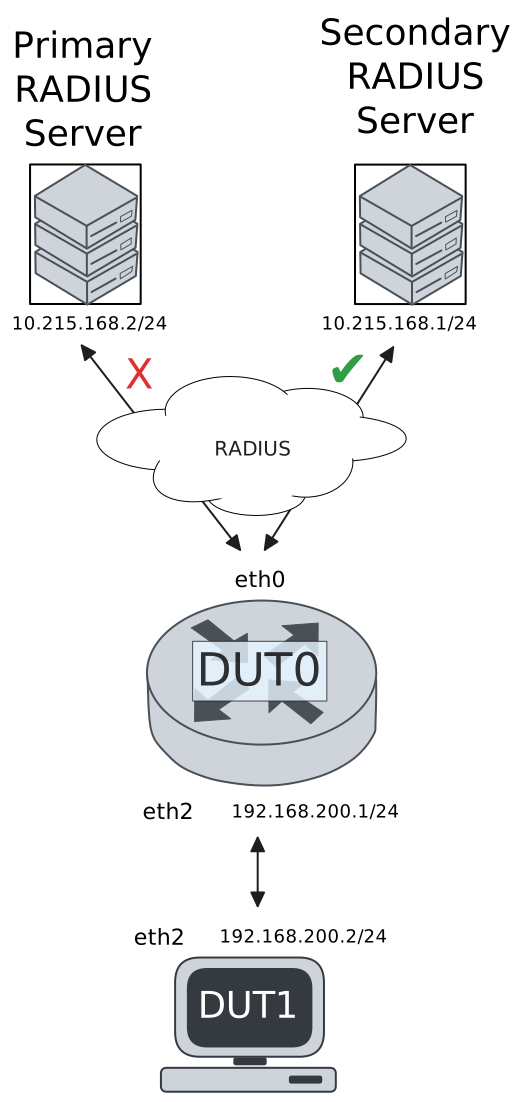
This scenario shows different Network Access Server (NAS) configurations: server failover and VRF-aware communication.
Test 802.1X Authentication Against NAS Through a VRF-Aware Interface
Description
This scenario shows how to configure 802.1X authentication. Authenticator-NAS communication if performed through a VRF-aware Ethernet interface.
Scenario
Step 1: Set the following configuration in DUT0 :
set interfaces ethernet eth0 address 10.215.168.64/24
set interfaces ethernet eth0 vrf WAN
set interfaces ethernet eth2 address 192.168.100.1/24
set interfaces ethernet eth2 authenticator 802.1x max-retransmissions 2
set interfaces ethernet eth2 authenticator aaa authentication list1
set interfaces ethernet eth2 authenticator log-level debug
set interfaces ethernet eth2 authenticator mode only-802.1x
set interfaces ethernet eth2 authenticator quiet-period 60
set interfaces ethernet eth2 authenticator reauth-period 0
set system aaa group radius radgroup1 local-vrf WAN
set system aaa group radius radgroup1 server serv1
set system aaa list list1 method 1 group radius radgroup1
set system aaa server radius serv1 address 10.215.168.1
set system aaa server radius serv1 encrypted-key U2FsdGVkX1/yqy9+1Ad94L3U6Oy28lkcidRgnKUdohaDAGBN94fzD6XwY8K1hLPwmqWR4L3eZDvbq/RX5KXTsw==
set system login user admin authentication encrypted-password '$6$GSjsCj8gHLv$/VcqU6FLi6CT2Oxn0MJQ2C2tqnRDrYKNF8HIYWJp68nvXvPdFccDsT04.WtigUONbKYrgKg8d6rEs8PjljMkH0'
set system vrf WAN
Step 2: Ping IP address 10.215.168.1 from DUT0:
admin@DUT0$ ping 10.215.168.1 vrf WAN count 1 size 56 timeout 1Show output
ping: Warning: source address might be selected on device other than: WAN
PING 10.215.168.1 (10.215.168.1) from 10.215.168.64 WAN: 56(84) bytes of data.
64 bytes from 10.215.168.1: icmp_seq=1 ttl=64 time=0.282 ms

--- 10.215.168.1 ping statistics ---
1 packets transmitted, 1 received, 0% packet loss, time 0ms
rtt min/avg/max/mdev = 0.282/0.282/0.282/0.000 ms
Step 3: Set the following configuration in DUT1 :
set interfaces ethernet eth2 address 192.168.100.2/24
set interfaces ethernet eth2 supplicant encrypted-password U2FsdGVkX1+KynhwHGB/rWXj2s4XjQez9MuREnzDtlY=
set interfaces ethernet eth2 supplicant username testing
set system login user admin authentication encrypted-password '$6$GSjsCj8gHLv$/VcqU6FLi6CT2Oxn0MJQ2C2tqnRDrYKNF8HIYWJp68nvXvPdFccDsT04.WtigUONbKYrgKg8d6rEs8PjljMkH0'
Step 4: Run command interfaces ethernet eth2 supplicant show status at DUT1 and check if output contains the following tokens:
AuthorizedShow output
---------------------------------------------------
        Field                      Value
---------------------------------------------------
EAP State                                   SUCCESS
EAP TLS Cipher          ECDHE-RSA-AES256-GCM-SHA384
EAP TLS Version                             TLSv1.2
PAE State                             AUTHENTICATED
Supplicant Port Status                   Authorized
WPA State                                 COMPLETED
Step 5: Run command interfaces ethernet eth2 supplicant show stats at DUT1 and check if output matches the following regular expressions:
Port Status\s+AuthorizedShow output
-------------------------------
       Field           Value
-------------------------------
EAPoL Frames (Rx)            11
EAPoL Frames (Tx)            11
Invalid Frames (Rx)           0
Logoff Frames (Tx)            0
Port Status          Authorized
Req Frames (Rx)               9
Req ID Frames (Rx)            1
Resp Frames (Tx)             10
Start Frames (Tx)             1
Step 6: Run command interfaces ethernet eth2 authenticator show stats at DUT0 and check if output matches the following regular expressions:
Authentication Successes\s+1
Authentication Mode\s+802\.1X
Show output
---------------------------------------------
         Field                   Value
---------------------------------------------
Access Challenges                           9
Authentication Backend                 RADIUS
Authentication Failures                     0
Authentication Mode                    802.1X
Authentication Status     Authorized (802.1X)
Authentication Successes                    1
EAPoL frames (Rx)                          11
EAPoL frames (Tx)                          11
Quiet Period                               60
Reauthenticate                          FALSE
Reauthenticate Period                       0
Session Time                                0
Session User MAC            de:ad:be:ef:6c:12
Session User Name                     testing
Step 7: Ping IP address 192.168.100.1 from DUT1:
admin@DUT1$ ping 192.168.100.1 count 1 size 56 timeout 1Show output
PING 192.168.100.1 (192.168.100.1) 56(84) bytes of data.
64 bytes from 192.168.100.1: icmp_seq=1 ttl=64 time=0.471 ms

--- 192.168.100.1 ping statistics ---
1 packets transmitted, 1 received, 0% packet loss, time 0ms
rtt min/avg/max/mdev = 0.471/0.471/0.471/0.000 ms
Test MAB Authentication Against NAS Through a VRF-Aware Interface
Description
This scenario shows how to configure MAB authentication. Authenticator-NAS communication if performed through a VRF-aware Ethernet interface.
Scenario
Step 1: Set the following configuration in DUT0 :
set interfaces ethernet eth0 address 10.215.168.64/24
set interfaces ethernet eth0 vrf WAN
set interfaces ethernet eth2 address 192.168.100.1/24
set interfaces ethernet eth2 authenticator aaa authentication list1
set interfaces ethernet eth2 authenticator log-level debug
set interfaces ethernet eth2 authenticator mode only-MAB
set interfaces ethernet eth2 authenticator quiet-period 60
set interfaces ethernet eth2 authenticator reauth-period 0
set system aaa group radius radgroup1 local-vrf WAN
set system aaa group radius radgroup1 server serv1
set system aaa list list1 method 1 group radius radgroup1
set system aaa server radius serv1 address 10.215.168.1
set system aaa server radius serv1 encrypted-key U2FsdGVkX1+pkCAw4NA1zomn61JXxFlFZWTM/4F+S1b+n9pflU+6e+re5Ano7DyUXniQ43/fJDXAXy0I54ccig==
set system login user admin authentication encrypted-password '$6$GSjsCj8gHLv$/VcqU6FLi6CT2Oxn0MJQ2C2tqnRDrYKNF8HIYWJp68nvXvPdFccDsT04.WtigUONbKYrgKg8d6rEs8PjljMkH0'
set system vrf WAN
Step 2: Ping IP address 10.215.168.1 from DUT0:
admin@DUT0$ ping 10.215.168.1 vrf WAN count 1 size 56 timeout 1Show output
ping: Warning: source address might be selected on device other than: WAN
PING 10.215.168.1 (10.215.168.1) from 10.215.168.64 WAN: 56(84) bytes of data.
64 bytes from 10.215.168.1: icmp_seq=1 ttl=64 time=0.281 ms

--- 10.215.168.1 ping statistics ---
1 packets transmitted, 1 received, 0% packet loss, time 0ms
rtt min/avg/max/mdev = 0.281/0.281/0.281/0.000 ms
Step 3: Set the following configuration in DUT1 :
set interfaces ethernet eth2 address 192.168.100.2/24
set system login user admin authentication encrypted-password '$6$GSjsCj8gHLv$/VcqU6FLi6CT2Oxn0MJQ2C2tqnRDrYKNF8HIYWJp68nvXvPdFccDsT04.WtigUONbKYrgKg8d6rEs8PjljMkH0'
Step 4: Ping IP address 192.168.100.1 from DUT1:
admin@DUT1$ ping 192.168.100.1 count 1 size 56 timeout 1Show output
PING 192.168.100.1 (192.168.100.1) 56(84) bytes of data.
64 bytes from 192.168.100.1: icmp_seq=1 ttl=64 time=0.328 ms

--- 192.168.100.1 ping statistics ---
1 packets transmitted, 1 received, 0% packet loss, time 0ms
rtt min/avg/max/mdev = 0.328/0.328/0.328/0.000 ms
Step 5: Run command interfaces ethernet eth2 authenticator show stats at DUT0 and check if output matches the following regular expressions:
Authentication Successes\s+1
Authentication Mode\s+MAB
Show output
-------------------------------------------
         Field                  Value
-------------------------------------------
Access Challenges                         0
Authentication Backend               RADIUS
Authentication Failures                   0
Authentication Mode                     MAB
Authentication Status      Authorized (MAB)
Authentication Successes                  1
EAPoL frames (Rx)                         0
EAPoL frames (Tx)                         0
Quiet Period                             60
Reauthenticate                        FALSE
Reauthenticate Period                     0
Session Time                              0
Session User MAC          de:ad:be:ef:6c:12
Session User Name                       N/A
Step 6: Ping IP address 192.168.100.1 from DUT1:
admin@DUT1$ ping 192.168.100.1 count 1 size 56 timeout 1Show output
PING 192.168.100.1 (192.168.100.1) 56(84) bytes of data.
64 bytes from 192.168.100.1: icmp_seq=1 ttl=64 time=0.250 ms

--- 192.168.100.1 ping statistics ---
1 packets transmitted, 1 received, 0% packet loss, time 0ms
rtt min/avg/max/mdev = 0.250/0.250/0.250/0.000 ms
Test 802.1X Authentication With Server Failover
Description
This scenario shows how to configure 802.1X authentication. The primary Nework Access Server is not reachable, so the secondary is used instead.
Scenario
Step 1: Set the following configuration in DUT0 :
set interfaces ethernet eth0 address 10.215.168.64/24
set interfaces ethernet eth0 vrf WAN
set interfaces ethernet eth2 address 192.168.100.1/24
set interfaces ethernet eth2 authenticator 802.1x max-retransmissions 2
set interfaces ethernet eth2 authenticator aaa authentication list1
set interfaces ethernet eth2 authenticator log-level debug
set interfaces ethernet eth2 authenticator mode only-802.1x
set interfaces ethernet eth2 authenticator quiet-period 60
set interfaces ethernet eth2 authenticator reauth-period 0
set system aaa group radius radgroup0 local-vrf WAN
set system aaa group radius radgroup0 server MAIN
set system aaa group radius radgroup1 local-vrf WAN
set system aaa group radius radgroup1 server serv1
set system aaa list list1 method 0 group radius radgroup0
set system aaa list list1 method 1 group radius radgroup1
set system aaa server radius MAIN address 10.215.168.2
set system aaa server radius MAIN encrypted-key U2FsdGVkX18zO0hO44sCbmWp5qWziEEGvZhkodw2F+rprwR7LqN76oOR25wgUeU2TBxT01tTQgdqGAo7qn6n/w==
set system aaa server radius serv1 address 10.215.168.1
set system aaa server radius serv1 encrypted-key U2FsdGVkX1+9WlQX9Dzemycv/m1Pcj1tpuM8huDyQSDeFI+NMt6pWINAfekI5i5s401PRoOtghWs96weQKBRGw==
set system login user admin authentication encrypted-password '$6$GSjsCj8gHLv$/VcqU6FLi6CT2Oxn0MJQ2C2tqnRDrYKNF8HIYWJp68nvXvPdFccDsT04.WtigUONbKYrgKg8d6rEs8PjljMkH0'
set system vrf WAN
Step 2: Ping IP address 10.215.168.1 from DUT0:
admin@DUT0$ ping 10.215.168.1 vrf WAN count 1 size 56 timeout 1Show output
ping: Warning: source address might be selected on device other than: WAN
PING 10.215.168.1 (10.215.168.1) from 10.215.168.64 WAN: 56(84) bytes of data.
64 bytes from 10.215.168.1: icmp_seq=1 ttl=64 time=0.194 ms

--- 10.215.168.1 ping statistics ---
1 packets transmitted, 1 received, 0% packet loss, time 0ms
rtt min/avg/max/mdev = 0.194/0.194/0.194/0.000 ms
Step 3: Set the following configuration in DUT1 :
set interfaces ethernet eth2 address 192.168.100.2/24
set interfaces ethernet eth2 supplicant encrypted-password U2FsdGVkX19F3i1ODTE/RJP3YQ81dCnPgjuk+odNA2g=
set interfaces ethernet eth2 supplicant username testing
set system login user admin authentication encrypted-password '$6$GSjsCj8gHLv$/VcqU6FLi6CT2Oxn0MJQ2C2tqnRDrYKNF8HIYWJp68nvXvPdFccDsT04.WtigUONbKYrgKg8d6rEs8PjljMkH0'
Step 4: Run command interfaces ethernet eth2 supplicant show status at DUT1 and check if output contains the following tokens:
AuthorizedShow output
---------------------------------------------------
        Field                      Value
---------------------------------------------------
EAP State                                   SUCCESS
EAP TLS Cipher          ECDHE-RSA-AES256-GCM-SHA384
EAP TLS Version                             TLSv1.2
PAE State                             AUTHENTICATED
Supplicant Port Status                   Authorized
WPA State                                 COMPLETED
Step 5: Run command interfaces ethernet eth2 supplicant show stats at DUT1 and check if output matches the following regular expressions:
Port Status\s+AuthorizedShow output
-------------------------------
       Field           Value
-------------------------------
EAPoL Frames (Rx)            11
EAPoL Frames (Tx)            11
Invalid Frames (Rx)           0
Logoff Frames (Tx)            0
Port Status          Authorized
Req Frames (Rx)               9
Req ID Frames (Rx)            1
Resp Frames (Tx)             10
Start Frames (Tx)             1
Step 6: Run command interfaces ethernet eth2 authenticator show stats at DUT0 and check if output matches the following regular expressions:
Authentication Successes\s+1
Authentication Mode\s+802\.1X
Show output
---------------------------------------------
         Field                   Value
---------------------------------------------
Access Challenges                           9
Authentication Backend                 RADIUS
Authentication Failures                     0
Authentication Mode                    802.1X
Authentication Status     Authorized (802.1X)
Authentication Successes                    1
EAPoL frames (Rx)                          11
EAPoL frames (Tx)                          11
Quiet Period                               60
Reauthenticate                          FALSE
Reauthenticate Period                       0
Session Time                                0
Session User MAC            de:ad:be:ef:6c:12
Session User Name                     testing
Step 7: Ping IP address 192.168.100.1 from DUT1:
admin@DUT1$ ping 192.168.100.1 count 1 size 56 timeout 1Show output
PING 192.168.100.1 (192.168.100.1) 56(84) bytes of data.
64 bytes from 192.168.100.1: icmp_seq=1 ttl=64 time=0.632 ms

--- 192.168.100.1 ping statistics ---
1 packets transmitted, 1 received, 0% packet loss, time 0ms
rtt min/avg/max/mdev = 0.632/0.632/0.632/0.000 ms
Step 8: Run command system journal show | grep "osdx hostapd" at DUT0 and check if output contains the following tokens:
No response from Authentication server 10.215.168.2Show output
Jan 27 15:16:12.869815 osdx hostapd[613095]: eth2: IEEE 802.11 Fetching hardware channel/rate support not supported.
Jan 27 15:16:12.870062 osdx hostapd[613095]: connect[radius]: No route to host
Jan 27 15:16:12.869827 osdx hostapd[613095]: eth2: RADIUS Authentication server 10.215.168.2:1812
Jan 27 15:16:12.869868 osdx hostapd[613095]: eth2: IEEE 802.1X Initializing IEEE 802.1X: mode=802.1X, eap_server=0, eap_quiet_period=60, eap_max_retrans=2
Jan 27 15:16:12.869872 osdx hostapd[613095]: eth2: IEEE 802.1X IEEE 802.1X: Enabling packet capture discovery mode
Jan 27 15:16:12.905637 osdx hostapd[613095]: Discovery mode enabled on eth2
Jan 27 15:16:12.905708 osdx hostapd[613095]: eth2: interface state UNINITIALIZED->ENABLED
Jan 27 15:16:12.905708 osdx hostapd[613095]: eth2: AP-ENABLED
Jan 27 15:16:16.104871 osdx hostapd[613096]: eth2: STA de:ad:be:ef:6c:12 IEEE 802.1X: New STA de:ad:be:ef:6c:12 added
Jan 27 15:16:16.104885 osdx hostapd[613096]: eth2: IEEE 802.1X IEEE 802.1X: Disabling packet capture discovery mode
Jan 27 15:16:16.117696 osdx hostapd[613096]: eth2: STA de:ad:be:ef:6c:12 IEEE 802.1X: start authentication
Jan 27 15:16:16.117729 osdx hostapd[613096]: eth2: STA 01:80:c2:00:00:03 IEEE 802.1X: disabling transmission of periodic EAP-Request frames
Jan 27 15:16:16.117745 osdx hostapd[613096]: eth2: STA de:ad:be:ef:6c:12 IEEE 802.1X: received EAPOL-Start from STA
Jan 27 15:16:16.117759 osdx hostapd[613096]: eth2: STA de:ad:be:ef:6c:12 IEEE 802.1X: unauthorizing port
Jan 27 15:16:16.117768 osdx hostapd[613096]: eth2: STA 01:80:c2:00:00:03 IEEE 802.1X: Trying RADIUS authentication
Jan 27 15:16:16.117793 osdx hostapd[613096]: eth2: STA de:ad:be:ef:6c:12 IEEE 802.1X: Sending EAP Packet (identifier 3)
Jan 27 15:16:16.118116 osdx hostapd[613096]: eth2: STA de:ad:be:ef:6c:12 IEEE 802.1X: received EAP packet (code=2 id=3 len=12) from STA: EAP Response-Identity (1)
Jan 27 15:16:16.118127 osdx hostapd[613096]: eth2: STA de:ad:be:ef:6c:12 IEEE 802.1X: STA identity 'testing'
Jan 27 15:16:16.118160 osdx hostapd[613096]: eth2: RADIUS Authentication server 10.215.168.2:1812
Jan 27 15:16:16.119922 osdx hostapd[613096]: eth2: RADIUS Sending RADIUS message to authentication server
Jan 27 15:16:16.119959 osdx hostapd[613096]: eth2: RADIUS Next RADIUS client retransmit in 1 seconds
Jan 27 15:16:17.120036 osdx hostapd[613096]: eth2: STA de:ad:be:ef:6c:12 RADIUS: Resending RADIUS message (id=0)
Jan 27 15:16:17.120069 osdx hostapd[613096]: eth2: RADIUS Next RADIUS client retransmit in 2 seconds
Jan 27 15:16:19.120638 osdx hostapd[613096]: eth2: STA de:ad:be:ef:6c:12 RADIUS: Resending RADIUS message (id=0)
Jan 27 15:16:19.120671 osdx hostapd[613096]: eth2: RADIUS Next RADIUS client retransmit in 4 seconds
Jan 27 15:16:23.120990 osdx hostapd[613096]: eth2: RADIUS No response from Authentication server 10.215.168.2:1812 - failover (1º round)
Jan 27 15:16:23.121000 osdx hostapd[613096]: eth2: RADIUS Authentication server 10.215.168.1:1812
Jan 27 15:16:23.121045 osdx hostapd[613096]: eth2: STA de:ad:be:ef:6c:12 RADIUS: Resending RADIUS message (id=0)
Jan 27 15:16:23.121073 osdx hostapd[613096]: eth2: RADIUS Next RADIUS client retransmit in 2 seconds
Jan 27 15:16:23.121391 osdx hostapd[613096]: eth2: RADIUS Received 80 bytes from RADIUS server
Jan 27 15:16:23.121399 osdx hostapd[613096]: eth2: RADIUS Received RADIUS message
Jan 27 15:16:23.121402 osdx hostapd[613096]: eth2: STA de:ad:be:ef:6c:12 RADIUS: Received RADIUS packet matched with a pending request, round trip time 0.00 sec
Jan 27 15:16:23.121444 osdx hostapd[613096]: eth2: STA de:ad:be:ef:6c:12 IEEE 802.1X: decapsulated EAP packet (code=1 id=4 len=22) from RADIUS server: EAP-Request-MD5 (4)
Jan 27 15:16:23.121454 osdx hostapd[613096]: eth2: STA de:ad:be:ef:6c:12 IEEE 802.1X: Sending EAP Packet (identifier 4)
Jan 27 15:16:23.121802 osdx hostapd[613096]: eth2: STA de:ad:be:ef:6c:12 IEEE 802.1X: received EAP packet (code=2 id=4 len=6) from STA: EAP Response-unknown (3)
Jan 27 15:16:23.121867 osdx hostapd[613096]: eth2: RADIUS Sending RADIUS message to authentication server
Jan 27 15:16:23.121885 osdx hostapd[613096]: eth2: RADIUS Next RADIUS client retransmit in 1 seconds
Jan 27 15:16:23.122129 osdx hostapd[613096]: eth2: RADIUS Received 64 bytes from RADIUS server
Jan 27 15:16:23.122135 osdx hostapd[613096]: eth2: RADIUS Received RADIUS message
Jan 27 15:16:23.122139 osdx hostapd[613096]: eth2: STA de:ad:be:ef:6c:12 RADIUS: Received RADIUS packet matched with a pending request, round trip time 0.00 sec
Jan 27 15:16:23.122170 osdx hostapd[613096]: eth2: STA de:ad:be:ef:6c:12 IEEE 802.1X: decapsulated EAP packet (code=1 id=5 len=6) from RADIUS server: EAP-Request-PEAP (25)
Jan 27 15:16:23.122177 osdx hostapd[613096]: eth2: STA de:ad:be:ef:6c:12 IEEE 802.1X: Sending EAP Packet (identifier 5)
Jan 27 15:16:23.122573 osdx hostapd[613096]: eth2: STA de:ad:be:ef:6c:12 IEEE 802.1X: received EAP packet (code=2 id=5 len=194) from STA: EAP Response-PEAP (25)
Jan 27 15:16:23.122621 osdx hostapd[613096]: eth2: RADIUS Sending RADIUS message to authentication server
Jan 27 15:16:23.122636 osdx hostapd[613096]: eth2: RADIUS Next RADIUS client retransmit in 1 seconds
Jan 27 15:16:23.123673 osdx hostapd[613096]: eth2: RADIUS Received 1068 bytes from RADIUS server
Jan 27 15:16:23.123678 osdx hostapd[613096]: eth2: RADIUS Received RADIUS message
Jan 27 15:16:23.123681 osdx hostapd[613096]: eth2: STA de:ad:be:ef:6c:12 RADIUS: Received RADIUS packet matched with a pending request, round trip time 0.00 sec
Jan 27 15:16:23.123703 osdx hostapd[613096]: eth2: STA de:ad:be:ef:6c:12 IEEE 802.1X: decapsulated EAP packet (code=1 id=6 len=1004) from RADIUS server: EAP-Request-PEAP (25)
Jan 27 15:16:23.123710 osdx hostapd[613096]: eth2: STA de:ad:be:ef:6c:12 IEEE 802.1X: Sending EAP Packet (identifier 6)
Jan 27 15:16:23.123892 osdx hostapd[613096]: eth2: STA de:ad:be:ef:6c:12 IEEE 802.1X: received EAP packet (code=2 id=6 len=6) from STA: EAP Response-PEAP (25)
Jan 27 15:16:23.123942 osdx hostapd[613096]: eth2: RADIUS Sending RADIUS message to authentication server
Jan 27 15:16:23.123957 osdx hostapd[613096]: eth2: RADIUS Next RADIUS client retransmit in 1 seconds
Jan 27 15:16:23.124110 osdx hostapd[613096]: eth2: RADIUS Received 229 bytes from RADIUS server
Jan 27 15:16:23.124115 osdx hostapd[613096]: eth2: RADIUS Received RADIUS message
Jan 27 15:16:23.124119 osdx hostapd[613096]: eth2: STA de:ad:be:ef:6c:12 RADIUS: Received RADIUS packet matched with a pending request, round trip time 0.00 sec
Jan 27 15:16:23.124134 osdx hostapd[613096]: eth2: STA de:ad:be:ef:6c:12 IEEE 802.1X: decapsulated EAP packet (code=1 id=7 len=171) from RADIUS server: EAP-Request-PEAP (25)
Jan 27 15:16:23.124141 osdx hostapd[613096]: eth2: STA de:ad:be:ef:6c:12 IEEE 802.1X: Sending EAP Packet (identifier 7)
Jan 27 15:16:23.125483 osdx hostapd[613096]: eth2: STA de:ad:be:ef:6c:12 IEEE 802.1X: received EAP packet (code=2 id=7 len=103) from STA: EAP Response-PEAP (25)
Jan 27 15:16:23.125529 osdx hostapd[613096]: eth2: RADIUS Sending RADIUS message to authentication server
Jan 27 15:16:23.125545 osdx hostapd[613096]: eth2: RADIUS Next RADIUS client retransmit in 1 seconds
Jan 27 15:16:23.125862 osdx hostapd[613096]: eth2: RADIUS Received 115 bytes from RADIUS server
Jan 27 15:16:23.125868 osdx hostapd[613096]: eth2: RADIUS Received RADIUS message
Jan 27 15:16:23.125872 osdx hostapd[613096]: eth2: STA de:ad:be:ef:6c:12 RADIUS: Received RADIUS packet matched with a pending request, round trip time 0.00 sec
Jan 27 15:16:23.125889 osdx hostapd[613096]: eth2: STA de:ad:be:ef:6c:12 IEEE 802.1X: decapsulated EAP packet (code=1 id=8 len=57) from RADIUS server: EAP-Request-PEAP (25)
Jan 27 15:16:23.125895 osdx hostapd[613096]: eth2: STA de:ad:be:ef:6c:12 IEEE 802.1X: Sending EAP Packet (identifier 8)
Jan 27 15:16:23.126131 osdx hostapd[613096]: eth2: STA de:ad:be:ef:6c:12 IEEE 802.1X: received EAP packet (code=2 id=8 len=6) from STA: EAP Response-PEAP (25)
Jan 27 15:16:23.126180 osdx hostapd[613096]: eth2: RADIUS Sending RADIUS message to authentication server
Jan 27 15:16:23.126192 osdx hostapd[613096]: eth2: RADIUS Next RADIUS client retransmit in 1 seconds
Jan 27 15:16:23.126333 osdx hostapd[613096]: eth2: RADIUS Received 98 bytes from RADIUS server
Jan 27 15:16:23.126339 osdx hostapd[613096]: eth2: RADIUS Received RADIUS message
Jan 27 15:16:23.126342 osdx hostapd[613096]: eth2: STA de:ad:be:ef:6c:12 RADIUS: Received RADIUS packet matched with a pending request, round trip time 0.00 sec
Jan 27 15:16:23.126368 osdx hostapd[613096]: eth2: STA de:ad:be:ef:6c:12 IEEE 802.1X: decapsulated EAP packet (code=1 id=9 len=40) from RADIUS server: EAP-Request-PEAP (25)
Jan 27 15:16:23.126378 osdx hostapd[613096]: eth2: STA de:ad:be:ef:6c:12 IEEE 802.1X: Sending EAP Packet (identifier 9)
Jan 27 15:16:23.126576 osdx hostapd[613096]: eth2: STA de:ad:be:ef:6c:12 IEEE 802.1X: received EAP packet (code=2 id=9 len=43) from STA: EAP Response-PEAP (25)
Jan 27 15:16:23.126618 osdx hostapd[613096]: eth2: RADIUS Sending RADIUS message to authentication server
Jan 27 15:16:23.126631 osdx hostapd[613096]: eth2: RADIUS Next RADIUS client retransmit in 1 seconds
Jan 27 15:16:23.126823 osdx hostapd[613096]: eth2: RADIUS Received 131 bytes from RADIUS server
Jan 27 15:16:23.126830 osdx hostapd[613096]: eth2: RADIUS Received RADIUS message
Jan 27 15:16:23.126834 osdx hostapd[613096]: eth2: STA de:ad:be:ef:6c:12 RADIUS: Received RADIUS packet matched with a pending request, round trip time 0.00 sec
Jan 27 15:16:23.126857 osdx hostapd[613096]: eth2: STA de:ad:be:ef:6c:12 IEEE 802.1X: decapsulated EAP packet (code=1 id=10 len=73) from RADIUS server: EAP-Request-PEAP (25)
Jan 27 15:16:23.126865 osdx hostapd[613096]: eth2: STA de:ad:be:ef:6c:12 IEEE 802.1X: Sending EAP Packet (identifier 10)
Jan 27 15:16:23.127158 osdx hostapd[613096]: eth2: STA de:ad:be:ef:6c:12 IEEE 802.1X: received EAP packet (code=2 id=10 len=97) from STA: EAP Response-PEAP (25)
Jan 27 15:16:23.127198 osdx hostapd[613096]: eth2: RADIUS Sending RADIUS message to authentication server
Jan 27 15:16:23.127209 osdx hostapd[613096]: eth2: RADIUS Next RADIUS client retransmit in 1 seconds
Jan 27 15:16:23.127418 osdx hostapd[613096]: eth2: RADIUS Received 140 bytes from RADIUS server
Jan 27 15:16:23.127424 osdx hostapd[613096]: eth2: RADIUS Received RADIUS message
Jan 27 15:16:23.127428 osdx hostapd[613096]: eth2: STA de:ad:be:ef:6c:12 RADIUS: Received RADIUS packet matched with a pending request, round trip time 0.00 sec
Jan 27 15:16:23.127443 osdx hostapd[613096]: eth2: STA de:ad:be:ef:6c:12 IEEE 802.1X: decapsulated EAP packet (code=1 id=11 len=82) from RADIUS server: EAP-Request-PEAP (25)
Jan 27 15:16:23.127449 osdx hostapd[613096]: eth2: STA de:ad:be:ef:6c:12 IEEE 802.1X: Sending EAP Packet (identifier 11)
Jan 27 15:16:23.127658 osdx hostapd[613096]: eth2: STA de:ad:be:ef:6c:12 IEEE 802.1X: received EAP packet (code=2 id=11 len=37) from STA: EAP Response-PEAP (25)
Jan 27 15:16:23.127715 osdx hostapd[613096]: eth2: RADIUS Sending RADIUS message to authentication server
Jan 27 15:16:23.127730 osdx hostapd[613096]: eth2: RADIUS Next RADIUS client retransmit in 1 seconds
Jan 27 15:16:23.127903 osdx hostapd[613096]: eth2: RADIUS Received 104 bytes from RADIUS server
Jan 27 15:16:23.127909 osdx hostapd[613096]: eth2: RADIUS Received RADIUS message
Jan 27 15:16:23.127913 osdx hostapd[613096]: eth2: STA de:ad:be:ef:6c:12 RADIUS: Received RADIUS packet matched with a pending request, round trip time 0.00 sec
Jan 27 15:16:23.127931 osdx hostapd[613096]: eth2: STA de:ad:be:ef:6c:12 IEEE 802.1X: decapsulated EAP packet (code=1 id=12 len=46) from RADIUS server: EAP-Request-PEAP (25)
Jan 27 15:16:23.127938 osdx hostapd[613096]: eth2: STA de:ad:be:ef:6c:12 IEEE 802.1X: Sending EAP Packet (identifier 12)
Jan 27 15:16:23.128131 osdx hostapd[613096]: eth2: STA de:ad:be:ef:6c:12 IEEE 802.1X: received EAP packet (code=2 id=12 len=46) from STA: EAP Response-PEAP (25)
Jan 27 15:16:23.128174 osdx hostapd[613096]: eth2: RADIUS Sending RADIUS message to authentication server
Jan 27 15:16:23.128188 osdx hostapd[613096]: eth2: RADIUS Next RADIUS client retransmit in 1 seconds
Jan 27 15:16:23.128382 osdx hostapd[613096]: eth2: RADIUS Received 175 bytes from RADIUS server
Jan 27 15:16:23.128389 osdx hostapd[613096]: eth2: RADIUS Received RADIUS message
Jan 27 15:16:23.128393 osdx hostapd[613096]: eth2: STA de:ad:be:ef:6c:12 RADIUS: Received RADIUS packet matched with a pending request, round trip time 0.00 sec
Jan 27 15:16:23.128423 osdx hostapd[613096]: eth2: STA de:ad:be:ef:6c:12 IEEE 802.1X: old identity 'testing' updated with User-Name from Access-Accept 'testing'
Jan 27 15:16:23.128427 osdx hostapd[613096]: eth2: STA de:ad:be:ef:6c:12 IEEE 802.1X: decapsulated EAP packet (code=3 id=12 len=4) from RADIUS server: EAP Success
Jan 27 15:16:23.128447 osdx hostapd[613096]: eth2: STA de:ad:be:ef:6c:12 IEEE 802.1X: Sending EAP Packet (identifier 12)
Jan 27 15:16:23.128470 osdx hostapd[613096]: eth2: STA de:ad:be:ef:6c:12 IEEE 802.1X: authorizing port
Jan 27 15:16:23.128475 osdx hostapd[613096]: eth2: STA de:ad:be:ef:6c:12 RADIUS: starting accounting session 55997308A2B8DCFE
Jan 27 15:16:23.128479 osdx hostapd[613096]: eth2: STA de:ad:be:ef:6c:12 IEEE 802.1X: authenticated - EAP type: 25 (PEAP)
Test MAB Authentication With Server Failover
Description
This scenario shows how to configure MAB authentication. The primary Nework Access Server is not reachable, so the secondary is used instead.
Scenario
Step 1: Set the following configuration in DUT0 :
set interfaces ethernet eth0 address 10.215.168.64/24
set interfaces ethernet eth0 vrf WAN
set interfaces ethernet eth2 address 192.168.100.1/24
set interfaces ethernet eth2 authenticator aaa authentication list1
set interfaces ethernet eth2 authenticator log-level debug
set interfaces ethernet eth2 authenticator mode only-MAB
set interfaces ethernet eth2 authenticator quiet-period 60
set interfaces ethernet eth2 authenticator reauth-period 0
set system aaa group radius radgroup0 local-vrf WAN
set system aaa group radius radgroup0 server MAIN
set system aaa group radius radgroup1 local-vrf WAN
set system aaa group radius radgroup1 server serv1
set system aaa list list1 method 0 group radius radgroup0
set system aaa list list1 method 1 group radius radgroup1
set system aaa server radius MAIN address 10.215.168.2
set system aaa server radius MAIN encrypted-key U2FsdGVkX1/Sn5nKP2EmloLz5E94AhBg72vs601YZetPiHFSLL/4dLkMxJaFrPgLdxCzmJBitS71zOrUwFBLMw==
set system aaa server radius serv1 address 10.215.168.1
set system aaa server radius serv1 encrypted-key U2FsdGVkX19FrbbNq3FjlB+SJBX+UUh230MUIxf1g+oTmVdANkZXkg5VqCPPqMlMvnkEQrA7wYVDpD5DUewPow==
set system login user admin authentication encrypted-password '$6$GSjsCj8gHLv$/VcqU6FLi6CT2Oxn0MJQ2C2tqnRDrYKNF8HIYWJp68nvXvPdFccDsT04.WtigUONbKYrgKg8d6rEs8PjljMkH0'
set system vrf WAN
Step 2: Ping IP address 10.215.168.1 from DUT0:
admin@DUT0$ ping 10.215.168.1 vrf WAN count 1 size 56 timeout 1Show output
ping: Warning: source address might be selected on device other than: WAN
PING 10.215.168.1 (10.215.168.1) from 10.215.168.64 WAN: 56(84) bytes of data.
64 bytes from 10.215.168.1: icmp_seq=1 ttl=64 time=0.271 ms

--- 10.215.168.1 ping statistics ---
1 packets transmitted, 1 received, 0% packet loss, time 0ms
rtt min/avg/max/mdev = 0.271/0.271/0.271/0.000 ms
Step 3: Set the following configuration in DUT1 :
set interfaces ethernet eth2 address 192.168.100.2/24
set system login user admin authentication encrypted-password '$6$GSjsCj8gHLv$/VcqU6FLi6CT2Oxn0MJQ2C2tqnRDrYKNF8HIYWJp68nvXvPdFccDsT04.WtigUONbKYrgKg8d6rEs8PjljMkH0'
Step 4: Run command interfaces ethernet eth2 authenticator show stats at DUT0 and check if output matches the following regular expressions:
Authentication Successes\s+1
Authentication Mode\s+MAB
Show output
-------------------------------------------
         Field                  Value
-------------------------------------------
Access Challenges                         0
Authentication Backend               RADIUS
Authentication Failures                   0
Authentication Mode                     MAB
Authentication Status      Authorized (MAB)
Authentication Successes                  1
EAPoL frames (Rx)                         0
EAPoL frames (Tx)                         0
Quiet Period                             60
Reauthenticate                        FALSE
Reauthenticate Period                     0
Session Time                              0
Session User MAC          de:ad:be:ef:6c:12
Session User Name                       N/A
Step 5: Ping IP address 192.168.100.1 from DUT1:
admin@DUT1$ ping 192.168.100.1 count 1 size 56 timeout 1Show output
PING 192.168.100.1 (192.168.100.1) 56(84) bytes of data.
64 bytes from 192.168.100.1: icmp_seq=1 ttl=64 time=0.254 ms

--- 192.168.100.1 ping statistics ---
1 packets transmitted, 1 received, 0% packet loss, time 0ms
rtt min/avg/max/mdev = 0.254/0.254/0.254/0.000 ms
Step 6: Run command system journal show | grep "osdx hostapd" at DUT0 and check if output contains the following tokens:
No response from Authentication server 10.215.168.2Show output
Jan 27 15:16:33.309458 osdx hostapd[613729]: eth2: IEEE 802.11 Fetching hardware channel/rate support not supported.
Jan 27 15:16:33.309479 osdx hostapd[613729]: eth2: RADIUS Authentication server 10.215.168.2:1812
Jan 27 15:16:33.309765 osdx hostapd[613729]: connect[radius]: No route to host
Jan 27 15:16:33.309539 osdx hostapd[613729]: eth2: IEEE 802.1X Initializing IEEE 802.1X: mode=MAB-only, eap_server=0, eap_quiet_period=60, eap_max_retrans=5
Jan 27 15:16:33.309543 osdx hostapd[613729]: eth2: IEEE 802.1X IEEE 802.1X: Enabling packet capture discovery mode
Jan 27 15:16:33.325264 osdx hostapd[613729]: Discovery mode enabled on eth2
Jan 27 15:16:33.325357 osdx hostapd[613729]: eth2: interface state UNINITIALIZED->ENABLED
Jan 27 15:16:33.325357 osdx hostapd[613729]: eth2: AP-ENABLED
Jan 27 15:16:38.326120 osdx hostapd[613730]: eth2: STA de:ad:be:ef:6c:12 DRIVER: Device discovered, triggering MAB authentication
Jan 27 15:16:38.326154 osdx hostapd[613730]: eth2: STA de:ad:be:ef:6c:12 IEEE 802.1X: New STA de:ad:be:ef:6c:12 added
Jan 27 15:16:38.326162 osdx hostapd[613730]: eth2: IEEE 802.1X IEEE 802.1X: Disabling packet capture discovery mode
Jan 27 15:16:38.341279 osdx hostapd[613730]: eth2: STA de:ad:be:ef:6c:12 IEEE 802.1X: MAB-only mode: Starting MAB authentication
Jan 27 15:16:38.341305 osdx hostapd[613730]: eth2: STA de:ad:be:ef:6c:12 IEEE 802.1X: MAB: Starting RADIUS query
Jan 27 15:16:38.341319 osdx hostapd[613730]: eth2: STA de:ad:be:ef:6c:12 IEEE 802.1X: MAB: User-Name = de:ad:be:ef:6c:12
Jan 27 15:16:38.343006 osdx hostapd[613730]: eth2: STA de:ad:be:ef:6c:12 IEEE 802.1X: MAB: User-Password = de:ad:be:ef:6c:12
Jan 27 15:16:38.343017 osdx hostapd[613730]: eth2: RADIUS Authentication server 10.215.168.2:1812
Jan 27 15:16:38.343091 osdx hostapd[613730]: eth2: RADIUS Sending RADIUS message to authentication server
Jan 27 15:16:38.343124 osdx hostapd[613730]: eth2: RADIUS Next RADIUS client retransmit in 1 seconds
Jan 27 15:16:39.343197 osdx hostapd[613730]: eth2: STA de:ad:be:ef:6c:12 RADIUS: Resending RADIUS message (id=128)
Jan 27 15:16:39.343222 osdx hostapd[613730]: eth2: RADIUS Next RADIUS client retransmit in 2 seconds
Jan 27 15:16:41.344228 osdx hostapd[613730]: eth2: STA de:ad:be:ef:6c:12 RADIUS: Resending RADIUS message (id=128)
Jan 27 15:16:41.344253 osdx hostapd[613730]: eth2: RADIUS Next RADIUS client retransmit in 4 seconds
Jan 27 15:16:45.345244 osdx hostapd[613730]: eth2: RADIUS No response from Authentication server 10.215.168.2:1812 - failover (1º round)
Jan 27 15:16:45.345256 osdx hostapd[613730]: eth2: RADIUS Authentication server 10.215.168.1:1812
Jan 27 15:16:45.345306 osdx hostapd[613730]: eth2: STA de:ad:be:ef:6c:12 RADIUS: Resending RADIUS message (id=128)
Jan 27 15:16:45.345340 osdx hostapd[613730]: eth2: RADIUS Next RADIUS client retransmit in 2 seconds
Jan 27 15:16:45.345600 osdx hostapd[613730]: eth2: RADIUS Received 20 bytes from RADIUS server
Jan 27 15:16:45.345607 osdx hostapd[613730]: eth2: RADIUS Received RADIUS message
Jan 27 15:16:45.345611 osdx hostapd[613730]: eth2: STA de:ad:be:ef:6c:12 RADIUS: Received RADIUS packet matched with a pending request, round trip time 0.00 sec
Jan 27 15:16:45.345616 osdx hostapd[613730]: eth2: STA de:ad:be:ef:6c:12 IEEE 802.1X: MAB: Processing RADIUS response
Jan 27 15:16:45.345669 osdx hostapd[613730]: eth2: STA de:ad:be:ef:6c:12 IEEE 802.1X: MAB: Identity set to 'de:ad:be:ef:6c:12'
Jan 27 15:16:45.345672 osdx hostapd[613730]: eth2: STA de:ad:be:ef:6c:12 IEEE 802.1X: MAB: station successfully authenticated
Jan 27 15:16:45.345676 osdx hostapd[613730]: eth2: IEEE 802.1X IEEE 802.1X: Discovery already disabled
Jan 27 15:16:45.345687 osdx hostapd[613730]: eth2: STA de:ad:be:ef:6c:12 IEEE 802.1X: authorizing port
Jan 27 15:16:45.345691 osdx hostapd[613730]: eth2: STA de:ad:be:ef:6c:12 RADIUS: starting accounting session 8153CBBDDA571ABC