Local-Address
This scenario shows how to configure a DHCP relay agent to
forward DHCP requests. By default, the local-address option uses
a custom local IP as source address for upstream traffic.
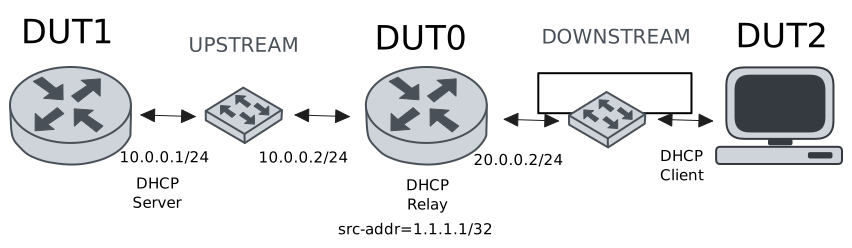
Test DHCP Relay With Local-Address
Description
This example shows how to configure the
local-address option. This command can be used
to set the source address for upstream traffic.
Scenario
Step 1: Set the following configuration in DUT0 :
set interfaces dummy dum0 address 1.1.1.1/32
set interfaces ethernet eth0 vif 100 address 10.0.0.2/24
set interfaces ethernet eth1 vif 200 address 20.0.0.2/24
set service dhcp-relay INS downstream-interface eth1.200
set service dhcp-relay INS local-address 1.1.1.1
set service dhcp-relay INS server 10.0.0.1
set service dhcp-relay INS upstream-interface eth0.100
set system login user admin authentication encrypted-password '$6$GSjsCj8gHLv$/VcqU6FLi6CT2Oxn0MJQ2C2tqnRDrYKNF8HIYWJp68nvXvPdFccDsT04.WtigUONbKYrgKg8d6rEs8PjljMkH0'
Step 2: Set the following configuration in DUT1 :
set interfaces ethernet eth0 vif 100 address 10.0.0.1/24
set interfaces ethernet eth0 vif 100 traffic policy in LOGGER
set protocols static route 0.0.0.0/0 next-hop 10.0.0.2
set service dhcp-server shared-network dummy subnet 10.0.0.1/32
set service dhcp-server shared-network remote subnet 20.0.0.0/24 start 20.0.0.50 stop 20.0.0.50
set system login user admin authentication encrypted-password '$6$GSjsCj8gHLv$/VcqU6FLi6CT2Oxn0MJQ2C2tqnRDrYKNF8HIYWJp68nvXvPdFccDsT04.WtigUONbKYrgKg8d6rEs8PjljMkH0'
set traffic policy LOGGER rule 1 log prefix DHCP_
set traffic policy LOGGER rule 1 selector UDP
set traffic selector UDP rule 1 destination port 67
set traffic selector UDP rule 1 protocol udp
Step 3: Set the following configuration in DUT2 :
set interfaces ethernet eth0 vif 200 address dhcp
set system login user admin authentication encrypted-password '$6$GSjsCj8gHLv$/VcqU6FLi6CT2Oxn0MJQ2C2tqnRDrYKNF8HIYWJp68nvXvPdFccDsT04.WtigUONbKYrgKg8d6rEs8PjljMkH0'
Step 4: Ping IP address 10.0.0.1 from DUT0:
admin@DUT0$ ping 10.0.0.1 count 1 size 56 timeout 1Show output
PING 10.0.0.1 (10.0.0.1) 56(84) bytes of data.
64 bytes from 10.0.0.1: icmp_seq=1 ttl=64 time=0.456 ms

--- 10.0.0.1 ping statistics ---
1 packets transmitted, 1 received, 0% packet loss, time 0ms
rtt min/avg/max/mdev = 0.456/0.456/0.456/0.000 ms
Step 5: Run command interfaces ethernet show at DUT2 and check if output contains the following tokens:
20.0.0.50Show output
---------------------------------------------------------------------
  Name             IP Address           Admin  Oper  Vrf  Description
---------------------------------------------------------------------
    eth0  fe80::dcad:beff:feef:6c20/64  up     up
eth0.200  20.0.0.50/24                  up     up
          fe80::dcad:beff:feef:6c20/64
    eth1                                down   down
    eth2                                down   down
    eth3                                down   down
Step 6: Run command system journal show | cat at DUT1 and check if output matches the following regular expressions:
SRC=1.1.1.1 DST=10.0.0.1Show output
Feb 12 18:03:38.357298 osdx systemd-journald[1751]: Runtime Journal (/run/log/journal/4b9b84bfb27047f880a6339fcfe21077) is 964.0K, max 6.5M, 5.5M free.
Feb 12 18:03:38.357673 osdx systemd-journald[1751]: Received client request to rotate journal, rotating.
Feb 12 18:03:38.357707 osdx systemd-journald[1751]: Vacuuming done, freed 0B of archived journals from /run/log/journal/4b9b84bfb27047f880a6339fcfe21077.
Feb 12 18:03:38.367979 osdx OSDxCLI[37265]: User 'admin' executed a new command: 'system journal clear'.
Feb 12 18:03:38.596868 osdx OSDxCLI[37265]: User 'admin' executed a new command: 'system coredump delete all'.
Feb 12 18:03:40.208826 osdx OSDxCLI[37265]: User 'admin' entered the configuration menu.
Feb 12 18:03:40.353596 osdx OSDxCLI[37265]: User 'admin' added a new cfg line: 'set interfaces eth0.100 address 10.0.0.1/24'.
Feb 12 18:03:40.430839 osdx OSDxCLI[37265]: User 'admin' added a new cfg line: 'set service dhcp-server shared-network dummy subnet 10.0.0.1/32'.
Feb 12 18:03:40.512492 osdx OSDxCLI[37265]: User 'admin' added a new cfg line: 'set service dhcp-server shared-network remote subnet 20.0.0.0/24 start 20.0.0.50 stop 20.0.0.50'.
Feb 12 18:03:40.600831 osdx OSDxCLI[37265]: User 'admin' added a new cfg line: 'set protocols static route 0.0.0.0/0 next-hop 10.0.0.2'.
Feb 12 18:03:40.663567 osdx OSDxCLI[37265]: User 'admin' added a new cfg line: 'set traffic policy LOGGER rule 1 log prefix DHCP_'.
Feb 12 18:03:40.747754 osdx OSDxCLI[37265]: User 'admin' added a new cfg line: 'set traffic policy LOGGER rule 1 selector UDP'.
Feb 12 18:03:40.827570 osdx OSDxCLI[37265]: User 'admin' added a new cfg line: 'set traffic selector UDP rule 1 protocol udp'.
Feb 12 18:03:40.885245 osdx OSDxCLI[37265]: User 'admin' added a new cfg line: 'set traffic selector UDP rule 1 destination port 67'.
Feb 12 18:03:40.985903 osdx OSDxCLI[37265]: User 'admin' added a new cfg line: 'set interfaces eth0.100 traffic policy in LOGGER'.
Feb 12 18:03:41.075786 osdx OSDxCLI[37265]: User 'admin' added a new cfg line: 'show working'.
Feb 12 18:03:41.229911 osdx ubnt-cfgd[118451]: inactive
Feb 12 18:03:41.345159 osdx INFO[118480]: FRR daemons did not change
Feb 12 18:03:41.381557 osdx kernel: 8021q: adding VLAN 0 to HW filter on device eth0
Feb 12 18:03:41.408918 osdx (udev-worker)[118529]: Network interface NamePolicy= disabled on kernel command line.
Feb 12 18:03:41.909994 osdx systemd[1]: Started dhcpd@main.service - "DHCP Server Service instance main".
Feb 12 18:03:41.912203 osdx cfgd[1426]: [37265]Completed change to active configuration
Feb 12 18:03:41.914151 osdx dhcpd[118635]: Wrote 0 leases to leases file.
Feb 12 18:03:41.925100 osdx OSDxCLI[37265]: User 'admin' committed the configuration.
Feb 12 18:03:41.944366 osdx OSDxCLI[37265]: User 'admin' left the configuration menu.
Feb 12 18:03:41.953939 osdx dhcpd[118635]:
Feb 12 18:03:41.953945 osdx dhcpd[118635]: No subnet declaration for eth0 (no IPv4 addresses).
Feb 12 18:03:41.953948 osdx dhcpd[118635]: ** Ignoring requests on eth0.  If this is not what
Feb 12 18:03:41.953951 osdx dhcpd[118635]:    you want, please write a subnet declaration
Feb 12 18:03:41.953953 osdx dhcpd[118635]:    in your dhcpd.conf file for the network segment
Feb 12 18:03:41.953956 osdx dhcpd[118635]:    to which interface eth0 is attached. **
Feb 12 18:03:41.953958 osdx dhcpd[118635]:
Feb 12 18:03:41.965736 osdx dhcpd[118635]: Server starting service.
Feb 12 18:03:42.763051 osdx dhcpd[118635]: DHCPDISCOVER from de:ad:be:ef:6c:20 via 20.0.0.2
Feb 12 18:03:42.765563 osdx kernel: [DHCP_-1] ACCEPT IN=eth0.100 OUT= MAC=de:ad:be:ef:6c:10:de:ad:be:ef:6c:00:08:00:45:00:01:48 SRC=1.1.1.1 DST=10.0.0.1 LEN=328 TOS=0x00 PREC=0x00 TTL=64 ID=12593 DF PROTO=UDP SPT=67 DPT=67 LEN=308
Feb 12 18:03:43.763573 osdx dhcpd[118635]: DHCPOFFER on 20.0.0.50 to de:ad:be:ef:6c:20 (osdx) via 20.0.0.2
Feb 12 18:03:43.764304 osdx dhcpd[118635]: DHCPREQUEST for 20.0.0.50 (10.0.0.1) from de:ad:be:ef:6c:20 (osdx) via 20.0.0.2
Feb 12 18:03:43.765547 osdx kernel: [DHCP_-1] ACCEPT IN=eth0.100 OUT= MAC=de:ad:be:ef:6c:10:de:ad:be:ef:6c:00:08:00:45:00:01:48 SRC=1.1.1.1 DST=10.0.0.1 LEN=328 TOS=0x00 PREC=0x00 TTL=64 ID=12753 DF PROTO=UDP SPT=67 DPT=67 LEN=308
Feb 12 18:03:43.805032 osdx dhcpd[118635]: DHCPACK on 20.0.0.50 to de:ad:be:ef:6c:20 (osdx) via 20.0.0.2