Radius Capture
This scenario shows how to capture and filter RADIUS accounting messages after successful authentication.
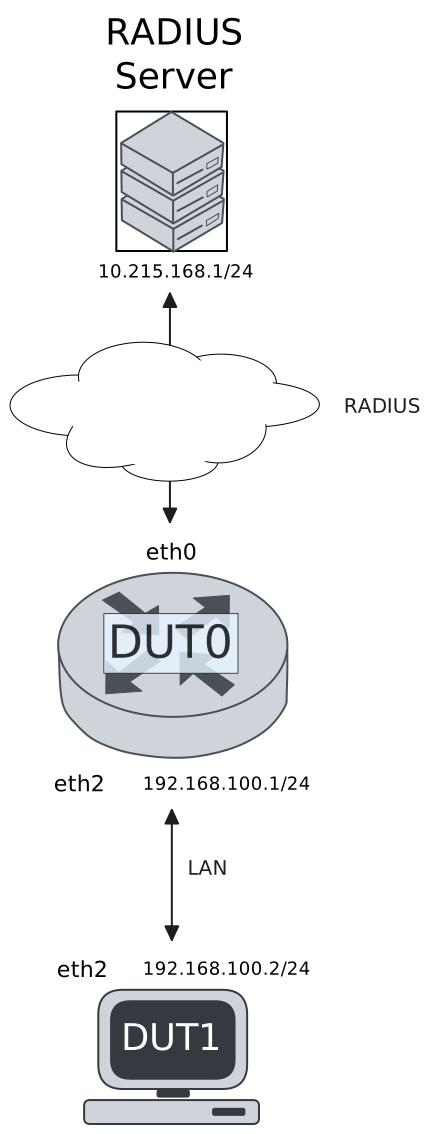
Test RADIUS Accounting With 802.1x Authentication
Description
DUT0 is configured with an 802.1x authenticated interface and DUT1 acts as an 802.1x supplicant. RADIUS accounting messages are captured in DUT0.
Scenario
Step 1: Set the following configuration in DUT0 :
set interfaces ethernet eth0 address 10.215.168.64/24
set interfaces ethernet eth2 address 192.168.100.1/24
set interfaces ethernet eth2 authenticator 802.1x max-retransmissions 2
set interfaces ethernet eth2 authenticator aaa accounting list1
set interfaces ethernet eth2 authenticator aaa authentication list1
set interfaces ethernet eth2 authenticator log-level debug
set interfaces ethernet eth2 authenticator mode only-802.1x
set interfaces ethernet eth2 authenticator quiet-period 60
set interfaces ethernet eth2 authenticator reauth-period 0
set system aaa group radius radgroup1 server serv1
set system aaa list list1 method 1 group radius radgroup1
set system aaa server radius serv1 address 10.215.168.1
set system aaa server radius serv1 encrypted-key U2FsdGVkX19zXcXaDd80nUy9uiiTQ/jTuKyuETCILtal17TDjgl6edbr+IJJoDKKNa+MrCDWwQ+Ogpiz94suRw==
set system login user admin authentication encrypted-password '$6$GSjsCj8gHLv$/VcqU6FLi6CT2Oxn0MJQ2C2tqnRDrYKNF8HIYWJp68nvXvPdFccDsT04.WtigUONbKYrgKg8d6rEs8PjljMkH0'
Step 2: Ping IP address 10.215.168.1 from DUT0:
admin@DUT0$ ping 10.215.168.1 count 1 size 56 timeout 1Show output
PING 10.215.168.1 (10.215.168.1) 56(84) bytes of data.
64 bytes from 10.215.168.1: icmp_seq=1 ttl=64 time=0.437 ms

--- 10.215.168.1 ping statistics ---
1 packets transmitted, 1 received, 0% packet loss, time 0ms
rtt min/avg/max/mdev = 0.437/0.437/0.437/0.000 ms
Note
Start packet capture in DUT0 to filter RADIUS messages
Step 3: Set the following configuration in DUT1 :
set interfaces ethernet eth2 address 192.168.100.2/24
set interfaces ethernet eth2 supplicant encrypted-password U2FsdGVkX1+4XF+/MqgQpqsLY1yILBURihe3fweWeSU=
set interfaces ethernet eth2 supplicant username testing
set system login user admin authentication encrypted-password '$6$GSjsCj8gHLv$/VcqU6FLi6CT2Oxn0MJQ2C2tqnRDrYKNF8HIYWJp68nvXvPdFccDsT04.WtigUONbKYrgKg8d6rEs8PjljMkH0'
Step 4: Run command interfaces ethernet eth2 supplicant show status at DUT1 and check if output contains the following tokens:
AuthorizedShow output
---------------------------------------------------
        Field                      Value
---------------------------------------------------
EAP State                                   SUCCESS
EAP TLS Cipher          ECDHE-RSA-AES256-GCM-SHA384
EAP TLS Version                             TLSv1.2
PAE State                             AUTHENTICATED
Supplicant Port Status                   Authorized
WPA State                                 COMPLETED
Step 5: Ping IP address 192.168.100.1 from DUT1:
admin@DUT1$ ping 192.168.100.1 count 1 size 56 timeout 1Show output
PING 192.168.100.1 (192.168.100.1) 56(84) bytes of data.
64 bytes from 192.168.100.1: icmp_seq=1 ttl=64 time=0.357 ms

--- 192.168.100.1 ping statistics ---
1 packets transmitted, 1 received, 0% packet loss, time 0ms
rtt min/avg/max/mdev = 0.357/0.357/0.357/0.000 ms
Note
Stop packet capture in DUT0 and expect
the following RADIUS messages:
Show output
tcpdump: listening on eth0, link-type EN10MB (Ethernet), snapshot length 262144 bytes
07:27:58.697374 de:ad:be:ef:6c:00 > fe:31:78:cf:ef:81, ethertype IPv4 (0x0800), length 183: (tos 0x0, ttl 64, id 56842, offset 0, flags [none], proto UDP (17), length 169)
    10.215.168.64.41821 > 10.215.168.1.1813: [bad udp cksum 0x6696 -> 0xbbe8!] RADIUS, length: 141
        Accounting-Request (4), id: 0x0b, Authenticator: 1e16236db7c80da9f4517fc11e15963d
          Acct-Status-Type Attribute (40), length: 6, Value: Start
            0x0000:  0000 0001
          Acct-Authentic Attribute (45), length: 6, Value: RADIUS
            0x0000:  0000 0001
          User-Name Attribute (1), length: 9, Value: testing
            0x0000:  7465 7374 696e 67
          Called-Station-Id Attribute (30), length: 20, Value: DE-AD-BE-EF-6C-02:
            0x0000:  4445 2d41 442d 4245 2d45 462d 3643 2d30
            0x0010:  323a
          Service-Type Attribute (6), length: 6, Value: Framed
            0x0000:  0000 0002
          Calling-Station-Id Attribute (31), length: 19, Value: DE-AD-BE-EF-6C-12
            0x0000:  4445 2d41 442d 4245 2d45 462d 3643 2d31
            0x0010:  32
          Acct-Session-Id Attribute (44), length: 18, Value: 605F68880A84F39F
            0x0000:  3630 3546 3638 3838 3041 3834 4633 3946
          NAS-Port-Type Attribute (61), length: 6, Value: Ethernet
            0x0000:  0000 000f
          Connect-Info Attribute (77), length: 13, Value: Unsupported
            0x0000:  556e 7375 7070 6f72 7465 64
          NAS-Port-Id Attribute (87), length: 6, Value: eth2
            0x0000:  6574 6832
          Event-Timestamp Attribute (55), length: 6, Value: Thu Feb 19 07:27:58 2026
            0x0000:  6996 bb7e
          Acct-Delay-Time Attribute (41), length: 6, Value: 00 secs
            0x0000:  0000 0000
1 packet captured
1 packet received by filter
0 packets dropped by kernel
admin@osdx$
Step 6: Run command interfaces ethernet eth2 authenticator show stats at DUT0 and check if output matches the following regular expressions:
Authentication Mode\s+802.1X
Session User MAC\s+de:ad:be:ef:6c:12
Session User Name\s+testing
Show output
---------------------------------------------
         Field                   Value
---------------------------------------------
Access Challenges                           9
Authentication Backend                 RADIUS
Authentication Failures                     0
Authentication Mode                    802.1X
Authentication Status     Authorized (802.1X)
Authentication Successes                    1
EAPoL frames (Rx)                          11
EAPoL frames (Tx)                          11
Quiet Period                               60
Reauthenticate                          FALSE
Reauthenticate Period                       0
Session Time                                0
Session User MAC            de:ad:be:ef:6c:12
Session User Name                     testing
Test RADIUS Accounting With MAB Authentication
Description
DUT0 is configured with a MAB authenticated interface. RADIUS accounting messages are captured in DUT0.
Scenario
Step 1: Set the following configuration in DUT0 :
set interfaces ethernet eth0 address 10.215.168.64/24
set interfaces ethernet eth2 address 192.168.100.1/24
set interfaces ethernet eth2 authenticator aaa accounting list1
set interfaces ethernet eth2 authenticator aaa authentication list1
set interfaces ethernet eth2 authenticator log-level debug
set interfaces ethernet eth2 authenticator mode only-MAB
set interfaces ethernet eth2 authenticator quiet-period 60
set interfaces ethernet eth2 authenticator reauth-period 0
set system aaa group radius radgroup1 server serv1
set system aaa list list1 method 1 group radius radgroup1
set system aaa server radius serv1 address 10.215.168.1
set system aaa server radius serv1 encrypted-key U2FsdGVkX1/bIjqhU0G87sdt5z0i9FnfjbEAfqql21/OuRqr6hx8len/qmKWwRtjCS+Z6RIxO2L/wqsZbub5yA==
set system login user admin authentication encrypted-password '$6$GSjsCj8gHLv$/VcqU6FLi6CT2Oxn0MJQ2C2tqnRDrYKNF8HIYWJp68nvXvPdFccDsT04.WtigUONbKYrgKg8d6rEs8PjljMkH0'
Step 2: Ping IP address 10.215.168.1 from DUT0:
admin@DUT0$ ping 10.215.168.1 count 1 size 56 timeout 1Show output
PING 10.215.168.1 (10.215.168.1) 56(84) bytes of data.
64 bytes from 10.215.168.1: icmp_seq=1 ttl=64 time=0.202 ms

--- 10.215.168.1 ping statistics ---
1 packets transmitted, 1 received, 0% packet loss, time 0ms
rtt min/avg/max/mdev = 0.202/0.202/0.202/0.000 ms
Note
Start packet capture in DUT0 to filter RADIUS messages
Step 3: Set the following configuration in DUT1 :
set interfaces ethernet eth2 address 192.168.100.2/24
set system login user admin authentication encrypted-password '$6$GSjsCj8gHLv$/VcqU6FLi6CT2Oxn0MJQ2C2tqnRDrYKNF8HIYWJp68nvXvPdFccDsT04.WtigUONbKYrgKg8d6rEs8PjljMkH0'
Step 4: Ping IP address 192.168.100.1 from DUT1:
admin@DUT1$ ping 192.168.100.1 count 1 size 56 timeout 1Show output
PING 192.168.100.1 (192.168.100.1) 56(84) bytes of data.
64 bytes from 192.168.100.1: icmp_seq=1 ttl=64 time=0.226 ms

--- 192.168.100.1 ping statistics ---
1 packets transmitted, 1 received, 0% packet loss, time 0ms
rtt min/avg/max/mdev = 0.226/0.226/0.226/0.000 ms
Note
Stop packet capture in DUT0 and expect
the following RADIUS messages:
Show output
tcpdump: listening on eth0, link-type EN10MB (Ethernet), snapshot length 262144 bytes
07:28:12.402646 de:ad:be:ef:6c:00 > fe:31:78:cf:ef:81, ethertype IPv4 (0x0800), length 193: (tos 0x0, ttl 64, id 30064, offset 0, flags [none], proto UDP (17), length 179)
    10.215.168.64.39484 > 10.215.168.1.1813: [bad udp cksum 0x66a0 -> 0x18d1!] RADIUS, length: 151
        Accounting-Request (4), id: 0x01, Authenticator: 49f039cc89ecd3bf2d558460192021ba
          Acct-Status-Type Attribute (40), length: 6, Value: Start
            0x0000:  0000 0001
          Acct-Authentic Attribute (45), length: 6, Value: Local
            0x0000:  0000 0002
          User-Name Attribute (1), length: 19, Value: de:ad:be:ef:6c:12
            0x0000:  6465 3a61 643a 6265 3a65 663a 3663 3a31
            0x0010:  32
          Called-Station-Id Attribute (30), length: 20, Value: DE-AD-BE-EF-6C-02:
            0x0000:  4445 2d41 442d 4245 2d45 462d 3643 2d30
            0x0010:  323a
          Service-Type Attribute (6), length: 6, Value: Framed
            0x0000:  0000 0002
          Calling-Station-Id Attribute (31), length: 19, Value: DE-AD-BE-EF-6C-12
            0x0000:  4445 2d41 442d 4245 2d45 462d 3643 2d31
            0x0010:  32
          Acct-Session-Id Attribute (44), length: 18, Value: AF1CF6EE5A4E811C
            0x0000:  4146 3143 4636 4545 3541 3445 3831 3143
          NAS-Port-Type Attribute (61), length: 6, Value: Ethernet
            0x0000:  0000 000f
          Connect-Info Attribute (77), length: 13, Value: Unsupported
            0x0000:  556e 7375 7070 6f72 7465 64
          NAS-Port-Id Attribute (87), length: 6, Value: eth2
            0x0000:  6574 6832
          Event-Timestamp Attribute (55), length: 6, Value: Thu Feb 19 07:28:12 2026
            0x0000:  6996 bb8c
          Acct-Delay-Time Attribute (41), length: 6, Value: 00 secs
            0x0000:  0000 0000
1 packet captured
2 packets received by filter
0 packets dropped by kernel
admin@osdx$
Step 5: Run command interfaces ethernet eth2 authenticator show stats at DUT0 and check if output matches the following regular expressions:
Authentication Mode\s+MAB
Session User MAC\s+de:ad:be:ef:6c:12
Session User Name\s+N/A
Show output
-------------------------------------------
         Field                  Value
-------------------------------------------
Access Challenges                         0
Authentication Backend               RADIUS
Authentication Failures                   0
Authentication Mode                     MAB
Authentication Status      Authorized (MAB)
Authentication Successes                  1
EAPoL frames (Rx)                         0
EAPoL frames (Tx)                         0
Quiet Period                             60
Reauthenticate                        FALSE
Reauthenticate Period                     0
Session Time                              1
Session User MAC          de:ad:be:ef:6c:12
Session User Name                       N/A