Network Access Server
This scenario shows different Network Access Server (NAS) configurations: server failover and VRF-aware communication.
Test 802.1X Authentication Against NAS Through a VRF-Aware Interface
Description
This scenario shows how to configure 802.1X authentication. It focuses on Authenticator/NAS communication, when performed via an VRF-aware Ethernet interface.
Scenario
Step 1: Set the following configuration in DUT0 :
set interfaces ethernet eth0 address 10.215.168.64/24
set interfaces ethernet eth0 vrf WAN
set interfaces ethernet eth2 address 192.168.100.1/24
set interfaces ethernet eth2 authenticator 802.1x max-retransmissions 2
set interfaces ethernet eth2 authenticator aaa authentication list1
set interfaces ethernet eth2 authenticator log-level debug
set interfaces ethernet eth2 authenticator mode only-802.1x
set interfaces ethernet eth2 authenticator quiet-period 60
set interfaces ethernet eth2 authenticator reauth-period 0
set system aaa group radius radgroup1 local-vrf WAN
set system aaa group radius radgroup1 server serv1
set system aaa list list1 method 1 group radius radgroup1
set system aaa server radius serv1 address 10.215.168.1
set system aaa server radius serv1 encrypted-key U2FsdGVkX19nITQv+eSXtp7sTyublLoa8zVIbJ4IzPJnh3/SUnuZz/rzvFiJXICvk3GMyE1WkmrBAyDvLFz2Mw==
set system login user admin authentication encrypted-password '$6$GSjsCj8gHLv$/VcqU6FLi6CT2Oxn0MJQ2C2tqnRDrYKNF8HIYWJp68nvXvPdFccDsT04.WtigUONbKYrgKg8d6rEs8PjljMkH0'
set system vrf WAN
Step 2: Ping IP address 10.215.168.1 from DUT0:
admin@DUT0$ ping 10.215.168.1 vrf WAN count 1 size 56 timeout 1Show output
ping: Warning: source address might be selected on device other than: WAN
PING 10.215.168.1 (10.215.168.1) from 10.215.168.64 WAN: 56(84) bytes of data.
64 bytes from 10.215.168.1: icmp_seq=1 ttl=64 time=0.220 ms

--- 10.215.168.1 ping statistics ---
1 packets transmitted, 1 received, 0% packet loss, time 0ms
rtt min/avg/max/mdev = 0.220/0.220/0.220/0.000 ms
Step 3: Set the following configuration in DUT1 :
set interfaces ethernet eth2 address 192.168.100.2/24
set interfaces ethernet eth2 supplicant encrypted-password U2FsdGVkX18hGYZEgXDLvpT2w/iqut+xbI8E6T93pak=
set interfaces ethernet eth2 supplicant username testing
set system login user admin authentication encrypted-password '$6$GSjsCj8gHLv$/VcqU6FLi6CT2Oxn0MJQ2C2tqnRDrYKNF8HIYWJp68nvXvPdFccDsT04.WtigUONbKYrgKg8d6rEs8PjljMkH0'
Step 4: Run command interfaces ethernet eth2 supplicant show status at DUT1 and check if output contains the following tokens:
AuthorizedShow output
---------------------------------------------------
        Field                      Value
---------------------------------------------------
EAP State                                   SUCCESS
EAP TLS Cipher          ECDHE-RSA-AES256-GCM-SHA384
EAP TLS Version                             TLSv1.2
PAE State                             AUTHENTICATED
Supplicant Port Status                   Authorized
WPA State                                 COMPLETED
Step 5: Run command interfaces ethernet eth2 supplicant show stats at DUT1 and check if output matches the following regular expressions:
Port Status\s+AuthorizedShow output
-------------------------------
       Field           Value
-------------------------------
EAPoL Frames (Rx)            11
EAPoL Frames (Tx)            11
Invalid Frames (Rx)           0
Logoff Frames (Tx)            0
Port Status          Authorized
Req Frames (Rx)               9
Req ID Frames (Rx)            1
Resp Frames (Tx)             10
Start Frames (Tx)             1
Step 6: Run command interfaces ethernet eth2 authenticator show stats at DUT0 and check if output matches the following regular expressions:
Authentication Successes\s+1
Authentication Mode\s+802\.1X
Show output
---------------------------------------------
         Field                   Value
---------------------------------------------
Access Challenges                           9
Authentication Backend                 RADIUS
Authentication Failures                     0
Authentication Mode                    802.1X
Authentication Status     Authorized (802.1X)
Authentication Successes                    1
EAPoL frames (Rx)                          11
EAPoL frames (Tx)                          11
Quiet Period                               60
Reauthenticate                          FALSE
Reauthenticate Period                       0
Session Time                                0
Session User MAC            de:ad:be:ef:6c:12
Session User Name                     testing
Step 7: Ping IP address 192.168.100.1 from DUT1:
admin@DUT1$ ping 192.168.100.1 count 1 size 56 timeout 1Show output
PING 192.168.100.1 (192.168.100.1) 56(84) bytes of data.
64 bytes from 192.168.100.1: icmp_seq=1 ttl=64 time=0.540 ms

--- 192.168.100.1 ping statistics ---
1 packets transmitted, 1 received, 0% packet loss, time 0ms
rtt min/avg/max/mdev = 0.540/0.540/0.540/0.000 ms
Test MAB Authentication Against NAS Through a VRF-Aware Interface
Description
This scenario shows how to configure MAB authentication. It focuses on Authenticator/NAS communication, when performed via an VRF-aware Ethernet interface.
Scenario
Step 1: Set the following configuration in DUT0 :
set interfaces ethernet eth0 address 10.215.168.64/24
set interfaces ethernet eth0 vrf WAN
set interfaces ethernet eth2 address 192.168.100.1/24
set interfaces ethernet eth2 authenticator aaa authentication list1
set interfaces ethernet eth2 authenticator log-level debug
set interfaces ethernet eth2 authenticator mode only-MAB
set interfaces ethernet eth2 authenticator quiet-period 60
set interfaces ethernet eth2 authenticator reauth-period 0
set system aaa group radius radgroup1 local-vrf WAN
set system aaa group radius radgroup1 server serv1
set system aaa list list1 method 1 group radius radgroup1
set system aaa server radius serv1 address 10.215.168.1
set system aaa server radius serv1 encrypted-key U2FsdGVkX18TJ3T4iJ9Sv5MgFku0h9FM5MSUVph+7U62ssPNaB0cYFKEnoIwWrsq+dEvP4SQlGd72tXO7dFRtQ==
set system login user admin authentication encrypted-password '$6$GSjsCj8gHLv$/VcqU6FLi6CT2Oxn0MJQ2C2tqnRDrYKNF8HIYWJp68nvXvPdFccDsT04.WtigUONbKYrgKg8d6rEs8PjljMkH0'
set system vrf WAN
Step 2: Ping IP address 10.215.168.1 from DUT0:
admin@DUT0$ ping 10.215.168.1 vrf WAN count 1 size 56 timeout 1Show output
ping: Warning: source address might be selected on device other than: WAN
PING 10.215.168.1 (10.215.168.1) from 10.215.168.64 WAN: 56(84) bytes of data.
64 bytes from 10.215.168.1: icmp_seq=1 ttl=64 time=1.27 ms

--- 10.215.168.1 ping statistics ---
1 packets transmitted, 1 received, 0% packet loss, time 0ms
rtt min/avg/max/mdev = 1.266/1.266/1.266/0.000 ms
Step 3: Set the following configuration in DUT1 :
set interfaces ethernet eth2 address 192.168.100.2/24
set system login user admin authentication encrypted-password '$6$GSjsCj8gHLv$/VcqU6FLi6CT2Oxn0MJQ2C2tqnRDrYKNF8HIYWJp68nvXvPdFccDsT04.WtigUONbKYrgKg8d6rEs8PjljMkH0'
Step 4: Ping IP address 192.168.100.1 from DUT1:
admin@DUT1$ ping 192.168.100.1 count 1 size 56 timeout 1Show output
PING 192.168.100.1 (192.168.100.1) 56(84) bytes of data.
64 bytes from 192.168.100.1: icmp_seq=1 ttl=64 time=0.878 ms

--- 192.168.100.1 ping statistics ---
1 packets transmitted, 1 received, 0% packet loss, time 0ms
rtt min/avg/max/mdev = 0.878/0.878/0.878/0.000 ms
Step 5: Run command interfaces ethernet eth2 authenticator show stats at DUT0 and check if output matches the following regular expressions:
Authentication Successes\s+1
Authentication Mode\s+MAB
Show output
-------------------------------------------
         Field                  Value
-------------------------------------------
Access Challenges                         0
Authentication Backend               RADIUS
Authentication Failures                   0
Authentication Mode                     MAB
Authentication Status      Authorized (MAB)
Authentication Successes                  1
EAPoL frames (Rx)                         0
EAPoL frames (Tx)                         0
Quiet Period                             60
Reauthenticate                        FALSE
Reauthenticate Period                     0
Session Time                              0
Session User MAC          de:ad:be:ef:6c:12
Session User Name                       N/A
Step 6: Ping IP address 192.168.100.1 from DUT1:
admin@DUT1$ ping 192.168.100.1 count 1 size 56 timeout 1Show output
PING 192.168.100.1 (192.168.100.1) 56(84) bytes of data.
64 bytes from 192.168.100.1: icmp_seq=1 ttl=64 time=0.292 ms

--- 192.168.100.1 ping statistics ---
1 packets transmitted, 1 received, 0% packet loss, time 0ms
rtt min/avg/max/mdev = 0.292/0.292/0.292/0.000 ms
Test 802.1X Authentication With Server Failover
Description
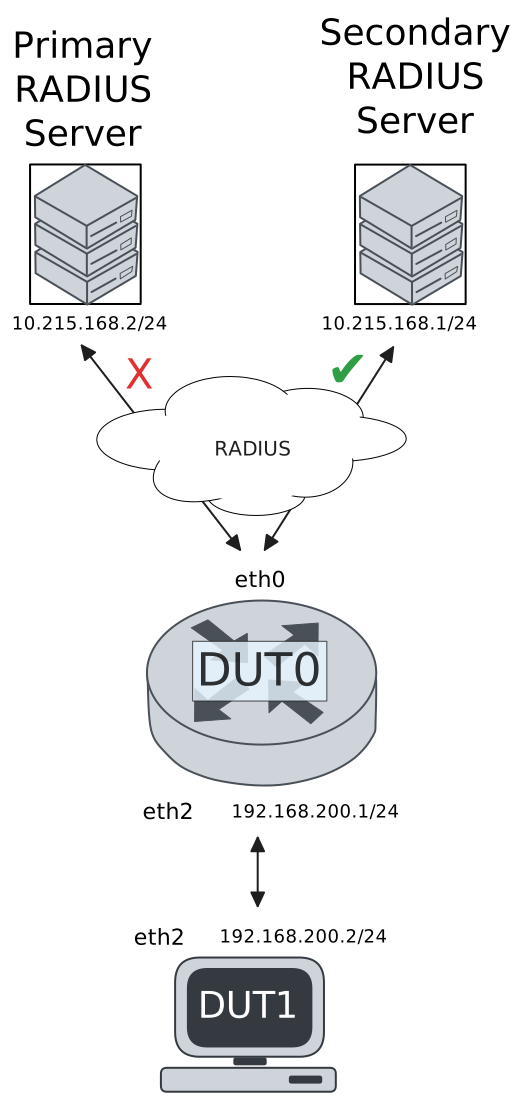
This scenario shows how to configure 802.1X authentication. The primary Nework Access Server is not reachable, so the secondary one is used instead.
Scenario
Step 1: Set the following configuration in DUT0 :
set interfaces ethernet eth0 address 10.215.168.64/24
set interfaces ethernet eth0 vrf WAN
set interfaces ethernet eth2 address 192.168.100.1/24
set interfaces ethernet eth2 authenticator 802.1x max-retransmissions 2
set interfaces ethernet eth2 authenticator aaa authentication list1
set interfaces ethernet eth2 authenticator log-level debug
set interfaces ethernet eth2 authenticator mode only-802.1x
set interfaces ethernet eth2 authenticator quiet-period 60
set interfaces ethernet eth2 authenticator reauth-period 0
set system aaa group radius radgroup0 local-vrf WAN
set system aaa group radius radgroup0 server MAIN
set system aaa group radius radgroup1 local-vrf WAN
set system aaa group radius radgroup1 server serv1
set system aaa list list1 method 0 group radius radgroup0
set system aaa list list1 method 1 group radius radgroup1
set system aaa server radius MAIN address 10.215.168.2
set system aaa server radius MAIN encrypted-key U2FsdGVkX1+RYh40ItF1CIKb7n0HzCNtVhKk+s/vpk/xzjFH2I4Iu+XSYmlGx95l2uhxMd7QLNwTAtnRyae6Iw==
set system aaa server radius serv1 address 10.215.168.1
set system aaa server radius serv1 encrypted-key U2FsdGVkX18HUYfef/BWakxG2cdBep4kbVnzyVcjC2B1Wqh7e4c2Uq1fNeBJDzivFRnO9k7ucDQab65Y1Q89JA==
set system login user admin authentication encrypted-password '$6$GSjsCj8gHLv$/VcqU6FLi6CT2Oxn0MJQ2C2tqnRDrYKNF8HIYWJp68nvXvPdFccDsT04.WtigUONbKYrgKg8d6rEs8PjljMkH0'
set system vrf WAN
Step 2: Ping IP address 10.215.168.1 from DUT0:
admin@DUT0$ ping 10.215.168.1 vrf WAN count 1 size 56 timeout 1Show output
ping: Warning: source address might be selected on device other than: WAN
PING 10.215.168.1 (10.215.168.1) from 10.215.168.64 WAN: 56(84) bytes of data.
64 bytes from 10.215.168.1: icmp_seq=1 ttl=64 time=1.00 ms

--- 10.215.168.1 ping statistics ---
1 packets transmitted, 1 received, 0% packet loss, time 0ms
rtt min/avg/max/mdev = 1.002/1.002/1.002/0.000 ms
Step 3: Set the following configuration in DUT1 :
set interfaces ethernet eth2 address 192.168.100.2/24
set interfaces ethernet eth2 supplicant encrypted-password U2FsdGVkX1/bhdf7AEn9GWsFU7OislJwqD+yF/dGDHU=
set interfaces ethernet eth2 supplicant username testing
set system login user admin authentication encrypted-password '$6$GSjsCj8gHLv$/VcqU6FLi6CT2Oxn0MJQ2C2tqnRDrYKNF8HIYWJp68nvXvPdFccDsT04.WtigUONbKYrgKg8d6rEs8PjljMkH0'
Step 4: Run command interfaces ethernet eth2 supplicant show status at DUT1 and check if output contains the following tokens:
AuthorizedShow output
---------------------------------------------------
        Field                      Value
---------------------------------------------------
EAP State                                   SUCCESS
EAP TLS Cipher          ECDHE-RSA-AES256-GCM-SHA384
EAP TLS Version                             TLSv1.2
PAE State                             AUTHENTICATED
Supplicant Port Status                   Authorized
WPA State                                 COMPLETED
Step 5: Run command interfaces ethernet eth2 supplicant show stats at DUT1 and check if output matches the following regular expressions:
Port Status\s+AuthorizedShow output
-------------------------------
       Field           Value
-------------------------------
EAPoL Frames (Rx)            11
EAPoL Frames (Tx)            11
Invalid Frames (Rx)           0
Logoff Frames (Tx)            0
Port Status          Authorized
Req Frames (Rx)               9
Req ID Frames (Rx)            1
Resp Frames (Tx)             10
Start Frames (Tx)             1
Step 6: Run command interfaces ethernet eth2 authenticator show stats at DUT0 and check if output matches the following regular expressions:
Authentication Successes\s+1
Authentication Mode\s+802\.1X
Show output
---------------------------------------------
         Field                   Value
---------------------------------------------
Access Challenges                           9
Authentication Backend                 RADIUS
Authentication Failures                     0
Authentication Mode                    802.1X
Authentication Status     Authorized (802.1X)
Authentication Successes                    1
EAPoL frames (Rx)                          11
EAPoL frames (Tx)                          11
Quiet Period                               60
Reauthenticate                          FALSE
Reauthenticate Period                       0
Session Time                                0
Session User MAC            de:ad:be:ef:6c:12
Session User Name                     testing
Step 7: Ping IP address 192.168.100.1 from DUT1:
admin@DUT1$ ping 192.168.100.1 count 1 size 56 timeout 1Show output
PING 192.168.100.1 (192.168.100.1) 56(84) bytes of data.
64 bytes from 192.168.100.1: icmp_seq=1 ttl=64 time=0.648 ms

--- 192.168.100.1 ping statistics ---
1 packets transmitted, 1 received, 0% packet loss, time 0ms
rtt min/avg/max/mdev = 0.648/0.648/0.648/0.000 ms
Step 8: Run command system journal show | grep "osdx hostapd" at DUT0 and check if output contains the following tokens:
No response from Authentication server 10.215.168.2Show output
Mar 05 18:25:16.920251 osdx hostapd[595076]: eth2: IEEE 802.11 Fetching hardware channel/rate support not supported.
Mar 05 18:25:16.920273 osdx hostapd[595076]: eth2: RADIUS Authentication server 10.215.168.2:1812
Mar 05 18:25:16.920518 osdx hostapd[595076]: connect[radius]: No route to host
Mar 05 18:25:16.920330 osdx hostapd[595076]: eth2: IEEE 802.1X Initializing IEEE 802.1X: mode=802.1X, eap_server=0, eap_quiet_period=60, eap_max_retrans=2
Mar 05 18:25:16.920334 osdx hostapd[595076]: eth2: IEEE 802.1X IEEE 802.1X: Enabling packet capture discovery mode
Mar 05 18:25:16.939976 osdx hostapd[595076]: Discovery mode enabled on eth2
Mar 05 18:25:16.940080 osdx hostapd[595076]: eth2: interface state UNINITIALIZED->ENABLED
Mar 05 18:25:16.940080 osdx hostapd[595076]: eth2: AP-ENABLED
Mar 05 18:25:20.080824 osdx hostapd[595077]: eth2: STA de:ad:be:ef:6c:12 IEEE 802.1X: New STA de:ad:be:ef:6c:12 added
Mar 05 18:25:20.080840 osdx hostapd[595077]: eth2: IEEE 802.1X IEEE 802.1X: Disabling packet capture discovery mode
Mar 05 18:25:20.104002 osdx hostapd[595077]: eth2: STA de:ad:be:ef:6c:12 IEEE 802.1X: start authentication
Mar 05 18:25:20.104031 osdx hostapd[595077]: eth2: STA 01:80:c2:00:00:03 IEEE 802.1X: disabling transmission of periodic EAP-Request frames
Mar 05 18:25:20.104047 osdx hostapd[595077]: eth2: STA de:ad:be:ef:6c:12 IEEE 802.1X: received EAPOL-Start from STA
Mar 05 18:25:20.104060 osdx hostapd[595077]: eth2: STA de:ad:be:ef:6c:12 IEEE 802.1X: unauthorizing port
Mar 05 18:25:20.104069 osdx hostapd[595077]: eth2: STA 01:80:c2:00:00:03 IEEE 802.1X: Trying RADIUS authentication
Mar 05 18:25:20.104095 osdx hostapd[595077]: eth2: STA de:ad:be:ef:6c:12 IEEE 802.1X: Sending EAP Packet (identifier 142)
Mar 05 18:25:20.104417 osdx hostapd[595077]: eth2: STA de:ad:be:ef:6c:12 IEEE 802.1X: received EAP packet (code=2 id=142 len=12) from STA: EAP Response-Identity (1)
Mar 05 18:25:20.104430 osdx hostapd[595077]: eth2: STA de:ad:be:ef:6c:12 IEEE 802.1X: STA identity 'testing'
Mar 05 18:25:20.104458 osdx hostapd[595077]: eth2: RADIUS Authentication server 10.215.168.2:1812
Mar 05 18:25:20.106311 osdx hostapd[595077]: eth2: RADIUS Sending RADIUS message to authentication server
Mar 05 18:25:20.106346 osdx hostapd[595077]: eth2: RADIUS Next RADIUS client retransmit in 1 seconds
Mar 05 18:25:21.106436 osdx hostapd[595077]: eth2: STA de:ad:be:ef:6c:12 RADIUS: Resending RADIUS message (id=0)
Mar 05 18:25:21.106466 osdx hostapd[595077]: eth2: RADIUS Next RADIUS client retransmit in 2 seconds
Mar 05 18:25:23.106752 osdx hostapd[595077]: eth2: STA de:ad:be:ef:6c:12 RADIUS: Resending RADIUS message (id=0)
Mar 05 18:25:23.106780 osdx hostapd[595077]: eth2: RADIUS Next RADIUS client retransmit in 4 seconds
Mar 05 18:25:27.107044 osdx hostapd[595077]: eth2: RADIUS No response from Authentication server 10.215.168.2:1812 - failover (1º round)
Mar 05 18:25:27.107056 osdx hostapd[595077]: eth2: RADIUS Authentication server 10.215.168.1:1812
Mar 05 18:25:27.107101 osdx hostapd[595077]: eth2: STA de:ad:be:ef:6c:12 RADIUS: Resending RADIUS message (id=0)
Mar 05 18:25:27.107127 osdx hostapd[595077]: eth2: RADIUS Next RADIUS client retransmit in 2 seconds
Mar 05 18:25:27.107414 osdx hostapd[595077]: eth2: RADIUS Received 80 bytes from RADIUS server
Mar 05 18:25:27.107418 osdx hostapd[595077]: eth2: RADIUS Received RADIUS message
Mar 05 18:25:27.107421 osdx hostapd[595077]: eth2: STA de:ad:be:ef:6c:12 RADIUS: Received RADIUS packet matched with a pending request, round trip time 0.00 sec
Mar 05 18:25:27.107462 osdx hostapd[595077]: eth2: STA de:ad:be:ef:6c:12 IEEE 802.1X: decapsulated EAP packet (code=1 id=143 len=22) from RADIUS server: EAP-Request-MD5 (4)
Mar 05 18:25:27.107470 osdx hostapd[595077]: eth2: STA de:ad:be:ef:6c:12 IEEE 802.1X: Sending EAP Packet (identifier 143)
Mar 05 18:25:27.107862 osdx hostapd[595077]: eth2: STA de:ad:be:ef:6c:12 IEEE 802.1X: received EAP packet (code=2 id=143 len=6) from STA: EAP Response-unknown (3)
Mar 05 18:25:27.107959 osdx hostapd[595077]: eth2: RADIUS Sending RADIUS message to authentication server
Mar 05 18:25:27.108019 osdx hostapd[595077]: eth2: RADIUS Next RADIUS client retransmit in 1 seconds
Mar 05 18:25:27.108264 osdx hostapd[595077]: eth2: RADIUS Received 64 bytes from RADIUS server
Mar 05 18:25:27.108271 osdx hostapd[595077]: eth2: RADIUS Received RADIUS message
Mar 05 18:25:27.108276 osdx hostapd[595077]: eth2: STA de:ad:be:ef:6c:12 RADIUS: Received RADIUS packet matched with a pending request, round trip time 0.00 sec
Mar 05 18:25:27.108299 osdx hostapd[595077]: eth2: STA de:ad:be:ef:6c:12 IEEE 802.1X: decapsulated EAP packet (code=1 id=144 len=6) from RADIUS server: EAP-Request-PEAP (25)
Mar 05 18:25:27.108307 osdx hostapd[595077]: eth2: STA de:ad:be:ef:6c:12 IEEE 802.1X: Sending EAP Packet (identifier 144)
Mar 05 18:25:27.108666 osdx hostapd[595077]: eth2: STA de:ad:be:ef:6c:12 IEEE 802.1X: received EAP packet (code=2 id=144 len=194) from STA: EAP Response-PEAP (25)
Mar 05 18:25:27.108719 osdx hostapd[595077]: eth2: RADIUS Sending RADIUS message to authentication server
Mar 05 18:25:27.108736 osdx hostapd[595077]: eth2: RADIUS Next RADIUS client retransmit in 1 seconds
Mar 05 18:25:27.110237 osdx hostapd[595077]: eth2: RADIUS Received 1068 bytes from RADIUS server
Mar 05 18:25:27.110245 osdx hostapd[595077]: eth2: RADIUS Received RADIUS message
Mar 05 18:25:27.110248 osdx hostapd[595077]: eth2: STA de:ad:be:ef:6c:12 RADIUS: Received RADIUS packet matched with a pending request, round trip time 0.00 sec
Mar 05 18:25:27.110276 osdx hostapd[595077]: eth2: STA de:ad:be:ef:6c:12 IEEE 802.1X: decapsulated EAP packet (code=1 id=145 len=1004) from RADIUS server: EAP-Request-PEAP (25)
Mar 05 18:25:27.110281 osdx hostapd[595077]: eth2: STA de:ad:be:ef:6c:12 IEEE 802.1X: Sending EAP Packet (identifier 145)
Mar 05 18:25:27.110468 osdx hostapd[595077]: eth2: STA de:ad:be:ef:6c:12 IEEE 802.1X: received EAP packet (code=2 id=145 len=6) from STA: EAP Response-PEAP (25)
Mar 05 18:25:27.110512 osdx hostapd[595077]: eth2: RADIUS Sending RADIUS message to authentication server
Mar 05 18:25:27.110525 osdx hostapd[595077]: eth2: RADIUS Next RADIUS client retransmit in 1 seconds
Mar 05 18:25:27.110668 osdx hostapd[595077]: eth2: RADIUS Received 229 bytes from RADIUS server
Mar 05 18:25:27.110675 osdx hostapd[595077]: eth2: RADIUS Received RADIUS message
Mar 05 18:25:27.110678 osdx hostapd[595077]: eth2: STA de:ad:be:ef:6c:12 RADIUS: Received RADIUS packet matched with a pending request, round trip time 0.00 sec
Mar 05 18:25:27.110709 osdx hostapd[595077]: eth2: STA de:ad:be:ef:6c:12 IEEE 802.1X: decapsulated EAP packet (code=1 id=146 len=171) from RADIUS server: EAP-Request-PEAP (25)
Mar 05 18:25:27.110715 osdx hostapd[595077]: eth2: STA de:ad:be:ef:6c:12 IEEE 802.1X: Sending EAP Packet (identifier 146)
Mar 05 18:25:27.112212 osdx hostapd[595077]: eth2: STA de:ad:be:ef:6c:12 IEEE 802.1X: received EAP packet (code=2 id=146 len=103) from STA: EAP Response-PEAP (25)
Mar 05 18:25:27.112264 osdx hostapd[595077]: eth2: RADIUS Sending RADIUS message to authentication server
Mar 05 18:25:27.112279 osdx hostapd[595077]: eth2: RADIUS Next RADIUS client retransmit in 1 seconds
Mar 05 18:25:27.112610 osdx hostapd[595077]: eth2: RADIUS Received 115 bytes from RADIUS server
Mar 05 18:25:27.112615 osdx hostapd[595077]: eth2: RADIUS Received RADIUS message
Mar 05 18:25:27.112618 osdx hostapd[595077]: eth2: STA de:ad:be:ef:6c:12 RADIUS: Received RADIUS packet matched with a pending request, round trip time 0.00 sec
Mar 05 18:25:27.112633 osdx hostapd[595077]: eth2: STA de:ad:be:ef:6c:12 IEEE 802.1X: decapsulated EAP packet (code=1 id=147 len=57) from RADIUS server: EAP-Request-PEAP (25)
Mar 05 18:25:27.112639 osdx hostapd[595077]: eth2: STA de:ad:be:ef:6c:12 IEEE 802.1X: Sending EAP Packet (identifier 147)
Mar 05 18:25:27.112873 osdx hostapd[595077]: eth2: STA de:ad:be:ef:6c:12 IEEE 802.1X: received EAP packet (code=2 id=147 len=6) from STA: EAP Response-PEAP (25)
Mar 05 18:25:27.112912 osdx hostapd[595077]: eth2: RADIUS Sending RADIUS message to authentication server
Mar 05 18:25:27.112925 osdx hostapd[595077]: eth2: RADIUS Next RADIUS client retransmit in 1 seconds
Mar 05 18:25:27.113068 osdx hostapd[595077]: eth2: RADIUS Received 98 bytes from RADIUS server
Mar 05 18:25:27.113073 osdx hostapd[595077]: eth2: RADIUS Received RADIUS message
Mar 05 18:25:27.113075 osdx hostapd[595077]: eth2: STA de:ad:be:ef:6c:12 RADIUS: Received RADIUS packet matched with a pending request, round trip time 0.00 sec
Mar 05 18:25:27.113088 osdx hostapd[595077]: eth2: STA de:ad:be:ef:6c:12 IEEE 802.1X: decapsulated EAP packet (code=1 id=148 len=40) from RADIUS server: EAP-Request-PEAP (25)
Mar 05 18:25:27.113093 osdx hostapd[595077]: eth2: STA de:ad:be:ef:6c:12 IEEE 802.1X: Sending EAP Packet (identifier 148)
Mar 05 18:25:27.113312 osdx hostapd[595077]: eth2: STA de:ad:be:ef:6c:12 IEEE 802.1X: received EAP packet (code=2 id=148 len=43) from STA: EAP Response-PEAP (25)
Mar 05 18:25:27.113340 osdx hostapd[595077]: eth2: RADIUS Sending RADIUS message to authentication server
Mar 05 18:25:27.113350 osdx hostapd[595077]: eth2: RADIUS Next RADIUS client retransmit in 1 seconds
Mar 05 18:25:27.113501 osdx hostapd[595077]: eth2: RADIUS Received 131 bytes from RADIUS server
Mar 05 18:25:27.113509 osdx hostapd[595077]: eth2: RADIUS Received RADIUS message
Mar 05 18:25:27.113515 osdx hostapd[595077]: eth2: STA de:ad:be:ef:6c:12 RADIUS: Received RADIUS packet matched with a pending request, round trip time 0.00 sec
Mar 05 18:25:27.113537 osdx hostapd[595077]: eth2: STA de:ad:be:ef:6c:12 IEEE 802.1X: decapsulated EAP packet (code=1 id=149 len=73) from RADIUS server: EAP-Request-PEAP (25)
Mar 05 18:25:27.113546 osdx hostapd[595077]: eth2: STA de:ad:be:ef:6c:12 IEEE 802.1X: Sending EAP Packet (identifier 149)
Mar 05 18:25:27.113806 osdx hostapd[595077]: eth2: STA de:ad:be:ef:6c:12 IEEE 802.1X: received EAP packet (code=2 id=149 len=97) from STA: EAP Response-PEAP (25)
Mar 05 18:25:27.113840 osdx hostapd[595077]: eth2: RADIUS Sending RADIUS message to authentication server
Mar 05 18:25:27.113855 osdx hostapd[595077]: eth2: RADIUS Next RADIUS client retransmit in 1 seconds
Mar 05 18:25:27.114044 osdx hostapd[595077]: eth2: RADIUS Received 140 bytes from RADIUS server
Mar 05 18:25:27.114050 osdx hostapd[595077]: eth2: RADIUS Received RADIUS message
Mar 05 18:25:27.114053 osdx hostapd[595077]: eth2: STA de:ad:be:ef:6c:12 RADIUS: Received RADIUS packet matched with a pending request, round trip time 0.00 sec
Mar 05 18:25:27.114065 osdx hostapd[595077]: eth2: STA de:ad:be:ef:6c:12 IEEE 802.1X: decapsulated EAP packet (code=1 id=150 len=82) from RADIUS server: EAP-Request-PEAP (25)
Mar 05 18:25:27.114072 osdx hostapd[595077]: eth2: STA de:ad:be:ef:6c:12 IEEE 802.1X: Sending EAP Packet (identifier 150)
Mar 05 18:25:27.114230 osdx hostapd[595077]: eth2: STA de:ad:be:ef:6c:12 IEEE 802.1X: received EAP packet (code=2 id=150 len=37) from STA: EAP Response-PEAP (25)
Mar 05 18:25:27.114258 osdx hostapd[595077]: eth2: RADIUS Sending RADIUS message to authentication server
Mar 05 18:25:27.114272 osdx hostapd[595077]: eth2: RADIUS Next RADIUS client retransmit in 1 seconds
Mar 05 18:25:27.114426 osdx hostapd[595077]: eth2: RADIUS Received 104 bytes from RADIUS server
Mar 05 18:25:27.114430 osdx hostapd[595077]: eth2: RADIUS Received RADIUS message
Mar 05 18:25:27.114432 osdx hostapd[595077]: eth2: STA de:ad:be:ef:6c:12 RADIUS: Received RADIUS packet matched with a pending request, round trip time 0.00 sec
Mar 05 18:25:27.114443 osdx hostapd[595077]: eth2: STA de:ad:be:ef:6c:12 IEEE 802.1X: decapsulated EAP packet (code=1 id=151 len=46) from RADIUS server: EAP-Request-PEAP (25)
Mar 05 18:25:27.114448 osdx hostapd[595077]: eth2: STA de:ad:be:ef:6c:12 IEEE 802.1X: Sending EAP Packet (identifier 151)
Mar 05 18:25:27.114628 osdx hostapd[595077]: eth2: STA de:ad:be:ef:6c:12 IEEE 802.1X: received EAP packet (code=2 id=151 len=46) from STA: EAP Response-PEAP (25)
Mar 05 18:25:27.114656 osdx hostapd[595077]: eth2: RADIUS Sending RADIUS message to authentication server
Mar 05 18:25:27.114667 osdx hostapd[595077]: eth2: RADIUS Next RADIUS client retransmit in 1 seconds
Mar 05 18:25:27.114859 osdx hostapd[595077]: eth2: RADIUS Received 175 bytes from RADIUS server
Mar 05 18:25:27.114864 osdx hostapd[595077]: eth2: RADIUS Received RADIUS message
Mar 05 18:25:27.114867 osdx hostapd[595077]: eth2: STA de:ad:be:ef:6c:12 RADIUS: Received RADIUS packet matched with a pending request, round trip time 0.00 sec
Mar 05 18:25:27.114886 osdx hostapd[595077]: eth2: STA de:ad:be:ef:6c:12 IEEE 802.1X: old identity 'testing' updated with User-Name from Access-Accept 'testing'
Mar 05 18:25:27.114889 osdx hostapd[595077]: eth2: STA de:ad:be:ef:6c:12 IEEE 802.1X: decapsulated EAP packet (code=3 id=151 len=4) from RADIUS server: EAP Success
Mar 05 18:25:27.114903 osdx hostapd[595077]: eth2: STA de:ad:be:ef:6c:12 IEEE 802.1X: Sending EAP Packet (identifier 151)
Mar 05 18:25:27.114915 osdx hostapd[595077]: eth2: STA de:ad:be:ef:6c:12 IEEE 802.1X: authorizing port
Mar 05 18:25:27.114918 osdx hostapd[595077]: eth2: STA de:ad:be:ef:6c:12 RADIUS: starting accounting session 1D11CB93BBA1A1AC
Mar 05 18:25:27.114921 osdx hostapd[595077]: eth2: STA de:ad:be:ef:6c:12 IEEE 802.1X: authenticated - EAP type: 25 (PEAP)
Test MAB Authentication With Server Failover
Description
This scenario shows how to configure MAB authentication. The primary Nework Access Server is not reachable, so the secondary one is used instead.
Scenario
Step 1: Set the following configuration in DUT0 :
set interfaces ethernet eth0 address 10.215.168.64/24
set interfaces ethernet eth0 vrf WAN
set interfaces ethernet eth2 address 192.168.100.1/24
set interfaces ethernet eth2 authenticator aaa authentication list1
set interfaces ethernet eth2 authenticator log-level debug
set interfaces ethernet eth2 authenticator mode only-MAB
set interfaces ethernet eth2 authenticator quiet-period 60
set interfaces ethernet eth2 authenticator reauth-period 0
set system aaa group radius radgroup0 local-vrf WAN
set system aaa group radius radgroup0 server MAIN
set system aaa group radius radgroup1 local-vrf WAN
set system aaa group radius radgroup1 server serv1
set system aaa list list1 method 0 group radius radgroup0
set system aaa list list1 method 1 group radius radgroup1
set system aaa server radius MAIN address 10.215.168.2
set system aaa server radius MAIN encrypted-key U2FsdGVkX19YyoWBIyANOEruM3Ix1hL9dOItKChsPY7fSAczJgqY1g2MhjMMXhGRrKKr9wmOcOdceojI6EkbsQ==
set system aaa server radius serv1 address 10.215.168.1
set system aaa server radius serv1 encrypted-key U2FsdGVkX19NJZzrQTdd2o3nY0cai4/RC61ctUhzV5soW29g49LxO3piVsyHZKDloPhURemkzW25AYZBHZPUtA==
set system login user admin authentication encrypted-password '$6$GSjsCj8gHLv$/VcqU6FLi6CT2Oxn0MJQ2C2tqnRDrYKNF8HIYWJp68nvXvPdFccDsT04.WtigUONbKYrgKg8d6rEs8PjljMkH0'
set system vrf WAN
Step 2: Ping IP address 10.215.168.1 from DUT0:
admin@DUT0$ ping 10.215.168.1 vrf WAN count 1 size 56 timeout 1Show output
ping: Warning: source address might be selected on device other than: WAN
PING 10.215.168.1 (10.215.168.1) from 10.215.168.64 WAN: 56(84) bytes of data.
64 bytes from 10.215.168.1: icmp_seq=1 ttl=64 time=1.02 ms

--- 10.215.168.1 ping statistics ---
1 packets transmitted, 1 received, 0% packet loss, time 0ms
rtt min/avg/max/mdev = 1.020/1.020/1.020/0.000 ms
Step 3: Set the following configuration in DUT1 :
set interfaces ethernet eth2 address 192.168.100.2/24
set system login user admin authentication encrypted-password '$6$GSjsCj8gHLv$/VcqU6FLi6CT2Oxn0MJQ2C2tqnRDrYKNF8HIYWJp68nvXvPdFccDsT04.WtigUONbKYrgKg8d6rEs8PjljMkH0'
Step 4: Run command interfaces ethernet eth2 authenticator show stats at DUT0 and check if output matches the following regular expressions:
Authentication Successes\s+1
Authentication Mode\s+MAB
Show output
-------------------------------------------
         Field                  Value
-------------------------------------------
Access Challenges                         0
Authentication Backend               RADIUS
Authentication Failures                   0
Authentication Mode                     MAB
Authentication Status      Authorized (MAB)
Authentication Successes                  1
EAPoL frames (Rx)                         0
EAPoL frames (Tx)                         0
Quiet Period                             60
Reauthenticate                        FALSE
Reauthenticate Period                     0
Session Time                              0
Session User MAC          de:ad:be:ef:6c:12
Session User Name                       N/A
Step 5: Ping IP address 192.168.100.1 from DUT1:
admin@DUT1$ ping 192.168.100.1 count 1 size 56 timeout 1Show output
PING 192.168.100.1 (192.168.100.1) 56(84) bytes of data.
64 bytes from 192.168.100.1: icmp_seq=1 ttl=64 time=0.535 ms

--- 192.168.100.1 ping statistics ---
1 packets transmitted, 1 received, 0% packet loss, time 0ms
rtt min/avg/max/mdev = 0.535/0.535/0.535/0.000 ms
Step 6: Run command system journal show | grep "osdx hostapd" at DUT0 and check if output contains the following tokens:
No response from Authentication server 10.215.168.2Show output
Mar 05 18:25:39.240337 osdx hostapd[595719]: eth2: IEEE 802.11 Fetching hardware channel/rate support not supported.
Mar 05 18:25:39.240354 osdx hostapd[595719]: eth2: RADIUS Authentication server 10.215.168.2:1812
Mar 05 18:25:39.240696 osdx hostapd[595719]: connect[radius]: No route to host
Mar 05 18:25:39.240417 osdx hostapd[595719]: eth2: IEEE 802.1X Initializing IEEE 802.1X: mode=MAB-only, eap_server=0, eap_quiet_period=60, eap_max_retrans=5
Mar 05 18:25:39.240422 osdx hostapd[595719]: eth2: IEEE 802.1X IEEE 802.1X: Enabling packet capture discovery mode
Mar 05 18:25:39.264162 osdx hostapd[595719]: Discovery mode enabled on eth2
Mar 05 18:25:39.264276 osdx hostapd[595719]: eth2: interface state UNINITIALIZED->ENABLED
Mar 05 18:25:39.264276 osdx hostapd[595719]: eth2: AP-ENABLED
Mar 05 18:25:44.264912 osdx hostapd[595720]: eth2: STA de:ad:be:ef:6c:12 DRIVER: Device discovered, triggering MAB authentication
Mar 05 18:25:44.264954 osdx hostapd[595720]: eth2: STA de:ad:be:ef:6c:12 IEEE 802.1X: New STA de:ad:be:ef:6c:12 added
Mar 05 18:25:44.264965 osdx hostapd[595720]: eth2: IEEE 802.1X IEEE 802.1X: Disabling packet capture discovery mode
Mar 05 18:25:44.280187 osdx hostapd[595720]: eth2: STA de:ad:be:ef:6c:12 IEEE 802.1X: MAB-only mode: Starting MAB authentication
Mar 05 18:25:44.280221 osdx hostapd[595720]: eth2: STA de:ad:be:ef:6c:12 IEEE 802.1X: MAB: Starting RADIUS query
Mar 05 18:25:44.280236 osdx hostapd[595720]: eth2: STA de:ad:be:ef:6c:12 IEEE 802.1X: MAB: User-Name = de:ad:be:ef:6c:12
Mar 05 18:25:44.281903 osdx hostapd[595720]: eth2: STA de:ad:be:ef:6c:12 IEEE 802.1X: MAB: User-Password = de:ad:be:ef:6c:12
Mar 05 18:25:44.281914 osdx hostapd[595720]: eth2: RADIUS Authentication server 10.215.168.2:1812
Mar 05 18:25:44.281995 osdx hostapd[595720]: eth2: RADIUS Sending RADIUS message to authentication server
Mar 05 18:25:44.282029 osdx hostapd[595720]: eth2: RADIUS Next RADIUS client retransmit in 1 seconds
Mar 05 18:25:45.282105 osdx hostapd[595720]: eth2: STA de:ad:be:ef:6c:12 RADIUS: Resending RADIUS message (id=128)
Mar 05 18:25:45.282136 osdx hostapd[595720]: eth2: RADIUS Next RADIUS client retransmit in 2 seconds
Mar 05 18:25:47.282925 osdx hostapd[595720]: eth2: STA de:ad:be:ef:6c:12 RADIUS: Resending RADIUS message (id=128)
Mar 05 18:25:47.282948 osdx hostapd[595720]: eth2: RADIUS Next RADIUS client retransmit in 4 seconds
Mar 05 18:25:51.283934 osdx hostapd[595720]: eth2: RADIUS No response from Authentication server 10.215.168.2:1812 - failover (1º round)
Mar 05 18:25:51.283947 osdx hostapd[595720]: eth2: RADIUS Authentication server 10.215.168.1:1812
Mar 05 18:25:51.284001 osdx hostapd[595720]: eth2: STA de:ad:be:ef:6c:12 RADIUS: Resending RADIUS message (id=128)
Mar 05 18:25:51.284039 osdx hostapd[595720]: eth2: RADIUS Next RADIUS client retransmit in 2 seconds
Mar 05 18:25:51.284317 osdx hostapd[595720]: eth2: RADIUS Received 20 bytes from RADIUS server
Mar 05 18:25:51.284320 osdx hostapd[595720]: eth2: RADIUS Received RADIUS message
Mar 05 18:25:51.284325 osdx hostapd[595720]: eth2: STA de:ad:be:ef:6c:12 RADIUS: Received RADIUS packet matched with a pending request, round trip time 0.00 sec
Mar 05 18:25:51.284330 osdx hostapd[595720]: eth2: STA de:ad:be:ef:6c:12 IEEE 802.1X: MAB: Processing RADIUS response
Mar 05 18:25:51.284369 osdx hostapd[595720]: eth2: STA de:ad:be:ef:6c:12 IEEE 802.1X: MAB: Identity set to 'de:ad:be:ef:6c:12'
Mar 05 18:25:51.284389 osdx hostapd[595720]: eth2: STA de:ad:be:ef:6c:12 IEEE 802.1X: MAB: station successfully authenticated
Mar 05 18:25:51.284393 osdx hostapd[595720]: eth2: IEEE 802.1X IEEE 802.1X: Discovery already disabled
Mar 05 18:25:51.284404 osdx hostapd[595720]: eth2: STA de:ad:be:ef:6c:12 IEEE 802.1X: authorizing port
Mar 05 18:25:51.284408 osdx hostapd[595720]: eth2: STA de:ad:be:ef:6c:12 RADIUS: starting accounting session CD198D92EF7F003A