Conntag
The following scenarios show how to configure traffic policies
using the conntag feature. Conntag allows tagging conntrack
entries with string values (up to 255 characters) for traffic
classification and filtering. This is similar to connmark but
uses human-readable string tags instead of numeric marks.
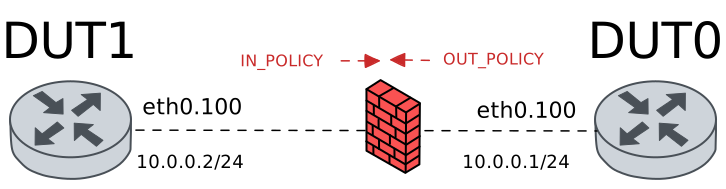
Test Policy Set Conntag Basic
Description
In this scenario, an ingress traffic policy is configured
in DUT0 to set a basic conntag string on incoming packets.
The conntag value is stored in the conntrack entry and can
be verified using the system conntrack show command.
Scenario
Step 1: Set the following configuration in DUT0 :
set interfaces ethernet eth0 vif 100 address 10.0.0.1/24
set interfaces ethernet eth0 vif 100 traffic policy in POLICY_IN
set system login user admin authentication encrypted-password '$6$GSjsCj8gHLv$/VcqU6FLi6CT2Oxn0MJQ2C2tqnRDrYKNF8HIYWJp68nvXvPdFccDsT04.WtigUONbKYrgKg8d6rEs8PjljMkH0'
set traffic policy POLICY_IN rule 1 set conntag my-traffic-tag
Step 2: Set the following configuration in DUT1 :
set interfaces ethernet eth0 vif 100 address 10.0.0.2/24
set system login user admin authentication encrypted-password '$6$GSjsCj8gHLv$/VcqU6FLi6CT2Oxn0MJQ2C2tqnRDrYKNF8HIYWJp68nvXvPdFccDsT04.WtigUONbKYrgKg8d6rEs8PjljMkH0'
Step 3: Ping IP address 10.0.0.1 from DUT1:
admin@DUT1$ ping 10.0.0.1 count 1 size 56 timeout 1Show output
PING 10.0.0.1 (10.0.0.1) 56(84) bytes of data.
64 bytes from 10.0.0.1: icmp_seq=1 ttl=64 time=0.473 ms

--- 10.0.0.1 ping statistics ---
1 packets transmitted, 1 received, 0% packet loss, time 0ms
rtt min/avg/max/mdev = 0.473/0.473/0.473/0.000 ms
Step 4: Run command system conntrack clear at DUT0 and expect this output:
Show output
Connection tracking table has been emptied
Step 5: Ping IP address 10.0.0.1 from DUT1:
admin@DUT1$ ping 10.0.0.1 count 3 size 56 timeout 1Show output
PING 10.0.0.1 (10.0.0.1) 56(84) bytes of data.
64 bytes from 10.0.0.1: icmp_seq=1 ttl=64 time=0.363 ms
64 bytes from 10.0.0.1: icmp_seq=2 ttl=64 time=0.268 ms
64 bytes from 10.0.0.1: icmp_seq=3 ttl=64 time=0.244 ms

--- 10.0.0.1 ping statistics ---
3 packets transmitted, 3 received, 0% packet loss, time 2053ms
rtt min/avg/max/mdev = 0.244/0.291/0.363/0.051 ms
Step 6: Run command system conntrack show at DUT0 and check if output contains the following tokens:
conntag=my-traffic-tagShow output
icmp     1 29 src=10.0.0.2 dst=10.0.0.1 type=8 code=0 id=336 packets=3 bytes=252 src=10.0.0.1 dst=10.0.0.2 type=0 code=0 id=336 packets=3 bytes=252 mark=0 conntag=my-traffic-tag use=1
conntrack v1.4.7 (conntrack-tools): 1 flow entries have been shown.
Test Policy Set Conntag With Numbers
Description
This scenario tests setting a conntag that includes numeric characters mixed with text, demonstrating that conntag values can contain alphanumeric strings with hyphens.
Scenario
Step 1: Set the following configuration in DUT0 :
set interfaces ethernet eth0 vif 100 address 10.0.0.1/24
set interfaces ethernet eth0 vif 100 traffic policy in POLICY_IN
set system login user admin authentication encrypted-password '$6$GSjsCj8gHLv$/VcqU6FLi6CT2Oxn0MJQ2C2tqnRDrYKNF8HIYWJp68nvXvPdFccDsT04.WtigUONbKYrgKg8d6rEs8PjljMkH0'
set traffic policy POLICY_IN rule 1 set conntag traffic-123-test
Step 2: Set the following configuration in DUT1 :
set interfaces ethernet eth0 vif 100 address 10.0.0.2/24
set system login user admin authentication encrypted-password '$6$GSjsCj8gHLv$/VcqU6FLi6CT2Oxn0MJQ2C2tqnRDrYKNF8HIYWJp68nvXvPdFccDsT04.WtigUONbKYrgKg8d6rEs8PjljMkH0'
Step 3: Ping IP address 10.0.0.1 from DUT1:
admin@DUT1$ ping 10.0.0.1 count 1 size 56 timeout 1Show output
PING 10.0.0.1 (10.0.0.1) 56(84) bytes of data.
64 bytes from 10.0.0.1: icmp_seq=1 ttl=64 time=0.572 ms

--- 10.0.0.1 ping statistics ---
1 packets transmitted, 1 received, 0% packet loss, time 0ms
rtt min/avg/max/mdev = 0.572/0.572/0.572/0.000 ms
Step 4: Run command system conntrack clear at DUT0 and expect this output:
Show output
Connection tracking table has been emptied
Step 5: Ping IP address 10.0.0.1 from DUT1:
admin@DUT1$ ping 10.0.0.1 count 3 size 56 timeout 1Show output
PING 10.0.0.1 (10.0.0.1) 56(84) bytes of data.
64 bytes from 10.0.0.1: icmp_seq=1 ttl=64 time=0.583 ms
64 bytes from 10.0.0.1: icmp_seq=2 ttl=64 time=0.433 ms
64 bytes from 10.0.0.1: icmp_seq=3 ttl=64 time=0.255 ms

--- 10.0.0.1 ping statistics ---
3 packets transmitted, 3 received, 0% packet loss, time 2031ms
rtt min/avg/max/mdev = 0.255/0.423/0.583/0.134 ms
Step 6: Run command system conntrack show at DUT0 and check if output contains the following tokens:
conntag=traffic-123-testShow output
icmp     1 29 src=10.0.0.2 dst=10.0.0.1 type=8 code=0 id=338 packets=3 bytes=252 src=10.0.0.1 dst=10.0.0.2 type=0 code=0 id=338 packets=3 bytes=252 mark=0 conntag=traffic-123-test use=1
conntrack v1.4.7 (conntrack-tools): 1 flow entries have been shown.
Test Policy Set Conntag Special Characters
Description
This scenario tests setting a conntag that includes special characters like underscores, dots, and hyphens, which are commonly used in application versioning and environment naming.
Scenario
Step 1: Set the following configuration in DUT0 :
set interfaces ethernet eth0 vif 100 address 10.0.0.1/24
set interfaces ethernet eth0 vif 100 traffic policy in POLICY_IN
set system login user admin authentication encrypted-password '$6$GSjsCj8gHLv$/VcqU6FLi6CT2Oxn0MJQ2C2tqnRDrYKNF8HIYWJp68nvXvPdFccDsT04.WtigUONbKYrgKg8d6rEs8PjljMkH0'
set traffic policy POLICY_IN rule 1 set conntag app_v2.0-prod
Step 2: Set the following configuration in DUT1 :
set interfaces ethernet eth0 vif 100 address 10.0.0.2/24
set system login user admin authentication encrypted-password '$6$GSjsCj8gHLv$/VcqU6FLi6CT2Oxn0MJQ2C2tqnRDrYKNF8HIYWJp68nvXvPdFccDsT04.WtigUONbKYrgKg8d6rEs8PjljMkH0'
Step 3: Ping IP address 10.0.0.1 from DUT1:
admin@DUT1$ ping 10.0.0.1 count 1 size 56 timeout 1Show output
PING 10.0.0.1 (10.0.0.1) 56(84) bytes of data.
64 bytes from 10.0.0.1: icmp_seq=1 ttl=64 time=0.622 ms

--- 10.0.0.1 ping statistics ---
1 packets transmitted, 1 received, 0% packet loss, time 0ms
rtt min/avg/max/mdev = 0.622/0.622/0.622/0.000 ms
Step 4: Run command system conntrack clear at DUT0 and expect this output:
Show output
Connection tracking table has been emptied
Step 5: Ping IP address 10.0.0.1 from DUT1:
admin@DUT1$ ping 10.0.0.1 count 3 size 56 timeout 1Show output
PING 10.0.0.1 (10.0.0.1) 56(84) bytes of data.
64 bytes from 10.0.0.1: icmp_seq=1 ttl=64 time=0.291 ms
64 bytes from 10.0.0.1: icmp_seq=2 ttl=64 time=0.255 ms
64 bytes from 10.0.0.1: icmp_seq=3 ttl=64 time=0.520 ms

--- 10.0.0.1 ping statistics ---
3 packets transmitted, 3 received, 0% packet loss, time 2041ms
rtt min/avg/max/mdev = 0.255/0.355/0.520/0.117 ms
Step 6: Run command system conntrack show at DUT0 and check if output contains the following tokens:
conntag=app_v2.0-prodShow output
icmp     1 29 src=10.0.0.2 dst=10.0.0.1 type=8 code=0 id=340 packets=3 bytes=252 src=10.0.0.1 dst=10.0.0.2 type=0 code=0 id=340 packets=3 bytes=252 mark=0 conntag=app_v2.0-prod use=1
conntrack v1.4.7 (conntrack-tools): 1 flow entries have been shown.
Test Policy Set Conntag Maximum Length
Description
This scenario tests the conntag feature with the maximum allowed string length of 255 characters. The system should accept and correctly store strings up to this limit.
Scenario
Step 1: Set the following configuration in DUT0 :
set interfaces ethernet eth0 vif 100 address 10.0.0.1/24
set interfaces ethernet eth0 vif 100 traffic policy in POLICY_IN
set system login user admin authentication encrypted-password '$6$GSjsCj8gHLv$/VcqU6FLi6CT2Oxn0MJQ2C2tqnRDrYKNF8HIYWJp68nvXvPdFccDsT04.WtigUONbKYrgKg8d6rEs8PjljMkH0'
set traffic policy POLICY_IN rule 1 set conntag Lorem-ipsum-dolor-sit-amet-consectetur-adipiscing-elit-sed-do-eiusmod-tempor-incididunt-ut-labore-et-dolore-magna-aliqua-Ut-enim-ad-minim-veniam-quis-nostrud-exercitation-ullamco-laboris-nisi-ut-aliquip-ex-ea-commodo-consequat-Duis-aute-irure-dolor-len255
Step 2: Set the following configuration in DUT1 :
set interfaces ethernet eth0 vif 100 address 10.0.0.2/24
set system login user admin authentication encrypted-password '$6$GSjsCj8gHLv$/VcqU6FLi6CT2Oxn0MJQ2C2tqnRDrYKNF8HIYWJp68nvXvPdFccDsT04.WtigUONbKYrgKg8d6rEs8PjljMkH0'
Step 3: Ping IP address 10.0.0.1 from DUT1:
admin@DUT1$ ping 10.0.0.1 count 1 size 56 timeout 1Show output
PING 10.0.0.1 (10.0.0.1) 56(84) bytes of data.
64 bytes from 10.0.0.1: icmp_seq=1 ttl=64 time=0.499 ms

--- 10.0.0.1 ping statistics ---
1 packets transmitted, 1 received, 0% packet loss, time 0ms
rtt min/avg/max/mdev = 0.499/0.499/0.499/0.000 ms
Step 4: Run command system conntrack clear at DUT0 and expect this output:
Show output
Connection tracking table has been emptied
Step 5: Ping IP address 10.0.0.1 from DUT1:
admin@DUT1$ ping 10.0.0.1 count 3 size 56 timeout 1Show output
PING 10.0.0.1 (10.0.0.1) 56(84) bytes of data.
64 bytes from 10.0.0.1: icmp_seq=1 ttl=64 time=0.326 ms
64 bytes from 10.0.0.1: icmp_seq=2 ttl=64 time=0.215 ms
64 bytes from 10.0.0.1: icmp_seq=3 ttl=64 time=0.238 ms

--- 10.0.0.1 ping statistics ---
3 packets transmitted, 3 received, 0% packet loss, time 2047ms
rtt min/avg/max/mdev = 0.215/0.259/0.326/0.047 ms
Step 6: Run command system conntrack show at DUT0 and expect this output:
Show output
icmp     1 29 src=10.0.0.2 dst=10.0.0.1 type=8 code=0 id=342 packets=3 bytes=252 src=10.0.0.1 dst=10.0.0.2 type=0 code=0 id=342 packets=3 bytes=252 mark=0 conntag=Lorem-ipsum-dolor-sit-amet-consectetur-adipiscing-elit-sed-do-eiusmod-tempor-incididunt-ut-labore-et-dolore-magna-aliqua-Ut-enim-ad-minim-veniam-quis-nostrud-exercitation-ullamco-laboris-nisi-ut-aliquip-ex-ea-commodo-consequat-Duis-aute-
irure-dolor-len255 use=1
conntrack v1.4.7 (conntrack-tools): 1 flow entries have been shown.
Test Policy Set Conntag Invalid Length
Description
This scenario tests that the system correctly rejects conntag strings that exceed the maximum allowed length of 255 characters with an appropriate error message.
Scenario
Step 1: Set the following configuration in DUT0 :
set interfaces ethernet eth0 vif 100 address 10.0.0.1/24
set interfaces ethernet eth0 vif 100 traffic policy in POLICY_IN
set system login user admin authentication encrypted-password '$6$GSjsCj8gHLv$/VcqU6FLi6CT2Oxn0MJQ2C2tqnRDrYKNF8HIYWJp68nvXvPdFccDsT04.WtigUONbKYrgKg8d6rEs8PjljMkH0'
set traffic policy POLICY_IN
Step 2: Expect a failure in the following command:
Run command set traffic policy POLICY_IN rule 1 set conntag Lorem-ipsum-dolor-sit-amet-consectetur-adipiscing-elit-sed-do-eiusmod-tempor-incididunt-ut-labore-et-dolore-magna-aliqua-Ut-enim-ad-minim-veniam-quis-nostrud-exercitation-ullamco-laboris-nisi-ut-aliquip-ex-ea-commodo-consequat-Duis-aute-irure-dolor-len_256 at DUT0 and expect this output:
Show output
tag string must be 1..255 non-space printable characters
Value validation failed
CLI Error: Command error
Test Policy Set Conntag Empty String
Description
This scenario tests that the system correctly rejects empty or whitespace-only conntag strings.
Scenario
Step 1: Set the following configuration in DUT0 :
set interfaces ethernet eth0 vif 100 address 10.0.0.1/24
set interfaces ethernet eth0 vif 100 traffic policy in POLICY_IN
set system login user admin authentication encrypted-password '$6$GSjsCj8gHLv$/VcqU6FLi6CT2Oxn0MJQ2C2tqnRDrYKNF8HIYWJp68nvXvPdFccDsT04.WtigUONbKYrgKg8d6rEs8PjljMkH0'
set traffic policy POLICY_IN
Step 2: Run command configure at DUT0 and expect this output:
Show output
admin@osdx#
Step 3: Run command set traffic policy POLICY_IN rule 1 set conntag at DUT0 and check if output contains the following tokens:
requires a valueShow output
Configuration path: [traffic policy POLICY_IN rule 1 set conntag] requires a value
CLI Error: Command error
Test Policy Set Conntag With Connmark
Description
This scenario demonstrates using both conntag and connmark together on the same traffic flow. This allows numeric classification (connmark) alongside descriptive string tagging (conntag) for comprehensive traffic identification.
Scenario
Step 1: Set the following configuration in DUT0 :
set interfaces ethernet eth0 vif 100 address 10.0.0.1/24
set interfaces ethernet eth0 vif 100 traffic policy in POLICY_IN
set system login user admin authentication encrypted-password '$6$GSjsCj8gHLv$/VcqU6FLi6CT2Oxn0MJQ2C2tqnRDrYKNF8HIYWJp68nvXvPdFccDsT04.WtigUONbKYrgKg8d6rEs8PjljMkH0'
set traffic policy POLICY_IN rule 1 set connmark 42
set traffic policy POLICY_IN rule 1 set conntag my-traffic-tag
Step 2: Set the following configuration in DUT1 :
set interfaces ethernet eth0 vif 100 address 10.0.0.2/24
set system login user admin authentication encrypted-password '$6$GSjsCj8gHLv$/VcqU6FLi6CT2Oxn0MJQ2C2tqnRDrYKNF8HIYWJp68nvXvPdFccDsT04.WtigUONbKYrgKg8d6rEs8PjljMkH0'
Step 3: Ping IP address 10.0.0.1 from DUT1:
admin@DUT1$ ping 10.0.0.1 count 1 size 56 timeout 1Show output
PING 10.0.0.1 (10.0.0.1) 56(84) bytes of data.
64 bytes from 10.0.0.1: icmp_seq=1 ttl=64 time=0.632 ms

--- 10.0.0.1 ping statistics ---
1 packets transmitted, 1 received, 0% packet loss, time 0ms
rtt min/avg/max/mdev = 0.632/0.632/0.632/0.000 ms
Step 4: Run command system conntrack clear at DUT0 and expect this output:
Show output
Connection tracking table has been emptied
Step 5: Ping IP address 10.0.0.1 from DUT1:
admin@DUT1$ ping 10.0.0.1 count 3 size 56 timeout 1Show output
PING 10.0.0.1 (10.0.0.1) 56(84) bytes of data.
64 bytes from 10.0.0.1: icmp_seq=1 ttl=64 time=0.215 ms
64 bytes from 10.0.0.1: icmp_seq=2 ttl=64 time=0.264 ms
64 bytes from 10.0.0.1: icmp_seq=3 ttl=64 time=0.235 ms

--- 10.0.0.1 ping statistics ---
3 packets transmitted, 3 received, 0% packet loss, time 2028ms
rtt min/avg/max/mdev = 0.215/0.238/0.264/0.020 ms
Step 6: Run command system conntrack show at DUT0 and expect this output:
Show output
icmp     1 29 src=10.0.0.2 dst=10.0.0.1 type=8 code=0 id=344 packets=3 bytes=252 src=10.0.0.1 dst=10.0.0.2 type=0 code=0 id=344 packets=3 bytes=252 mark=42 conntag=my-traffic-tag use=1
conntrack v1.4.7 (conntrack-tools): 1 flow entries have been shown.
Test Policy Set Conntag With VRF
Description
This scenario demonstrates using conntag in combination with VRF routing. Traffic is tagged with a conntag and also assigned to a specific VRF for routing purposes.
Scenario
Step 1: Set the following configuration in DUT0 :
set interfaces ethernet eth0 vif 100 address 10.0.0.1/24
set interfaces ethernet eth0 vif 100 traffic policy in POLICY_IN
set interfaces ethernet eth0 vif 100 vrf RED
set system login user admin authentication encrypted-password '$6$GSjsCj8gHLv$/VcqU6FLi6CT2Oxn0MJQ2C2tqnRDrYKNF8HIYWJp68nvXvPdFccDsT04.WtigUONbKYrgKg8d6rEs8PjljMkH0'
set system vrf RED
set traffic policy POLICY_IN rule 1 set conntag my-traffic-tag
set traffic policy POLICY_IN rule 1 set vrf RED
Step 2: Set the following configuration in DUT1 :
set interfaces ethernet eth0 vif 100 address 10.0.0.2/24
set system login user admin authentication encrypted-password '$6$GSjsCj8gHLv$/VcqU6FLi6CT2Oxn0MJQ2C2tqnRDrYKNF8HIYWJp68nvXvPdFccDsT04.WtigUONbKYrgKg8d6rEs8PjljMkH0'
Step 3: Ping IP address 10.0.0.1 from DUT1:
admin@DUT1$ ping 10.0.0.1 count 1 size 56 timeout 1Show output
PING 10.0.0.1 (10.0.0.1) 56(84) bytes of data.
64 bytes from 10.0.0.1: icmp_seq=1 ttl=64 time=0.620 ms

--- 10.0.0.1 ping statistics ---
1 packets transmitted, 1 received, 0% packet loss, time 0ms
rtt min/avg/max/mdev = 0.620/0.620/0.620/0.000 ms
Step 4: Run command system conntrack clear at DUT0 and expect this output:
Show output
Connection tracking table has been emptied
Step 5: Ping IP address 10.0.0.1 from DUT1:
admin@DUT1$ ping 10.0.0.1 count 3 size 56 timeout 1Show output
PING 10.0.0.1 (10.0.0.1) 56(84) bytes of data.
64 bytes from 10.0.0.1: icmp_seq=1 ttl=64 time=0.456 ms
64 bytes from 10.0.0.1: icmp_seq=2 ttl=64 time=0.540 ms
64 bytes from 10.0.0.1: icmp_seq=3 ttl=64 time=0.242 ms

--- 10.0.0.1 ping statistics ---
3 packets transmitted, 3 received, 0% packet loss, time 2037ms
rtt min/avg/max/mdev = 0.242/0.412/0.540/0.125 ms
Step 6: Run command system conntrack show at DUT0 and expect this output:
Show output
icmp     1 29 src=10.0.0.2 dst=10.0.0.1 type=8 code=0 id=346 vrf=RED packets=3 bytes=252 src=10.0.0.1 dst=10.0.0.2 type=0 code=0 id=346 vrf=RED packets=3 bytes=252 mark=0 conntag=my-traffic-tag use=1
conntrack v1.4.7 (conntrack-tools): 1 flow entries have been shown.
Test Policy Modify Conntag
Description
This scenario demonstrates modifying the conntag value on an existing traffic policy rule and verifying that new connections use the updated tag value.
Scenario
Step 1: Set the following configuration in DUT0 :
set interfaces ethernet eth0 vif 100 address 10.0.0.1/24
set interfaces ethernet eth0 vif 100 traffic policy in POLICY_IN
set system login user admin authentication encrypted-password '$6$GSjsCj8gHLv$/VcqU6FLi6CT2Oxn0MJQ2C2tqnRDrYKNF8HIYWJp68nvXvPdFccDsT04.WtigUONbKYrgKg8d6rEs8PjljMkH0'
set traffic policy POLICY_IN rule 1 set conntag initial-tag
Step 2: Set the following configuration in DUT1 :
set interfaces ethernet eth0 vif 100 address 10.0.0.2/24
set system login user admin authentication encrypted-password '$6$GSjsCj8gHLv$/VcqU6FLi6CT2Oxn0MJQ2C2tqnRDrYKNF8HIYWJp68nvXvPdFccDsT04.WtigUONbKYrgKg8d6rEs8PjljMkH0'
Step 3: Ping IP address 10.0.0.1 from DUT1:
admin@DUT1$ ping 10.0.0.1 count 1 size 56 timeout 1Show output
PING 10.0.0.1 (10.0.0.1) 56(84) bytes of data.
64 bytes from 10.0.0.1: icmp_seq=1 ttl=64 time=0.592 ms

--- 10.0.0.1 ping statistics ---
1 packets transmitted, 1 received, 0% packet loss, time 0ms
rtt min/avg/max/mdev = 0.592/0.592/0.592/0.000 ms
Step 4: Run command system conntrack clear at DUT0 and expect this output:
Show output
Connection tracking table has been emptied
Step 5: Ping IP address 10.0.0.1 from DUT1:
admin@DUT1$ ping 10.0.0.1 count 3 size 56 timeout 1Show output
PING 10.0.0.1 (10.0.0.1) 56(84) bytes of data.
64 bytes from 10.0.0.1: icmp_seq=1 ttl=64 time=0.454 ms
64 bytes from 10.0.0.1: icmp_seq=2 ttl=64 time=0.240 ms
64 bytes from 10.0.0.1: icmp_seq=3 ttl=64 time=0.473 ms

--- 10.0.0.1 ping statistics ---
3 packets transmitted, 3 received, 0% packet loss, time 2042ms
rtt min/avg/max/mdev = 0.240/0.389/0.473/0.105 ms
Step 6: Run command system conntrack show at DUT0 and check if output contains the following tokens:
conntag=initial-tagShow output
icmp     1 29 src=10.0.0.2 dst=10.0.0.1 type=8 code=0 id=348 packets=3 bytes=252 src=10.0.0.1 dst=10.0.0.2 type=0 code=0 id=348 packets=3 bytes=252 mark=0 conntag=initial-tag use=1
conntrack v1.4.7 (conntrack-tools): 1 flow entries have been shown.
Step 7: Run command system conntrack clear at DUT0 and expect this output:
Show output
Connection tracking table has been emptied
Step 8: Modify the following configuration lines in DUT0 :
set traffic policy POLICY_IN rule 1 set conntag modified-tag
Step 9: Ping IP address 10.0.0.1 from DUT1:
admin@DUT1$ ping 10.0.0.1 count 3 size 56 timeout 1Show output
PING 10.0.0.1 (10.0.0.1) 56(84) bytes of data.
64 bytes from 10.0.0.1: icmp_seq=1 ttl=64 time=0.384 ms
64 bytes from 10.0.0.1: icmp_seq=2 ttl=64 time=0.263 ms
64 bytes from 10.0.0.1: icmp_seq=3 ttl=64 time=0.274 ms

--- 10.0.0.1 ping statistics ---
3 packets transmitted, 3 received, 0% packet loss, time 2052ms
rtt min/avg/max/mdev = 0.263/0.307/0.384/0.054 ms
Step 10: Run command system conntrack show at DUT0 and check if output contains the following tokens:
conntag=modified-tagShow output
icmp     1 29 src=10.0.0.2 dst=10.0.0.1 type=8 code=0 id=349 packets=3 bytes=252 src=10.0.0.1 dst=10.0.0.2 type=0 code=0 id=349 packets=3 bytes=252 mark=0 conntag=modified-tag use=1
conntrack v1.4.7 (conntrack-tools): 1 flow entries have been shown.
Test Policy Delete Conntag
Description
This scenario tests removing a conntag configuration from a traffic policy and verifying that new connections no longer have the tag applied.
Scenario
Step 1: Set the following configuration in DUT0 :
set interfaces ethernet eth0 vif 100 address 10.0.0.1/24
set interfaces ethernet eth0 vif 100 traffic policy in POLICY_IN
set system login user admin authentication encrypted-password '$6$GSjsCj8gHLv$/VcqU6FLi6CT2Oxn0MJQ2C2tqnRDrYKNF8HIYWJp68nvXvPdFccDsT04.WtigUONbKYrgKg8d6rEs8PjljMkH0'
set traffic policy POLICY_IN rule 1 set conntag my-traffic-tag
Step 2: Set the following configuration in DUT1 :
set interfaces ethernet eth0 vif 100 address 10.0.0.2/24
set system login user admin authentication encrypted-password '$6$GSjsCj8gHLv$/VcqU6FLi6CT2Oxn0MJQ2C2tqnRDrYKNF8HIYWJp68nvXvPdFccDsT04.WtigUONbKYrgKg8d6rEs8PjljMkH0'
Step 3: Ping IP address 10.0.0.1 from DUT1:
admin@DUT1$ ping 10.0.0.1 count 1 size 56 timeout 1Show output
PING 10.0.0.1 (10.0.0.1) 56(84) bytes of data.
64 bytes from 10.0.0.1: icmp_seq=1 ttl=64 time=0.597 ms

--- 10.0.0.1 ping statistics ---
1 packets transmitted, 1 received, 0% packet loss, time 0ms
rtt min/avg/max/mdev = 0.597/0.597/0.597/0.000 ms
Step 4: Run command system conntrack clear at DUT0 and expect this output:
Show output
Connection tracking table has been emptied
Step 5: Ping IP address 10.0.0.1 from DUT1:
admin@DUT1$ ping 10.0.0.1 count 3 size 56 timeout 1Show output
PING 10.0.0.1 (10.0.0.1) 56(84) bytes of data.
64 bytes from 10.0.0.1: icmp_seq=1 ttl=64 time=0.341 ms
64 bytes from 10.0.0.1: icmp_seq=2 ttl=64 time=0.590 ms
64 bytes from 10.0.0.1: icmp_seq=3 ttl=64 time=0.368 ms

--- 10.0.0.1 ping statistics ---
3 packets transmitted, 3 received, 0% packet loss, time 2025ms
rtt min/avg/max/mdev = 0.341/0.433/0.590/0.111 ms
Step 6: Run command system conntrack show at DUT0 and check if output contains the following tokens:
conntag=my-traffic-tagShow output
icmp     1 29 src=10.0.0.2 dst=10.0.0.1 type=8 code=0 id=351 packets=3 bytes=252 src=10.0.0.1 dst=10.0.0.2 type=0 code=0 id=351 packets=3 bytes=252 mark=0 conntag=my-traffic-tag use=1
conntrack v1.4.7 (conntrack-tools): 1 flow entries have been shown.
Step 7: Run command system conntrack clear at DUT0 and expect this output:
Show output
Connection tracking table has been emptied
Step 8: Modify the following configuration lines in DUT0 :
delete traffic policy POLICY_IN rule 1 set
set traffic policy POLICY_IN rule 1 action accept
Step 9: Ping IP address 10.0.0.1 from DUT1:
admin@DUT1$ ping 10.0.0.1 count 3 size 56 timeout 1Show output
PING 10.0.0.1 (10.0.0.1) 56(84) bytes of data.
64 bytes from 10.0.0.1: icmp_seq=1 ttl=64 time=0.403 ms
64 bytes from 10.0.0.1: icmp_seq=2 ttl=64 time=0.275 ms
64 bytes from 10.0.0.1: icmp_seq=3 ttl=64 time=0.603 ms

--- 10.0.0.1 ping statistics ---
3 packets transmitted, 3 received, 0% packet loss, time 2052ms
rtt min/avg/max/mdev = 0.275/0.427/0.603/0.134 ms
Step 10: Run command system conntrack show at DUT0 and expect this output:
Show output
icmp     1 29 src=10.0.0.2 dst=10.0.0.1 type=8 code=0 id=352 packets=3 bytes=252 src=10.0.0.1 dst=10.0.0.2 type=0 code=0 id=352 packets=3 bytes=252 mark=0 use=1
conntrack v1.4.7 (conntrack-tools): 1 flow entries have been shown.