Policy
The following scenarios show how to configure different
traffic policies. Policies can be used to manage and
classify network packets. traffic selectors can be
configured to filter packets based on certain fields.
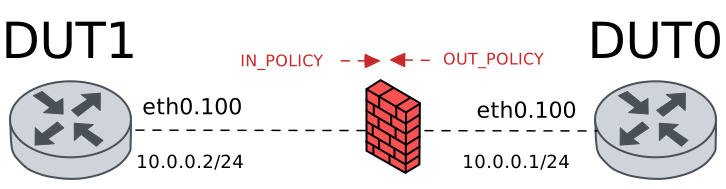
Test Policy Actions
Description
In this scenario, an ingress traffic policy is configured
in DUT0 (‘eth0’ interface). Different traffic actions are
configured to accept, drop or limit incoming traffic.
Scenario
Step 1: Set the following configuration in DUT0 :
set interfaces ethernet eth0 vif 100 address 10.0.0.1/24
set interfaces ethernet eth0 vif 100 traffic policy in POLICY_IN
set interfaces ethernet eth0 vif 100 traffic policy out POLICY_OUT
set system login user admin authentication encrypted-password '$6$GSjsCj8gHLv$/VcqU6FLi6CT2Oxn0MJQ2C2tqnRDrYKNF8HIYWJp68nvXvPdFccDsT04.WtigUONbKYrgKg8d6rEs8PjljMkH0'
set traffic policy POLICY_IN rule 1 action accept
set traffic policy POLICY_OUT
Step 2: Set the following configuration in DUT1 :
set interfaces ethernet eth0 vif 100 address 10.0.0.2/24
set system login user admin authentication encrypted-password '$6$GSjsCj8gHLv$/VcqU6FLi6CT2Oxn0MJQ2C2tqnRDrYKNF8HIYWJp68nvXvPdFccDsT04.WtigUONbKYrgKg8d6rEs8PjljMkH0'
Step 3: Ping IP address 10.0.0.1 from DUT1:
admin@DUT1$ ping 10.0.0.1 count 1 size 56 timeout 1Show output
PING 10.0.0.1 (10.0.0.1) 56(84) bytes of data.
64 bytes from 10.0.0.1: icmp_seq=1 ttl=64 time=0.641 ms

--- 10.0.0.1 ping statistics ---
1 packets transmitted, 1 received, 0% packet loss, time 0ms
rtt min/avg/max/mdev = 0.641/0.641/0.641/0.000 ms
Step 4: Modify the following configuration lines in DUT0 :
delete traffic policy POLICY_IN rule 1 action accept
set traffic policy POLICY_IN rule 1 action drop
Step 5: Expect a failure in the following command:
Initiate a udp connection from DUT1 to DUT0 and try to send some messages between both endpoints
admin@DUT0$ monitor test connection server 8080 udp
admin@DUT1$ monitor test connection client 10.0.0.1 8080 udp
Step 6: Modify the following configuration lines in DUT0 :
delete traffic policy POLICY_IN rule 1 action drop
set traffic policy POLICY_IN rule 1 action rate-limit 10
Step 7: Initiate a bandwidth test from DUT1 to DUT0
admin@DUT0$ monitor test performance server port 5001
admin@DUT1$ monitor test performance client 10.0.0.1 duration 5 port 5001 parallel 1
Expect this output in
DUT1:Connecting to host 10.0.0.1, port 5001 [ 5] local 10.0.0.2 port 41440 connected to 10.0.0.1 port 5001 [ ID] Interval Transfer Bitrate Retr Cwnd [ 5] 0.00-1.00 sec 3.30 MBytes 27.7 Mbits/sec 220 15.6 KBytes [ 5] 1.00-2.00 sec 1.12 MBytes 9.38 Mbits/sec 120 7.07 KBytes [ 5] 2.00-3.00 sec 1.12 MBytes 9.38 Mbits/sec 101 7.07 KBytes [ 5] 3.00-4.00 sec 1.12 MBytes 9.38 Mbits/sec 137 7.07 KBytes [ 5] 4.00-5.00 sec 1.12 MBytes 9.38 Mbits/sec 113 9.90 KBytes - - - - - - - - - - - - - - - - - - - - - - - - - [ ID] Interval Transfer Bitrate Retr [ 5] 0.00-5.00 sec 7.78 MBytes 13.1 Mbits/sec 691 sender [ 5] 0.00-5.00 sec 6.81 MBytes 11.4 Mbits/sec receiver iperf Done.
Note
Previous test should show a very low bandwidth rate.
Test Policy Copy
Description
In this scenario, an ingress traffic policy is configured
in DUT0 (‘eth0’ interface). Different copy actions are
configured to store the ToS value in the conntrack mark
and extra conntrack mark fields.
Scenario
Step 1: Set the following configuration in DUT0 :
set interfaces ethernet eth0 vif 100 address 10.0.0.1/24
set interfaces ethernet eth0 vif 100 traffic policy in POLICY_IN
set interfaces ethernet eth0 vif 100 traffic policy out POLICY_OUT
set system login user admin authentication encrypted-password '$6$GSjsCj8gHLv$/VcqU6FLi6CT2Oxn0MJQ2C2tqnRDrYKNF8HIYWJp68nvXvPdFccDsT04.WtigUONbKYrgKg8d6rEs8PjljMkH0'
set traffic policy POLICY_IN rule 1 copy tos connmark
set traffic policy POLICY_OUT
Step 2: Set the following configuration in DUT1 :
set interfaces ethernet eth0 vif 100 address 10.0.0.2/24
set system login user admin authentication encrypted-password '$6$GSjsCj8gHLv$/VcqU6FLi6CT2Oxn0MJQ2C2tqnRDrYKNF8HIYWJp68nvXvPdFccDsT04.WtigUONbKYrgKg8d6rEs8PjljMkH0'
Step 3: Ping IP address 10.0.0.1 from DUT1:
admin@DUT1$ ping 10.0.0.1 tos 12 count 5 size 56 timeout 1Show output
PING 10.0.0.1 (10.0.0.1) 56(84) bytes of data.
64 bytes from 10.0.0.1: icmp_seq=1 ttl=64 time=0.801 ms
64 bytes from 10.0.0.1: icmp_seq=2 ttl=64 time=0.262 ms
64 bytes from 10.0.0.1: icmp_seq=3 ttl=64 time=0.257 ms
64 bytes from 10.0.0.1: icmp_seq=4 ttl=64 time=0.329 ms
64 bytes from 10.0.0.1: icmp_seq=5 ttl=64 time=0.251 ms

--- 10.0.0.1 ping statistics ---
5 packets transmitted, 5 received, 0% packet loss, time 4094ms
rtt min/avg/max/mdev = 0.251/0.380/0.801/0.212 ms
Step 4: Run command system conntrack show at DUT0 and check if output contains the following tokens:
mark=12Show output
icmp     1 29 src=10.0.0.2 dst=10.0.0.1 type=8 code=0 id=287 packets=5 bytes=420 src=10.0.0.1 dst=10.0.0.2 type=0 code=0 id=287 packets=5 bytes=420 mark=12 use=1
conntrack v1.4.7 (conntrack-tools): 1 flow entries have been shown.
Step 5: Modify the following configuration lines in DUT0 :
delete traffic policy POLICY_IN rule 1 copy tos connmark
set traffic policy POLICY_IN rule 1 copy tos extra-connmark 1
Step 6: Ping IP address 10.0.0.1 from DUT1:
admin@DUT1$ ping 10.0.0.1 tos 12 count 5 size 56 timeout 1Show output
PING 10.0.0.1 (10.0.0.1) 56(84) bytes of data.
64 bytes from 10.0.0.1: icmp_seq=1 ttl=64 time=0.505 ms
64 bytes from 10.0.0.1: icmp_seq=2 ttl=64 time=0.308 ms
64 bytes from 10.0.0.1: icmp_seq=3 ttl=64 time=0.346 ms
64 bytes from 10.0.0.1: icmp_seq=4 ttl=64 time=0.260 ms
64 bytes from 10.0.0.1: icmp_seq=5 ttl=64 time=0.275 ms

--- 10.0.0.1 ping statistics ---
5 packets transmitted, 5 received, 0% packet loss, time 4073ms
rtt min/avg/max/mdev = 0.260/0.338/0.505/0.088 ms
Step 7: Run command system conntrack show at DUT0 and check if output contains the following tokens:
emark1=12Show output
icmp     1 29 src=10.0.0.2 dst=10.0.0.1 type=8 code=0 id=288 packets=5 bytes=420 src=10.0.0.1 dst=10.0.0.2 type=0 code=0 id=288 packets=5 bytes=420 mark=0 emark1=12 use=1
conntrack v1.4.7 (conntrack-tools): 1 flow entries have been shown.
Test Policy Set
Description
In this scenario, an egress traffic policy is configured
in DUT0 (‘eth0’ interface) to mark outgoing packets
using ToS and CoS fields.
Scenario
Step 1: Set the following configuration in DUT0 :
set interfaces ethernet eth0 vif 100 address 10.0.0.1/24
set interfaces ethernet eth0 vif 100 traffic policy in POLICY_IN
set interfaces ethernet eth0 vif 100 traffic policy out POLICY_OUT
set system login user admin authentication encrypted-password '$6$GSjsCj8gHLv$/VcqU6FLi6CT2Oxn0MJQ2C2tqnRDrYKNF8HIYWJp68nvXvPdFccDsT04.WtigUONbKYrgKg8d6rEs8PjljMkH0'
set traffic policy POLICY_IN
set traffic policy POLICY_OUT rule 1 set tos 12
Step 2: Set the following configuration in DUT1 :
set interfaces ethernet eth0 vif 100 address 10.0.0.2/24
set system login user admin authentication encrypted-password '$6$GSjsCj8gHLv$/VcqU6FLi6CT2Oxn0MJQ2C2tqnRDrYKNF8HIYWJp68nvXvPdFccDsT04.WtigUONbKYrgKg8d6rEs8PjljMkH0'
Step 3: Run command traffic dump monitor detail interface eth0 filter "host 10.0.0.2" at DUT1.
Step 4: Ping IP address 10.0.0.2 from DUT0:
admin@DUT0$ ping 10.0.0.2 count 1 size 56 timeout 1Show output
PING 10.0.0.2 (10.0.0.2) 56(84) bytes of data.
64 bytes from 10.0.0.2: icmp_seq=1 ttl=64 time=0.467 ms

--- 10.0.0.2 ping statistics ---
1 packets transmitted, 1 received, 0% packet loss, time 0ms
rtt min/avg/max/mdev = 0.467/0.467/0.467/0.000 ms
Step 5: Modify the following configuration lines in DUT0 :
delete traffic policy POLICY_OUT rule 1 set tos
set traffic policy POLICY_OUT rule 1 set cos 5
Step 6: Run command traffic dump monitor detail interface eth0 filter "host 10.0.0.2" at DUT1.
Step 7: Ping IP address 10.0.0.2 from DUT0:
admin@DUT0$ ping 10.0.0.2 count 1 size 56 timeout 1Show output
PING 10.0.0.2 (10.0.0.2) 56(84) bytes of data.
64 bytes from 10.0.0.2: icmp_seq=1 ttl=64 time=0.257 ms

--- 10.0.0.2 ping statistics ---
1 packets transmitted, 1 received, 0% packet loss, time 0ms
rtt min/avg/max/mdev = 0.257/0.257/0.257/0.000 ms
Test Policy Set Conntrack Values
Description
In this scenario, an ingress traffic policy is configured
in DUT0 (‘eth0’ interface). Different set actions are
configured to change the conntrack mark, the app-id and the
VRF.
Scenario
Step 1: Set the following configuration in DUT0 :
set interfaces ethernet eth0 vif 100 address 10.0.0.1/24
set interfaces ethernet eth0 vif 100 traffic policy in POLICY_IN
set interfaces ethernet eth0 vif 100 traffic policy out POLICY_OUT
set system login user admin authentication encrypted-password '$6$GSjsCj8gHLv$/VcqU6FLi6CT2Oxn0MJQ2C2tqnRDrYKNF8HIYWJp68nvXvPdFccDsT04.WtigUONbKYrgKg8d6rEs8PjljMkH0'
set traffic policy POLICY_IN rule 1 set connmark 15
set traffic policy POLICY_OUT
Step 2: Set the following configuration in DUT1 :
set interfaces ethernet eth0 vif 100 address 10.0.0.2/24
set system login user admin authentication encrypted-password '$6$GSjsCj8gHLv$/VcqU6FLi6CT2Oxn0MJQ2C2tqnRDrYKNF8HIYWJp68nvXvPdFccDsT04.WtigUONbKYrgKg8d6rEs8PjljMkH0'
Step 3: Ping IP address 10.0.0.1 from DUT1:
admin@DUT1$ ping 10.0.0.1 count 5 size 56 timeout 1Show output
PING 10.0.0.1 (10.0.0.1) 56(84) bytes of data.
64 bytes from 10.0.0.1: icmp_seq=1 ttl=64 time=0.730 ms
64 bytes from 10.0.0.1: icmp_seq=2 ttl=64 time=0.265 ms
64 bytes from 10.0.0.1: icmp_seq=3 ttl=64 time=0.269 ms
64 bytes from 10.0.0.1: icmp_seq=4 ttl=64 time=0.241 ms
64 bytes from 10.0.0.1: icmp_seq=5 ttl=64 time=0.272 ms

--- 10.0.0.1 ping statistics ---
5 packets transmitted, 5 received, 0% packet loss, time 4104ms
rtt min/avg/max/mdev = 0.241/0.355/0.730/0.187 ms
Step 4: Run command system conntrack show at DUT0 and check if output contains the following tokens:
mark=15Show output
icmp     1 29 src=10.0.0.2 dst=10.0.0.1 type=8 code=0 id=289 packets=5 bytes=420 src=10.0.0.1 dst=10.0.0.2 type=0 code=0 id=289 packets=5 bytes=420 mark=15 use=1
conntrack v1.4.7 (conntrack-tools): 1 flow entries have been shown.
Step 5: Modify the following configuration lines in DUT0 :
delete traffic policy POLICY_IN rule 1 set connmark
set traffic policy POLICY_IN rule 1 set app-id custom 80
Step 6: Ping IP address 10.0.0.1 from DUT1:
admin@DUT1$ ping 10.0.0.1 count 5 size 56 timeout 1Show output
PING 10.0.0.1 (10.0.0.1) 56(84) bytes of data.
64 bytes from 10.0.0.1: icmp_seq=1 ttl=64 time=0.578 ms
64 bytes from 10.0.0.1: icmp_seq=2 ttl=64 time=0.239 ms
64 bytes from 10.0.0.1: icmp_seq=3 ttl=64 time=0.310 ms
64 bytes from 10.0.0.1: icmp_seq=4 ttl=64 time=0.259 ms
64 bytes from 10.0.0.1: icmp_seq=5 ttl=64 time=0.281 ms

--- 10.0.0.1 ping statistics ---
5 packets transmitted, 5 received, 0% packet loss, time 4103ms
rtt min/avg/max/mdev = 0.239/0.333/0.578/0.124 ms
Step 7: Run command system conntrack show at DUT0 and check if output contains the following tokens:
appdetect[U6:80]Show output
icmp     1 29 src=10.0.0.2 dst=10.0.0.1 type=8 code=0 id=290 packets=5 bytes=420 src=10.0.0.1 dst=10.0.0.2 type=0 code=0 id=290 packets=5 bytes=420 mark=0 use=1 appdetect[U6:80]
conntrack v1.4.7 (conntrack-tools): 1 flow entries have been shown.
Step 8: Modify the following configuration lines in DUT0 :
set system conntrack app-detect app-id-storage chained
Step 9: Run command system conntrack clear at DUT0.
Step 10: Ping IP address 10.0.0.1 from DUT1:
admin@DUT1$ ping 10.0.0.1 count 5 size 56 timeout 1Show output
PING 10.0.0.1 (10.0.0.1) 56(84) bytes of data.
64 bytes from 10.0.0.1: icmp_seq=1 ttl=64 time=0.214 ms
64 bytes from 10.0.0.1: icmp_seq=2 ttl=64 time=0.282 ms
64 bytes from 10.0.0.1: icmp_seq=3 ttl=64 time=0.246 ms
64 bytes from 10.0.0.1: icmp_seq=4 ttl=64 time=0.341 ms
64 bytes from 10.0.0.1: icmp_seq=5 ttl=64 time=0.280 ms

--- 10.0.0.1 ping statistics ---
5 packets transmitted, 5 received, 0% packet loss, time 4090ms
rtt min/avg/max/mdev = 0.214/0.272/0.341/0.042 ms
Step 11: Run command system conntrack show at DUT0 and check if output matches the following regular expressions:
appdetect\[L3:1;U6:80\]Show output
icmp     1 29 src=10.0.0.2 dst=10.0.0.1 type=8 code=0 id=291 packets=5 bytes=420 src=10.0.0.1 dst=10.0.0.2 type=0 code=0 id=291 packets=5 bytes=420 mark=0 use=1 appdetect[L3:1;U6:80]
conntrack v1.4.7 (conntrack-tools): 1 flow entries have been shown.
Step 12: Modify the following configuration lines in DUT0 :
delete traffic policy POLICY_IN rule 1 set app-id
set interfaces ethernet eth0 vif 100 vrf RED
set system vrf RED
set traffic policy POLICY_IN rule 1 set vrf RED
Step 13: Ping IP address 10.0.0.1 from DUT1:
admin@DUT1$ ping 10.0.0.1 count 5 size 56 timeout 1Show output
PING 10.0.0.1 (10.0.0.1) 56(84) bytes of data.
64 bytes from 10.0.0.1: icmp_seq=1 ttl=64 time=0.555 ms
64 bytes from 10.0.0.1: icmp_seq=2 ttl=64 time=0.256 ms
64 bytes from 10.0.0.1: icmp_seq=3 ttl=64 time=0.267 ms
64 bytes from 10.0.0.1: icmp_seq=4 ttl=64 time=0.226 ms
64 bytes from 10.0.0.1: icmp_seq=5 ttl=64 time=0.460 ms

--- 10.0.0.1 ping statistics ---
5 packets transmitted, 5 received, 0% packet loss, time 4082ms
rtt min/avg/max/mdev = 0.226/0.352/0.555/0.130 ms
Step 14: Run command system conntrack show at DUT0 and check if output contains the following tokens:
vrf=REDShow output
icmp     1 29 src=10.0.0.2 dst=10.0.0.1 type=8 code=0 id=292 vrf=RED packets=5 bytes=420 src=10.0.0.1 dst=10.0.0.2 type=0 code=0 id=292 vrf=RED packets=5 bytes=420 mark=0 use=1 appdetect[L3:1]
conntrack v1.4.7 (conntrack-tools): 1 flow entries have been shown.
Test Policy Log
Description
In this scenario, an ingress traffic policy is configured
in DUT0 (‘eth0’ interface). The log option is configured to
show system messages that help debug and analyze the
network status. Additionally, an invalid log prefix is included
to illustrate the maximum length allowed.
Scenario
Step 1: Set the following configuration in DUT0 :
set interfaces ethernet eth0 vif 100 address 10.0.0.1/24
set interfaces ethernet eth0 vif 100 traffic policy in POLICY_IN
set interfaces ethernet eth0 vif 100 traffic policy out POLICY_OUT
set system login user admin authentication encrypted-password '$6$GSjsCj8gHLv$/VcqU6FLi6CT2Oxn0MJQ2C2tqnRDrYKNF8HIYWJp68nvXvPdFccDsT04.WtigUONbKYrgKg8d6rEs8PjljMkH0'
set traffic policy POLICY_IN rule 1 log level err
set traffic policy POLICY_IN rule 1 log prefix Lorem-ipsum-dolor-sit-amet-consectetur-adipiscing-elit-quisque-lorem-ipsum-dolor-sit-ame-vit
set traffic policy POLICY_OUT
Step 2: Set the following configuration in DUT1 :
set interfaces ethernet eth0 vif 100 address 10.0.0.2/24
set system login user admin authentication encrypted-password '$6$GSjsCj8gHLv$/VcqU6FLi6CT2Oxn0MJQ2C2tqnRDrYKNF8HIYWJp68nvXvPdFccDsT04.WtigUONbKYrgKg8d6rEs8PjljMkH0'
Step 3: Ping IP address 10.0.0.1 from DUT1:
admin@DUT1$ ping 10.0.0.1 count 1 size 56 timeout 1Show output
PING 10.0.0.1 (10.0.0.1) 56(84) bytes of data.
64 bytes from 10.0.0.1: icmp_seq=1 ttl=64 time=0.807 ms

--- 10.0.0.1 ping statistics ---
1 packets transmitted, 1 received, 0% packet loss, time 0ms
rtt min/avg/max/mdev = 0.807/0.807/0.807/0.000 ms
Step 4: Run command system journal show | tail at DUT0 and check if output contains the following tokens:
[Lorem-ipsum-dolor-sit-amet-consectetur-adipiscing-elit-quisque-lorem-ipsum-dolor-sit-ame-vit-1] ACCEPT IN=eth0Show output
Jun 04 14:52:13.776388 osdx WARNING[539166]: No supported link modes on interface eth0
Jun 04 14:52:13.777841 osdx modulelauncher[539166]: osdx.utils.xos cmd error: /sbin/ethtool -A eth0 autoneg on
Jun 04 14:52:13.777853 osdx modulelauncher[539166]: Command '/sbin/ethtool -A eth0 autoneg on' returned non-zero exit status 76.
Jun 04 14:52:13.779289 osdx modulelauncher[539166]: osdx.utils.xos cmd error: /sbin/ethtool -s eth0 autoneg on advertise Asym_Pause off Pause off --
Jun 04 14:52:13.779299 osdx modulelauncher[539166]: Command '/sbin/ethtool -s eth0 autoneg on advertise Asym_Pause off Pause off --' returned non-zero exit status 75.
Jun 04 14:52:13.794174 osdx (udev-worker)[539187]: Network interface NamePolicy= disabled on kernel command line.
Jun 04 14:52:13.968317 osdx cfgd[1850]: [393060]Completed change to active configuration
Jun 04 14:52:14.004392 osdx OSDxCLI[393060]: User 'admin' committed the configuration.
Jun 04 14:52:14.032065 osdx OSDxCLI[393060]: User 'admin' left the configuration menu.
Jun 04 14:52:15.030338 osdx kernel: [Lorem-ipsum-dolor-sit-amet-consectetur-adipiscing-elit-quisque-lorem-ipsum-dolor-sit-ame-vit-1] ACCEPT IN=eth0.100 OUT= MAC=de:ad:be:ef:6c:00:de:ad:be:ef:6c:10:08:00:45:00:00:54 SRC=10.0.0.2 DST=10.0.0.1 LEN=84 TOS=0x00 PREC=0x00 TTL=64 ID=57086 DF PROTO=ICMP TYPE=8 CODE=0 ID=293 SEQ=1
Step 5: Run command configure at DUT0 and expect this output:
Show output
admin@osdx#
Step 6: Run command set traffic policy INVALID_LOG_PREFIX rule 1 log prefix Lorem-ipsum-dolor-sit-amet-consectetur-adipiscing-elit-quisque-lorem-ipsum-dolor-sit-amet-vita at DUT0 and check if output contains the following tokens:
Log prefix must be 92 characters or less and must contain printable characters except those defined as part of the space character classShow output
Log prefix must be 92 characters or less and must contain printable characters except those defined as part of the space character class
Value validation failed
CLI Error: Command error
Test Policy Advisor
Description
In this scenario, an ingress traffic policy is configured
in DUT0 (‘eth0’ interface). The advisor option is
configured to enable/disable the rule depending on
the advisor status. If the rule is enabled, incoming traffic
will be dropped.
Scenario
Step 1: Set the following configuration in DUT0 :
set interfaces ethernet eth0 vif 100 address 10.0.0.1/24
set interfaces ethernet eth0 vif 100 traffic policy in POLICY_IN
set interfaces ethernet eth0 vif 100 traffic policy out POLICY_OUT
set system advisor ADV test false
set system login user admin authentication encrypted-password '$6$GSjsCj8gHLv$/VcqU6FLi6CT2Oxn0MJQ2C2tqnRDrYKNF8HIYWJp68nvXvPdFccDsT04.WtigUONbKYrgKg8d6rEs8PjljMkH0'
set traffic policy POLICY_IN rule 1 action drop
set traffic policy POLICY_IN rule 1 advisor ADV
set traffic policy POLICY_OUT
Step 2: Set the following configuration in DUT1 :
set interfaces ethernet eth0 vif 100 address 10.0.0.2/24
set system login user admin authentication encrypted-password '$6$GSjsCj8gHLv$/VcqU6FLi6CT2Oxn0MJQ2C2tqnRDrYKNF8HIYWJp68nvXvPdFccDsT04.WtigUONbKYrgKg8d6rEs8PjljMkH0'
Step 3: Ping IP address 10.0.0.1 from DUT1:
admin@DUT1$ ping 10.0.0.1 count 1 size 56 timeout 1Show output
PING 10.0.0.1 (10.0.0.1) 56(84) bytes of data.
64 bytes from 10.0.0.1: icmp_seq=1 ttl=64 time=0.777 ms

--- 10.0.0.1 ping statistics ---
1 packets transmitted, 1 received, 0% packet loss, time 0ms
rtt min/avg/max/mdev = 0.777/0.777/0.777/0.000 ms
Step 4: Modify the following configuration lines in DUT0 :
set system advisor ADV test true
Step 5: Expect a failure in the following command:
Ping IP address 10.0.0.1 from DUT1:
admin@DUT1$ ping 10.0.0.1 count 1 size 56 timeout 1Show output
PING 10.0.0.1 (10.0.0.1) 56(84) bytes of data.

--- 10.0.0.1 ping statistics ---
1 packets transmitted, 0 received, 100% packet loss, time 0ms
Step 6: Modify the following configuration lines in DUT0 :
set system advisor ADV test false
Step 7: Ping IP address 10.0.0.1 from DUT1:
admin@DUT1$ ping 10.0.0.1 count 1 size 56 timeout 1Show output
PING 10.0.0.1 (10.0.0.1) 56(84) bytes of data.
64 bytes from 10.0.0.1: icmp_seq=1 ttl=64 time=0.261 ms

--- 10.0.0.1 ping statistics ---
1 packets transmitted, 1 received, 0% packet loss, time 0ms
rtt min/avg/max/mdev = 0.261/0.261/0.261/0.000 ms
Test Policy Set Label
Description
In this scenario, an ingress traffic policy is configured
in DUT0 (‘eth0’ interface). The set label action is
configured to assign a label to conntrack entries. Labels are
used to classify and identify connections in the conntrack table,
which can be useful for traffic analysis and policy enforcement.
Scenario
Step 1: Set the following configuration in DUT0 :
set interfaces ethernet eth0 vif 100 address 10.0.0.1/24
set interfaces ethernet eth0 vif 100 traffic policy in POLICY_IN
set interfaces ethernet eth0 vif 100 traffic policy out POLICY_OUT
set system login user admin authentication encrypted-password '$6$GSjsCj8gHLv$/VcqU6FLi6CT2Oxn0MJQ2C2tqnRDrYKNF8HIYWJp68nvXvPdFccDsT04.WtigUONbKYrgKg8d6rEs8PjljMkH0'
set traffic label TESTLABEL
set traffic policy POLICY_IN rule 1 set label TESTLABEL
set traffic policy POLICY_OUT
Step 2: Set the following configuration in DUT1 :
set interfaces ethernet eth0 vif 100 address 10.0.0.2/24
set system login user admin authentication encrypted-password '$6$GSjsCj8gHLv$/VcqU6FLi6CT2Oxn0MJQ2C2tqnRDrYKNF8HIYWJp68nvXvPdFccDsT04.WtigUONbKYrgKg8d6rEs8PjljMkH0'
Step 3: Ping IP address 10.0.0.1 from DUT1:
admin@DUT1$ ping 10.0.0.1 count 5 size 56 timeout 1Show output
PING 10.0.0.1 (10.0.0.1) 56(84) bytes of data.
64 bytes from 10.0.0.1: icmp_seq=1 ttl=64 time=0.591 ms
64 bytes from 10.0.0.1: icmp_seq=2 ttl=64 time=0.258 ms
64 bytes from 10.0.0.1: icmp_seq=3 ttl=64 time=0.277 ms
64 bytes from 10.0.0.1: icmp_seq=4 ttl=64 time=0.315 ms
64 bytes from 10.0.0.1: icmp_seq=5 ttl=64 time=0.235 ms

--- 10.0.0.1 ping statistics ---
5 packets transmitted, 5 received, 0% packet loss, time 4083ms
rtt min/avg/max/mdev = 0.235/0.335/0.591/0.130 ms
Step 4: Run command system conntrack show at DUT0 and check if output contains the following tokens:
labels=TESTLABELShow output
icmp     1 29 src=10.0.0.2 dst=10.0.0.1 type=8 code=0 id=297 packets=5 bytes=420 src=10.0.0.1 dst=10.0.0.2 type=0 code=0 id=297 packets=5 bytes=420 mark=0 use=1 labels=TESTLABEL
conntrack v1.4.7 (conntrack-tools): 1 flow entries have been shown.