Policy
The following scenarios show how to configure different
traffic policies. Policies can be used to manage and
classify network packets. traffic selectors can be
configured to filter packets based on certain fields.
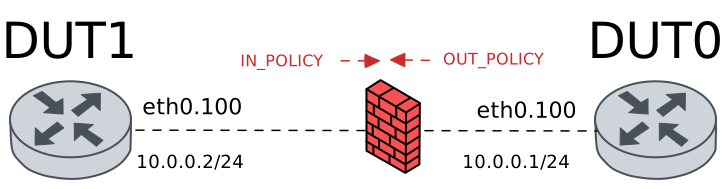
Test Policy Actions
Description
In this scenario, an ingress traffic policy is configured
in DUT0 (‘eth0’ interface). Different traffic actions are
configured to accept, drop or limit incoming traffic.
Scenario
Step 1: Set the following configuration in DUT0 :
set interfaces ethernet eth0 vif 100 address 10.0.0.1/24
set interfaces ethernet eth0 vif 100 traffic policy in POLICY_IN
set interfaces ethernet eth0 vif 100 traffic policy out POLICY_OUT
set system login user admin authentication encrypted-password '$6$GSjsCj8gHLv$/VcqU6FLi6CT2Oxn0MJQ2C2tqnRDrYKNF8HIYWJp68nvXvPdFccDsT04.WtigUONbKYrgKg8d6rEs8PjljMkH0'
set traffic policy POLICY_IN rule 1 action accept
set traffic policy POLICY_OUT
Step 2: Set the following configuration in DUT1 :
set interfaces ethernet eth0 vif 100 address 10.0.0.2/24
set system login user admin authentication encrypted-password '$6$GSjsCj8gHLv$/VcqU6FLi6CT2Oxn0MJQ2C2tqnRDrYKNF8HIYWJp68nvXvPdFccDsT04.WtigUONbKYrgKg8d6rEs8PjljMkH0'
Step 3: Ping the IP address 10.0.0.1 from DUT1:
admin@DUT1$ ping 10.0.0.1 count 1 size 56 timeout 1Show output
PING 10.0.0.1 (10.0.0.1) 56(84) bytes of data.
64 bytes from 10.0.0.1: icmp_seq=1 ttl=64 time=0.661 ms

--- 10.0.0.1 ping statistics ---
1 packets transmitted, 1 received, 0% packet loss, time 0ms
rtt min/avg/max/mdev = 0.661/0.661/0.661/0.000 ms
Step 4: Modify the following configuration lines in DUT0 :
delete traffic policy POLICY_IN rule 1 action accept
set traffic policy POLICY_IN rule 1 action drop
Step 5: Expect a failure in the following command:
Initiate a udp connection from DUT1 to DUT0 and exchange messages between both endpoints
admin@DUT0$ monitor test connection server 8080 udp
admin@DUT1$ monitor test connection client 10.0.0.1 8080 udp
Step 6: Modify the following configuration lines in DUT0 :
delete traffic policy POLICY_IN rule 1 action drop
set traffic policy POLICY_IN rule 1 action rate-limit 10
Step 7: Initiate a bandwidth test from DUT1 to DUT0
admin@DUT0$ monitor test performance server port 5001
admin@DUT1$ monitor test performance client 10.0.0.1 duration 5 port 5001 parallel 1
Expect the following output on
DUT1:Connecting to host 10.0.0.1, port 5001 [ 5] local 10.0.0.2 port 37924 connected to 10.0.0.1 port 5001 [ ID] Interval Transfer Bitrate Retr Cwnd [ 5] 0.00-1.00 sec 3.02 MBytes 25.3 Mbits/sec 190 7.07 KBytes [ 5] 1.00-2.00 sec 1.30 MBytes 10.9 Mbits/sec 140 7.07 KBytes [ 5] 2.00-3.00 sec 1.06 MBytes 8.86 Mbits/sec 116 5.66 KBytes [ 5] 3.00-4.00 sec 1.12 MBytes 9.38 Mbits/sec 132 7.07 KBytes [ 5] 4.00-5.00 sec 1.30 MBytes 10.9 Mbits/sec 135 7.07 KBytes - - - - - - - - - - - - - - - - - - - - - - - - - [ ID] Interval Transfer Bitrate Retr [ 5] 0.00-5.00 sec 7.80 MBytes 13.1 Mbits/sec 713 sender [ 5] 0.00-5.00 sec 7.05 MBytes 11.8 Mbits/sec receiver iperf Done.
Note
Previous test should show a very low bandwidth rate.
Test Policy Copy
Description
In this scenario, an ingress traffic policy is configured
in DUT0 (‘eth0’ interface). Different copy actions are
configured to store the ToS value in the conntrack mark
and extra conntrack mark fields.
Scenario
Step 1: Set the following configuration in DUT0 :
set interfaces ethernet eth0 vif 100 address 10.0.0.1/24
set interfaces ethernet eth0 vif 100 traffic policy in POLICY_IN
set interfaces ethernet eth0 vif 100 traffic policy out POLICY_OUT
set system login user admin authentication encrypted-password '$6$GSjsCj8gHLv$/VcqU6FLi6CT2Oxn0MJQ2C2tqnRDrYKNF8HIYWJp68nvXvPdFccDsT04.WtigUONbKYrgKg8d6rEs8PjljMkH0'
set traffic policy POLICY_IN rule 1 copy tos connmark
set traffic policy POLICY_OUT
Step 2: Set the following configuration in DUT1 :
set interfaces ethernet eth0 vif 100 address 10.0.0.2/24
set system login user admin authentication encrypted-password '$6$GSjsCj8gHLv$/VcqU6FLi6CT2Oxn0MJQ2C2tqnRDrYKNF8HIYWJp68nvXvPdFccDsT04.WtigUONbKYrgKg8d6rEs8PjljMkH0'
Step 3: Ping the IP address 10.0.0.1 from DUT1:
admin@DUT1$ ping 10.0.0.1 tos 12 count 5 size 56 timeout 1Show output
PING 10.0.0.1 (10.0.0.1) 56(84) bytes of data.
64 bytes from 10.0.0.1: icmp_seq=1 ttl=64 time=0.719 ms
64 bytes from 10.0.0.1: icmp_seq=2 ttl=64 time=0.438 ms
64 bytes from 10.0.0.1: icmp_seq=3 ttl=64 time=0.365 ms
64 bytes from 10.0.0.1: icmp_seq=4 ttl=64 time=0.750 ms
64 bytes from 10.0.0.1: icmp_seq=5 ttl=64 time=0.328 ms

--- 10.0.0.1 ping statistics ---
5 packets transmitted, 5 received, 0% packet loss, time 4059ms
rtt min/avg/max/mdev = 0.328/0.520/0.750/0.178 ms
Step 4: Run the command system conntrack show on DUT0 and check whether the output contains the following tokens:
mark=12Show output
icmp     1 29 src=10.0.0.2 dst=10.0.0.1 type=8 code=0 id=497 packets=5 bytes=420 src=10.0.0.1 dst=10.0.0.2 type=0 code=0 id=497 packets=5 bytes=420 mark=12 use=1
conntrack v1.4.7 (conntrack-tools): 1 flow entries have been shown.
Step 5: Modify the following configuration lines in DUT0 :
delete traffic policy POLICY_IN rule 1 copy tos connmark
set traffic policy POLICY_IN rule 1 copy tos extra-connmark 1
Step 6: Ping the IP address 10.0.0.1 from DUT1:
admin@DUT1$ ping 10.0.0.1 tos 12 count 5 size 56 timeout 1Show output
PING 10.0.0.1 (10.0.0.1) 56(84) bytes of data.
64 bytes from 10.0.0.1: icmp_seq=1 ttl=64 time=0.429 ms
64 bytes from 10.0.0.1: icmp_seq=2 ttl=64 time=0.289 ms
64 bytes from 10.0.0.1: icmp_seq=3 ttl=64 time=0.237 ms
64 bytes from 10.0.0.1: icmp_seq=4 ttl=64 time=0.259 ms
64 bytes from 10.0.0.1: icmp_seq=5 ttl=64 time=0.269 ms

--- 10.0.0.1 ping statistics ---
5 packets transmitted, 5 received, 0% packet loss, time 4096ms
rtt min/avg/max/mdev = 0.237/0.296/0.429/0.068 ms
Step 7: Run the command system conntrack show on DUT0 and check whether the output contains the following tokens:
emark1=12Show output
icmp     1 29 src=10.0.0.2 dst=10.0.0.1 type=8 code=0 id=498 packets=5 bytes=420 src=10.0.0.1 dst=10.0.0.2 type=0 code=0 id=498 packets=5 bytes=420 mark=0 emark1=12 use=1
conntrack v1.4.7 (conntrack-tools): 1 flow entries have been shown.
Test Policy Set
Description
In this scenario, an egress traffic policy is configured
in DUT0 (‘eth0’ interface) to mark outgoing packets
using ToS and CoS fields.
Scenario
Step 1: Set the following configuration in DUT0 :
set interfaces ethernet eth0 vif 100 address 10.0.0.1/24
set interfaces ethernet eth0 vif 100 traffic policy in POLICY_IN
set interfaces ethernet eth0 vif 100 traffic policy out POLICY_OUT
set system login user admin authentication encrypted-password '$6$GSjsCj8gHLv$/VcqU6FLi6CT2Oxn0MJQ2C2tqnRDrYKNF8HIYWJp68nvXvPdFccDsT04.WtigUONbKYrgKg8d6rEs8PjljMkH0'
set traffic policy POLICY_IN
set traffic policy POLICY_OUT rule 1 set tos 12
Step 2: Set the following configuration in DUT1 :
set interfaces ethernet eth0 vif 100 address 10.0.0.2/24
set system login user admin authentication encrypted-password '$6$GSjsCj8gHLv$/VcqU6FLi6CT2Oxn0MJQ2C2tqnRDrYKNF8HIYWJp68nvXvPdFccDsT04.WtigUONbKYrgKg8d6rEs8PjljMkH0'
Step 3: Run the command traffic dump monitor detail interface eth0 filter "host 10.0.0.2" on DUT1.
Step 4: Ping the IP address 10.0.0.2 from DUT0:
admin@DUT0$ ping 10.0.0.2 count 1 size 56 timeout 1Show output
PING 10.0.0.2 (10.0.0.2) 56(84) bytes of data.
64 bytes from 10.0.0.2: icmp_seq=1 ttl=64 time=0.755 ms

--- 10.0.0.2 ping statistics ---
1 packets transmitted, 1 received, 0% packet loss, time 0ms
rtt min/avg/max/mdev = 0.755/0.755/0.755/0.000 ms
Step 5: Modify the following configuration lines in DUT0 :
delete traffic policy POLICY_OUT rule 1 set tos
set traffic policy POLICY_OUT rule 1 set cos-mark 5
Step 6: Run the command traffic dump monitor detail interface eth0 filter "host 10.0.0.2" on DUT1.
Step 7: Ping the IP address 10.0.0.2 from DUT0:
admin@DUT0$ ping 10.0.0.2 count 1 size 56 timeout 1Show output
PING 10.0.0.2 (10.0.0.2) 56(84) bytes of data.
64 bytes from 10.0.0.2: icmp_seq=1 ttl=64 time=5.84 ms

--- 10.0.0.2 ping statistics ---
1 packets transmitted, 1 received, 0% packet loss, time 0ms
rtt min/avg/max/mdev = 5.844/5.844/5.844/0.000 ms
Test Policy Set Conntrack Values
Description
In this scenario, an ingress traffic policy is configured
in DUT0 (‘eth0’ interface). Different set actions are
configured to change the conntrack mark, the app-id and the
VRF.
Scenario
Step 1: Set the following configuration in DUT0 :
set interfaces ethernet eth0 vif 100 address 10.0.0.1/24
set interfaces ethernet eth0 vif 100 traffic policy in POLICY_IN
set interfaces ethernet eth0 vif 100 traffic policy out POLICY_OUT
set system login user admin authentication encrypted-password '$6$GSjsCj8gHLv$/VcqU6FLi6CT2Oxn0MJQ2C2tqnRDrYKNF8HIYWJp68nvXvPdFccDsT04.WtigUONbKYrgKg8d6rEs8PjljMkH0'
set traffic policy POLICY_IN rule 1 set connmark 15
set traffic policy POLICY_OUT
Step 2: Set the following configuration in DUT1 :
set interfaces ethernet eth0 vif 100 address 10.0.0.2/24
set system login user admin authentication encrypted-password '$6$GSjsCj8gHLv$/VcqU6FLi6CT2Oxn0MJQ2C2tqnRDrYKNF8HIYWJp68nvXvPdFccDsT04.WtigUONbKYrgKg8d6rEs8PjljMkH0'
Step 3: Ping the IP address 10.0.0.1 from DUT1:
admin@DUT1$ ping 10.0.0.1 count 5 size 56 timeout 1Show output
PING 10.0.0.1 (10.0.0.1) 56(84) bytes of data.
64 bytes from 10.0.0.1: icmp_seq=1 ttl=64 time=0.649 ms
64 bytes from 10.0.0.1: icmp_seq=2 ttl=64 time=0.256 ms
64 bytes from 10.0.0.1: icmp_seq=3 ttl=64 time=0.250 ms
64 bytes from 10.0.0.1: icmp_seq=4 ttl=64 time=0.262 ms
64 bytes from 10.0.0.1: icmp_seq=5 ttl=64 time=0.300 ms

--- 10.0.0.1 ping statistics ---
5 packets transmitted, 5 received, 0% packet loss, time 4091ms
rtt min/avg/max/mdev = 0.250/0.343/0.649/0.153 ms
Step 4: Run the command system conntrack show on DUT0 and check whether the output contains the following tokens:
mark=15Show output
icmp     1 29 src=10.0.0.2 dst=10.0.0.1 type=8 code=0 id=499 packets=5 bytes=420 src=10.0.0.1 dst=10.0.0.2 type=0 code=0 id=499 packets=5 bytes=420 mark=15 use=1
conntrack v1.4.7 (conntrack-tools): 1 flow entries have been shown.
Step 5: Modify the following configuration lines in DUT0 :
delete traffic policy POLICY_IN rule 1 set connmark
set traffic policy POLICY_IN rule 1 set app-id custom 80
Step 6: Ping the IP address 10.0.0.1 from DUT1:
admin@DUT1$ ping 10.0.0.1 count 5 size 56 timeout 1Show output
PING 10.0.0.1 (10.0.0.1) 56(84) bytes of data.
64 bytes from 10.0.0.1: icmp_seq=1 ttl=64 time=0.354 ms
64 bytes from 10.0.0.1: icmp_seq=2 ttl=64 time=0.278 ms
64 bytes from 10.0.0.1: icmp_seq=3 ttl=64 time=0.254 ms
64 bytes from 10.0.0.1: icmp_seq=4 ttl=64 time=0.485 ms
64 bytes from 10.0.0.1: icmp_seq=5 ttl=64 time=0.300 ms

--- 10.0.0.1 ping statistics ---
5 packets transmitted, 5 received, 0% packet loss, time 4089ms
rtt min/avg/max/mdev = 0.254/0.334/0.485/0.082 ms
Step 7: Run the command system conntrack show on DUT0 and check whether the output contains the following tokens:
appdetect[U6:80]Show output
icmp     1 29 src=10.0.0.2 dst=10.0.0.1 type=8 code=0 id=500 packets=5 bytes=420 src=10.0.0.1 dst=10.0.0.2 type=0 code=0 id=500 packets=5 bytes=420 mark=0 use=1 appdetect[U6:80]
conntrack v1.4.7 (conntrack-tools): 1 flow entries have been shown.
Step 8: Modify the following configuration lines in DUT0 :
set system conntrack app-detect app-id-storage chained
Step 9: Run the command system conntrack clear on DUT0.
Step 10: Ping the IP address 10.0.0.1 from DUT1:
admin@DUT1$ ping 10.0.0.1 count 5 size 56 timeout 1Show output
PING 10.0.0.1 (10.0.0.1) 56(84) bytes of data.
64 bytes from 10.0.0.1: icmp_seq=1 ttl=64 time=0.513 ms
64 bytes from 10.0.0.1: icmp_seq=2 ttl=64 time=0.275 ms
64 bytes from 10.0.0.1: icmp_seq=3 ttl=64 time=0.276 ms
64 bytes from 10.0.0.1: icmp_seq=4 ttl=64 time=0.280 ms
64 bytes from 10.0.0.1: icmp_seq=5 ttl=64 time=0.256 ms

--- 10.0.0.1 ping statistics ---
5 packets transmitted, 5 received, 0% packet loss, time 4099ms
rtt min/avg/max/mdev = 0.256/0.320/0.513/0.096 ms
Step 11: Run the command system conntrack show on DUT0 and check whether the output matches the following regular expressions:
appdetect\[L3:1;U6:80\]Show output
icmp     1 29 src=10.0.0.2 dst=10.0.0.1 type=8 code=0 id=501 packets=5 bytes=420 src=10.0.0.1 dst=10.0.0.2 type=0 code=0 id=501 packets=5 bytes=420 mark=0 use=1 appdetect[L3:1;U6:80]
conntrack v1.4.7 (conntrack-tools): 1 flow entries have been shown.
Step 12: Modify the following configuration lines in DUT0 :
delete traffic policy POLICY_IN rule 1 set app-id
set interfaces ethernet eth0 vif 100 vrf RED
set system vrf RED
set traffic policy POLICY_IN rule 1 set vrf RED
Step 13: Ping the IP address 10.0.0.1 from DUT1:
admin@DUT1$ ping 10.0.0.1 count 5 size 56 timeout 1Show output
PING 10.0.0.1 (10.0.0.1) 56(84) bytes of data.
64 bytes from 10.0.0.1: icmp_seq=1 ttl=64 time=0.553 ms
64 bytes from 10.0.0.1: icmp_seq=2 ttl=64 time=0.361 ms
64 bytes from 10.0.0.1: icmp_seq=3 ttl=64 time=0.246 ms
64 bytes from 10.0.0.1: icmp_seq=4 ttl=64 time=0.348 ms
64 bytes from 10.0.0.1: icmp_seq=5 ttl=64 time=0.247 ms

--- 10.0.0.1 ping statistics ---
5 packets transmitted, 5 received, 0% packet loss, time 4099ms
rtt min/avg/max/mdev = 0.246/0.351/0.553/0.112 ms
Step 14: Run the command system conntrack show on DUT0 and check whether the output contains the following tokens:
vrf=REDShow output
icmp     1 29 src=10.0.0.2 dst=10.0.0.1 type=8 code=0 id=502 vrf=RED packets=5 bytes=420 src=10.0.0.1 dst=10.0.0.2 type=0 code=0 id=502 vrf=RED packets=5 bytes=420 mark=0 use=1 appdetect[L3:1]
conntrack v1.4.7 (conntrack-tools): 1 flow entries have been shown.
Test Policy Log
Description
In this scenario, an ingress traffic policy is configured
in DUT0 (‘eth0’ interface). The log option is configured to
show system messages that help debug and analyze the
network status. Additionally, an invalid log prefix is included
to illustrate the maximum length allowed.
Scenario
Step 1: Set the following configuration in DUT0 :
set interfaces ethernet eth0 vif 100 address 10.0.0.1/24
set interfaces ethernet eth0 vif 100 traffic policy in POLICY_IN
set interfaces ethernet eth0 vif 100 traffic policy out POLICY_OUT
set system login user admin authentication encrypted-password '$6$GSjsCj8gHLv$/VcqU6FLi6CT2Oxn0MJQ2C2tqnRDrYKNF8HIYWJp68nvXvPdFccDsT04.WtigUONbKYrgKg8d6rEs8PjljMkH0'
set traffic policy POLICY_IN rule 1 log level err
set traffic policy POLICY_IN rule 1 log prefix Lorem-ipsum-dolor-sit-amet-consectetur-adipiscing-elit-quisque-lorem-ipsum-dolor-sit-ame-vit
set traffic policy POLICY_OUT
Step 2: Set the following configuration in DUT1 :
set interfaces ethernet eth0 vif 100 address 10.0.0.2/24
set system login user admin authentication encrypted-password '$6$GSjsCj8gHLv$/VcqU6FLi6CT2Oxn0MJQ2C2tqnRDrYKNF8HIYWJp68nvXvPdFccDsT04.WtigUONbKYrgKg8d6rEs8PjljMkH0'
Step 3: Ping the IP address 10.0.0.1 from DUT1:
admin@DUT1$ ping 10.0.0.1 count 1 size 56 timeout 1Show output
PING 10.0.0.1 (10.0.0.1) 56(84) bytes of data.
64 bytes from 10.0.0.1: icmp_seq=1 ttl=64 time=0.770 ms

--- 10.0.0.1 ping statistics ---
1 packets transmitted, 1 received, 0% packet loss, time 0ms
rtt min/avg/max/mdev = 0.770/0.770/0.770/0.000 ms
Step 4: Run the command system journal show | tail on DUT0 and check whether the output contains the following tokens:
[Lorem-ipsum-dolor-sit-amet-consectetur-adipiscing-elit-quisque-lorem-ipsum-dolor-sit-ame-vit-1] ACCEPT IN=eth0Show output
Sep 16 18:31:02.628708 osdx WARNING[578327]: No supported link modes on interface eth0
Sep 16 18:31:02.630549 osdx modulelauncher[578327]: osdx.utils.xos cmd error: /sbin/ethtool -A eth0 autoneg on
Sep 16 18:31:02.630566 osdx modulelauncher[578327]: Command '/sbin/ethtool -A eth0 autoneg on' returned non-zero exit status 76.
Sep 16 18:31:02.631972 osdx modulelauncher[578327]: osdx.utils.xos cmd error: /sbin/ethtool -s eth0 autoneg on advertise Pause off Asym_Pause off --
Sep 16 18:31:02.631983 osdx modulelauncher[578327]: Command '/sbin/ethtool -s eth0 autoneg on advertise Pause off Asym_Pause off --' returned non-zero exit status 75.
Sep 16 18:31:02.642371 osdx (udev-worker)[578341]: Network interface NamePolicy= disabled on kernel command line.
Sep 16 18:31:03.000838 osdx cfgd[1892]: [463253]Completed change to active configuration
Sep 16 18:31:03.001497 osdx OSDxCLI[463253]: User 'admin' committed the configuration.
Sep 16 18:31:03.026425 osdx OSDxCLI[463253]: User 'admin' left the configuration menu.
Sep 16 18:31:04.069374 osdx kernel: [Lorem-ipsum-dolor-sit-amet-consectetur-adipiscing-elit-quisque-lorem-ipsum-dolor-sit-ame-vit-1] ACCEPT IN=eth0.100 OUT= MAC=de:ad:be:ef:6c:00:de:ad:be:ef:6c:10:08:00:45:00:00:54 SRC=10.0.0.2 DST=10.0.0.1 LEN=84 TOS=0x00 PREC=0x00 TTL=64 ID=21251 DF PROTO=ICMP TYPE=8 CODE=0 ID=503 SEQ=1
Step 5: Run the command configure on DUT0 and expect the following output:
Show output
admin@osdx#
Step 6: Run the command set traffic policy INVALID_LOG_PREFIX rule 1 log prefix Lorem-ipsum-dolor-sit-amet-consectetur-adipiscing-elit-quisque-lorem-ipsum-dolor-sit-amet-vita on DUT0 and check whether the output contains the following tokens:
Log prefix must be 92 characters or less and must contain printable characters except those defined as part of the space character classShow output
Log prefix must be 92 characters or less and must contain printable characters except those defined as part of the space character class
Value validation failed
CLI Error: Command error
Test Policy Advisor
Description
In this scenario, an ingress traffic policy is configured
in DUT0 (‘eth0’ interface). The advisor option is
configured to enable/disable the rule depending on
the advisor status. If the rule is enabled, incoming traffic
will be dropped.
Scenario
Step 1: Set the following configuration in DUT0 :
set interfaces ethernet eth0 vif 100 address 10.0.0.1/24
set interfaces ethernet eth0 vif 100 traffic policy in POLICY_IN
set interfaces ethernet eth0 vif 100 traffic policy out POLICY_OUT
set system advisor ADV test false
set system login user admin authentication encrypted-password '$6$GSjsCj8gHLv$/VcqU6FLi6CT2Oxn0MJQ2C2tqnRDrYKNF8HIYWJp68nvXvPdFccDsT04.WtigUONbKYrgKg8d6rEs8PjljMkH0'
set traffic policy POLICY_IN rule 1 action drop
set traffic policy POLICY_IN rule 1 advisor ADV
set traffic policy POLICY_OUT
Step 2: Set the following configuration in DUT1 :
set interfaces ethernet eth0 vif 100 address 10.0.0.2/24
set system login user admin authentication encrypted-password '$6$GSjsCj8gHLv$/VcqU6FLi6CT2Oxn0MJQ2C2tqnRDrYKNF8HIYWJp68nvXvPdFccDsT04.WtigUONbKYrgKg8d6rEs8PjljMkH0'
Step 3: Ping the IP address 10.0.0.1 from DUT1:
admin@DUT1$ ping 10.0.0.1 count 1 size 56 timeout 1Show output
PING 10.0.0.1 (10.0.0.1) 56(84) bytes of data.
64 bytes from 10.0.0.1: icmp_seq=1 ttl=64 time=0.546 ms

--- 10.0.0.1 ping statistics ---
1 packets transmitted, 1 received, 0% packet loss, time 0ms
rtt min/avg/max/mdev = 0.546/0.546/0.546/0.000 ms
Step 4: Modify the following configuration lines in DUT0 :
set system advisor ADV test true
Step 5: Expect a failure in the following command:
Ping the IP address 10.0.0.1 from DUT1:
admin@DUT1$ ping 10.0.0.1 count 1 size 56 timeout 1Show output
PING 10.0.0.1 (10.0.0.1) 56(84) bytes of data.

--- 10.0.0.1 ping statistics ---
1 packets transmitted, 0 received, 100% packet loss, time 0ms
Step 6: Modify the following configuration lines in DUT0 :
set system advisor ADV test false
Step 7: Ping the IP address 10.0.0.1 from DUT1:
admin@DUT1$ ping 10.0.0.1 count 1 size 56 timeout 1Show output
PING 10.0.0.1 (10.0.0.1) 56(84) bytes of data.
64 bytes from 10.0.0.1: icmp_seq=1 ttl=64 time=0.434 ms

--- 10.0.0.1 ping statistics ---
1 packets transmitted, 1 received, 0% packet loss, time 0ms
rtt min/avg/max/mdev = 0.434/0.434/0.434/0.000 ms
Test Policy Set Label
Description
In this scenario, an ingress traffic policy is configured
in DUT0 (‘eth0’ interface). The set label action is
configured to assign a label to conntrack entries. Labels are
used to classify and identify connections in the conntrack table,
which can be useful for traffic analysis and policy enforcement.
Scenario
Step 1: Set the following configuration in DUT0 :
set interfaces ethernet eth0 vif 100 address 10.0.0.1/24
set interfaces ethernet eth0 vif 100 traffic policy in POLICY_IN
set interfaces ethernet eth0 vif 100 traffic policy out POLICY_OUT
set system login user admin authentication encrypted-password '$6$GSjsCj8gHLv$/VcqU6FLi6CT2Oxn0MJQ2C2tqnRDrYKNF8HIYWJp68nvXvPdFccDsT04.WtigUONbKYrgKg8d6rEs8PjljMkH0'
set traffic label TESTLABEL
set traffic policy POLICY_IN rule 1 set label TESTLABEL
set traffic policy POLICY_OUT
Step 2: Set the following configuration in DUT1 :
set interfaces ethernet eth0 vif 100 address 10.0.0.2/24
set system login user admin authentication encrypted-password '$6$GSjsCj8gHLv$/VcqU6FLi6CT2Oxn0MJQ2C2tqnRDrYKNF8HIYWJp68nvXvPdFccDsT04.WtigUONbKYrgKg8d6rEs8PjljMkH0'
Step 3: Ping the IP address 10.0.0.1 from DUT1:
admin@DUT1$ ping 10.0.0.1 count 5 size 56 timeout 1Show output
PING 10.0.0.1 (10.0.0.1) 56(84) bytes of data.
64 bytes from 10.0.0.1: icmp_seq=1 ttl=64 time=0.784 ms
64 bytes from 10.0.0.1: icmp_seq=2 ttl=64 time=0.281 ms
64 bytes from 10.0.0.1: icmp_seq=3 ttl=64 time=0.249 ms
64 bytes from 10.0.0.1: icmp_seq=4 ttl=64 time=0.250 ms
64 bytes from 10.0.0.1: icmp_seq=5 ttl=64 time=0.267 ms

--- 10.0.0.1 ping statistics ---
5 packets transmitted, 5 received, 0% packet loss, time 4089ms
rtt min/avg/max/mdev = 0.249/0.366/0.784/0.209 ms
Step 4: Run the command system conntrack show on DUT0 and check whether the output contains the following tokens:
labels=TESTLABELShow output
icmp     1 29 src=10.0.0.2 dst=10.0.0.1 type=8 code=0 id=507 packets=5 bytes=420 src=10.0.0.1 dst=10.0.0.2 type=0 code=0 id=507 packets=5 bytes=420 mark=0 use=1 labels=TESTLABEL
conntrack v1.4.7 (conntrack-tools): 1 flow entries have been shown.