Conntag
The following scenarios show how to configure traffic policies
using the conntag feature. Conntag allows tagging conntrack
entries with string values (up to 255 characters) for traffic
classification and filtering. This is similar to connmark but
uses human-readable string tags instead of numeric marks.
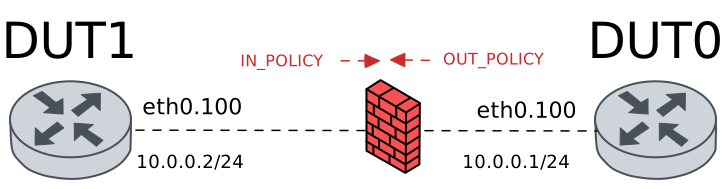
Test Policy Set Conntag Basic
Description
In this scenario, an ingress traffic policy is configured
in DUT0 to set a basic conntag string on incoming packets.
The conntag value is stored in the conntrack entry and can
be verified using the system conntrack show command.
Scenario
Step 1: Set the following configuration in DUT0 :
set interfaces ethernet eth0 vif 100 address 10.0.0.1/24
set interfaces ethernet eth0 vif 100 traffic policy in POLICY_IN
set system login user admin authentication encrypted-password '$6$GSjsCj8gHLv$/VcqU6FLi6CT2Oxn0MJQ2C2tqnRDrYKNF8HIYWJp68nvXvPdFccDsT04.WtigUONbKYrgKg8d6rEs8PjljMkH0'
set traffic policy POLICY_IN rule 1 set conntag my-traffic-tag
Step 2: Set the following configuration in DUT1 :
set interfaces ethernet eth0 vif 100 address 10.0.0.2/24
set system login user admin authentication encrypted-password '$6$GSjsCj8gHLv$/VcqU6FLi6CT2Oxn0MJQ2C2tqnRDrYKNF8HIYWJp68nvXvPdFccDsT04.WtigUONbKYrgKg8d6rEs8PjljMkH0'
Step 3: Ping the IP address 10.0.0.1 from DUT1:
admin@DUT1$ ping 10.0.0.1 count 1 size 56 timeout 1Show output
PING 10.0.0.1 (10.0.0.1) 56(84) bytes of data.
64 bytes from 10.0.0.1: icmp_seq=1 ttl=64 time=0.582 ms

--- 10.0.0.1 ping statistics ---
1 packets transmitted, 1 received, 0% packet loss, time 0ms
rtt min/avg/max/mdev = 0.582/0.582/0.582/0.000 ms
Step 4: Run the command system conntrack clear on DUT0 and expect the following output:
Show output
Connection tracking table has been emptied
Step 5: Ping the IP address 10.0.0.1 from DUT1:
admin@DUT1$ ping 10.0.0.1 count 3 size 56 timeout 1Show output
PING 10.0.0.1 (10.0.0.1) 56(84) bytes of data.
64 bytes from 10.0.0.1: icmp_seq=1 ttl=64 time=0.263 ms
64 bytes from 10.0.0.1: icmp_seq=2 ttl=64 time=0.255 ms
64 bytes from 10.0.0.1: icmp_seq=3 ttl=64 time=0.260 ms

--- 10.0.0.1 ping statistics ---
3 packets transmitted, 3 received, 0% packet loss, time 2031ms
rtt min/avg/max/mdev = 0.255/0.259/0.263/0.003 ms
Step 6: Run the command system conntrack show on DUT0 and check whether the output contains the following tokens:
conntag=my-traffic-tagShow output
icmp     1 29 src=10.0.0.2 dst=10.0.0.1 type=8 code=0 id=475 packets=3 bytes=252 src=10.0.0.1 dst=10.0.0.2 type=0 code=0 id=475 packets=3 bytes=252 mark=0 conntag=my-traffic-tag use=1
conntrack v1.4.7 (conntrack-tools): 1 flow entries have been shown.
Test Policy Set Conntag With Numbers
Description
This scenario tests setting a conntag that includes numeric characters mixed with text, demonstrating that conntag values can contain alphanumeric strings with hyphens.
Scenario
Step 1: Set the following configuration in DUT0 :
set interfaces ethernet eth0 vif 100 address 10.0.0.1/24
set interfaces ethernet eth0 vif 100 traffic policy in POLICY_IN
set system login user admin authentication encrypted-password '$6$GSjsCj8gHLv$/VcqU6FLi6CT2Oxn0MJQ2C2tqnRDrYKNF8HIYWJp68nvXvPdFccDsT04.WtigUONbKYrgKg8d6rEs8PjljMkH0'
set traffic policy POLICY_IN rule 1 set conntag traffic-123-test
Step 2: Set the following configuration in DUT1 :
set interfaces ethernet eth0 vif 100 address 10.0.0.2/24
set system login user admin authentication encrypted-password '$6$GSjsCj8gHLv$/VcqU6FLi6CT2Oxn0MJQ2C2tqnRDrYKNF8HIYWJp68nvXvPdFccDsT04.WtigUONbKYrgKg8d6rEs8PjljMkH0'
Step 3: Ping the IP address 10.0.0.1 from DUT1:
admin@DUT1$ ping 10.0.0.1 count 1 size 56 timeout 1Show output
PING 10.0.0.1 (10.0.0.1) 56(84) bytes of data.
64 bytes from 10.0.0.1: icmp_seq=1 ttl=64 time=0.689 ms

--- 10.0.0.1 ping statistics ---
1 packets transmitted, 1 received, 0% packet loss, time 0ms
rtt min/avg/max/mdev = 0.689/0.689/0.689/0.000 ms
Step 4: Run the command system conntrack clear on DUT0 and expect the following output:
Show output
Connection tracking table has been emptied
Step 5: Ping the IP address 10.0.0.1 from DUT1:
admin@DUT1$ ping 10.0.0.1 count 3 size 56 timeout 1Show output
PING 10.0.0.1 (10.0.0.1) 56(84) bytes of data.
64 bytes from 10.0.0.1: icmp_seq=1 ttl=64 time=0.267 ms
64 bytes from 10.0.0.1: icmp_seq=2 ttl=64 time=0.265 ms
64 bytes from 10.0.0.1: icmp_seq=3 ttl=64 time=0.281 ms

--- 10.0.0.1 ping statistics ---
3 packets transmitted, 3 received, 0% packet loss, time 2054ms
rtt min/avg/max/mdev = 0.265/0.271/0.281/0.007 ms
Step 6: Run the command system conntrack show on DUT0 and check whether the output contains the following tokens:
conntag=traffic-123-testShow output
icmp     1 29 src=10.0.0.2 dst=10.0.0.1 type=8 code=0 id=477 packets=3 bytes=252 src=10.0.0.1 dst=10.0.0.2 type=0 code=0 id=477 packets=3 bytes=252 mark=0 conntag=traffic-123-test use=1
conntrack v1.4.7 (conntrack-tools): 1 flow entries have been shown.
Test Policy Set Conntag Special Characters
Description
This scenario tests setting a conntag that includes special characters like underscores, dots, and hyphens, which are commonly used in application versioning and environment naming.
Scenario
Step 1: Set the following configuration in DUT0 :
set interfaces ethernet eth0 vif 100 address 10.0.0.1/24
set interfaces ethernet eth0 vif 100 traffic policy in POLICY_IN
set system login user admin authentication encrypted-password '$6$GSjsCj8gHLv$/VcqU6FLi6CT2Oxn0MJQ2C2tqnRDrYKNF8HIYWJp68nvXvPdFccDsT04.WtigUONbKYrgKg8d6rEs8PjljMkH0'
set traffic policy POLICY_IN rule 1 set conntag app_v2.0-prod
Step 2: Set the following configuration in DUT1 :
set interfaces ethernet eth0 vif 100 address 10.0.0.2/24
set system login user admin authentication encrypted-password '$6$GSjsCj8gHLv$/VcqU6FLi6CT2Oxn0MJQ2C2tqnRDrYKNF8HIYWJp68nvXvPdFccDsT04.WtigUONbKYrgKg8d6rEs8PjljMkH0'
Step 3: Ping the IP address 10.0.0.1 from DUT1:
admin@DUT1$ ping 10.0.0.1 count 1 size 56 timeout 1Show output
PING 10.0.0.1 (10.0.0.1) 56(84) bytes of data.
64 bytes from 10.0.0.1: icmp_seq=1 ttl=64 time=5.84 ms

--- 10.0.0.1 ping statistics ---
1 packets transmitted, 1 received, 0% packet loss, time 0ms
rtt min/avg/max/mdev = 5.841/5.841/5.841/0.000 ms
Step 4: Run the command system conntrack clear on DUT0 and expect the following output:
Show output
Connection tracking table has been emptied
Step 5: Ping the IP address 10.0.0.1 from DUT1:
admin@DUT1$ ping 10.0.0.1 count 3 size 56 timeout 1Show output
PING 10.0.0.1 (10.0.0.1) 56(84) bytes of data.
64 bytes from 10.0.0.1: icmp_seq=1 ttl=64 time=0.830 ms
64 bytes from 10.0.0.1: icmp_seq=2 ttl=64 time=0.259 ms
64 bytes from 10.0.0.1: icmp_seq=3 ttl=64 time=0.289 ms

--- 10.0.0.1 ping statistics ---
3 packets transmitted, 3 received, 0% packet loss, time 2051ms
rtt min/avg/max/mdev = 0.259/0.459/0.830/0.262 ms
Step 6: Run the command system conntrack show on DUT0 and check whether the output contains the following tokens:
conntag=app_v2.0-prodShow output
icmp     1 29 src=10.0.0.2 dst=10.0.0.1 type=8 code=0 id=479 packets=3 bytes=252 src=10.0.0.1 dst=10.0.0.2 type=0 code=0 id=479 packets=3 bytes=252 mark=0 conntag=app_v2.0-prod use=1
conntrack v1.4.7 (conntrack-tools): 1 flow entries have been shown.
Test Policy Set Conntag Maximum Length
Description
This scenario tests the conntag feature with the maximum allowed string length of 255 characters. The system should accept and correctly store strings up to this limit.
Scenario
Step 1: Set the following configuration in DUT0 :
set interfaces ethernet eth0 vif 100 address 10.0.0.1/24
set interfaces ethernet eth0 vif 100 traffic policy in POLICY_IN
set system login user admin authentication encrypted-password '$6$GSjsCj8gHLv$/VcqU6FLi6CT2Oxn0MJQ2C2tqnRDrYKNF8HIYWJp68nvXvPdFccDsT04.WtigUONbKYrgKg8d6rEs8PjljMkH0'
set traffic policy POLICY_IN rule 1 set conntag Lorem-ipsum-dolor-sit-amet-consectetur-adipiscing-elit-sed-do-eiusmod-tempor-incididunt-ut-labore-et-dolore-magna-aliqua-Ut-enim-ad-minim-veniam-quis-nostrud-exercitation-ullamco-laboris-nisi-ut-aliquip-ex-ea-commodo-consequat-Duis-aute-irure-dolor-len255
Step 2: Set the following configuration in DUT1 :
set interfaces ethernet eth0 vif 100 address 10.0.0.2/24
set system login user admin authentication encrypted-password '$6$GSjsCj8gHLv$/VcqU6FLi6CT2Oxn0MJQ2C2tqnRDrYKNF8HIYWJp68nvXvPdFccDsT04.WtigUONbKYrgKg8d6rEs8PjljMkH0'
Step 3: Ping the IP address 10.0.0.1 from DUT1:
admin@DUT1$ ping 10.0.0.1 count 1 size 56 timeout 1Show output
PING 10.0.0.1 (10.0.0.1) 56(84) bytes of data.
64 bytes from 10.0.0.1: icmp_seq=1 ttl=64 time=0.532 ms

--- 10.0.0.1 ping statistics ---
1 packets transmitted, 1 received, 0% packet loss, time 0ms
rtt min/avg/max/mdev = 0.532/0.532/0.532/0.000 ms
Step 4: Run the command system conntrack clear on DUT0 and expect the following output:
Show output
Connection tracking table has been emptied
Step 5: Ping the IP address 10.0.0.1 from DUT1:
admin@DUT1$ ping 10.0.0.1 count 3 size 56 timeout 1Show output
PING 10.0.0.1 (10.0.0.1) 56(84) bytes of data.
64 bytes from 10.0.0.1: icmp_seq=1 ttl=64 time=0.314 ms
64 bytes from 10.0.0.1: icmp_seq=2 ttl=64 time=0.260 ms
64 bytes from 10.0.0.1: icmp_seq=3 ttl=64 time=0.256 ms

--- 10.0.0.1 ping statistics ---
3 packets transmitted, 3 received, 0% packet loss, time 2047ms
rtt min/avg/max/mdev = 0.256/0.276/0.314/0.026 ms
Step 6: Run the command system conntrack show on DUT0 and expect the following output:
Show output
icmp     1 29 src=10.0.0.2 dst=10.0.0.1 type=8 code=0 id=481 packets=3 bytes=252 src=10.0.0.1 dst=10.0.0.2 type=0 code=0 id=481 packets=3 bytes=252 mark=0 conntag=Lorem-ipsum-dolor-sit-amet-consectetur-adipiscing-elit-sed-do-eiusmod-tempor-incididunt-ut-labore-et-dolore-magna-aliqua-Ut-enim-ad-minim-veniam-quis-nostrud-exercitation-ullamco-laboris-nisi-ut-aliquip-ex-ea-commodo-consequat-Duis-aute-
irure-dolor-len255 use=1
conntrack v1.4.7 (conntrack-tools): 1 flow entries have been shown.
Test Policy Set Conntag Invalid Length
Description
This scenario tests that the system correctly rejects conntag strings that exceed the maximum allowed length of 255 characters with an appropriate error message.
Scenario
Step 1: Set the following configuration in DUT0 :
set interfaces ethernet eth0 vif 100 address 10.0.0.1/24
set interfaces ethernet eth0 vif 100 traffic policy in POLICY_IN
set system login user admin authentication encrypted-password '$6$GSjsCj8gHLv$/VcqU6FLi6CT2Oxn0MJQ2C2tqnRDrYKNF8HIYWJp68nvXvPdFccDsT04.WtigUONbKYrgKg8d6rEs8PjljMkH0'
set traffic policy POLICY_IN
Step 2: Expect a failure in the following command:
Run the command set traffic policy POLICY_IN rule 1 set conntag Lorem-ipsum-dolor-sit-amet-consectetur-adipiscing-elit-sed-do-eiusmod-tempor-incididunt-ut-labore-et-dolore-magna-aliqua-Ut-enim-ad-minim-veniam-quis-nostrud-exercitation-ullamco-laboris-nisi-ut-aliquip-ex-ea-commodo-consequat-Duis-aute-irure-dolor-len_256 on DUT0 and expect the following output:
Show output
tag string must be 1..255 non-space printable characters
Value validation failed
CLI Error: Command error
Test Policy Set Conntag Empty String
Description
This scenario tests that the system correctly rejects empty or whitespace-only conntag strings.
Scenario
Step 1: Set the following configuration in DUT0 :
set interfaces ethernet eth0 vif 100 address 10.0.0.1/24
set interfaces ethernet eth0 vif 100 traffic policy in POLICY_IN
set system login user admin authentication encrypted-password '$6$GSjsCj8gHLv$/VcqU6FLi6CT2Oxn0MJQ2C2tqnRDrYKNF8HIYWJp68nvXvPdFccDsT04.WtigUONbKYrgKg8d6rEs8PjljMkH0'
set traffic policy POLICY_IN
Step 2: Run the command configure on DUT0 and expect the following output:
Show output
admin@osdx#
Step 3: Run the command set traffic policy POLICY_IN rule 1 set conntag on DUT0 and check whether the output contains the following tokens:
requires a valueShow output
Configuration path: [traffic policy POLICY_IN rule 1 set conntag] requires a value
CLI Error: Command error
Test Policy Set Conntag With Connmark
Description
This scenario demonstrates using both conntag and connmark together on the same traffic flow. This allows numeric classification (connmark) alongside descriptive string tagging (conntag) for comprehensive traffic identification.
Scenario
Step 1: Set the following configuration in DUT0 :
set interfaces ethernet eth0 vif 100 address 10.0.0.1/24
set interfaces ethernet eth0 vif 100 traffic policy in POLICY_IN
set system login user admin authentication encrypted-password '$6$GSjsCj8gHLv$/VcqU6FLi6CT2Oxn0MJQ2C2tqnRDrYKNF8HIYWJp68nvXvPdFccDsT04.WtigUONbKYrgKg8d6rEs8PjljMkH0'
set traffic policy POLICY_IN rule 1 set connmark 42
set traffic policy POLICY_IN rule 1 set conntag my-traffic-tag
Step 2: Set the following configuration in DUT1 :
set interfaces ethernet eth0 vif 100 address 10.0.0.2/24
set system login user admin authentication encrypted-password '$6$GSjsCj8gHLv$/VcqU6FLi6CT2Oxn0MJQ2C2tqnRDrYKNF8HIYWJp68nvXvPdFccDsT04.WtigUONbKYrgKg8d6rEs8PjljMkH0'
Step 3: Ping the IP address 10.0.0.1 from DUT1:
admin@DUT1$ ping 10.0.0.1 count 1 size 56 timeout 1Show output
PING 10.0.0.1 (10.0.0.1) 56(84) bytes of data.
64 bytes from 10.0.0.1: icmp_seq=1 ttl=64 time=0.638 ms

--- 10.0.0.1 ping statistics ---
1 packets transmitted, 1 received, 0% packet loss, time 0ms
rtt min/avg/max/mdev = 0.638/0.638/0.638/0.000 ms
Step 4: Run the command system conntrack clear on DUT0 and expect the following output:
Show output
Connection tracking table has been emptied
Step 5: Ping the IP address 10.0.0.1 from DUT1:
admin@DUT1$ ping 10.0.0.1 count 3 size 56 timeout 1Show output
PING 10.0.0.1 (10.0.0.1) 56(84) bytes of data.
64 bytes from 10.0.0.1: icmp_seq=1 ttl=64 time=0.525 ms
64 bytes from 10.0.0.1: icmp_seq=2 ttl=64 time=0.269 ms
64 bytes from 10.0.0.1: icmp_seq=3 ttl=64 time=0.304 ms

--- 10.0.0.1 ping statistics ---
3 packets transmitted, 3 received, 0% packet loss, time 2049ms
rtt min/avg/max/mdev = 0.269/0.366/0.525/0.113 ms
Step 6: Run the command system conntrack show on DUT0 and expect the following output:
Show output
icmp     1 29 src=10.0.0.2 dst=10.0.0.1 type=8 code=0 id=483 packets=3 bytes=252 src=10.0.0.1 dst=10.0.0.2 type=0 code=0 id=483 packets=3 bytes=252 mark=42 conntag=my-traffic-tag use=1
conntrack v1.4.7 (conntrack-tools): 1 flow entries have been shown.
Test Policy Set Conntag With VRF
Description
This scenario demonstrates using conntag in combination with VRF routing. Traffic is tagged with a conntag and also assigned to a specific VRF for routing purposes.
Scenario
Step 1: Set the following configuration in DUT0 :
set interfaces ethernet eth0 vif 100 address 10.0.0.1/24
set interfaces ethernet eth0 vif 100 traffic policy in POLICY_IN
set interfaces ethernet eth0 vif 100 vrf RED
set system login user admin authentication encrypted-password '$6$GSjsCj8gHLv$/VcqU6FLi6CT2Oxn0MJQ2C2tqnRDrYKNF8HIYWJp68nvXvPdFccDsT04.WtigUONbKYrgKg8d6rEs8PjljMkH0'
set system vrf RED
set traffic policy POLICY_IN rule 1 set conntag my-traffic-tag
set traffic policy POLICY_IN rule 1 set vrf RED
Step 2: Set the following configuration in DUT1 :
set interfaces ethernet eth0 vif 100 address 10.0.0.2/24
set system login user admin authentication encrypted-password '$6$GSjsCj8gHLv$/VcqU6FLi6CT2Oxn0MJQ2C2tqnRDrYKNF8HIYWJp68nvXvPdFccDsT04.WtigUONbKYrgKg8d6rEs8PjljMkH0'
Step 3: Ping the IP address 10.0.0.1 from DUT1:
admin@DUT1$ ping 10.0.0.1 count 1 size 56 timeout 1Show output
PING 10.0.0.1 (10.0.0.1) 56(84) bytes of data.
64 bytes from 10.0.0.1: icmp_seq=1 ttl=64 time=0.598 ms

--- 10.0.0.1 ping statistics ---
1 packets transmitted, 1 received, 0% packet loss, time 0ms
rtt min/avg/max/mdev = 0.598/0.598/0.598/0.000 ms
Step 4: Run the command system conntrack clear on DUT0 and expect the following output:
Show output
Connection tracking table has been emptied
Step 5: Ping the IP address 10.0.0.1 from DUT1:
admin@DUT1$ ping 10.0.0.1 count 3 size 56 timeout 1Show output
PING 10.0.0.1 (10.0.0.1) 56(84) bytes of data.
64 bytes from 10.0.0.1: icmp_seq=1 ttl=64 time=0.513 ms
64 bytes from 10.0.0.1: icmp_seq=2 ttl=64 time=0.259 ms
64 bytes from 10.0.0.1: icmp_seq=3 ttl=64 time=0.257 ms

--- 10.0.0.1 ping statistics ---
3 packets transmitted, 3 received, 0% packet loss, time 2054ms
rtt min/avg/max/mdev = 0.257/0.343/0.513/0.120 ms
Step 6: Run the command system conntrack show on DUT0 and expect the following output:
Show output
icmp     1 29 src=10.0.0.2 dst=10.0.0.1 type=8 code=0 id=485 vrf=RED packets=3 bytes=252 src=10.0.0.1 dst=10.0.0.2 type=0 code=0 id=485 vrf=RED packets=3 bytes=252 mark=0 conntag=my-traffic-tag use=1
conntrack v1.4.7 (conntrack-tools): 1 flow entries have been shown.
Test Policy Modify Conntag
Description
This scenario demonstrates modifying the conntag value on an existing traffic policy rule and verifying that new connections use the updated tag value.
Scenario
Step 1: Set the following configuration in DUT0 :
set interfaces ethernet eth0 vif 100 address 10.0.0.1/24
set interfaces ethernet eth0 vif 100 traffic policy in POLICY_IN
set system login user admin authentication encrypted-password '$6$GSjsCj8gHLv$/VcqU6FLi6CT2Oxn0MJQ2C2tqnRDrYKNF8HIYWJp68nvXvPdFccDsT04.WtigUONbKYrgKg8d6rEs8PjljMkH0'
set traffic policy POLICY_IN rule 1 set conntag initial-tag
Step 2: Set the following configuration in DUT1 :
set interfaces ethernet eth0 vif 100 address 10.0.0.2/24
set system login user admin authentication encrypted-password '$6$GSjsCj8gHLv$/VcqU6FLi6CT2Oxn0MJQ2C2tqnRDrYKNF8HIYWJp68nvXvPdFccDsT04.WtigUONbKYrgKg8d6rEs8PjljMkH0'
Step 3: Ping the IP address 10.0.0.1 from DUT1:
admin@DUT1$ ping 10.0.0.1 count 1 size 56 timeout 1Show output
PING 10.0.0.1 (10.0.0.1) 56(84) bytes of data.
64 bytes from 10.0.0.1: icmp_seq=1 ttl=64 time=0.588 ms

--- 10.0.0.1 ping statistics ---
1 packets transmitted, 1 received, 0% packet loss, time 0ms
rtt min/avg/max/mdev = 0.588/0.588/0.588/0.000 ms
Step 4: Run the command system conntrack clear on DUT0 and expect the following output:
Show output
Connection tracking table has been emptied
Step 5: Ping the IP address 10.0.0.1 from DUT1:
admin@DUT1$ ping 10.0.0.1 count 3 size 56 timeout 1Show output
PING 10.0.0.1 (10.0.0.1) 56(84) bytes of data.
64 bytes from 10.0.0.1: icmp_seq=1 ttl=64 time=0.542 ms
64 bytes from 10.0.0.1: icmp_seq=2 ttl=64 time=0.203 ms
64 bytes from 10.0.0.1: icmp_seq=3 ttl=64 time=0.268 ms

--- 10.0.0.1 ping statistics ---
3 packets transmitted, 3 received, 0% packet loss, time 2038ms
rtt min/avg/max/mdev = 0.203/0.337/0.542/0.146 ms
Step 6: Run the command system conntrack show on DUT0 and check whether the output contains the following tokens:
conntag=initial-tagShow output
icmp     1 29 src=10.0.0.2 dst=10.0.0.1 type=8 code=0 id=487 packets=3 bytes=252 src=10.0.0.1 dst=10.0.0.2 type=0 code=0 id=487 packets=3 bytes=252 mark=0 conntag=initial-tag use=1
conntrack v1.4.7 (conntrack-tools): 1 flow entries have been shown.
Step 7: Run the command system conntrack clear on DUT0 and expect the following output:
Show output
Connection tracking table has been emptied
Step 8: Modify the following configuration lines in DUT0 :
set traffic policy POLICY_IN rule 1 set conntag modified-tag
Step 9: Ping the IP address 10.0.0.1 from DUT1:
admin@DUT1$ ping 10.0.0.1 count 3 size 56 timeout 1Show output
PING 10.0.0.1 (10.0.0.1) 56(84) bytes of data.
64 bytes from 10.0.0.1: icmp_seq=1 ttl=64 time=21.2 ms
64 bytes from 10.0.0.1: icmp_seq=2 ttl=64 time=0.260 ms
64 bytes from 10.0.0.1: icmp_seq=3 ttl=64 time=0.257 ms

--- 10.0.0.1 ping statistics ---
3 packets transmitted, 3 received, 0% packet loss, time 2001ms
rtt min/avg/max/mdev = 0.257/7.224/21.155/9.850 ms
Step 10: Run the command system conntrack show on DUT0 and check whether the output contains the following tokens:
conntag=modified-tagShow output
icmp     1 29 src=10.0.0.2 dst=10.0.0.1 type=8 code=0 id=488 packets=3 bytes=252 src=10.0.0.1 dst=10.0.0.2 type=0 code=0 id=488 packets=3 bytes=252 mark=0 conntag=modified-tag use=1
conntrack v1.4.7 (conntrack-tools): 1 flow entries have been shown.
Test Policy Delete Conntag
Description
This scenario tests removing a conntag configuration from a traffic policy and verifying that new connections no longer have the tag applied.
Scenario
Step 1: Set the following configuration in DUT0 :
set interfaces ethernet eth0 vif 100 address 10.0.0.1/24
set interfaces ethernet eth0 vif 100 traffic policy in POLICY_IN
set system login user admin authentication encrypted-password '$6$GSjsCj8gHLv$/VcqU6FLi6CT2Oxn0MJQ2C2tqnRDrYKNF8HIYWJp68nvXvPdFccDsT04.WtigUONbKYrgKg8d6rEs8PjljMkH0'
set traffic policy POLICY_IN rule 1 set conntag my-traffic-tag
Step 2: Set the following configuration in DUT1 :
set interfaces ethernet eth0 vif 100 address 10.0.0.2/24
set system login user admin authentication encrypted-password '$6$GSjsCj8gHLv$/VcqU6FLi6CT2Oxn0MJQ2C2tqnRDrYKNF8HIYWJp68nvXvPdFccDsT04.WtigUONbKYrgKg8d6rEs8PjljMkH0'
Step 3: Ping the IP address 10.0.0.1 from DUT1:
admin@DUT1$ ping 10.0.0.1 count 1 size 56 timeout 1Show output
PING 10.0.0.1 (10.0.0.1) 56(84) bytes of data.
64 bytes from 10.0.0.1: icmp_seq=1 ttl=64 time=0.607 ms

--- 10.0.0.1 ping statistics ---
1 packets transmitted, 1 received, 0% packet loss, time 0ms
rtt min/avg/max/mdev = 0.607/0.607/0.607/0.000 ms
Step 4: Run the command system conntrack clear on DUT0 and expect the following output:
Show output
Connection tracking table has been emptied
Step 5: Ping the IP address 10.0.0.1 from DUT1:
admin@DUT1$ ping 10.0.0.1 count 3 size 56 timeout 1Show output
PING 10.0.0.1 (10.0.0.1) 56(84) bytes of data.
64 bytes from 10.0.0.1: icmp_seq=1 ttl=64 time=0.351 ms
64 bytes from 10.0.0.1: icmp_seq=2 ttl=64 time=0.285 ms
64 bytes from 10.0.0.1: icmp_seq=3 ttl=64 time=0.226 ms

--- 10.0.0.1 ping statistics ---
3 packets transmitted, 3 received, 0% packet loss, time 2050ms
rtt min/avg/max/mdev = 0.226/0.287/0.351/0.051 ms
Step 6: Run the command system conntrack show on DUT0 and check whether the output contains the following tokens:
conntag=my-traffic-tagShow output
icmp     1 29 src=10.0.0.2 dst=10.0.0.1 type=8 code=0 id=490 packets=3 bytes=252 src=10.0.0.1 dst=10.0.0.2 type=0 code=0 id=490 packets=3 bytes=252 mark=0 conntag=my-traffic-tag use=1
conntrack v1.4.7 (conntrack-tools): 1 flow entries have been shown.
Step 7: Run the command system conntrack clear on DUT0 and expect the following output:
Show output
Connection tracking table has been emptied
Step 8: Modify the following configuration lines in DUT0 :
delete traffic policy POLICY_IN rule 1 set
set traffic policy POLICY_IN rule 1 action accept
Step 9: Ping the IP address 10.0.0.1 from DUT1:
admin@DUT1$ ping 10.0.0.1 count 3 size 56 timeout 1Show output
PING 10.0.0.1 (10.0.0.1) 56(84) bytes of data.
64 bytes from 10.0.0.1: icmp_seq=1 ttl=64 time=0.398 ms
64 bytes from 10.0.0.1: icmp_seq=2 ttl=64 time=0.288 ms
64 bytes from 10.0.0.1: icmp_seq=3 ttl=64 time=0.240 ms

--- 10.0.0.1 ping statistics ---
3 packets transmitted, 3 received, 0% packet loss, time 2050ms
rtt min/avg/max/mdev = 0.240/0.308/0.398/0.066 ms
Step 10: Run the command system conntrack show on DUT0 and expect the following output:
Show output
icmp     1 29 src=10.0.0.2 dst=10.0.0.1 type=8 code=0 id=491 packets=3 bytes=252 src=10.0.0.1 dst=10.0.0.2 type=0 code=0 id=491 packets=3 bytes=252 mark=0 use=1
conntrack v1.4.7 (conntrack-tools): 1 flow entries have been shown.