Vlan Preclassification
The following scenario shows how to pre-classify packets using traffic policies. This reduces packet processing time and improves system performance.
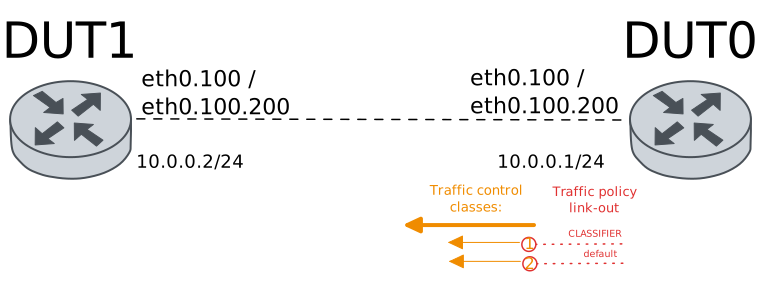
Test VLAN Pre-Classify Out (802.1Q)
Description
A traffic policy is configured in DUT0 (interface
eth0). This policy enables vlan
pre-classification in the link-out hook; i.e., all
packets leaving this interface are processed.
Traffic policy is responsible of setting the class Id
for traffic control in egress. Traffic selector filter
based on ethernet protocol (802.1Q) and VLAN Id (100).
Scenario
Step 1: Set the following configuration in DUT0 :
set interfaces ethernet eth0 mtu 1390
set interfaces ethernet eth0 traffic control out HTB
set interfaces ethernet eth0 traffic policy link-out CLASSIFIER
set interfaces ethernet eth0 vif 100 address 10.0.0.1/24
set system login user admin authentication encrypted-password '$6$GSjsCj8gHLv$/VcqU6FLi6CT2Oxn0MJQ2C2tqnRDrYKNF8HIYWJp68nvXvPdFccDsT04.WtigUONbKYrgKg8d6rEs8PjljMkH0'
set traffic control HTB type htb bandwidth 100
set traffic control HTB type htb class 1 bandwidth percentage 100
set traffic control HTB type htb class 2 bandwidth percentage 10
set traffic control HTB type htb default-class 2
set traffic policy CLASSIFIER rule 1 selector VLAN
set traffic policy CLASSIFIER rule 1 set class 1
set traffic selector VLAN rule 1 ether-type 8021q
set traffic selector VLAN rule 1 vlan id 100
Step 2: Set the following configuration in DUT1 :
set interfaces ethernet eth0 mtu 1390
set interfaces ethernet eth0 vif 100 address 10.0.0.2/24
set system login user admin authentication encrypted-password '$6$GSjsCj8gHLv$/VcqU6FLi6CT2Oxn0MJQ2C2tqnRDrYKNF8HIYWJp68nvXvPdFccDsT04.WtigUONbKYrgKg8d6rEs8PjljMkH0'
Step 3: Ping the IP address 10.0.0.2 from DUT0:
admin@DUT0$ ping 10.0.0.2 count 1 size 56 timeout 1Show output
PING 10.0.0.2 (10.0.0.2) 56(84) bytes of data.
64 bytes from 10.0.0.2: icmp_seq=1 ttl=64 time=0.327 ms

--- 10.0.0.2 ping statistics ---
1 packets transmitted, 1 received, 0% packet loss, time 0ms
rtt min/avg/max/mdev = 0.327/0.327/0.327/0.000 ms
Step 4: Run the command traffic control clear on DUT0 and expect no output.
Step 5: Initiate a bandwidth test from DUT0 to DUT1
admin@DUT1$ monitor test performance server port 5001
admin@DUT0$ monitor test performance client 10.0.0.2 duration 5 port 5001 parallel 1
Expect the following output on
DUT0:Connecting to host 10.0.0.2, port 5001 [ 5] local 10.0.0.1 port 40930 connected to 10.0.0.2 port 5001 [ ID] Interval Transfer Bitrate Retr Cwnd [ 5] 0.00-1.00 sec 13.6 MBytes 114 Mbits/sec 168 69.3 KBytes [ 5] 1.00-2.00 sec 11.1 MBytes 93.0 Mbits/sec 82 71.9 KBytes [ 5] 2.00-3.00 sec 11.4 MBytes 95.6 Mbits/sec 76 66.6 KBytes [ 5] 3.00-4.00 sec 11.4 MBytes 95.6 Mbits/sec 52 98.0 KBytes [ 5] 4.00-5.00 sec 11.4 MBytes 95.6 Mbits/sec 70 96.7 KBytes - - - - - - - - - - - - - - - - - - - - - - - - - [ ID] Interval Transfer Bitrate Retr [ 5] 0.00-5.00 sec 58.9 MBytes 98.7 Mbits/sec 448 sender [ 5] 0.00-5.00 sec 58.2 MBytes 97.7 Mbits/sec receiver iperf Done.
Step 6: Run the command traffic control show on DUT0 and check whether the output matches the following regular expressions:
class 1\s+1:0\s+\d+\s+[1-9]\d{3,}
class 2 \(default\)\s+1:0\s+\d+\s+\d{1,2}\s
Show output
Traffic control for interface 'eth0' - 'egress' mode

------------------------------------------------------------------------------------
ID   traffic control        type         parent  bytes sent  pkts sent  pkts dropped
------------------------------------------------------------------------------------
1:0  HTB              htb                root      64190395      45742            16
1:1  HTB              class 1            1:0       64190155      45740             0
1:2  HTB              class 2 (default)  1:0            240          2             0
2:0  -                htb                1:1       64190155      45740            16
3:0  -                htb                1:2            240          2             0
Step 7: Modify the following configuration lines in DUT0 :
delete interfaces ethernet eth0 vif 100
set interfaces ethernet eth0 vif 101 address 10.0.0.1/24
Step 8: Modify the following configuration lines in DUT1 :
delete interfaces ethernet eth0 vif 100
set interfaces ethernet eth0 vif 101 address 10.0.0.2/24
Step 9: Run the command traffic control clear on DUT0 and expect no output.
Step 10: Initiate a bandwidth test from DUT0 to DUT1
admin@DUT1$ monitor test performance server port 5001
admin@DUT0$ monitor test performance client 10.0.0.2 duration 5 port 5001 parallel 1
Expect the following output on
DUT0:Connecting to host 10.0.0.2, port 5001 [ 5] local 10.0.0.1 port 41522 connected to 10.0.0.2 port 5001 [ ID] Interval Transfer Bitrate Retr Cwnd [ 5] 0.00-1.00 sec 1.79 MBytes 15.0 Mbits/sec 119 9.15 KBytes [ 5] 1.00-2.00 sec 1.10 MBytes 9.25 Mbits/sec 28 9.15 KBytes [ 5] 2.00-3.00 sec 1.10 MBytes 9.25 Mbits/sec 38 14.4 KBytes [ 5] 3.00-4.00 sec 1.10 MBytes 9.25 Mbits/sec 38 9.15 KBytes [ 5] 4.00-5.00 sec 1.10 MBytes 9.25 Mbits/sec 38 13.1 KBytes - - - - - - - - - - - - - - - - - - - - - - - - - [ ID] Interval Transfer Bitrate Retr [ 5] 0.00-5.00 sec 6.20 MBytes 10.4 Mbits/sec 261 sender [ 5] 0.00-5.00 sec 5.83 MBytes 9.77 Mbits/sec receiver iperf Done.
Step 11: Run the command traffic control show on DUT0 and check whether the output matches the following regular expressions:
class 1\s+1:0\s+\d+\s+\d{1,2}\s
class 2 \(default\)\s+1:0\s+\d+\s+[1-9]\d{3,}
Show output
Traffic control for interface 'eth0' - 'egress' mode

------------------------------------------------------------------------------------
ID   traffic control        type         parent  bytes sent  pkts sent  pkts dropped
------------------------------------------------------------------------------------
1:0  HTB              htb                root       6425617       4600            40
1:1  HTB              class 1            1:0              0          0             0
1:2  HTB              class 2 (default)  1:0        6425617       4600             0
2:0  -                htb                1:1              0          0             0
3:0  -                htb                1:2        6425617       4600            40
Test VLAN Pre-Classify Out (QinQ)
Description
A traffic policy is configured in DUT0 (interface
eth0). This policy enables vlan
pre-classification in the link-out hook; i.e., all
packets leaving this interface are processed.
Traffic policy is responsible of setting the class Id
for traffic control in egress. Traffic selector filter
based on QinQ (802.1ad over 802.1Q), VLAN Id (100) and
C-VLAN Id (200)
Scenario
Step 1: Set the following configuration in DUT0 :
set interfaces ethernet eth0 mtu 1390
set interfaces ethernet eth0 traffic control out HTB
set interfaces ethernet eth0 traffic policy link-out CLASSIFIER
set interfaces ethernet eth0 vif 100 ethertype 802.1ad
set interfaces ethernet eth0 vif 100 vif-c 200 address 10.0.0.1/24
set system login user admin authentication encrypted-password '$6$GSjsCj8gHLv$/VcqU6FLi6CT2Oxn0MJQ2C2tqnRDrYKNF8HIYWJp68nvXvPdFccDsT04.WtigUONbKYrgKg8d6rEs8PjljMkH0'
set traffic control HTB type htb bandwidth 100
set traffic control HTB type htb class 1 bandwidth percentage 100
set traffic control HTB type htb class 2 bandwidth percentage 10
set traffic control HTB type htb default-class 2
set traffic policy CLASSIFIER rule 1 selector VLAN
set traffic policy CLASSIFIER rule 1 set class 1
set traffic selector VLAN rule 1 ether-type 8021ad
set traffic selector VLAN rule 1 vlan id 100
set traffic selector VLAN rule 1 vlan inner-id 200
set traffic selector VLAN rule 1 vlan protocol 8021q
Step 2: Set the following configuration in DUT1 :
set interfaces ethernet eth0 mtu 1390
set interfaces ethernet eth0 vif 100 ethertype 802.1ad
set interfaces ethernet eth0 vif 100 vif-c 200 address 10.0.0.2/24
set system login user admin authentication encrypted-password '$6$GSjsCj8gHLv$/VcqU6FLi6CT2Oxn0MJQ2C2tqnRDrYKNF8HIYWJp68nvXvPdFccDsT04.WtigUONbKYrgKg8d6rEs8PjljMkH0'
Step 3: Ping the IP address 10.0.0.2 from DUT0:
admin@DUT0$ ping 10.0.0.2 count 1 size 56 timeout 1Show output
PING 10.0.0.2 (10.0.0.2) 56(84) bytes of data.
64 bytes from 10.0.0.2: icmp_seq=1 ttl=64 time=0.433 ms

--- 10.0.0.2 ping statistics ---
1 packets transmitted, 1 received, 0% packet loss, time 0ms
rtt min/avg/max/mdev = 0.433/0.433/0.433/0.000 ms
Step 4: Run the command traffic control clear on DUT0 and expect no output.
Step 5: Initiate a bandwidth test from DUT0 to DUT1
admin@DUT1$ monitor test performance server port 5001
admin@DUT0$ monitor test performance client 10.0.0.2 duration 5 port 5001 parallel 1
Expect the following output on
DUT0:Connecting to host 10.0.0.2, port 5001 [ 5] local 10.0.0.1 port 37576 connected to 10.0.0.2 port 5001 [ ID] Interval Transfer Bitrate Retr Cwnd [ 5] 0.00-1.00 sec 13.4 MBytes 112 Mbits/sec 188 70.6 KBytes [ 5] 1.00-2.00 sec 11.3 MBytes 95.0 Mbits/sec 45 101 KBytes [ 5] 2.00-3.00 sec 11.5 MBytes 96.1 Mbits/sec 82 98.0 KBytes [ 5] 3.00-4.00 sec 11.3 MBytes 94.5 Mbits/sec 85 77.1 KBytes [ 5] 4.00-5.00 sec 11.4 MBytes 95.6 Mbits/sec 68 66.6 KBytes - - - - - - - - - - - - - - - - - - - - - - - - - [ ID] Interval Transfer Bitrate Retr [ 5] 0.00-5.00 sec 58.9 MBytes 98.7 Mbits/sec 468 sender [ 5] 0.00-5.00 sec 58.1 MBytes 97.4 Mbits/sec receiver iperf Done.
Step 6: Run the command traffic control show on DUT0 and check whether the output matches the following regular expressions:
class 1\s+1:0\s+\d+\s+[1-9]\d{3,}
class 2 \(default\)\s+1:0\s+\d+\s+\d{1,2}\s
Show output
Traffic control for interface 'eth0' - 'egress' mode

------------------------------------------------------------------------------------
ID   traffic control        type         parent  bytes sent  pkts sent  pkts dropped
------------------------------------------------------------------------------------
1:0  HTB              htb                root      64165000      45593            16
1:1  HTB              class 1            1:0       64164520      45589             0
1:2  HTB              class 2 (default)  1:0            480          4             0
2:0  -                htb                1:1       64164520      45589            16
3:0  -                htb                1:2            480          4             0
Step 7: Modify the following configuration lines in DUT0 :
delete interfaces ethernet eth0 vif 100 vif-c 200
set interfaces ethernet eth0 vif 100 vif-c 201 address 10.0.0.1/24
Step 8: Modify the following configuration lines in DUT1 :
delete interfaces ethernet eth0 vif 100 vif-c 200
set interfaces ethernet eth0 vif 100 vif-c 201 address 10.0.0.2/24
Step 9: Run the command traffic control clear on DUT0 and expect no output.
Step 10: Initiate a bandwidth test from DUT0 to DUT1
admin@DUT1$ monitor test performance server port 5001
admin@DUT0$ monitor test performance client 10.0.0.2 duration 5 port 5001 parallel 1
Expect the following output on
DUT0:Connecting to host 10.0.0.2, port 5001 [ 5] local 10.0.0.1 port 52312 connected to 10.0.0.2 port 5001 [ ID] Interval Transfer Bitrate Retr Cwnd [ 5] 0.00-1.00 sec 1.64 MBytes 13.8 Mbits/sec 106 13.1 KBytes [ 5] 1.00-2.00 sec 1.10 MBytes 9.25 Mbits/sec 30 10.5 KBytes [ 5] 2.00-3.00 sec 1.29 MBytes 10.8 Mbits/sec 36 11.8 KBytes [ 5] 3.00-4.00 sec 1.10 MBytes 9.25 Mbits/sec 41 11.8 KBytes [ 5] 4.00-5.00 sec 1.10 MBytes 9.25 Mbits/sec 38 11.8 KBytes - - - - - - - - - - - - - - - - - - - - - - - - - [ ID] Interval Transfer Bitrate Retr [ 5] 0.00-5.00 sec 6.24 MBytes 10.5 Mbits/sec 251 sender [ 5] 0.00-5.00 sec 5.81 MBytes 9.74 Mbits/sec receiver iperf Done.
Step 11: Run the command traffic control show on DUT0 and check whether the output matches the following regular expressions:
class 1\s+1:0\s+\d+\s+\d{1,2}\s
class 2 \(default\)\s+1:0\s+\d+\s+[1-9]\d{3,}
Show output
Traffic control for interface 'eth0' - 'egress' mode

------------------------------------------------------------------------------------
ID   traffic control        type         parent  bytes sent  pkts sent  pkts dropped
------------------------------------------------------------------------------------
1:0  HTB              htb                root       6424563       4587            48
1:1  HTB              class 1            1:0              0          0             0
1:2  HTB              class 2 (default)  1:0        6424563       4587             0
2:0  -                htb                1:1              0          0             0
3:0  -                htb                1:2        6424563       4587            48
Test VLAN Pre-Classify Out (QinQ) with PCP matches
Description
A traffic policy is configured in DUT0 (interface
eth0). This policy enables vlan
pre-classification in the link-out hook; i.e., all
packets leaving this interface are processed.
Traffic policy is responsible of setting the class Id
for traffic control in egress. Traffic selector filter
based on QinQ (802.1ad over 802.1Q), VLAN Id (100),
VLAN PCP (3), C-VLAN Id (200) and C-VLAN PCP (5).
Scenario
Step 1: Set the following configuration in DUT0 :
set interfaces ethernet eth0 mtu 1390
set interfaces ethernet eth0 traffic control out HTB
set interfaces ethernet eth0 traffic policy link-out CLASSIFIER
set interfaces ethernet eth0 vif 100 ethertype 802.1ad
set interfaces ethernet eth0 vif 100 traffic policy link-out OUTER_COS
set interfaces ethernet eth0 vif 100 vif-c 200 address 10.0.0.1/24
set interfaces ethernet eth0 vif 100 vif-c 200 traffic policy link-out INNER_COS
set system login user admin authentication encrypted-password '$6$GSjsCj8gHLv$/VcqU6FLi6CT2Oxn0MJQ2C2tqnRDrYKNF8HIYWJp68nvXvPdFccDsT04.WtigUONbKYrgKg8d6rEs8PjljMkH0'
set traffic control HTB type htb bandwidth 100
set traffic control HTB type htb class 1 bandwidth percentage 100
set traffic control HTB type htb class 2 bandwidth percentage 10
set traffic control HTB type htb default-class 2
set traffic policy CLASSIFIER rule 1 selector VLAN
set traffic policy CLASSIFIER rule 1 set class 1
set traffic policy INNER_COS rule 1 set cos-mark 5
set traffic policy OUTER_COS rule 1 set cos-mark 3
set traffic selector VLAN rule 1 ether-type 8021ad
set traffic selector VLAN rule 1 vlan id 100
set traffic selector VLAN rule 1 vlan inner-id 200
set traffic selector VLAN rule 1 vlan inner-pcp 5
set traffic selector VLAN rule 1 vlan pcp 3
set traffic selector VLAN rule 1 vlan protocol 8021q
Step 2: Set the following configuration in DUT1 :
set interfaces ethernet eth0 mtu 1390
set interfaces ethernet eth0 vif 100 ethertype 802.1ad
set interfaces ethernet eth0 vif 100 vif-c 200 address 10.0.0.2/24
set system login user admin authentication encrypted-password '$6$GSjsCj8gHLv$/VcqU6FLi6CT2Oxn0MJQ2C2tqnRDrYKNF8HIYWJp68nvXvPdFccDsT04.WtigUONbKYrgKg8d6rEs8PjljMkH0'
Step 3: Ping the IP address 10.0.0.2 from DUT0:
admin@DUT0$ ping 10.0.0.2 count 1 size 56 timeout 1Show output
PING 10.0.0.2 (10.0.0.2) 56(84) bytes of data.
64 bytes from 10.0.0.2: icmp_seq=1 ttl=64 time=0.317 ms

--- 10.0.0.2 ping statistics ---
1 packets transmitted, 1 received, 0% packet loss, time 0ms
rtt min/avg/max/mdev = 0.317/0.317/0.317/0.000 ms
Step 4: Run the command traffic control clear on DUT0 and expect no output.
Step 5: Initiate a bandwidth test from DUT0 to DUT1
admin@DUT1$ monitor test performance server port 5001
admin@DUT0$ monitor test performance client 10.0.0.2 duration 5 port 5001 parallel 1
Expect the following output on
DUT0:Connecting to host 10.0.0.2, port 5001 [ 5] local 10.0.0.1 port 51406 connected to 10.0.0.2 port 5001 [ ID] Interval Transfer Bitrate Retr Cwnd [ 5] 0.00-1.00 sec 13.7 MBytes 115 Mbits/sec 206 77.1 KBytes [ 5] 1.00-2.00 sec 11.3 MBytes 94.5 Mbits/sec 105 58.8 KBytes [ 5] 2.00-3.00 sec 11.5 MBytes 96.1 Mbits/sec 56 94.1 KBytes [ 5] 3.00-4.00 sec 11.4 MBytes 95.6 Mbits/sec 71 99.3 KBytes [ 5] 4.00-5.00 sec 11.3 MBytes 95.1 Mbits/sec 68 96.7 KBytes - - - - - - - - - - - - - - - - - - - - - - - - - [ ID] Interval Transfer Bitrate Retr [ 5] 0.00-5.00 sec 59.2 MBytes 99.2 Mbits/sec 506 sender [ 5] 0.00-5.00 sec 58.1 MBytes 97.4 Mbits/sec receiver iperf Done.
Step 6: Run the command traffic control show on DUT0 and check whether the output matches the following regular expressions:
class 1\s+1:0\s+\d+\s+[1-9]\d{3,}
class 2 \(default\)\s+1:0\s+\d+\s+\d{1,2}\s
Show output
Traffic control for interface 'eth0' - 'egress' mode

------------------------------------------------------------------------------------
ID   traffic control        type         parent  bytes sent  pkts sent  pkts dropped
------------------------------------------------------------------------------------
1:0  HTB              htb                root      64200659      45619            18
1:1  HTB              class 1            1:0       64200479      45617             0
1:2  HTB              class 2 (default)  1:0            180          2             0
2:0  -                htb                1:1       64200479      45617            18
3:0  -                htb                1:2            180          2             0
Step 7: Modify the following configuration lines in DUT0 :
delete interfaces ethernet eth0 vif 100 vif-c 200 address
set interfaces ethernet eth0 vif 100 vif-c 201 address 10.0.0.1/24
Step 8: Modify the following configuration lines in DUT1 :
delete interfaces ethernet eth0 vif 100 vif-c 200
set interfaces ethernet eth0 vif 100 vif-c 201 address 10.0.0.2/24
Step 9: Run the command traffic control clear on DUT0 and expect no output.
Step 10: Initiate a bandwidth test from DUT0 to DUT1
admin@DUT1$ monitor test performance server port 5001
admin@DUT0$ monitor test performance client 10.0.0.2 duration 5 port 5001 parallel 1
Expect the following output on
DUT0:Connecting to host 10.0.0.2, port 5001 [ 5] local 10.0.0.1 port 51412 connected to 10.0.0.2 port 5001 [ ID] Interval Transfer Bitrate Retr Cwnd [ 5] 0.00-1.00 sec 1.84 MBytes 15.4 Mbits/sec 153 14.4 KBytes [ 5] 1.00-2.00 sec 1004 KBytes 8.22 Mbits/sec 48 14.4 KBytes [ 5] 2.00-3.00 sec 1.22 MBytes 10.3 Mbits/sec 48 15.7 KBytes [ 5] 3.00-4.00 sec 1.22 MBytes 10.3 Mbits/sec 56 10.5 KBytes [ 5] 4.00-5.00 sec 1004 KBytes 8.22 Mbits/sec 41 15.7 KBytes - - - - - - - - - - - - - - - - - - - - - - - - - [ ID] Interval Transfer Bitrate Retr [ 5] 0.00-5.00 sec 6.25 MBytes 10.5 Mbits/sec 346 sender [ 5] 0.00-5.00 sec 5.81 MBytes 9.74 Mbits/sec receiver iperf Done.
Step 11: Run the command traffic control show on DUT0 and check whether the output matches the following regular expressions:
class 1\s+1:0\s+\d+\s+\d{1,2}\s
class 2 \(default\)\s+1:0\s+\d+\s+[1-9]\d{3,}
Show output
Traffic control for interface 'eth0' - 'egress' mode

------------------------------------------------------------------------------------
ID   traffic control        type         parent  bytes sent  pkts sent  pkts dropped
------------------------------------------------------------------------------------
1:0  HTB              htb                root       6427794       4589            51
1:1  HTB              class 1            1:0              0          0             0
1:2  HTB              class 2 (default)  1:0        6427794       4589             0
2:0  -                htb                1:1              0          0             0
3:0  -                htb                1:2        6427794       4589            51